How to Connect OpenAI with Pinecone (With or Without an AI Agent)
Connect OpenAI embeddings and generation to Pinecone vector storage in a FlowRunner workflow, optionally as an AI agent that pauses for human approval before any irreversible memory change.
How do you connect OpenAI to Pinecone?
You connect OpenAI to Pinecone in FlowRunner by using the Create Embeddings action to generate a vector from any text, then piping that vector into the Upsert Vectors action to write it into a Pinecone namespace. FlowRunner is a visual AI-agent orchestration platform where automations run autonomously and pause for human judgment on the steps that carry real consequence. That same embedding-and-upsert connection can run as a full AI agent that decides when to retrieve, when to rerank, and when to pause for a person before deleting memory that cannot be recovered.
The problem this solves
Most teams that use both OpenAI and Pinecone are doing this by hand. A developer writes a script. The script runs when someone remembers to run it. The knowledge base drifts from the source documents, nobody is sure which version is in the index, and the next time an agent returns a stale answer the team goes digging through the script to figure out when it last ran.
The bigger problem is the destructive side. Deleting an index or namespace in Pinecone is permanent. Teams working around this write extra checks, add approval emails, or just accept that a bad script run might wipe memory that took weeks to build. Neither option scales. The team needs a process, not a script, and the process needs to know the difference between a safe read and an irreversible write.
How it works: the connection
The OpenAI connector in FlowRunner exposes the full platform surface: the Responses and Chat Completions APIs for text generation, Create Embeddings for vectorization, Search Vector Store for retrieval from OpenAI-managed stores, and Moderate Content to screen generated output before it leaves the flow. The Pinecone connector covers the full lifecycle of a managed vector database: Create Index and Create Index for Model for provisioning, Upsert Vectors and Upsert Records for ingestion, Query Vectors and Search Records for retrieval, Rerank Documents for relevance sorting, and Describe Index Stats and Describe Index for readiness checks.
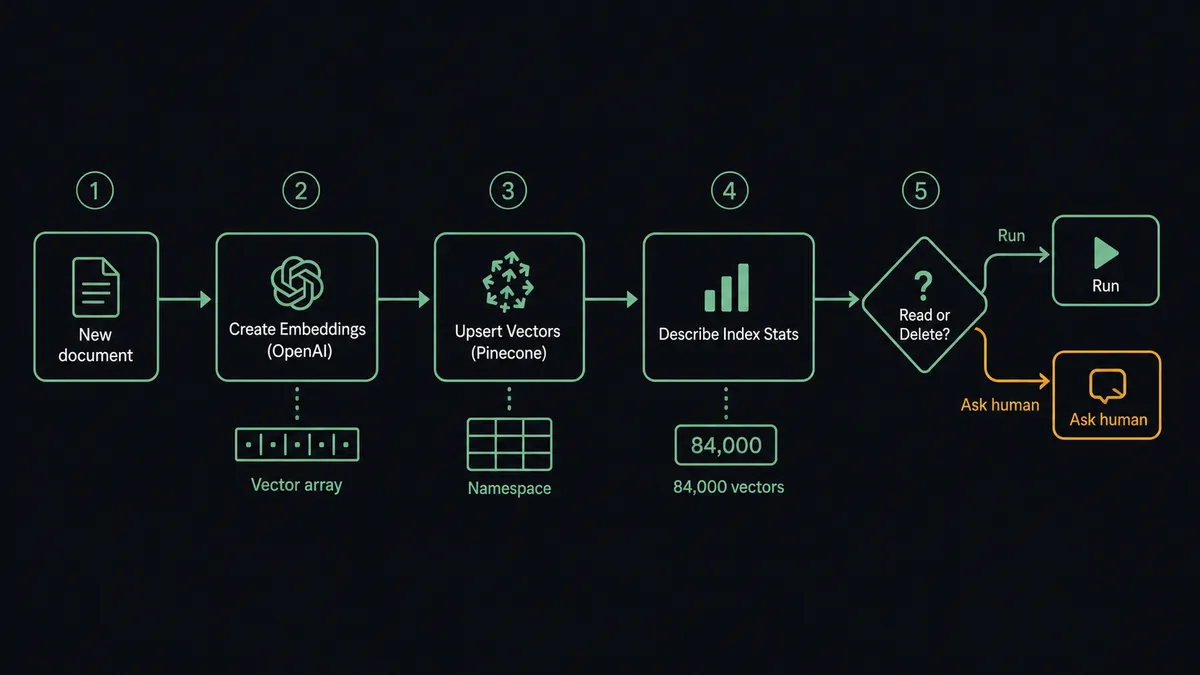
A standard ingestion connection works like this. A trigger fires when a new document arrives. The flow calls Create Embeddings (OpenAI) on the document text, producing a dense vector. It passes that vector to Upsert Vectors (Pinecone), writing it into the correct namespace with the document ID and any metadata. It then calls Describe Index Stats to confirm the write landed and the index count is what it should be. Confident retrieval flows on top of that: Query Vectors returns the nearest neighbors to a query vector, Rerank Documents reorders them by relevance to the exact query wording, and the top passages go to Create Chat Completion (OpenAI) as grounding context for a generated answer.
If your Pinecone index was created with Create Index for Model, you can skip the separate embedding step entirely. Upsert Records sends raw text and Pinecone’s hosted model embeds it automatically. Search Records works the same way on the retrieval side. For teams that prefer to own the embedding model, Create Embeddings (OpenAI) gives you that control with explicit vector dimensions.
Can an AI agent run it? (and why a human stays in the loop)
A standard automation follows a fixed sequence. An AI agent reads its instructions, looks at the data in front of it, and picks which tools to use. For an OpenAI and Pinecone workflow, that means the agent can decide to embed and upsert a document, decide to query and rerank for a retrieval request, decide to call Moderate Content on a generated answer before it goes anywhere, and decide to escalate before touching anything it cannot take back.
The escalation is where FlowRunner separates itself. Zapier and n8n can chain API calls. Neither offers an intelligent decision to invoke human oversight as a callable tool based on what the agent finds in the data.
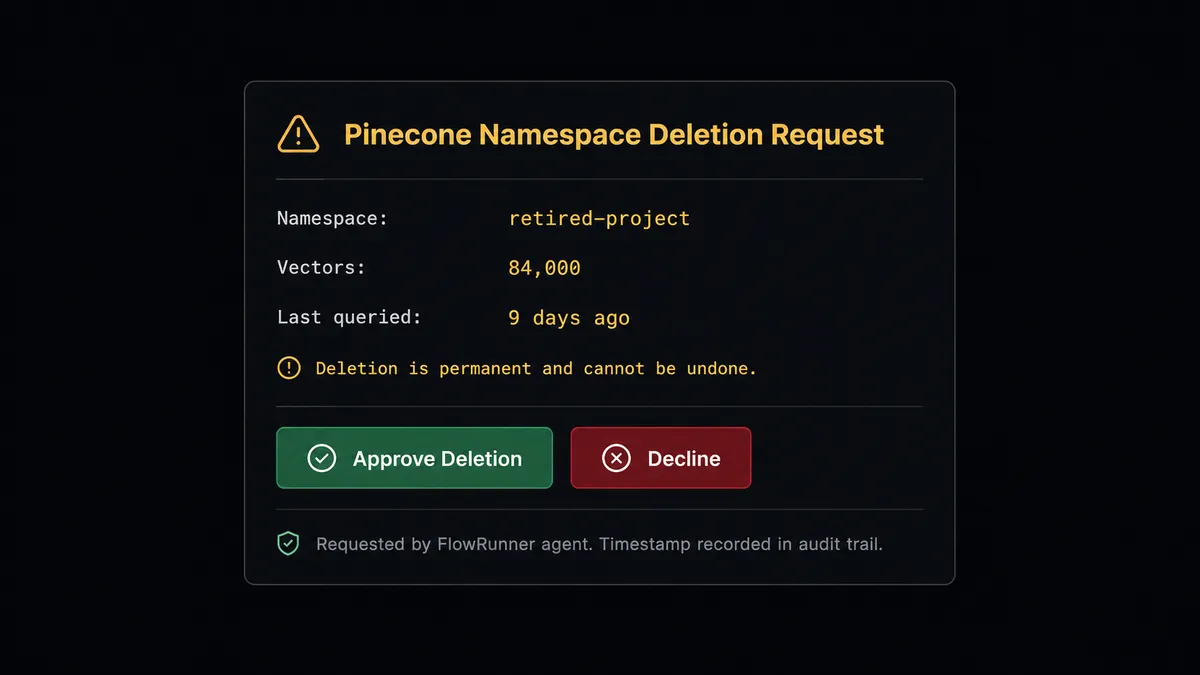
Here is what that looks like in practice. A team is retiring a project and its Pinecone namespace should be cleaned up. The agent is given a Delete Namespace task. Before it runs, the agent calls Describe Index Stats. The stats come back: 84,000 vectors, last queried nine days ago. The agent does not apply a hardcoded threshold like “more than 10,000 vectors requires approval.” It reads the situation. This namespace still has recent activity. The data cannot be recovered after deletion. The agent invokes its human-in-loop tool.
A Slack message goes to the data owner: “The retired-project namespace holds 84,000 vectors and was last queried nine days ago. Deleting it is permanent. Approve or decline?” The workflow pauses. The data owner reviews and clicks Approve. The agent resumes, calls Delete Namespace, and logs the decision, the owner’s identity, and the timestamp in the audit trail. If the owner declines, the namespace stays and the agent notes the outcome. No manual intervention from a developer. No out-of-band email thread. A person owned the irreversible step, and the record shows it.
That is the digital andon cord. The agent stops the line when it hits something that matters and should not be automated past.
FlowRunner vs Zapier
Zapier is the tool most non-technical teams reach for first. It has a large library of integrations, a straightforward interface, and it handles simple linear connections reliably. For connecting two SaaS tools with a trigger and an action, it works.
The OpenAI and Pinecone combination pushes past what Zapier was designed for. Pinecone is not a standard SaaS app with a prebuilt Zapier connector updated by a vendor team. It is infrastructure, and working with it at the flow level means calling multiple actions in sequence, evaluating intermediate results, and making decisions based on what those results show. Zapier executes a fixed step list. It does not read data and reason about what to do next.
| Feature | Zapier | FlowRunner |
|---|---|---|
| OpenAI and Pinecone connectors | OpenAI via Zapier connector; no native Pinecone connector | Both connectors with full API surface including vector upsert, query, rerank, index stats |
| AI agent decision-making | No. Steps run in a fixed sequence | Yes. Agent reads data, picks tools, decides what to do |
| Human-in-loop on destructive steps | No native pause-for-approval on agent reasoning | Agent pauses autonomously, packages context, routes to a person via Slack, email, or WhatsApp |
| BYOK for AI provider | No. OpenAI calls routed through Zapier | Yes. Your OpenAI key, your Pinecone key, your costs |
| Audit trail | Basic Zap history | Full step-level audit trail including human decisions, decider identity, timestamp |
| Pricing model | Per-task pricing; costs increase with volume | Workflow-based tiers with clear execution limits; unlimited users on every plan |
Before and after
| Category | Before | After |
|---|---|---|
| Knowledge base freshness | Someone runs a script when they remember; the index drifts from source documents | New documents embed and upsert automatically as they arrive; the index tracks the source |
| Retrieval quality | Nearest-neighbor results returned as-is; relevance varies | Rerank Documents reorders results by exact query relevance before they reach the LLM |
| Destructive operations | Developers add ad-hoc checks or accept the risk of a bad deletion run | Agent gathers index stats, asks the data owner, and deletes only after explicit approval |
| Generated answer safety | Output goes directly to the user or downstream system | Moderate Content screens every generated draft before it leaves the flow |
| Visibility | Script logs if the developer added them | Every embedding, upsert, query, and human decision recorded in a step-level audit trail |
What you can build
Retrieval-augmented support agent. A support email arrives. The agent calls Search Records (Pinecone) to find the most relevant knowledge base passages, then calls Create Response (OpenAI) to draft a grounded reply with citations. It runs the draft through Moderate Content, then sends it to the support agent for review before the reply goes to the customer. Support starts from a solid, sourced draft instead of a blank reply box.
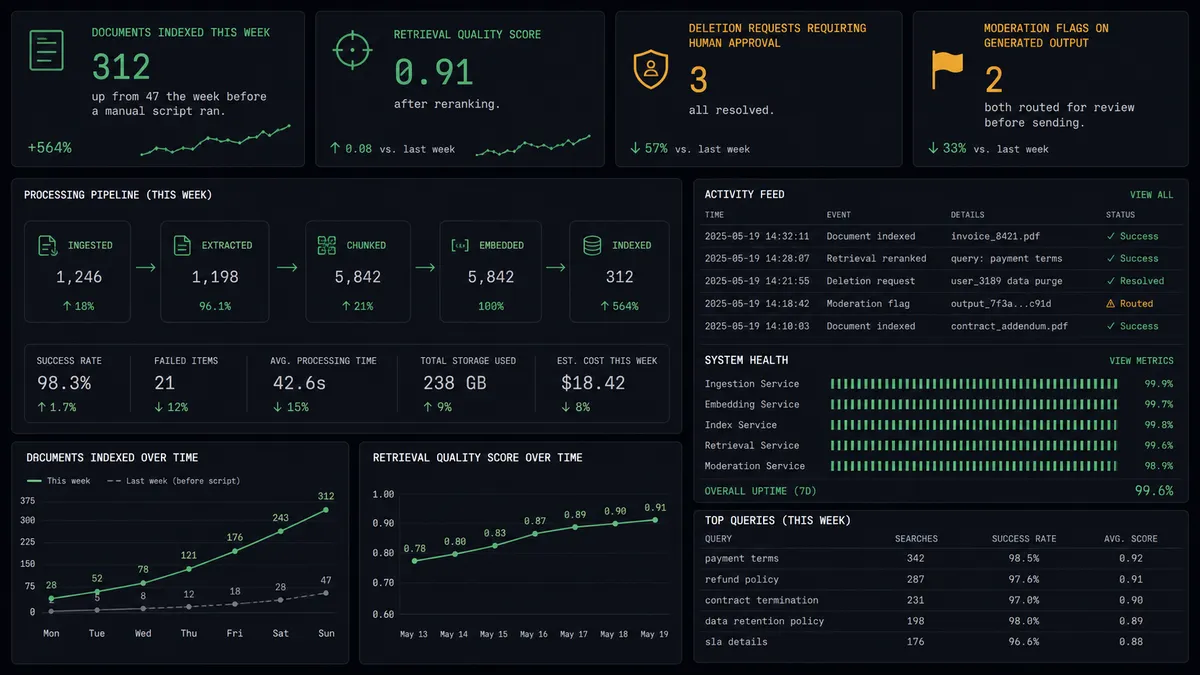
Live knowledge base sync. A document is updated in your content system. The agent calls Create Embeddings (OpenAI) on the new text, calls Upsert Vectors (Pinecone) to overwrite the old vector with the same document ID, then calls Describe Index Stats to confirm the write landed. The knowledge base tracks the source material without anyone rebuilding it.
Semantic search over internal documentation. Employees ask questions through a Slack command. The agent embeds the question with Create Embeddings (OpenAI), calls Query Vectors (Pinecone) for the top candidates, calls Rerank Documents (Pinecone) to sort by exact relevance, and passes the top passages to Create Chat Completion (OpenAI) to generate a cited answer. Confident answers return immediately; questions touching sensitive policy route to the owning team.
Batch embedding pipeline for large document sets. A document library needs to be indexed. The agent assembles a .jsonl file of embedding requests, submits it with Create Batch (OpenAI), polls with Get Batch until the status is complete, then retrieves the output file with Download File Content. It processes the results and calls Upsert Vectors (Pinecone) in sequence. Batch processing runs at 50 percent of standard OpenAI cost and does not require holding a connection open.
Controlled namespace retirement. A project ends. The agent calls Describe Index Stats to gather the vector count and recent query activity, then routes a deletion summary to the data owner via Slack. Only after the owner approves does the agent call Delete Namespace. The cleanup is deliberate, audited, and cannot happen by accident.
Common questions
Is it free to connect OpenAI and Pinecone on FlowRunner? FlowRunner has a free plan with 100 executions a month, every integration included, and no credit card required, and new accounts get 14 days of Professional on top. You supply your own OpenAI API key and Pinecone API key, so AI model costs and Pinecone index costs are billed directly by those providers on your existing accounts.
Does the agent need my own OpenAI key? Yes. FlowRunner uses a bring-your-own-key model for AI providers. You connect your OpenAI API key once in the FlowRunner connector settings and it is available to every flow that calls OpenAI actions. Your key, your costs, your usage data.
Can I self-host FlowRunner? Yes. FlowRunner offers a self-hosted Community Edition at no cost for a single instance. Enterprise self-hosted adds multi-instance clustering, SSO/SAML, full audit retention, and compliance reporting. Cloud-hosted tiers are also available from $45 per month.
What happens when the agent is not sure what to do? The agent does not guess or fail silently. It invokes a human-in-loop flow as a callable tool: assembles what it found, why it is pausing, and the available options, then contacts the responsible person via Slack, email, or another channel. The workflow pauses until that person responds. The decision, the decider’s identity, and the timestamp all land in the audit trail.
What irreversible Pinecone actions require human approval? Delete Index and Delete Namespace are permanent and cannot be undone. FlowRunner’s agent pauses before either action, gathers the vector count from Describe Index Stats and the recent query activity, and routes a confirmation request to the data owner. The deletion runs only after the owner approves.
Can this workflow handle large document sets? Yes. OpenAI’s batch API lets you send a .jsonl file of embedding requests and process them asynchronously at 50 percent of the standard cost. FlowRunner’s Create Batch and Get Batch actions let an agent submit, poll, and retrieve batch results as workflow steps, so large ingestion runs do not require you to hold a connection open.
Getting started
FlowRunner has a free plan with 100 executions a month, every integration included, and no credit card required, and new accounts get 14 days of Professional on top. All tiers include unlimited users and unlimited workflows, so your full team can build and iterate from day one.
To connect OpenAI and Pinecone, start with the integration pages: OpenAI on FlowRunner and Pinecone on FlowRunner. Both walk through connector setup and the full action library.
To start building, visit flowrunner.ai. To talk through your use case first, book a 30-minute intro at calendly.com/flowrunner/intro.
Frequently asked questions
Is it free to connect OpenAI and Pinecone on FlowRunner?
FlowRunner has a free plan with 100 executions a month, every integration included, and no credit card required, and new accounts get 14 days of Professional on top. You supply your own OpenAI API key and Pinecone API key, so AI model costs and Pinecone index costs are billed directly by those providers on your existing accounts.
Does the agent need my own OpenAI key?
Yes. FlowRunner uses a bring-your-own-key model for AI providers. You connect your OpenAI API key once in the FlowRunner connector settings and it is available to every flow that calls OpenAI actions. Your key, your costs, your usage data.
Can I self-host FlowRunner?
Yes. FlowRunner offers a self-hosted Community Edition at no cost for a single instance. Enterprise self-hosted adds multi-instance clustering, SSO/SAML, full audit retention, and compliance reporting. Cloud-hosted tiers are also available from $45 per month.
What happens when the agent is not sure what to do?
The agent does not guess or fail silently. It invokes a human-in-loop flow as a callable tool: assembles what it found, why it is pausing, and the available options, then contacts the responsible person via Slack, email, or another channel. The workflow pauses until that person responds. The decision, the decider's identity, and the timestamp all land in the audit trail.
What irreversible Pinecone actions require human approval?
Delete Index and Delete Namespace are permanent and cannot be undone. FlowRunner's agent pauses before either action, gathers the vector count from Describe Index Stats and the recent query activity, and routes a confirmation request to the data owner. The deletion runs only after the owner approves.
Can this workflow handle large document sets?
Yes. OpenAI's batch API lets you send a .jsonl file of embedding requests and process them asynchronously at 50 percent of the standard cost. FlowRunner's Create Batch and Get Batch actions let an agent submit, poll, and retrieve batch results as workflow steps, so large ingestion runs do not require you to hold a connection open.