Gemini AI Google Sheets Integration: Extraction, Not Retyping
Connect Gemini AI and Google Sheets so a new row triggers document extraction, and run it as an AI agent that pauses for a human on invoices that don't add up.
How do you connect Gemini AI to Google Sheets?
Connecting Gemini AI to Google Sheets means using Google Sheets’ On New Row trigger to fire a flow whenever a document gets logged into a tracking sheet, then calling Gemini AI’s Upload File and Generate Content actions to extract or classify that document, and writing the result back into the same row with Update Row. FlowRunner is a visual AI-agent orchestration platform where automations run autonomously and pause for human judgment on the steps that carry real consequence. The same connection runs two ways: as a standing rule that always extracts and writes back, or as an AI agent that reads what Gemini found, decides whether it looks right, and pauses for a person on the rows that don’t add up.
The problem it solves
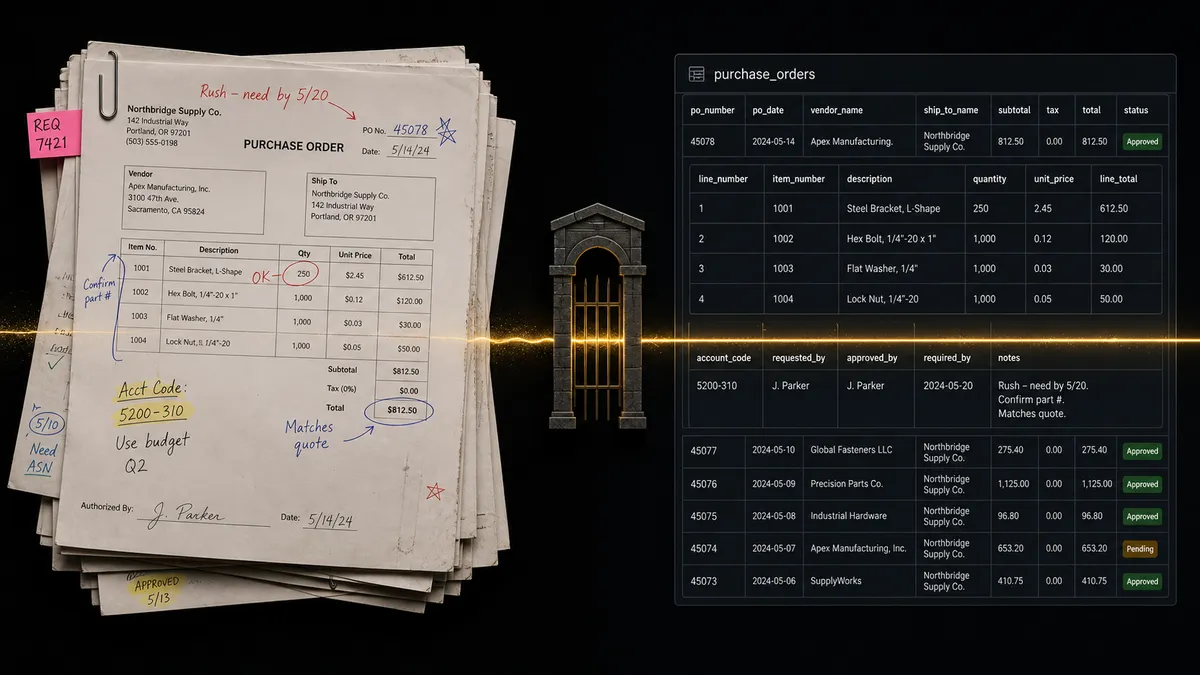
An AP clerk or an ops lead ends up as the human OCR layer for anything that doesn’t come in as a clean digital PDF. A vendor sends a photo of an invoice from their phone, or a scanned page from an old fax machine, and the standard extraction tool can’t read it. So someone opens the image, reads the vendor name, the invoice number, the line items, and the total, and types them into a tracking sheet by hand. It’s slow, it’s error-prone, and it’s the kind of manual work that eats a morning without anyone noticing where the time went.
The sheet itself doesn’t help. A billing manager builds a tracking log because it’s the fastest way to get visibility across a messy intake process, but a spreadsheet doesn’t trigger anything. A new row sits there until a person happens to notice it and acts on it. Exceptions fall through the cracks because nothing is watching the sheet. And the reporting is just as manual: someone opens the file, exports it, and emails it around, week after week. The team wants time back, not another tool to babysit.
How it works: the connection
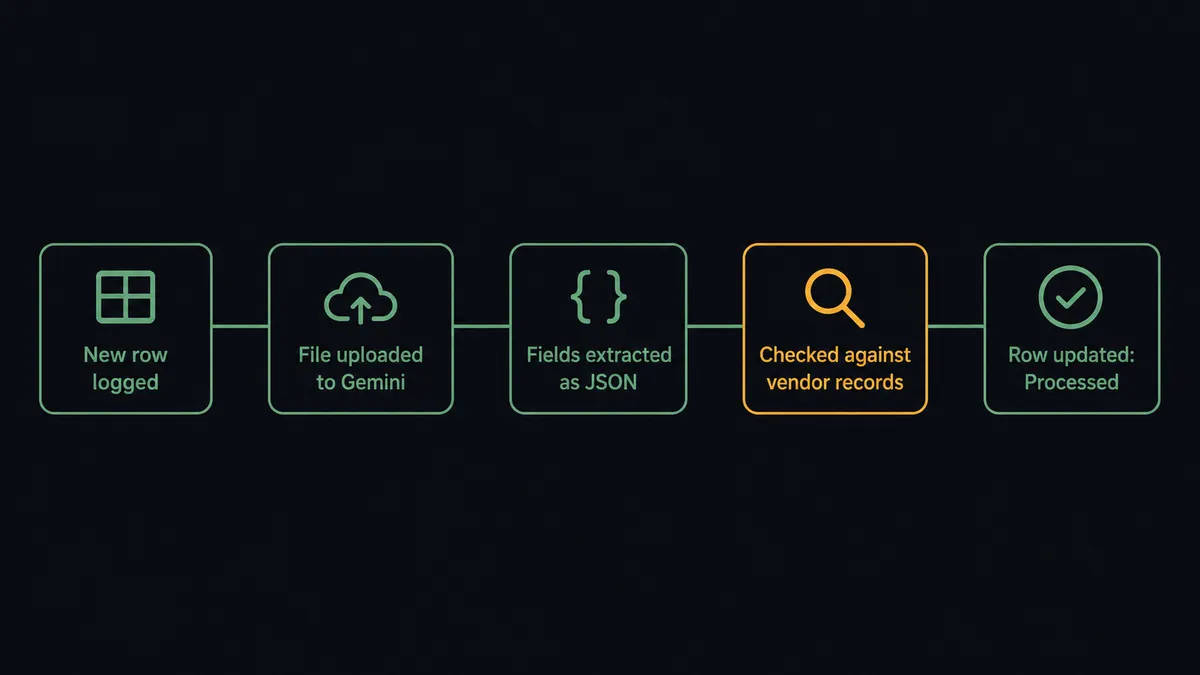
The flow starts with Google Sheets’ On New Row trigger, watching a tracking sheet where each row represents one incoming document: a vendor name, a link to the scanned file, and a status column. The moment a row lands, the flow fires.
From there, the flow calls Gemini AI. Upload File sends the scanned image to Gemini’s Files API and waits until it’s processed. Generate Content is called next with a structured extraction prompt, something like “Extract vendor name, invoice number, invoice date, line items, and total amount from this invoice. Return as JSON.” Gemini returns the structured data.
The extracted JSON is checked against the sheet’s own records, using Find Row to locate the vendor’s history and Get Rows to pull recent amounts for comparison. When it checks out, Update Row writes the extracted fields straight into the same row and sets the status column to “Processed.” A scan that used to require manual entry now updates its own tracking row.
Can an AI agent run it? (and why a human stays in the loop)
Running this as a fixed rule works for the invoices that look like every other invoice from that vendor. It stops being enough the moment something looks off, and a rule can’t tell the difference between “off” and “fine.”
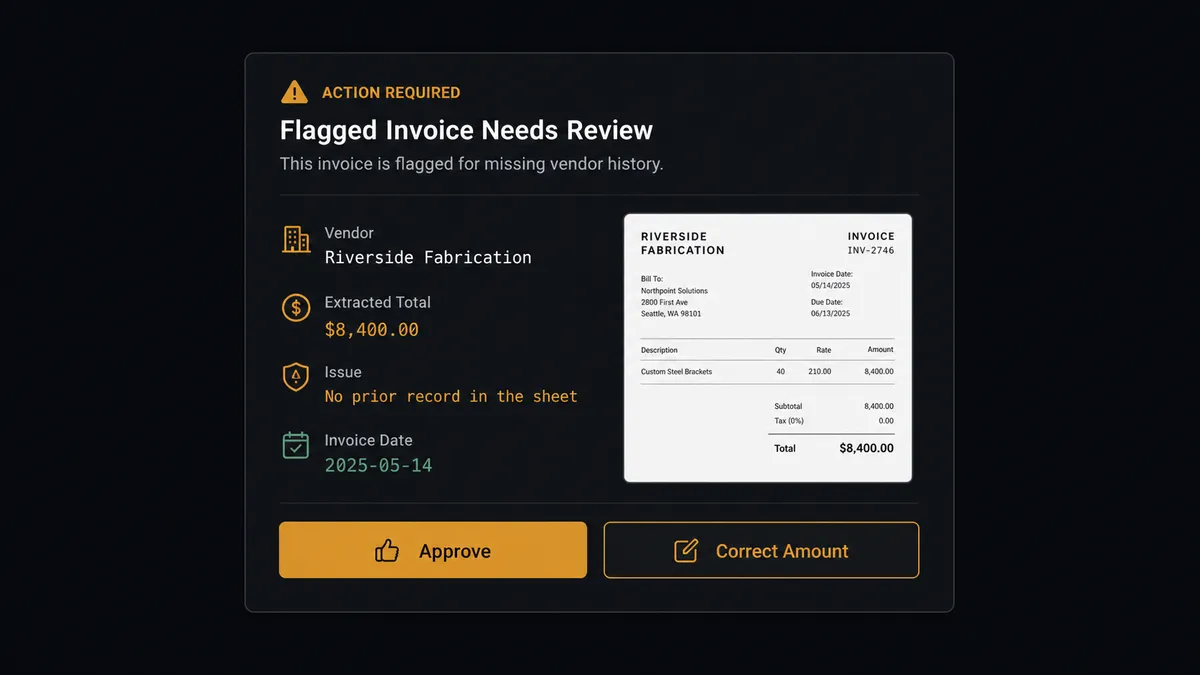
An AI agent can. The agent has Upload File, Generate Content, Find Row, Get Rows, and Update Row available to it as tools, and it decides which to call and in what order based on what it actually finds. When Gemini’s extraction comes back with a vendor the sheet has never seen, or a total that’s three times the vendor’s usual invoice amount, the agent doesn’t write it into the sheet and move on. It invokes a human-in-loop flow as a tool, the same way it would invoke Update Row.
That flow packages the scan, the extracted fields, and the specific reason for the flag, then sends it to the AP manager over Slack: “New vendor ‘Riverside Fabrication’ submitted an invoice for $8,400. No prior record in the sheet. Extraction attached. Approve to log as-is, or correct the amount before I write it back.” The AP manager approves, corrects, or rejects. The agent resumes with that decision, writes the final result to the row, and the decision, the decider, and the timestamp are all captured in the audit trail.
This is not a sync tool quietly moving data from one place to another. It’s an agent that knows when to stop and ask, a digital andon cord for the invoices that shouldn’t go through on autopilot.
FlowRunner vs Zapier
Zapier is the tool most ops teams already reach for to connect Google Sheets to everything else, and it’s genuinely fast to set up for straightforward triggers like a new row starting a notification or a CRM update. For pushing data between apps on a fixed rule, it does the job well.
Where it runs out of road is document extraction that needs judgment, not just a trigger. Zapier can call an AI step, but it has no native concept of an agent pausing mid-flow to ask a specific person a specific question with full context, and no built-in audit trail of who approved what and when.
| Capability | FlowRunner | Zapier |
|---|---|---|
| Human-in-loop on flagged extractions | Native: the agent invokes a human-in-loop flow as a callable tool, mid-run | Not native: requires custom webhook workarounds, no built-in audit trail |
| AI provider keys | BYOK: connect your own Gemini key, pay Google directly | Zapier’s AI actions run through its own metered credits |
| Users included | Unlimited users on every tier | Per-user pricing on higher tiers |
| Pricing model | Transparent workflow-based execution tiers | Per-task pricing that scales unpredictably with volume |
| Self-hosting | Self-hosted option on Enterprise, free Community Edition | Cloud-only, no self-hosted option |
Before and after
| What changes | Before | After |
|---|---|---|
| Scanned invoice entry | Staff retype data from low-quality scans other tools can’t extract | Gemini extracts fields from any scanned image automatically |
| Row activity | A new row sits until someone notices and acts on it | A new row starts extraction and validation the moment it lands |
| Exception handling | Mismatches and unfamiliar vendors get missed or caught late | The agent flags them to a person before anything is written downstream |
| Reporting | Someone opens the sheet and exports a file by hand each week | Export Sheet delivers the report on a schedule, unopened |
| Audit visibility | No record of who approved a questionable invoice or when | Every human decision is timestamped and logged automatically |
What you can build
Scanned invoice intake. A vendor drops a photo of an invoice into a shared drive, a row logs it in the tracking sheet, Gemini extracts the fields, and the agent writes validated data back or escalates a mismatch to AP.
Contract due diligence log. Each contract PDF gets a row with a file link. Gemini’s Generate Content summarizes it and flags unusual terms, and the agent writes the summary and risk level back into the row for the deal team to scan.
Support inbox triage sheet. Incoming support emails are logged as rows. Gemini classifies each one as billing, technical, or feature request, and the agent updates the row with the classification and routes it to the right team.
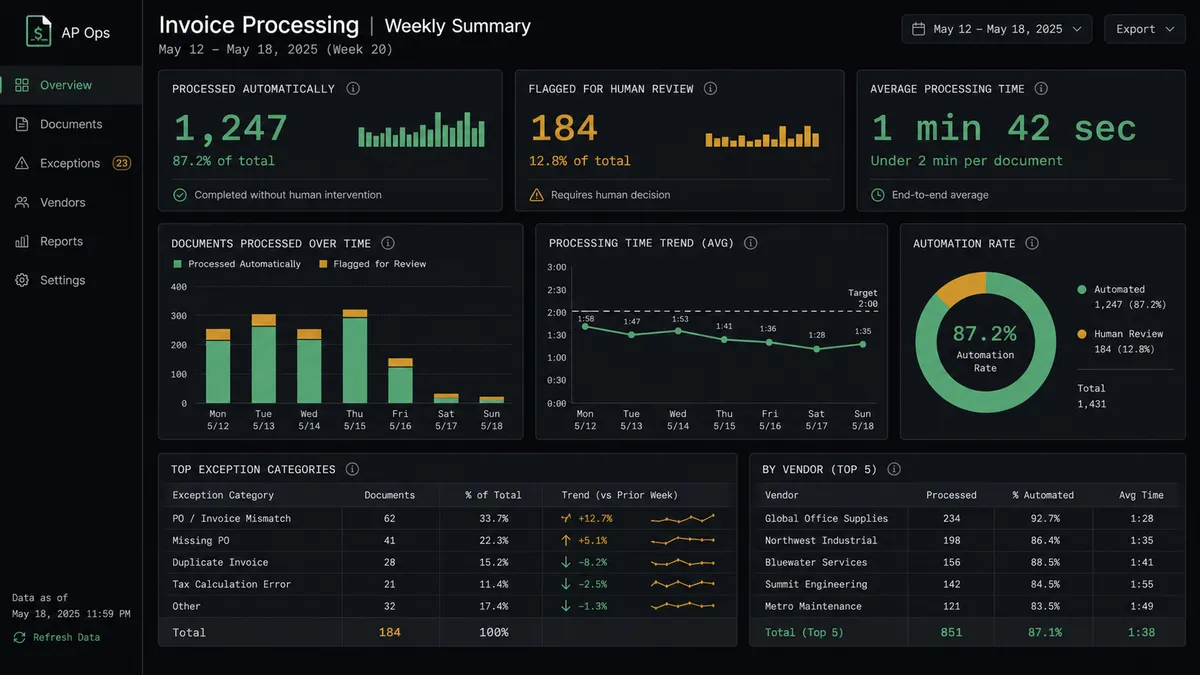
Weekly exception report. On a schedule, the agent calls Export Sheet to produce a file of everything processed and everything still flagged for review, and delivers it as an email attachment without anyone opening the spreadsheet.
Common questions
Is it free to connect Gemini AI and Google Sheets on FlowRunner? FlowRunner has a free plan with 100 executions a month, every integration included, and no credit card required, and new accounts get 14 days of Professional on top. Both Gemini AI and Google Sheets are included integrations on every paid tier, so there’s no separate connector fee.
Do I need my own Gemini API key? Yes. FlowRunner uses a bring-your-own-key model for AI providers, so you connect your own Gemini API key and pay Google directly for extraction calls, while FlowRunner handles the orchestration and the human-in-loop step.
Can I self-host this Gemini AI plus Google Sheets flow? Yes. FlowRunner’s Enterprise tier includes a self-hosted deployment option, and the free Community Edition supports a single self-hosted instance if you want to run the flow entirely on your own infrastructure.
What happens when the agent isn’t sure about an extracted invoice? The agent doesn’t guess. It packages the scanned image, the extracted fields, and the reason for its doubt, sends that to a person over Slack or email as a human-in-loop step, and waits for a decision before it writes anything into your systems of record.
Do I need a tracking sheet already set up, or does FlowRunner build one? You need a Google Sheet with a header row that names your columns (vendor, file link, status, and so on). FlowRunner’s Load Header Row action reads that structure so the agent can address columns by name instead of by coordinate.
Does this only work for invoices, or can it handle other documents? The same pattern works for any document type Gemini can read: contracts, support emails, receipts, or scanned forms. Only the extraction prompt and the tracking sheet’s columns change.
Getting started
FlowRunner has a free plan with 100 executions a month, every integration included, and no credit card required, and new accounts get 14 days of Professional on top. Connect Gemini AI and Google Sheets, point the flow at your tracking sheet, and add the human-in-loop step before you turn it on.
Start free at flowrunner.ai, or book time to walk through your specific intake process at calendly.com/flowrunner/intro.
Frequently asked questions
Is it free to connect Gemini AI and Google Sheets on FlowRunner?
FlowRunner has a free plan with 100 executions a month, every integration included, and no credit card required, and new accounts get 14 days of Professional on top. Both Gemini AI and Google Sheets are included integrations on every paid tier, so there's no separate connector fee.
Do I need my own Gemini API key?
Yes. FlowRunner uses a bring-your-own-key model for AI providers, so you connect your own Gemini API key and pay Google directly for extraction calls, while FlowRunner handles the orchestration and the human-in-loop step.
Can I self-host this Gemini AI plus Google Sheets flow?
Yes. FlowRunner's Enterprise tier includes a self-hosted deployment option, and the free Community Edition supports a single self-hosted instance if you want to run the flow entirely on your own infrastructure.
What happens when the agent isn't sure about an extracted invoice?
The agent doesn't guess. It packages the scanned image, the extracted fields, and the reason for its doubt, sends that to a person over Slack or email as a human-in-loop step, and waits for a decision before it writes anything into your systems of record.
Do I need a tracking sheet already set up, or does FlowRunner build one?
You need a Google Sheet with a header row that names your columns (vendor, file link, status, and so on). FlowRunner's Load Header Row action reads that structure so the agent can address columns by name instead of by coordinate.
Does this only work for invoices, or can it handle other documents?
The same pattern works for any document type Gemini can read: contracts, support emails, receipts, or scanned forms. Only the extraction prompt and the tracking sheet's columns change.