How to Connect Airtable with Bitrix24 (With or Without an AI Agent)
Connect Airtable records to Bitrix24 leads and deals, optionally as an AI agent that keeps both systems in step and pauses for a human before any record is deleted in a duplicate cleanup.
How do you connect Airtable to Bitrix24?
You connect Airtable to Bitrix24 by having Airtable’s On New or Updated Record trigger drive Bitrix24 actions: the workflow pulls the row with Find Record, checks for an existing match with List Contacts or List Leads, writes the record with Create Lead or Update Deal, and stamps the Bitrix24 ID back onto the row with Update Record, so the base your team actually works in and the CRM your pipeline lives in stop drifting apart. Bitrix24 has no triggers of its own, so the workflow starts from the Airtable side or on a schedule. FlowRunner is a visual AI-agent orchestration platform where automations run autonomously and pause for human judgment on the steps that carry real consequence. The same connection can run as an AI agent that reconciles the two systems continuously and pauses for a named human before any record is deleted in a cleanup.
The problem it solves
Right now your Airtable base and your Bitrix24 portal describe the same customers in two diverging dialects. The intake team lives in Airtable because it is fast and flexible. Sales lives in Bitrix24 because that is where deals, calls, and tasks belong. Someone bridges the two by exporting, copying, or retyping, usually weekly, always behind. A lead captured Monday in Airtable reaches the CRM Thursday, if the bridge person was not on vacation. Edits made on one side never make it to the other, so both teams half-trust both systems and keep private spreadsheets as insurance.
The duplicates are the compounding tax. Every manual import creates a few: the same company under two spellings, the same contact with a work and a personal email. Reports double-count pipeline. Two reps call the same prospect. Eventually someone declares a cleanup day, and that is its own hazard, because bulk deleting CRM records with no review is how a live deal’s history disappears. The absence of a sync does not just cost speed. It costs trust in the data on both sides.
How it works: the connection
The connection listens to Airtable and writes to Bitrix24, then closes the loop. Here is the plain version, grounded in the real connector actions.
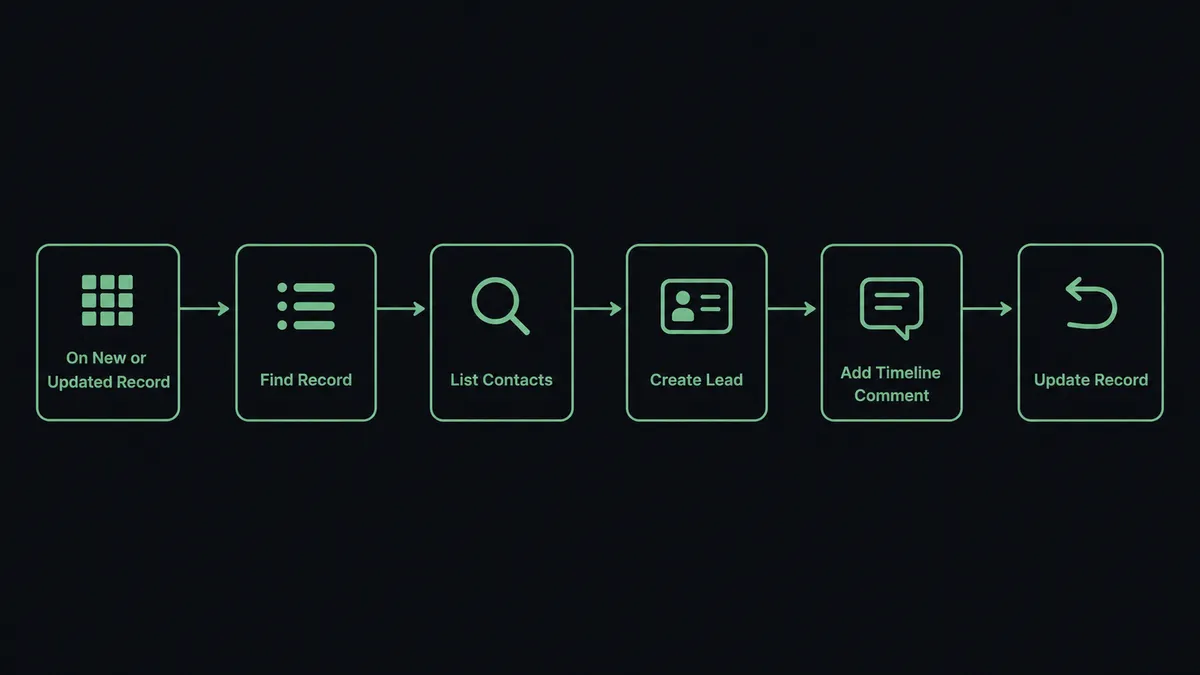
- Trigger: Airtable fires On New or Updated Record when a row is added or edited in the intake table.
- Read: The workflow calls Find Record to pull the full row: name, company, status, and value.
- Check for a match: It calls List Contacts and List Leads in Bitrix24 to see whether this person or company already exists.
- Write the record: For a new entry it calls Create Lead or Create Contact; for a known one it calls Update Deal or Update Contact so the CRM reflects the edit.
- Log the source: It calls Add Timeline Comment on the Bitrix24 record referencing the Airtable row, so anyone can trace where the data came from.
- Close the loop: It calls Update Record in Airtable to stamp the Bitrix24 ID on the row, which is what makes every future sync an update instead of a duplicate.
That is the “just connect them” answer. Rows become leads, edits become updates, and the ID write-back keeps the two systems permanently paired instead of drifting.
Can an AI agent run it? (and why a human stays in the loop)
Yes, and matching is exactly the kind of judgment a fixed field mapping cannot make. Instead of comparing one email column and hoping, an AI agent reads the whole row and the candidate records, and picks the Airtable and Bitrix24 actions it needs as tools. Find Record, Find Many Records, List Contacts, List Leads, Create Lead, Update Contact, Delete Lead, Update Record: that is the toolbox, and the agent chooses based on how confident the match actually is.
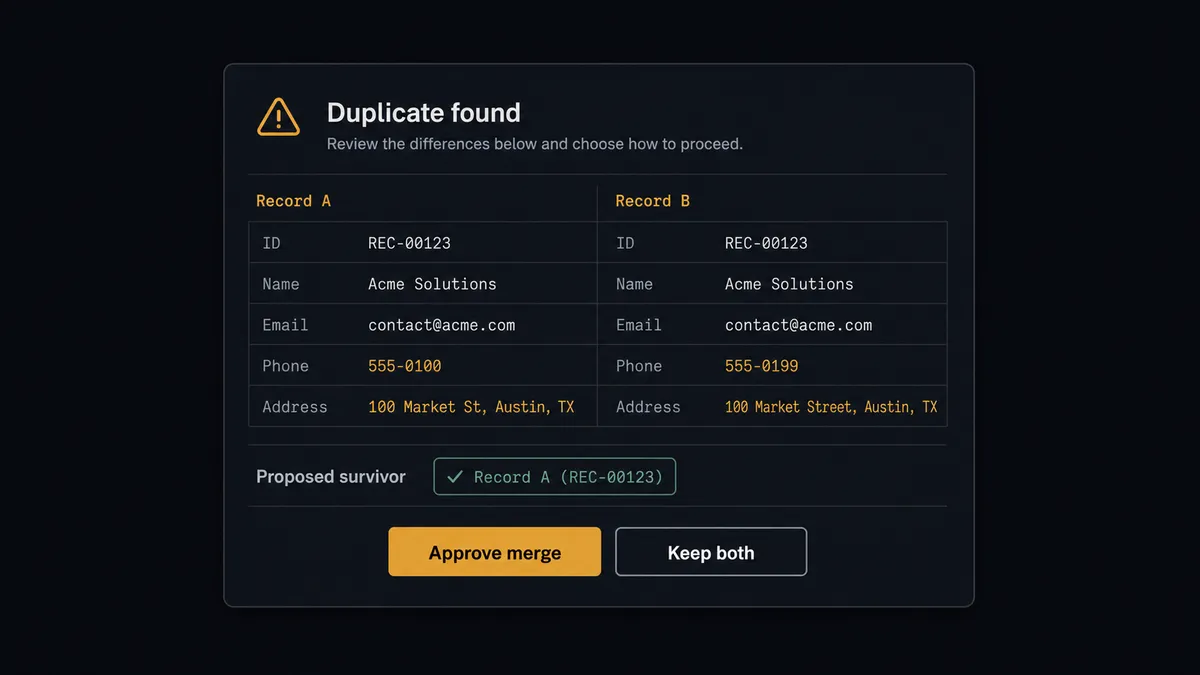
“Acme Corp” in Airtable and “ACME Corporation” in Bitrix24 with the same domain are the same company, and the agent treats them that way, updating rather than creating. But the consequential step is deletion. When the agent’s reconciliation pass finds two Bitrix24 records that are almost certainly the same contact, it does not just fire Delete Contact on the one it likes less. It assembles the evidence: both records side by side, the fields that match, the fields that differ, which one carries deal history. Then it invokes a human-in-loop flow it holds as a callable tool. The workflow pauses and posts to your channel: “Likely duplicate: [record A] and [record B] share [matching fields]. Proposed survivor: [record]. Approve merge and delete?” A person decides in one click. Only then does Delete Contact or Delete Lead run, the survivor gets the merged fields via Update Contact, and the audit trail records who approved it and when.
Deletion is the one operation in a CRM you cannot walk back casually, which is why it is the one operation that always waits for a person. Prospects call this the digital andon cord: like Toyota’s quality control pull cord, the workflow stops the line the moment it hits uncertainty, and your team pulls it back into motion.
FlowRunner vs Zapier
Most teams syncing Airtable to a CRM reach for Zapier first, and for good reason. Zapier connects to both Airtable and Bitrix24, its editor is quick to learn, and its template gallery covers record-to-CRM patterns you can clone in minutes. For a straight “new row creates a lead” push, it is a fast, proven path.
The difference shows up in reconciliation. FlowRunner is built around native human-in-the-loop and AI-agent orchestration, where the agent judges matches, closes the loop with write-backs, and a person stays on every deletion.
| What matters for this pair | FlowRunner | Zapier |
|---|---|---|
| Human-in-the-loop on record deletion | Native. The agent invokes an approval flow as a callable tool and pauses before Delete Contact or Delete Lead | Available by adding approval steps, not a native agent decision |
| Who runs the flow | An AI agent reads the row and candidate records, reasons, and picks actions as tools | Predefined step sequence you configure per Zap |
| Users included | Unlimited users on every tier | Priced by task volume; seats vary by plan |
| Bring your own AI keys | Yes, BYOK | AI features tied to Zapier’s own AI offering |
| Self-hosted option | Yes, cloud-hosted or self-hosted | Cloud only |
| Pricing model | Transparent workflow-based tiers | Per-task pricing that gets harder to predict as row volume grows |
If your base is small and duplicates are rare, Zapier will move the rows fine. If two teams live in two systems and the data has to stay trustworthy on both sides, this pairing is the better fit.
Before and after
| Category | Before | After |
|---|---|---|
| Lead handoff | Rows exported and retyped into Bitrix24 on a weekly batch | Create Lead runs the moment On New or Updated Record fires |
| Two-system drift | Edits on one side never reach the other | Update Deal and Update Record carry changes both ways, keyed by the stamped ID |
| Duplicate records | Each import adds a few more; reports double-count pipeline | The agent matches against List Contacts and List Leads before creating anything |
| Cleanup risk | Bulk deletes on cleanup day erase records with live history | Delete Contact waits for a named approver with both records in view |
| Traceability | Nobody can say where a CRM record came from | Add Timeline Comment links every record to its source Airtable row |
What you can build
Intake to CRM, hands off. On New or Updated Record fires. The agent pulls the row with Find Record, checks List Contacts, writes Create Lead, logs the source with Add Timeline Comment, and stamps the ID back with Update Record. The bridge person retires from copying.
Duplicate merge with named approval. The agent’s reconciliation pass flags two near-identical Bitrix24 records, posts both through the human-in-loop tool, and only runs Delete Lead and the surviving Update Contact after a person picks the survivor.
Deal status write-back. On a schedule, the agent reads List Deals and Get Deal in Bitrix24 and calls Update Record on the matching Airtable rows, so the intake team sees stage and outcome without asking sales for a report.
Task fan-out from a project base. When a row’s status column flips to active, the agent calls Create Task and Create Activity in Bitrix24 for the owning team, and Create Comment on the Airtable record linking to the created work.
Batch import with guardrails. For a one-time migration, the agent walks the base with Find Many Records, creates leads in Bitrix24 in controlled batches, and routes every uncertain match to the approval flow instead of guessing, so the migration does not seed a duplicate problem.
Common questions
Is it free to connect Airtable and Bitrix24 on FlowRunner? You can build and run the connection on a $100 credit with no credit card, which is roughly 67 days free on the Growth tier at $45/mo. Both connectors are available on every FlowRunner tier, and every tier includes unlimited users and unlimited workflows.
Can I self-host the Airtable to Bitrix24 workflow? Yes. FlowRunner offers a cloud-hosted option and a self-hosted option, so the connection can run inside your own environment.
Does the AI agent need my own OpenAI or Claude key? FlowRunner uses a bring-your-own-keys model, so you connect the AI provider key you already have. You are not locked to one model.
What happens when the agent finds two records that look like the same company? The agent stops and invokes a human-in-loop step instead of deleting anything. It posts both records side by side with the fields that match and the fields that differ, then waits for a person to choose which record survives. Delete Contact or Delete Lead only runs after that approval.
Which Airtable events can drive a Bitrix24 action? Airtable offers two triggers: On New Record and On New or Updated Record. On New or Updated Record is the usual choice for a sync, since it fires both when a row is added and when someone edits it. Bitrix24 has no triggers, so the workflow always starts from the Airtable side or on a schedule.
Does the sync work in both directions? The trigger side starts in Airtable, and the agent closes the loop by writing back: after creating a lead or deal it calls Update Record to stamp the Bitrix24 ID on the row, and on a schedule it reads Bitrix24 with List Deals and refreshes the matching rows with Update Record.
Getting started
Start with a $100 credit on the Growth tier at $45/mo. That is roughly 67 days free, and no credit card is required. Both connectors are available on every tier, and every tier includes unlimited users and unlimited workflows.
Explore the integration details:
- Airtable integration (2 triggers and 17 actions covering bases, tables, records, and comments)
- Bitrix24 integration (40 actions covering leads, deals, tasks, and notifications)
Start building free at flowrunner.ai or book a demo to see a live Airtable to Bitrix24 workflow, merge approval and all.