In the last update, your AI tool learned to run the flows it builds. This release closes the loop: when a run fails, the same AI can tell you why and fix it. The second new feature handles one of the most common reasons a flow stops working, an account whose sign-in expired. After those come improvements, a bug fix, and two billing changes you should know about. Each item links to the docs page that shows how.
FlowRunner Prompt to Flow: ask your AI why a run failed
The AI tool you connect with FlowRunner Prompt to Flow (Claude, ChatGPT, Codex, Cursor and others) can now read your flows’ run history. It sees the same information as a flow’s Instances tab. So when something goes wrong, you don’t have to dig through runs yourself. Just ask:
Two runs of Order Priority failed yesterday. What happened?
The AI finds the step that failed and tells you why. It also tells you whether the cause is in the flow or outside it: a service that is down or refusing the request, an account that needs signing in again, or bad incoming data. It can show what a step received and returned, and the run’s log, for runs that worked as well as runs that failed.
Explaining changes nothing. When you ask for a fix and the cause is in the flow, the AI changes the flow and tells you what it changed. When the cause is outside the flow, it tells you what to do.
Two things worth knowing. Runs hold the data they handled, and that data goes to the AI model, so the AI asks your permission before it reads a flow’s runs for the first time in a conversation. And it sees the runs within your plan’s log history, and says so when older runs are hidden.
There’s nothing to set up. If you’re already connected through Prompt to Flow, it works today. See Ask why a run failed.
OAuth Connections: Reconnect an account whose sign-in expired
Sometimes a service such as Gmail stops accepting an account’s access. Until now that showed up as a failed step and not much else. Now FlowRunner says so clearly everywhere it matters, and gives you a one-click way back: Reconnect.
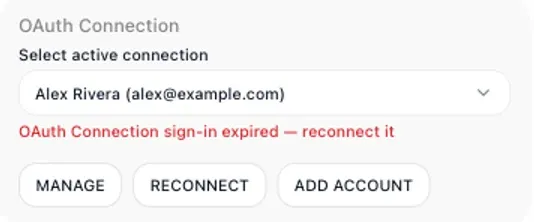
Every block that uses the account shows that its sign-in expired, with a RECONNECT button right there:
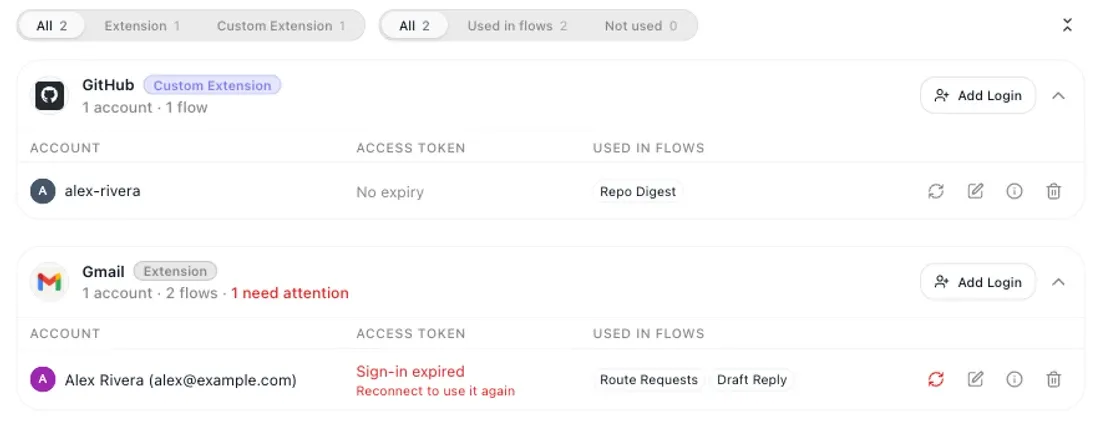
On the OAuth Connections screen, the account shows Sign-in expired, and its service card counts it under need attention, so you can see at a glance which accounts need you:
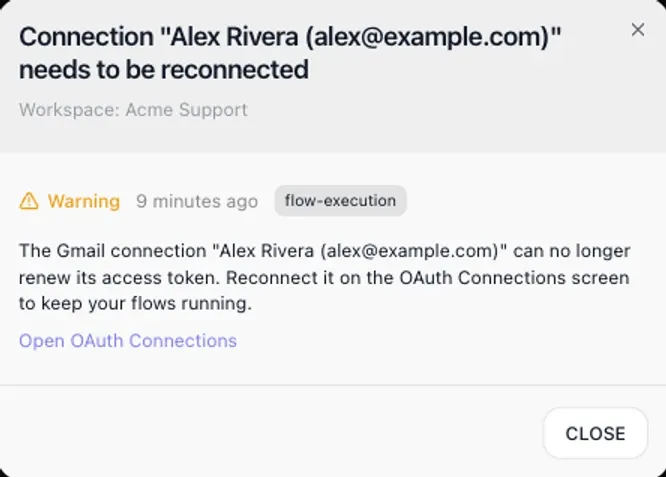
The step that uses the account fails with a plain message that tells you where to reconnect it. A flow with such a block can’t be started until the account is reconnected. And the workspace team gets a notification, in the bell and by email, with a link straight to the OAuth Connections screen. It comes at most once an hour per connection, so a busy flow doesn’t flood anyone’s inbox.
Reconnecting updates the same connection, so every flow that uses it works again without touching its blocks. See When a sign-in expires, the OAuth Connections screen, and the notification.
Improvements
AI Agent fails clearly when the answer isn’t JSON. With Force Parsed Output on, an AI Agent whose answer can’t be read as JSON now fails at that step with a clear message, instead of passing the unparsed answer on to the next block. A Handle Error block catches it like any other failure. A single value such as a number counts as JSON. See AI Agent.
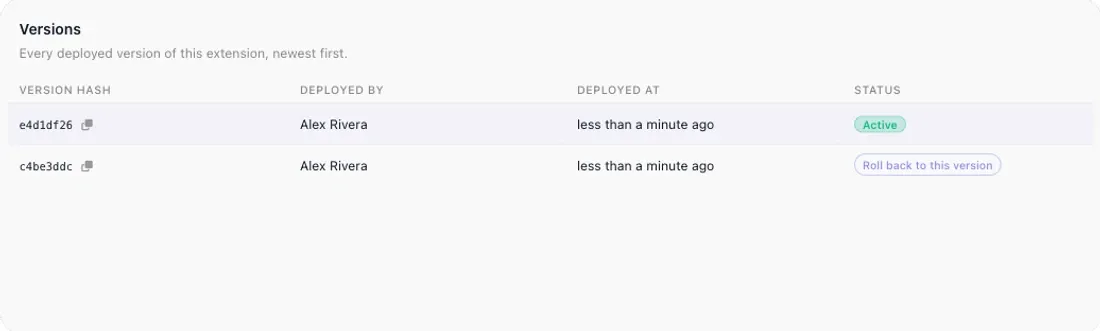
Switch custom extension versions with confidence. The Versions tab shows who deployed each version and when. Every other version has an Upgrade to this version or Roll back to this version button, switching asks for confirmation first, and the Activity tab records each switch. See Versions.
Sign-in links work once. A link the AI gives you to connect an account, such as Slack or Google Sheets, now works once, for 30 minutes. A used or expired link says so, and you ask the AI for a new one. See Connect the accounts a flow uses.
Bug fixes
- Stored files are no longer replaced by accident. A custom extension that saved a file under a name already in use replaced the old file, even when it didn’t ask to. Now that upload is refused unless the extension asks to overwrite. See Storing files.
Changes to what counts and what you pay
Launching a flow from the editor counts as an execution. Running a whole flow from the flow editor, with the lightning button in the toolbar or on a block, is a real run of the flow. It counts as one execution against the workspace’s monthly allowance, the same as a run started any other way. That’s true on a version you’re still building as well as on a live one. Running one block at a time while you build is still free and doesn’t count. See What testing costs.
Upgrading from the Free plan starts a new billing month. When a workspace on the Free plan moves to a paid plan, it pays the new plan’s full monthly price and a new billing month starts that day. The execution counter starts again from zero, so the whole new allowance is available at once. Moving between paid plans works as before. See Changing plan mid-month.
Try it
If you’re connected through Prompt to Flow, ask your AI about the last run that failed. If you haven’t connected yet, the FlowRunner Prompt to Flow guide shows how. If you’re new to FlowRunner, start free. No credit card, and every integration is on every plan. The pricing page has the details for every plan.
Frequently asked questions
Can my AI tool tell me why a FlowRunner run failed?
Yes. With FlowRunner Prompt to Flow connected, ask in plain words, for example "Two runs of Order Priority failed yesterday. What happened?" The AI reads the flow's run history, tells you which step failed and why, and says whether the cause is in the flow or outside it. Ask it to fix the problem and it changes the flow when the cause is in the flow.
What happens when a connected account's sign-in expires?
Steps that use the account fail with a plain message, the account shows Sign-in expired on the OAuth Connections screen, every block that uses it shows a RECONNECT button, and the workspace team gets a notification in the bell and by email. Reconnecting updates the same connection, so every flow that uses it works again without changing its blocks.
Does launching a flow from the editor count as an execution?
Yes. Launching a whole flow from the flow editor, with the lightning button in the toolbar or on a block, counts as one execution, on a draft version as well as a live one. Running one block at a time while you build is still free.