
Two days ago we shipped FlowRunner Prompt to Flow, and the next release is already out. It brings four new features: a shared list of your team’s services in the flow editor, knowledge bases on Weaviate, warnings before a workspace runs out of executions, and a way to restart a cancelled subscription. There are also a few improvements and a round of bug fixes. Each item links to the docs page that shows how to use it.
Team’s Stack: your team’s services, always in the block list
FlowRunner connects to thousands of third-party services. That’s a long list to search every time you want Slack. Until now, the Extensions group in the flow editor showed the services in the open flow plus a set of popular ones, and you searched for everything else.
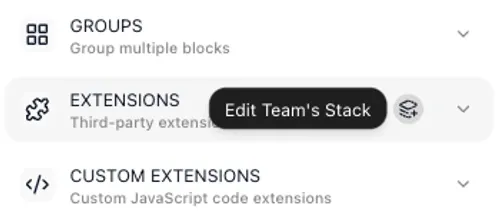
Now you pick the services your team works with once, and every developer in the workspace finds them in the Extensions group every time they build. Click the icon at the right of the Extensions group header. Its tooltip reads Edit Team’s Stack, or Edit My Stack if you’re the only developer in the workspace.
The dialog has three tabs. Used in your flows lists the services your workspace already uses, All services searches every service, and In stack shows what you’ve picked. The first time you open it, the services your flows already use are picked for you to review. Click Add next to anything else you want, then Save.
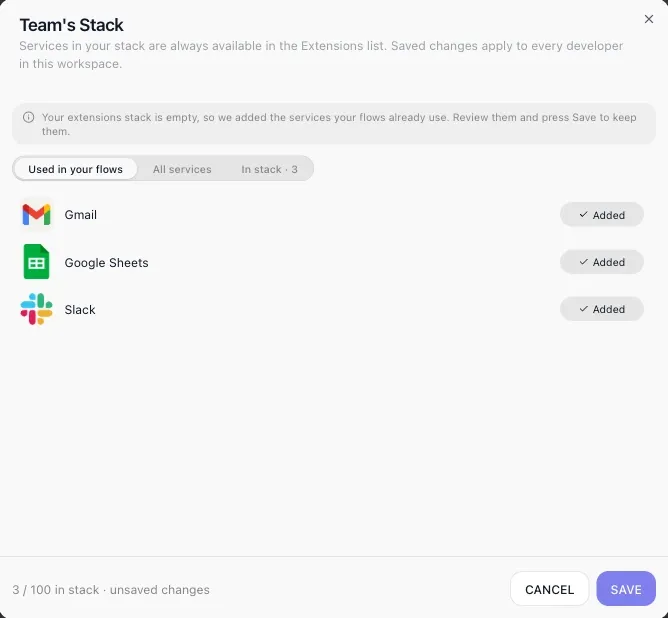
A stack holds up to 100 services and belongs to the workspace, so everyone sees the same list and anyone can change it. With a stack set, the Extensions group shows the services the open flow uses first, then the stack. See the flow editor.
Knowledge Bases on Weaviate
If your team already runs Weaviate, your AI agents can now use it. A knowledge base can store its data in your own Weaviate cluster, alongside the stores FlowRunner already supported: MongoDB Atlas, Qdrant, PostgreSQL and OpenSearch.
When you create the knowledge base, enter the cluster’s REST and gRPC addresses from your Weaviate panel, add its API key, and press Test. The dialog confirms the connection and shows the cluster’s Weaviate version. Then pick an existing collection or name a new one. If the collection already holds data, you choose which property holds the text, and you can turn on Search entire collection so the agent searches everything already in it, not only what you upload through FlowRunner. Upload your documents, attach the knowledge base to an AI Agent, and the agent answers from them. See Knowledge Bases.
Execution-limit warnings: no surprise at the end of the month
Every plan except Enterprise comes with a monthly execution allowance. FlowRunner now tells you as a workspace uses it up, so nobody finds out from a run that didn’t start. You get a warning at 80%, 90% and 95% of the allowance, and again at 100%.
Each warning pops up in the console and stays under the bell icon. It also goes by email to every member of the workspace, so whoever handles billing hears about it even if they don’t open the console that week. The executions counter at the top of the navigation turns amber, then red, and at 100% a red warning icon appears beside it. Click the icon to open Billing.
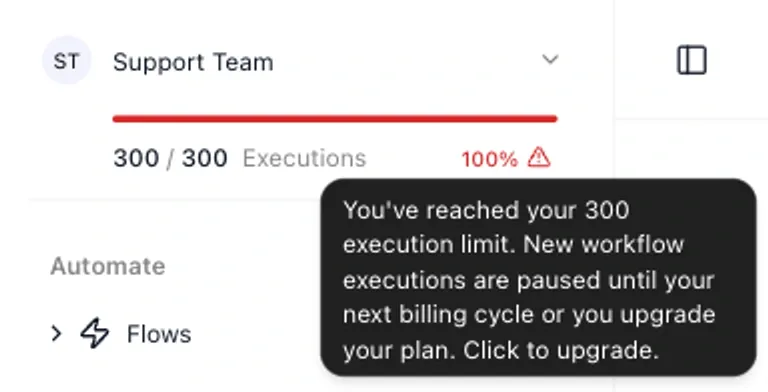
At 100%, runs already in progress finish normally, but no new run starts. Runs start again when the next billing cycle begins, or as soon as the workspace moves to a bigger plan. Your flows, logs and settings are all kept in the meantime. There’s nothing to turn on: the warnings start the next time a workspace passes 80%. See Running out of executions.
Restart a cancelled subscription
When a workspace’s subscription is cancelled, the workspace is suspended, not deleted. Its flows and data are kept. The owner can now start a new subscription right from the Billing page, either on the old plan at the old price or on a different plan, and the workspace is active again as soon as the payment goes through. Nothing has to be rebuilt.
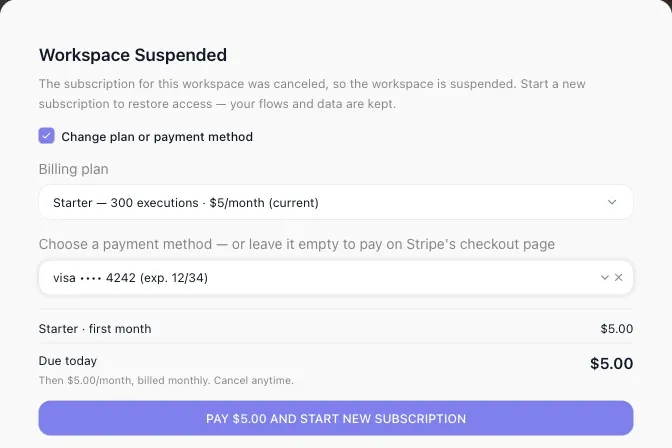
See Restarting a cancelled subscription.
Improvements
Search finds the block you meant. Search in the block list now needs every word you type to match, and it ranks a match in the service’s name first, then the action’s name, then its description. Type “telegram send message” and Telegram’s Send Message comes up first. See the flow editor.
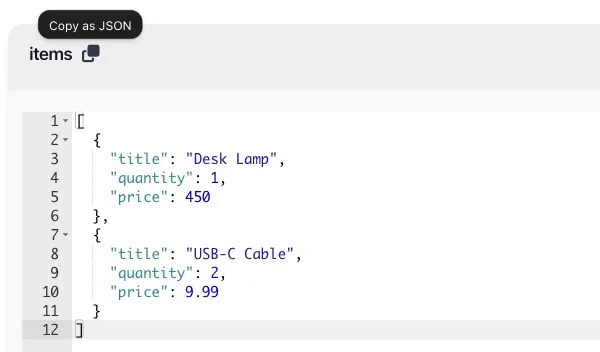
Edit lists and objects as JSON while testing. Test data that’s an object or a list (an order’s items, say) now opens in a JSON editor that shows it formatted, so a long list is easy to read and check. The Copy as JSON icon beside its name copies the whole value, formatted, so you can paste it somewhere else. See Testing.
A clear limit for Custom Cloud Code results. A Custom Cloud Code block can return up to 5 MB. A bigger result stops the block with a plain message that says so, and the flow’s error handler can catch it like any other failure. See Custom Cloud Code.
Bug fixes
- Errors from web services now say what went wrong. When a service answered an HTTP Request with an error, the flow’s error handler got an empty message. Now it gets the service’s own message. See Error handling.
- Sum adds whole numbers and decimals together. Transform Data’s Sum failed when the numbers mixed whole numbers and decimals, such as 2 and 2.5. Now it returns 4.5. See Transform Data.
- Decimals reach custom extensions. A number such as 52.52 passed to a custom extension action arrived as 52. Now it arrives as 52.52. See Parameters and types.
- Testing a callback flow runs it once. Launching a live flow that starts with an External Callback, with “Trigger the External Callback automatically” on, left an extra run waiting. Now the flow runs once, from start to finish. See Testing.
- “Mark read” is always there. The button for marking a notification section as read went missing while the section had more messages to load. Now it shows up whenever the section has unread messages. See Notifications.
Try it
If you’re new to FlowRunner, start free. No credit card, and every integration is on every plan. The pricing page lists the monthly executions on every plan.
Frequently asked questions
What is Team's Stack in FlowRunner?
Team's Stack is a list of up to 100 third-party services that a workspace picks once. Every developer in the workspace then finds those services in the Extensions group of the flow editor every time they build, without searching. It is called My Stack when you are the workspace's only developer.
Can a FlowRunner knowledge base use Weaviate?
Yes. A knowledge base can store its data in your own Weaviate cluster. You enter the cluster's REST and gRPC addresses and its API key, press Test, and pick an existing collection or name a new one. MongoDB Atlas, Qdrant, PostgreSQL and OpenSearch are also supported.
When does FlowRunner warn me that a workspace is running out of executions?
At 80%, 90% and 95% of the workspace's monthly execution allowance, and again at 100%. Each warning appears in the console, stays under the bell icon, and goes by email to every member of the workspace. Enterprise workspaces have no execution limit.
Can I restart a cancelled FlowRunner subscription?
Yes. A workspace whose subscription was cancelled is suspended, not deleted, and its flows and data are kept. The owner can start a new subscription from the Billing page, on the old plan at the old price or on another plan, and the workspace is active again as soon as the payment goes through.