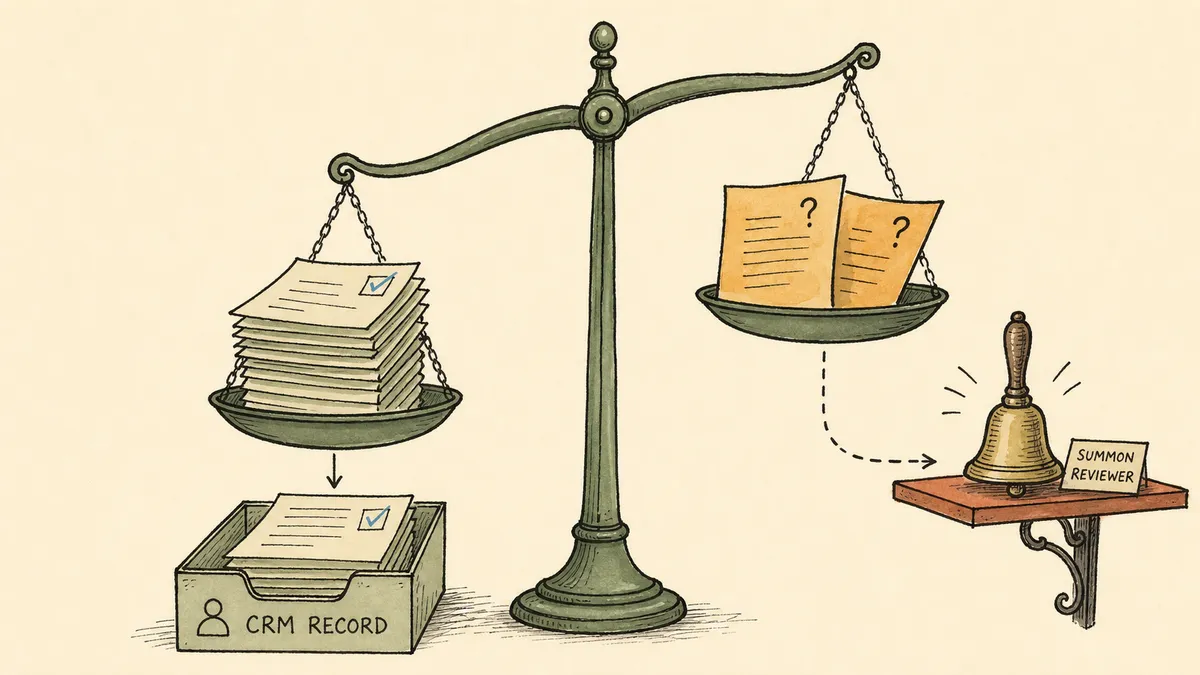
Search “salesforce intelligent document processing” and the first screen is Salesforce selling you Salesforce: Intelligent Document Automation, Intelligent Document Reader, Document AI inside Agentforce. All of it real, all of it answering one question. Can AI read the PDF? Yes. That question was settled a while ago. It is not the question a finance leader is actually asking when an order form, a contract, or a distributor billback needs to become a record in the CRM.
The question that decides whether this works is the unglamorous one: who owns the workflow when the extraction is wrong? A document is read, fields come out, and now a record is about to be created or updated in Salesforce on the strength of what a model believed. If the model was sure and correct, nobody needs to do anything. If it was sure and wrong, or unsure and right, somebody in finance needs to see it before it lands. This article is about that somebody, and about the workflow that knows when to call them.
What CFOs actually mean by intelligent document processing for Salesforce
Strip the vendor language and the scope is narrow and concrete. There is a set of recurring documents that need to land as Salesforce records: order forms that map to opportunities or custom order objects, signed contracts that attach to accounts, distributor billback statements with line items, vendor forms that update a record finance already has. The documents arrive in the messy real world (email, a shared drive, a vendor portal, an upload) and need to end up as structured data in the system of record.
The finance-side pain is specific, and it is not “we cannot read PDFs.” In conversations with finance leaders, the same picture keeps surfacing. The existing AI effort is piecemeal, with no broad strategy behind it, and the opaque vendor tools they have looked at read like a black box they are asked to trust. Underneath that, the day-to-day is more ordinary. Distributor billing has real errors in it, and if both sides post a payment against the same statement, that is a duplicate payment, not a rounding issue. Near month-end, items fall through the cracks. And when the person who normally handles a vendor’s bills is out, a senior finance staffer enters them by hand, because the judgment in that work has never actually been removed, only assigned to whoever is around.
That last detail is the whole story. The judgment did not go away. Intelligent document processing for Salesforce is not the project of making the judgment disappear. It is the project of letting the routine documents flow into Salesforce on their own and getting the judgment cases in front of a person, on purpose, before they become records.
Native Salesforce IDP versus an orchestrated workflow
Because the SERP is dominated by Salesforce’s own features, the distinction is worth drawing flat before anything else. Salesforce native document AI and an orchestrated IDP workflow are not the same product solving the same problem at different price points. They sit at different layers, and one is built to call the other.
| Salesforce native document AI | Orchestrated IDP workflow (FlowRunner) | |
|---|---|---|
| Core job | Read a document, extract and classify fields | Coordinate intake, extraction, validation, the write, and human review around it |
| Where the document comes from | Documents already inside Salesforce or pushed to it | Any source: email, shared drive, vendor portal, upload |
| Validation against existing records | Limited to what the configured feature performs | Explicit query against Salesforce before the write to avoid duplicates and match parents |
| Low-confidence result | Handled inside the feature’s own logic | Pauses the workflow and routes the document to a named reviewer with context |
| Who owns the threshold | Configured within the Salesforce feature | Finance owns it as a workflow rule, editable without a developer |
| The extractor itself | Salesforce’s model | Pluggable: can be Salesforce’s own document AI, or another extractor |
Read the bottom row. The orchestration layer does not replace the extractor. It can call Salesforce’s native Intelligent Document Automation and Intelligent Document Reader as the reading step and then own everything around it. If Salesforce’s document AI is the best reader for your contracts, use it as the reader. The workflow question (where the document came from, whether it matches an existing record, what happens when the extraction is shaky) lives one layer up regardless of whose model does the reading.
The four moving parts of a defensible IDP workflow
Every workflow that lands document data in Salesforce without a reviewer regretting it later is built from four parts. Naming them separately is the point, because the value lives in the seams between them, not in any one box.
- Intake. The triggering event. An email arrives from a known distributor, a file lands in a watched drive folder, a form posts from a vendor portal, someone uploads a contract. The document is in flight, not yet anything in Salesforce.
- Extraction. A document model converts the file into structured fields. This is the part the search results are obsessed with, and it is genuinely the easiest of the four to source. It can be Salesforce’s own document AI, a dedicated parser, or an LLM-backed extraction prompt. What matters downstream is that it returns confidence per field, not one score for the whole document.
- The Salesforce write. The extracted data becomes a record. Depending on the document, that is a new record, an update to an existing one, or a parent record with child line items. This is where the connector earns its keep, and where matching against what already exists prevents the duplicates.
- Exception handling. When the extraction is low-confidence or a business rule is violated, the document does not write. It pauses and routes to a person, with the extracted fields and the source document attached, and resumes once they decide.
The brief most teams write for this kind of project spends ninety percent of its words on extraction and a sentence on the other three. Reverse that ratio and you have a workflow finance will actually trust.
Why a black-box agent is the wrong shape for finance
Here is the part most write-ups on Salesforce IDP will not say plainly. The industry frames the goal as accuracy, as straight-through processing, as the percentage of documents that never touch a human. Push the accuracy number high enough and the exceptions vanish, the story goes. But the exceptions are not the failure case. The exceptions are the work. A higher accuracy number does not retire the judgment in a duplicate billback or a contract whose terms do not match the account on file. It just moves that judgment somewhere quieter, and quieter is exactly where finance does not want it.
This is why a single self-directed agent that ingests a document and decides on its own what to write is the wrong shape here, however capable it is. The finance leaders describing their AI efforts as a black box are not being technophobic. They are naming a real requirement: they need to see each step, and they need a defined place where the work that requires a person stops and waits for one. The unit of trust is not the model’s average accuracy across a thousand documents. It is the trail behind this document, the one about to become a payable record.
That requirement is what separates the extraction step from the layer above it. Reading the document is a contained task, and Salesforce, a parser, or a model can each do it well. Deciding what the read result means against everything else is a different job. The account it should attach to, the billing period that may already have posted, the contract version on file, the reviewer who signs off when the numbers are soft: that is coordination across systems and people no single document-AI feature was built to own. That coordination is a category of its own. An orchestration layer is the system that owns it: it picks the document up wherever it arrives, runs it through whichever extractor fits, checks the result against the system of record, and stops to bring a person in at the one moment that needs a person. FlowRunner is built for that layer. Salesforce stays the system of record and, if you choose, the document reader. The orchestration layer takes the workflow between the inbox and the record, which is the part that was never going to fit inside the CRM.
For the broader framing of why coordinated automation beats a do-everything agent, the piece on AI automation versus AI agents draws the same line at the category level.
What FlowRunner does at each step
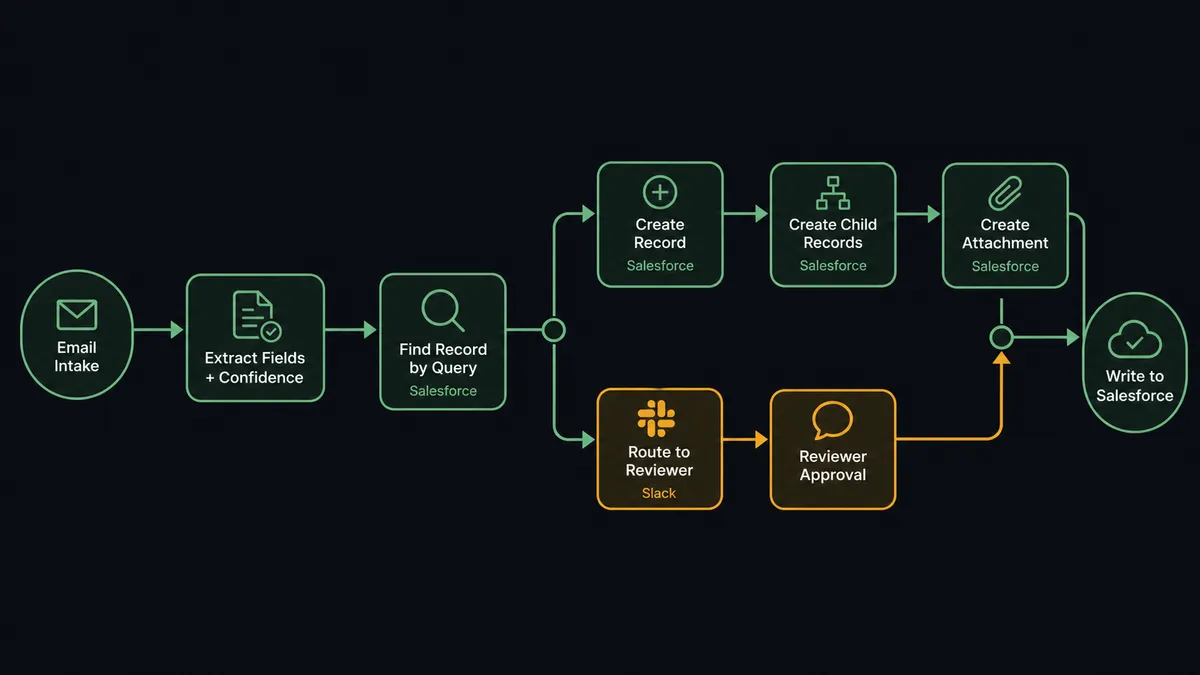
The mechanics are concrete, and they lean on Salesforce connector actions that already exist. FlowRunner’s Salesforce integration exposes Find Record by Query, Find Record, Find Child Records, Create Record, Create Child Records with line item support, Update Record, and Create Attachment, among others (FlowRunner Salesforce integration). Mapped to the four parts:
- Intake. A trigger on the document source. For recurring vendor documents that arrive by email, that is a mailbox trigger filtered by sender and subject. For portal or drive sources, the corresponding trigger fires the run.
- Extraction. The reading step returns structured fields with a confidence score per field. The extractor is your choice; the workflow expects per-field confidence so it can route on the field that matters rather than on an average.
- Match before you write. Before creating anything, Find Record by Query checks Salesforce for the account or contract the document refers to, so a known distributor updates the existing account instead of spawning a second one. Find Child Records pulls the related agreements or prior line items the new document should reconcile against.
- Write the record and its lines together. A clean extraction with a matched parent uses Create Record for the header and Create Child Records (with line item support) for the lines, or Update Record when the document corresponds to an existing opportunity or custom object. Create Attachment keeps the source document on the record. Salesforce supports writing a parent and its related children in a single request through its composite request patterns (Salesforce composite REST API), which is what the Create Child Records action is built on.
- Pause for a person when it is not clean. When a field’s confidence is below the threshold, or a finance rule is violated (a billing period that already posted, a total that does not match the line items), the workflow does not write. It pings a reviewer in Slack or by email with the extracted fields and the document attached, and resumes once they confirm, correct, or reject.
The decision rule in the fourth step is the part finance owns. Illustratively, the routing logic reads like this:
{
  "branch_on": "extraction_result",
  "routes": [
    { "when": "min_field_confidence >= 0.90 && period_already_posted == false", "do": "write_salesforce_record" },
    { "when": "min_field_confidence < 0.90 || header_vs_lines_mismatch == true", "do": "route_to_reviewer" },
    { "when": "period_already_posted == true", "do": "route_to_reviewer_duplicate_risk" }
  ]
}
That snippet is an illustration of the decision logic, not a literal export of FlowRunner’s internal workflow format. The exact node-and-edge shape is a platform detail best read from the FlowRunner documentation rather than reproduced here. What is real and verifiable is the set of Salesforce actions being sequenced and the fact that a human review step sits between the extraction and the write.
A worked example: distributor billback statements into Salesforce
Make it concrete with the document finance leaders raise most, because it carries real money risk: the distributor billback statement.
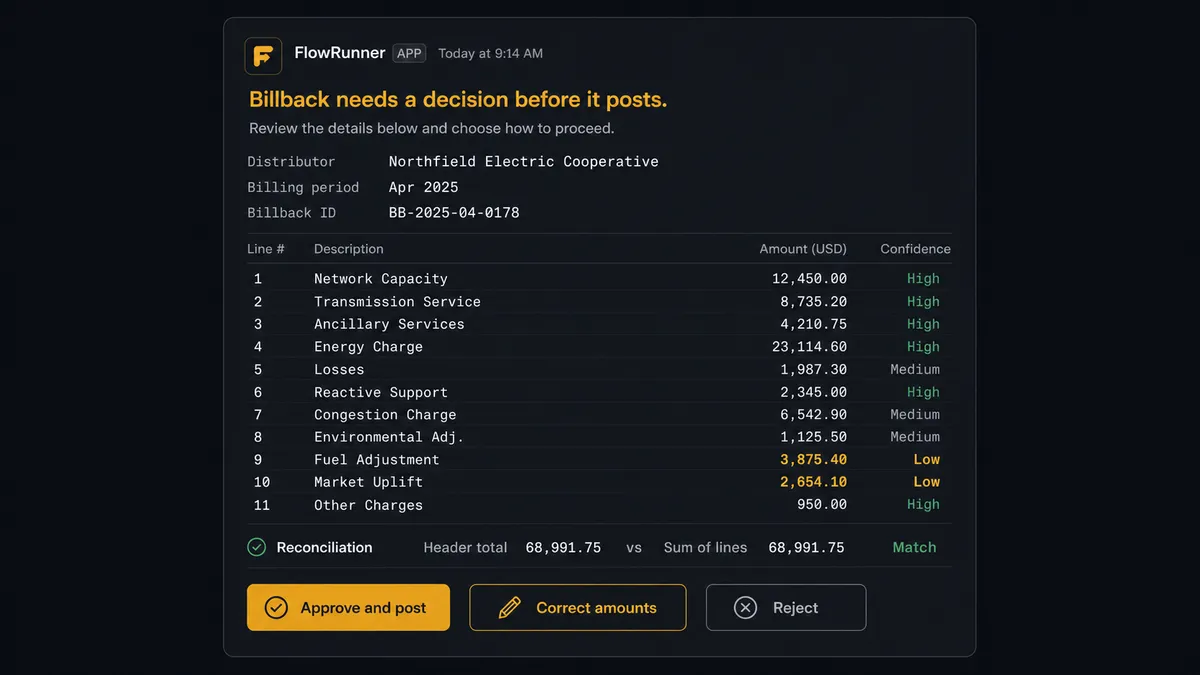
A statement arrives by email from a distributor finance already works with. The intake trigger fires on the sender and subject. The extraction step reads the statement and returns the distributor name, the billing period, and an array of line items, each with a description, an amount, and a confidence score. The distributor name comes back clean. The period comes back clean. Two of the eleven line items come back soft, because the statement had a credit adjustment that overlapped the amount column on the page.
Find Record by Query matches the distributor name to the existing Salesforce account, so nothing duplicates. Find Child Records pulls the related billback agreements and the prior periods already on the account. The workflow computes two derived signals: whether this billing period already posted (it has not) and whether the sum of the line items reconciles with the statement header within tolerance.
The two soft line items fail the confidence check, so the workflow does not write. It packages the extracted fields, the per-field confidence, the reconciliation delta, and the source PDF. Then it posts a card to the finance channel: “Billback from [distributor], period clean, 2 of 11 line items below confidence, header reconciles within tolerance.” The reviewer opens the statement in the same click, confirms the two amounts against the page, and approves.
The workflow resumes. Create Record writes the billback header against the matched account, Create Child Records (with line item support) writes the eleven lines in one request, and Create Attachment keeps the statement on the record. Every step is logged: which account was matched, which fields were soft, who approved them, when. If anyone asks in October why this billback posted the way it did and who signed off, the answer is in the run, not in someone’s memory. The other distributor statements that came in clean that morning never paused at all; they were records before anyone opened Slack.
This is the same exception-routing spine that finance teams use for parsed invoices flowing into the ERP without manual entry and for vendor documents flowing into NetSuite. The system of record changes; the shape of the work does not. And it is adjacent to, but distinct from, keeping the records themselves clean: the companion piece on treating Salesforce data hygiene as a control surface covers the intake-quality problem for leads and contacts, where the question is duplicate matching rather than document extraction. The Salesforce plus Slack human-in-the-loop workflow documents the reviewer-side experience in detail.
Edge cases and trade-offs worth naming
No architecture is free, and the honest read includes where it stops.
- The confidence check is a filter, not a correctness oracle. A field the extractor was sure about but got wrong (because a layout shifted invisibly and a credit landed in the amount column) writes without pausing. The defenses are a reconciliation check (does the header match the sum of the lines) and sampling (route every Nth clean document through review anyway). Neither is perfect; both are layered safety nets on top of the confidence branch.
- It only governs intake paths that route through it. If someone keys a billback directly into Salesforce by hand, only the native Salesforce controls apply. The workflow polices the document sources wired to it, not every record in the org.
- It does not replace Salesforce’s native document AI or its native rules. If Salesforce’s reader is your extractor, the workflow orchestrates it. Salesforce duplicate and validation rules keep running as the last-mile check on whatever the workflow writes. The orchestration layer adds an upstream check; it does not retire the ones inside the CRM.
- A human review gate adds latency. Soft documents wait for a reviewer. For finance documents that carry payment risk, that is the right trade, because the document that needed judgment gets it before it posts. Where speed matters more than scrutiny, tune the threshold to escalate fewer borderline cases.
- The audit trail is a platform behavior, not a compliance certification. FlowRunner records each step of each run, which gives finance a per-document trail of what was matched, what was soft, and who approved it. That is designed to meet common expectations for a record per document. It is not, on its own, a statement that the workflow is a certified control under a specific framework. Treat the log as evidence, and pair it with your own controls where an audit requires it.
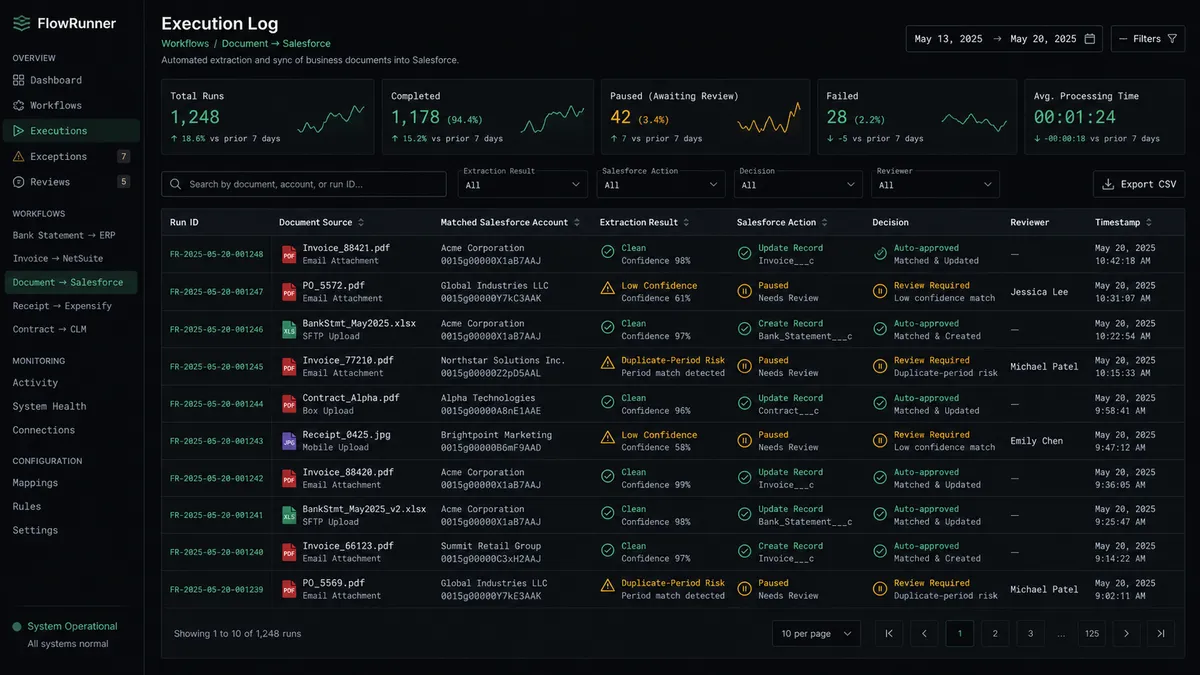
The load-bearing decision in the whole build is the threshold and the business rules in the branch. Set the bar too low and the reviewer drowns in documents that did not need them. Set it too high and soft extractions post as records and surface as problems at month-end. That rule deserves real design time, and it belongs to finance, not to whoever wired the workflow.
How to evaluate an IDP approach for Salesforce
Four questions sort the decision faster than any feature comparison.
- Can you see and edit the workflow, or is the logic locked inside a vendor’s agent? If the routing and the threshold live somewhere you cannot read, you have bought the black box finance leaders already distrust. The logic that decides what posts and what pauses should be visible and editable.
- Can a non-developer in finance change a routing rule? When the distributor list changes, or a new document type arrives, or the tolerance needs tightening, the person who owns the numbers should be able to change the rule without filing a ticket.
- Does the exception path produce something an auditor would recognize as a control? A per-document log of what was matched, what was soft, and who approved it is a control. A model’s chat transcript is not. Decide where the answer to “who approved this and why” will live before you need it.
- Does it work with the document sources you already use? Documents arrive by email, in shared drives, through vendor portals. An approach that only reads what is already inside Salesforce has skipped the hardest part of the workflow, which is everything before the document reaches the CRM.
The takeaway
Salesforce can read the document. That was never the hard part, and the search results that lead with it are answering a question finance settled a while ago. The hard part is the workflow around the read: pulling the document from wherever it actually arrives, checking it against the records you already have, and putting the soft cases in front of a person before they become payable records. That work is coordination across the inbox, the extractor, the system of record, and the reviewer, and it is the part that grows as the document volume grows.
Keep Salesforce as the system of record. Use its document AI as the reader if it fits your documents. Then put the orchestration layer above it: the layer that lets the clean documents flow into Salesforce on their own and routes the judgment cases to the people who own the judgment, with everything they need attached and a trail behind every decision. The records belong in the CRM. The work of deciding which documents become records belongs to the layer above it.
Frequently asked questions
Does Salesforce have intelligent document processing built in?
Yes. Salesforce ships document AI capabilities such as Intelligent Document Automation and Intelligent Document Reader that extract and classify data from documents inside the platform. They are real and worth using. What they do not own is the cross-system workflow: pulling documents from the inboxes and portals they arrive in, validating an extraction against existing Salesforce records, and routing a low-confidence result to a named reviewer before it becomes a record.
Can FlowRunner replace Salesforce Einstein or Agentforce for document processing?
No, and it is not meant to. FlowRunner is an orchestration layer that coordinates document sources, an extractor (which can be Salesforce's own document AI), the Salesforce write, and a human reviewer. It sits above the extraction step and governs what happens around it. If Salesforce's native document AI is the right extractor for your documents, FlowRunner orchestrates it rather than competing with it.
How does intelligent document processing avoid creating bad Salesforce records?
By putting a confidence check and a business-rule check between the extraction and the write. A clean, high-confidence extraction that matches an existing account creates or updates the record automatically. A low-confidence field, or one that violates a finance rule like a duplicate billing period, pauses the workflow and routes the document to a reviewer with the extracted fields and the source attached. Nothing lands in Salesforce until it clears the bar.