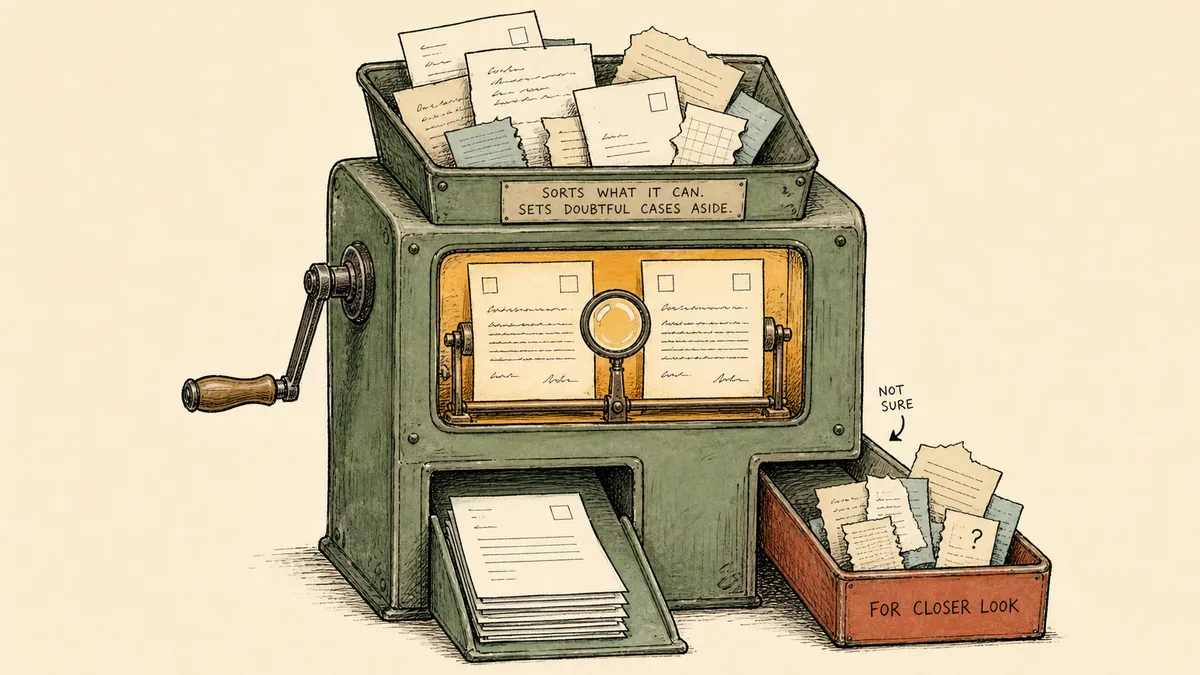
The phrase “Salesforce data cleansing tool” is doing more work than it looks, and picking the wrong tool starts with not noticing that. The term bundles three different jobs, and the right product for one of them is the wrong product for the other two. Before you compare vendors, the question worth answering is which job is actually yours.
This article is about that question. Not a ranked list of cleansing apps, but a way to tell what you are really buying, and where a tool that checks records at intake fits next to one that scrubs them in bulk.
What sales ops actually means by a Salesforce data cleansing tool
Three separate jobs hide under the one phrase:
- Deduplication. Finding the records that are the same real-world entity under different spellings, emails, or domains, and merging them into one. This is the job most people picture when they say cleansing.
- Field normalization. Making the values consistent. Country names, industry picklists, job-title variants, phone formats. The data is not duplicated, it is just inconsistent enough to break reporting and routing.
- Stale-record detection. Finding the records that have gone cold or were never finished. Missing required fields, no activity past a threshold, owners who left the company.
Most of the dedicated tools on the AppExchange lead with the first job, and they run it as a scheduled batch: pull a large set of records, score them against matching heuristics, surface or auto-merge the duplicates, then run again next week or next quarter (AppExchange data cleansing category). For a one-time cleanup of a historical mess, that batch shape is exactly right. A specialized matching engine running fuzzy logic across hundreds of thousands of rows is purpose-built work, and nothing in this article suggests doing that by hand.
Here is the part most cleansing-tool roundups skip. A batch sweep fixes records after they have already broken. Between sweeps, new leads keep arriving: web forms drop them in, enrichment vendors push them back, reps create accounts by hand, list imports load a few thousand in an afternoon. Every one of those is a fresh chance to create the next duplicate, the next malformed phone number, the next half-filled record. The sweep cleans the cohort, and the intake quietly refills it. That gap, the time between when a bad record lands and when the next sweep catches it, is where the recurring cleanup project actually comes from.
So the first evaluation question is not “which tool has the best match rate.” It is: is my primary problem the historical mess that already exists, or the intake quality that keeps producing more of it? Those are different problems, and they point at different tools.
Where FlowRunner fits relative to dedicated cleansing tools
Let me be precise about what FlowRunner is and is not here, because the honest framing is the whole point.
FlowRunner is an orchestration layer, not a record-matching engine. It does not replicate the fuzzy-matching scale of a specialized tool built to dedupe a million-row historical database. If that is your job, use the specialized tool. What FlowRunner does is sit one step upstream of the Salesforce write, intercept the intake event, check the candidate record against Salesforce before it lands, and pull a human in when the match is ambiguous. It enforces hygiene at the point of creation rather than sweeping for it later.
The two approaches answer different questions, so a side-by-side is the clearest way to see the split.
| Batch cleansing tool | FlowRunner (intake orchestration) | |
|---|---|---|
| Primary job | Dedupe and standardize records that already exist | Catch duplicate, malformed, low-confidence records before they land |
| When it runs | On a schedule (weekly, monthly, quarterly) | At the moment of intake or write, on every record |
| Best at | Large historical cleanup, fuzzy matching at scale | Preventing the next bad record from being created |
| Ambiguous matches | Surfaced in a report or auto-merged by heuristic | Routed to a person in Slack with both records in context |
| Audit trail | The tool’s own merge log | Per-record execution log of every check and decision |
| What it does not do | Stop bad records arriving between runs | Replace fuzzy matching across a giant existing database |
Read across the bottom row. Neither approach does the other one’s job. A batch tool cannot police the intake; an orchestration layer is not built for million-row historical fuzzy matching. The teams that get this right do not pick one. They run native rules underneath, a batch engine for the historical cleanup if they have one, and an intake layer for the ongoing quality. The three do not compete.
For the deep treatment of the intake-as-control-surface idea, the companion piece on treating Salesforce data hygiene as a control surface rather than a cleanup project walks the same architecture from the hygiene angle. This article stays on the evaluation question: which tool for which job.
What the intercept-at-intake pattern looks like
The mechanic is straightforward, and it leans on Salesforce actions that already exist in the integration. FlowRunner’s Salesforce connector exposes Find Record by Query, Find Records by Query, Create Lead, Update Lead, and Update Record, among others, and those can be sequenced with conditional logic and a human review step (FlowRunner Salesforce integration). The shape:
- Trigger on the intake source, not on the Salesforce save. A form submission, an enrichment webhook, a list-import row. The candidate record is in flight, not yet committed to Salesforce.
- Normalize the candidate in the workflow. Standardize the country code, map the industry picklist, format the phone, lower-case the company name, extract the domain from the email. This happens on the way in.
- Query Salesforce for matches. Run Find Record by Query on email, normalized company name, and domain. The query returns zero, one, or several candidates.
- Branch on match confidence. A clean single match updates the existing record. A no-match creates a new one. An ambiguous result, several plausible matches or a single match where critical fields disagree, goes to a person.
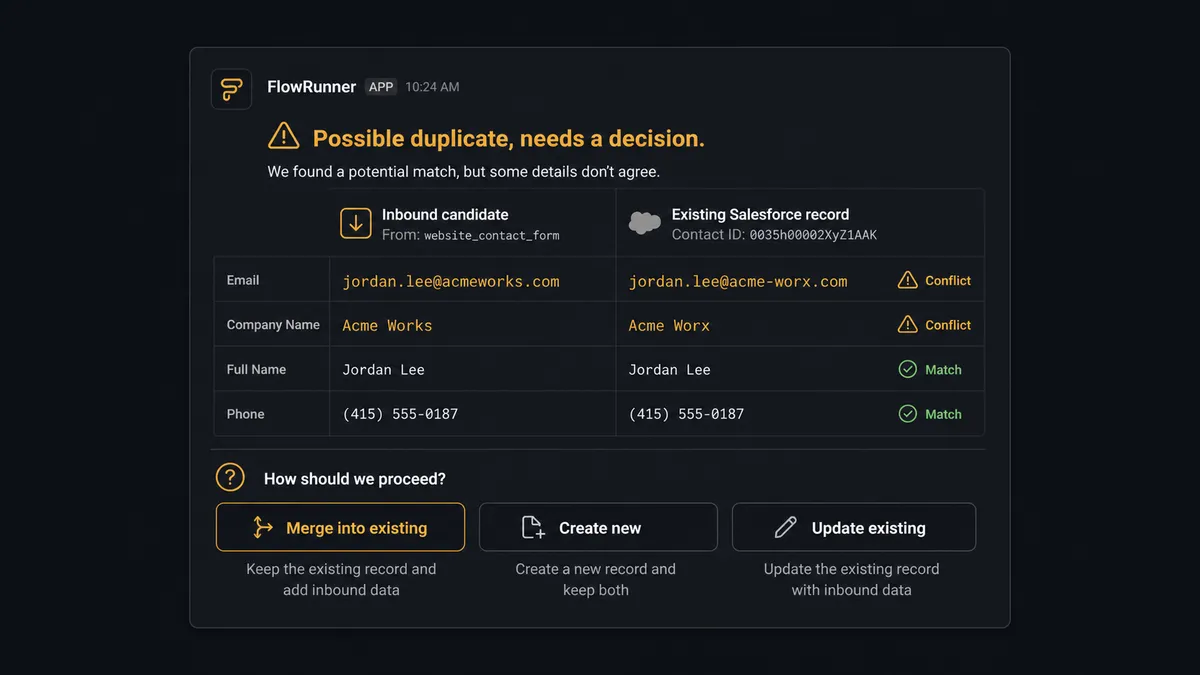
- Resolve the ambiguous case in Slack. Post both records side by side to the channel sales ops watches, with the overlapping and conflicting fields highlighted. The reviewer picks merge, create, or update. FlowRunner executes the chosen Salesforce action and logs the decision.
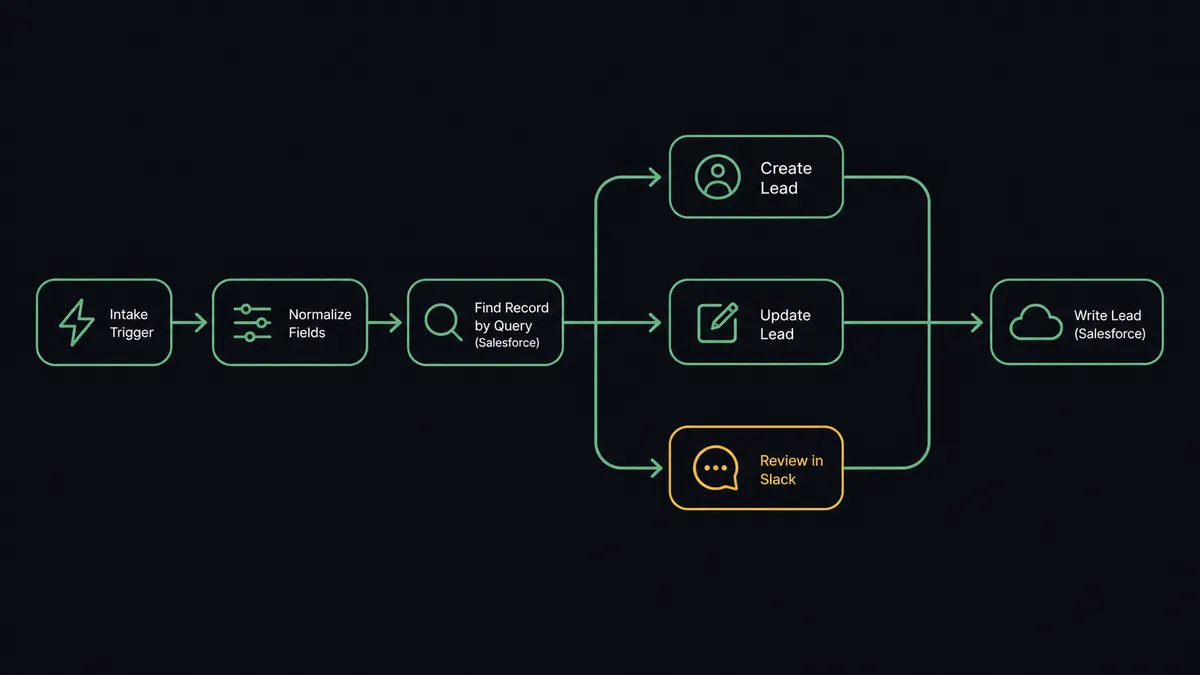
The branch in step four is where the design lives. The logic is a confidence threshold, and the shape of that condition matters more than any other choice in the build. Illustratively, the branching config reads like this:
{
  "branch_on": "match_result",
  "routes": [
    { "when": "match_count == 0", "do": "Create Lead" },
    { "when": "match_count == 1 && conflicting_fields == 0", "do": "Update Lead" },
    { "when": "match_count >= 2 || conflicting_fields >= 2", "do": "human_review_slack" }
  ]
}
That snippet is an illustration of the decision logic, not a literal export of FlowRunner’s internal workflow format. The exact node-and-edge JSON shape is a platform detail best read from the FlowRunner documentation rather than reproduced here, and the build-order specifics live in the Salesforce plus Slack human-in-the-loop workflow guide. What is real and verifiable is the set of Salesforce actions being sequenced and the fact that a human review step sits between the query and the write.
Why the ambiguous cases need a human, not a better heuristic
The hard cases in CRM cleansing are not “definitely the same” or “definitely different.” Those are easy, and any matching engine handles them. The hard cases are “probably the same, but the email is different, the company name is spelled three ways, and one record has a phone the other does not.”
Resolving that well usually means looking at context a matcher does not weigh: where the lead came from, what the enrichment vendor returned, whether there is prior activity on one of the records. A sales ops reviewer with that context in front of them makes a better call than a confidence score does, because the score is guessing at exactly the thing the human can see. This is not a knock on matching engines. It is the boundary of what a heuristic can know.
This is the part most posts on Salesforce data cleansing will not say plainly: a cleansing tool cannot fix the intake that produces the mess, and no matching heuristic, however good, will resolve the cases that actually need judgment. Cleansing is partly an automation problem and partly an exception-handling problem. The exception-handling part is where the recurring debt accumulates, and it is the part a batch sweep is structurally unable to own, because by the time the sweep runs the ambiguous record is already months old and already worked by a rep.
That gap, the ongoing intake quality and the judgment calls inside it, is a seam no native rule and no batch tool was built to hold. It is cross-system coordination: an intake event from one place, a query against the system of record, a person in a messaging channel, a write back. That coordination is the work between systems, and it is exactly the kind of work that grows as a sales stack matures. An orchestration layer is the category that owns that seam, a system that sits above the systems of record, listens for what they emit, gathers the context the native rules never had, and pulls a person in at the moments that need a decision. FlowRunner is built for that layer. Salesforce keeps its scope as the system of record. The batch tool keeps its scope as the historical scrubber. The orchestration layer takes the intake.
What this approach trades off
No architecture is free, and the honest read includes the costs.
- It is slower than a batch tool for one-time historical cleanups. If your job is deduping six years of accumulated records across hundreds of thousands of rows, a specialized matching engine is faster and more thorough. Use it. Run the intake layer afterward so the cleaned database stays clean.
- You define the match and normalization rules up front. A dedicated tool ships prebuilt matching heuristics tuned by the vendor. With an orchestration layer, you decide which fields, in which combinations, count as a match, and what turns “possible duplicate” into “send to a human.” That is more design work at the start. It is also why the result fits your data instead of a vendor’s averaged assumptions.
- A human review gate adds latency. Ambiguous records wait for sales ops. For most intake that is the right trade, since a record that needs judgment gets it before it lands. For high-velocity inbound where a five-minute delay costs revenue, tune the ambiguity rule to escalate fewer borderline cases.
- It only polices intake paths that route through it. If a rep hand-creates records directly in Salesforce, only the native rules apply. The workflow governs the paths wired to it, not every keystroke in the org.
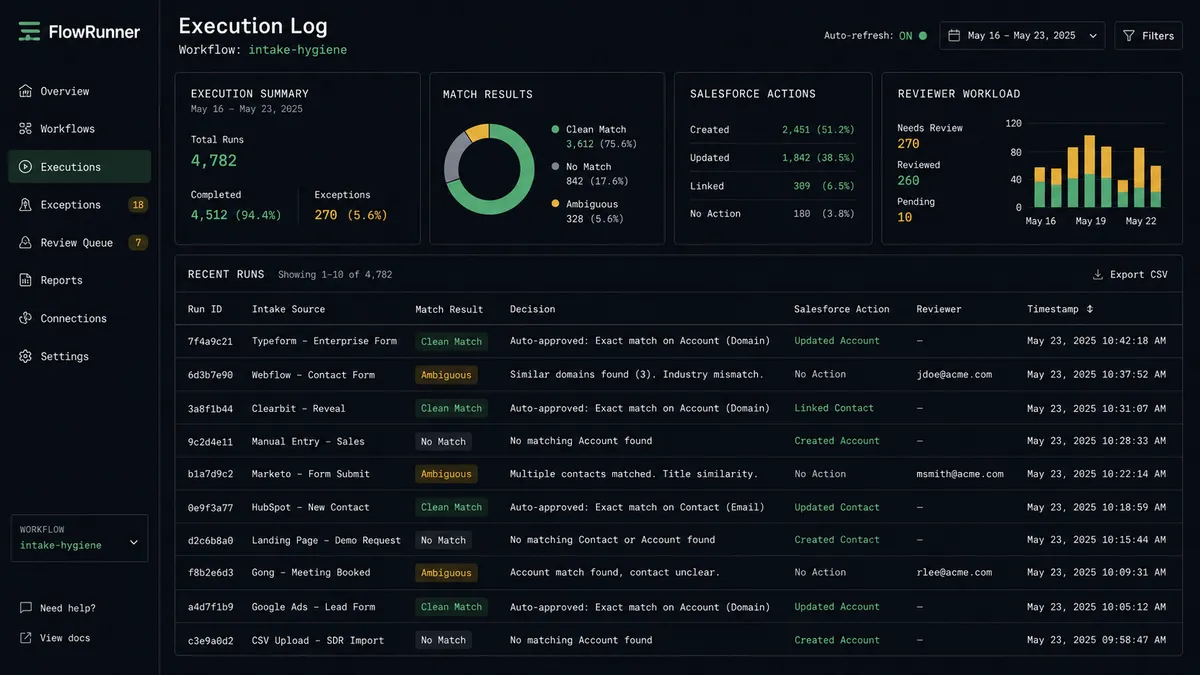
- It pays back differently than a sweep. A batch tool shows its value in a big one-time number of merged duplicates. The intake layer shows its value as a shrinking cleanup surface over months, plus a reviewable per-record audit trail. The payoff is real but slower to read on a dashboard.
The match query is the load-bearing piece. Weak criteria flag too much as ambiguous and bury the reviewer. Strict criteria let near-duplicates slip through as no-match and become next quarter’s dedupe problem. That query deserves real design time, not a default.
Keep the native rules; they are the baseline
None of this displaces what Salesforce already gives you. The platform ships native duplicate rules and matching rules that match incoming records and either alert the user or block the save, and they run across the standard Sales Cloud editions (Starter, Pro Suite, Enterprise, Unlimited, Unlimited Plus, and Developer). Every org should keep them on. They are the last-mile check on whatever any tool writes.
What they do not do is resolve ambiguous matches or run before a record reaches Salesforce. A duplicate rule at save time either alerts the rep, who often lacks the context to decide, or blocks the save, which loses the record with no path to resolution. That is not a flaw. It is the documented scope of a save-time check. The intake layer adds an upstream check; it does not replace the native one. The same pattern works one CRM over, where you can flag duplicate contacts before they reach HubSpot from a Google Form intake. The system of record changes; the shape of the work does not.
How to evaluate this against a dedicated cleansing tool
Four questions sort the decision faster than any feature matrix.
- Is the primary problem historical mess or ongoing intake quality? Historical mess points at a batch matching engine. Ongoing intake quality points at an orchestration layer. Most established orgs have both, in which case the answer is both, used for different work.
- Do reviewers need context to resolve duplicates? If your ambiguous cases get resolved well only when someone can see lead source, enrichment data, and prior activity, a tool that surfaces matches in a report is weaker than one that routes the case to a person with the records side by side. If your duplicates are clean enough to auto-merge by rule, the report is fine.
- Does the team already live in Slack for decisions? A human review step is only useful if the human actually sees it. If sales ops works out of Slack, routing ambiguous matches there fits the existing habit. If approvals happen elsewhere, route them elsewhere, but make sure the channel is one people watch.
- Where does the audit trail need to sit? Inside Salesforce field history, in the cleansing tool’s merge log, or in an orchestration log that records every check and human decision per record. If the question “why did this account end up linked to this contact, and who decided” needs an answer six months later, decide now where that answer will live.
The takeaway
“Salesforce data cleansing tool” is not one product category, it is three jobs wearing one name, and the batch-sweep tools that dominate the search results are built for only one of them. Deduplicating a historical database is real, specialized work, and a dedicated matching engine does it well. Keeping the database clean afterward is a different job, and a batch sweep cannot do it because it runs after the damage, not before.
So the decision is not which cleansing tool wins. It is which jobs you have. If yours is a one-time historical scrub, buy the matching engine. If yours is the steady drip of malformed and duplicate records at intake, the better shape is a layer that checks every write, resolves the easy cases automatically, and routes the judgment calls to a person before anything lands. Keep the Salesforce native rules underneath either way. The records belong in the CRM. The work of keeping them clean as they arrive belongs to the layer above it.
Frequently asked questions
What is the best Salesforce data cleansing tool?
There is no single best one, because the term covers three different jobs. For a one-time historical cleanup across hundreds of thousands of records, a dedicated matching engine like the ones on the AppExchange is the right fit. For preventing bad records at intake, an orchestration layer that checks every write is the better shape. Most teams need both, plus Salesforce native duplicate rules underneath.
Can FlowRunner replace a dedicated Salesforce data cleansing tool?
No, and it is not meant to. A specialized matching engine is built for large historical dedupe at scale. FlowRunner is an orchestration layer that intercepts intake and writes, checks records against Salesforce before they land, and routes ambiguous matches to a person. It complements a matching engine and the native rules rather than replacing either.
Does Salesforce have built-in data cleansing?
Salesforce ships native duplicate rules and validation rules that match and reject records at save time across the standard Sales Cloud editions. They are a real baseline every org should use. They do not resolve ambiguous matches or run before a record reaches Salesforce, which is where most cleansing debt accumulates.