How to Connect Xero with Bland AI (With or Without an AI Agent)
Connect Xero's AR aging to Bland AI outbound phone calls, with an AI agent that builds the daily collections call list and pauses for a named human before Send Call dials a customer.
How do you connect Xero to Bland AI?
You connect Xero to Bland AI by having a scheduled workflow pull the AR aging with Get Aged Receivables, enrich each overdue account with Get Contact and Get Invoice, and place a reminder call with Bland AI’s Send Call action, so an overdue balance in the ledger becomes a polite, scripted phone call without anyone picking up a handset. FlowRunner is a visual AI-agent orchestration platform where automations run autonomously and pause for human judgment on the steps that carry real consequence. The same connection can run as an AI agent that builds the call list itself, drafts the talking points per account, and pauses for a named AR manager before Send Call dials a single customer.
The problem it solves
Right now, collections is the job everyone defers. The bookkeeper exports the aged receivables report on Monday, highlights the accounts past 30 days, and the follow-up calls fall to whoever has an hour free. Most weeks, nobody does. Email reminders go out and get ignored, because an email is easy to ignore and a phone call is not. The balances age from 30 days to 60 to 90 while everything else feels more urgent than dialing a customer about money.
The edges are worse than the backlog. Someone finally makes the calls and reaches a customer who paid two days ago, which is embarrassing and erodes trust. A customer in an active dispute gets a dunning call that inflames the situation. A promise to pay made on Tuesday’s call is forgotten by Thursday because it lived in a sticky note. There is no record of who was called, what was said, or what was promised, so every follow-up starts from zero.
How it works: the connection
The connection reads from Xero and dials through Bland AI. Here is the plain version, grounded in the real connector actions.
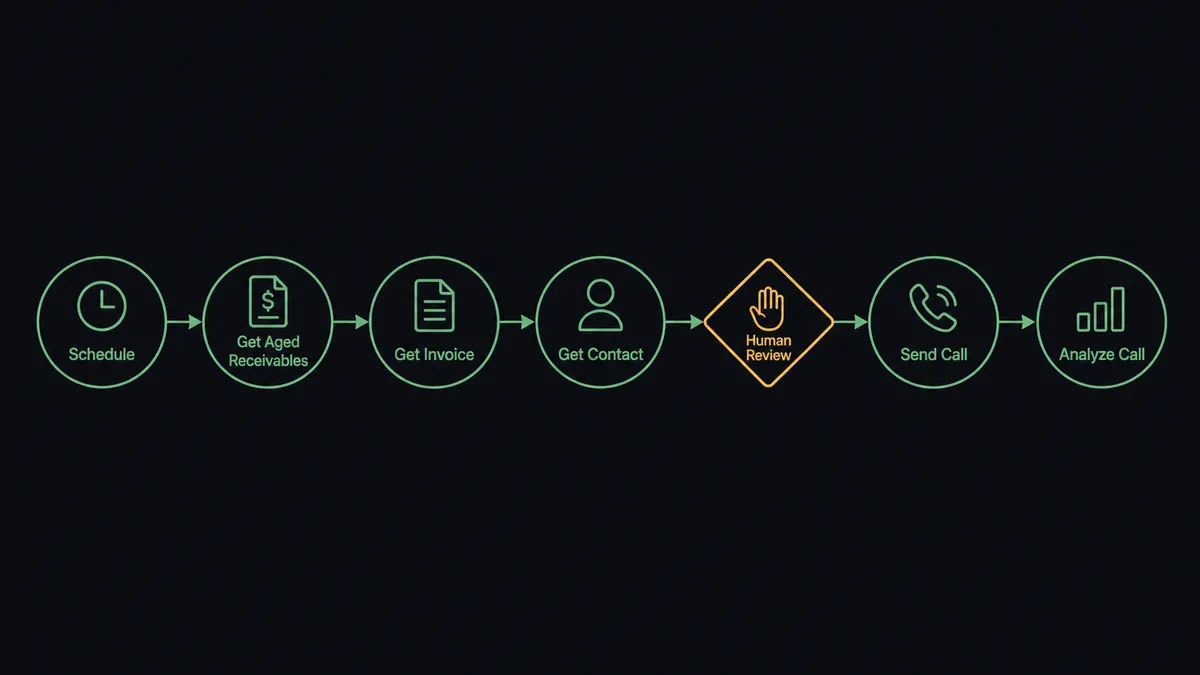
- Trigger: A daily schedule fires each morning and the workflow calls Get Aged Receivables in Xero.
- Read: For each overdue account, it calls Get Invoice to confirm the balance is still outstanding and pulls the due date and invoice numbers.
- Enrich: It calls Get Contact to fetch the customer’s phone number and account history.
- Filter: It drops accounts where On New Payment Received has already fired, so nobody gets called about a paid invoice.
- Call: It calls Send Call in Bland AI with the customer’s number and the balance, invoice references, and days outstanding passed as script variables.
- Log: When the call ends, it calls Analyze Call to extract the outcome and Get Call Recording to attach the recording reference.
- Close the loop: When the customer pays, Xero’s On New Payment Received trigger fires and the account drops out of tomorrow’s queue.
That is the “just connect them” answer: the aging report becomes a call queue that is worked every day, with every outcome written down.
Can an AI agent run it? (and why a human stays in the loop)
Yes, and this is where the connection stops being a dialer and starts being a collections analyst. Instead of calling every account past 30 days, an AI agent reads the aging report, reasons about each balance, and picks its actions as tools: Get Aged Receivables, Get Invoice, Get Contact, Send Call, Analyze Call, and Stop Call are its toolbox. It weighs the balance, the days outstanding, the customer’s payment history, and whatever the last call surfaced, then decides which accounts genuinely warrant a call today and drafts talking points for each one.
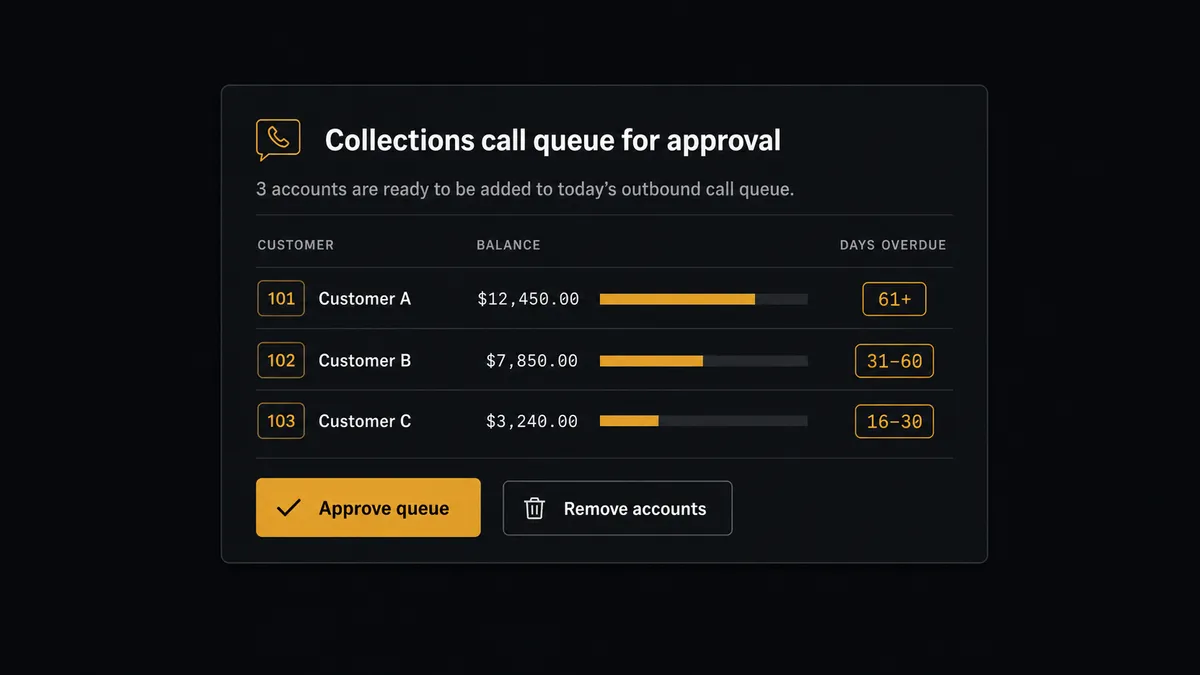
The consequential step is obvious: Send Call puts a synthetic voice on the phone with a real customer about money they owe you. That is a customer relationship on the line, and the agent does not take it alone. Before any call is placed, the agent invokes a human-in-loop flow it holds as a callable tool. The workflow pauses and posts the proposed queue to the AR channel: “Proposed collections calls for today: [customer], [balance], [days overdue], script summary attached. Approve the list or remove accounts?” The AR manager scans it in a minute, pulls the account that just signed a renewal, and approves the rest. Only then does Send Call dial.
The part a filter rule cannot do is judgment. An account 45 days out with a spotless three-year history gets a gentle script or gets skipped entirely. An account 31 days out with two broken promises gets called first. When Analyze Call surfaces a dispute mid-call, the agent stops the sequence for that account and routes it to a person instead of redialing next week. Prospects call this the digital andon cord: like Toyota’s production line, the workflow stops the line the moment it hits uncertainty, and a human pulls it back into motion.
FlowRunner vs Zapier
Zapier deserves its reputation for reach. It connects to both Xero and Bland, its template gallery means a basic “invoice overdue, place a call” Zap can be live in an afternoon, and for a simple one-way notification flow it is a fast, proven choice. If your entire requirement is “when X happens, dial Y,” Zapier does that.
The gap appears when the automation can embarrass you. A Zap fires on its trigger every time, for every account, with no one looking. FlowRunner is built around native human-in-the-loop and AI-agent orchestration, where the agent decides who should be called and a named person approves before the phone rings.
| What matters for this pair | FlowRunner | Zapier |
|---|---|---|
| Human-in-the-loop before Send Call dials a customer | Native. The agent invokes an approval flow as a callable tool and waits for the AR manager | Available via added approval steps, not a native agent decision |
| Who runs the flow | An AI agent reads the aging report, reasons per account, picks actions as tools | Predefined step sequence you configure per Zap |
| Users included | Unlimited users on every tier | Priced by task volume; seats vary by plan |
| Bring your own AI keys | Yes, BYOK. Connect the AI provider key you already have | AI features tied to Zapier’s own AI offering |
| Self-hosted option | Yes, cloud-hosted or self-hosted | Cloud only |
| Pricing model | Transparent workflow-based tiers | Per-task pricing that can be hard to predict as volume grows |
If you need a simple notification when an invoice goes overdue, Zapier is a fine fit. If you are putting an automated voice on the phone with your customers about money, and you want a human approving that list every morning, this pairing is built for exactly that.
Before and after
| Category | Before | After |
|---|---|---|
| Call consistency | Collections calls happen when someone finds a free hour, which is rarely | The queue is built and worked every morning without fail |
| Account selection | Whoever calls works top-down from an exported spreadsheet | The agent prioritizes by balance, age, and history, and a person approves the list |
| Awkward calls | Customers who already paid or are in dispute still get dunning calls | Paid and disputed accounts are filtered out before the queue is even proposed |
| Record keeping | Promises to pay live in sticky notes and memory | Every call has a recording reference, an Analyze Call outcome, and a promise-to-pay date on file |
| Accountability | Nobody can say who decided to call which customer | Every placed call carries the approver’s name and timestamp in the audit trail |
What you can build
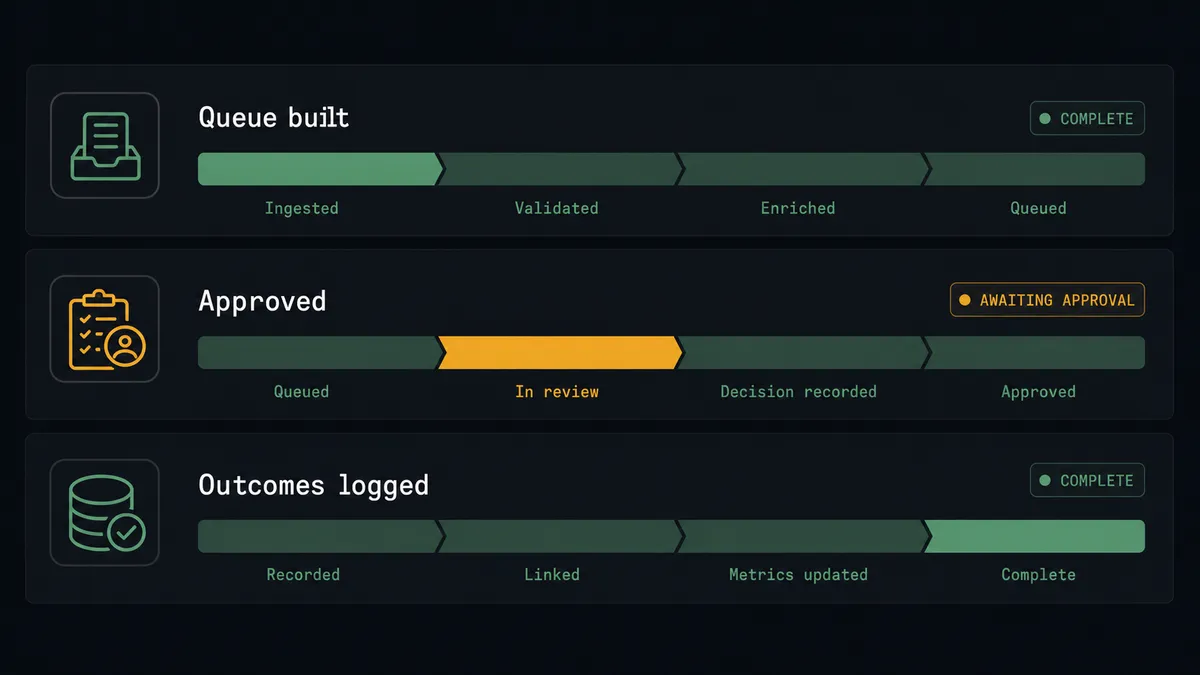
The morning collections queue. The schedule fires, Get Aged Receivables pulls the aging, the agent enriches accounts with Get Contact and Get Invoice, drafts scripts, and sends the queue for approval. On sign-off, Send Call works the list and Analyze Call writes every outcome back.
Promise-to-pay follow-through. Analyze Call extracts a promised payment date from the conversation. The agent sets a follow-up for that date; if On New Payment Received fires first, the follow-up is cancelled. If it does not, the account returns to the next approval queue with the broken promise noted.
Dispute triage from the transcript. When Analyze Call surfaces a disputed line item, the agent halts collections for that account, drafts a Create Credit Note in Xero for the disputed amount, and pauses for approval before anything posts to the ledger.
High-value invoice courtesy call. On Invoice Created fires for an invoice above your threshold. The agent proposes a courtesy call confirming receipt and payment details, a person approves it, and Send Call places a welcome-toned call instead of a dunning one.
Escalation ladder by age. Accounts at 30, 60, and 90 days get scripts with different firmness. Anything crossing 90 days is routed to a person for a decision before any further call is proposed.
Common questions
Is it free to connect Xero and Bland AI on FlowRunner? You can build and run the connection on FlowRunner’s free plan, which includes 100 executions a month and every integration with no credit card required, and new accounts also get 14 days of Professional. Both connectors are available on every FlowRunner tier, and every tier includes unlimited users and unlimited workflows.
Can I self-host the Xero to Bland AI workflow? Yes. FlowRunner offers a cloud-hosted option and a self-hosted option, so the connection can run inside your own environment. Self-hosting is available for teams that need the workflow to run on their own infrastructure.
Does the AI agent need my own OpenAI or Claude key? FlowRunner uses a bring-your-own-keys model, so you connect the AI provider key you already have. You are not locked to one model, and you control which provider runs the agent.
What happens when the agent is not sure an account should be called? The agent leaves it off the approved queue and escalates it separately. Accounts with an active dispute, a recent promise to pay, or a payment already visible through On New Payment Received are flagged for the AR manager with the reason, and no call is placed until a person decides.
Which triggers and actions does the Xero to Bland AI workflow use? Bland AI has no triggers, so the workflow starts on a daily schedule and calls Get Aged Receivables in Xero. It enriches each account with Get Contact and Get Invoice, places approved calls with Send Call, and logs outcomes with Analyze Call. Xero’s On New Payment Received trigger removes paid accounts from the queue.
What happens after a collections call ends? The workflow calls Analyze Call to extract the outcome, such as a promise-to-pay date or a dispute, and attaches the recording reference from Get Call Recording. The result is logged against the invoice so the AR manager sees exactly what was said and what was promised.
Getting started
Start on the free plan: 100 executions a month, every integration included, no credit card required, plus 14 days of Professional for new accounts. Both connectors are available on every tier, and every tier includes unlimited users and unlimited workflows.
Explore the integration details:
- Xero integration (8 triggers and 38 actions covering invoices, payments, contacts, and financial reports)
- Bland AI integration (11 actions covering outbound calls, call analysis, and recordings)
Start building free at flowrunner.ai or book a demo to see a live Xero to Bland AI workflow, call-queue approval and all.
Frequently asked questions
Is it free to connect Xero and Bland AI on FlowRunner?
You can build and run the connection on FlowRunner's free plan, which includes 100 executions a month and every integration with no credit card required, and new accounts also get 14 days of Professional. Both connectors are available on every FlowRunner tier, and every tier includes unlimited users and unlimited workflows.
Can I self-host the Xero to Bland AI workflow?
Yes. FlowRunner offers a cloud-hosted option and a self-hosted option, so the connection can run inside your own environment. Self-hosting is available for teams that need the workflow to run on their own infrastructure.
Does the AI agent need my own OpenAI or Claude key?
FlowRunner uses a bring-your-own-keys model, so you connect the AI provider key you already have. You are not locked to one model, and you control which provider runs the agent.
What happens when the agent is not sure an account should be called?
The agent leaves it off the approved queue and escalates it separately. Accounts with an active dispute, a recent promise to pay, or a payment already visible through On New Payment Received are flagged for the AR manager with the reason, and no call is placed until a person decides.
Which triggers and actions does the Xero to Bland AI workflow use?
Bland AI has no triggers, so the workflow starts on a daily schedule and calls Get Aged Receivables in Xero. It enriches each account with Get Contact and Get Invoice, places approved calls with Send Call, and logs outcomes with Analyze Call. Xero's On New Payment Received trigger removes paid accounts from the queue.
What happens after a collections call ends?
The workflow calls Analyze Call to extract the outcome, such as a promise-to-pay date or a dispute, and attaches the recording reference from Get Call Recording. The result is logged against the invoice so the AR manager sees exactly what was said and what was promised.