How to Connect SurveyMonkey with HubSpot (With or Without an AI Agent)
Connect SurveyMonkey and HubSpot so survey responses automatically create or update contacts, flag detractors, and route exceptions to your team before any automated follow-up fires.
How do you connect SurveyMonkey to HubSpot?
You trigger a scheduled poll in FlowRunner that calls List All Responses Bulk in SurveyMonkey, translates the raw answer IDs into readable text using Get Survey Details, checks HubSpot for an existing contact with Get Contact by Email, and then creates or updates the contact record automatically. FlowRunner is a visual AI-agent orchestration platform where automations run autonomously and pause for human judgment on the steps that carry real consequence. The same connection can run as an AI agent that reads each response, reasons about it, and invokes a human-in-loop flow when a detractor score or flagged answer needs a person, not an automated reply.
The problem: responses pile up, CRM data goes stale
The SurveyMonkey response lands in your inbox as a notification. Someone has to open it, decode the answer IDs, decide whether the score means anything, and then manually enter the relevant data into HubSpot. If they have thirty responses to get through, the detractor at the bottom of the list might not reach anyone until Thursday. By then, the relationship is harder to salvage.
The CRM side is just as fragile. Contacts created from survey responses are often partial. The lifecycle stage is wrong. The deal is missing. The survey data that could have scored the lead never makes it into a field where sales can see it. Your team works from whatever they remembered to enter, and the exceptions fall through the cracks.
How it works: the connection
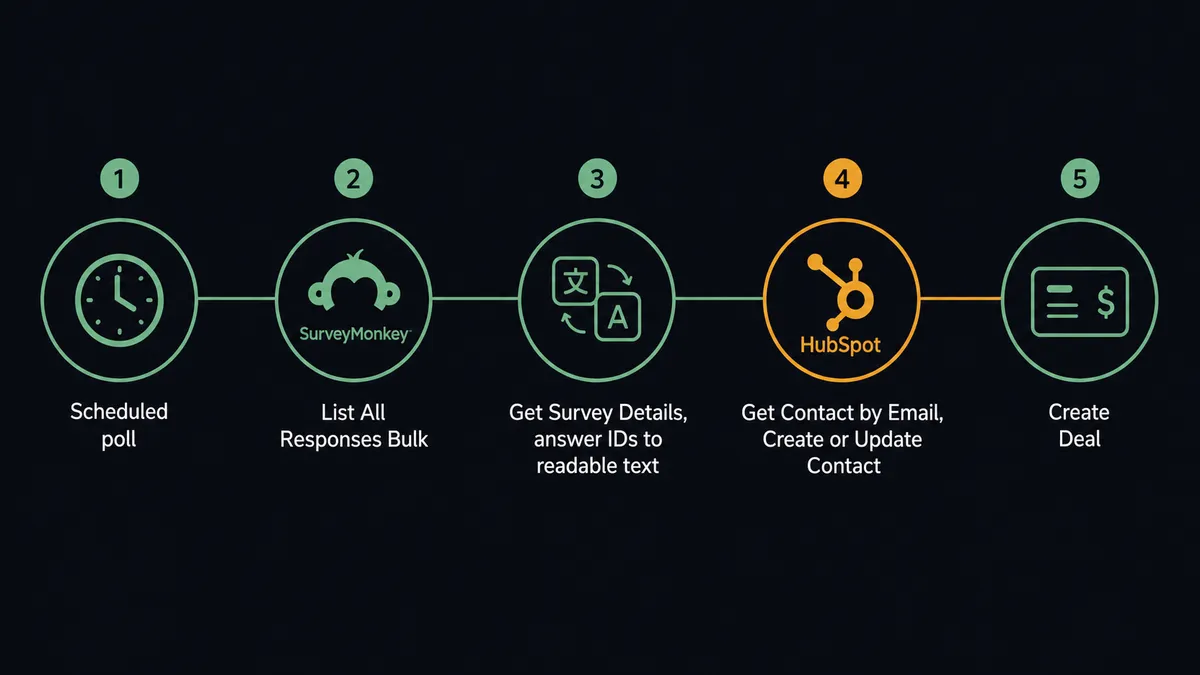
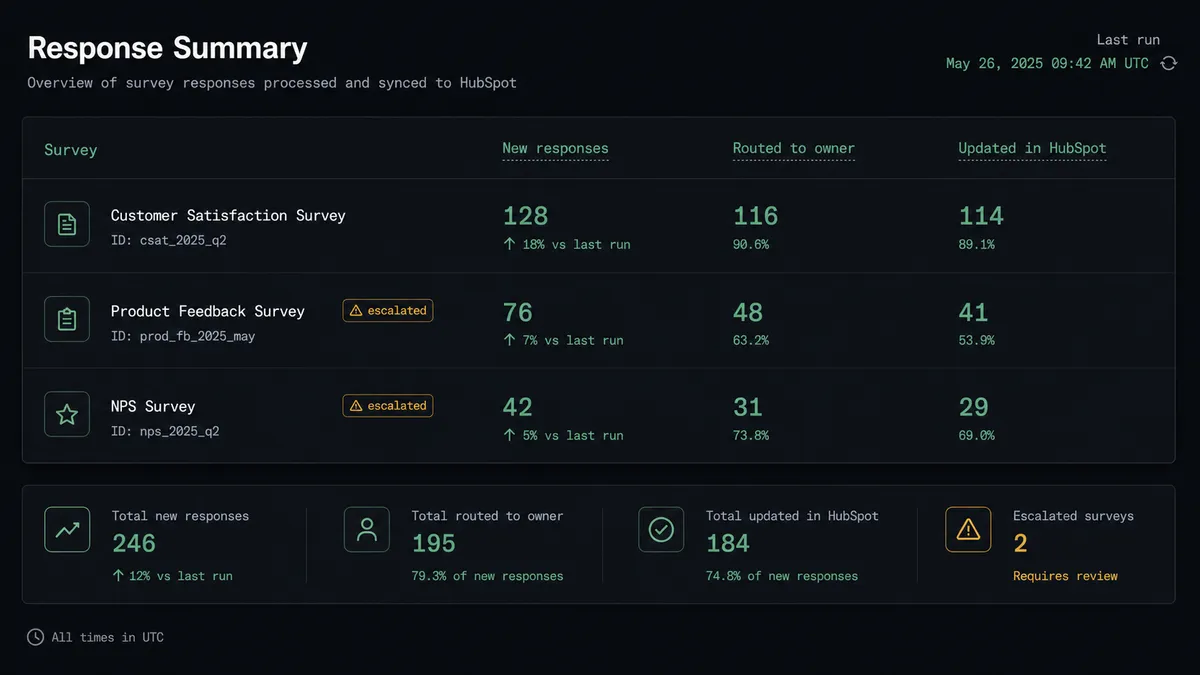
The workflow runs on a schedule. At each interval, the agent calls List All Responses Bulk to pull new SurveyMonkey submissions. Raw responses come back as answer IDs, not readable text. The agent then calls Get Survey Details, which returns the full survey structure including every question heading and every answer choice with its label. The agent maps the IDs to text so every response is legible before anything else happens.
With readable responses in hand, the agent checks HubSpot using Get Contact by Email. If a record exists, it updates the contact properties with the survey data. If no record exists, it creates a new contact. If a response signals buying intent or comes from a prospect already in a deal, the agent updates the deal stage or creates a new deal in the appropriate pipeline.
Routine responses flow into your reporting and CRM automatically. The team does not touch the export. The data is current.
Can an AI agent run it? (and why a human stays in the loop)
A plain connection runs the same sequence every time. An AI agent reads the data and decides what to do based on what it finds. That distinction matters for SurveyMonkey and HubSpot because not every response should go the same place.
The agent reads a response that scores in the detractor range. It does not send the standard follow-up email. It does not silently log the response and move on. It invokes the human-in-loop flow as a callable tool, the same way it would invoke any integration action. This is not a hardcoded threshold. The agent evaluates the full response context: the score, the answer to the open-ended question, the respondent’s history in HubSpot.
Here is what the account owner receives:
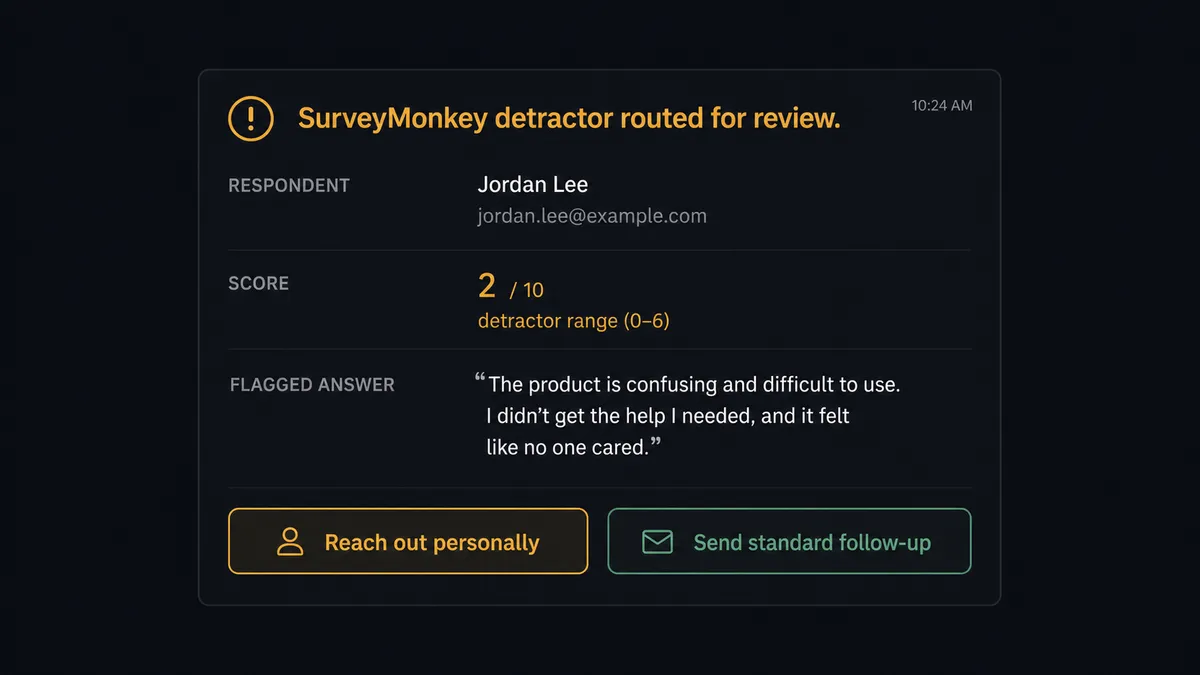
“[Respondent] left a 4 on the Q2 Product Satisfaction survey and flagged product reliability as a concern. Mapped response: [summary]. Do you want to reach out personally, or should I send the standard follow-up?”
The owner responds with one click. The agent resumes with the decision as input. The response, the owner’s choice, and the timestamp go into the audit trail. This is what prospects call the “digital andon cord.” The agent stops the line when it hits something that deserves a person, not a script.
The same logic applies to HubSpot duplicates. When the agent finds two contacts that match the same email, it pauses and routes the ambiguity to a CRM admin: “I found two contacts matching this email. Which should I associate this response with?” The admin decides. The agent associates and documents. Clean data, accountable process.
FlowRunner vs Zapier
Zapier is the tool most non-technical teams use first to connect SurveyMonkey and HubSpot. It is well-built for simple trigger-action flows, the setup is fast, and the library of pre-built Zaps is large. If you need a response to create a contact and that is the full scope of the job, Zapier is a reasonable starting point.
The differences show up when the workflow needs to reason.
| What you are comparing | Zapier | FlowRunner |
|---|---|---|
| Human-in-loop routing | Conditional branches based on field values; no agent judgment | Agent invokes human escalation as a callable tool based on its own evaluation of the response |
| Duplicate handling | Filter steps can block on known conditions; ambiguous duplicates fall through | Agent pauses on ambiguity and routes to a human for resolution before writing to CRM |
| Response translation | Field mapping from API values; answer IDs must be pre-mapped manually | Agent calls Get Survey Details to translate answer IDs to readable text automatically |
| Pricing model | Per-task pricing that grows with volume; multi-step Zaps cost more | Workflow-based tiers; unlimited users and workflows on every plan |
| AI agent reasoning | Rules-based filters; no agent decision layer | Agent reads data, reasons about it, and chooses tools and escalation based on context |
Before and after
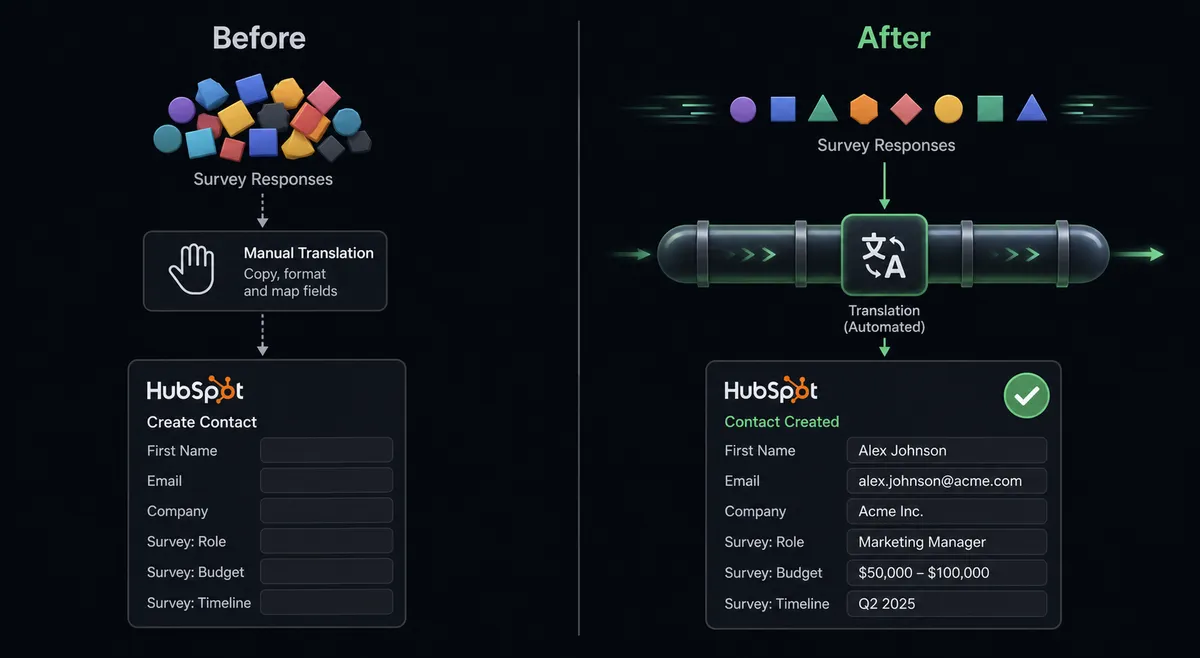
| Category | Before | After |
|---|---|---|
| Response export | Staff copy responses into a reporting sheet one at a time | New responses export on schedule; no manual step |
| Answer readability | Answer IDs must be decoded by hand against the survey structure | Agent maps IDs to question headings and choice labels automatically |
| CRM accuracy | Survey data entered manually when someone remembers | Contact and deal records updated from every response on the same run |
| Detractor response time | A low score noticed days later when someone reads the report | Detractor routed to account owner while there is still time to act |
| Duplicate contacts | No systematic check; duplicates accumulate | Agent checks Get Contact by Email before creating any record; ambiguous matches paused for human review |
What you can build
NPS survey to lead scoring pipeline. The agent reads NPS responses from List All Responses Bulk, maps scores to a custom HubSpot contact property using Get Survey Details, and updates the lifecycle stage for promoters automatically. Detractors pause for account owner review before any outreach fires.
Post-purchase feedback to deal update. After a purchase, the agent distributes a satisfaction survey via Create Collector, collects responses on a schedule, and updates the associated HubSpot deal with satisfaction score and open-ended feedback. Negative scores trigger an escalation flow to the account manager.
Event registration to contact creation. The agent reads event survey responses with List Survey Responses, checks HubSpot for existing contacts with Get Contact by Email, creates new contacts for attendees not in the CRM, and creates deals for respondents who indicated interest in a follow-up conversation.
Survey response to company health scoring. The agent aggregates responses by company domain, reads the account in HubSpot with Get Company by ID, and updates a custom health score property based on aggregate satisfaction data. Companies with declining scores surface to the customer success team.
Collector distribution from CRM segment. When a HubSpot segment updates (for example, contacts who have been customers for 90 days), the agent creates an email collector with Create Collector and distributes the survey link to the segment automatically. Responses map back to the originating contacts.
Common questions
Is it free to connect SurveyMonkey and HubSpot on FlowRunner? FlowRunner has a free plan with 100 executions a month, every integration included, and no credit card required, and new accounts get 14 days of Professional on top. After the trial, Growth is $45 per month.
Can I self-host the SurveyMonkey and HubSpot integration? Yes. FlowRunner offers a Community Edition for self-hosting at no cost. Enterprise self-hosting with multi-instance clustering and full compliance features is available on a custom plan.
Does the AI agent need my own OpenAI or AI provider key? FlowRunner uses a bring-your-own-key model. You connect your preferred AI provider and FlowRunner orchestrates the agent. You are not locked into one model.
What happens when the agent is not sure what to do with a survey response? The agent pauses and routes the response to the right person through their preferred channel, Slack, email, or WhatsApp, with full context attached. It does not guess. It does not send an automated reply. The person decides.
Can I map custom SurveyMonkey questions to HubSpot contact properties? Yes. The agent reads the full survey structure using Get Survey Details, which returns each question heading and answer choice as readable text. You define which fields map to which HubSpot contact or deal properties in the workflow configuration.
Does the connection handle duplicates in HubSpot? The agent runs Get Contact by Email before creating any new record. If a match exists, it updates the existing contact. If a potential duplicate is ambiguous, the agent pauses and asks a CRM admin to resolve it before proceeding.
Getting started
FlowRunner includes both SurveyMonkey and HubSpot as verified connectors. FlowRunner has a free plan with 100 executions a month, every integration included, and no credit card required, and new accounts get 14 days of Professional on top.
You can build and activate the connection yourself at flowrunner.ai, or book a 30-minute introduction at calendly.com/flowrunner/intro to walk through the workflow with someone who can answer questions about your specific setup.
Frequently asked questions
Is it free to connect SurveyMonkey and HubSpot on FlowRunner?
FlowRunner has a free plan with 100 executions a month, every integration included, and no credit card required, and new accounts get 14 days of Professional on top. After the trial, Growth is $45 per month.
Can I self-host the SurveyMonkey and HubSpot integration?
Yes. FlowRunner offers a Community Edition for self-hosting at no cost. Enterprise self-hosting with multi-instance clustering and full compliance features is available on a custom plan.
Does the AI agent need my own OpenAI or AI provider key?
FlowRunner uses a bring-your-own-key model. You connect your preferred AI provider and FlowRunner orchestrates the agent. You are not locked into one model.
What happens when the agent is not sure what to do with a survey response?
The agent pauses and routes the response to the right person through their preferred channel, Slack, email, or WhatsApp, with full context attached. It does not guess. It does not send an automated reply. The person decides.
Can I map custom SurveyMonkey questions to HubSpot contact properties?
Yes. The agent reads the full survey structure using Get Survey Details, which returns each question heading and answer choice as readable text. You define which fields map to which HubSpot contact or deal properties in the workflow configuration.
Does the connection handle duplicates in HubSpot?
The agent runs Get Contact by Email before creating any new record. If a match exists, it updates the existing contact. If a potential duplicate is ambiguous, the agent pauses and asks a CRM admin to resolve it before proceeding.