How to Connect Gravity Forms with HubSpot (With or Without an AI Agent)
Connect Gravity Forms to HubSpot so every WordPress form submission creates a contact and deal automatically, with an AI agent that pauses for human review on the high-value leads validation flags.
How do you connect Gravity Forms to HubSpot?
You connect Gravity Forms to HubSpot by having a FlowRunner workflow poll Get Form Entries on your WordPress site, then run each new submission through Validate Submission before calling Get Contact by Email and, depending on the result, Create Contact, Create Deal, and Associate Objects in HubSpot. FlowRunner is a visual AI-agent orchestration platform where automations run autonomously and pause for human judgment on the steps that carry real consequence. The same connection can run as an AI agent that reads each submission in context, decides whether to process or escalate, and routes high-value validation failures to a human before touching your CRM.
The problem operations teams live with today
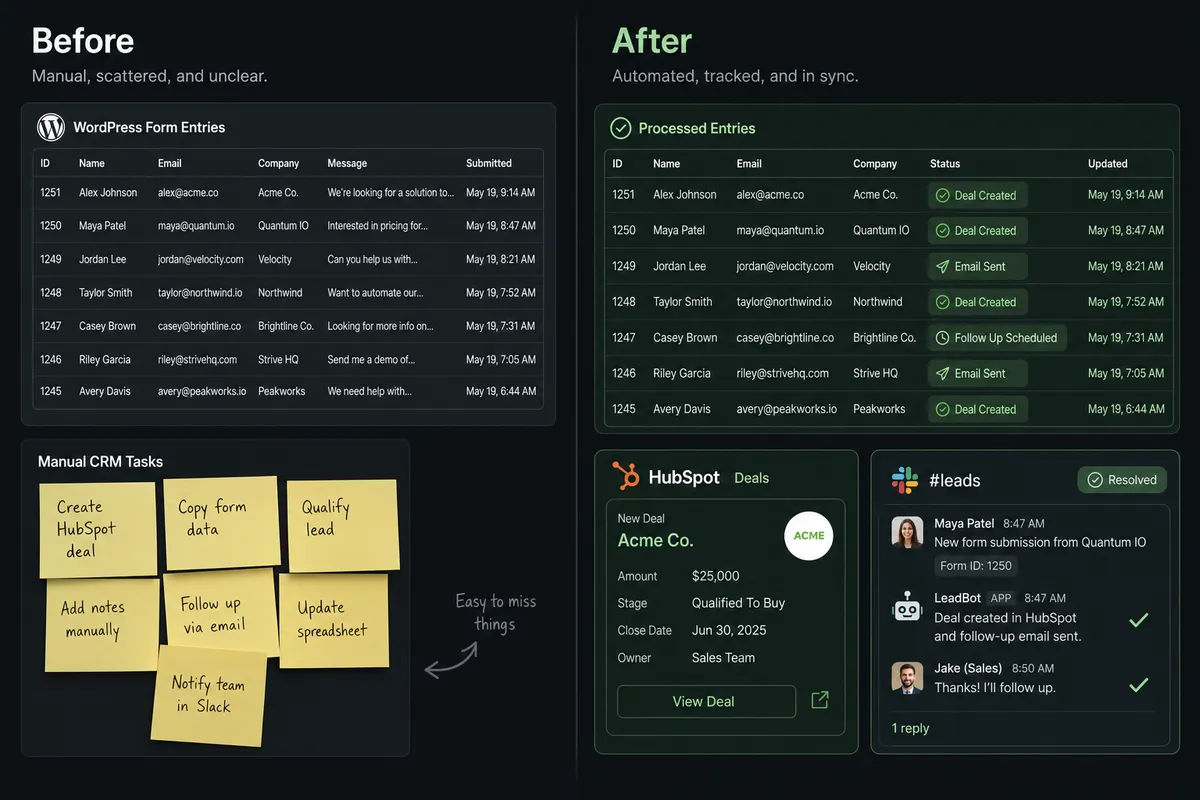
Most WordPress sites running Gravity Forms have the same manual loop: a staff member exports entries from the WordPress admin, pastes them into a spreadsheet, and works through the list to create contacts in HubSpot by hand. When the volume is low, it is manageable. When it grows, leads fall through the cracks. A form submitted Friday afternoon might not reach a sales rep until Monday. Invalid entries with missing fields or malformed emails create dirty CRM records that take weeks to clean up.
The deeper problem is deduplication. Without a systematic check before creating a CRM record, teams end up with duplicate contacts and split deal histories. Sales reps make calls without knowing a prospect already exists in the pipeline. High-value leads that fail a validation check get quietly discarded because there is no good process for flagging exceptions. The spreadsheet that was supposed to save time becomes the source of the problem.
How it works: the connection
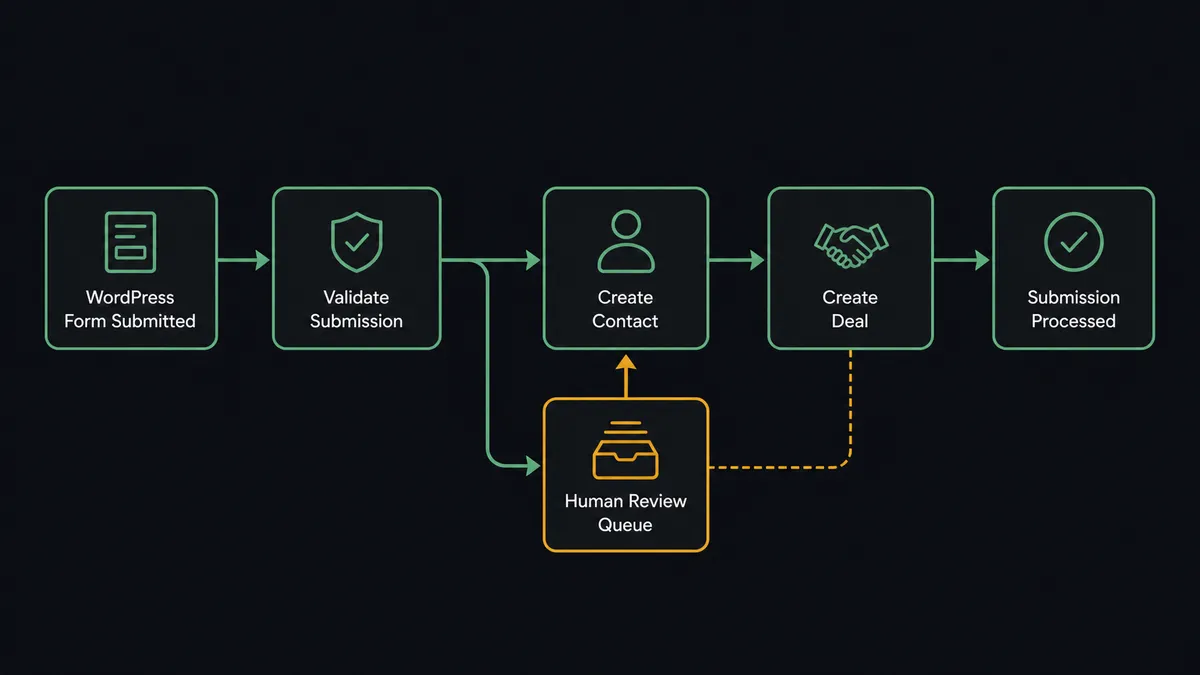
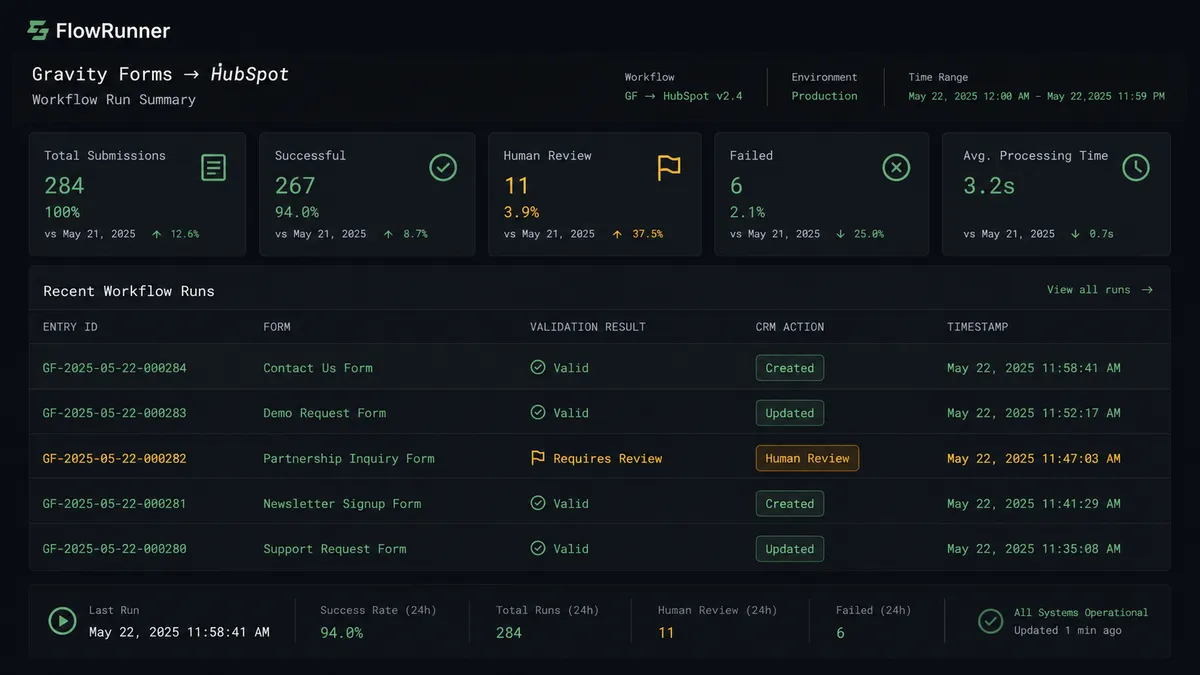
The FlowRunner workflow starts with a scheduled poll against Get Form Entries. Every 15 minutes, the agent retrieves new entries from the target form on your WordPress site. For each entry, it calls Validate Submission to check data integrity: required fields present, email format valid, no empty critical inputs.
For entries that pass validation, the agent calls Get Contact by Email in HubSpot. If a contact with that email already exists, the agent calls Update Contact to apply any new information from the form. If no contact exists, it calls Create Contact, then Create Company if the company is new, then Associate Objects to link the contact to the company record. It then calls Create Deal to open the opportunity in the inbound pipeline with the lifecycle stage set to Lead.
After CRM actions complete, the agent calls Update Entry in Gravity Forms to write a processed status and timestamp back to the original entry. The WordPress admin panel shows exactly which entries have been handled. Any subsequent poll skips entries with a processed status, making the workflow idempotent.
All 21 HubSpot actions and 13 Gravity Forms actions are available as tools. The agent calls the ones the situation requires.
Can an AI agent run it? (And why a human stays in the loop)
A plain automation follows the same sequence every time. An AI agent reads the data, reasons about it, and decides. For a Gravity Forms to HubSpot connection, the difference matters most when validation fails.
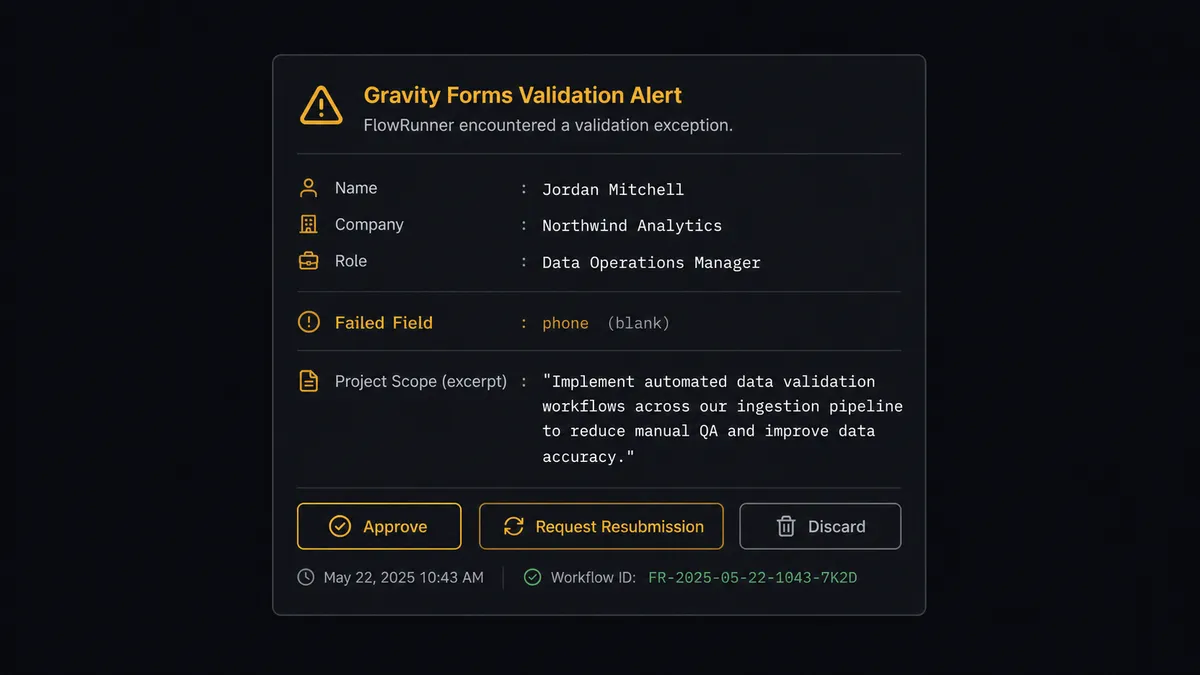
Consider this scenario. A submission comes in from a director at a company with 400 employees. The entry fails validation because the phone field is blank. A simple automation discards it or queues it for manual review with no context. The agent does something different.
The agent evaluates the entry: the company name, the role, the project description in the message field. It recognizes that the apparent value of this lead does not match the risk of discarding it over a missing phone number. It invokes the human-in-loop flow as a callable tool.
The ops manager receives a Slack message: “Validation failure on a submission from [Name], Director at [Company]. The phone field is blank, but the project scope described looks substantial. Options: Approve and process with available data, Request resubmission by email, or Discard.” The manager responds with one click. The agent resumes with the decision as input, documents the choice in the audit trail, and either creates the CRM record or fires the resubmission email.
This is not a hardcoded threshold. The agent does not escalate every validation failure. It escalates the ones where the apparent value and the failure context together warrant a human judgment call. That is the digital andon cord: the agent stops the line when it hits uncertainty, not on a schedule.
FlowRunner vs Zapier
Zapier is the most common tool non-technical teams reach for when connecting WordPress forms to a CRM. It is easy to set up, well-documented, and handles the standard case well: form submission fires, contact gets created. If that is all you need, Zapier works.
The differences appear at the edges, and those edges are where leads and data quality problems actually live.
| Feature | Zapier | FlowRunner |
|---|---|---|
| Basic trigger to action connection | Yes | Yes |
| Validates form data before CRM write | No | Yes, via Validate Submission action |
| Human-in-loop on exceptions | No native option | Native callable tool; agent decides when to invoke |
| Deduplication before contact creation | Requires separate lookup step, manual config | Agent calls Get Contact by Email automatically as part of reasoning |
| Per-user pricing | Yes | Unlimited users on every tier |
| BYOK for AI model | No | Yes |
| Audit trail with human decision log | No | Yes, from Growth tier |
Zapier handles the straight-line case. FlowRunner handles the straight-line case and the exceptions, without building a separate exception-handling workflow for each one.
Before and after
| Category | Before | After |
|---|---|---|
| Lead processing speed | Manual export and paste cycle; submissions sit until staff checks WordPress admin | New entries retrieved, validated, and in HubSpot within 15 minutes of submission |
| Data quality | Invalid emails and missing fields create dirty CRM records | Validate Submission runs on every entry before any CRM record is created |
| Duplicate contacts | No systematic check; splits deal history across duplicate records | Get Contact by Email runs before every Create Contact call |
| High-value validation failures | Discarded or lost in a review queue with no context | Routed to ops manager via Slack with full entry context and one-click decision options |
| Duplicate processing risk | No record of processed entries; same submission can create multiple CRM records | Update Entry writes processed status and timestamp; subsequent polls skip handled entries |
| Team visibility | Entry status only visible in WordPress admin | Audit trail in FlowRunner logs every entry, every validation result, every human decision |
What you can build
Lead capture to deal pipeline, fully automated. The agent polls Get Form Entries, validates each submission, checks for duplicates with Get Contact by Email, creates the contact and deal, and associates records. A new lead is in HubSpot and assigned to a sales rep within 15 minutes of the form being submitted, with no human in the loop unless there is a reason.
High-value exception routing. When Validate Submission flags an entry that looks like a substantial opportunity, the agent packages the entry context and invokes the human-in-loop tool. The ops manager sees the submission, the failure reason, and the apparent value in a single Slack message. One click processes or discards.
Service request intake to project creation. A service request form feeds entries to the agent, which calls Get Form Entries, validates the data, creates the contact in HubSpot, and creates a deal in the services pipeline. The account is ready for scoping before anyone manually checks the WordPress admin.
CRM record enrichment from form updates. When a returning contact submits a new form with updated information, the agent calls Get Contact by Email, identifies the existing record, and calls Update Contact to apply changes. The CRM stays current without manual data entry or a separate enrichment workflow.
Duplicate contact triage. When the agent detects ambiguity, two contacts with overlapping data from the same form submission, it does not silently choose. It pauses and routes the question to the CRM admin: “I found two contacts matching this email. Which should I associate this deal with?” The admin decides. The agent associates and documents the decision.
Common questions
Is it free to connect Gravity Forms and HubSpot on FlowRunner? FlowRunner has a free plan with 100 executions a month, every integration included, and no credit card required, and new accounts get 14 days of Professional on top. No credit card is required to start. Corporate email required.
Can I self-host the Gravity Forms to HubSpot connection? Yes. FlowRunner offers a self-hosted Community Edition at no cost, and an Enterprise self-hosted tier for multi-instance deployments with full compliance features.
Does the agent need my own OpenAI key? FlowRunner uses a bring-your-own-keys model. You connect your own AI provider credentials, whether OpenAI, Anthropic, or another supported provider. FlowRunner does not bundle a shared AI key.
What happens when the agent is not sure about a form entry? The agent pauses and contacts the appropriate person through your preferred channel, Slack, email, or WhatsApp, with full context about the entry and why it flagged it. The workflow resumes only after a human makes the call.
Will the agent create duplicate contacts in HubSpot? No. The agent calls Get Contact by Email before creating any new contact. If a record exists, it updates the existing one. If a potential duplicate is ambiguous, it pauses and routes the question to a CRM admin rather than guessing.
How many users can access the FlowRunner workflow? All FlowRunner tiers include unlimited users and unlimited workflows. Your entire team can collaborate on the same automation without per-seat charges.
Getting started
FlowRunner has a free plan with 100 executions a month, every integration included, and no credit card required, and new accounts get 14 days of Professional on top.
To get started:
- Create your account at flowrunner.ai
- Connect the Gravity Forms integration using your WordPress site credentials
- Connect the HubSpot integration via API key or OAuth2
- Build the workflow described above using FlowRunner’s visual builder
- Activate and let the audit trail do its job
If you want to see the workflow running against your actual Gravity Forms data before committing, book a demo at calendly.com/flowrunner/intro. The session runs against a live environment, not a slide deck.
Your team focuses on the form submissions that need a human judgment call. FlowRunner handles the rest.
Frequently asked questions
Is it free to connect Gravity Forms and HubSpot on FlowRunner?
FlowRunner has a free plan with 100 executions a month, every integration included, and no credit card required, and new accounts get 14 days of Professional on top. No credit card is required to start. Corporate email required.
Can I self-host the Gravity Forms to HubSpot connection?
Yes. FlowRunner offers a self-hosted Community Edition at no cost, and an Enterprise self-hosted tier for multi-instance deployments with full compliance features.
Does the agent need my own OpenAI key?
FlowRunner uses a bring-your-own-keys model. You connect your own AI provider credentials, whether OpenAI, Anthropic, or another supported provider. FlowRunner does not bundle a shared AI key.
What happens when the agent is not sure about a form entry?
The agent pauses and contacts the appropriate person through your preferred channel, Slack, email, or WhatsApp, with full context about the entry and why it flagged it. The workflow resumes only after a human makes the call.
Will the agent create duplicate contacts in HubSpot?
No. The agent calls Get Contact by Email before creating any new contact. If a record exists, it updates the existing one. If a potential duplicate is ambiguous, it pauses and routes the question to a CRM admin rather than guessing.
How many users can access the FlowRunner workflow?
All FlowRunner tiers include unlimited users and unlimited workflows. Your entire team can collaborate on the same automation without per-seat charges.