Stripe + Invoice Ninja: Payments Applied, Big Invoices Reviewed
Connect Stripe to Invoice Ninja so confirmed charges record and apply to the right invoice automatically, and run it as an AI agent that pauses for a person before an oversized or mismatched invoice sends.
How do you connect Stripe to Invoice Ninja?
You connect Stripe to Invoice Ninja by having Stripe’s Parse Webhook Event trigger fire on a confirmed charge, then calling Create Payment in Invoice Ninja to record the amount and apply it to the matching invoice. FlowRunner is a visual AI-agent orchestration platform where automations run autonomously and pause for human judgment on the steps that carry real consequence. Run as an AI agent, the same connection also works the other direction: when a deal closes, the agent creates the client and the invoice itself, and it pauses for a named person before an oversized or mismatched invoice actually sends.
The problem it solves
A billing manager running Stripe and Invoice Ninja side by side spends a chunk of every week doing work that has already happened twice: once when the customer paid, and once when someone has to open Invoice Ninja and tell it so. A charge clears in Stripe. Nothing in Invoice Ninja knows about it until a person logs in, finds the client, finds the invoice, and records the payment by hand. Multiply that by every charge, every day, and the payment ledger is always a little behind the bank.
The other direction is worse. A deal closes in the CRM and the AP clerk re-keys it into Invoice Ninja line by line: new client, invoice, line items, send. Accepted quotes sit unbilled because nobody remembered to turn them into invoices. When a quote finally gets billed a week late, or a payment gets applied to the wrong invoice, it falls through the cracks until someone notices the balance does not add up. None of this is complicated work. It is just manual, repetitive, and exactly the kind of thing that eats a billing manager’s time back.
How it works: the connection
The connection runs in both directions, grounded in the real actions on each side.
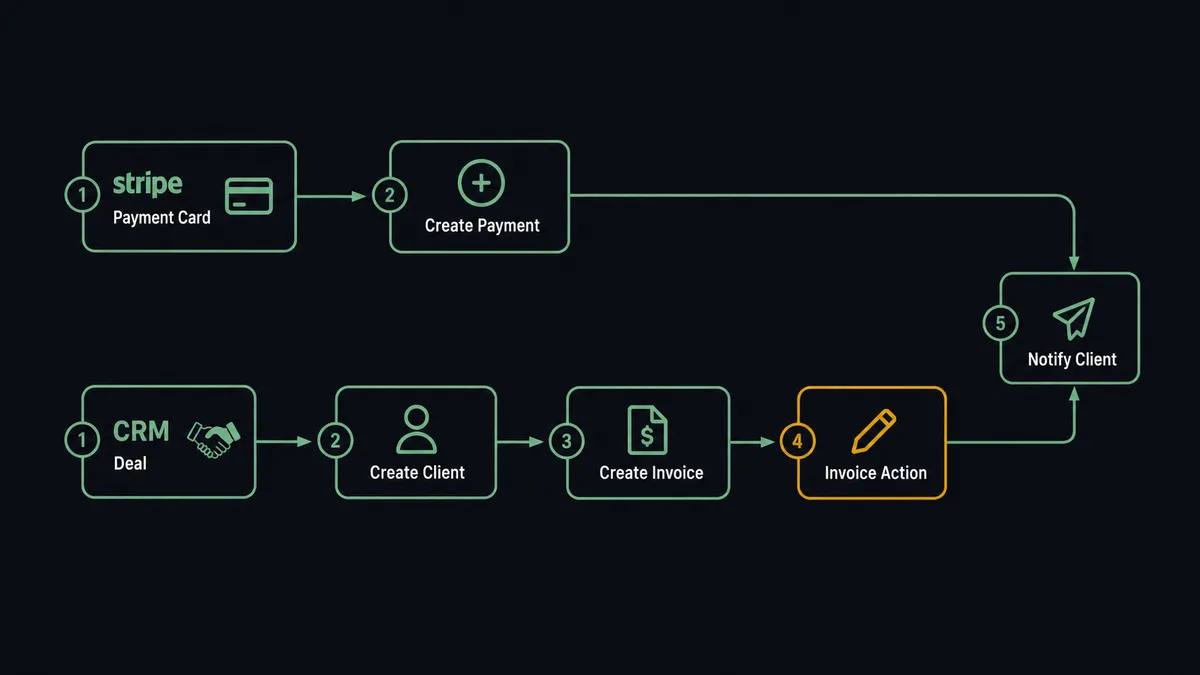
- Trigger: Stripe’s Parse Webhook Event fires when a payment confirms.
- Action: The flow calls Create Payment in Invoice Ninja, recording the amount for the client and applying it to the matching invoice.
- Trigger (reverse direction): A deal closes in the CRM.
- Action: The flow calls Create Client in Invoice Ninja to onboard the customer, then Create Invoice to bill them from the deal’s line items.
- Action: Once an invoice is ready, Invoice Action sends it to the client by email.
- Notify: The team is told the payment applied or the invoice went out.
That is the plain answer: confirmed charges reconcile themselves, and closed deals become sent invoices, without anyone re-keying either one.
Can an AI agent run it? (and why a human stays in the loop)
Yes, and the agent is what turns a one-way sync into a working billing operator. It holds Create Client, Create Invoice, Create Payment, Approve Quote, and Invoice Action as tools. Told to bill a closed deal, it does not need a pre-built path for that exact deal. It reads the line items, decides whether the client already exists or needs creating, builds the invoice, and checks its own work against the deal before doing anything a customer will see.
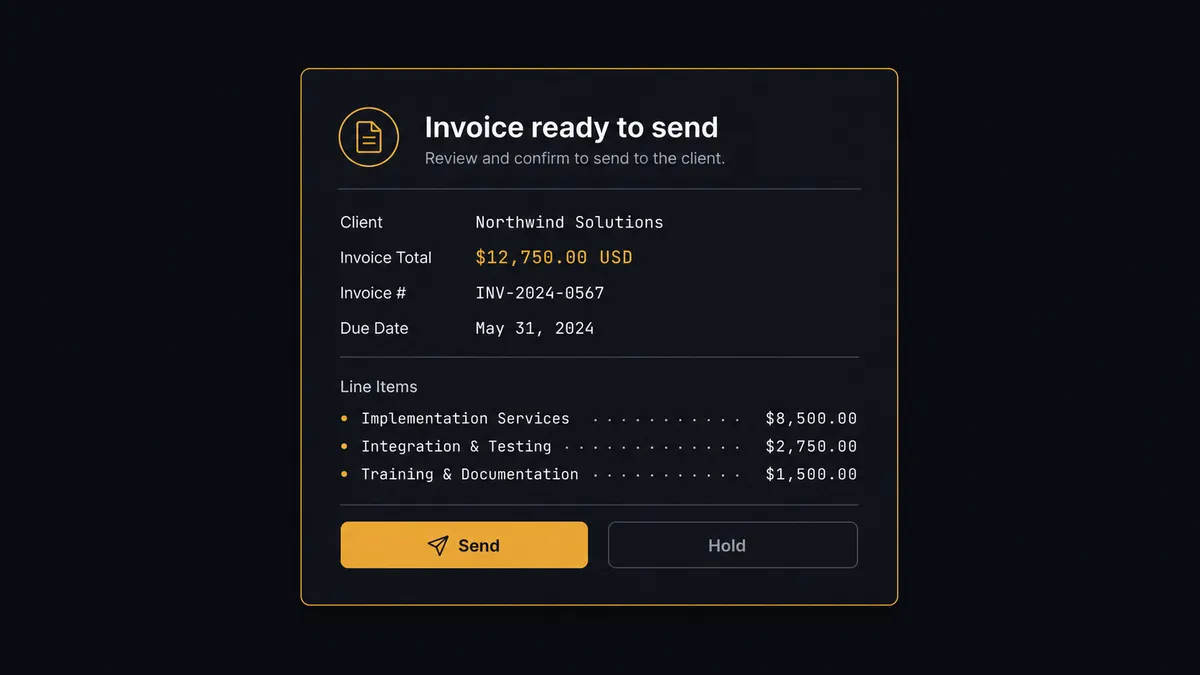
The consequential step is sending. Creating a client or recording a payment leaves the customer relationship intact either way, but an invoice that reaches a client with the wrong total is awkward to walk back. So the agent’s discipline is fixed: before Invoice Action fires, it checks the invoice total against a configured threshold and against the deal it came from. If the invoice is larger than the threshold, or its total does not match the deal, the agent pauses and invokes the human-review flow it holds as a callable tool. The Slack card reads: “This invoice is ready to send to the client shown. Send it?” with the client, the total, and the line items attached. A named person confirms, corrects, or rejects, and the agent sends exactly what was approved with Invoice Action. The approver and the timestamp land in the audit trail.
This is the digital andon cord for billing: the routine work, client creation, payment recording, quote-to-invoice conversion, runs on its own, and the line stops the moment an invoice is big enough or off enough from the deal to matter. This is not a sync tool. The agent knows when to stop and ask.
FlowRunner vs n8n
n8n is a credible way to wire Stripe to Invoice Ninja if you have developers who want to own the plumbing: it is fair-code, self-hostable, and its HTTP-request nodes can reach both APIs without much trouble. For a team that wants to hand-build each branch and maintain it as code-adjacent infrastructure, that works.
The difference is who decides what to do with an ambiguous case, and where that judgment lives. In n8n every branch is predefined; the flow does exactly what its nodes say and nothing more. In FlowRunner the agent holds both connectors’ actions as tools and decides, per event, which one to call, and the approval gate is a native flow the agent invokes as a tool rather than a wait-node pattern you assemble yourself.
| What matters for this pair | FlowRunner | n8n |
|---|---|---|
| Human-in-the-loop before an invoice sends | Native. The agent checks the total against the deal and a threshold, then waits for a named approver | Buildable with wait nodes and custom wiring; the check and the approval logic are yours to build and maintain |
| Who decides how to bill an ambiguous deal | An AI agent reads the deal, reasons, and picks the right sequence of actions | Node graph you design per path; the flow follows the branch you built for that case |
| Users included | Unlimited users on every tier | Cloud plans price by executions; unlimited self-host means running it yourself |
| Bring your own AI keys | Yes, BYOK | Yes, own keys in its AI nodes |
| Self-hosted option | Yes, cloud-hosted or self-hosted, and Invoice Ninja itself runs on both | Yes, fair-code self-host |
| Pricing model | Transparent workflow-based tiers | Execution-based cloud pricing; self-host costs move to your infrastructure and time |
If your team wants to own every branch and is willing to build and maintain the send-approval logic by hand, n8n gets there. If you want an operator that bills the routine deals itself and holds only the invoices that need a second look, this pairing is the better fit.
Before and after
| Category | Before | After |
|---|---|---|
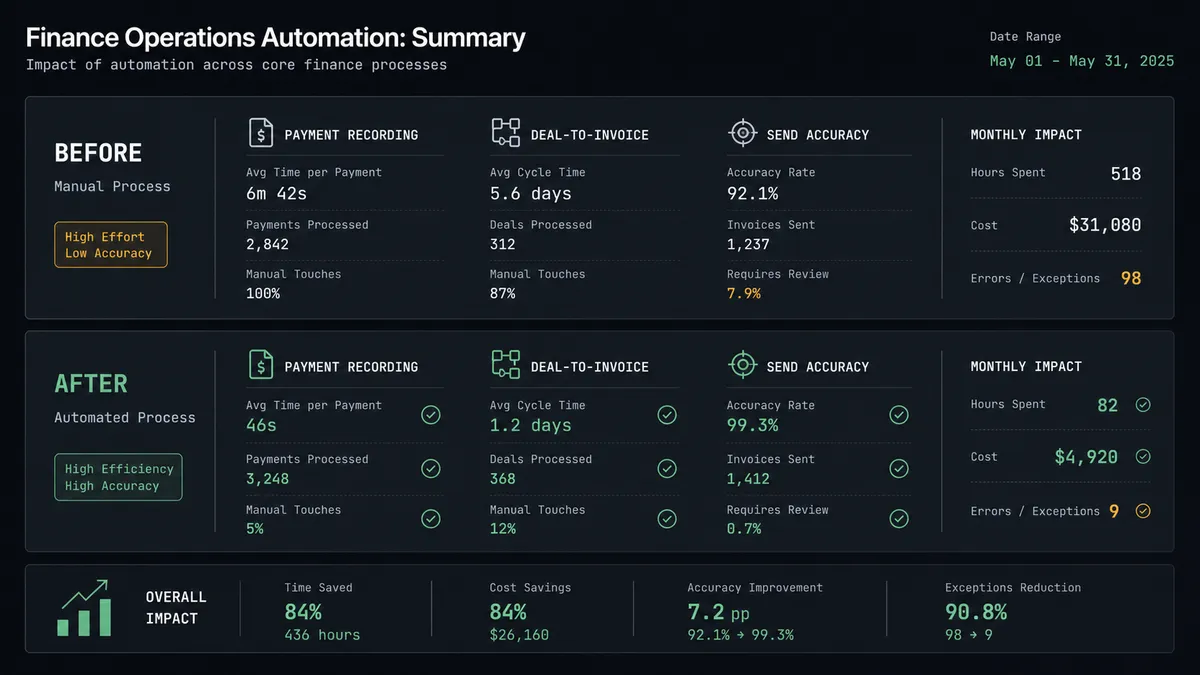
| Payment recording | Billing staff open Invoice Ninja and match each confirmed Stripe charge to an invoice by hand | Create Payment records and applies the charge to the matching invoice automatically |
| Deal to invoice | A closed deal is re-entered into Invoice Ninja line by line | Create Client and Create Invoice bill the customer from the deal without re-keying |
| Quote follow-up | Accepted quotes sit unbilled until someone notices | Approve Quote and Create Invoice turn an accepted quote into billing as part of the flow |
| Send accuracy | Large or mismatched invoices go out with no second look | Invoices above the threshold, or off from the deal, pause for a named approver before Invoice Action sends |
| Audit trail | No record of who approved a questionable invoice, or when | Every held invoice logs the approver’s identity and the decision timestamp |
What you can build
Payment-to-invoice reconciliation. Parse Webhook Event fires on a confirmed Stripe charge, and Create Payment applies it to the matching Invoice Ninja invoice. Balances stay accurate without anyone opening either system.
Closed-deal billing. A deal closes in the CRM and the agent calls Create Client and Create Invoice from the deal’s line items, then Invoice Action sends it once it clears the review gate.
Quote-to-cash. A client accepts a quote, the agent calls Approve Quote, alerts the sales team, and calls Create Invoice so the client is billed without the quote sitting unbilled.
Gated large-invoice review. Any invoice over the configured amount, or one whose total does not match the originating deal, pauses in Slack with the client, total, and line items until a named person approves it.
Catalog-aware billing. The agent checks List Products before building an invoice, so line items and prices stay consistent with the product catalog instead of being typed fresh each time.
Common questions
Is it free to connect Stripe and Invoice Ninja on FlowRunner? You can build and run the connection on FlowRunner’s free plan, which includes 100 executions a month and every integration with no credit card required, and new accounts also get 14 days of Professional. Both connectors are available on every FlowRunner tier, and every tier includes unlimited users and unlimited workflows.
Can I self-host the Stripe to Invoice Ninja workflow? Yes. FlowRunner offers a cloud-hosted option and a self-hosted option, and Invoice Ninja itself runs on both hosted and self-hosted installs through the same v5 API, so the whole chain can live inside your own environment.
Does the AI agent need my own OpenAI or Claude key? FlowRunner uses a bring-your-own-keys model, so you connect the AI provider key you already have instead of paying a markup on a bundled model.
What happens when the agent is not sure an invoice is ready to send? The agent never sends blind. When an invoice is above the configured threshold or does not match the deal it came from, it posts the client, the total, and the line items to Slack and asks a named person to confirm before Invoice Action fires.
Does the agent record partial or duplicate Stripe payments correctly? Create Payment applies a confirmed charge to a specific invoice, so routine payments reconcile automatically. If the amount does not match any open invoice, the agent treats that as an exception and asks a person instead of guessing which invoice to apply it to.
Can this also bill accepted quotes, not just closed deals? Yes. When a client accepts a quote, the agent calls Approve Quote and then Create Invoice, so accepted quotes turn into billing as part of the same flow instead of waiting for someone to notice.
Getting started
Start on the free plan: 100 executions a month, every integration included, no credit card required, plus 14 days of Professional for new accounts. Both connectors are available on every tier, and every tier includes unlimited users and unlimited workflows.
Explore the integration details:
- Stripe integration (1 trigger and 67 actions covering payments, subscriptions, refunds, disputes, and invoicing)
- Invoice Ninja integration (22 actions covering clients, invoices, payments, quotes, and the product catalog)
Start building free at flowrunner.ai or book a demo to see a live Stripe to Invoice Ninja workflow, approval gate and all.
Frequently asked questions
Is it free to connect Stripe and Invoice Ninja on FlowRunner?
You can build and run the connection on FlowRunner's free plan, which includes 100 executions a month and every integration with no credit card required, and new accounts also get 14 days of Professional. Both connectors are available on every FlowRunner tier, and every tier includes unlimited users and unlimited workflows.
Can I self-host the Stripe to Invoice Ninja workflow?
Yes. FlowRunner offers a cloud-hosted option and a self-hosted option, and Invoice Ninja itself runs on both hosted and self-hosted installs through the same v5 API, so the whole chain can live inside your own environment.
Does the AI agent need my own OpenAI or Claude key?
FlowRunner uses a bring-your-own-keys model, so you connect the AI provider key you already have instead of paying a markup on a bundled model.
What happens when the agent is not sure an invoice is ready to send?
The agent never sends blind. When an invoice is above the configured threshold or does not match the deal it came from, it posts the client, the total, and the line items to Slack and asks a named person to confirm before Invoice Action fires.
Does the agent record partial or duplicate Stripe payments correctly?
Create Payment applies a confirmed charge to a specific invoice, so routine payments reconcile automatically. If the amount does not match any open invoice, the agent treats that as an exception and asks a person instead of guessing which invoice to apply it to.
Can this also bill accepted quotes, not just closed deals?
Yes. When a client accepts a quote, the agent calls Approve Quote and then Create Invoice, so accepted quotes turn into billing as part of the same flow instead of waiting for someone to notice.