Log Square Payouts in Google Sheets Automatically
Connect Square and Google Sheets so every payout reconciles into a workbook automatically, with a human called in only when the entries don't tie out.
How do you connect Square to Google Sheets?
To connect Square to Google Sheets, an agent pulls new deposits with List Payouts, itemizes each one with List Payout Entries, and writes the individual charges, refunds, and fees into a reconciliation workbook using Add Rows. FlowRunner is a visual AI-agent orchestration platform where automations run autonomously and pause for human judgment on the steps that carry real consequence. The same connection can run as an AI agent that checks whether each payout ties out to the day’s payments and calls a person only when an entry doesn’t match, instead of dumping every deposit into the sheet unverified.
The problem it solves
A bookkeeper or accounting manager closes the books at month end and finds the bank deposit doesn’t match what the register shows. Square bundles dozens of individual charges, a handful of refunds, and its processing fees into one lump-sum payout, and none of that detail shows up on the bank statement. So someone opens Square’s dashboard, exports the payout activity, and pastes it into a spreadsheet by hand, charge by charge, trying to figure out which fees explain the gap between what customers paid and what actually landed in the account.
This is exactly the kind of task that falls through the cracks when the business gets busy. A payout with a rounding discrepancy or a disputed charge sits unreconciled for weeks because nobody has time to trace it. Multiply that across every location and every deposit, and the finance team spends hours each month on a task that is mostly transcription, with the actual judgment call, deciding whether a mismatch is a processing error or a real problem, buried somewhere in the middle of it.
How it works: the connection
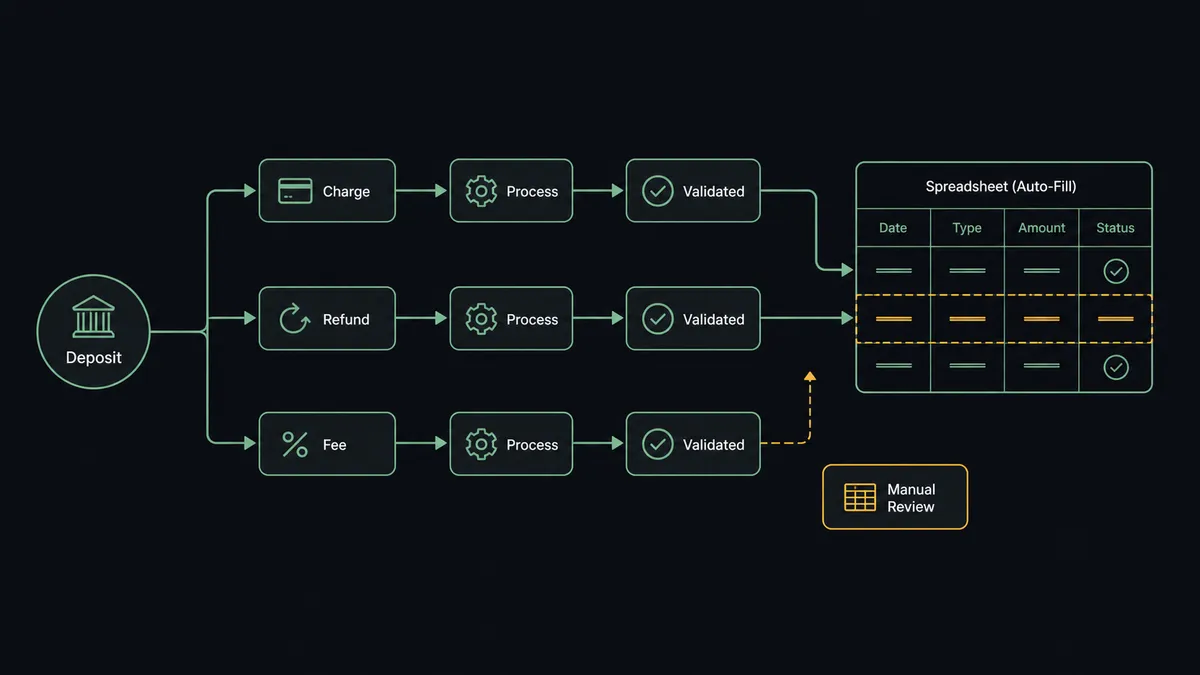
The agent starts each cycle with List Payouts to find deposits that haven’t been reconciled yet. For each one, it calls List Payout Entries, which itemizes the lump-sum deposit into its component charges, refunds, and fees, the raw detail Square doesn’t surface on the bank statement. The agent then writes those entries into the reconciliation workbook with Add Rows, mapped to the sheet’s existing header columns so the data lands in the same layout the finance team already uses.
Before it writes anything, the agent cross-checks the itemized entries against the day’s recorded payments, pulled with List Payments and Get Payment. When a payout’s entries sum to what was actually charged, the row gets written and marked reconciled. When they don’t, the agent doesn’t force a number into the sheet to make the row look complete. That’s the moment it escalates, covered next.
Can an AI agent run it? (and why a human stays in the loop)
This is not a sync tool copying rows from one system to another. The agent reads the itemized payout, reasons about whether it reconciles, and chooses which action to take next. It has List Payments, Get Payment, and Add Rows available as tools, and it decides how to use them based on what the data actually shows, not a fixed sequence someone wired together once.
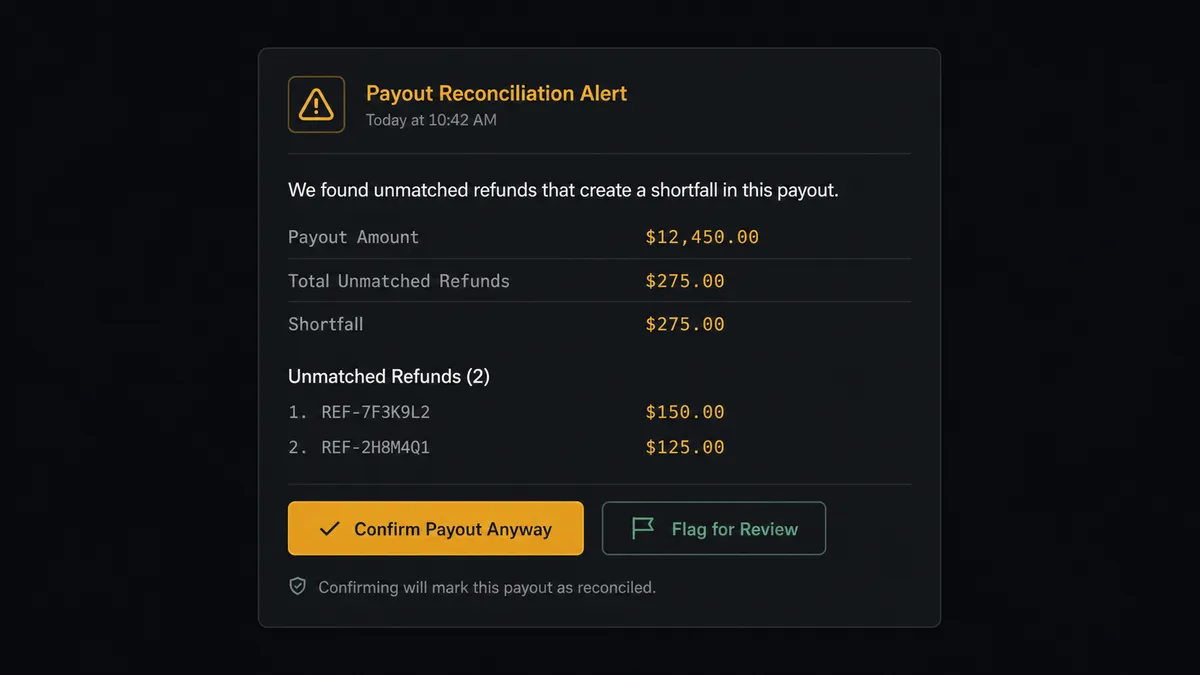
When a payout’s entries don’t sum to the day’s recorded payments, the agent invokes a human-in-loop flow as a callable tool rather than guessing at the difference or leaving the row blank. It packages the specific entries that disagree, the payout total, the sum of matched payments, and the size of the gap, and posts that to the finance channel: “Payout for March 14 is $46 short of its recorded payments. Two refunds appear in the payout that aren’t logged as processed. Confirm the refunds and I’ll post the reconciled entry, or flag it for review.” The finance lead checks the two refunds, confirms one and rejects the other as a duplicate, and the agent resumes, writing the confirmed entry and holding the disputed one for follow-up. The decision, who made it, and when, all land in the audit trail.
This is not a hardcoded threshold like “flag anything over $50.” The agent evaluates the actual entries and escalates because something specific doesn’t add up. Prospects call this a digital andon cord: like Toyota’s quality control pull cord, FlowRunner stops the line when the agent hits real uncertainty instead of pushing an unverified number downstream. This is not a sync tool. The agent knows when to stop and ask.
FlowRunner vs Zapier
Zapier is a genuinely good fit for a simple one-step handoff, and plenty of small businesses use it to push a new Square payment into a spreadsheet row with no setup friction at all. For a single trigger-to-action connection with no judgment involved, it does the job.
Where it runs out of road is exactly the scenario above: a payout that needs to be itemized, checked against payments, and only sometimes escalated. Zapier’s approval steps are conditional branches someone configures in advance (“if amount over $X, wait for approval”), not a judgment call the workflow makes by evaluating the actual data.
| FlowRunner | Zapier | |
|---|---|---|
| Human-in-the-loop | Native: the agent decides when to escalate based on context, not a preset rule | Bolt-on conditional branches with fixed thresholds |
| Users included | Unlimited on every tier | Priced per user on higher tiers |
| AI provider | BYOK, bring the provider and model you already use | Built-in AI limited to Zapier’s own model options |
| Self-hosting | Free Community Edition, or Enterprise self-hosted | Cloud only |
| Pricing model | Transparent workflow-based tiers with a clear execution cap | Per-task pricing that gets confusing at volume |
Before and after
| What changes | Before | After |
|---|---|---|
| Payout reconciliation | The bank deposit and the register disagree, and nobody can say which fees explain the gap | Every deposit is reconciled against its individual charges, refunds, and fees |
| Sheet updates | Someone exports payout activity and pastes it into the workbook by hand | The reconciliation workbook stays current as payouts land |
| Row triggers | A new row sits until a person notices it and decides what to do | Reconciled rows write themselves; only mismatches reach a person |
| Reporting | Each report is produced by opening the sheet and downloading a file | Sheets export to a file on a schedule, no one opens the spreadsheet |
What you can build
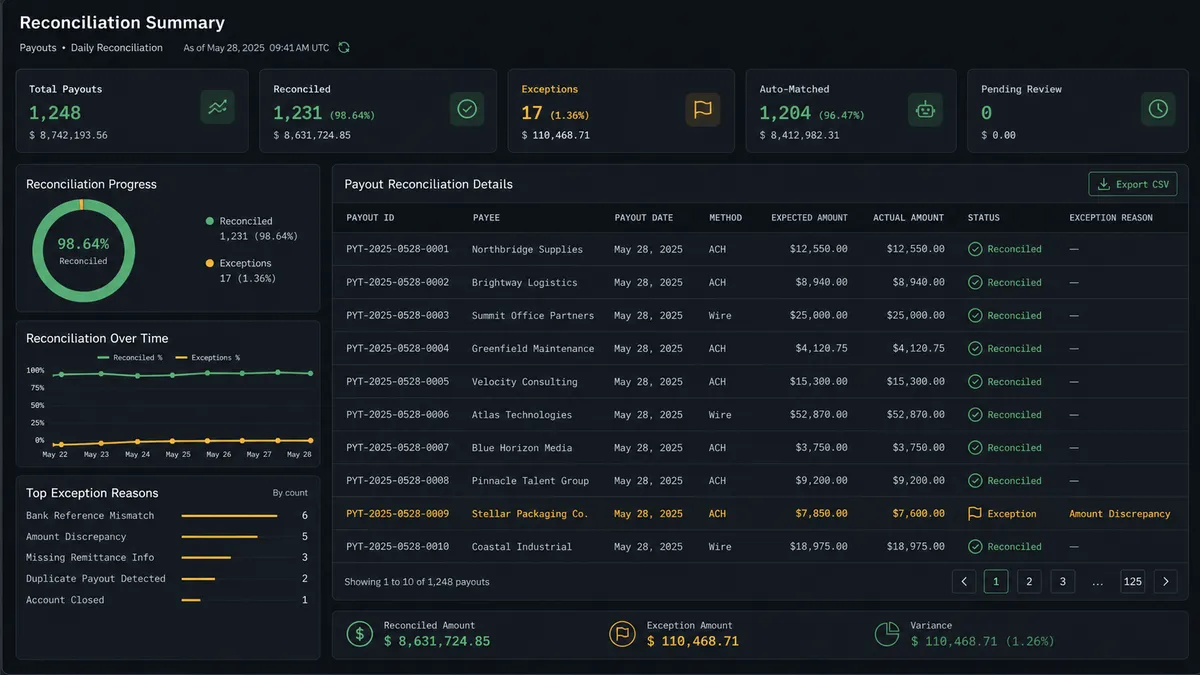
Daily payout reconciliation workbook. The agent itemizes every Square payout with List Payout Entries and writes matched entries into Google Sheets automatically, escalating only the payouts that don’t tie out to the finance channel.
Catalog cleanup audit log. When the agent proposes deleting dead catalog items with Search Catalog and Delete Catalog Object, it writes the approved deletion list and the object IDs Square returns into a Sheets tab, so there’s a standing record of what was removed and who signed off.
Invoice status tracker. As orders move from Create Order to Create Invoice to Publish Invoice, the agent logs each status change into a Sheets tracker with Add Row, giving the account team a live view of what’s drafted, approved, and paid without opening Square.
Scheduled deposit summary. On a weekly cadence, the agent runs Export Sheet against the reconciliation workbook and delivers the file as an email attachment, so leadership gets a payout summary without touching the spreadsheet.
Common questions
Is it free to connect Square and Google Sheets on FlowRunner? Yes. FlowRunner has a free plan with 100 executions a month, every integration included, and no credit card required, and new accounts get 14 days of Professional on top.
Can I self-host the Square and Google Sheets connection? Yes. FlowRunner offers a free Community Edition for self-hosting, and an Enterprise self-hosted option with multi-instance clustering and the full compliance suite for teams that need it.
Does the agent need my own OpenAI key? FlowRunner runs on a bring-your-own-key model for AI providers, so you connect the provider and model you already use rather than being locked into one vendor.
What happens when the agent finds a payout that doesn’t tie out? The agent does not guess or write an unverified number into the sheet. It posts the specific entries that disagree to the finance channel, waits for a person to decide, and only then writes the resolved record.
Do I need to write formulas or code to map Square payouts into Google Sheets columns? No. The agent reads Square’s payout entries and writes them into the sheet’s mapped columns directly, using the header row FlowRunner loads when you set up the connection.
Can the same flow also log catalog cleanup or invoice activity to Sheets? Yes. The same agent that reconciles payouts can write a record of approved catalog deletions or invoice status changes to a separate tab, since both flows already run through the same Square connection.
Getting started
Connect Square and Google Sheets in FlowRunner and reconcile your first payout without touching a spreadsheet by hand. FlowRunner has a free plan with 100 executions a month, every integration included, and no credit card required, and new accounts get 14 days of Professional on top.ai](https://flowrunner.ai). Want help mapping your specific reconciliation workflow first? Book a walkthrough at calendly.com/flowrunner/intro.
Frequently asked questions
Is it free to connect Square and Google Sheets on FlowRunner?
Yes. FlowRunner has a free plan with 100 executions a month, every integration included, and no credit card required, and new accounts get 14 days of Professional on top.
Can I self-host the Square and Google Sheets connection?
Yes. FlowRunner offers a free Community Edition for self-hosting, and an Enterprise self-hosted option with multi-instance clustering and the full compliance suite for teams that need it.
Does the agent need my own OpenAI key?
FlowRunner runs on a bring-your-own-key model for AI providers, so you connect the provider and model you already use rather than being locked into one vendor.
What happens when the agent finds a payout that doesn't tie out?
The agent does not guess or write an unverified number into the sheet. It posts the specific entries that disagree to the finance channel, waits for a person to decide, and only then writes the resolved record.
Do I need to write formulas or code to map Square payouts into Google Sheets columns?
No. The agent reads Square's payout entries and writes them into the sheet's mapped columns directly, using the header row FlowRunner loads when you set up the connection.
Can the same flow also log catalog cleanup or invoice activity to Sheets?
Yes. The same agent that reconciles payouts can write a record of approved catalog deletions or invoice status changes to a separate tab, since both flows already run through the same Square connection.