ShipStation + Google Sheets: Every Shipment Logged Automatically
Connect ShipStation and Google Sheets so every shipped order writes itself to a tracking sheet, with an AI agent pausing for ops before it buys a costly label.
How do you connect ShipStation to Google Sheets?
On New Order in ShipStation triggers the flow, and once the agent buys the shipping label with Create Shipment Label, it calls Add Row in Google Sheets to log the order number, carrier, cost, and tracking number to a tracking sheet. FlowRunner is a visual AI-agent orchestration platform where automations run autonomously and pause for human judgment on the steps that carry real consequence. The same connection can run as a plain sync, or as an AI agent that rate-shops the order, buys the label, and pauses for a person before purchasing anything priced above your cost threshold.
The problem it solves
Fulfillment teams run on two disconnected systems. ShipStation buys the labels; a spreadsheet is where someone tracks what shipped, what it cost, and whether the numbers still make sense against margin. Today that spreadsheet gets updated by an ops coordinator who opens ShipStation at the end of the day, exports a batch of shipments, and pastes the carrier and cost into a tracking sheet by hand. Expensive labels bought on a slow afternoon do not get flagged until someone reviews the week’s spend, by which point the order shipped and the margin is gone.
The exceptions are the real cost. A label that quietly eats a third of an order’s value falls through the cracks because nobody is watching each purchase in real time, and a coordinator manually reconciling ShipStation exports against a tracking sheet does not have time back for anything else. Scaling order volume just means more exports, more pasting, and more expensive labels slipping through unnoticed.
How it works: the connection
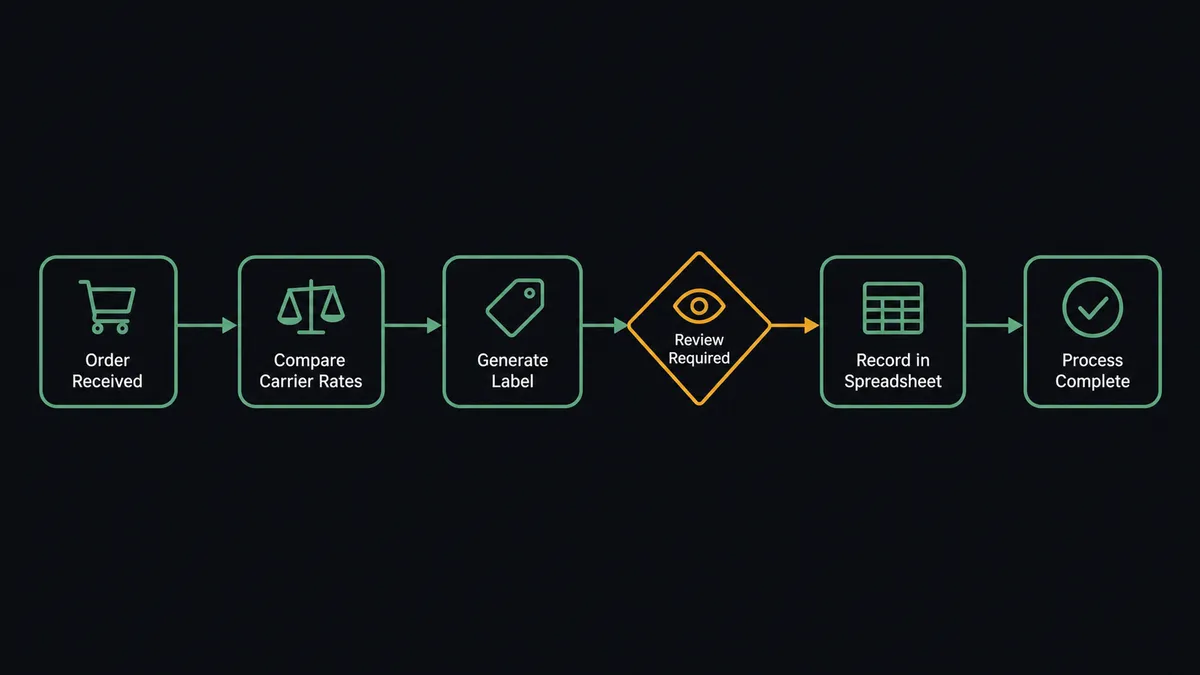
The flow starts when On New Order fires in ShipStation as soon as an order appears. The agent reads the ship-to address, items, and requested service, then calls Get Shipment Rates to pull live carrier options for that specific shipment. It checks the cheapest viable rate against the order’s value, and for orders that clear the cost threshold, it runs Create Shipment Label to buy the label and capture the tracking number, then Mark Order as Shipped to close out the order in ShipStation.
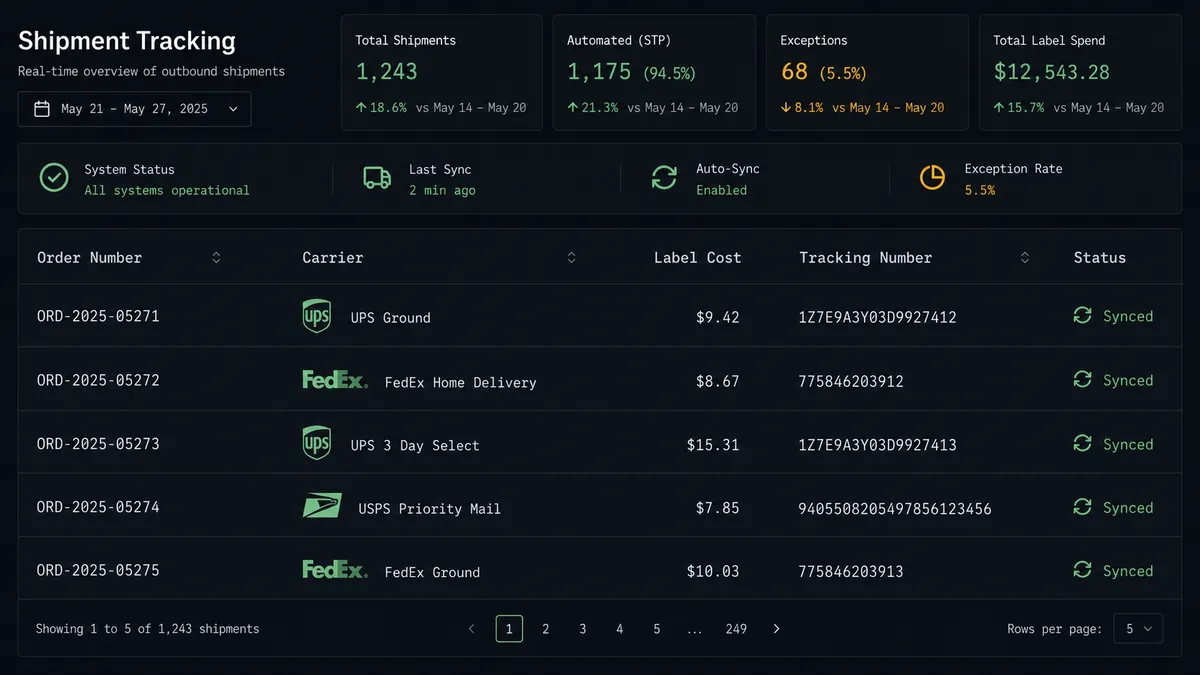
Right after the label is bought, the agent calls Add Row in Google Sheets, writing the order number, the carrier chosen, the label cost, and the tracking number into the header columns of your tracking sheet. The sheet stays current as shipments happen instead of at the end of a batch someone remembers to run. If a downstream system also needs the shipment record, ShipStation’s On New Shipment trigger can fire the same write independently, so the sheet reflects the event the moment it exists.
Can an AI agent run it? (and why a human stays in the loop)
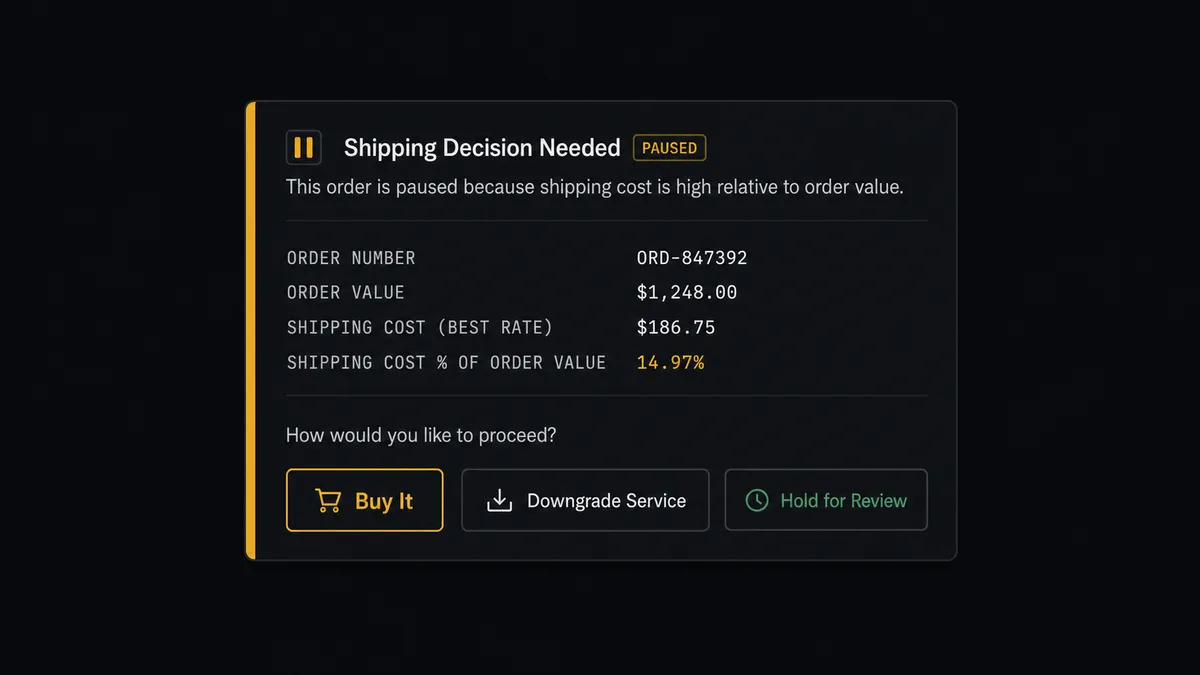
A sync tool moves data. An agent reasons about it. When Get Shipment Rates comes back, the agent does not just take the cheapest number and buy it. It compares that rate against the order’s value and a configured cost threshold, and for a label that would eat too much of the order’s margin, it stops before spending anything.
This is where the agent invokes a human-in-loop flow as a callable tool, not a hardcoded rule that fires the same way every time. It packages the order number, the rate options it found, and the margin impact, then posts to Slack: “Order #3391 cheapest label is $47 on a $95 order. Buy it, downgrade the service, or hold for review?” Ops sees the full context in one message and picks an option. On approval, the agent runs Create Shipment Label, records who approved it and which rate was chosen, and continues on to log the shipment in Google Sheets. Orders that clear the threshold never touch a person; they ship straight through.
This is not a sync tool. The agent knows when to stop and ask. Prospects call this pattern a digital andon cord: like Toyota’s quality control pull cord, the flow stops the line the moment it hits a decision that carries real cost, and resumes the instant a person weighs in.
FlowRunner vs Zapier
Zapier is genuinely easy to set up for a straightforward ShipStation-to-Sheets sync, and plenty of ops teams already have a Zap doing exactly that. Where it runs out of road is the moment a label costs more than it should: Zapier moves the data whether or not the number makes sense, because it has no concept of a decision that needs a person before it executes.
| FlowRunner | Zapier | |
|---|---|---|
| Human-in-the-loop | Native: the agent invokes a Slack approval as a callable tool mid-flow | Not built in; requires a separate manual check outside the Zap |
| Users included | Unlimited on every tier | Priced per user on higher tiers |
| AI provider | Bring your own key, any supported provider | Limited native AI steps, provider-locked |
| Pricing model | Transparent workflow-based execution limits per tier | Per-task pricing that scales unpredictably with volume |
| Self-hosting | Enterprise self-hosted option available | Cloud-only |
Before and after
| Metric | Before | After |
|---|---|---|
| Rate shopping | Someone compares carrier rates in ShipStation for each order before buying | On New Order fires and Get Shipment Rates returns live options automatically |
| Costly labels | High-cost labels are purchased with no check against the order’s margin | Labels over a cost threshold pause for a human before the purchase is made |
| Tracking sheet updates | Someone exports from ShipStation and pastes shipment data into a sheet each week | Add Row logs the order, carrier, cost, and tracking number the moment the label is bought |
| Unused labels | Unused labels are rarely voided, so postage is spent on shipments that never move | Void Shipment Label runs in-flow when an order is cancelled after the label was bought |
| Visibility | Reports are manual exports opened and downloaded by hand | The tracking sheet stays current as shipments happen, ready for anyone to open |
What you can build
Rate-shopped fulfillment with a cost gate. On New Order triggers Get Shipment Rates and Create Shipment Label, with any label above your threshold routed to Slack before it is bought.
Shipment reporting sheet. On New Shipment logs the carrier, cost, and tracking number to Google Sheets via Add Row, giving ops a live tracking sheet without a single manual export.
Cross-system order intake with hold logic. Create or Update Order pushes orders from an upstream system into ShipStation, with Hold Order Until and Restore Order from Hold parking partial orders until stock is confirmed, all logged to Sheets as the record of truth.
Scheduled fulfillment report. Export Sheet generates an Excel file of the week’s logged shipments on a schedule and attaches it to an email, so the team gets the report without opening the sheet.
Cancelled order cleanup. When an order is cancelled after a label was bought, Void Shipment Label runs automatically and the agent updates the corresponding row in Google Sheets to reflect the void.
Common questions
Is it free to connect ShipStation and Google Sheets on FlowRunner? Yes. FlowRunner has a free plan with 100 executions a month, every integration included, and no credit card required, and new accounts get 14 days of Professional on top.
Do I need to write any code to log ShipStation shipments in Google Sheets? No. You connect both accounts, pick the ShipStation trigger and the Google Sheets action in FlowRunner’s visual builder, and map the fields.
Can the agent decide not to buy a shipping label on its own? Yes. When Get Shipment Rates returns a cost above your threshold, the agent holds the purchase and routes the order to a person in Slack instead of buying the label automatically.
Does the AI agent need my own OpenAI key? FlowRunner uses a bring-your-own-key model, so you connect the AI provider account you already use rather than paying FlowRunner a markup on model usage.
What happens if a shipment logs to the sheet with missing data? The agent validates the row against the sheet’s required fields before writing, and if a value is missing it flags the row and routes it to the sheet owner in Slack to correct rather than pushing an incomplete record.
Can I self-host this ShipStation and Google Sheets workflow? Yes. FlowRunner offers a self-hosted Enterprise option for teams that need the orchestration running on their own infrastructure, alongside the standard cloud tiers.
Getting started
Start on the free plan: 100 executions a month, every integration included, no credit card required, plus 14 days of Professional for new accounts. Connect ShipStation and Google Sheets, map the trigger and action, and add the Slack approval step for labels above your threshold. Sign up at flowrunner.ai or book a walkthrough at calendly.com/flowrunner/intro.
Frequently asked questions
Is it free to connect ShipStation and Google Sheets on FlowRunner?
Yes. FlowRunner has a free plan with 100 executions a month, every integration included, and no credit card required, and new accounts get 14 days of Professional on top.
Do I need to write any code to log ShipStation shipments in Google Sheets?
No. You connect both accounts, pick the ShipStation trigger and the Google Sheets action in FlowRunner's visual builder, and map the fields. No API code or scripts are required.
Can the agent decide not to buy a shipping label on its own?
Yes. When Get Shipment Rates returns a cost above your threshold, the agent holds the purchase and routes the order to a person in Slack instead of buying the label automatically.
Does the AI agent need my own OpenAI key?
FlowRunner uses a bring-your-own-key model, so you connect the AI provider account you already use rather than paying FlowRunner a markup on model usage.
What happens if a shipment logs to the sheet with missing data?
The agent validates the row against the sheet's required fields before writing, and if a value is missing it flags the row and routes it to the sheet owner in Slack to correct rather than pushing an incomplete record.
Can I self-host this ShipStation and Google Sheets workflow?
Yes. FlowRunner offers a self-hosted Enterprise option for teams that need the orchestration running on their own infrastructure, alongside the standard cloud tiers.