Square + Xero: Every Payout Reconciled Before It Posts
Connect Square payouts to Xero's ledger, optionally as an AI agent that reconciles clean deposits automatically and pauses for a human before a refund becomes a credit note.
How do you connect Square to Xero?
You connect Square to Xero by having a scheduled check pull new deposits with Square’s List Payouts, itemize each one with List Payout Entries, and post the reconciled entry to Xero with Create Bank Transaction, so every dollar Square deposits shows up in the ledger as a coded entry instead of a lump sum someone has to explain later. FlowRunner is a visual AI-agent orchestration platform where automations run autonomously and pause for human judgment on the steps that carry real consequence. The same connection can run as an AI agent that itemizes and codes every clean payout on its own, and pauses for a named human before a refund becomes a Xero credit note or a mismatched payout gets recorded.
The problem it solves
Today a bookkeeper or AP clerk runs the register on Square and the books on Xero, and the two only agree when someone makes them agree. Most mornings, someone logs into the Square dashboard, downloads the previous day’s payout, and re-keys the deposit into a spreadsheet before summarizing it into a single journal entry in Xero. Processing fees get lumped into one catch-all “bank fees” line because untangling which fee belongs to which sale takes longer than anyone has between other tasks. A payout that is a few dollars short of the day’s sales total gets a shrug and a rounding adjustment, because nobody has time to open every entry.
The exceptions are where the real damage happens, and exceptions are exactly what fall through the cracks in a manual process. A $58 gap in a $4,830 payout might be an ordinary processing fee, or it might be a refund nobody flagged, or a chargeback that needs a manager’s attention today, and finding out which one requires opening Square’s settlement report and matching timestamps by hand. Quarter close gets delayed while someone chases a handful of stray dollars across two systems that were never built to talk to each other, and the person closing the books never gets that afternoon back.
How it works: the connection
Square does not fire events for payouts, so the connection runs on a schedule and reads Square rather than waiting on it. Here is the plain version, grounded in the real connector actions.
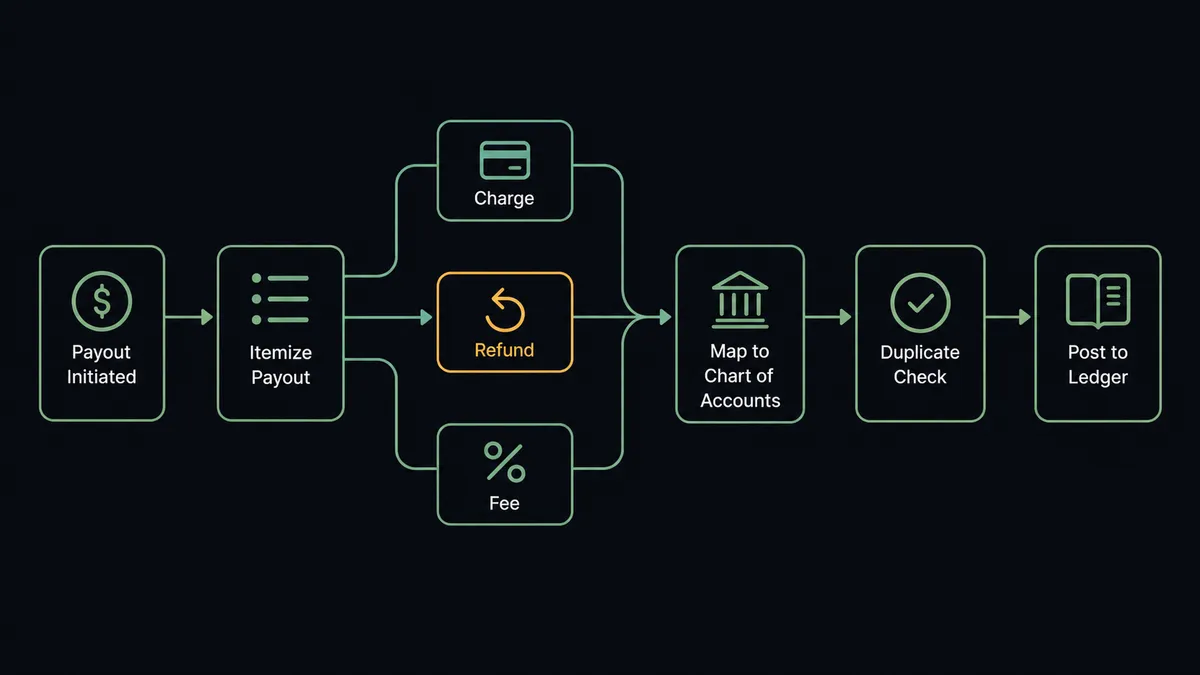
- Trigger: A daily schedule (or more frequent, if payout volume calls for it) checks Square’s List Payouts for any deposit that landed since the last run.
- Itemize: List Payout Entries breaks the payout into its component charges, refunds, and fees, the same breakdown Square’s own settlement report shows.
- Code: Get Accounts pulls the Xero chart of accounts, so the workflow knows which GL code covers processing fees versus sales revenue versus refunds.
- Dedupe: Find Bank Transactions in Xero confirms this payout has not already been posted, so a rerun of the schedule never double-books a deposit.
- Post: Create Bank Transaction records the payout as one reconciled entry in Xero, split by the fee and revenue lines the payout entries reveal.
- Credit: Any entry that is a refund gets matched to the customer with Find Contacts and recorded with Create Credit Note, then applied against the open invoice with Allocate Credit Note.
That is the “just connect them” answer. Square stays the source of what actually happened at the register; Xero stops being a hand-summarized copy of it.
Can an AI agent run it? (and why a human stays in the loop)
Yes, and the agent is what turns a field-mapping script into something a finance team can actually trust with the books. Instead of posting a summary journal entry and hoping it is close enough, an AI agent reads every entry in a payout, tallies it against the deposit total, and reasons about what it finds. List Payouts, Get Payout, List Payout Entries, Get Accounts, Find Bank Transactions, Create Bank Transaction, Find Contacts, Create Credit Note, Allocate Credit Note: these are the agent’s tools, and it chooses among them per payout, not per template.
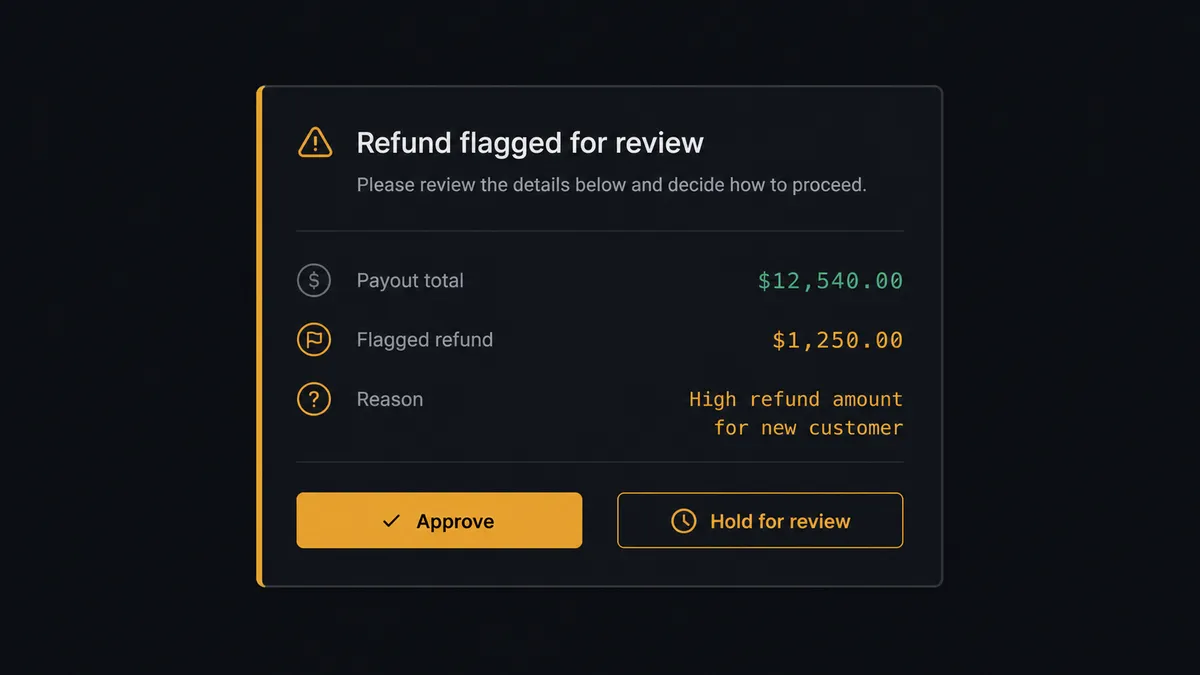
The consequential step is any entry that moves money backward or does not add up. On a Tuesday, the agent pulls a $6,140 payout and List Payout Entries shows a $312 refund inside it, three times larger than that customer’s usual refund and with no matching invoice visible in Xero. Instead of quietly creating the credit note, the agent stops and posts to the finance channel: “Payout for $6,140 includes a $312 refund to [Customer], flagged because it is 3x this account’s typical refund size and no matching Xero invoice was found. Approve the credit note and allocation, or hold for review?” The finance lead checks Square’s dashboard, confirms the return was legitimate, and approves. The agent creates the credit note, allocates it, and logs the approver’s name and timestamp against the transaction. A payout that ties out cleanly, with no refunds and no gap against Find Bank Transactions, posts on its own with no one paged.
Prospects call this pattern a digital andon cord: like Toyota’s quality control pull cord, the workflow stops the line the moment it hits uncertainty, and a person pulls it back into motion. This is not a sync tool guessing at a summary number. The agent knows when to stop and ask.
FlowRunner vs Zapier
Plenty of small businesses connecting Square to Xero start with Zapier, and for understandable reasons. Zapier has native triggers for new Square payments and native Xero actions to create bank transactions, and a working Zap can be live in minutes without anyone technical involved. For a straightforward “new payment, log a line item” automation, it does the job.
The difference shows up at reconciliation, where a payout is a bundle of charges, refunds, and fees that need to be itemized, coded, and checked before anything posts. FlowRunner is built around native human-in-the-loop and AI-agent orchestration, where the agent tallies the entries and knows which ones need a person before a refund becomes a credit note.
| What matters for this pair | FlowRunner | Zapier |
|---|---|---|
| Human-in-the-loop before a refund posts as a credit note | Native. The agent invokes an approval flow as a callable tool and pauses until finance signs off | Available only if you build a manual approval step into the Zap yourself |
| Who itemizes the payout | An AI agent reads List Payout Entries, tallies the total, and reasons about mismatches | A fixed step sequence you configure per Zap, without reasoning about what it finds |
| Users included | Unlimited users on every tier | Priced by task volume; seats vary by plan |
| Bring your own AI keys | Yes, BYOK. Connect the AI provider key you already have | AI features tied to Zapier’s own AI offering |
| Self-hosted option | Yes, cloud-hosted or self-hosted | Cloud only |
| Pricing model | Transparent workflow-based tiers with clear execution limits | Per-task pricing that gets harder to predict as payout and refund volume grows |
If all you need is a line item logged when a payment comes in, Zapier will do it. If a payout should be itemized, coded to the right accounts, and checked against the ledger before anything posts, with a person approving every refund that carries weight, that is where FlowRunner is the better fit.
Before and after
| Category | Before | After |
|---|---|---|
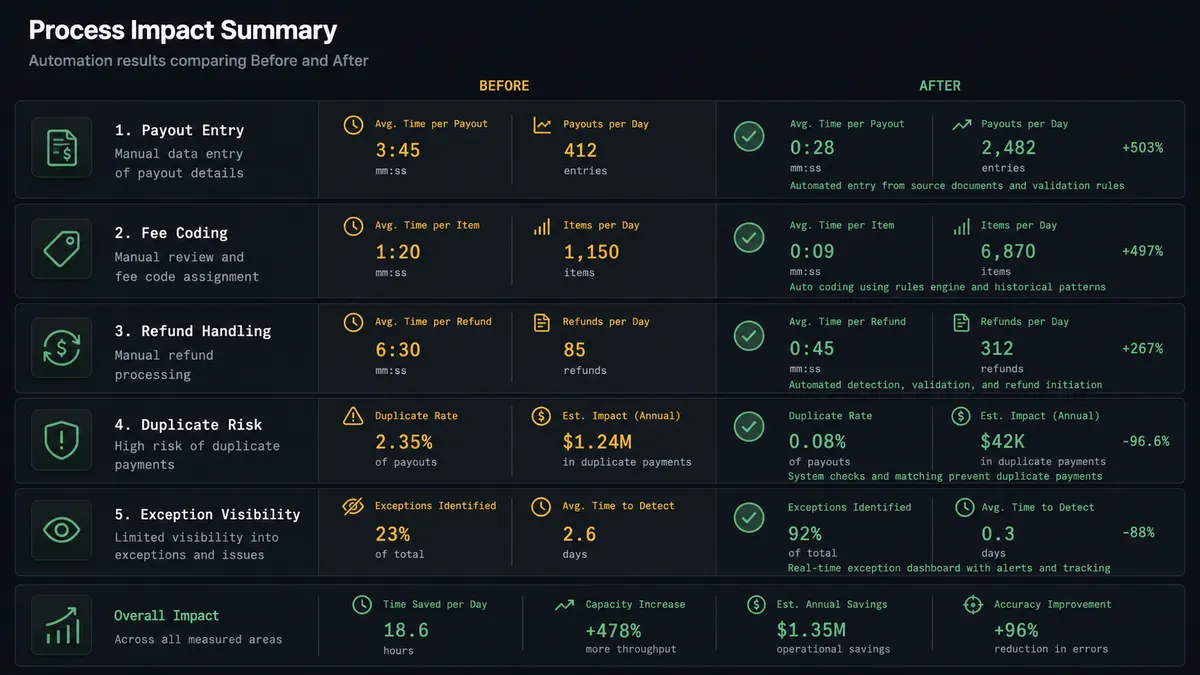
| Payout entry | Staff re-keys yesterday’s payout into a spreadsheet, then into Xero as one summary line | List Payout Entries feeds Create Bank Transaction automatically, itemized |
| Fee coding | Processing fees dumped into a single catch-all GL line | Get Accounts assigns the correct fee and revenue code per entry |
| Refund handling | Refunds show up as an unexplained gap in the deposit total | Each refund becomes a matched Xero credit note, allocated to the right invoice |
| Duplicate risk | A rerun of the manual process risks the same payout posted twice | Find Bank Transactions checks for an existing entry before anything writes |
| Exception visibility | Mismatches surface during month-end close, if at all | Flagged the same day the payout lands, before quarter close is at risk |
What you can build
Daily payout reconciliation. A schedule calls List Payouts and List Payout Entries each morning, codes the entries with Get Accounts, and posts a clean Create Bank Transaction, so the books close the same day the money lands instead of at month end.
Refund-to-credit-note guardrail. Every refund found inside a payout is matched to a customer with Find Contacts and queued as Create Credit Note and Allocate Credit Note, with unusually large or unmatched refunds held for a named approver first.
Wholesale invoice mirror. Search Orders and Search Invoices in Square watch for newly published wholesale invoices, and the agent mirrors the billing into Xero with Create Contact and Create Invoice, so accrual-basis books reflect a sale the moment it is invoiced, not when the payout eventually clears.
Catalog-driven revenue coding. Search Catalog groups sales by product category, and the agent maps each category to the right Xero revenue account via Get Accounts, so gross sales, not just net deposits, post to the correct line without a manual mapping spreadsheet.
Receivables cross-check. On a schedule, the agent pulls Get Aged Receivables from Xero and cross-references active customers in Square with Search Customers, flagging anyone with a Square subscription in good standing but an aging Xero balance, so collections conversations start from real data.
Common questions
Is it free to connect Square and Xero on FlowRunner? You can build and run the connection on FlowRunner’s free plan, which includes 100 executions a month and every integration with no credit card required, and new accounts also get 14 days of Professional. Both connectors are available on every FlowRunner tier, and every tier includes unlimited users and unlimited workflows.
Can I self-host the Square to Xero workflow? Yes. FlowRunner offers a cloud-hosted option and a self-hosted option, so the reconciliation can run inside your own environment if that is a requirement for your finance team.
Does the AI agent need my own OpenAI or Claude key? FlowRunner uses a bring-your-own-keys model, so you connect the AI provider key you already have. You are not locked to one model, and you control which provider runs the agent.
Does Square have its own trigger to start this workflow? No. Square does not expose event triggers in this connector, so the workflow starts on a schedule and calls List Payouts to check for anything new. Xero’s own triggers, including On New Payment Received and On Invoice Updated, can drive the reverse direction for invoice and payment sync.
What happens when a payout doesn’t tie out to the day’s sales? The agent does not guess. It posts the payout total, the itemized entries from List Payout Entries, and the specific gap to your finance channel, then waits for a person to confirm the fee, refund, or chargeback before anything gets recorded in Xero.
What happens to Square refunds in Xero? Each refund inside a payout becomes a Create Credit Note in Xero, matched to the customer through Find Contacts and applied against the open invoice with Allocate Credit Note. Refunds that are unusually large for that customer, or that the agent cannot match to an invoice, are held for approval first.
Getting started
Start on the free plan: 100 executions a month, every integration included, no credit card required, plus 14 days of Professional for new accounts. Both connectors are available on every tier, and every tier includes unlimited users and unlimited workflows.
Explore the integration details:
- Square integration (58 actions covering payments, orders, catalog, inventory, invoices, subscriptions, and payouts)
- Xero integration (8 triggers and 38 actions covering invoices, contacts, payments, credit notes, and financial reports)
Start building free at flowrunner.ai or book a demo to see a live Square to Xero reconciliation, refund approval and all.
Frequently asked questions
Is it free to connect Square and Xero on FlowRunner?
You can build and run the connection on FlowRunner's free plan, which includes 100 executions a month and every integration with no credit card required, and new accounts also get 14 days of Professional. Both connectors are available on every FlowRunner tier, and every tier includes unlimited users and unlimited workflows.
Can I self-host the Square to Xero workflow?
Yes. FlowRunner offers a cloud-hosted option and a self-hosted option, so the reconciliation can run inside your own environment if that is a requirement for your finance team.
Does the AI agent need my own OpenAI or Claude key?
FlowRunner uses a bring-your-own-keys model, so you connect the AI provider key you already have. You are not locked to one model, and you control which provider runs the agent.
Does Square have its own trigger to start this workflow?
No. Square does not expose event triggers in this connector, so the workflow starts on a schedule and calls List Payouts to check for anything new. Xero's own triggers, including On New Payment Received and On Invoice Updated, can drive the reverse direction for invoice and payment sync.
What happens when a payout doesn't tie out to the day's sales?
The agent does not guess. It posts the payout total, the itemized entries from List Payout Entries, and the specific gap to your finance channel, then waits for a person to confirm the fee, refund, or chargeback before anything gets recorded in Xero.
What happens to Square refunds in Xero?
Each refund inside a payout becomes a Create Credit Note in Xero, matched to the customer through Find Contacts and applied against the open invoice with Allocate Credit Note. Refunds that are unusually large for that customer, or that the agent cannot match to an invoice, are held for approval first.