Connect Shopify to Sage Accounting: Orders Become Invoices
Connect Shopify orders and payouts to Sage Accounting, optionally as an AI agent that mirrors every sale automatically and pauses for the bookkeeper before a receipt posts.
How do you connect Shopify to Sage Accounting?
You connect Shopify to Sage Accounting by having Shopify’s On New Order trigger drive Sage Accounting actions: the workflow matches the buyer with List Contacts or creates one with Create Contact, then mirrors the sale with Create Sales Invoice, resolving each line against List Ledger Accounts and List Tax Rates, so a checkout in the store becomes a real invoice in the books. FlowRunner is a visual AI-agent orchestration platform where automations run autonomously and pause for human judgment on the steps that carry real consequence. The same connection can run as an AI agent that reads each order, mirrors it into Sage Accounting on its own, and pauses for the bookkeeper before it allocates a receipt with Create Contact Payment or issues a refund with Create Sales Credit Note.
The problem it solves
Right now the bridge between your store and your books is a person, usually a bookkeeper or an ops lead wearing the finance hat. An order clears in Shopify. Sales sit in the payment processor until someone finds a quiet afternoon to key them in, one at a time, against a Sage contact that may or may not already exist. Multiply that by every order, every day, and the books are always a batch behind the storefront.
The exceptions are where it really breaks. A payout lands and nobody is sure which invoices it covers, so receipts pile up unmatched and month-end becomes an archaeology of which payment paid which invoice. A refund gets issued in Shopify but the credit note in Sage never follows, so AR overstates what customers actually owe. Sage Accounting will not let a paid invoice be quietly edited, only voided and rebuilt, which is the right instinct but a slow one to do by hand under deadline. These are not edge cases, they are Tuesday. Your team tracks them in spreadsheets and DM threads, and every reconciliation cycle turns into a scavenger hunt for what fell through the cracks. What you want back is time and a ledger you trust without checking it twice.
How it works: the connection
The connection listens to Shopify and writes to Sage Accounting. Here is the plain version, grounded in the real connector actions.
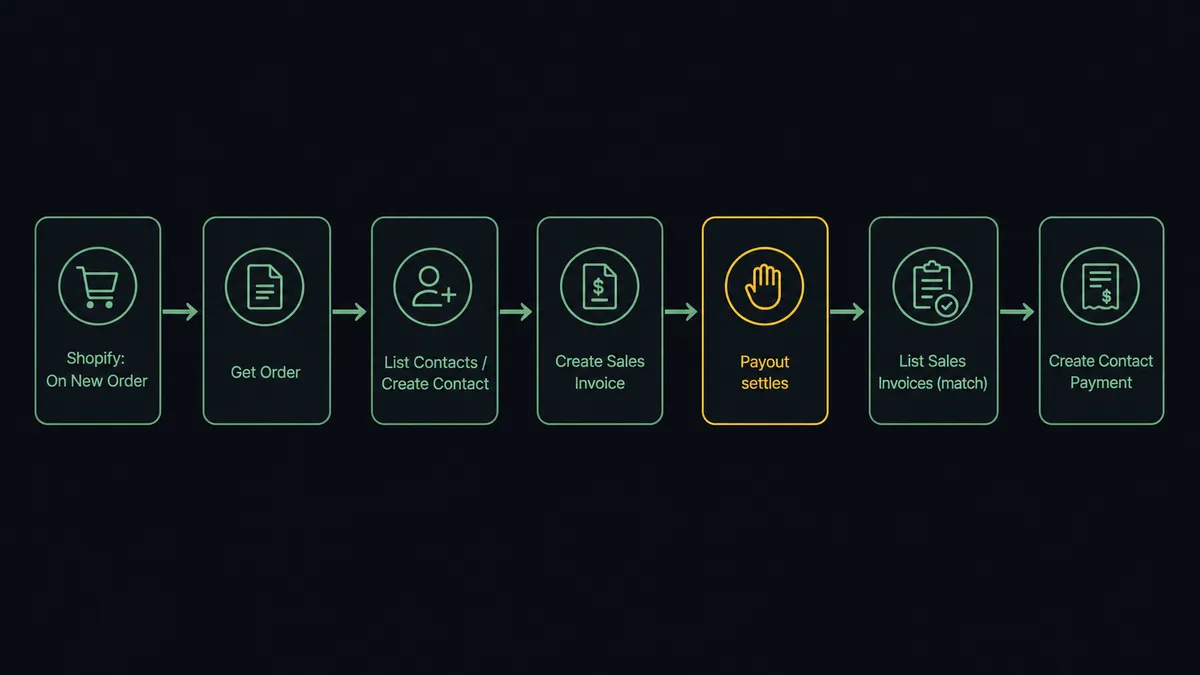
- Trigger: Shopify fires On New Order when a customer checks out.
- Read: The workflow calls Get Order to pull the full order: line items, customer, addresses, and the order total.
- Match the customer: It calls List Contacts in Sage Accounting to search for the buyer by email. If none exists, it calls Create Contact with the customer’s default sales ledger account and currency.
- Mirror the sale: It calls Create Sales Invoice with the order’s line items, resolving each ledger account with List Ledger Accounts and each tax rate with List Tax Rates. Sage returns the assigned invoice number and totals.
- Match the payout: When the Shopify payout for that order settles, the workflow calls List Sales Invoices filtered to outstanding status and matches the receipt amount to one or more open invoices.
- Record the receipt: Once the allocation is confirmed, it calls Create Contact Payment against the connected bank account, allocated across the matched invoices.
That is the “just connect them” answer. Orders become invoices, payouts become allocated receipts, and nobody keys anything by hand. Sage Accounting has no native triggers of its own, so a dispute path runs the same way from the Shopify side: On New Dispute fires, the workflow pulls the order and payout context with Get List of Disputes, and a Create Sales Credit Note draft is prepared against the matching invoice before the evidence deadline.
Can an AI agent run it? (and why a human stays in the loop)
Yes, and this is the upgrade a plain sync tool cannot offer. Instead of a fixed script that always runs the same steps in the same order, an AI agent reads the order or the payout in front of it, reasons about it, and picks the Shopify and Sage Accounting actions it needs as tools. Get Order, Create Sales Invoice, List Sales Invoices, Create Contact Payment, Create Sales Credit Note: these are the agent’s toolbox, and it chooses which to use based on the situation.
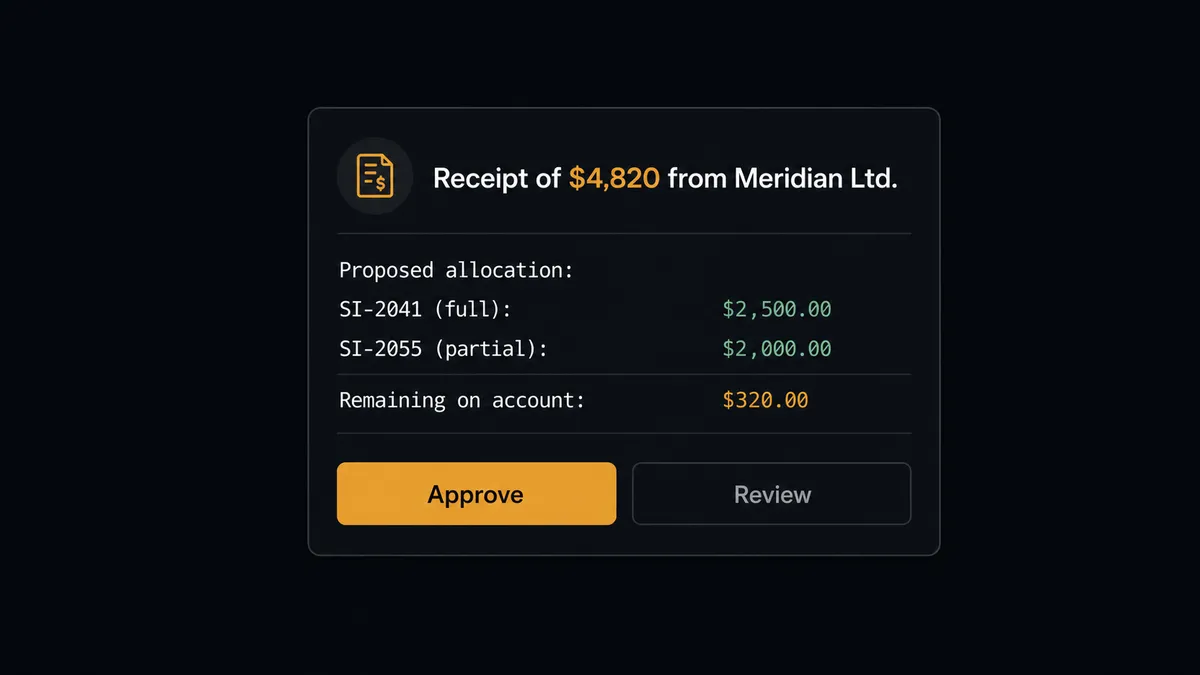
The consequential step is money touching the ledger. Sage Accounting encodes how accounting actually works: a payment is not a status flag, it is a Contact Payment allocated across specific invoices, and once that allocation posts, unwinding a wrong match means voiding and re-entering rather than editing. So the settlement agent never posts its own allocation. When a payout arrives, it gathers the context a bookkeeper would need: the receipt amount, the customer, and a proposed match against outstanding invoices with any partials or remainders flagged. Then it invokes a human-in-loop flow it holds as a callable tool. The workflow pauses and posts to the finance channel: “Receipt of $4,820 from Meridian Ltd. Proposed allocation: invoice SI-2041 in full, SI-2055 partial, $320 remaining on account. Approve?” The bookkeeper confirms or corrects in one reply. Only then does the agent call Create Contact Payment.
Here is the part a threshold rule cannot do. The agent escalates on context, not on an arbitrary dollar line. A receipt that does not cleanly match any open invoice gets pulled to a person even if the amount is small, because a wrong match tells your team a debt is settled that is not. A routine, exact-match payout against a single invoice posts on its own. This is not a sync tool. The agent knows when to stop and ask. Prospects call it a digital andon cord: like Toyota’s quality control pull cord, the workflow stops the line the moment it hits uncertainty, and your bookkeeper pulls it back into motion with one approval.
FlowRunner vs Zapier
Most non-technical teams connecting Shopify to Sage Accounting reach for Zapier first, and for good reason. Zapier has an enormous connector library, a genuinely friendly setup experience, and templates for exactly this kind of order-to-invoice sync. For a straight, one-way “new order creates an invoice” Zap, it is fast to stand up and it works. Credit where it is due.
The difference shows up at the steps that carry consequence and at scale. FlowRunner is built around native human-in-the-loop and AI-agent orchestration, where the agent decides when to pause for a person, rather than a fixed multi-step Zap. Here is the honest side-by-side.
| What matters for this pair | FlowRunner | Zapier |
|---|---|---|
| Human-in-the-loop on payment allocation | Native. The agent invokes an approval flow as a callable tool and pauses before Create Contact Payment or Create Sales Credit Note | Available via added approval steps or paths, not a native agent decision |
| Who runs the flow | An AI agent reads the order or payout, reasons, and picks actions as tools | Predefined step sequence you configure per Zap |
| Users included | Unlimited users on every tier | Priced by task volume; seats vary by plan |
| Bring your own AI keys | Yes, BYOK. Connect the AI provider key you already have | AI features tied to Zapier’s own AI offering |
| Self-hosted option | Yes, cloud-hosted or self-hosted | Cloud only |
| Pricing model | Transparent workflow-based tiers with clear execution limits | Per-task pricing that can be hard to predict as volume grows |
If all you need is a one-way Shopify to Sage Accounting push, Zapier will do it. If you want the store and the ledger in step and a bookkeeper on the allocation and refund decisions, with a full audit trail, that is where FlowRunner is the better fit.
Before and after
The numbers below come from the connectors’ own before and after data for this pair.
| Category | Before | After |
|---|---|---|
| Revenue reaching the books | Sales sit in the payment processor until someone finds a quiet afternoon to key them in | Agents create the invoice while the transaction is still fresh, the same day it settles |
| Payment allocation | Receipts pile up unmatched, and month-end becomes an archaeology of which payment covered which invoice | The agent proposes the match; the bookkeeper approves it before Create Contact Payment posts |
| Store and ledger consistency | Closed sales exist in Shopify for days before the books ever hear about them | Deals, invoices, and payments stay in step without an export ritual |
| Refund records | Refund decisions get made in DMs, then keyed in with no consistent record of who approved what | Every refund is quoted with full context and issued as a credit note only after a named approver signs off |
| Inventory drift across locations | Stock counts fall out of sync between the storefront and the warehouse feed, and oversells surface at fulfillment | Stock levels sync from the supplier feed into each location as counts change |
What you can build
Order to mirrored invoice, hands off. On New Order fires. The agent calls Get Order, matches the buyer with List Contacts or Create Contact, then mirrors the sale with Create Sales Invoice against the resolved ledger accounts and tax rates. The ledger stays current with zero manual entry.
Receipt allocation with named approval. A Shopify payout settles. The agent drafts an allocation plan against List Sales Invoices, invokes the human-in-loop tool with the proposed match, and only calls Create Contact Payment after the bookkeeper approves. Every receipt carries an approver and a timestamp.
Refund becomes a credit note. A Shopify refund is issued. The agent packages the order, amount, and reason, pauses for approval, and calls Create Sales Credit Note against the original invoice only after a person signs off, so AR reflects reality instead of lagging it.
Dispute response before the deadline. On New Dispute fires. The agent pulls the order, customer, and payout context with Get List of Disputes and posts the amount, reason, and evidence deadline to finance so a person can decide how to respond in time, with a credit note staged if the dispute is lost.
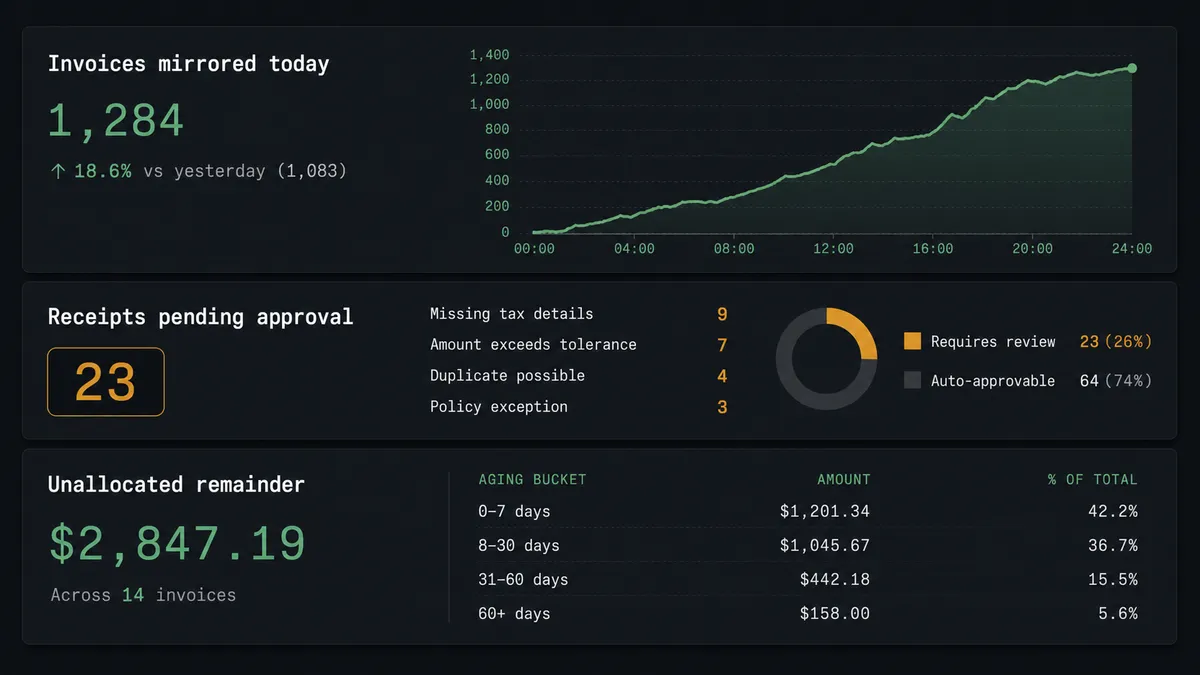
Accounts receivable digest. On a weekly schedule the agent calls List Sales Invoices filtered to outstanding statuses and List Contact Payments for the period, then posts invoices aging past terms, grouped by customer, to the finance channel so the follow-up conversation starts from current numbers.

Common questions
Is it free to connect Shopify and Sage Accounting on FlowRunner? You can build and run the connection on FlowRunner’s free plan, which includes 100 executions a month and every integration with no credit card required, and new accounts also get 14 days of Professional. Both connectors are available on every FlowRunner tier, and every tier includes unlimited users and unlimited workflows.
Can I self-host the Shopify to Sage Accounting workflow? Yes. FlowRunner offers a cloud-hosted option and a self-hosted option, so the connection can run inside your own environment. Self-hosting is available for teams that need the workflow on their own infrastructure.
Does the AI agent need my own OpenAI or Claude key? FlowRunner uses a bring-your-own-keys model, so you connect the AI provider key you already have. You are not locked to one model, and you control which provider runs the agent.
What happens when the agent is not sure about a payment allocation? The agent stops and invokes a human-in-loop step. It posts the receipt amount, the customer, and its proposed match against outstanding invoices to the channel your bookkeeper already uses, then waits for approval before it calls Create Contact Payment.
Which Shopify events can trigger a Sage Accounting action? Shopify offers six triggers: On New Order, On Order Updated, On New Customer, On Customer Updated, On New Product, and On New Dispute. On New Order and On New Dispute are the two most teams start with for accounting sync.
Can Sage Accounting itself trigger a flow? Sage Accounting exposes 49 actions but no native triggers, so Sage-side changes are picked up on a schedule using List Sales Invoices and List Contact Payments with their last-modified filters rather than a real-time webhook.
Getting started
Start on the free plan: 100 executions a month, every integration included, no credit card required, plus 14 days of Professional for new accounts. Both connectors are available on every tier, and every tier includes unlimited users and unlimited workflows.
Explore the integration details:
- Shopify integration (6 triggers and 25 actions covering orders, refunds, collections, customers, multi-location inventory, and Shopify Payments)
- Sage Accounting integration (49 actions covering contacts, sales invoices, credit notes, quotes, products, payments, and journals)
Start building free at flowrunner.ai or book a demo to see a live Shopify to Sage Accounting workflow, allocation approval and all.
Frequently asked questions
Is it free to connect Shopify and Sage Accounting on FlowRunner?
You can build and run the connection on FlowRunner's free plan, which includes 100 executions a month and every integration with no credit card required, and new accounts also get 14 days of Professional. Both connectors are available on every FlowRunner tier, and every tier includes unlimited users and unlimited workflows.
Can I self-host the Shopify to Sage Accounting workflow?
Yes. FlowRunner offers a cloud-hosted option and a self-hosted option, so the connection can run inside your own environment. Self-hosting is available for teams that need the workflow on their own infrastructure.
Does the AI agent need my own OpenAI or Claude key?
FlowRunner uses a bring-your-own-keys model, so you connect the AI provider key you already have. You are not locked to one model, and you control which provider runs the agent.
What happens when the agent is not sure about a payment allocation?
The agent stops and invokes a human-in-loop step. It posts the receipt amount, the customer, and its proposed match against outstanding invoices to the channel your bookkeeper already uses, then waits for approval before it calls Create Contact Payment.
Which Shopify events can trigger a Sage Accounting action?
Shopify offers six triggers: On New Order, On Order Updated, On New Customer, On Customer Updated, On New Product, and On New Dispute. On New Order and On New Dispute are the two most teams start with for accounting sync.
Can Sage Accounting itself trigger a flow?
Sage Accounting exposes 49 actions but no native triggers, so Sage-side changes are picked up on a schedule using List Sales Invoices and List Contact Payments with their last-modified filters rather than a real-time webhook.