Connect EasyPost to Shopify: Verified Addresses, Automatic Labels
Connect EasyPost and Shopify so a new order buys a verified shipping label automatically, with the option to run it as an AI agent that pauses for a person when an address fails verification.
How do you connect EasyPost to Shopify?
Connect EasyPost to Shopify by triggering on Shopify’s On New Order event and running EasyPost’s Verify Address, Create Shipment, and Buy Shipment actions against the order’s shipping details. FlowRunner is a visual AI-agent orchestration platform where automations run autonomously and pause for human judgment on the steps that carry real consequence, and this connection is a native example: it can run as a plain trigger-and-action sync, or the same connection can run as an AI agent that reads each order, decides whether the address is safe to ship to, and pauses for a person only when EasyPost can’t confirm the destination. Either way, no label gets bought against an address that hasn’t been verified.
The problem it solves
Right now, someone on the fulfillment team is opening the Shopify order queue, copying the ship-to address into a shipping tool by hand, and buying a label without knowing whether the address is even deliverable. A typo in an apartment number or a missing suite doesn’t surface until the package bounces back or a customer emails asking where their order went. International orders make it worse: the same person is now filling out customs declarations line by line, one order at a time, while orders back up behind them. When volume spikes, this doesn’t get faster, it gets riskier. Exceptions fall through the cracks because there’s no consistent point where a bad address gets caught before money is spent on postage.
Meanwhile, labels that get voided or go unused because an order was cancelled after the fact rarely get reclaimed. Nobody is tracking which purchased labels qualify for a refund, so that money just leaks out of the process month after month. The manual version of this workflow doesn’t scale with order volume, and it doesn’t leave a record of who verified what before a label got bought.
How it works: the connection
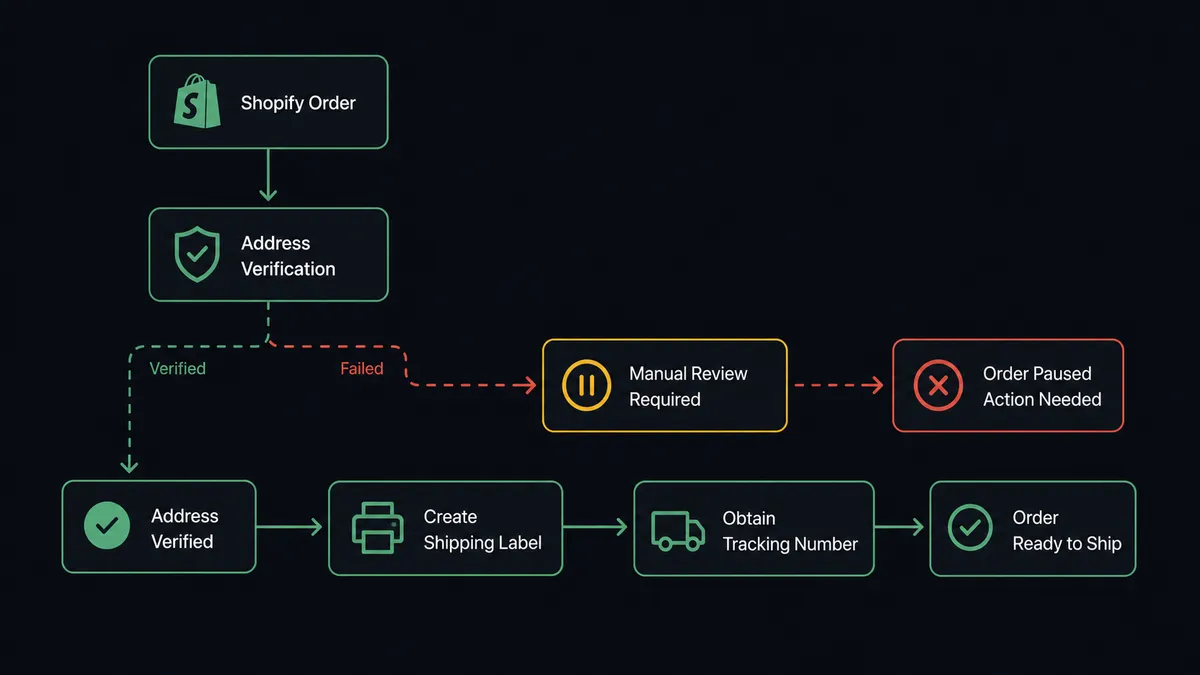
Shopify’s On New Order trigger fires the moment a customer checks out. The flow reads the order’s line items, shipping address, and parcel details directly from that event, no separate lookup required.
From there, EasyPost’s Verify Address runs against the ship-to address before anything else happens. This is the gate: a destination has to pass verification before a label gets purchased against it. For addresses that pass, Create Parcel captures the package dimensions and Create Shipment returns rate options across carriers (USPS, UPS, FedEx, DHL). Buy Shipment purchases the label against the selected rate and returns the tracking number.
For orders that ship internationally, Create Customs Info and Create Customs Item build the customs declaration inside the same flow, so the paperwork gets produced alongside the label instead of afterward by hand. Once the label is bought, the tracking number gets written back to the order and Add Tags marks it in Shopify so anyone looking at the order queue can see it’s been handled. If an order is cancelled after a label was already purchased, Refund Shipment reclaims the postage instead of letting it lapse.
Can an AI agent run it? (and why a human stays in the loop)
Yes, and this is where FlowRunner does something a plain sync tool can’t. Instead of hardcoding “if Verify Address fails, send an email,” the agent treats Verify Address, Create Shipment, and Buy Shipment as tools it chooses to use based on what it finds in the order. It reads the shipping address, decides whether it’s clean enough to proceed, and only escalates the ones that actually need a person.
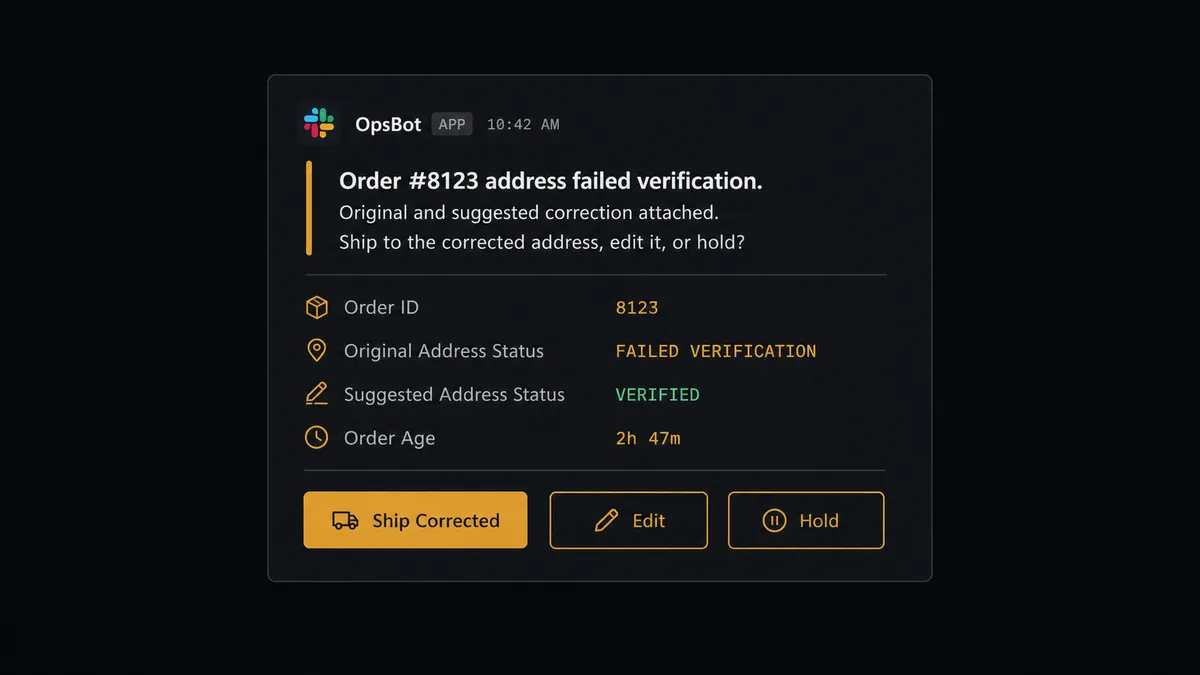
Here’s the decision moment: Verify Address comes back with a low-confidence correction on order #8123, suggesting the street number is off by one digit. A plain automation with a hardcoded rule would either ship blind or block every order that isn’t a perfect match. The agent instead reasons about the specific failure, decides this one needs a human, and invokes a human-in-loop flow as a callable tool. It posts to the fulfillment team’s Slack channel: “Order #8123 address failed verification. Original and suggested correction attached. Ship to the corrected address, edit it, or hold?” The agent packages both versions of the address and the order context, so the person deciding doesn’t have to go dig for it.
The team responds with one of three choices. On approval, the agent runs Create Shipment and Buy Shipment against the confirmed address and records who approved it, when, and what they chose. Clean addresses never touch a human at all; they flow straight through to a purchased label. This is not a sync tool quietly failing or silently shipping to a bad address. This is a digital andon cord: the agent knows when to stop and ask, and it only pulls the cord when the data actually warrants it.
The same pattern applies on the Shopify side. When a refund needs to be issued, the agent gathers the order, the amount, and the restock intent, then posts to the operations channel and waits for a named approver before it calls Create Refund. The money-movement step always has a person’s name attached to it in the audit trail.
FlowRunner vs Zapier
Zapier is a genuinely fast way to wire a Shopify trigger to an EasyPost action, and for a team that just wants “new order creates a shipment” with no exceptions handling, it does that job well. Where it runs out of road is the address failure case: Zapier can route a failed verification to a notification, but it can’t reason about whether this specific failure is worth a person’s time versus routine enough to auto-correct, and it can’t pause mid-workflow and resume exactly where it left off once a human responds.
| Capability | Zapier | FlowRunner |
|---|---|---|
| Human-in-the-loop on address failures | Send a notification; no pause-and-resume | Native: agent pauses, packages context, resumes on response |
| AI agent reasoning over the order | Not available; rule-based paths only | Agent reads the order and decides which tool to use |
| Users included | Priced per user on paid plans | Unlimited users on every tier |
| AI provider | Zapier-managed AI credits | BYOK: bring your own OpenAI or Anthropic key |
| Self-hosting | Not offered | Free Community Edition and self-hosted Enterprise |
| Pricing model | Per-task pricing that scales with volume | Transparent workflow-based tiers with a fixed execution cap |
Before and after
| Category | Before | After |
|---|---|---|
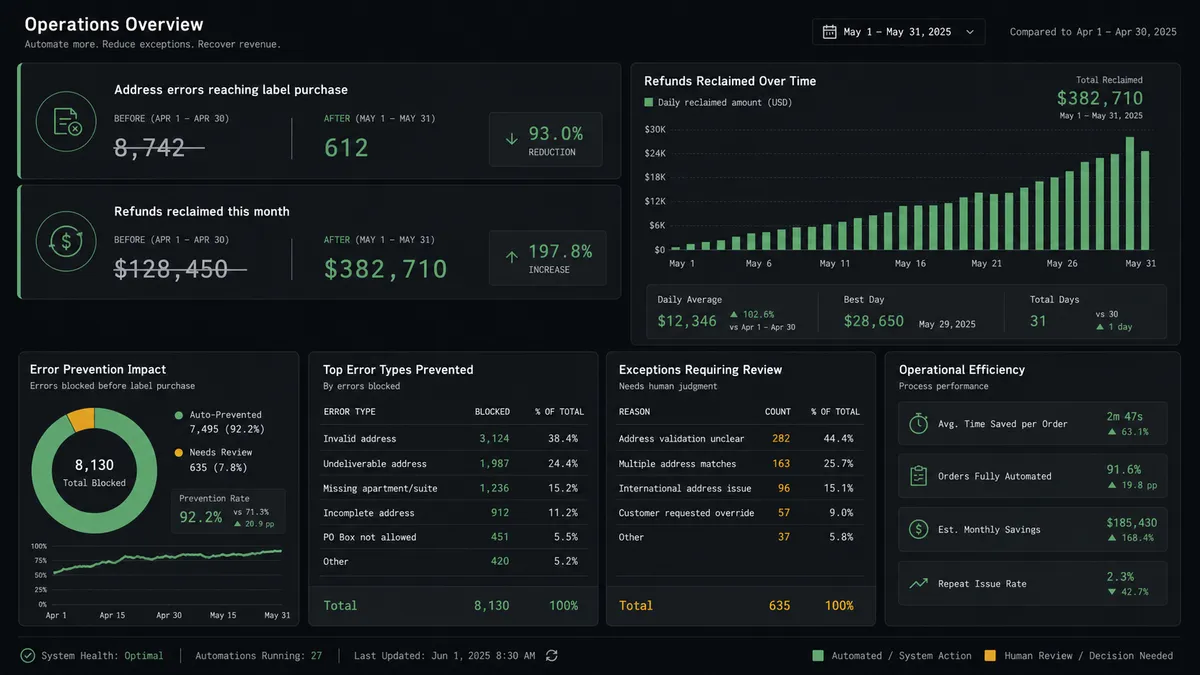
| Address errors | Labels are bought against unverified addresses and surface later as undeliverables | Verify Address runs before any label is bought, so bad destinations stop at the gate |
| Customs paperwork | International orders wait while someone fills in customs forms by hand | Create Customs Info and Create Customs Item build the declaration inside the flow |
| Unreclaimed refunds | Voided or unused labels are rarely reclaimed because nobody tracks them | Refund Shipment runs automatically on the labels that qualify |
| Order triage | New orders wait in the admin queue until someone opens the dashboard | Orders are validated, tagged, and routed the moment they are placed |
| Refund approval | Refund decisions get made in DMs with no consistent record of who approved what | Every refund is quoted with full context and issued only after a named approver signs off |
What you can build
Order-to-label with address gating. Every new Shopify order runs through Verify Address before EasyPost buys a label, so bad destinations get caught before postage is spent instead of after the package bounces.
International orders with customs built in. Cross-border Shopify orders trigger Create Customs Info and Create Customs Item alongside Create and Buy Shipment, so the label and the customs paperwork come out of the same flow.
Cancelled-order refund recovery. When a Shopify order is cancelled after its label was already purchased, the agent calls Refund Shipment to reclaim the postage instead of letting it lapse unnoticed.
Fraud-and-address dual gate. The agent checks the order against fraud signals and the high-value threshold at the same time it checks the address, so a single Slack message can cover both a hold-for-fraud and a hold-for-address decision when they land together.
Dispute response with shipping context. When Shopify fires On New Dispute, the agent pulls the order and its EasyPost tracking history into the evidence packet it sends to finance, so the person responding to the dispute has the full delivery record on hand.
Common questions
Is it free to connect EasyPost and Shopify on FlowRunner? Yes. FlowRunner has a free plan with 100 executions a month, every integration included, and no credit card required, and new accounts get 14 days of Professional on top.
Do I need to know how to code to set this up? No. The connection is built visually by choosing the Shopify trigger and the EasyPost actions from a list, with no scripting or API keys to manage by hand.
Can I self-host this workflow instead of using FlowRunner’s cloud? Yes. FlowRunner offers a free Community Edition for self-hosting and a self-hosted Enterprise tier with full compliance features for teams that need the workflow to run on their own infrastructure.
Does the AI agent need my own OpenAI key? Yes. FlowRunner uses a Bring Your Own Keys model, so the agent runs on the AI provider and API key you choose rather than a shared or hidden model.
What happens when the agent isn’t sure whether to buy a label? It stops. When Verify Address returns a failure or a low-confidence correction, the agent pauses the order, posts the original and suggested address to the fulfillment team, and waits for a person to approve, edit, or hold before any label is purchased.
Can the same flow also handle Shopify refunds? Yes. A parallel human-in-loop gate can sit in front of Create Refund in Shopify, so a named approver signs off on the amount before the agent issues the refund.
Getting started
Start on the free plan: 100 executions a month, every integration included, no credit card required, plus 14 days of Professional for new accounts. Connect your EasyPost account and your Shopify store, choose On New Order as the trigger, and build the flow from Verify Address through Buy Shipment with the human-in-loop step in between.
Go to flowrunner.ai to start building, or book time at calendly.com/flowrunner/intro to walk through this exact connection with the team.
Frequently asked questions
Is it free to connect EasyPost and Shopify on FlowRunner?
Yes. FlowRunner has a free plan with 100 executions a month, every integration included, and no credit card required, and new accounts get 14 days of Professional on top.
Do I need to know how to code to set this up?
No. The connection is built visually by choosing the Shopify trigger and the EasyPost actions from a list, with no scripting or API keys to manage by hand.
Can I self-host this workflow instead of using FlowRunner's cloud?
Yes. FlowRunner offers a free Community Edition for self-hosting and a self-hosted Enterprise tier with full compliance features for teams that need the workflow to run on their own infrastructure.
Does the AI agent need my own OpenAI key?
Yes. FlowRunner uses a Bring Your Own Keys model, so the agent runs on the AI provider and API key you choose rather than a shared or hidden model.
What happens when the agent isn't sure whether to buy a label?
It stops. When Verify Address returns a failure or a low-confidence correction, the agent pauses the order, posts the original and suggested address to the fulfillment team, and waits for a person to approve, edit, or hold before any label is purchased.
Can the same flow also handle Shopify refunds?
Yes. A parallel human-in-loop gate can sit in front of Create Refund in Shopify, so a named approver signs off on the amount before the agent issues the refund.