Connect Sentry to Linear: Every Error Becomes One Tracked Issue
Connect Sentry and Linear so new errors become tracked issues automatically, with an AI agent that checks for duplicates first and pauses for a triage lead when a match is unclear.
How do you connect Sentry to Linear?
A scheduled flow runs List Issues in Sentry to pull new unresolved errors, and the agent turns each one into either a comment on an existing Linear issue or a new one, decided by a Search Issues check in Linear first. FlowRunner is a visual AI-agent orchestration platform where automations run autonomously and pause for human judgment on the steps that carry real consequence. The same connection can run as a simple sync, or as an AI agent that reasons about each alert and pauses for a triage lead when it can’t tell whether an issue already exists.
The problem it solves
An engineering team on Sentry generates errors faster than anyone can triage them by hand. A new unresolved issue shows up, someone on call has to decide: is this a known problem that already has a Linear ticket, or something new that needs to be filed? Most teams solve this by having whoever is on call check Sentry, search Linear manually, and file a ticket if nothing looks close enough. That works until the backlog gets busy. Alerts get filed twice because nobody had time to search first. Or they don’t get filed at all because the engineer assumed someone else already handled it.
The result is a Linear backlog that either has duplicate issues for the same root cause, cluttering sprint planning, or missing issues because an alert fell through the cracks during a busy on-call week. Either way, someone spends time later untangling it: merging duplicate tickets, or digging through Sentry to reconstruct what happened on an error nobody tracked. That’s manual work that scales with error volume, not with headcount.
How it works: the connection
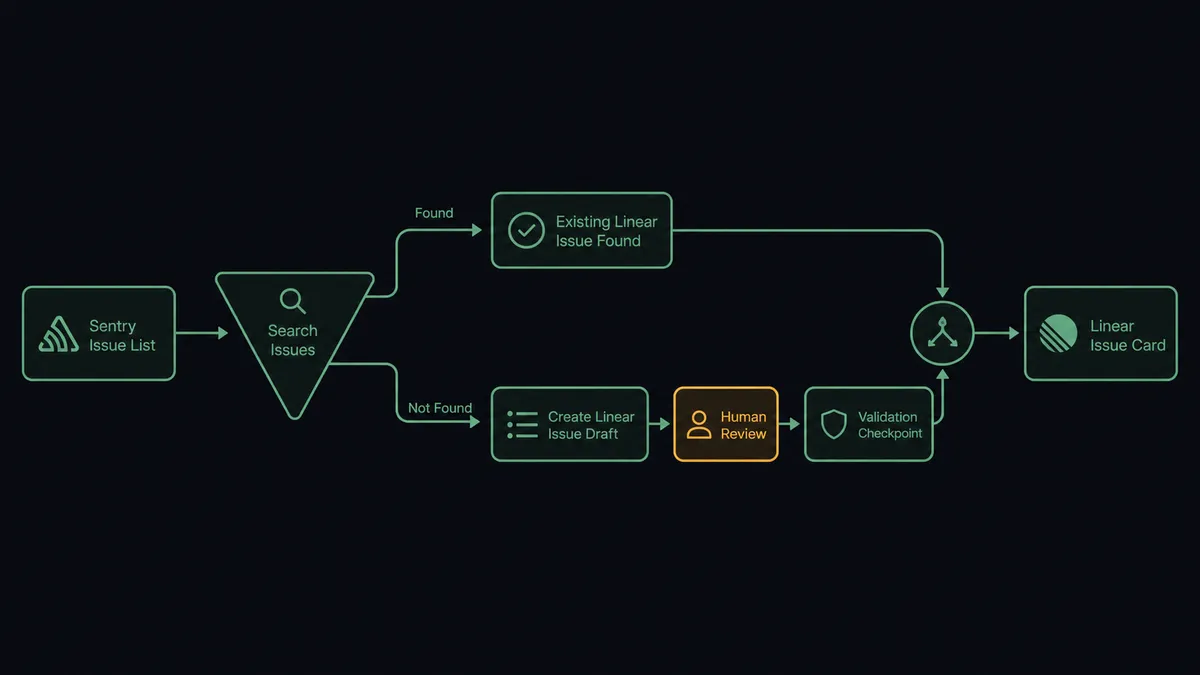
The flow starts on a schedule rather than a native webhook, because Sentry doesn’t expose a trigger in FlowRunner. A scheduled flow calls List Issues with an is:unresolved filter, which surfaces the errors that showed up since the last run. For each one, the agent reads the issue’s title, culprit, and event count, which is enough context to work with without pulling the full stack trace.
Before creating anything, the agent calls Search Issues in Linear to check whether a matching open issue already exists for that component or error signature. If Search Issues returns a clear match, the agent calls Create Comment on that existing issue with the new occurrence, so the ticket’s history shows the error is still happening without spawning a duplicate. If nothing close comes back, the agent has a candidate for a new ticket, but it doesn’t file it yet. That’s the gate.
Can an AI agent run it? (and why a human stays in the loop)
This isn’t a one-way sync that files a ticket for every alert and lets duplicates pile up for someone to clean up later. The agent reasons about each alert before it acts. When Search Issues comes back with a strong match, the agent handles it alone: Create Comment, done, no person involved. When the match is ambiguous, the agent stops.
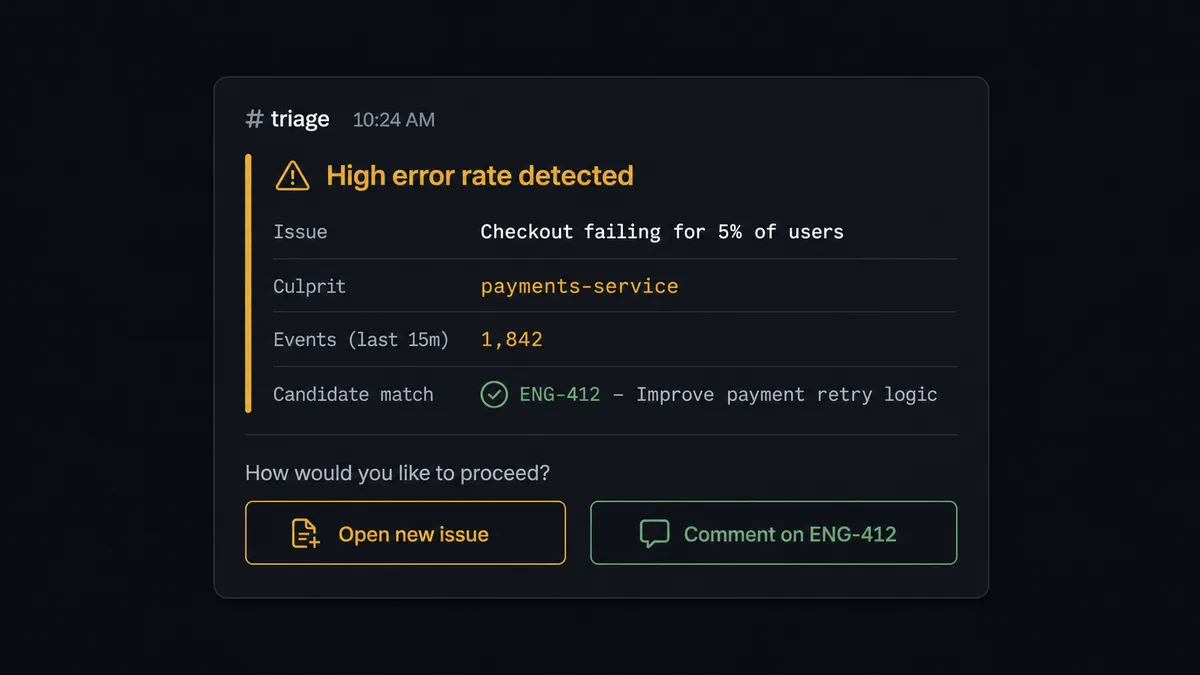
Here’s the decision moment. The agent finds an alert about a timeout in the billing service. Search Issues returns one candidate, ENG-412, an older ticket about a different timeout in the same service, filed three weeks ago. The stack trace overlaps but isn’t identical. The agent doesn’t guess. It posts to the triage channel: “This alert may match issue ENG-412 or may be new. Open a new issue, or comment on ENG-412?” It includes the Sentry issue’s culprit, event count, and a link to ENG-412 so the triage lead has full context without switching tools. A triage lead picks one. Only after that reply does the agent call Create Issue or Create Comment.
The same discipline shows up on the Sentry side of the flow. If the agent’s triage rules flag issues that look like stale test noise, it doesn’t delete them. It posts the candidates to the engineering channel with their event history and asks an engineer to confirm the list, because Delete Issue is permanent and removes every event under it. This is not a sync tool. The agent knows when to stop and ask, and it packages the exact context a person needs to answer in one message instead of asking them to go dig for it.
FlowRunner vs n8n
n8n is a strong choice for developer teams that want deep, self-hosted control over their automations, and its library of nodes for both Sentry-style monitoring tools and Linear-style trackers is extensive. If your team already has engineers comfortable writing custom JavaScript nodes and maintaining their own instance, n8n gives you that flexibility natively.
Where FlowRunner differs is what happens at the decision point. In n8n, an “if unsure, ask a human” branch is something you wire yourself with an IF node and a manual webhook or wait step, built and maintained per workflow. In FlowRunner, human-in-loop is a callable tool the agent invokes based on its own reasoning about the alert, not a hardcoded branch you have to design in advance for every ambiguous case.
| Dimension | FlowRunner | n8n |
|---|---|---|
| Human-in-loop | Native: a callable tool the agent invokes based on context | Not built in: assembled per workflow from IF nodes and wait steps |
| Users included | Unlimited on every tier | Priced by tier, self-hosted Business adds cost for more seats |
| AI provider keys | BYOK, bring your own model and key | Supports custom nodes and API calls, but no native agent-with-tools layer |
| Self-hosting | Enterprise self-hosted option available | Native self-hosted, fair-code license |
| Pricing model | Transparent workflow-based tiers with clear execution limits | Execution-based pricing that can be hard to predict at scale |
Before and after
| Category | Before | After |
|---|---|---|
| Issue backlog noise | Unresolved Sentry issues pile up faster than anyone triages them | The agent resolves, ignores, and assigns issues that match clear rules |
| Duplicate tickets | Every alert opens a fresh Linear issue, so the backlog fills with repeats | The agent searches for a match before it proposes a new issue |
| Manual dedup work | Someone scans the backlog later to find and merge duplicates | Dedup happens before creation, not after |
| Ambiguous cases | An engineer guesses whether an alert is new or a repeat | A triage lead confirms the borderline cases with full context in one message |
| Deletion risk | Someone deletes issues in bulk and loses events they later needed | Permanent deletes wait for an engineer to confirm the list |
What you can build
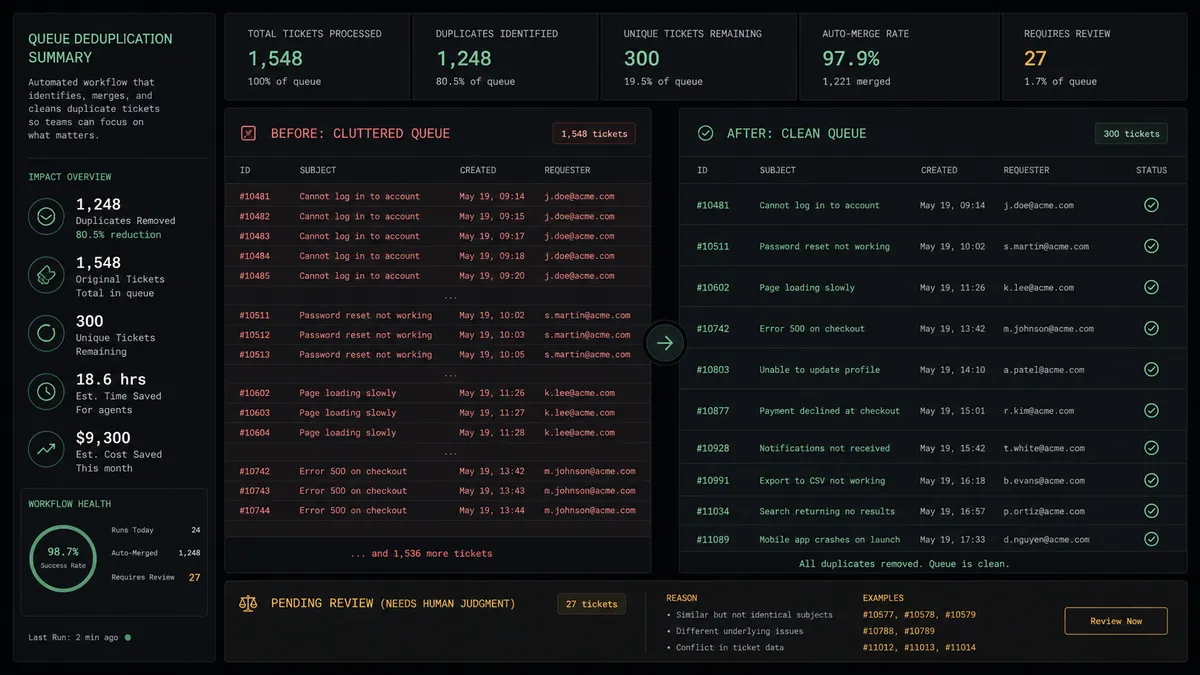
Alert-to-issue with a dedup gate. New Sentry errors become Linear issues, but only after the agent checks Search Issues for a match, so the backlog stays free of duplicate tickets for the same root cause.
Critical error escalation. When a new critical issue shows up in Sentry, the agent posts to the team channel with a link to the issue, so a serious error reaches the people who watch that channel with context attached instead of waiting for the next triage pass.
Release-linked ticket tracking. After a deploy flow calls Create Release and Create Deploy in Sentry, any resulting Linear issues carry the release version in their description, so a ticket is traceable back to the deploy that introduced it.
Status feedback loop. The On Linear Event trigger fires when an issue moves to a Done state, and the agent can post a summary back to the original alert thread, closing the loop from error to fix without anyone checking Linear by hand.
Common questions
Is it free to connect Sentry and Linear on FlowRunner? FlowRunner has a free plan with 100 executions a month, every integration included, and no credit card required, and new accounts get 14 days of Professional on top.
Can I use this with self-hosted Sentry? Yes. Sentry’s connector supports self-hosted instances by pointing at your own instance URL, so the trigger flow works the same whether you run Sentry Cloud or host it yourself.
Does the AI agent need my own OpenAI key? FlowRunner uses a bring-your-own-key model for AI providers, so the agent runs on the key and model you choose rather than a fixed FlowRunner-owned model.
What happens when the agent isn’t sure whether an alert matches an existing Linear issue? It stops. The agent posts the alert and a proposed new issue to the triage channel and asks a person to confirm before it calls Create Issue, instead of guessing and risking a duplicate or a lost signal.
Can the agent delete Sentry issues on its own? No. Delete Issue is permanent in Sentry, so the agent only proposes deletions and waits for an engineer to confirm the list before it deletes anything.
Getting started
FlowRunner has a free plan with 100 executions a month, every integration included, and no credit card required, and new accounts get 14 days of Professional on top. Build the dedup gate and the triage escalation step yourself in minutes, or book a walkthrough and we’ll help you set it up. Start at flowrunner.ai.
Frequently asked questions
Is it free to connect Sentry and Linear on FlowRunner?
FlowRunner has a free plan with 100 executions a month, every integration included, and no credit card required, and new accounts get 14 days of Professional on top.
Can I use this with self-hosted Sentry?
Yes. Sentry's connector supports self-hosted instances by pointing at your own instance URL, so the trigger flow works the same whether you run Sentry Cloud or host it yourself.
Does the AI agent need my own OpenAI key?
FlowRunner uses a bring-your-own-key model for AI providers, so the agent runs on the key and model you choose rather than a fixed FlowRunner-owned model.
What happens when the agent isn't sure whether an alert matches an existing Linear issue?
It stops. The agent posts the alert and a proposed new issue to the triage channel and asks a person to confirm before it calls Create Issue, instead of guessing and risking a duplicate or a lost signal.
Can the agent delete Sentry issues on its own?
No. Delete Issue is permanent in Sentry, so the agent only proposes deletions and waits for an engineer to confirm the list before it deletes anything.