Send GitHub Issues to Linear Without Duplicate Tickets
Connect GitHub and Linear so new issues sync automatically, with an AI agent that checks for duplicates and pauses for a human on ambiguous matches.
How do you connect GitHub to Linear?
Connect GitHub’s On Issue Opened trigger to Linear’s Create Issue action, with Search Issues run first as a duplicate check. Every time a new issue lands in a watched GitHub repository, the flow reads the issue details, checks Linear for a matching ticket, and either comments on the existing one or files a new one. FlowRunner is a visual AI-agent orchestration platform where automations run autonomously and pause for human judgment on the steps that carry real consequence. The same connection can run as a straight sync, or as an AI agent that reasons about ambiguous matches and pauses for a human before it creates a ticket that might duplicate one already in the backlog.
The problem it solves
An engineering manager or a support lead ends up bridging GitHub and Linear by hand. A customer bug gets filed as a GitHub issue by an engineer, and someone has to remember to also open a Linear ticket, tag the right team, set a priority, and link it back. When a pull request merges, someone has to remember to close or update the corresponding ticket too, or it sits in “In Progress” for a week after the fix already shipped. Multiply this across a team filing a dozen issues a day and the backlog drifts out of sync with what’s actually true in GitHub.
The manual version also produces duplicates. Two engineers file the same bug from two different angles, or a support agent forwards a monitoring alert as a new issue without checking whether it already exists. Someone has to scan the backlog later and merge the repeats, which is exactly the kind of cleanup work that eats a Monday morning and never shows up as “real” work.
How it works: the connection
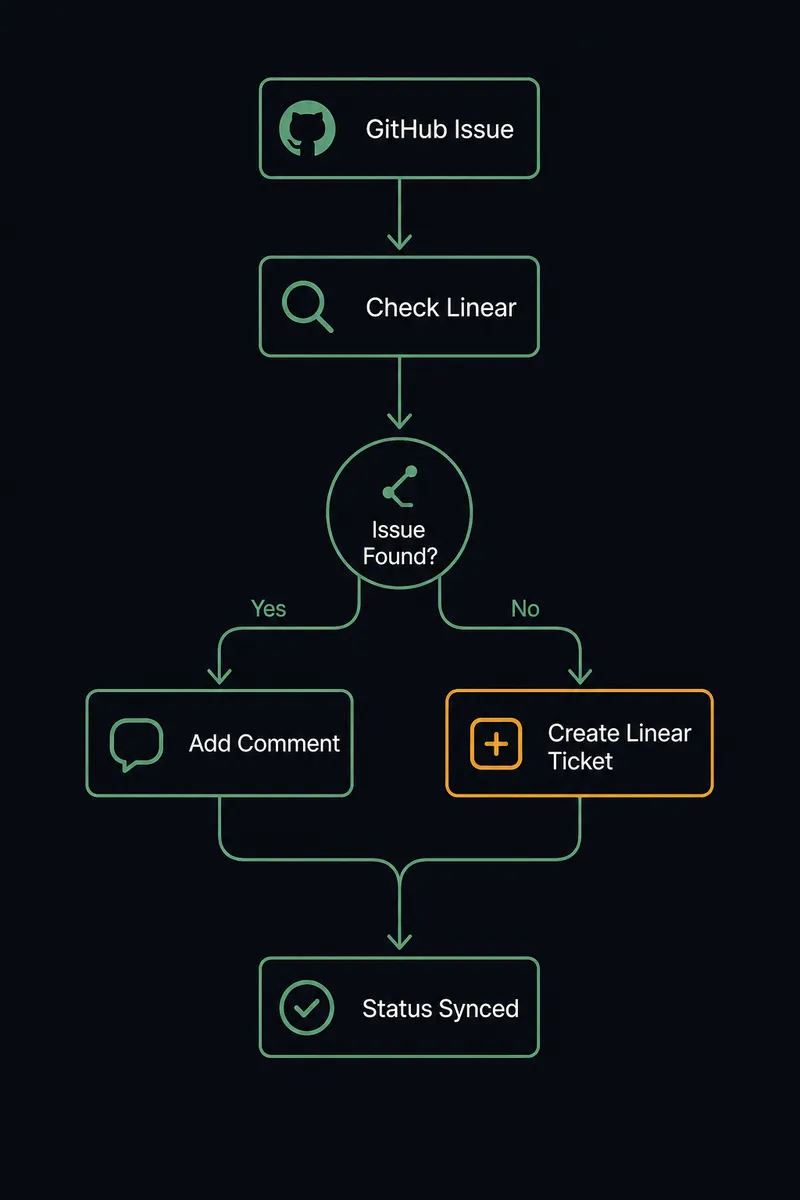
The flow starts on GitHub’s On Issue Opened trigger, which fires the moment a new issue is opened in a watched repository. The agent reads the issue title, body, author, and the component it touches. Before creating anything on the Linear side, it calls Search Issues against the workspace to check whether a matching ticket already exists.
If Search Issues returns a clear match, the agent calls Create Comment on the existing Linear issue, adding the new occurrence as a note rather than opening a duplicate. If no match exists, the agent calls Create Issue on the right team, setting title, description, priority, and labels from the GitHub issue’s content. The reverse direction closes the loop: when the linked pull request merges in GitHub, the agent calls Update Issue in Linear to move the ticket to a Done state, so status in Linear reflects what actually shipped without anyone opening GitHub to check.
Can an AI agent run it? (and why a human stays in the loop)
Yes, and this is the step where FlowRunner differs from a plain sync tool. The agent doesn’t just move data from GitHub to Linear on a fixed mapping. It reads the incoming issue, calls Search Issues as a tool, and reasons about whether the result is a confident match or a coin flip. A near-identical title on an issue closed two sprints ago is not the same call as an open issue with matching error text filed yesterday. The agent treats these differently because it evaluates context, not a hardcoded string match.
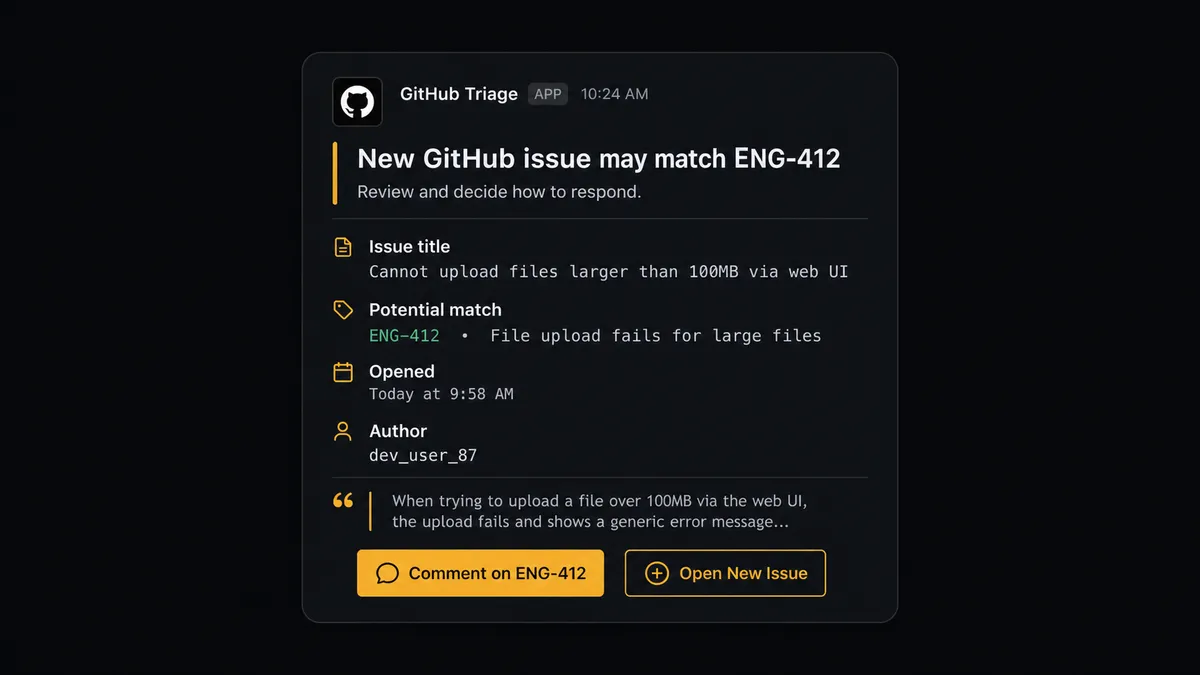
When the match is unclear, the agent invokes a human-in-loop flow as a callable tool, the same way it calls Create Issue or Search Issues. It posts the GitHub issue and its own proposed Linear ticket to a triage channel in Slack: “This issue may match ENG-412, or it may be new. Comment on ENG-412, or open a new ticket?” A triage lead picks one. The agent resumes with that decision, executes the corresponding action, and records the decision, the decider’s identity, and the timestamp in the audit trail. This is not a sync tool with an if-then branch. The agent knows when to stop and ask, and the threshold isn’t fixed at “confidence below 80%,” it’s a judgment call the agent makes the same way a person triaging the backlog would.
FlowRunner vs n8n
n8n is a strong fit for technical teams. It has deep GitHub and Linear nodes, a large library of community workflows, and engineers who already think in JSON and expressions will feel at home in it fast. That’s a genuine strength, not a strawman.
Where the two diverge is what happens at the duplicate-detection step above. In n8n, building that decision requires wiring an IF node, a manual Slack-message node, and a wait-for-webhook step to resume the workflow, all hand-built and hand-maintained. In FlowRunner, the agent calls the human-in-loop flow as a tool the same way it calls any integration action, and the escalation logic is the agent’s own reasoning, not a chain of conditional nodes someone has to keep updating as edge cases pile up.
| Capability | FlowRunner | n8n |
|---|---|---|
| Human-in-loop escalation | Native: the agent invokes a human-in-loop flow as a callable tool based on its own judgment | Built by hand with IF nodes and wait steps; no built-in escalation reasoning |
| AI agent tool use | Agent calls GitHub and Linear actions as tools inside one reasoning loop | LangChain-based agent nodes added onto the workflow canvas |
| Users included | Unlimited on every tier, including Growth at $45/mo | Seat-based limits on lower tiers |
| Compliance and audit trail | Built into Professional at $299/mo: 30-day audit trails and RBAC | Full audit retention and SSO live in a custom-priced Enterprise tier |
| Pricing model | Transparent workflow-based tiers with a hard execution cap | Per-execution pricing that gets harder to predict as workflows scale |
Before and after
| Category | Before | After |
|---|---|---|
| Duplicate tickets | Every GitHub bug report opens a fresh Linear issue, so the backlog fills with repeats | The agent searches Linear before proposing a new ticket, so duplicates get caught at the source |
| Manual triage time | Someone scans the backlog later to find and merge duplicates | A triage lead only sees the genuinely ambiguous cases, in one Slack message |
| Ticket status drift | Linear tickets sit in “In Progress” after the fix already merged in GitHub | Update Issue fires on merge, so status reflects what actually shipped |
| Cross-system visibility | Status lives in separate GitHub tabs and Linear boards, with no single record | PR events, dedup checks, and status changes flow through one auditable workflow |
What you can build
Bug-to-ticket pipeline. On Issue Opened in GitHub triggers a Search Issues dedup check in Linear, with Create Issue or Create Comment as the outcome, so support-reported bugs never fork into duplicate tracking.
Merge-to-Done sync. When Merge Pull Request runs in GitHub, the agent calls Update Issue in Linear to close out the linked ticket automatically, keeping the backlog honest without a manual status update.
Release digest to the backlog. On Release Published in GitHub, the agent calls List Workflow Runs to confirm the release pipeline passed, then posts a Create Comment update on every Linear issue tagged for that release.
Backlog import from a planning doc. A workflow reads a list of prioritized work and calls Create Issue in Linear for each row, resolving team, priority, and labels via List Teams and List Labels first.
Getting started
FlowRunner has a free plan with 100 executions a month, every integration included, and no credit card required, and new accounts get 14 days of Professional on top. Connect GitHub and Linear, pick the trigger that matches your team’s workflow, and add the human-in-loop step where the ambiguous calls belong. Start at flowrunner.ai, or book a walkthrough at calendly.com/flowrunner/intro.
Frequently asked questions
Is it free to connect GitHub and Linear on FlowRunner?
FlowRunner has a free plan with 100 executions a month, every integration included, and no credit card required, and new accounts get 14 days of Professional on top. Beyond the free plan, Growth is $45/mo for 12,000 executions with unlimited users and workflows.
Can I self-host the GitHub to Linear connection?
Yes. The Community Edition is free for a single self-hosted instance, and the Enterprise tier adds multi-instance clustering with the full compliance suite for teams that need on-prem deployment.
Does the agent need my own OpenAI key?
FlowRunner uses a bring-your-own-key model for AI providers, so you connect the provider you already use, whether that's Anthropic, OpenAI, or another model vendor, and the agent runs on your key.
What happens when the agent isn't sure whether a GitHub issue duplicates an existing Linear ticket?
The agent stops before creating anything. It posts the GitHub issue and its proposed Linear ticket to a triage channel and waits for a person to confirm whether it's a new issue or a comment on an existing one.
Can the same flow update Linear when a linked GitHub pull request merges?
Yes. The agent calls Update Issue in Linear to move the status to Done once the linked pull request merges, so stakeholders see progress without opening GitHub.
Is this trigger webhook-based or does it poll GitHub?
It's webhook-based. On Issue Opened fires the moment a new issue lands in a watched repository, so the Linear sync starts within seconds, not on a polling interval.