How to Connect Sentry with Slack (With or Without an AI Agent)
Connect Sentry to Slack so error alerts and triage decisions move through one channel, optionally as an AI agent that resolves issues by rule and pauses for human confirmation on any delete that cannot be undone.
How do you connect Sentry to Slack?
You connect Sentry to Slack in FlowRunner by using the List Issues action as the data source and Send Message to Channel as the delivery mechanism: a scheduled flow lists unresolved Sentry issues, the agent triages them by rule, and exceptions land in your engineering channel as structured Slack messages with the full issue context attached. FlowRunner is a visual AI-agent orchestration platform where automations run autonomously and pause for human judgment on the steps that carry real consequence. That same connection runs as an AI agent that resolves, ignores, and assigns issues on its own but stops at the deletion gate and asks an engineer to confirm before calling Delete Issue.
The problem it solves
Every engineering team knows the backlog growth problem. Issues accumulate in Sentry faster than anyone triages them. An engineer sits down in the morning, sees 200 unresolved issues, and spends the first hour of the day sorting through noise instead of building. The ones that actually need attention fall through the cracks. Critical errors sit next to stale test failures from six months ago. Routing decisions get made inconsistently depending on who happens to look first.
Manual cleanup makes it worse. Someone bulk-deletes a set of issues that looked like noise, and a week later realizes those events had the stack trace that explained a production regression. Slack fills with one-off pings. Issues get assigned to the wrong team. Release context gets lost because nobody recorded the deploy in Sentry after shipping. The tooling is there. The automation connecting them is not.
How it works: the connection
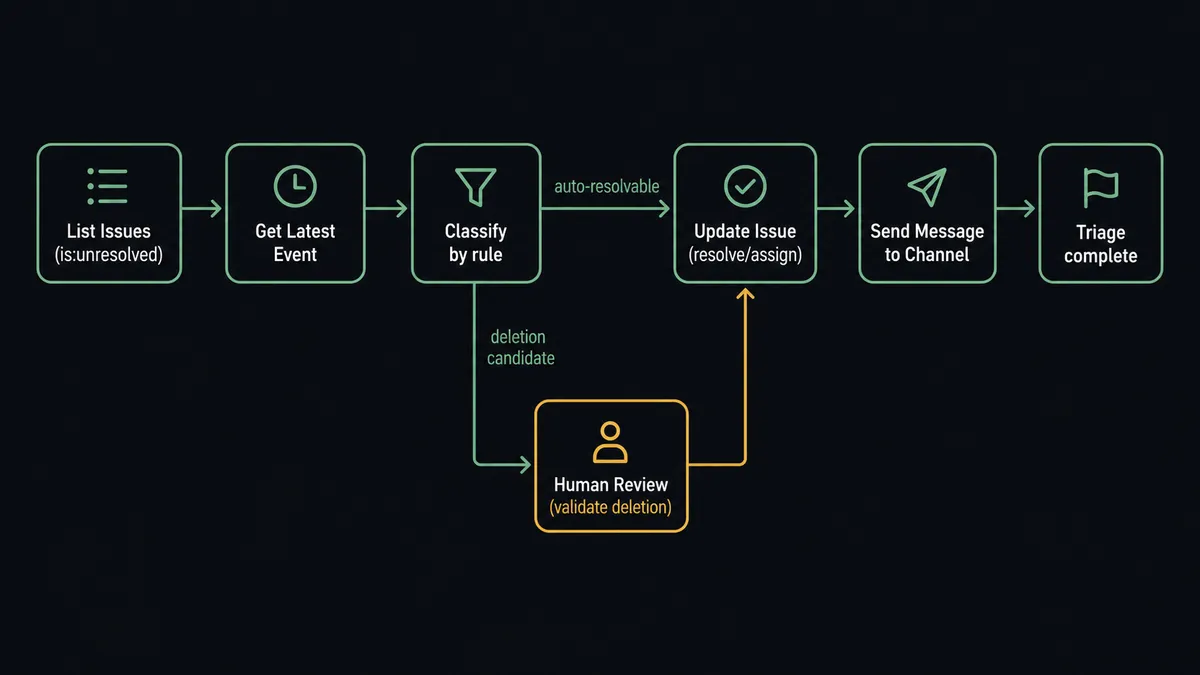
FlowRunner connects Sentry and Slack directly through their APIs. Here is how the basic connection flows:
- A scheduled flow triggers on your chosen cadence, typically nightly or every few hours.
- List Issues queries your Sentry project with an is:unresolved filter, returning new issues with their titles, culprits, and event counts.
- Get Latest Event pulls the freshest stack trace for issues the agent flags as critical.
- The agent classifies each issue using your triage rules: known-noise patterns get an Update Issue call to ignore or resolve them, owner-matched bugs get assigned by rule, and new critical issues get routed immediately.
- Send Message to Channel posts a formatted alert to your engineering Slack channel with the issue title, event count, severity, and a direct link to the Sentry issue page.
- For release tracking, Create Release and Create Deploy fire after your CI/CD flow completes, so Sentry ties errors to the version that introduced them.
The Sentry connector works with self-hosted Sentry instances. Point it at your instance URL during setup and authenticate with your auth token. Every action is built against the Sentry API, so named fields like project slug, issue ID, assignee, and environment map directly.
Can an AI agent run it? (And why a human stays in the loop)
A basic Sentry-to-Slack connection sends alerts. An AI agent in FlowRunner triages the underlying issues before they become alerts. That is a different category of work.
The agent reads each issue from List Issues: the title, culprit module, event count, and the latest stack trace from Get Latest Event. It applies your triage instructions to classify the issue. Known test-environment noise gets resolved automatically via Update Issue. Issues that match an owner pattern get assigned to the right team. New production-surface bugs with high event counts get escalated immediately via Send Message to Channel to your on-call engineer via Send Direct Message.
The deletion gate is where the human-in-loop moment lives. Resolving and ignoring are reversible. Deleting an issue removes it and every event attached to it, permanently. The agent does not make that call alone.
When the agent’s classification flags a set of issues as stale test noise that a human would ordinarily delete, it assembles a Slack message: the issue titles, event counts, first occurrence dates, and a note on why each looks deletable. It posts this to your engineering channel via Send Message to Channel with two interactive buttons per issue: Confirm Delete and Skip. It does not call Delete Issue yet.
An engineer reviews the list. They might confirm three items and skip one that looks stale but matches a pattern they recognize. Each button click fires the On Block Action trigger. The agent resumes with the confirmed list and calls Delete Issue only for the approved items. The engineer’s Slack identity, the timestamp of their response, and the decision itself are captured in the audit trail.
This is not an arbitrary threshold. The agent does not say “if event count is less than 5, propose deletion.” It reads the issue context. It considers whether the culprit module looks like a test fixture. It factors in the last seen date and whether the issue is linked to a known resolved release. The same issue might get auto-resolved in one context and flagged for deletion review in another, based on what the agent finds.
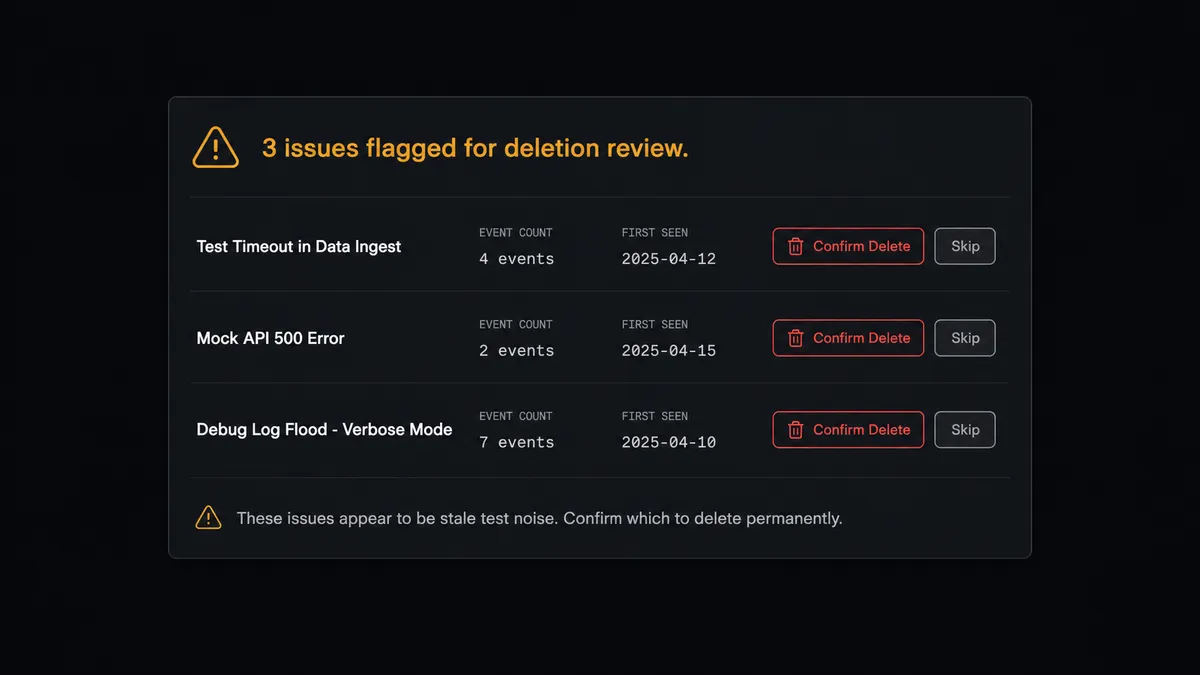
Prospects call this the “digital andon cord”: like Toyota’s quality control pull cord, FlowRunner stops the line when the agent hits a decision that should belong to a person. The agent keeps the backlog moving. A person owns the step that cannot be walked back.
FlowRunner vs Zapier (The tool you’re probably comparing)
Zapier is a solid choice for straightforward alert routing. If your goal is “new Sentry issue fires a Slack message,” Zapier handles that in minutes with no configuration overhead.
The gap shows up when the workflow needs to reason, not just relay.
| Feature | Zapier | FlowRunner |
|---|---|---|
| Alert routing (trigger fires, Slack message sends) | Yes, fast to set up | Yes |
| Classify issues by rule before notifying | No, triggers send all or filtered by static field | Yes, agent applies reasoning per issue |
| Human-in-loop with interactive buttons | No native support | Yes, On Block Action resumes the flow |
| Irreversible action gate (Delete Issue) | No, must configure separately | Yes, agent holds delete until human confirms |
| Unlimited users and workflows | Per-seat pricing | All tiers, including Growth at $45/mo |
| Self-host option | No | Yes, Community Edition free |
Zapier is a good connector tool. FlowRunner is an orchestration layer. If the workflow needs decisions, branching, human confirmation on consequential steps, and an audit trail that captures who decided what and when, that is where they diverge.
Before and after
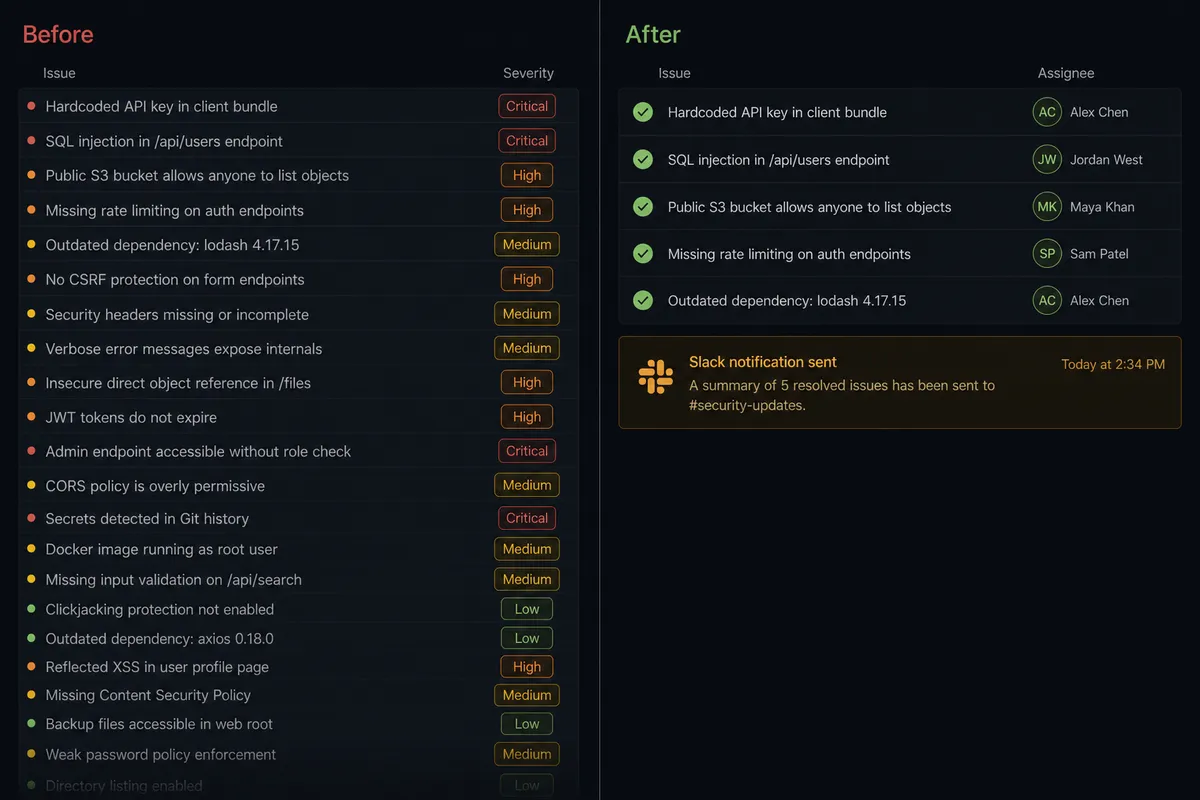
| Metric | Before | After |
|---|---|---|
| Daily triage time | Engineer spends 45-60 minutes each morning sorting new issues manually | Agent handles classify, resolve, and assign automatically on schedule |
| Backlog noise | Unresolved issues accumulate faster than any individual triages them | Known-noise issues get resolved or ignored by rule, clearing the queue |
| Critical error response | Critical errors sit in the queue until someone reads them | Agent escalates via Send Direct Message within minutes of detection |
| Deletion risk | Bulk deletes lose event history that teams later need | Delete Issue runs only after engineer confirms via Slack |
| Release context | Errors disconnected from deploys; hard to trace which version introduced them | Create Release and Create Deploy record every deploy automatically |
What you can build
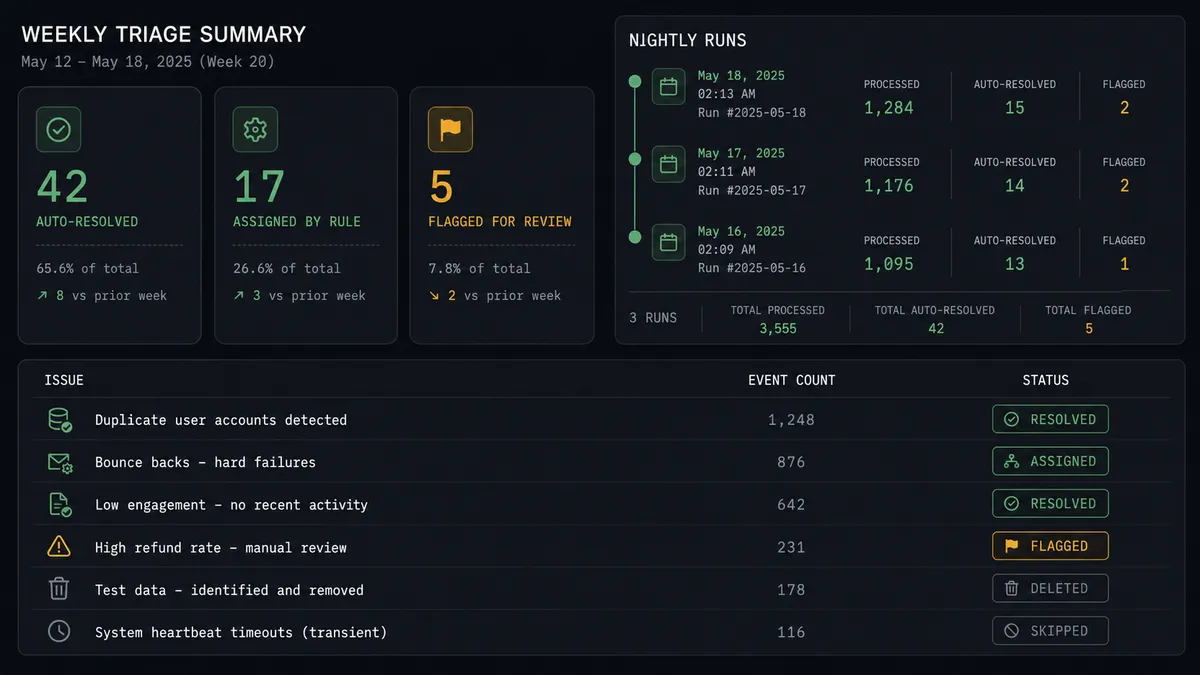
Automated nightly triage with escalation to on-call A scheduled flow runs List Issues at midnight, the agent classifies the queue, resolves and assigns what it can, and sends a morning summary to #engineering via Send Message to Channel. Critical new issues trigger a Send Direct Message to the on-call engineer immediately.
Deletion gate with full context The agent flags stale issues based on event count, culprit module, and last seen date. It posts a confirmation card to the engineering channel via Send Message to Channel with issue details and Confirm Delete buttons. The On Block Action trigger captures the engineer’s response and routes it back to the Delete Issue call.
Release-error correlation pipeline After a CI/CD deploy, the agent calls Create Release and Create Deploy so Sentry associates any new issues with the right version. If List Issues surfaces new errors within an hour of the deploy, the agent sends a formatted alert to #deploys via Send Message to Channel with the release version and error count.
On-demand triage via Slack mention An engineer types a mention in the engineering channel to trigger the triage flow. The On Mention trigger fires a flow that calls List Issues, classifies the current queue, and posts a structured summary back in the thread. The engineer gets a snapshot of the backlog state without opening Sentry.
New critical error to incident channel When List Issues detects an issue with severity above a configured threshold, the agent creates a private incident channel via Create Private Channel, invites the responsible team members via Invite User to Channel, and posts the full issue detail including the latest stack trace from Get Latest Event. The incident workspace exists before anyone has to go looking for a place to coordinate.
Common questions
Is it free to connect Sentry and Slack on FlowRunner? FlowRunner has a free plan with 100 executions a month, every integration included, and no credit card required, and new accounts get 14 days of Professional on top. Beyond the free plan, Growth starts at $45 per month. All tiers include unlimited users and workflows.
Can I self-host FlowRunner? Yes. FlowRunner offers a self-hosted Community Edition at no cost for a single instance, and an Enterprise self-hosted option with multi-instance clustering and full compliance features.
Does the agent need my own OpenAI or Claude key? FlowRunner uses a bring-your-own-keys model. You supply the API key for whichever AI provider you choose. FlowRunner orchestrates the agent; it does not own or bill for your model usage.
What happens when the agent is not sure whether to delete an issue? The agent posts the candidate issues to a designated Slack channel with their event counts and a confirmation prompt. It does not call Delete Issue until an engineer responds. The decision and the responder’s identity are captured in the audit trail.
Can I use FlowRunner with a self-hosted Sentry instance? Yes. The Sentry connector supports self-hosted Sentry. Point it at your instance URL during setup and authenticate with your auth token.
What Slack triggers can kick off the Sentry workflow? You can start a Sentry triage flow from an On Mention in Slack, an On Channel Message in a designated ops channel, or on a schedule. The On Block Action trigger is what resumes the flow after an engineer confirms or rejects a deletion.
Getting started
FlowRunner has a free plan with 100 executions a month, every integration included, and no credit card required, and new accounts get 14 days of Professional on top.
Set up both integrations from the FlowRunner connections page:
- Sentry integration - connect via auth token, supports self-hosted
- Slack integration - connect via OAuth2, multi-workspace ready
Start a trial at flowrunner.ai or book a walkthrough at calendly.com/flowrunner/intro. The walkthrough covers the full triage flow, deletion gate, and how to configure the On Block Action trigger for your team’s approval pattern.
Frequently asked questions
Is it free to connect Sentry and Slack on FlowRunner?
FlowRunner has a free plan with 100 executions a month, every integration included, and no credit card required, and new accounts get 14 days of Professional on top. Beyond the free plan, Growth starts at $45 per month. All tiers include unlimited users and workflows.
Can I self-host FlowRunner?
Yes. FlowRunner offers a self-hosted Community Edition at no cost for a single instance, and an Enterprise self-hosted option with multi-instance clustering and full compliance features.
Does the agent need my own OpenAI or Claude key?
FlowRunner uses a bring-your-own-keys model. You supply the API key for whichever AI provider you choose. FlowRunner orchestrates the agent; it does not own or bill for your model usage.
What happens when the agent is not sure whether to delete an issue?
The agent posts the candidate issues to a designated Slack channel with their event counts and a confirmation prompt. It does not call Delete Issue until an engineer responds. The decision and the responder's identity are captured in the audit trail.
Can I use FlowRunner with a self-hosted Sentry instance?
Yes. The Sentry connector supports self-hosted Sentry. Point it at your instance URL during setup and authenticate with your auth token.
What Slack triggers can kick off the Sentry workflow?
You can start a Sentry triage flow from an On Mention in Slack, an On Channel Message in a designated ops channel, or on a schedule. The On Block Action trigger is what resumes the flow after an engineer confirms or rejects a deletion.