Perplexity Notion Integration: Cited Research, Reviewed Pages
Connect Perplexity and Notion in FlowRunner so Sonar-grounded, cited research briefs land as reviewed Notion pages automatically, with a human confirming sources before anything goes into the team's knowledge base.
How do you connect Perplexity to Notion?
In FlowRunner, a scheduled or on-demand trigger starts the flow, Perplexity’s Ask or Chat Completion (Advanced) action returns a web-grounded answer with live citations, and Notion’s Create Page and Append Block Children actions write that answer into a structured page as formatted content blocks. FlowRunner is a visual AI-agent orchestration platform where automations run autonomously and pause for human judgment on the steps that carry real consequence. That same connection runs as an AI agent that decides when a brief needs a human to confirm the sources before it lands in the team’s knowledge base.
The problem it solves
Research today lives in whatever tool the analyst had open. Someone opens a dozen browser tabs, reads through search results, copies quotes into a doc, and tries to remember which link supported which claim. By the time the brief reaches a deal team, a leadership meeting, or a client, half the sourcing has been lost and nobody can trace a specific number back to where it came from. Ask the analyst to double-check a claim from three weeks ago and you get a shrug, not a link.
Even when the research gets written down, it scatters. A market brief lands in a personal notes app. A due diligence finding lives in a spreadsheet one person updates by hand. A decision made on a Slack thread has no searchable record once the thread scrolls past. Ops leads lose visibility into what the team actually found and why a call was made, and nothing consistently makes it back into the shared workspace the rest of the company already uses.
How it works: the connection
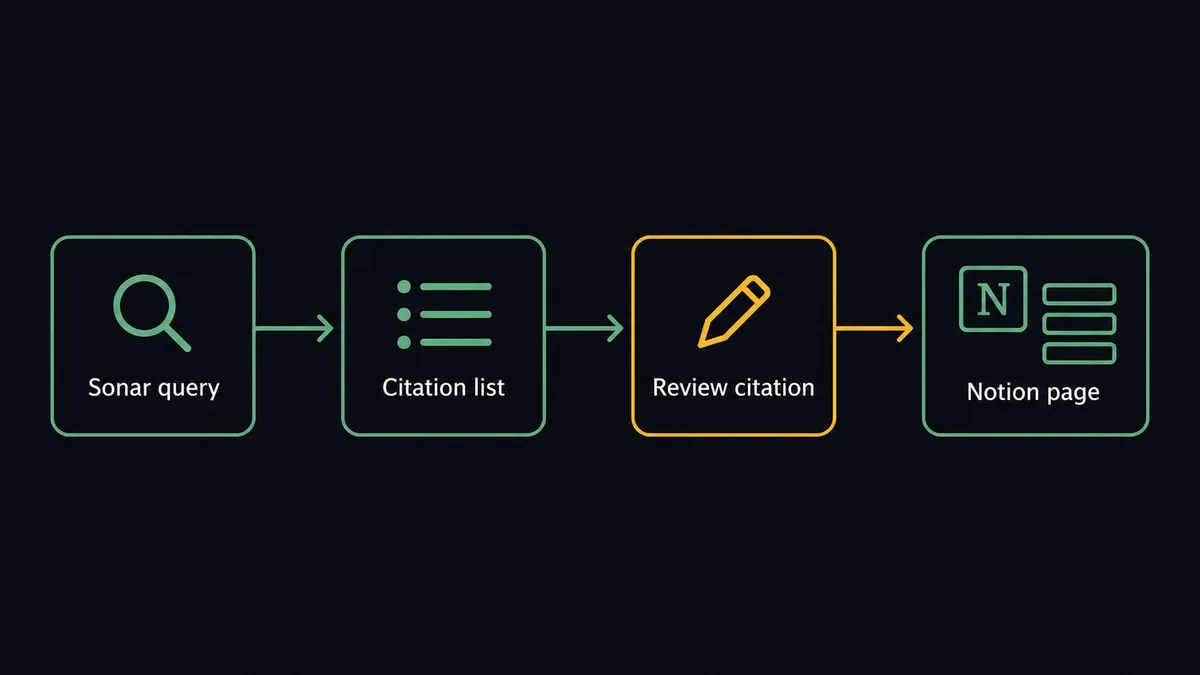
The flow starts with a topic, not a manual search. A FlowRunner trigger, either scheduled to run against a standing list of topics or fired on demand when someone submits a request, kicks off the run. Perplexity’s Ask action (or Chat Completion (Advanced) for control over search mode, recency filters, and domain restrictions) queries Sonar and returns an answer generated from live web sources along with its citation list, not a model answering from memory.
From there, Notion’s actions turn that answer into a document instead of a chat log. Find Page by Title checks whether a page on this topic already exists, so a follow-up research pass updates the existing brief instead of creating a duplicate. Create Page (or Find or Create Database Item for a structured research database) adds the brief with the topic, date, and status as page properties. Append Block Children then writes the summary, key findings, and full citation list into the page as formatted content blocks, the same way an analyst would format the doc by hand, just faster and without the copy-paste.
Can an AI agent run it? (and why a human stays in the loop)
A sync tool would stop at “answer generated, page created.” An AI agent does more: it reads the answer, checks that every cited source actually resolves and is recent, and reasons about who the brief is for before deciding what happens next. If the research is for internal use by the same analyst who asked, it moves straight to Notion. If the brief will drive a decision, get shared with a client, or reach anyone outside the research team, the agent treats that as the consequential step and invokes a human-in-loop flow as a callable tool, not because a rule told it to, but because it evaluated the situation and judged that a person needs to see it first.
When it escalates, the agent packages the full context: the generated answer, every citation link, and the reason it flagged the brief (for example, “sources conflict on the reported valuation” or “this is going to the client tomorrow”). It sends that package to the analyst by Slack or email with Confirm and Edit options. The workflow pauses there. The analyst checks the sources, confirms or edits the answer, and the agent resumes, writing the confirmed version to Notion and logging the reviewer’s identity and timestamp in the audit trail.
This is the digital andon cord: the agent doesn’t stop the line for every request, only for the ones where an unverified answer would carry real risk. It is not a sync tool. The agent knows when to stop and ask.

FlowRunner vs Zapier
Zapier is a fast, reliable way to move data between apps, and for teams that just need “when X happens in one app, do Y in another,” it does that job well with a huge library of pre-built app connections. For a straight Perplexity-to-Notion sync, Zapier can trigger an action and drop text into a Notion page without much setup.
Where it runs out of road is the judgment step. Zapier’s AI features sit on top of its trigger-action model as another action to run; they don’t reason about the data or decide, mid-run, that a specific answer needs a person to look at it before it moves forward. That decision has to be built by hand as a rigid filter, or skipped entirely.
| FlowRunner | Zapier | |
|---|---|---|
| Human-in-the-loop | Native: the agent decides when to escalate and packages full context for the reviewer | Not native: approval steps are manual filters, not agent judgment |
| AI agent reasoning | Agent reads the answer, checks sources, and chooses the next action as a tool call | AI features run as a fixed step, not an autonomous decision-maker |
| Users included | Unlimited users and workflows on every tier | Per-user pricing on paid plans |
| AI provider keys | BYOK: your own Perplexity API key, your usage, your billing | Zapier-managed AI credits with usage caps |
| Self-hosting | Free Community Edition, plus an Enterprise self-hosted option | Cloud only |
| Pricing model | Transparent workflow-based tiers with a clear execution ceiling | Task-based pricing that can be hard to predict at scale |
Before and after
| Metric | Before | After |
|---|---|---|
| Research to documented brief | An analyst opens a dozen tabs and copies notes by hand | Sourced brief lands in Notion, ready for review, within minutes of the request |
| Source verification | A generated answer with no way to check where it came from | Every claim carries a linked citation the analyst can click and confirm |
| Currency of information | A model answering from training data that can be stale | Answers built from what is on the web right now |
| Duplicate research | The same topic gets re-researched because nobody remembers the last pass | Find Page by Title updates the existing brief instead of creating a copy |
| Decision audit trail | Escalation calls made over Slack leave no searchable record | Every human decision logged as a Notion comment with reviewer and timestamp |
What you can build
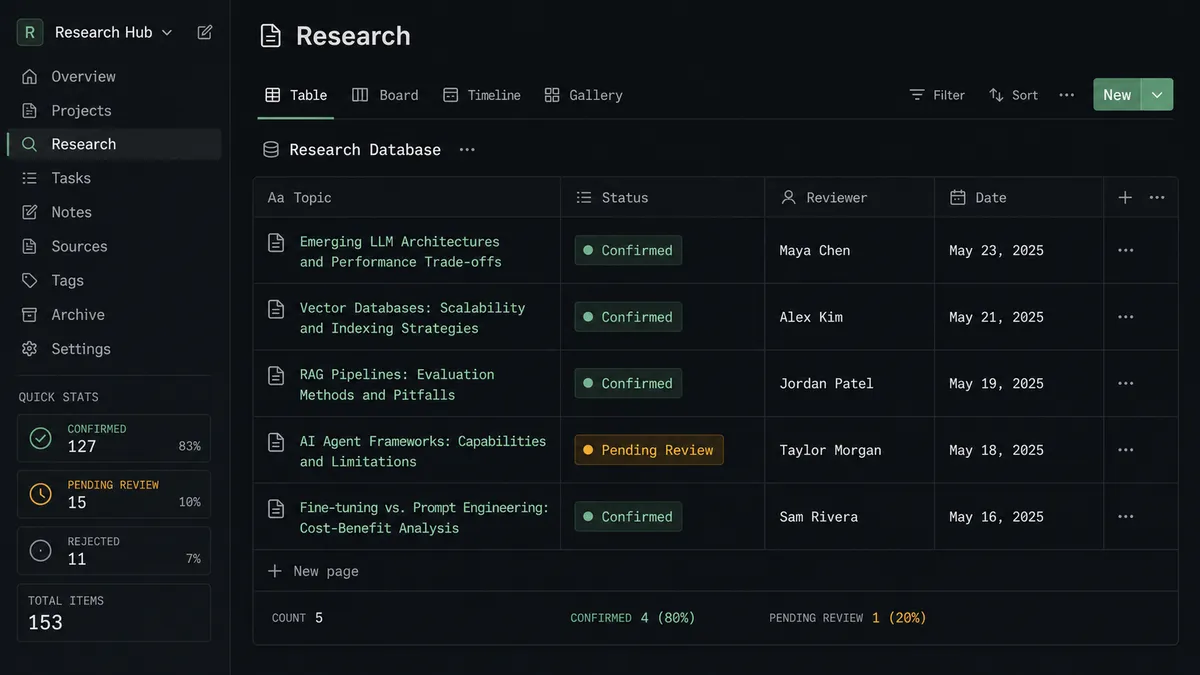
Daily market brief digest. A Scheduled Trigger runs Perplexity’s Ask action against a standing list of markets or competitors each morning, and confirmed briefs land as new pages in a Notion Research database before the team’s first meeting.
Due diligence knowledge base. As documents move through a review pipeline, the agent uses Perplexity to research flagged claims and Notion’s Create Database Item action to log each finding, source, and risk level, giving the deal team a live database instead of a shared spreadsheet.
Client-facing answer review. Any answer generated with the Agent API that is headed to a client gets routed through the human-in-loop step before Append Block Children writes it to the shared workspace, so nothing customer-facing goes out unverified.
Searchable escalation log. Every time the agent invokes human-in-loop, Create Comment records the decision on the relevant Notion page, building a decision history the ops lead can search without touching the raw FlowRunner audit trail.
Common questions
Is it free to connect Perplexity and Notion on FlowRunner? FlowRunner has a free plan with 100 executions a month, every integration included, and no credit card required, and new accounts get 14 days of Professional on top. Both the Perplexity connector (BYOK, your own Perplexity API key) and the Notion connector (OAuth2) are included on every tier.
Do I need my own Perplexity API key? Yes. FlowRunner uses a BYOK model for AI providers, so you connect your own Perplexity API key in the FlowRunner credentials vault. Your Perplexity usage and billing stay on your own account.
Can I self-host FlowRunner? Yes. FlowRunner offers a free Community Edition for self-hosted single-instance deployments and an Enterprise self-hosted tier with multi-instance clustering and full compliance features. Contact the team for Enterprise self-hosted pricing.
What happens when the agent isn’t sure a source is reliable? The agent invokes a human-in-loop flow as a callable tool. It pauses the workflow, posts the draft brief with every citation link to the analyst, and waits for a decision before writing anything to Notion. The decision, the decider’s identity, and the timestamp are captured in the audit trail.
Does this create duplicate pages in Notion if the same topic comes up twice? No. The agent uses Notion’s Find Page by Title action to check for an existing page before creating a new one, so repeat research on the same topic updates the existing brief instead of duplicating it.
Can the same connection log human decisions, not just research? Yes. Every time the agent escalates a brief for review, it can use Notion’s Create Comment action to record who approved it and when, turning Notion into a searchable decision log alongside the research itself.
Getting started
FlowRunner has a free plan with 100 executions a month, every integration included, and no credit card required, and new accounts get 14 days of Professional on top. Start at flowrunner.ai or book a walkthrough at calendly.com/flowrunner/intro to see the human-in-loop step configured against your own research workflow.
Frequently asked questions
Is it free to connect Perplexity and Notion on FlowRunner?
FlowRunner has a free plan with 100 executions a month, every integration included, and no credit card required, and new accounts get 14 days of Professional on top. Both the Perplexity connector (BYOK, your own Perplexity API key) and the Notion connector (OAuth2) are included on every tier.
Do I need my own Perplexity API key?
Yes. FlowRunner uses a BYOK model for AI providers, so you connect your own Perplexity API key in the FlowRunner credentials vault. Your Perplexity usage and billing stay on your own account.
Can I self-host FlowRunner?
Yes. FlowRunner offers a free Community Edition for self-hosted single-instance deployments and an Enterprise self-hosted tier with multi-instance clustering and full compliance features. Contact the team for Enterprise self-hosted pricing.
What happens when the agent isn't sure a source is reliable?
The agent invokes a human-in-loop flow as a callable tool. It pauses the workflow, posts the draft brief with every citation link to the analyst, and waits for a decision before writing anything to Notion. The decision, the decider's identity, and the timestamp are captured in the audit trail.
Does this create duplicate pages in Notion if the same topic comes up twice?
No. The agent uses Notion's Find Page by Title action to check for an existing page before creating a new one, so repeat research on the same topic updates the existing brief instead of duplicating it.
Can the same connection log human decisions, not just research?
Yes. Every time the agent escalates a brief for review, it can use Notion's Create Comment action to record who approved it and when, turning Notion into a searchable decision log alongside the research itself.