Log Deepgram Call Transcripts in Notion Automatically
Connect Deepgram call transcripts to Notion pages automatically, and run it as an AI agent that pauses for a CS lead before a flagged call gets its save play decided.
How do you connect Deepgram to Notion?
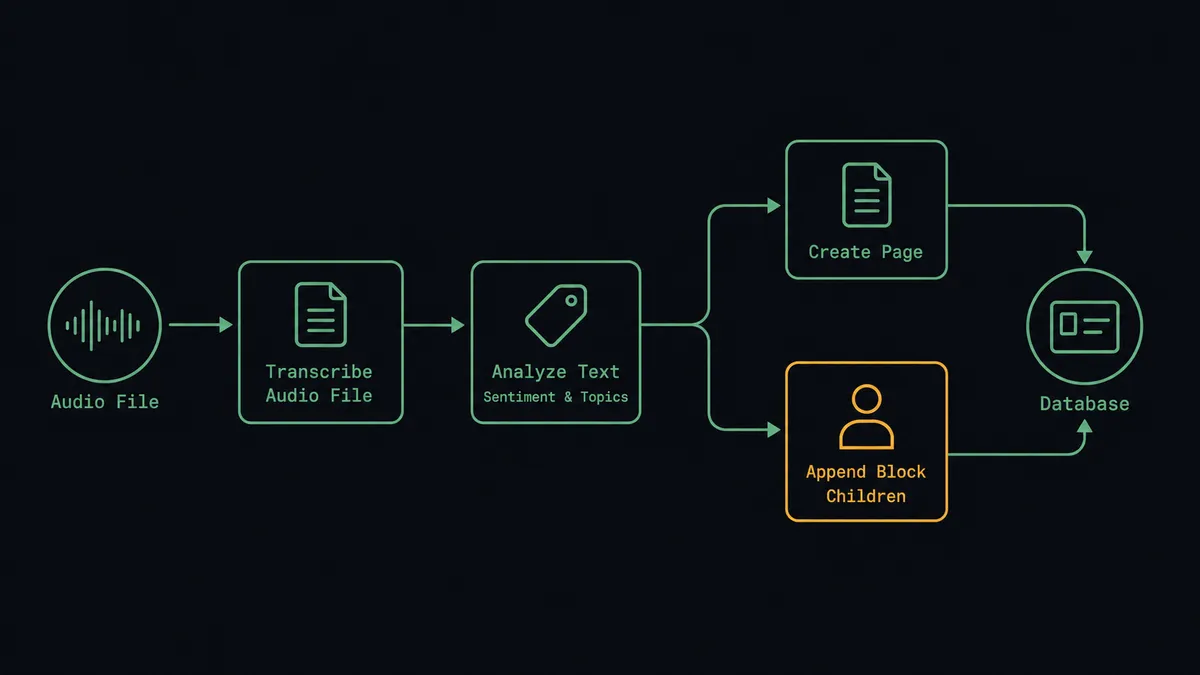
When a new call recording lands in file storage, FlowRunner runs Deepgram’s Transcribe Audio File with diarization and summarization enabled, scores the transcript with Analyze Text for sentiment and intent, then calls Create Page and Append Block Children in Notion to document the call with a summary, key topics, and action items. FlowRunner is a visual AI-agent orchestration platform where automations run autonomously and pause for human judgment on the steps that carry real consequence. The same connection can run as a straightforward transcribe-and-document sync, or it can run as an AI agent that also reads the sentiment score and pauses for a CS lead before a flagged call gets its save play decided.
The problem it solves
A support or CS team running on recorded calls usually treats those recordings as insurance, not information. Calls get stored because someone requires it, not because anyone plans to listen back, so the actual signal, a customer explaining why they’re about to cancel, sits inside an audio file nobody opens unless a complaint already escalated through a different channel. The notes that do exist live wherever the rep happened to type them: a personal doc, a half-finished Slack message, sometimes nothing at all, and the next person who needs context on that account starts from zero.
The other half of the problem is that a spreadsheet or someone’s memory is the only thing standing between a save-able customer and a lost one. Cancellation intent and negative sentiment show up in a call the same way whether it’s a small account or a large one, and unless a person happens to be paying close attention on that specific call, the warning never surfaces until the account is already gone. By the time someone pulls the recording to understand what happened, there’s no save play left to run, only a postmortem.
How it works: the connection
The flow starts when a new call recording lands in file storage, from the phone system directly or pulled in from Google Drive. Deepgram’s Transcribe Audio File runs against it with diarization and summarization enabled, so the output isn’t a wall of text but a speaker-labeled transcript with a summary already attached: who said what, and what the call was actually about. Analyze Text then scores that transcript for sentiment and intent, tagging the topics it covers and flagging language that reads as frustration, a billing dispute, or cancellation intent.
From there the agent turns to Notion. It calls Create Page in the Deals or Meetings database with the account name and call date as page properties, then Append Block Children to add the formatted content: the summary, the key topics Analyze Text detected, and the action items pulled out of the conversation. The page is live in Notion, in the database the team already works from, typically within two minutes of the call ending. For the calls that raise no flags, that’s the whole flow: transcribed, documented, done.
Can an AI agent run it? (and why a human stays in the loop)
Yes, and this is the half of the flow that a scheduled sync can’t do. A basic sync transcribes and files every call the same way, on the same rules, regardless of what’s actually in them. An AI agent reads the sentiment score and the topic tags Analyze Text returned, weighs them against what a routine call looks like, and decides for itself whether this one needs a person before the flow finishes.
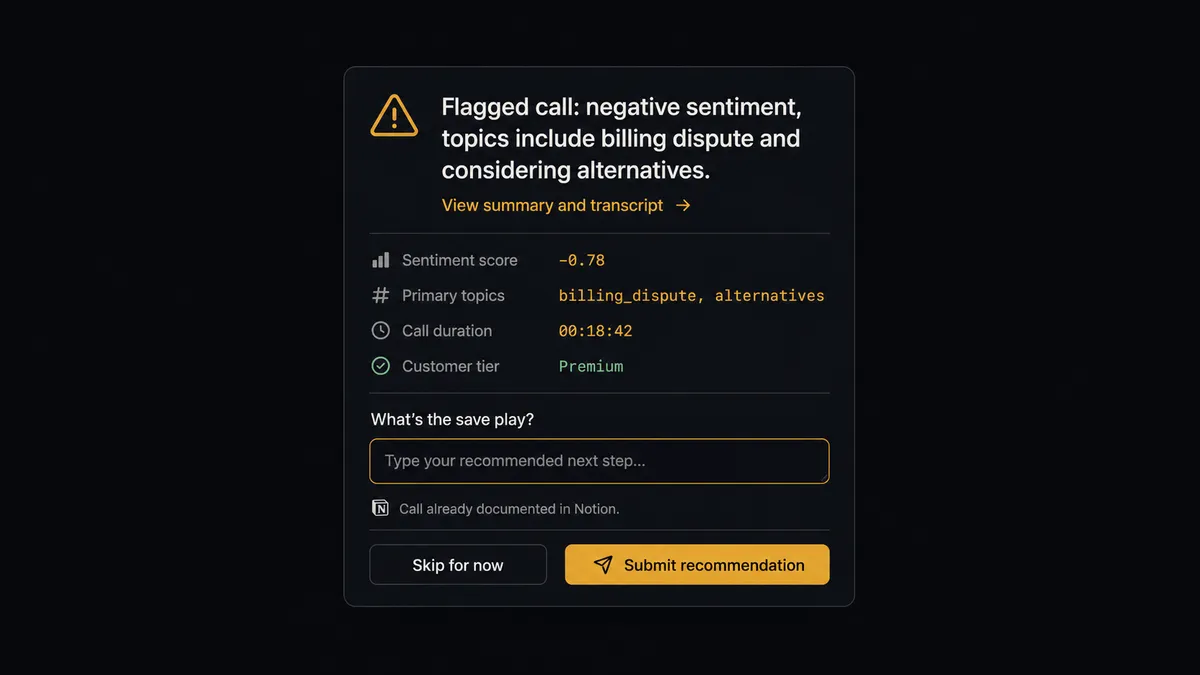
Here’s the actual decision moment. A customer’s call comes back with a negative sentiment score and topic tags for a billing dispute and language Analyze Text associates with cancellation intent. The agent has already run Transcribe Audio File and documented the call in Notion, the same as it would for any call. But before that call closes out as just another logged transcript, the agent treats the next step, deciding the save play, as a human-in-the-loop moment. It posts to the CS lead in Slack: “Flagged call: negative sentiment, topics include billing dispute and considering alternatives. Summary and full transcript link attached. What’s the save play?” The CS lead reviews the flagged call and decides how to respond. A routine check-in call with neutral sentiment never reaches this gate; it just documents and moves on.
Once the CS lead responds, the agent calls Create Comment on the Notion page with the decision and the reasoning behind it, so the save play and who made the call are part of the same record the summary already lives in. That’s the audit trail intact without anyone needing to open FlowRunner’s own logs to find it.
This is not a transcription tool with a filing cabinet attached. The agent decides which calls carry risk and which don’t, and it only interrupts a person for the ones that do. Prospects who’ve seen this pattern before call it a digital andon cord: transcription and documentation keep running on every call, and the line stops only when a real signal shows up.
FlowRunner vs n8n
n8n is a fair choice for a team with an engineer who wants to wire this up directly. Its HTTP Request node can call Deepgram’s transcription and text-intelligence endpoints, and its Notion node covers page and database writes, so a technical team can build the transcribe-and-document half of this flow without much friction, and self-host the whole thing if that’s the priority. That part is fair to credit.
Where it runs out of room is the decision. n8n can run an IF node on a sentiment score, but the branch is a fixed rule someone wrote once: score below a number, send a notification. It can’t read the sentiment score alongside the topic tags, weigh what actually makes one flagged call more urgent than another with a similar score, and choose on its own to escalate one and let the other pass. Building anything close to that in n8n means writing and maintaining custom logic outside the workflow, and it still isn’t the agent’s judgment, it’s a script standing in for one.
| Capability | FlowRunner | n8n |
|---|---|---|
| Human-in-the-loop on the escalation step | Native: the agent reasons about sentiment and topic tags and invokes a CS lead review as a callable tool | Not native: IF/Switch nodes route on a fixed threshold, not a judgment call |
| Setup effort for Deepgram and Notion | Verified connectors with named actions, no custom API wiring | Deepgram support typically means a hand-built HTTP Request node against the API |
| Users included | Unlimited users on every tier | Cloud and team plans price by active workflow user |
| Self-hosting | Available on Enterprise | Core to n8n’s model, available on every tier |
| AI provider access | Bring your own key for the AI agent step | Bring your own key, similar model |
Before and after
| Metric | Before | After |
|---|---|---|
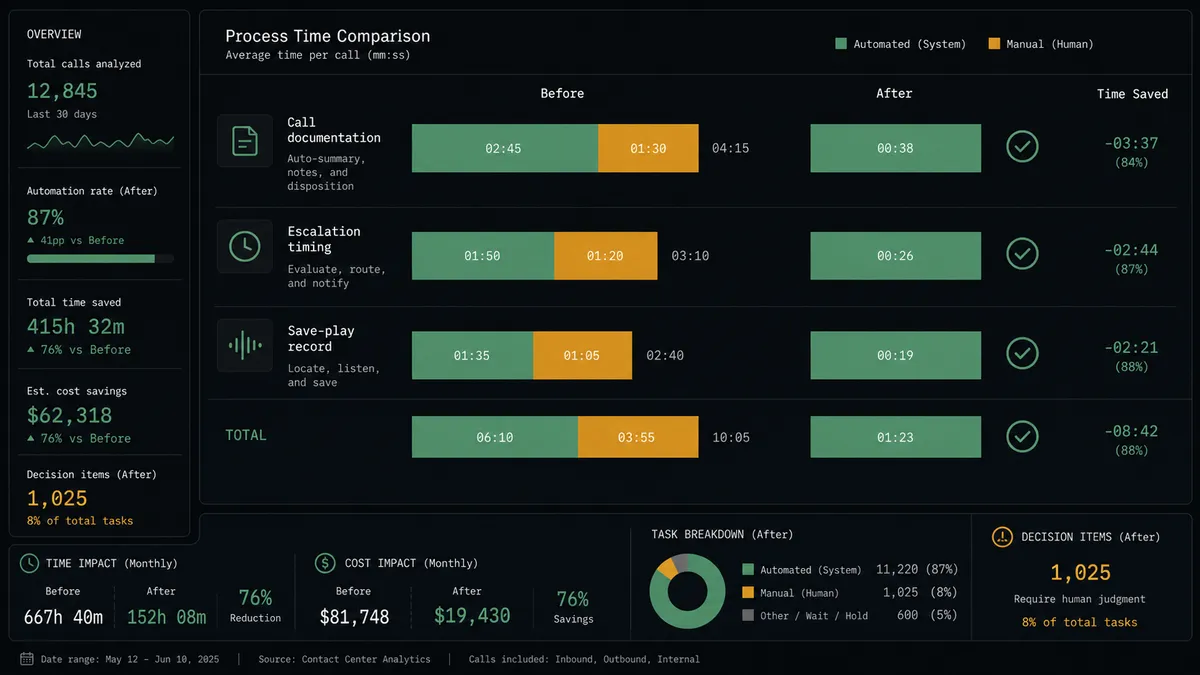
| Call documentation | Recordings get stored and rarely opened again | Every call becomes a speaker-labeled, summarized transcript automatically |
| Meeting notes | Notes live in personal docs or don’t get taken at all | The Notion page is live with summary and action items within 2 minutes of the call ending |
| Escalation timing | A negative call surfaces only if someone happened to be paying attention | Negative sentiment and cancellation intent route to the CS lead the same day |
| Save-play record | Escalation decisions live in someone’s memory or a Slack thread that scrolls away | The decision and reasoning are logged as a comment on the Notion page |
| Knowledge base state | Whether an account page reflects the latest call depends on who remembered to update it | The database reflects the most recent call and decision without anyone updating it by hand |
What you can build
Call QA pipeline with escalation. Every recording runs through Transcribe Audio File and Analyze Text, and calls that flag for negative sentiment or cancellation intent route to the CS lead in Slack with the summary and transcript link before the agent logs the outcome in Notion.
Meeting-to-deal documentation. Sales call recordings feed Transcribe Audio File and land as a Create Page call in the Deals database, with Append Block Children adding the summary, topics, and next steps so the deal page reflects the conversation within minutes.
Voice announcements from approved copy. Approved announcement text goes through Convert Text to Speech with an Aura voice, and the agent logs the generated audio file’s location as a comment on the relevant Notion page for the team producing the IVR greeting or product walkthrough.
Due diligence call log. As calls tied to an active deal come in, the agent transcribes and analyzes each one, then creates a database item in the due diligence database with the call’s findings, so the deal team has a running record without opening a single recording themselves.
Common questions
Is it free to connect Deepgram and Notion on FlowRunner? Yes. FlowRunner has a free plan with 100 executions a month, every integration included, and no credit card required, and new accounts get 14 days of Professional on top.
Can I self-host the Deepgram to Notion flow? Yes. FlowRunner offers a self-hosted Enterprise option alongside the cloud tiers, so the same transcription, documentation, and escalation workflow can run on infrastructure you control.
Does the agent need my own OpenAI key? The AI agent step runs on a bring-your-own-key model, so you connect the AI provider you already use rather than routing usage through a vendor-owned key.
What happens when the agent isn’t sure whether a call needs a person? The agent doesn’t guess. It packages the transcript summary, the sentiment score, and the flagged topics, posts that to the CS lead in the channel your team already watches, and waits for their save-play decision before the flow treats the call as resolved.
Does this replace listening to the actual recording? No. The transcript, summary, and flagged topics are meant to tell the CS lead which calls are worth their time; the audio and full transcript link travel with every escalation so they can go deeper whenever the summary isn’t enough.
Can the same flow log every escalation decision automatically? Yes. Once the CS lead responds, the agent calls Create Comment on the Notion page with the decision and the reasoning, so the save play and who made the call are part of the searchable record.
Getting started
FlowRunner has a free plan with 100 executions a month, every integration included, and no credit card required, and new accounts get 14 days of Professional on top. Start with the transcribe-and-document flow, then add the sentiment-escalation gate when your CS team is ready for it. Get started at flowrunner.ai or book a walkthrough at calendly.com/flowrunner/intro.
Frequently asked questions
Is it free to connect Deepgram and Notion on FlowRunner?
Yes. FlowRunner has a free plan with 100 executions a month, every integration included, and no credit card required, and new accounts get 14 days of Professional on top.
Can I self-host the Deepgram to Notion flow?
Yes. FlowRunner offers a self-hosted Enterprise option alongside the cloud tiers, so the same transcription, documentation, and escalation workflow can run on infrastructure you control.
Does the agent need my own OpenAI key?
The AI agent step runs on a bring-your-own-key model, so you connect the AI provider you already use rather than routing usage through a vendor-owned key.
What happens when the agent isn't sure whether a call needs a person?
The agent doesn't guess. It packages the transcript summary, the sentiment score, and the flagged topics, posts that to the CS lead in the channel your team already watches, and waits for their save-play decision before the flow treats the call as resolved.
Does this replace listening to the actual recording?
No. The transcript, summary, and flagged topics are meant to tell the CS lead which calls are worth their time; the audio and full transcript link travel with every escalation so they can go deeper whenever the summary isn't enough.
Can the same flow log every escalation decision automatically?
Yes. Once the CS lead responds, the agent calls Create Comment on the Notion page with the decision and the reasoning, so the save play and who made the call are part of the searchable record.