How to Connect OpenAI with ElevenLabs (With or Without an AI Agent)
Connect OpenAI's text generation and moderation to ElevenLabs voice synthesis in a FlowRunner workflow, then optionally run it as an AI agent that pauses for a human before publishing branded audio.
How do you connect OpenAI to ElevenLabs?
Use FlowRunner to trigger a workflow on a new content item, call OpenAI’s Create Response action to generate or refine a script, then pass that output directly to ElevenLabs Text to Speech, which returns a ready-to-use audio file URL. FlowRunner is a visual AI-agent orchestration platform where automations run autonomously and pause for human judgment on the steps that carry real consequence. The same connection can run as an AI agent that screens generated text through OpenAI Moderate Content first, evaluates whether the audio is destined for external publishing, and invokes a human reviewer before a single branded voice-over goes out.
The problem it solves
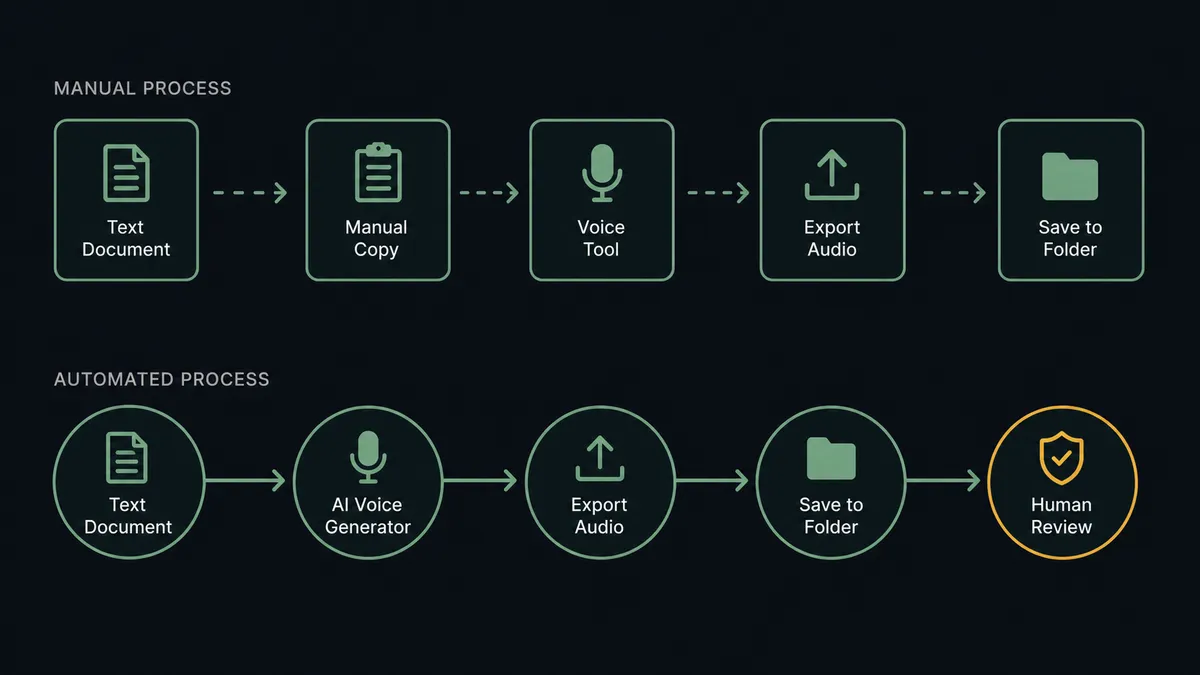
Most content and operations teams produce voice-overs the same way they did five years ago. A writer drafts a script in a document. Someone copies it into a voice synthesis tool, selects a voice, exports the file, and drops it into a shared folder. A brand owner listens and decides whether it matches the tone. If it does not, the loop starts again. Nothing in that sequence is hard. All of it is manual, slow, and prone to the kind of exceptions that fall through the cracks: the wrong voice selected, a draft that never got a moderation check, a file that never made it to the right folder.
The bigger problem is inconsistency. When voice selection is left to whoever runs the export step that day, the same company sounds different on every asset. Transcription is its own separate chore. Recorded meetings, customer calls, and field audio wait in a queue for someone to run them through a separate tool. Content teams end up managing two pipelines instead of one: a text pipeline and an audio pipeline that never quite stay in sync.
How it works: the connection
FlowRunner connects OpenAI and ElevenLabs through a single workflow that a non-technical team member can build. Here is the path from content item to finished audio file.
A trigger fires when a new row lands in a content sheet, a file arrives in storage, or a scheduled batch job starts. The workflow picks up the script text and the target voice ID from that input.
OpenAI handles the text side. The agent calls Create Response or Create Chat Completion with the script as input. This step can generate a script from a brief, refine a rough draft, or simply pass a finished script through. Before any audio is produced, the agent calls Moderate Content. This screens the generated text against OpenAI’s safety categories: harassment, hate speech, violence, sexual content, and others. If the result flags anything, the workflow stops or routes for review before ElevenLabs is called.
ElevenLabs handles the audio side. Once the text passes moderation, the agent calls Get Voices to confirm the requested voice is available, then calls Text to Speech with the script text, voice ID, and a speech model. ElevenLabs returns an audio file URL. The agent writes that URL back to the content record and posts a note to the production channel.
Every step is traceable. The script that went in, the moderation result, the voice ID used, and the file URL that came out are all captured in FlowRunner’s audit trail.
Can an AI agent run it? (and why a human stays in the loop)
Yes, and this is where the connection becomes something more than a sync tool.
A standard Zapier or n8n workflow runs a fixed sequence: trigger fires, step A runs, step B runs, done. It does not read the data and make a judgment. An AI agent in FlowRunner does. The agent reads the content item, evaluates the context, and decides which tools to invoke and in what order. It is not executing a script; it is reasoning about the situation.
The moment that matters most is the publish decision. Internal audio, routine transcripts, and test generations can flow through automatically. But when the agent recognizes that a generated voice-over is destined for external publishing under the company’s brand, it stops. Not because a threshold was crossed, but because the agent evaluated the context: this is branded audio, the voice carries the company’s identity, a human should hear it before it goes out.
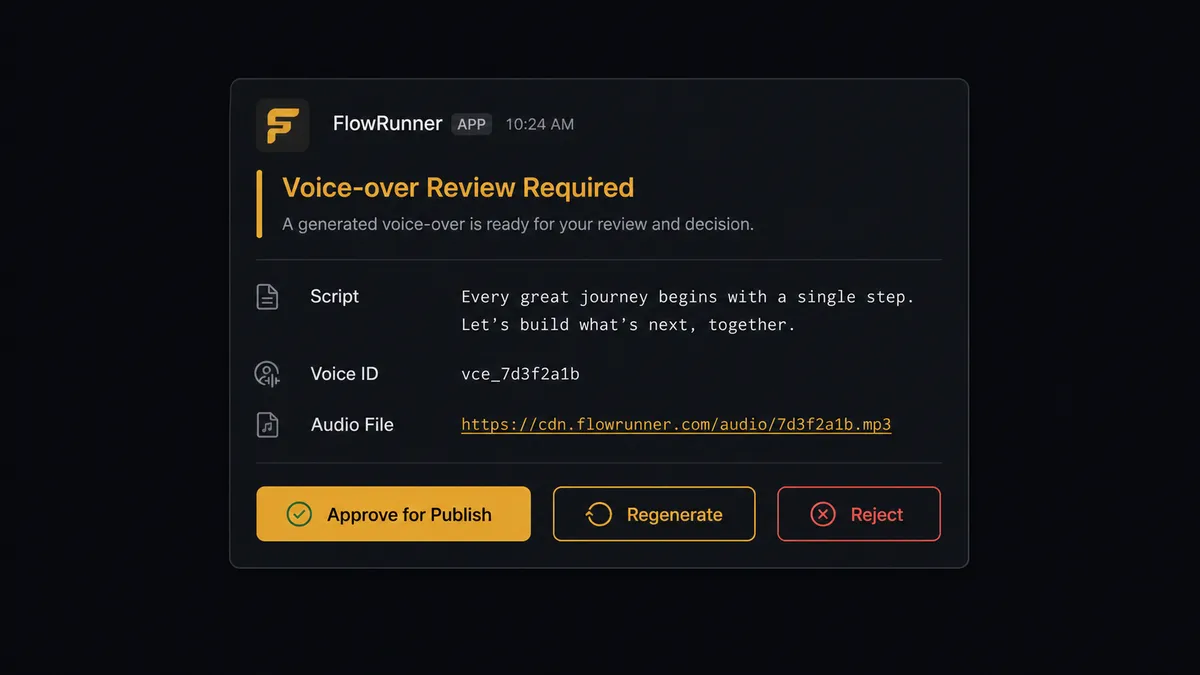
The agent invokes a human-in-loop subflow as a callable tool. That subflow sends a Slack message to the brand owner: “Generated voice-over for the launch announcement using the brand voice. Listen and approve for publish, regenerate, or reject?” The Slack card includes the audio file URL, the script it was generated from, and the voice ID used. The brand owner listens to exactly what will go out. They approve, request a regeneration, or reject. The workflow resumes with that decision recorded, along with the owner’s identity and the timestamp.
This is what ElevenLabs’ own documentation calls out as the right moment for oversight: cloned or branded voices carry reputational weight. Routine internal audio does not need that gate. Branded external audio does. The agent knows the difference.
FlowRunner vs the tool you are probably comparing
If your team is non-technical, you are likely looking at Zapier. If someone on your team has configured n8n before, you are probably comparing against that. Here is an honest look at both.
Zapier is the most accessible automation platform available. The trigger/action model is intuitive, the library is large, and most teams can get a basic connection live in under an hour. For a simple “new row triggers a voice-over” workflow with no conditional logic, Zapier works.
n8n gives technical teams more control. You can write code inside nodes, branch on complex conditions, and self-host the whole thing. For teams comfortable building in a developer-first tool, it handles this pair reasonably well.
| Capability | Zapier | n8n | FlowRunner |
|---|---|---|---|
| AI agent reasoning (not just a fixed sequence) | No | Partial (LangChain agent node) | Yes, native |
| Human-in-loop as a callable agent tool | No | No | Yes |
| Moderation step before audio production | Manual wiring | Manual wiring | Native action |
| Unlimited users on every paid tier | No | No | Yes |
| BYOK for OpenAI and ElevenLabs | No | Yes | Yes |
| Self-hosted option | No | Yes | Yes |
| Audit trail with decision-maker identity | No | No | Yes (Professional and above) |
The real gap is not features on a checklist. It is what happens when the workflow hits a situation the rule did not anticipate. A Zapier zap or n8n workflow follows its steps. A FlowRunner agent reads what is in front of it and decides. That difference matters most at the step where a brand owner’s reputation is on the line.
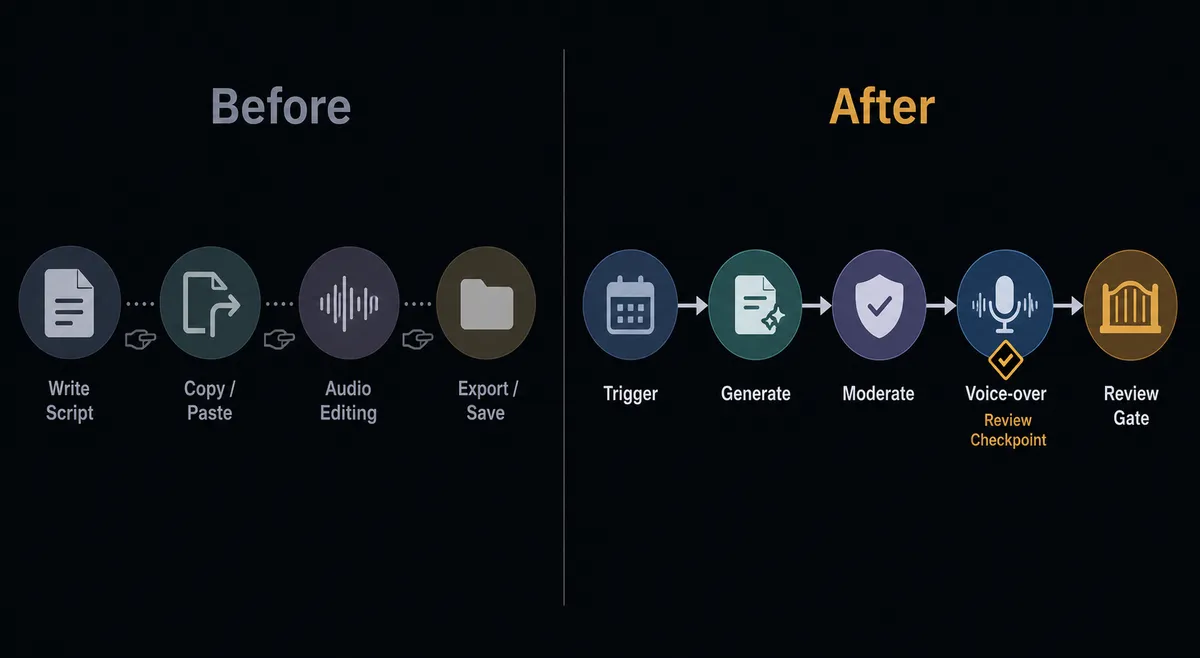
Before and after
| Category | Before | After |
|---|---|---|
| Voice-over production | Writer drafts, someone exports manually in a separate audio tool, file dropped in a shared folder | Script flows directly from content record to ElevenLabs Text to Speech; audio URL written back automatically |
| Moderation | Generated text sent to audio with no safety check | OpenAI Moderate Content screens every draft before ElevenLabs is called |
| Brand consistency | Voice selected by whoever runs the export step | One designed brand voice referenced by ID across the entire content library |
| Branded audio review | Brand owner discovers published audio after the fact | Agent routes branded audio to Slack for approval before any file publishes |
| Transcription | Recorded audio waits in a queue for a manual transcription step | OpenAI Speech to Text transcribes audio inline as part of the same workflow |
| Audit trail | No record of which voice was used or who approved what | Every generation, moderation result, voice ID, and approval decision logged |
What you can build
Content pipeline with automated voice-overs. A content sheet trigger fires when a new row arrives with a script column. The agent calls OpenAI Create Response to refine the draft, checks it through Moderate Content, then calls ElevenLabs Text to Speech with the team’s brand voice ID. The audio URL writes back to the row. Production channel notified. The team reviews finished audio instead of producing each clip manually.
Meeting transcript to branded summary audio. Audio recordings arrive in storage after customer calls or internal meetings. The agent calls OpenAI Speech to Text (Whisper) to transcribe, then Create Response to produce a clean structured summary. ElevenLabs Text to Speech turns the summary into a narrated audio briefing, stored and distributed to stakeholders. No transcription queue. No manual editing step.
Multimodal campaign asset production with human gate. A campaign brief triggers a flow. The agent calls OpenAI Create Response with a reasoning model to draft copy, then Generate Image with gpt-image-1 for visual options, then ElevenLabs Text to Speech for the voice-over. All three assets route to a creative director for selection and approval before anything publishes. Generation happens in the flow; the human owns what ships.
Brand voice prototype to production library. A marketing operations lead starts with a text description of the desired brand voice. The agent calls ElevenLabs Design Voice from Text to prototype candidates, then Create Voice from Generation to save the chosen one. That voice ID is referenced in every subsequent Text to Speech call across the content library. One consistent brand voice, built once, used everywhere.
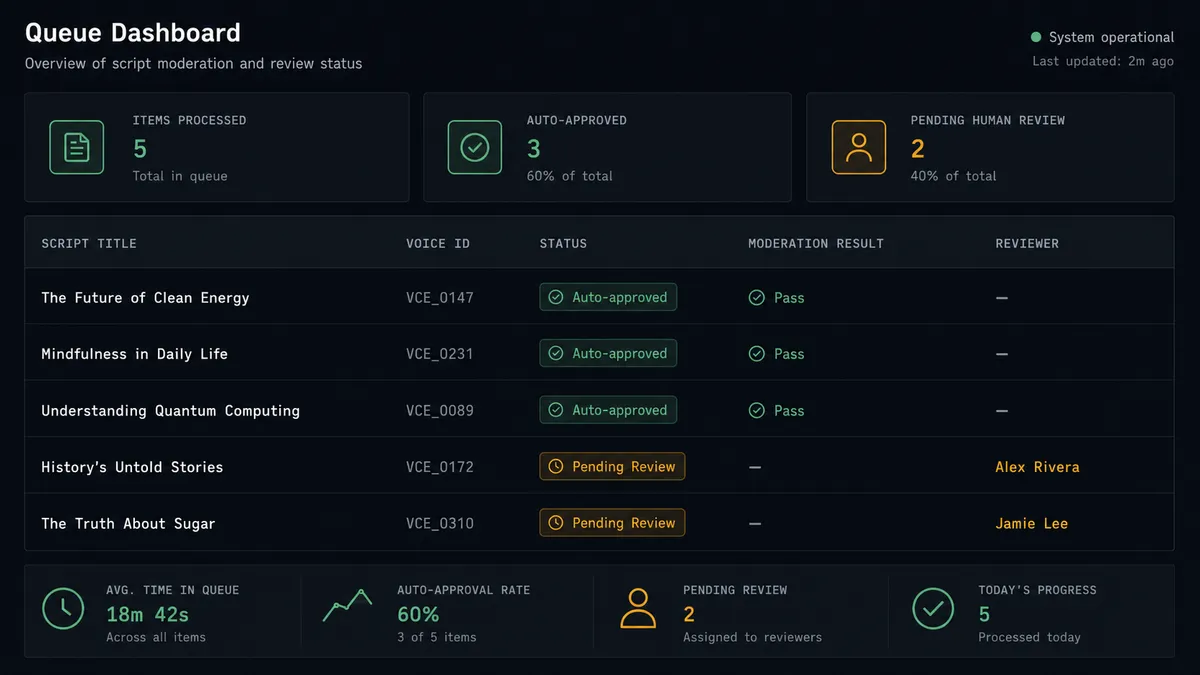
Batch audio generation with quality gate. A scheduled trigger fires on a content queue of scripts waiting for audio. The agent calls ElevenLabs Text to Speech on each, runs the output through OpenAI Moderate Content, and auto-approves routine internal audio. Scripts marked for external publishing pause and route to the brand owner. The agent processes the entire queue; a human only touches the items that carry real consequence.
Common questions
Is it free to connect OpenAI and ElevenLabs on FlowRunner? FlowRunner has a free plan with 100 executions a month, every integration included, and no credit card required, and new accounts get 14 days of Professional on top. You bring your own OpenAI and ElevenLabs API keys, so the only platform cost is the FlowRunner tier you choose.
Does the agent need my own OpenAI API key? Yes. FlowRunner uses a BYOK (Bring Your Own Keys) model. You connect your OpenAI account with your own API key, so your usage, costs, and model access stay under your control.
Can I self-host this workflow? Yes. FlowRunner offers a self-hosted Community Edition at no cost and an Enterprise self-hosted option for multi-instance deployments with full compliance features.
What happens when the agent is not sure whether to publish the audio? The agent pauses the workflow and routes the audio file to a reviewer via Slack, email, or another channel you configure. It packages the generated file, the script it was built from, and the reason for escalation. The reviewer approves, requests a regeneration, or rejects, and the workflow resumes with that decision recorded in the audit trail.
Can FlowRunner transcribe audio and then generate a voice-over from the transcript in the same workflow? Yes. A single FlowRunner workflow can call OpenAI’s Speech to Text (Whisper) to transcribe an audio file, pass the transcript to a reasoning model via Create Response, and then send the refined output to ElevenLabs Text to Speech, all in one continuous flow.
How is this different from connecting OpenAI and ElevenLabs in Zapier or n8n? Zapier and n8n execute a fixed sequence of steps. FlowRunner runs an AI agent that reads the data, reasons about it, and decides which tools to invoke and in what order. The agent can also invoke a human-in-loop flow as a callable tool, so a branded voice-over never publishes without a person signing off.
Getting started
FlowRunner has a free plan with 100 executions a month, every integration included, and no credit card required, and new accounts get 14 days of Professional on top. Unlimited users and unlimited workflows on every tier.
Both integration pages have the full action and capability lists: OpenAI on FlowRunner and ElevenLabs on FlowRunner.
To start building: flowrunner.ai. To talk through your specific content pipeline or get a walkthrough of the human-in-loop setup: calendly.com/flowrunner/intro.
Frequently asked questions
Is it free to connect OpenAI and ElevenLabs on FlowRunner?
FlowRunner has a free plan with 100 executions a month, every integration included, and no credit card required, and new accounts get 14 days of Professional on top. You bring your own OpenAI and ElevenLabs API keys, so the only platform cost is the FlowRunner tier you choose.
Does the agent need my own OpenAI API key?
Yes. FlowRunner uses a BYOK (Bring Your Own Keys) model. You connect your OpenAI account with your own API key, so your usage, costs, and model access stay under your control.
Can I self-host this workflow?
Yes. FlowRunner offers a self-hosted Community Edition at no cost and an Enterprise self-hosted option for multi-instance deployments with full compliance features.
What happens when the agent is not sure whether to publish the audio?
The agent pauses the workflow and routes the audio file to a reviewer via Slack, email, or another channel you configure. It packages the generated file, the script it was built from, and the reason for escalation. The reviewer approves, requests a regeneration, or rejects, and the workflow resumes with that decision recorded in the audit trail.
Can FlowRunner transcribe audio and then generate a voice-over from the transcript in the same workflow?
Yes. A single FlowRunner workflow can call OpenAI's Speech to Text (Whisper) to transcribe an audio file, pass the transcript to a reasoning model via Create Response, and then send the refined output to ElevenLabs Text to Speech, all in one continuous flow.
How is this different from connecting OpenAI and ElevenLabs in Zapier or n8n?
Zapier and n8n execute a fixed sequence of steps. FlowRunner runs an AI agent that reads the data, reasons about it, and decides which tools to invoke and in what order. The agent can also invoke a human-in-loop flow as a callable tool, so a branded voice-over never publishes without a person signing off.