OpenAI Notion Integration: Every Call Becomes a Reviewed Page
Connect OpenAI and Notion so every sales call recording becomes a documented Notion page automatically, with an AI agent that pauses for a human before a recap reaches a client.
How do you connect OpenAI to Notion?
You connect OpenAI to Notion by having OpenAI’s Speech to Text and Create Chat Completion actions turn a recording or a raw transcript into a structured summary, then handing that summary to Notion’s Create Page and Append Block Children actions, which write it into a page in your workspace. FlowRunner is a visual AI-agent orchestration platform where automations run autonomously and pause for human judgment on the steps that carry real consequence. The same connection can run as a fixed script that always writes the same way, or as an AI agent that reads the transcript, decides what the recap should say, and stops to ask a person before anything with pricing or deal terms leaves the workspace.
The problem it solves
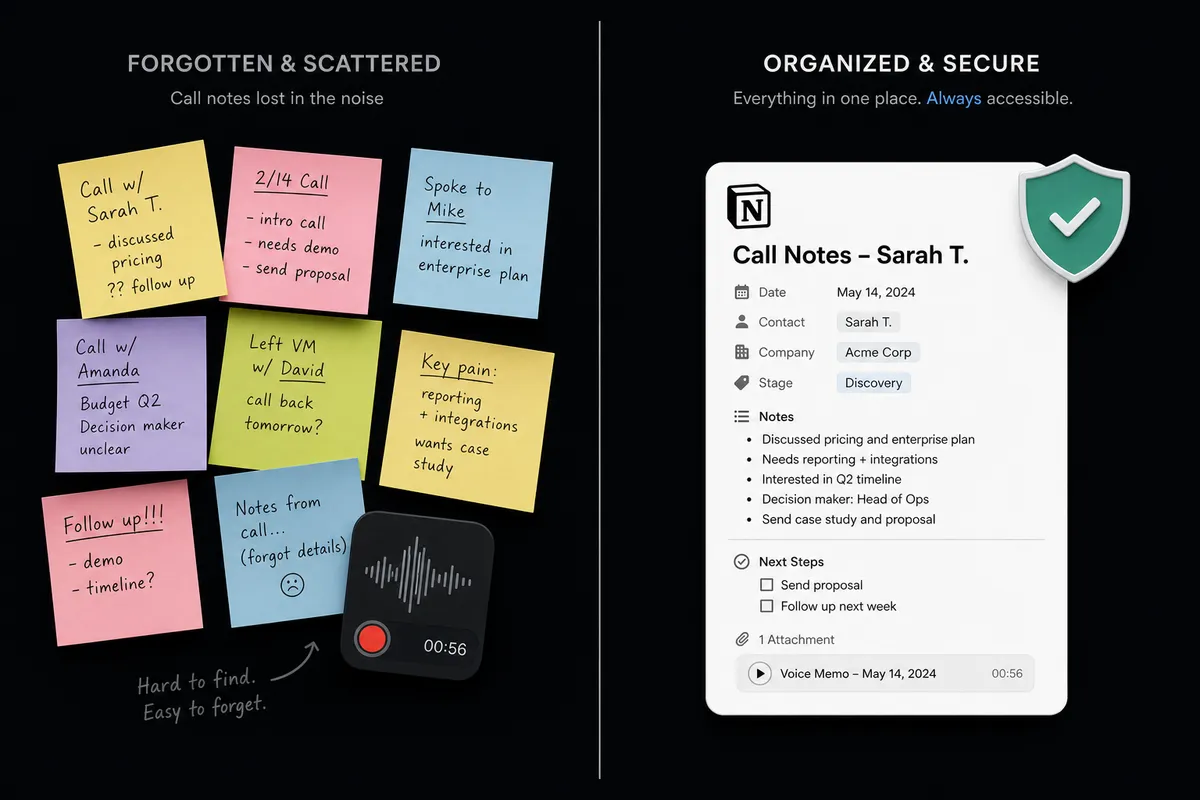
A sales rep or deal team lead ends a call and moves straight to the next one. The notes, if they exist at all, live in a phone’s voice memo app, a personal notebook, or nowhere. By the time anyone sits down to write up the call, the details have faded: what was actually promised, which objection came up twice, who owns the follow-up. Deal reviews turn into someone reconstructing the conversation from memory a week later, and the account team finds out about a commitment the rep made only when the customer brings it up first.
The gap gets worse under volume. A due diligence team working through a document stack has the same problem in a different shape: findings pile up in a shared spreadsheet that nobody updates in real time, so two reviewers duplicate work on the same document while a third document sits untouched. And when a call recap or a finding does get written up, there’s no consistent check on what it says before it goes to a client or a partner. A rep pastes a summary into an email, pricing language and all, without anyone else seeing it first. Nothing here is a skills problem. It’s manual transcription, manual write-up, and no review step, repeated every single day.
How it works: the connection
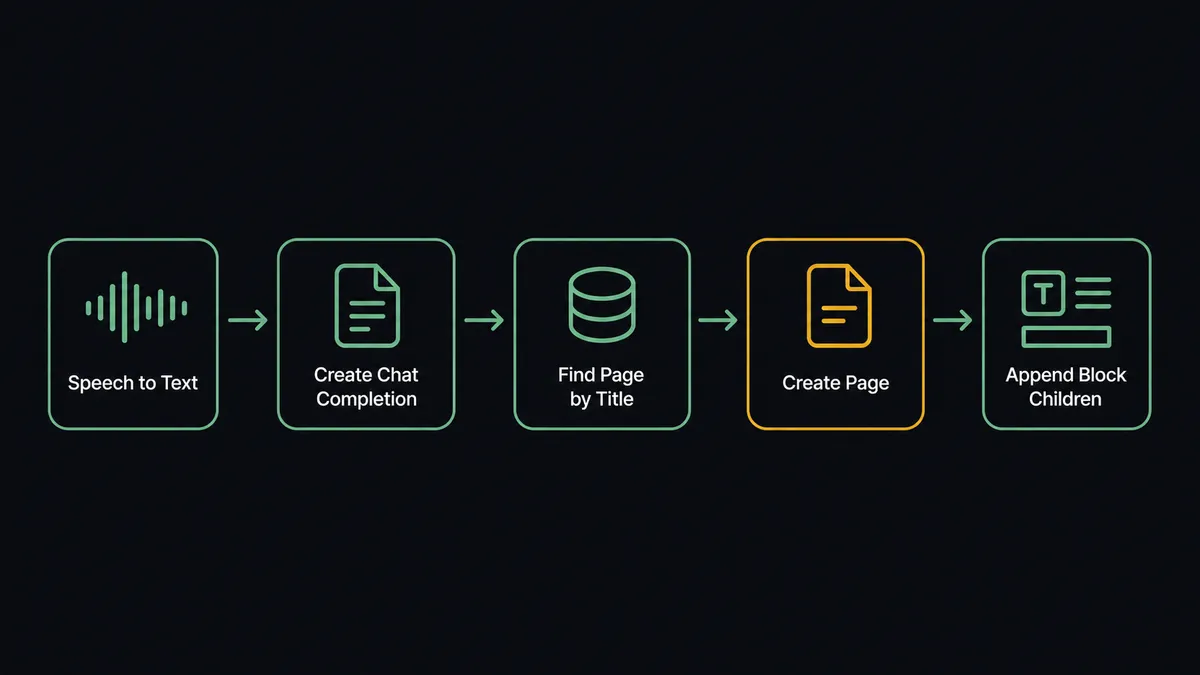
The flow starts on a schedule, since neither OpenAI nor Notion exposes a native trigger for this pair. On each run, the agent calls Upload File in OpenAI to bring the recording into OpenAI’s files, then Speech to Text to transcribe it into plain text.
With the transcript in hand, the agent calls Create Chat Completion to draft a summary: the deal name, the call date, key topics discussed, and a list of action items pulled directly from what was said. Before writing anything, it calls Find Page by Title in Notion to check whether a page for this deal already exists, so the recap lands as a fresh page or an update instead of a duplicate.
Once the target page is confirmed, Create Page opens it in the Deals database with the deal name and call date as properties, and Append Block Children writes the summary, the key topics, and the action items into the page as formatted content blocks. The page is live in Notion, built from the actual call, without a rep opening a blank document.
Can an AI agent run it? (and why a human stays in the loop)
A fixed sync tool would transcribe, summarize, and write the page the same way every time, with no read on what the call actually contained. FlowRunner’s agent reads the transcript, reasons about it, and calls those same OpenAI and Notion actions as tools it chooses to use in the order the call calls for. This is not a sync tool. The agent knows when to stop and ask.
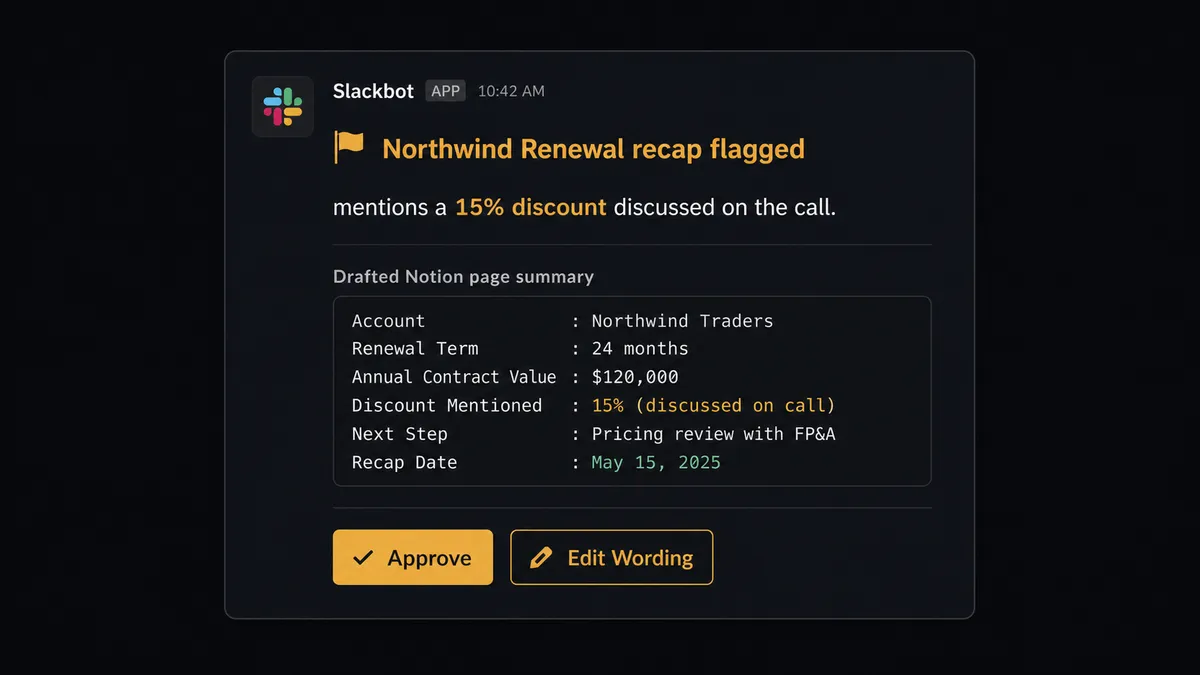
The moment that matters is what happens after the recap is drafted and written to the page. A generated summary is a draft the flow produces, not a final decision. When the agent’s summary mentions a price, a discount, a contract term, or names an external stakeholder who might see the page, it does not clear the page for sharing on its own. It packages the recap, the specific line that triggered the flag, and the deal context, then sends it to the deal owner in Slack: “The recap for Northwind Renewal mentions a 15% discount discussed on the call. Review before this page goes to anyone outside the team.” The owner edits the wording or confirms it, and the agent calls Create Comment to log the sign-off and Update Page Properties to mark the page ready to share. A routine internal sync call with no pricing or commitment language clears without anyone touching it.
The same judgment runs on the intake side. If Find Page by Title turns up an existing page for the deal, the agent appends to it instead of creating a duplicate database entry, and if the transcript is too short or garbled to summarize reliably, it flags the recording for the rep instead of writing a low-confidence guess into the record. Prospects call this the digital andon cord: the moment the agent hits something it shouldn’t decide alone, it stops the line and hands it to a person.
FlowRunner vs Zapier
Zapier connects OpenAI and Notion natively, and for a team that just wants a transcript summarized and pasted into a page, it’s a fast, proven setup with a large template library to start from. If the entire requirement is “summarize this and log it,” Zapier gets that running in an afternoon.
Where the two diverge is what happens before that page reaches someone outside the team, and who is actually reading the call before the page gets written. Zapier runs the same trigger-to-action sequence every time, on every call, with no read on what was actually said. FlowRunner’s agent reads the transcript, reasons about what’s in it, and decides when a recap needs a person before it clears for sharing.
| Capability | Zapier | FlowRunner |
|---|---|---|
| Human-in-loop before a recap ships externally | A manual review step or delay you build and wire yourself | Native: the agent invokes a human-in-loop flow as a callable tool when the recap touches pricing or terms |
| Reasoning over each call | Fixed action sequence, same steps run for every transcript | The agent reads the transcript and decides whether to file it, flag it, or hold it |
| AI provider | Zapier’s own AI credits or a connected key, depending on the app | Bring-your-own-key: every OpenAI call runs on your account |
| Users included | Paid seats on the tiers with the automation depth this flow needs | Unlimited users on every tier |
| Pricing model | Per-task pricing that gets harder to predict as call volume grows | Transparent workflow-based tiers with clear execution limits |
Before and after
| Category | Before | After |
|---|---|---|
| Meeting documentation | Notes live in personal apps or don’t get written down at all | The recap is live in Notion within minutes of the call ending |
| Summary drafting | A rep reconstructs the call from memory hours or days later | Speech to Text and Create Chat Completion draft the summary from the actual transcript |
| Duplicate pages | A second rep creates a new page for a deal that already has one | Find Page by Title checks first, so updates land on the existing page |
| External sharing | A recap with pricing language gets pasted into an email with no review | Recaps mentioning pricing or terms pause for the deal owner’s approval first |
| Decision record | No searchable record of who approved what before it went to a client | Every approval is logged as a Notion comment with the reason and the reviewer |
What you can build
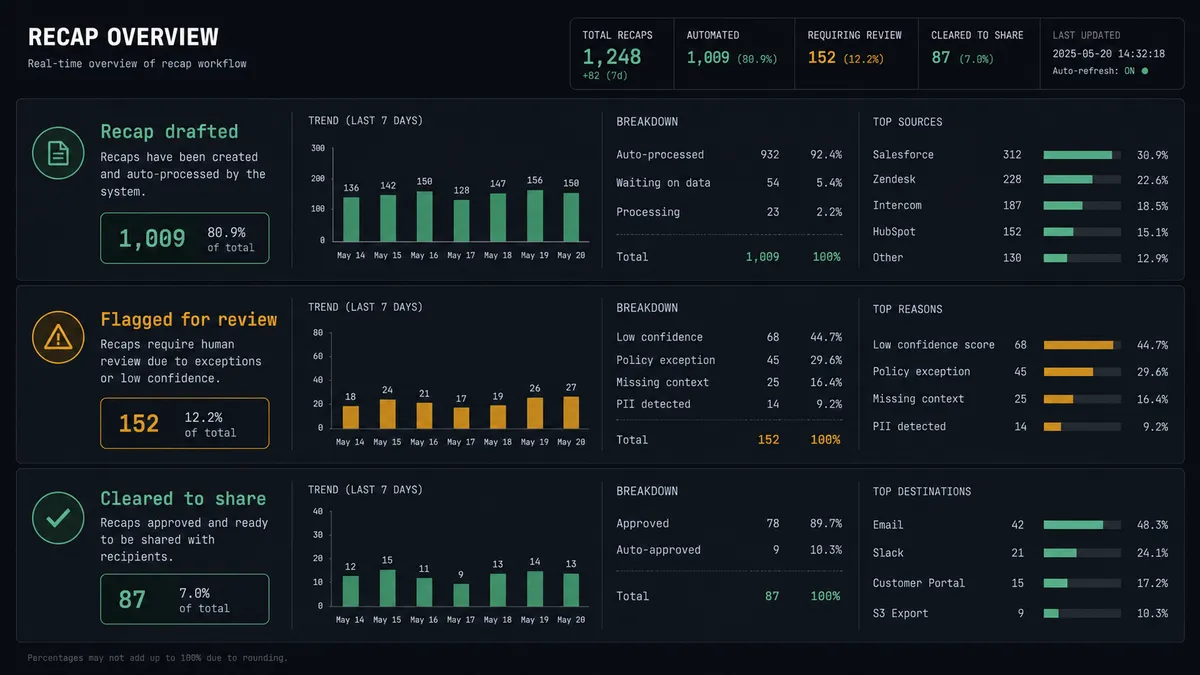
Sales call recaps with a pricing gate. Every call recording becomes a Notion page automatically, and any recap mentioning pricing, discounts, or terms pauses for the deal owner before it’s marked ready to share.
Support decision log. OpenAI classifies and drafts a reply to an incoming support message with Create Chat Completion and screens it with Moderate Content, and Notion’s Create Database Item logs the ticket, the draft, and the reviewer’s decision as a searchable record.
Due diligence findings from uploaded documents. As documents come in, the agent processes each one with Upload File and Create Response, and Create Database Item logs the finding, risk level, and source into a due diligence database in real time.
Multimodal campaign review board. The agent drafts copy with Create Chat Completion and generates image options with Generate Image, then Create Page in Notion holds the options together for a reviewer to pick before anything ships.
Grounded internal Q&A with a running log. The agent answers an employee question with Search Vector Store against your own content, then Create Database Item logs the question and the cited answer into a Notion FAQ database for the next person who asks.
Common questions
Is it free to connect OpenAI and Notion on FlowRunner? FlowRunner has a free plan with 100 executions a month, every integration included, and no credit card required, and new accounts get 14 days of Professional on top. Beyond the free plan, Growth starts at $45/mo for 12,000 executions.
Can I self-host the OpenAI and Notion connection? Yes. The Community Edition is free for a single self-hosted instance, and the self-hosted Enterprise tier adds multi-instance clustering and the full compliance suite for teams that need the transcripts and drafts to stay on their own infrastructure.
Does the agent need my own OpenAI key? Yes. FlowRunner uses a bring-your-own-key model, so you connect your own OpenAI API key and every Speech to Text, Create Chat Completion, and Moderate Content call runs on your account, not a shared pool.
What happens when the agent isn’t sure a recap is safe to share externally? The agent does not post the comment that clears it for sharing. It packages the summary, the reason it flagged the recap, such as a mention of pricing or a contract term, and sends it to the deal owner in Slack for edit and approval first.
Which OpenAI and Notion actions does this connection use? Neither connector exposes a trigger, so the flow starts on a schedule. It calls OpenAI’s Upload File, Speech to Text, and Create Chat Completion to transcribe and summarize the call, then Notion’s Find Page by Title, Create Page, and Append Block Children to write the recap, with Create Comment and Update Page Properties marking it reviewed.
Does this replace the notes my sales reps already take? No. The agent drafts the recap and files it in Notion, but the rep still edits and approves anything going to a client; routine internal recaps are the only ones that move without a stop.
Getting started
FlowRunner has a free plan with 100 executions a month, every integration included, and no credit card required, and new accounts get 14 days of Professional on top. Start at flowrunner.ai to build the flow yourself, or book time at calendly.com/flowrunner/intro to walk through the pricing-language gate and deal database setup with the team.
Frequently asked questions
Is it free to connect OpenAI and Notion on FlowRunner?
FlowRunner has a free plan with 100 executions a month, every integration included, and no credit card required, and new accounts get 14 days of Professional on top. Beyond the free plan, Growth starts at $45/mo for 12,000 executions.
Can I self-host the OpenAI and Notion connection?
Yes. The Community Edition is free for a single self-hosted instance, and the self-hosted Enterprise tier adds multi-instance clustering and the full compliance suite for teams that need the transcripts and drafts to stay on their own infrastructure.
Does the agent need my own OpenAI key?
Yes. FlowRunner uses a bring-your-own-key model, so you connect your own OpenAI API key and every Speech to Text, Create Chat Completion, and Moderate Content call runs on your account, not a shared pool.
What happens when the agent isn't sure a recap is safe to share externally?
The agent does not post the comment that clears it for sharing. It packages the summary, the reason it flagged the recap, such as a mention of pricing or a contract term, and sends it to the deal owner in Slack for edit and approval first.
Which OpenAI and Notion actions does this connection use?
Neither connector exposes a trigger, so the flow starts on a schedule. It calls OpenAI's Upload File, Speech to Text, and Create Chat Completion to transcribe and summarize the call, then Notion's Find Page by Title, Create Page, and Append Block Children to write the recap, with Create Comment and Update Page Properties marking it reviewed.
Does this replace the notes my sales reps already take?
No. The agent drafts the recap and files it in Notion, but the rep still edits and approves anything going to a client; routine internal recaps are the only ones that move without a stop.