How to Connect JustCall to Pipedrive: Log Every Call on the Deal
Connect JustCall and Pipedrive so every call and follow-up text lands on the right deal, and let an AI agent run the sync while a human approves the first text sent from the team's number.
How do you connect JustCall to Pipedrive?
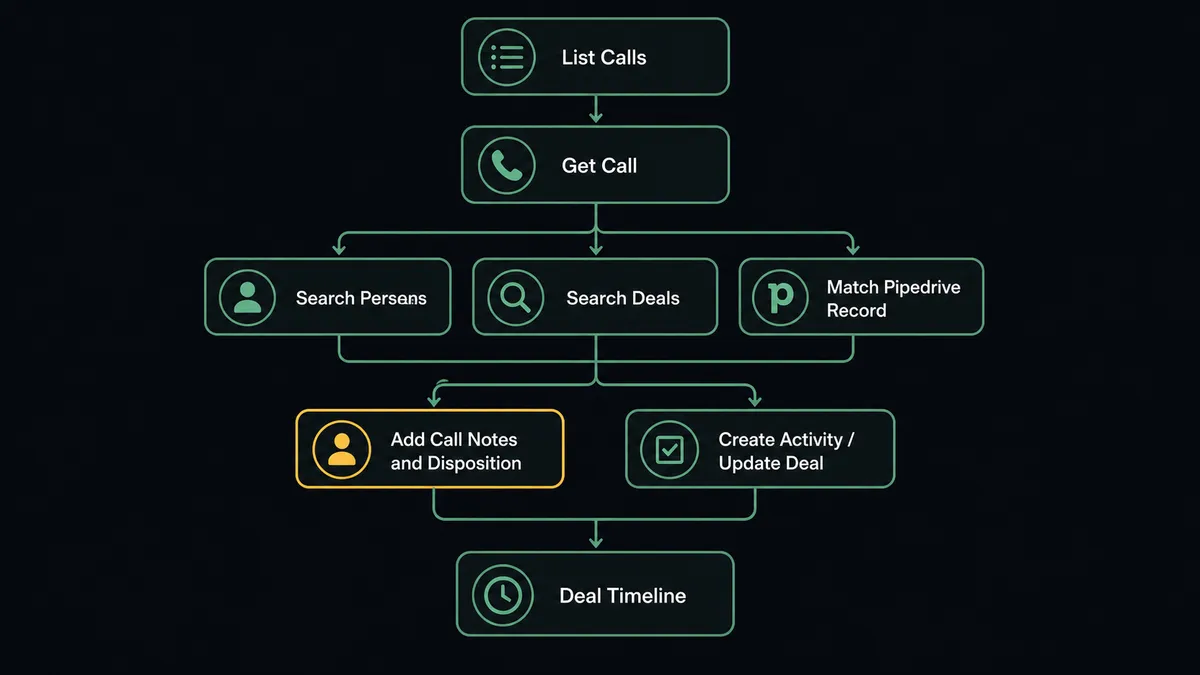
A scheduled sweep of List Calls and Get Call in JustCall feeds an agent that matches each caller against Pipedrive with Search Persons and Search Deals, then writes the outcome back with Add Call Notes and Disposition in JustCall and Create Activity, Create Note, or Update Deal in Pipedrive. FlowRunner is a visual AI-agent orchestration platform where automations run autonomously and pause for human judgment on the steps that carry real consequence. The same connection can run as an AI agent that also drafts SMS follow-ups from the call, and it pauses for the owning rep before the first text sends from the team’s JustCall number.
The problem it solves
An outbound rep finishes a call, and the next call is already ringing. Writing up the disposition and the note can wait, so it does, and by 4 pm there’s a stack of a dozen calls with nothing logged. The pipeline review on Monday runs on whatever got typed in, which is rarely all of it, and a manager reconstructing “what happened with this account” is stuck listening to a recording because the CRM says nothing. Meanwhile a prospect who asked to be texted with pricing gets that text from whoever’s phone the conversation happened to be on, a message the rest of the team, and the CRM, never sees.
The manual version of this depends on the rep remembering three separate things after every call that actually sells: write the note, pick the disposition, and update the deal, then remembering a fourth thing on top of that if a text was promised. Exceptions, the call that closed on the spot, the prospect who went quiet mid-pitch, fall through the cracks because nothing forces JustCall’s record of what happened to reach Pipedrive’s record of the deal. Billing managers and ops leads lose the time back they’d get from an activity report that assembles itself, and reps lose their evenings to data entry as penance for a busy day.
How it works: the connection
The flow runs on a schedule, an afternoon sweep that calls List Calls to pull the day’s completed conversations from JustCall. For each call, Get Call retrieves the duration, the assigned agent, the recording URL, and whatever notes the rep managed to leave live. That caller’s number is checked against Pipedrive with Search Persons and Search Deals, so the flow finds the existing person and open deal instead of treating every call as a stranger.
Once the match is made, Add Call Notes and Disposition writes the outcome code and a summary onto the JustCall side, the purpose-built action for post-call hygiene. The same outcome lands in Pipedrive through Create Activity and Create Note, so the deal’s timeline shows what actually happened on the call, not just that a call occurred. When the call closes an opportunity or moves it forward, Update Deal advances the stage.
If the call ended with the prospect asking to be texted, the flow’s second half picks up. Send SMS is the action that reaches a customer’s phone, drafted with the pricing link or detail the prospect asked for and the rep’s name, sent from the JustCall number tied to that number’s List Phone Numbers record. Check Text Reply polls the thread afterward, and when a reply lands, Reply to Text carries the conversation forward from the same thread automatically.
Can an AI agent run it? (and why a human stays in the loop)
A sync tool moves a call log from one system to another on a fixed rule. An agent reads what the call actually contained, reasons about it, and decides what to do next, including when to stop and let a person decide. This is the upgrade Zapier and n8n’s rule-based flows can’t offer: the agent has List Calls, Get Call, Search Persons, Search Deals, Add Call Notes and Disposition, Create Activity, Send SMS, and dozens of other JustCall and Pipedrive actions available as tools, and it chooses which ones to use based on what each call and each record actually look like.
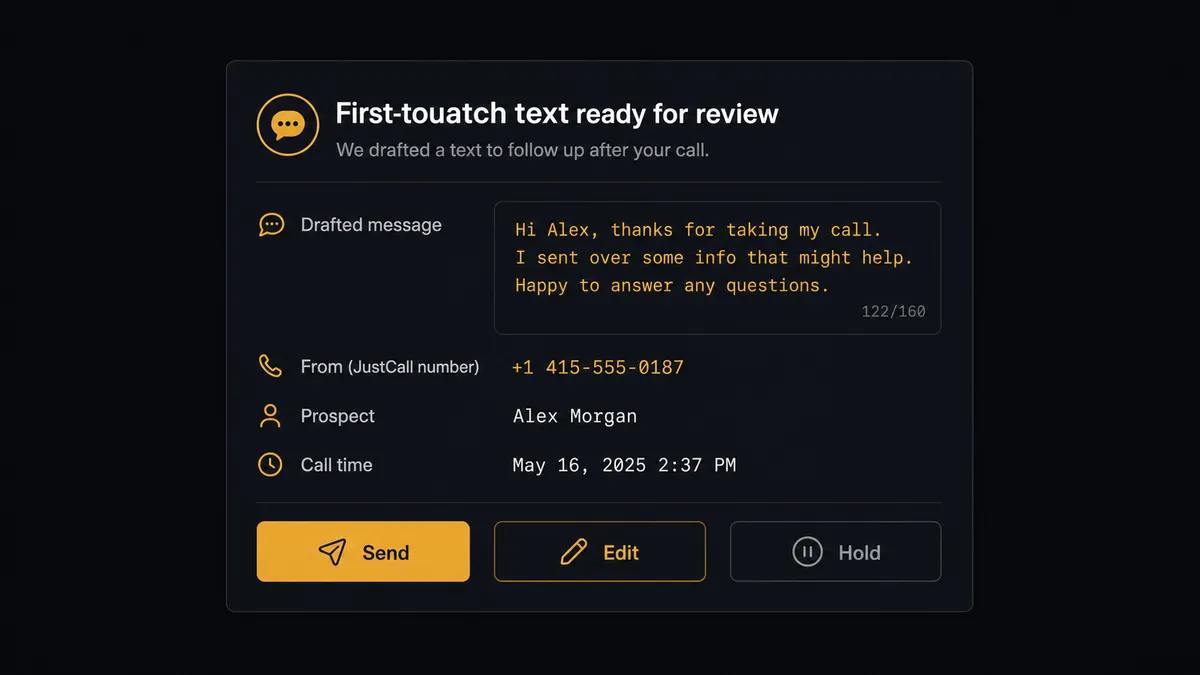
The moment that matters most is the first text. Send SMS drops a message into a customer’s pocket from the team’s business number, and there is no unsend. One bad merge field, one stale list, one message sent at the wrong hour, and the number attached to every active deal risks getting marked as spam or reported for compliance. So when the agent’s post-call review finds a prospect who asked to be texted, it does not fire Send SMS on its own. It drafts the message with the full conversation context, names the sending number from List Phone Numbers, and packages the draft for the rep who owns the relationship: “Prospect asked for pricing by text after today’s 2:15 pm call. Draft message and sending number attached. Send, edit, or hold?” The rep decides. Replies inside an existing thread flow more freely, because the customer opened that channel, but the first message from a business number to a person is a human call every time.
Pipedrive’s own human-in-loop highlight sits right next to this one: when the agent’s Search Persons or Search Deals turns up two records that could be the same contact, it does not run Merge Persons or Merge Deals on its own either. It packages both records with their deal and call history and routes the merge decision the same way, to a person, before anything combines or disappears.
This is not a sync tool. The agent knows when to stop and ask, and it leaves a record of the approver and the timestamp behind every text and every merge.
FlowRunner vs Zapier
Zapier is genuinely good at what it was built for: a single-trigger, single-action zap that a non-technical team can set up fast, and it already lists both JustCall and Pipedrive as supported apps. For a one-step “new call creates a Pipedrive activity” automation, Zapier gets it done without much setup.
Where it runs out of road is judgment. A zap can move a call record from JustCall into a Pipedrive activity; it cannot read the call, decide the prospect asked for a text, draft that text, and know that the send itself needs a person’s approval first. That decision either gets hardcoded as a rigid rule that fires every text automatically, which is exactly the risk a business number can’t afford, or it gets left out of the automation entirely.
| Dimension | Zapier | FlowRunner |
|---|---|---|
| Human-in-the-loop | Not native; requires a separate approval app bolted on | Native tool the agent calls before the first SMS or any merge, with full context and audit trail |
| Decision logic | Fixed trigger-to-action steps | AI agent reads the call outcome and decides whether to log, text, or escalate |
| First-touch SMS handling | Sends on the mapped rule regardless of context | Agent drafts the message and a rep approves before it leaves the number |
| Users per plan | Priced per user on most tiers | Unlimited users on every tier |
| AI provider | Zapier’s own AI credits, metered | BYOK, connect the provider you already pay for |
| Pricing model | Per-task pricing that scales with call and text volume | Transparent workflow-based tiers with a fixed execution ceiling |
Before and after
| Metric | Before | After |
|---|---|---|
| Call logging | Reps dial the next number instead of writing notes, and the pipeline report is built on blanks | Agents backfill notes and dispositions the same afternoon, so the CRM reflects what actually happened |
| Deal timeline accuracy | Manual entry, hours or days after the call | Create Activity and Create Note write the outcome onto the deal the same afternoon |
| SMS follow-ups | Sent from whoever’s phone the conversation is on, invisible to the rest of the team | Drafted with context, approved by the owning rep, and sent from the team’s JustCall number |
| Duplicate contacts | No systematic check before a new person is created in Pipedrive | Search Persons and Search Deals run before every match, and merges route to a person |
| Activity reporting | Someone assembles who called whom, how often, and what happened | Calls and texts by agent and date flow to reporting on schedule |
What you can build
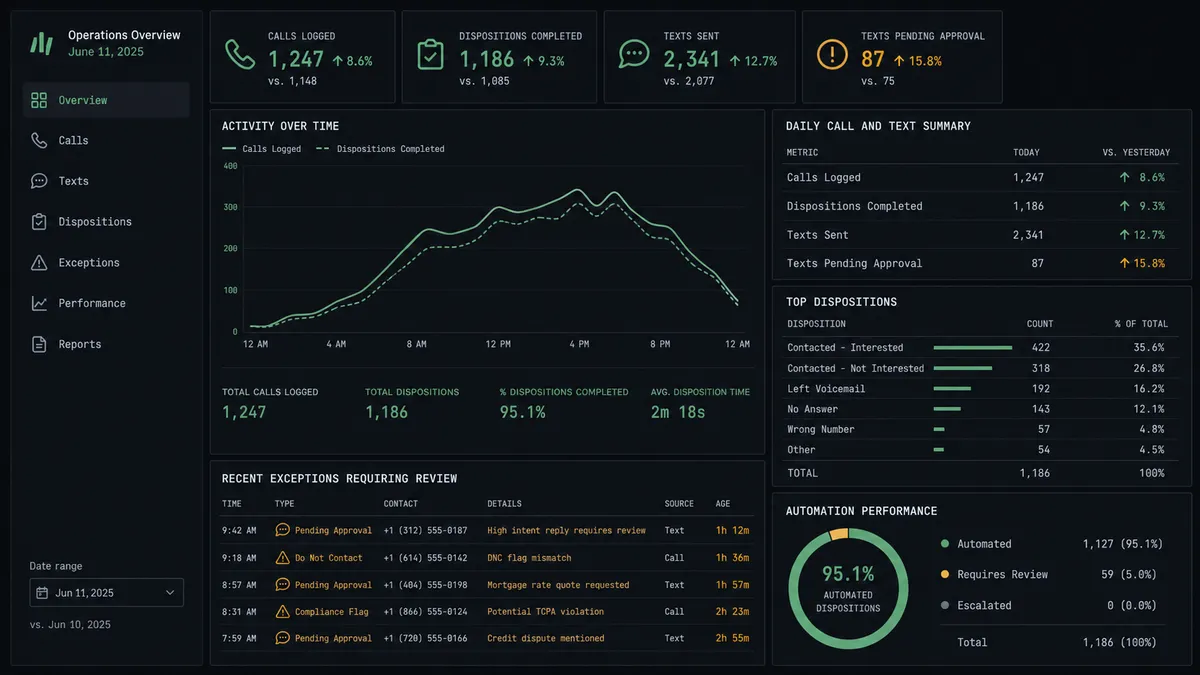
Same-day disposition backlog cleared. List Calls and Get Call feed calls with no notes into Add Call Notes and Disposition, matched first to their Pipedrive deal with Search Persons and Search Deals.
Approved SMS follow-up sequences. Send SMS drafts the message from call context, a rep approves it, and Check Text Reply plus Reply to Text carry the conversation forward from the same thread.
Call-to-deal activity logging. Create Activity and Create Note write every call’s outcome onto the right Pipedrive deal, so the timeline shows what was actually discussed, not just that a call happened.
Stage progression from call outcomes. When a call closes or advances an opportunity, Update Deal moves the stage without the rep opening a second tab mid-conversation.
Contact book kept in sync. Create Contact and Update Contact keep JustCall’s caller ID matching Pipedrive’s persons, with Delete Contact and any Pipedrive merge held for a human to confirm.
Common questions
Is it free to connect JustCall and Pipedrive on FlowRunner? Yes for a trial period. FlowRunner has a free plan with 100 executions a month, every integration included, and no credit card required, and new accounts get 14 days of Professional on top.
Can I self-host the JustCall-Pipedrive connection? Yes. FlowRunner offers a free Community Edition for self-hosting a single instance, and an Enterprise self-hosted option with multi-instance clustering and the full compliance suite for larger teams.
Does the agent need my own OpenAI key? FlowRunner uses a bring-your-own-key model, so you connect the AI provider you already pay for rather than paying FlowRunner a markup on model usage.
What happens when the agent isn’t sure a text should send? It does not send it. The agent drafts the message with full conversation context and routes it to the rep who owns the relationship, and the text only goes out from the team’s JustCall number once that rep approves it.
Does this replace JustCall’s or Pipedrive’s own integration? It replaces the need for a fixed sync rule. Instead of a static field mapping, an agent reads each call, matches it to a Pipedrive record, and decides what to log and when to text, pausing for a person only on the step that reaches a customer’s phone.
How long does it take to set up? Most teams connect both accounts, pick the call sweep schedule, and have the first day’s calls logging onto Pipedrive deals within 30 minutes.
Getting started
FlowRunner has a free plan with 100 executions a month, every integration included, and no credit card required, and new accounts get 14 days of Professional on top. Connect JustCall and Pipedrive to see the trigger and action library for each, start building at flowrunner.ai, or book a walkthrough at calendly.com/flowrunner/intro.
Frequently asked questions
Is it free to connect JustCall and Pipedrive on FlowRunner?
Yes for a trial period. FlowRunner has a free plan with 100 executions a month, every integration included, and no credit card required, and new accounts get 14 days of Professional on top.
Can I self-host the JustCall-Pipedrive connection?
Yes. FlowRunner offers a free Community Edition for self-hosting a single instance, and an Enterprise self-hosted option with multi-instance clustering and the full compliance suite for larger teams.
Does the agent need my own OpenAI key?
FlowRunner uses a bring-your-own-key model, so you connect the AI provider you already pay for rather than paying FlowRunner a markup on model usage.
What happens when the agent isn't sure a text should send?
It does not send it. The agent drafts the message with full conversation context and routes it to the rep who owns the relationship, and the text only goes out from the team's JustCall number once that rep approves it.
Does this replace JustCall's or Pipedrive's own integration?
It replaces the need for a fixed sync rule. Instead of a static field mapping, an agent reads each call, matches it to a Pipedrive record, and decides what to log and when to text, pausing for a person only on the step that reaches a customer's phone.
How long does it take to set up?
Most teams connect both accounts, pick the call sweep schedule, and have the first day's calls logging onto Pipedrive deals within 30 minutes.