Aircall Pipedrive Integration: Insight Cards Before You Say Hello
Connect Aircall and Pipedrive so every inbound call arrives with deal context on screen, and let an AI agent run the sync while a human approves any record merge.
How do you connect Aircall to Pipedrive?
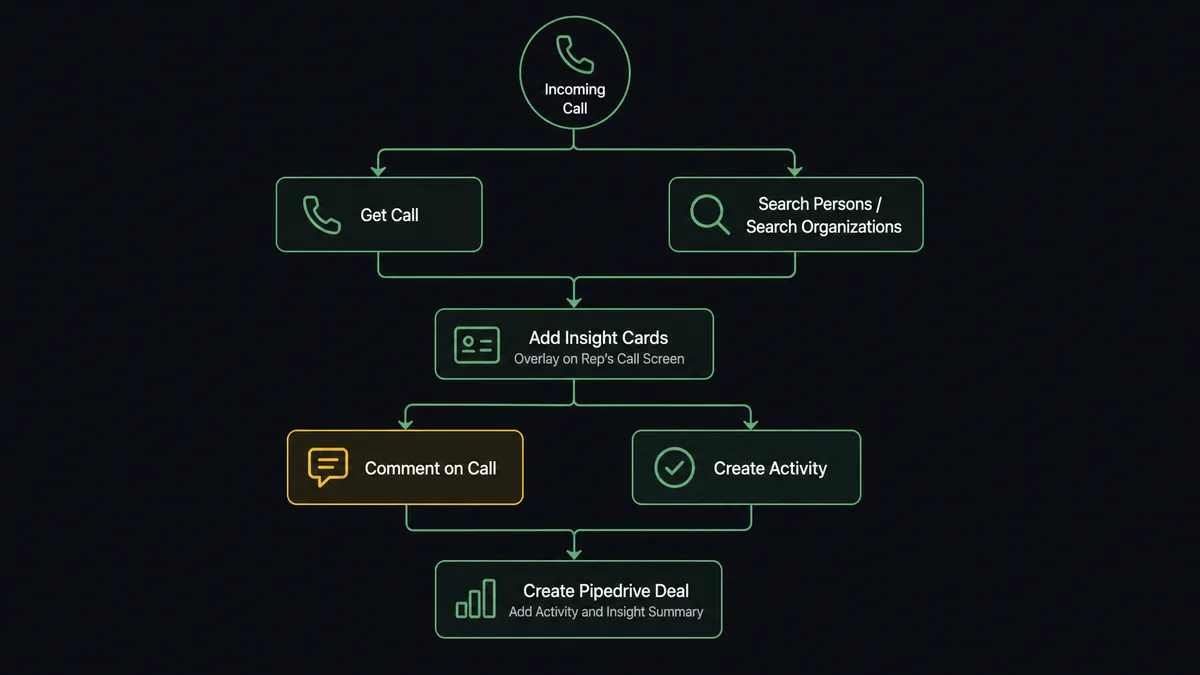
An inbound call event from Aircall’s webhook triggers Get Call, which resolves the caller; that caller is matched against Pipedrive with Search Persons and Search Organizations, and the deal, activity, and account data flows back into Aircall through Add Insight Cards while the phone is still ringing. FlowRunner is a visual AI-agent orchestration platform where automations run autonomously and pause for human judgment on the steps that carry real consequence. The same connection can run as a fixed sync, or upgrade to an AI agent that reasons about each caller and calls a human-in-loop flow as a tool before it merges or deletes a Pipedrive record.
The problem it solves
A sales rep’s phone rings and all they have is a number. They pick up cold, spend the first minute asking who’s calling and what account they’re on, then hang up and either log the call immediately or, more often, mean to log it later and don’t. Meanwhile the CRM has its own gap: leads and inbound contacts get typed into Pipedrive by hand, sometimes hours after the call that generated them, sometimes with a duplicate person record because nobody checked first. Deals sit in the wrong stage because updating them means opening a browser tab mid-conversation.
The manual version of this process depends entirely on the rep remembering to do three separate things after every call: log the outcome, tag it correctly, and update the deal. Exceptions, the VIP caller who gets treated like a stranger, the flagged complaint that never becomes a ticket, fall through the cracks because nothing forces the connection between the phone system and the CRM. Reps lose the first minute of every call to context-gathering, and ops leads lose visibility into which calls actually moved a deal forward.
How it works: the connection
The flow starts the moment a call rings. Create Webhook registers Aircall’s call events with FlowRunner, so an inbound call fires the trigger without anyone touching a dashboard. Get Call pulls the caller’s number, the line dialed, and the assigned rep. That number is checked against Pipedrive with Search Persons and, where relevant, Search Organizations, so the flow finds the existing account instead of guessing.
Once the match is found, Add Insight Cards pushes the account status, deal stage, deal value, and last activity onto the rep’s Aircall screen before they answer. Add Link to Call attaches the Pipedrive record directly so the rep can open it in one click. After the call ends, Comment on Call and Add Tags to Call capture what happened and categorize it, while Create Activity and Create Note write the same outcome into Pipedrive so it lives on the deal, not just on the call log. When the call closes an opportunity, Update Deal moves the stage and Get Deal Products attaches the relevant line items.
None of this requires the rep to switch tabs mid-call or remember to log anything afterward. The data moves because the call happened, not because someone remembered to enter it.
Can an AI agent run it? (and why a human stays in the loop)
A sync tool moves fields from one system to another on a fixed rule. An agent reads the call, reasons about what it found, and decides what to do next, including when to stop and ask a person. This is the upgrade Zapier and n8n’s rule-based flows can’t offer: the agent has Get Call, Search Persons, Search Organizations, Add Insight Cards, Create Activity, and dozens of other Pipedrive and Aircall actions available as tools, and it chooses which ones to use based on what the call actually looks like.
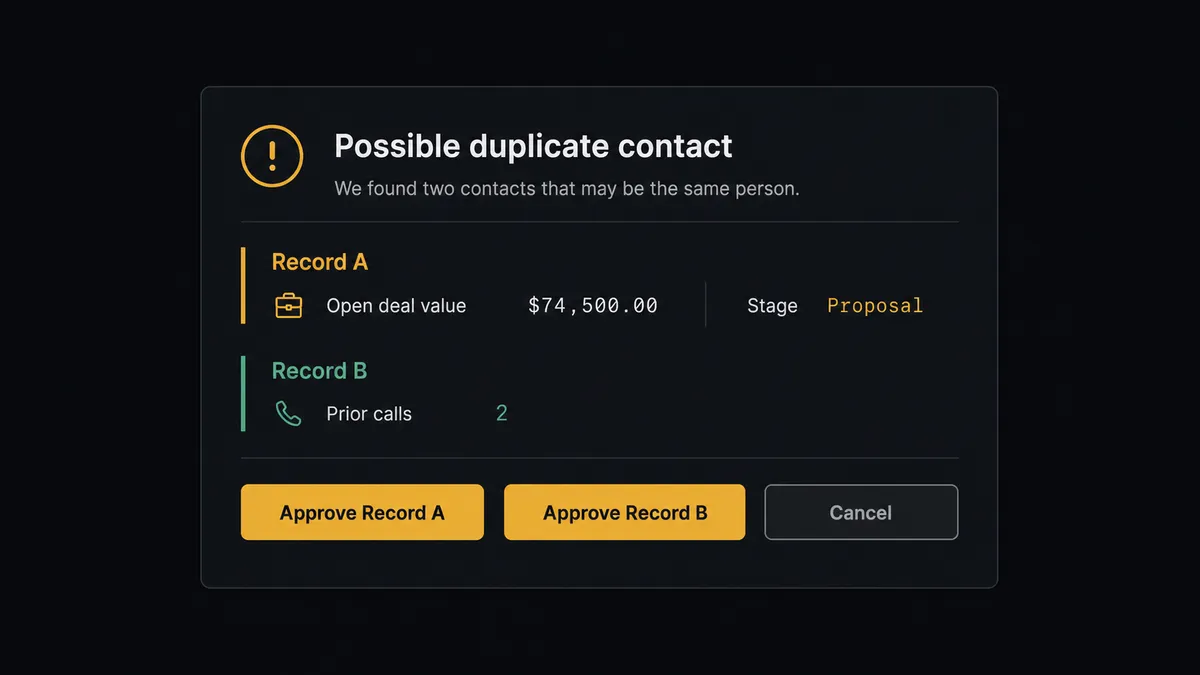
The moment that matters most is duplicate resolution. Pipedrive’s own human-in-loop highlight is explicit about this: Merge Persons, Merge Deals, Merge Organizations, and any bulk delete are exactly where an agent should stop and ask, because merging the wrong two contacts destroys history that can’t be reconstructed. When the agent’s caller-matching step finds two person records that could plausibly be the same contact, one from a form fill three months ago, one created from this call, it does not merge them on its own. It assembles both records with their deal and activity history, runs a dry-count of what would be affected, and posts to the sales lead: “Two person records may be the same contact. Record A has an open deal worth $18,000 in stage Proposal. Record B has no deal but two prior calls. Approve the survivor, modify, or cancel?” The lead picks. The agent executes exactly that choice and logs the decision, the approver, and the timestamp to the audit trail.
This is not a sync tool. The agent knows when to stop and ask, and the record it keeps of that decision is what a compliance review actually wants to see.
FlowRunner vs Zapier
Zapier is genuinely good at what it was built for: single-trigger, single-action zaps that non-technical teams can set up in minutes, and it already has both Aircall and Pipedrive as supported apps. For a one-step “new call tags a contact” automation, Zapier gets it done fast.
Where it runs out of road is the judgment step. A Zap can move data from a trigger to an action; it cannot look at two Pipedrive person records, weigh their deal history, and decide whether a human should be asked before merging them. That decision either gets hardcoded as a rigid rule or skipped entirely.
| Dimension | Zapier | FlowRunner |
|---|---|---|
| Human-in-the-loop | Not native; requires a separate approval app bolted on | Native tool the agent calls mid-workflow, with full context and audit trail |
| Decision logic | Fixed trigger-to-action steps | AI agent reads the call and record data and decides which actions to invoke |
| Duplicate/merge handling | No built-in judgment; runs the mapped action regardless | Agent pauses for a person before Merge Persons, Merge Deals, or any bulk delete |
| Users per plan | Priced per user on most tiers | Unlimited users on every tier |
| AI provider | Zapier’s own AI credits, metered | BYOK, connect the provider you already pay for |
| Pricing model | Per-task pricing that scales with call volume | Transparent workflow-based tiers with a fixed execution ceiling |
Before and after
| Metric | Before | After |
|---|---|---|
| Rep context at pickup | Rep answers knowing only a phone number | Account status, deal stage, and value are on screen before the rep says hello |
| Call logging | Depends on the rep remembering to log it after the call | Comment on Call, Add Tags to Call, and Create Activity fire automatically at wrap-up |
| Duplicate contacts | No systematic check before a new person is created | Search Persons and Search Organizations run before every create |
| Deal stage accuracy | Updated whenever the rep gets to it, sometimes days later | Update Deal moves the stage from the call outcome itself |
| Record merges | Merged by whoever notices the duplicate, no review step | Agent packages both records and routes the merge decision to the sales lead |
What you can build
Live insight cards on every inbound call. Get Call plus Search Persons and Search Organizations push account status, deal value, and open activities to the rep’s Aircall screen before they answer.
Automatic call-to-deal logging. Comment on Call and Add Tags to Call in Aircall pair with Create Activity and Create Note in Pipedrive, so every call is recorded on both sides without a rep typing it twice.
Contact sync with a merge gate. Create Contact and Update Contact keep Aircall’s caller ID aligned with Pipedrive, while the agent routes any Merge Persons decision to a human before records combine.
Stage progression from call outcomes. When a call closes an opportunity, Update Deal advances the stage and Get Deal Products attaches the relevant line items, so Pipedrive reflects the conversation that just happened.
Flagged-call follow-up queue. Calls tagged for review during wrap-up create a Task or Activity in Pipedrive, so the next morning’s follow-up list already exists instead of living in someone’s memory.
Common questions
Is it free to connect Aircall and Pipedrive on FlowRunner? Yes for a trial period. FlowRunner has a free plan with 100 executions a month, every integration included, and no credit card required, and new accounts get 14 days of Professional on top.
Can I self-host the Aircall-Pipedrive connection? Yes. FlowRunner offers a free Community Edition for self-hosting a single instance, and an Enterprise self-hosted option with multi-instance clustering and the full compliance suite for larger teams.
Does the agent need my own OpenAI key? FlowRunner uses a bring-your-own-key model, so you connect the AI provider you already pay for rather than paying FlowRunner a markup on model usage.
What happens when the agent isn’t sure which Pipedrive record matches a caller? It does not guess. It packages both candidate records with their history and asks a person to confirm the match or approve a merge before anything is combined or deleted.
Does this replace Aircall’s or Pipedrive’s own integration? It replaces the need for a fixed sync rule. Instead of a static field-mapping integration, an agent reads each call and each record, decides what to do, and only pauses for a human on the steps that could lose data.
How long does it take to set up? Most teams connect both accounts, pick the webhook trigger, and have insight cards showing on live calls within 30 minutes.
Getting started
FlowRunner has a free plan with 100 executions a month, every integration included, and no credit card required, and new accounts get 14 days of Professional on top. Connect Aircall and Pipedrive to see the trigger and action library for each, start building at flowrunner.ai, or book a walkthrough at calendly.com/flowrunner/intro.
Frequently asked questions
Is it free to connect Aircall and Pipedrive on FlowRunner?
Yes for a trial period. FlowRunner has a free plan with 100 executions a month, every integration included, and no credit card required, and new accounts get 14 days of Professional on top.
Can I self-host the Aircall-Pipedrive connection?
Yes. FlowRunner offers a free Community Edition for self-hosting a single instance, and an Enterprise self-hosted option with multi-instance clustering and the full compliance suite for larger teams.
Does the agent need my own OpenAI key?
FlowRunner uses a bring-your-own-key model, so you connect the AI provider you already pay for rather than paying FlowRunner a markup on model usage.
What happens when the agent isn't sure which Pipedrive record matches a caller?
It does not guess. It packages both candidate records with their history and asks a person to confirm the match or approve a merge before anything is combined or deleted.
Does this replace Aircall's or Pipedrive's own integration?
It replaces the need for a fixed sync rule. Instead of a static field-mapping integration, an agent reads each call and each record, decides what to do, and only pauses for a human on the steps that could lose data.
How long does it take to set up?
Most teams connect both accounts, pick the webhook trigger, and have insight cards showing on live calls within 30 minutes.