Help Scout + HubSpot: Every Ticket Linked to Its Deal
Connect Help Scout conversations to HubSpot contacts and deals automatically, and run it as an AI agent that pauses for a person before a support case touches an active deal.
How do you connect Help Scout to HubSpot?
You connect Help Scout to HubSpot by having a scheduled flow pull conversations with Help Scout’s List Conversations action, look up the customer in HubSpot with Get Contact by Email, and then update the matching contact or deal with Update Contact or Update Deal. FlowRunner is a visual AI-agent orchestration platform where automations run autonomously and pause for human judgment on the steps that carry real consequence. The same connection can run as an AI agent that reads the conversation, decides whether it touches an open deal, and pauses for a deal owner before changing anything in HubSpot.
The problem it solves
A customer emails support with a billing question, and nobody on the sales side knows it happened. The support agent in Help Scout has no visibility into whether that customer has an open deal, a renewal coming up, or a six-figure account with a dedicated rep. Meanwhile the account executive in HubSpot has no idea a case exists until the customer mentions it on a call, or worse, until the deal stalls and nobody can explain why.
Today, closing that gap means someone manually checking two systems: a support lead scanning Help Scout for anything that smells like an account risk, then pinging sales, or a sales rep periodically searching Help Scout for their accounts by hand. It is slow, it depends on someone remembering to look, and it falls through the cracks the moment either team gets busy. The spreadsheet version of this, a shared tracker someone updates when they remember, works for a week and then quietly stops.
How it works: the connection
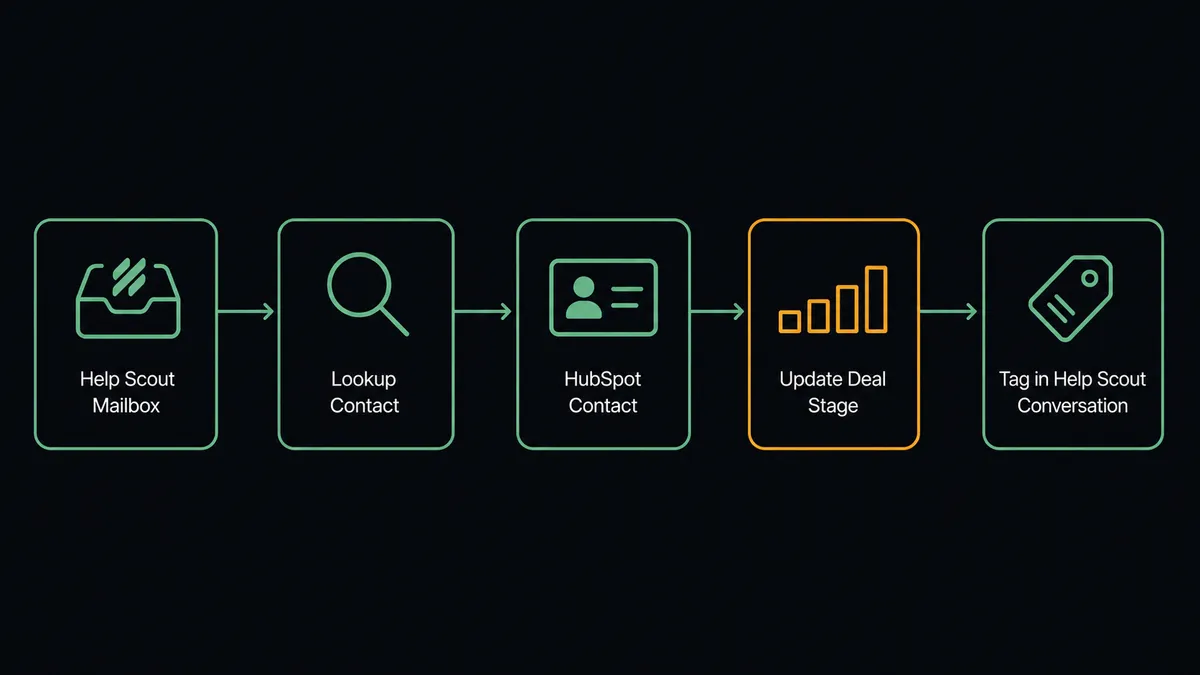
Help Scout has no native event trigger, so the flow starts on a schedule. Every few minutes, FlowRunner calls List Conversations, filtered to conversations modified since the last run. For each one, it calls Get Conversation to pull the subject, status, and thread list, and Get Customer to get the customer’s email and profile.
With that email in hand, FlowRunner calls Get Contact by Email in HubSpot. If a contact exists, it calls Get Associations to check whether that contact is tied to a company or an open deal. If the conversation involves a customer with no HubSpot record at all, the agent can create one with Create Contact, so support interactions start building CRM history even before sales ever engages.
When there’s a match, the connection writes back: Update Contact can log the interaction or bump a lead score, and Update Deal can note the touch on an open opportunity. On the Help Scout side, Add Tags marks the conversation with the account tier or deal stage pulled from HubSpot, and Assign Conversation can route the case to a specialist if the customer account warrants it. Two systems that never talked now share the same picture of the customer, without a rep or a support agent copying anything by hand.
Can an AI agent run it? (and why a human stays in the loop)
A fixed sync would update every matching record the same way, every time. An AI agent does something different: it reads the conversation content, the customer’s deal context, and the deal’s stage and value, and it reasons about whether this particular case is routine or one that should not proceed without a person. This is not a sync tool. The agent knows when to stop and ask.
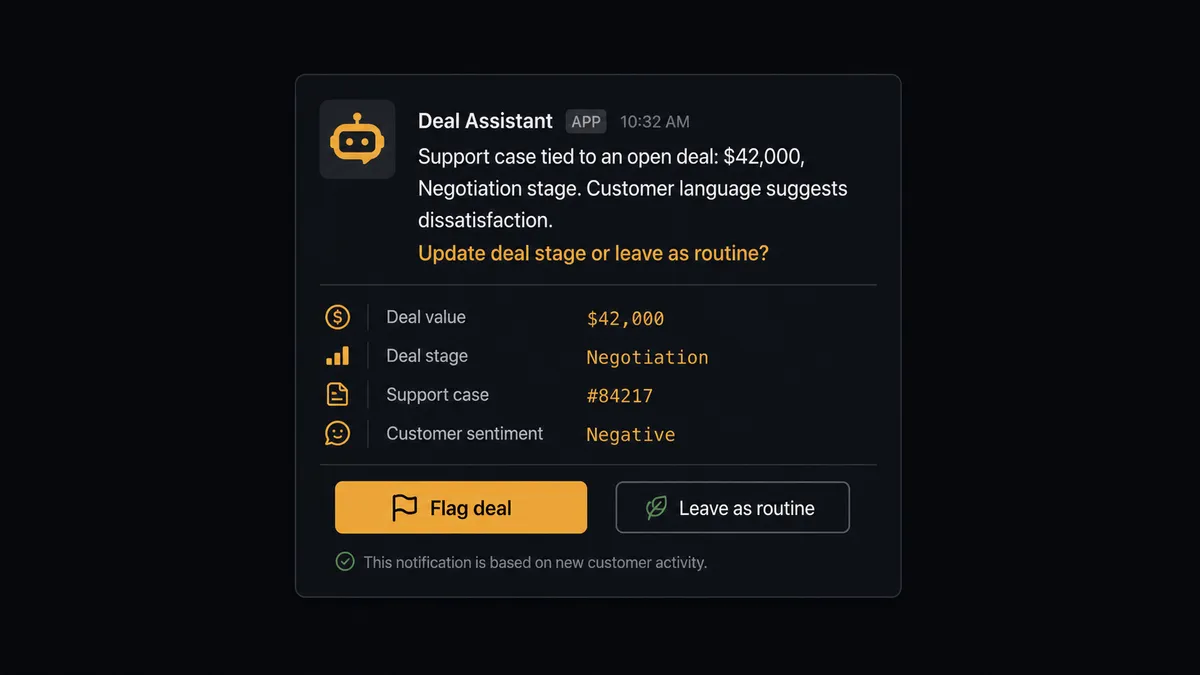
Here is a real decision moment. A conversation comes in from a customer whose HubSpot record shows an open deal in the Negotiation stage worth $42,000. The subject line and thread content suggest dissatisfaction, something closer to “reconsidering” than a routine question. A fixed integration would tag the conversation and move on. The agent instead recognizes that this conversation, tied to a deal at this stage and this value, is not the same as a password reset ticket from a free-tier account. It invokes a human-in-loop flow as a callable tool, pausing execution before it touches the deal record.
The agent packages the conversation subject and thread summary, the customer’s name and company, the deal’s current stage and value, and its own read of the situation (“customer language suggests dissatisfaction on an active $42,000 deal in Negotiation”) and sends it to the deal owner in Slack with two options: update the deal stage to reflect risk, or leave it and let the agent proceed with a routine tag update. The deal owner responds. The agent resumes, either applying the requested change or continuing the standard tagging flow, and the decision, the decider, and the timestamp are all captured in the audit trail.
FlowRunner vs Zapier
Zapier is a genuinely fast way to wire Help Scout and HubSpot together. Its Help Scout and HubSpot apps are mature, the setup takes minutes, and for a simple one-way sync (new conversation creates a HubSpot note, say) it works well and needs no explanation for a non-technical team.
Where it stops is judgment. Zapier’s paths and filters can route on a fixed condition (a keyword, a field value), but they cannot read a conversation, weigh it against a deal’s stage and value, and decide on their own that this particular case warrants a person’s attention while a hundred others don’t. That decision, in FlowRunner, is the agent’s to make, not a rule someone has to anticipate and hardcode in advance.
| FlowRunner | Zapier | |
|---|---|---|
| Human-in-loop | Native: the agent invokes a human-in-loop flow as a callable tool, mid-reasoning | Bolt-on at best: a filter step or manual approval app, triggered by a fixed condition |
| Decision logic | Agent reads context and decides case-by-case | Rule-based: same path every time a condition matches |
| Users included | Unlimited on every tier | Priced per user on higher tiers |
| AI provider | BYOK, connect the provider you already use | Zapier AI runs on Zapier’s own model access |
| Self-hosting | Available (Community Edition free, Enterprise for scale) | Not available; cloud only |
| Pricing model | Transparent workflow-based tiers with a fixed execution ceiling | Task-based pricing that scales with volume, less predictable at high case counts |
Before and after
| Metric | Before | After |
|---|---|---|
| Case-to-CRM visibility | Sales finds out about a support case only if someone mentions it | Every conversation checks against HubSpot within minutes of arriving |
| Duplicate contact creation | No systematic check before a new contact gets created | Get Contact by Email runs before any Create Contact, every time |
| Deal risk detection | Depends on a rep noticing a pattern across two disconnected systems | The agent flags conversations tied to active deals as they happen |
| CRM data entry | Manual updates to contact or deal records after a support touch | Update Contact and Update Deal run automatically after each relevant case |
| Conversation routing | Assignment and tagging wait for a support agent to work the queue | Add Tags and Assign Conversation run with account context from HubSpot already attached |
What you can build
Account-aware ticket routing. When a conversation comes in, the agent checks HubSpot for the customer’s deal stage and company size, then uses Assign Conversation to route enterprise accounts to a senior support rep automatically.
Support-to-pipeline visibility. Every conversation tied to an open deal gets logged with Update Deal, so the deal owner sees support history directly in HubSpot without asking the support team.
New customer bootstrapping. When a conversation arrives from an email with no HubSpot match, the agent creates the contact with Create Contact and associates it to a company with Associate Objects, so sales has a record before the ticket is even resolved.
Deal-risk escalation. Conversations that mention cancellation, pricing pushback, or dissatisfaction on an active deal pause for the deal owner before any tag or stage change, using the human-in-loop flow described above.
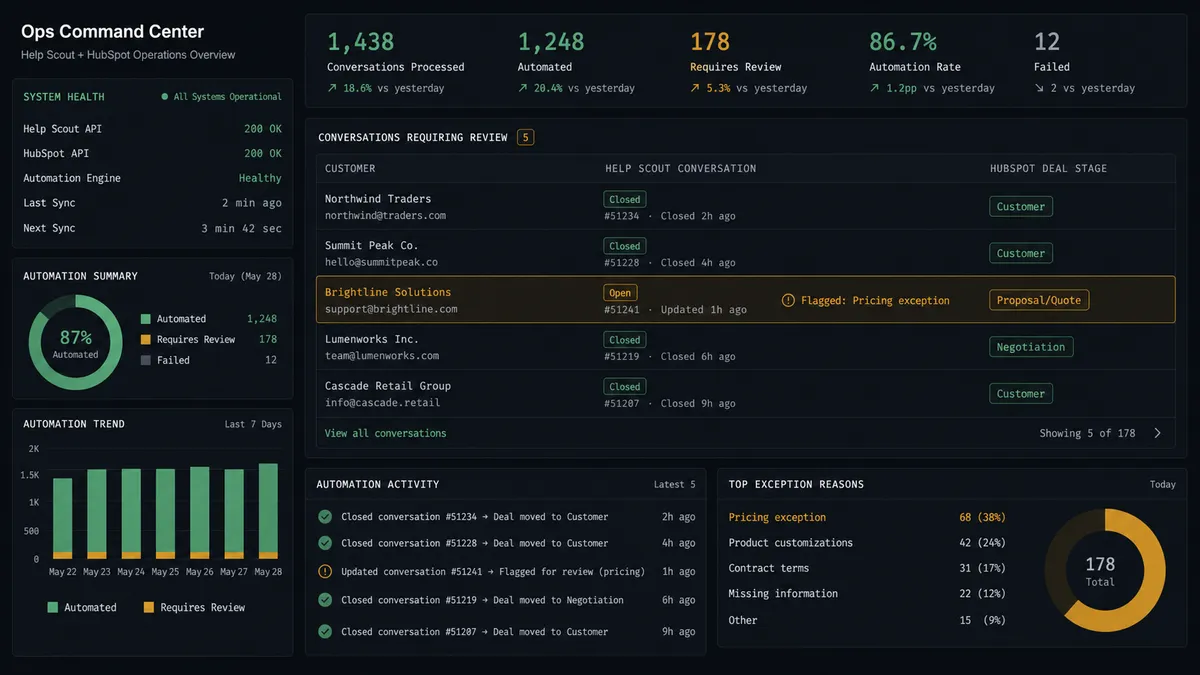
Weekly account health digest. A separate scheduled flow uses List Conversations alongside HubSpot’s Get All Deals to summarize which open deals had a support touch that week, giving sales leadership a picture without pulling two reports by hand.
Common questions
Is it free to connect Help Scout and HubSpot on FlowRunner? Yes for a trial period. FlowRunner has a free plan with 100 executions a month, every integration included, and no credit card required, and new accounts get 14 days of Professional on top.
Can I self-host the Help Scout to HubSpot connection? Yes. FlowRunner offers a free self-hosted Community Edition for a single instance, and a self-hosted Enterprise option with multi-instance clustering and the full compliance suite for larger teams.
Does the agent need my own OpenAI key? FlowRunner uses a bring-your-own-key model for AI providers, so you connect the AI provider you already pay for rather than routing usage through a vendor-owned key.
What happens when the agent isn’t sure whether a case affects a deal? It does not guess. It packages the conversation, the customer, and the deal’s current stage and value, posts that to the deal owner in Slack, and waits for a decision before touching the CRM record.
Does this replace Help Scout’s or HubSpot’s own integrations? It replaces the need for a fixed field-mapping sync. An agent reads each conversation and each CRM record, reasons about whether the case matters to the deal, and only pauses a person on the step that carries consequence.
Do I still need Zapier if I already have FlowRunner? No. FlowRunner connects Help Scout and HubSpot directly and adds the AI agent and human-in-loop layer that Zapier does not offer natively.
Getting started
Connecting Help Scout and HubSpot takes about ten minutes. Start on the free plan: 100 executions a month, every integration included, no credit card required, plus 14 days of Professional for new accounts. Connect your Help Scout mailbox and your HubSpot portal, choose the scheduled trigger, and decide where the human-in-loop step should sit.
Ready to build it? Start free at flowrunner.ai, or book a walkthrough at calendly.com/flowrunner/intro.
Frequently asked questions
Is it free to connect Help Scout and HubSpot on FlowRunner?
Yes for a trial period. FlowRunner has a free plan with 100 executions a month, every integration included, and no credit card required, and new accounts get 14 days of Professional on top.
Can I self-host the Help Scout to HubSpot connection?
Yes. FlowRunner offers a free self-hosted Community Edition for a single instance, and a self-hosted Enterprise option with multi-instance clustering and the full compliance suite for larger teams.
Does the agent need my own OpenAI key?
FlowRunner uses a bring-your-own-key model for AI providers, so you connect the AI provider you already pay for rather than routing usage through a vendor-owned key.
What happens when the agent isn't sure whether a case affects a deal?
It does not guess. It packages the conversation, the customer, and the deal's current stage and value, posts that to the deal owner in Slack, and waits for a decision before touching the CRM record.
Does this replace Help Scout's or HubSpot's own integrations?
It replaces the need for a fixed field-mapping sync. An agent reads each conversation and each CRM record, reasons about whether the case matters to the deal, and only pauses a person on the step that carries consequence.