How to Connect Zendesk with HubSpot (With or Without an AI Agent)
Connect Zendesk and HubSpot so every new support ticket creates or updates the matching HubSpot contact and deal automatically, with an AI agent that pauses for human review when a ticket signals a deal at risk.
How do you connect Zendesk to HubSpot?
When a Zendesk ticket is created or updated, FlowRunner fires on the On Ticket Event trigger, reads the requester’s email with Get Ticket, looks up the matching record in HubSpot with Get Contact by Email, and creates or updates the contact and associated deal automatically. FlowRunner is a visual AI-agent orchestration platform where automations run autonomously and pause for human judgment on the steps that carry real consequence. The same connection can run as an AI agent that reads the ticket conversation, evaluates the customer’s deal stage, and calls a human into the loop before marking a deal at risk.
The problem support and sales teams live with
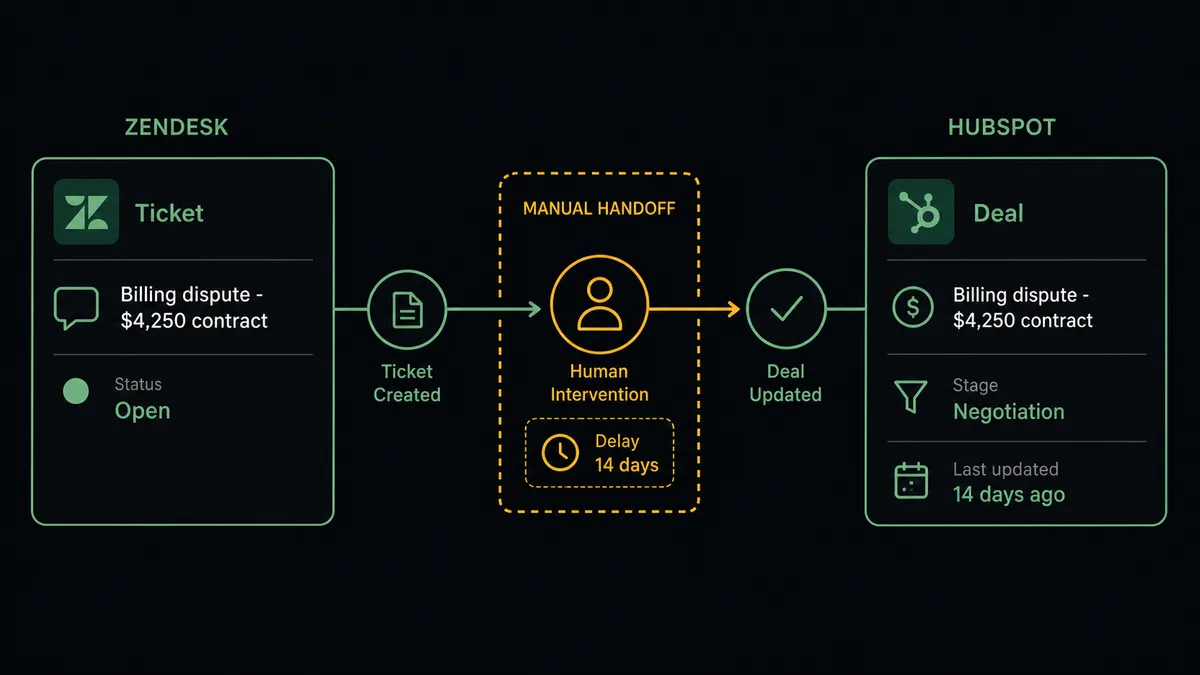
A customer opens a Zendesk ticket about a billing dispute. The support agent triages it, resolves it, closes it. The HubSpot deal sitting in Negotiation with that customer never changes. Two weeks later, the account goes quiet and the sales rep has no idea there was a support escalation at all.
The gap is not a technology failure. It is a process gap that neither system closes on its own. Support and sales run in parallel. Every new ticket that touches an at-risk account, every conversation that signals churn, every request from a customer whose renewal is six weeks out falls through the cracks because no one is watching both systems at once. The ops lead who manages both queues ends up in spreadsheets, manually correlating Zendesk ticket IDs with HubSpot deal records, trying to build a picture that should exist automatically.
How it works: the connection
The connection starts the moment a Zendesk ticket is created or updated. On Ticket Event fires in real time, delivered through a webhook that FlowRunner provisions and manages automatically. No polling. No delay.
The agent calls Get Ticket to read the full ticket record: subject, priority, status, group, tags, and requester. It follows that with List Ticket Comments to get the full conversation before it acts. With that data in hand, it calls Get Contact by Email in HubSpot using the requester’s email address.
From there the flow branches cleanly. If no HubSpot contact exists for that email, the agent calls Create Contact and sets the lifecycle stage based on the ticket context. It then calls Associate Objects to link the new contact to the right company record. If a contact already exists, the agent calls Update Contact to add any new information from the ticket and uses Get Deal by ID to find open deals tied to that account.
When the ticket contains priority or subject signals that matter to the sales team, the agent calls Update Deal to change the stage or add a note. Every step uses real field mappings: the Zendesk requester email maps directly to the HubSpot contact lookup; the ticket subject and priority map to deal notes and contact activity.
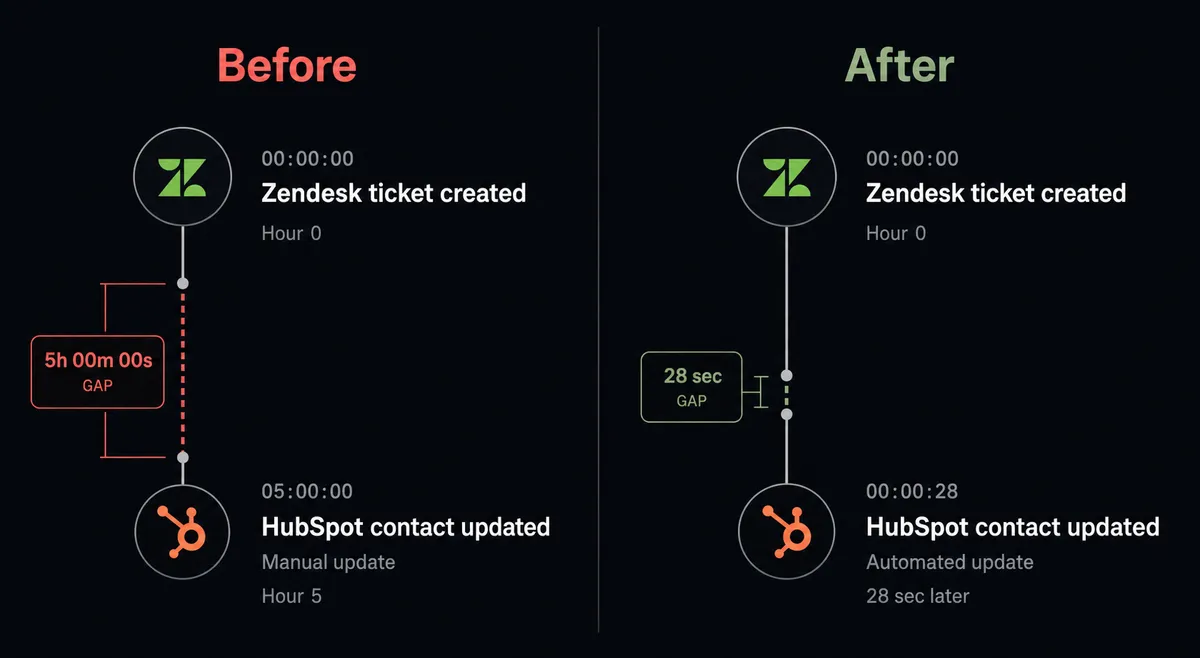
The result: every Zendesk ticket event produces a current HubSpot record in under 30 seconds, with no rep touching either system.
Can an AI agent run it? (And why a human stays in the loop)
The plain connection syncs records. The AI agent version reads the situation and decides what to do with it.
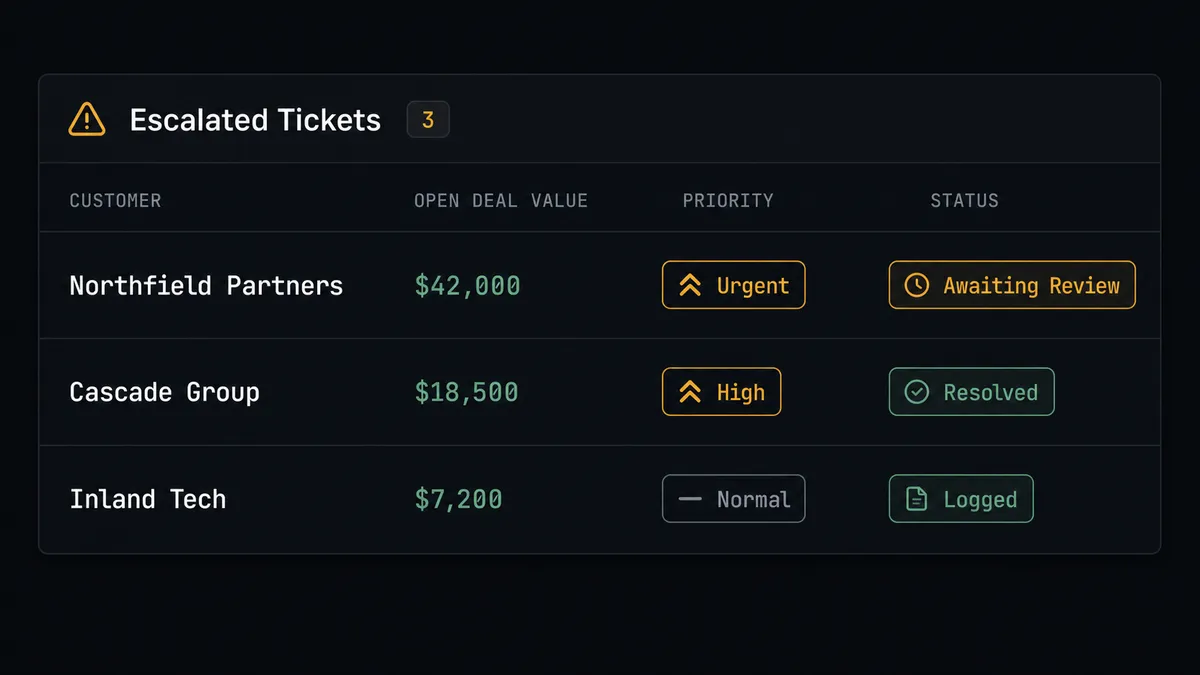
Here is the difference. A standard integration sees a Zendesk ticket and creates a HubSpot contact. The agent sees the ticket, reads the conversation with List Ticket Comments, checks whether there is an open deal with Get Deal by ID, and evaluates what the ticket signals for that deal. A billing question on a $400 account gets logged and closed. A billing dispute on a $42,000 contract in the Negotiation stage gets flagged.
That flagging is not a hardcoded threshold. The agent reasons about the combination: the deal size, the stage, the language in the ticket (“cancel,” “pricing issue,” “not what we agreed”), the time since the last deal update. When those factors converge in a way the agent reads as high-stakes, it invokes the human-in-loop flow as a callable tool.
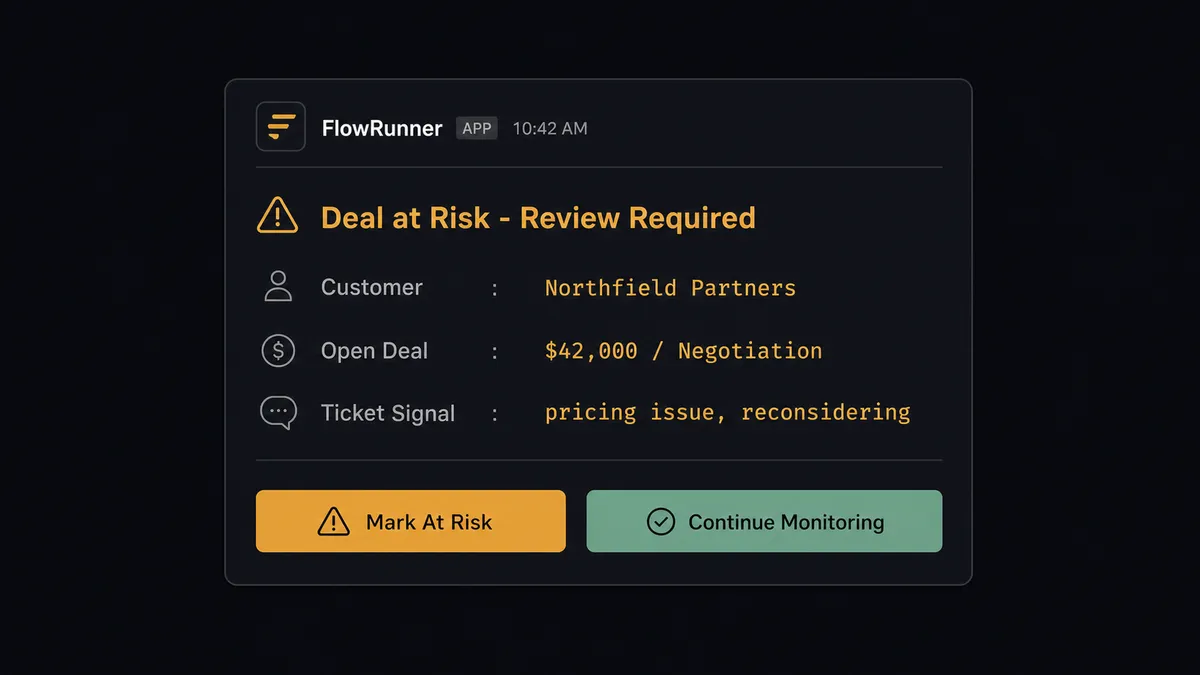
The workflow pauses. The sales rep receives a structured message via Slack:
“Zendesk ticket #48291: Billing dispute. Customer: Northfield Partners. Open deal: $42,000 in Negotiation, last updated 11 days ago. Ticket language mentions ‘pricing issue’ and ‘reconsidering.’ Do you want to mark this deal at risk and schedule a call, or continue monitoring?”
The rep gets the ticket subject, the open deal value, the deal stage, the exact language that triggered the escalation, and two clear options. They decide. The agent applies the decision with Update Deal and logs the action in the audit trail. The sales rep does not need to go looking; the context comes to them.
This is not a sync tool. The agent knows when to stop and ask. Prospects call it a digital andon cord: the line pauses when AI hits something a human should own.
FlowRunner vs the tool you’re probably comparing
If your team is non-technical, you are probably using Zapier today. If your team has some technical capacity, you may be evaluating n8n. Both are legitimate tools with real install bases.
Zapier does this connection well for simple use cases. It has a large library of pre-built Zaps, an approachable interface, and reliable uptime. For teams that need a contact created in HubSpot whenever a Zendesk ticket appears, Zapier works.
n8n offers more flexibility and self-hosting, which makes it attractive for teams that want control over their infrastructure. It has LangChain agent nodes and a strong community.
Where FlowRunner is different:
| Capability | Zapier | n8n | FlowRunner |
|---|---|---|---|
| Human-in-loop as native agent tool | No | No | Yes |
| Agent reads ticket and reasons about deal risk | No | Limited | Yes |
| Unlimited users on every paid tier | Per-user pricing | Per-user pricing | Yes |
| Bring your own AI provider keys | No | No | Yes |
| Built-in audit trail for human decisions | No | No | Yes |
| Self-hosted option | No | Yes | Yes |
The core difference is not the connection. It is what happens at the point of consequence. Zapier and n8n move data. FlowRunner moves data and delegates the judgment calls.
Before and after
| Metric | Before | After |
|---|---|---|
| Time to sync a Zendesk ticket to HubSpot | Hours to days, if it happens at all | Under 30 seconds on ticket creation |
| Deal visibility on active support cases | Sales rep checks Zendesk manually, or hears from support | Agent flags deal-risk tickets to the rep in real time |
| Duplicate contact risk | No deduplication before creating records | Agent calls Get Contact by Email before every create |
| Human review on high-stakes tickets | No systematic escalation path | Agent pauses and routes context to the rep for a decision |
| Audit trail for escalation decisions | None | Every human decision logged with actor, timestamp, and context |
What you can build
Real-time CRM sync on every ticket When On Ticket Event fires, the agent calls Get Contact by Email and updates the HubSpot contact with the latest ticket data. Sales reps always see current support activity without switching tools.
Deal-risk escalation for high-value accounts The agent checks Get Deal by ID for any open deal tied to the ticket’s requester. When the deal is in a late stage and the ticket signals friction, it invokes the human-in-loop flow and sends the rep a structured decision request via Slack.
New-lead creation from inbound support tickets When a ticket arrives from an email not yet in HubSpot, the agent calls Create Contact, sets the lifecycle stage to Lead, creates a deal in the inbound pipeline with Create Deal, and routes it to the right sales rep using territory rules, all before a human touches either system.
Duplicate contact resolution When Search Contacts finds two HubSpot records matching the same requester email, the agent pauses and routes the conflict to a CRM admin via the human-in-loop flow, showing both records and asking which to associate the ticket with. Clean data, accountable decision.
Ticket-driven deal stage updates When a customer opens a ticket marked urgent on an account with an open renewal deal, the agent calls Update Deal to change the stage to At Risk and logs the ticket ID as a note. The sales manager sees the pipeline change immediately without a manual update from the rep.
Common questions
Is it free to connect Zendesk and HubSpot on FlowRunner? FlowRunner has a free plan with 100 executions a month, every integration included, and no credit card required, and new accounts get 14 days of Professional on top. Beyond the free plan, Growth starts at $45 per month and includes unlimited users, unlimited workflows, and full Zendesk and HubSpot connectors.
Can I self-host FlowRunner? Yes. FlowRunner offers a Community Edition for self-hosted deployments at no cost, and an Enterprise self-hosted tier with multi-instance clustering and full compliance features. Cloud hosting is available on all paid tiers.
Does the agent need my own OpenAI key? FlowRunner uses a bring-your-own-keys model for AI providers. You connect your own key from any supported provider: OpenAI, Anthropic, or others. You control cost and model selection directly.
What happens when the agent isn’t sure whether a ticket signals a deal at risk? The agent pauses the workflow and sends a structured message to a sales rep or CRM admin via Slack or email, providing the ticket subject, customer name, open deal value, and the specific language that triggered the escalation. The human decides whether to mark the deal at risk or continue. Nothing is changed until a person responds.
Does this replace my Zendesk or HubSpot plan? No. FlowRunner sits on top of your existing Zendesk and HubSpot subscriptions. It connects them and orchestrates work between them. You keep all your existing data, settings, and team access in both systems.
Can I connect more than just Zendesk and HubSpot in the same workflow? Yes. A single FlowRunner workflow can include Zendesk, HubSpot, Slack, and any other supported integration. For example, the agent can create a Zendesk ticket, update a HubSpot deal, and notify a Slack channel in one uninterrupted flow.
Getting started
FlowRunner has a free plan with 100 executions a month, every integration included, and no credit card required, and new accounts get 14 days of Professional on top.
Connect both integrations from the FlowRunner integrations library: Zendesk and HubSpot. The Zendesk connector provisions the On Ticket Event webhook automatically. HubSpot connects via API key or OAuth2.
Start building at flowrunner.ai or book a 30-minute walkthrough at calendly.com/flowrunner/intro. Bring your Zendesk and HubSpot credentials and we will have a live flow running in the session.
Frequently asked questions
Is it free to connect Zendesk and HubSpot on FlowRunner?
FlowRunner has a free plan with 100 executions a month, every integration included, and no credit card required, and new accounts get 14 days of Professional on top. Beyond the free plan, Growth starts at $45 per month and includes unlimited users, unlimited workflows, and full Zendesk and HubSpot connectors.
Can I self-host FlowRunner?
Yes. FlowRunner offers a Community Edition for self-hosted deployments at no cost, and an Enterprise self-hosted tier with multi-instance clustering and full compliance features. Cloud hosting is available on all paid tiers.
Does the agent need my own OpenAI key?
FlowRunner uses a bring-your-own-keys model for AI providers. You connect your own key from any supported provider: OpenAI, Anthropic, or others. You control cost and model selection directly.
What happens when the agent isn't sure whether a ticket signals a deal at risk?
The agent pauses the workflow and sends a structured message to a sales rep or CRM admin via Slack or email, providing the ticket subject, customer name, open deal value, and the specific language that triggered the escalation. The human decides whether to mark the deal at risk or continue. Nothing is changed until a person responds.
Does this replace my Zendesk or HubSpot plan?
No. FlowRunner sits on top of your existing Zendesk and HubSpot subscriptions. It connects them and orchestrates work between them. You keep all your existing data, settings, and team access in both systems.
Can I connect more than just Zendesk and HubSpot in the same workflow?
Yes. A single FlowRunner workflow can include Zendesk, HubSpot, Slack, and any other supported integration. For example, the agent can create a Zendesk ticket, update a HubSpot deal, and notify a Slack channel in one uninterrupted flow.