Sync Gong Call Insights to Salesforce Pro Automatically
Connect Gong and Salesforce Pro so every call recap lands on the right record automatically, with an AI agent that pauses for a sales manager before it converts a lead.
How do you connect Gong to Salesforce Pro?
Gong’s On New Call trigger fires the moment a completed call finishes processing, and that fires Salesforce Pro’s Find Record and Convert Lead to Contact actions to match the caller to a lead and, once approved, move them into the pipeline. FlowRunner is a visual AI-agent orchestration platform where automations run autonomously and pause for human judgment on the steps that carry real consequence. Run as a straight connection, every finished call gets checked against your Salesforce pipeline automatically. Run as an agent, the same flow reads the call’s content, decides whether it signals a qualified lead, and pauses for a sales manager before it converts anything.
What’s the problem with doing this by hand?
A rep finishes a call. The insight from that conversation, whether the prospect confirmed budget, named a decision date, or brought a competitor into the conversation, lives in Gong until someone goes and gets it. In most teams, that someone is the rep, working from memory an hour or a day later, typing a summary into Salesforce between other calls. When they’re slammed, the summary doesn’t happen at all, and the next person who touches that lead is working from a stale record.
Lead conversion has the same gap. A rep who just had a strong call knows the lead is ready, but Salesforce doesn’t know that until the rep manually converts it, and different reps convert at different points in the process. Revenue ops sees inconsistent stages that don’t reflect what actually happened on the call. Sales managers end up in a Friday scramble reconciling call activity against Salesforce records that never quite match, and real signal falls through the cracks between two systems that were never talking to each other.
How does the connection actually work?
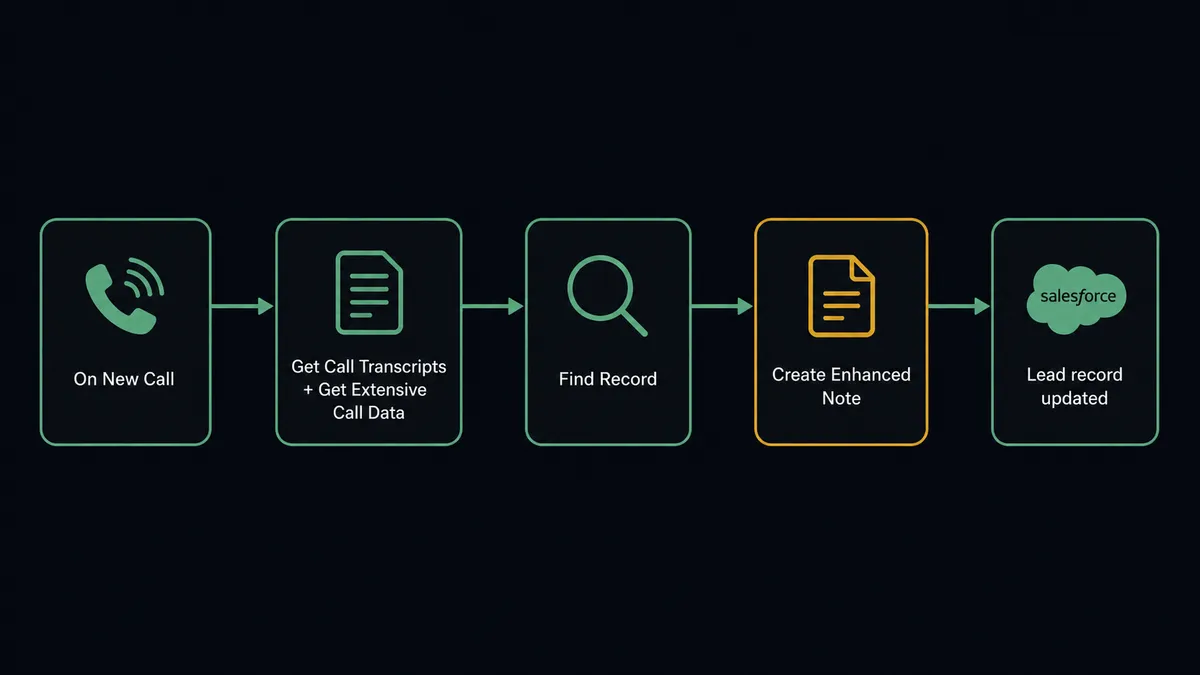
When Gong’s On New Call trigger fires, the flow pulls Get Call Transcripts for the speaker-attributed text and Get Extensive Call Data for the AI-derived brief, key points, and topics. It then runs Find Record in Salesforce Pro, matching the external party on the call to an existing lead by email. That single lookup is what turns a Gong call ID into a Salesforce record the rest of the flow can act on.
From there, the flow writes the recap back with Create Enhanced Note, attaching the call’s key points and brief directly to the Salesforce record so the next person who opens it sees the substance of the conversation without listening to the recording. If the call also updates known facts, like a new stated timeline or budget figure, Update Record keeps the lead’s fields current. None of this requires a person to open Gong or Salesforce; the connection alone gets the recap onto the record every time a call ends.
Can an AI agent run it? (and why a human stays in the loop)
A straight connection logs the call. An AI agent reads it. Once the recap and brief land, the agent evaluates the call against qualification signals: was budget confirmed, was a timeline named, was a decision maker actually on the line. It’s reasoning over the same fields a rep would scan for, not applying a fixed keyword rule.
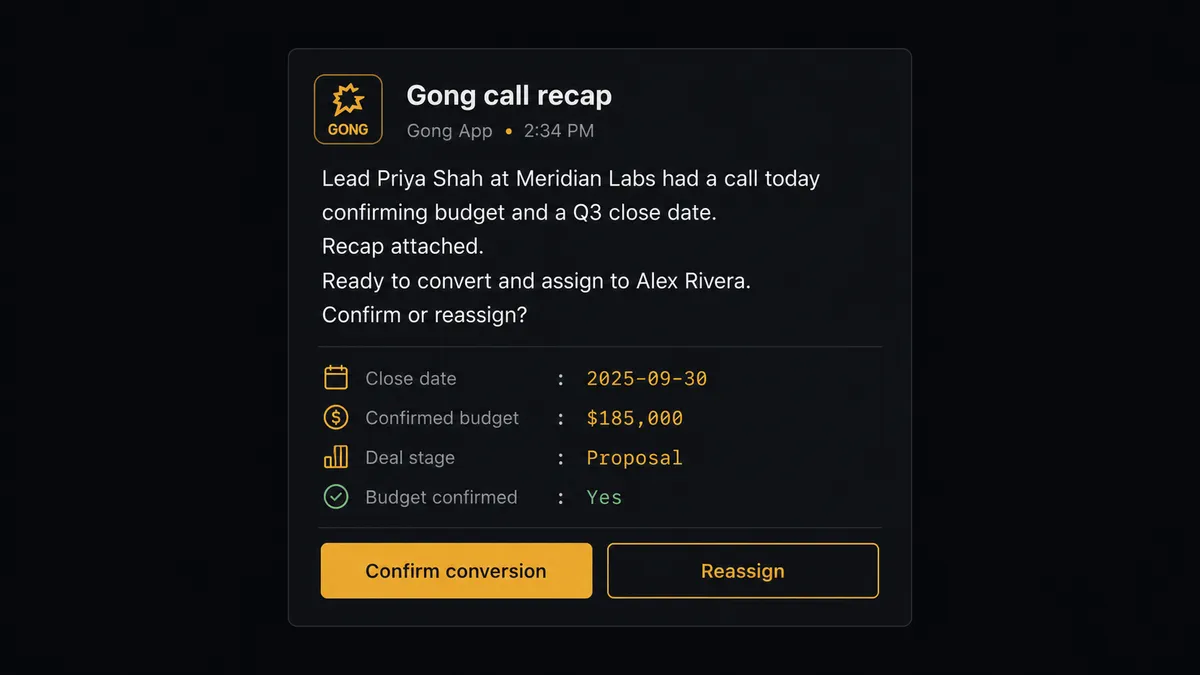
When those signals clear the bar, the agent doesn’t just run Convert Lead to Contact on its own. Lead conversion is irreversible in Salesforce; once a lead becomes a contact, account, and opportunity, there’s no clean undo. So the agent treats it as the consequential step and invokes a human-in-loop tool instead, sending the sales manager a Slack message: “Lead [Name] at [Company] had a call today confirming budget and a Q3 close date. Recap attached. Ready to convert and assign to [Rep Name]. Confirm or reassign?” The manager approves in one click, or reassigns the lead to a different rep. Only then does the agent run Convert Lead to Contact and follow with Create Enhanced Note to attach the Gong recap to the new opportunity. The decision, the approver, and the timestamp are all logged.
This is not a sync tool quietly moving fields between two systems. It’s a digital andon cord: the agent keeps working through every call that doesn’t clear the bar, and stops the line the moment one does, so a person makes the call that actually changes the pipeline.
FlowRunner vs Zapier for Gong and Salesforce Pro
Zapier connects Gong and Salesforce Pro well for simple, single-step syncs, and its editor is genuinely easy for a non-technical team to pick up. That’s a real strength, and it’s why so many ops teams start there. Where it runs out of road is judgment: a Zap can fire an action, but it can’t read a call brief, weigh qualification signals, and decide whether this particular lead is ready to convert.
| Zapier | FlowRunner | |
|---|---|---|
| Human-in-the-loop | Bolt-on: a manual approval step you wire yourself, no context packaging | Native: the agent decides when to pause and packages the call recap and score automatically |
| Decision-making | Fixed trigger-to-action steps only | AI agent reads the call brief and reasons about whether to convert |
| Users included | Paid per user on higher tiers | Unlimited users on every tier |
| AI provider | Uses Zapier’s built-in AI | BYOK: bring your own OpenAI or Anthropic key |
| Self-hosting | Not available | Available on Enterprise |
| Pricing model | Per-task pricing that scales with volume | Transparent workflow-based tiers with clear execution limits |
Before and after
| Metric | Before | After |
|---|---|---|
| Call review | Someone listens to recordings to find what mattered in a conversation | The agent pulls the transcript and insights the moment a call is ready |
| Recap in Salesforce | Reps type summaries from memory, hours or days later, or skip it | Recaps and key points land on the Salesforce record automatically |
| Lead conversion | Different reps convert leads at different points in the process | Every conversion requires explicit manager approval with the decision logged |
| Activity reporting | Rep call counters exported and pasted into a leaderboard by hand | Activity data is read and appended to reports without manual export |
What you can build
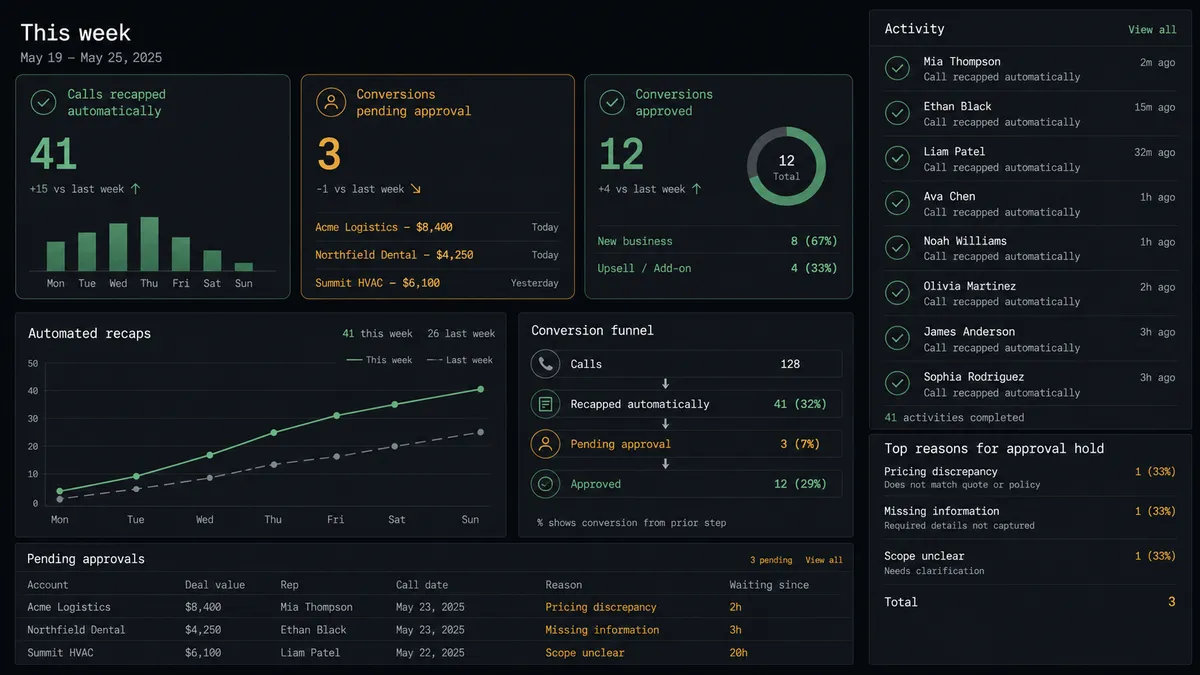
Call-to-conversion pipeline. On New Call triggers Get Extensive Call Data and Find Record; the agent scores the call for qualification signals and routes conversion-ready leads to the sales manager on Slack before Convert Lead to Contact runs.
Weekly rep activity leaderboard. Get Aggregated Activity pulls per-rep call counters over the week, and the agent appends them to a Salesforce report or dashboard without anyone touching an export.
Deal-risk escalation. When a call brief mentions a competitor or a stated objection, the agent flags the linked Salesforce opportunity and notifies the rep’s manager instead of letting the signal sit unread in Gong.
Compliance-safe erasure across both systems. A GDPR request triggers Get Data for Email in Gong; the agent checks for matching Salesforce Pro records and routes the full picture, not just the Gong data, to a compliance owner before Erase Data for Email runs.
Common questions
Is it free to connect Gong and Salesforce Pro on FlowRunner? Yes. FlowRunner has a free plan with 100 executions a month, every integration included, and no credit card required, and new accounts get 14 days of Professional on top.
Can I self-host this Gong to Salesforce Pro flow? Yes. Enterprise plans include a self-hosted option, so the same Gong-to-Salesforce Pro orchestration can run on your own infrastructure with the same human-in-loop step intact.
Does the AI agent need my own OpenAI key? FlowRunner runs on a BYOK model, so you connect the AI provider key you already use and the agent reasons over Gong call data using that account, not a shared FlowRunner key.
What happens when the agent isn’t sure whether to convert a lead? The agent does not guess. It pauses the flow, sends the call recap and lead score to the sales manager on Slack, and waits for a human decision before Convert Lead to Contact ever runs.
Does this replace Gong’s own Salesforce integration? No. Gong’s native Salesforce sync moves standard CRM fields between the two systems; this flow adds the judgment layer, deciding when a call’s content justifies a Slack approval request and executing the conversion and note in Salesforce Pro once granted.
Can the same flow handle GDPR erasure requests that touch both systems? Yes. Gong’s Get Data for Email and Erase Data for Email actions can run inside a flow that also checks Salesforce Pro records, with the actual erasure always routed to a compliance owner for approval first.
Getting started
FlowRunner has a free plan with 100 executions a month, every integration included, and no credit card required, and new accounts get 14 days of Professional on top. Build the connection first, then add the AI agent and the Slack approval step when you’re ready to let it decide which calls are worth a conversion. Start at flowrunner.ai or book a walkthrough at calendly.com/flowrunner/intro.
Frequently asked questions
Is it free to connect Gong and Salesforce Pro on FlowRunner?
Yes. FlowRunner has a free plan with 100 executions a month, every integration included, and no credit card required, and new accounts get 14 days of Professional on top.
Can I self-host this Gong to Salesforce Pro flow?
Yes. Enterprise plans include a self-hosted option, so the same Gong-to-Salesforce Pro orchestration can run on your own infrastructure with the same human-in-loop step intact.
Does the AI agent need my own OpenAI key?
FlowRunner runs on a BYOK model, so you connect the AI provider key you already use and the agent reasons over Gong call data using that account, not a shared FlowRunner key.
What happens when the agent isn't sure whether to convert a lead?
The agent does not guess. It pauses the flow, sends the call recap and lead score to the sales manager on Slack, and waits for a human decision before Convert Lead to Contact ever runs.
Does this replace Gong's own Salesforce integration?
No. Gong's native Salesforce sync moves standard CRM fields between the two systems; this flow adds the judgment layer, deciding when a call's content justifies a Slack approval request and executing the conversion and note in Salesforce Pro once granted.
Can the same flow handle GDPR erasure requests that touch both systems?
Yes. Gong's Get Data for Email and Erase Data for Email actions can run inside a flow that also checks Salesforce Pro records, with the actual erasure always routed to a compliance owner for approval first.