How to Connect HubSpot with Salesforce Pro (With or Without an AI Agent)
Connect HubSpot and Salesforce Pro so contacts, deals, and lead conversions stay in sync across both CRMs automatically, with an AI agent that pauses for human approval before irreversible Salesforce actions.
How do you connect HubSpot to Salesforce Pro?
You connect HubSpot to Salesforce Pro by building a FlowRunner workflow that uses Get Contact by Email and Create Deal in HubSpot alongside Create Lead, Convert Lead to Contact, and Update Record in Salesforce Pro to keep both CRMs in sync as leads move through your pipeline. FlowRunner is a visual AI-agent orchestration platform where automations run autonomously and pause for human judgment on the steps that carry real consequence. The same connection can run as an AI agent that reads each record, scores it against your ICP criteria, and calls a human approval flow before executing any irreversible Salesforce conversion.
The problem with running two CRMs manually
Most sales operations teams land in a two-CRM situation gradually. HubSpot handles inbound marketing and early-stage lead nurturing. Salesforce manages the enterprise sales process, opportunity forecasting, and revenue operations. Both are the system of record for something. Neither talks to the other automatically.
The result is manual. An SDR qualifies a lead in HubSpot and then recreates it in Salesforce by hand. A rep closes a deal in Salesforce but the HubSpot contact still shows “Lead” stage two weeks later. A marketing ops person runs SOQL queries on Friday afternoons to reconcile campaign attribution because the data only lives in Salesforce. Exceptions fall through the cracks because there is no automated check before records are created or converted in either system. Duplicates accumulate. Territory disputes arise when a lead is converted in Salesforce and assigned to the wrong rep because the agent converting it did not know about the HubSpot owner.
This is not a data problem. It is a process problem. The manual hand-off between two systems creates exactly the kind of fragile, spreadsheet-dependent workflow that scales badly as pipeline volume grows.
How it works: the connection between HubSpot and Salesforce Pro
A FlowRunner workflow fires when an inbound lead arrives, on a schedule, or from any upstream trigger your stack supports.
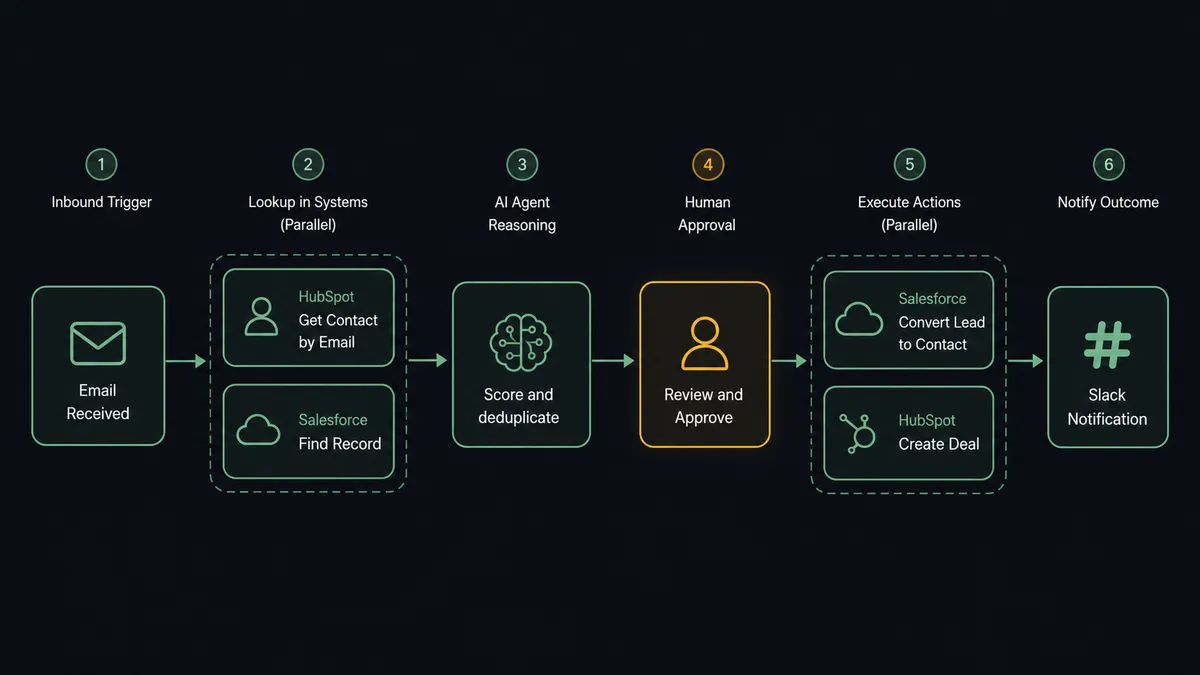
The agent’s first move is a check across both systems. It calls Get Contact by Email in HubSpot to look for an existing CRM record. Simultaneously, it calls Find Record in Salesforce Pro to check whether a lead or contact already exists there. If both checks return empty, the lead is new and the agent creates records in both systems: Create Contact in HubSpot (associating it with the company and setting the lifecycle stage to Lead) and Create Lead in Salesforce Pro (enriching it with any available firmographic data).
If a record already exists in one system but not the other, the agent creates the missing record and associates it. If records exist in both, the agent updates both with the latest data and flags any discrepancy in owner assignments or stage for human review.
When a lead progresses to the conversion point, the agent calls Find Child Records in Salesforce to retrieve any opportunity line items, then prepares the full conversion package: Convert Lead to Contact in Salesforce Pro alongside Create Deal in HubSpot to open the corresponding pipeline record. Both CRMs reflect the same conversion event within seconds.
Can an AI agent run it? (And why a human stays in the loop)
A standard integration tool runs this as a fixed sequence: trigger fires, contact created, lead created, done. An AI agent in FlowRunner reads the data, reasons about what it finds, and decides what to do next. That distinction matters on the steps that carry real consequence.
Lead conversion in Salesforce is irreversible. Once you execute Convert Lead to Contact, the lead record merges into a contact and opportunity. If the territory assignment is wrong, or the lead score threshold was marginal, or there is an existing account at that company that the rep should be mapped to instead, undoing the conversion is painful. That is exactly the kind of step where a human stays in the loop.
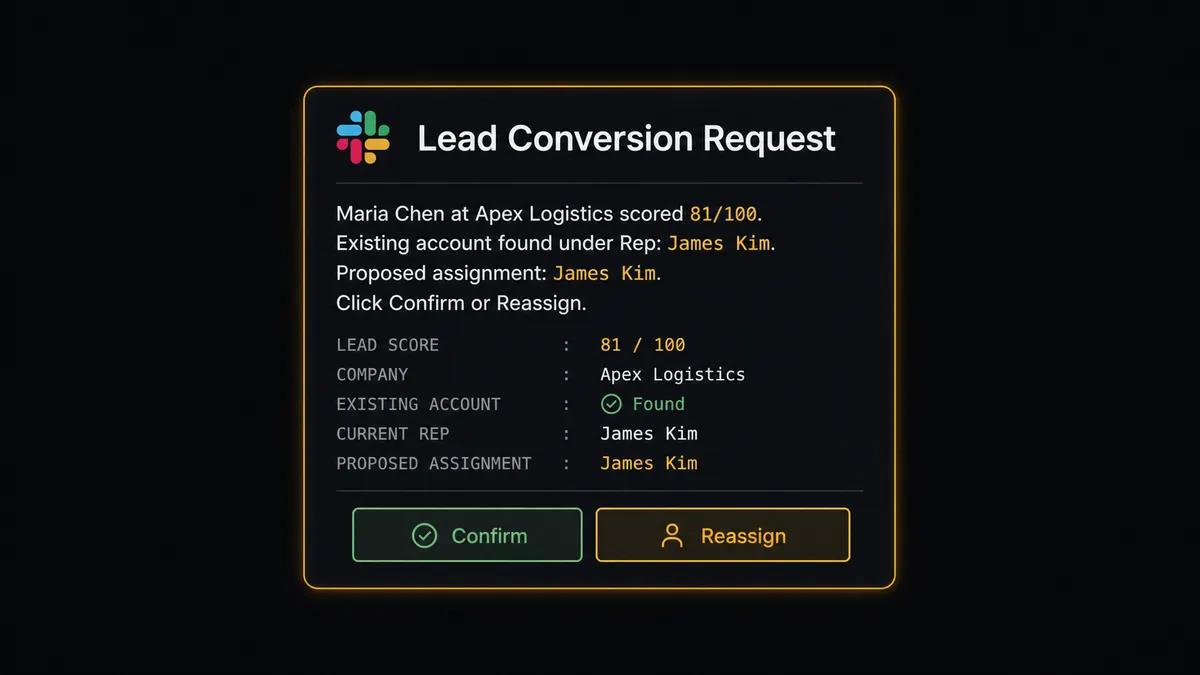
Here is how the agent handles it. A lead comes in from a web form. The agent creates the lead in Salesforce Pro and the contact in HubSpot. It then scores the lead against your ICP criteria using the firmographic data it retrieved. The score is 81. Your threshold for conversion is 75. The agent is ready to convert.
But it notices something: the company domain matches an existing account in Salesforce with a different owner. The agent does not auto-convert. It pauses and routes the decision to the sales manager via Slack: “Lead [Maria Chen] at [Apex Logistics] scored 81. An existing account exists under [Rep: James Kim]. Ready to convert and assign. Confirm assignment or reassign before I proceed?” The manager sees the conflict, checks the territory map, and clicks Reassign. The agent updates the owner field, converts the lead to a contact and opportunity under the correct rep, creates the deal in HubSpot with the matching owner, and logs the full decision in both CRMs. The decision, the decider’s name, and the timestamp are in the audit trail.
This is not a hardcoded threshold. The agent escalated because the account ownership conflict introduced risk the threshold alone could not evaluate. A different 81-score lead with no existing account would convert automatically.
FlowRunner vs Zapier for HubSpot and Salesforce Pro
The most common tool for this connection is Zapier. Zapier is genuinely good at simple trigger-action connections, has extensive documentation, and works well for teams that need a fast, low-maintenance setup with no engineering involvement.
The differences show up when your workflow needs to reason about data rather than just move it.
| Capability | Zapier | FlowRunner |
|---|---|---|
| Fixed trigger-action sequences | Yes, well-documented | Yes, plus AI agent reasoning over the data |
| Human approval on consequential steps | No native capability | Native: agent invokes human-in-loop as a callable tool |
| Duplicate detection before record creation | Manual filter steps only | Agent checks both systems and routes conflicts to a human |
| Lead scoring and ICP evaluation | Not available | Agent evaluates firmographic criteria and scores against your rules |
| Unlimited users on every paid tier | Seat-based pricing | All FlowRunner tiers include unlimited users |
| Audit trail for human decisions | Not available | Every approval, approver identity, and timestamp logged |
If your workflow is “when a lead form is submitted, create a HubSpot contact and a Salesforce lead,” Zapier handles that cleanly. If your workflow is “qualify the lead, check for duplicates, score against ICP, and only convert in Salesforce after a manager approves the territory assignment,” FlowRunner is the right tool.
Before and after
| Metric | Before | After |
|---|---|---|
| Lead entry time | SDR manually recreates lead in Salesforce after HubSpot qualification | Lead appears in both systems in under 30 seconds from form submission |
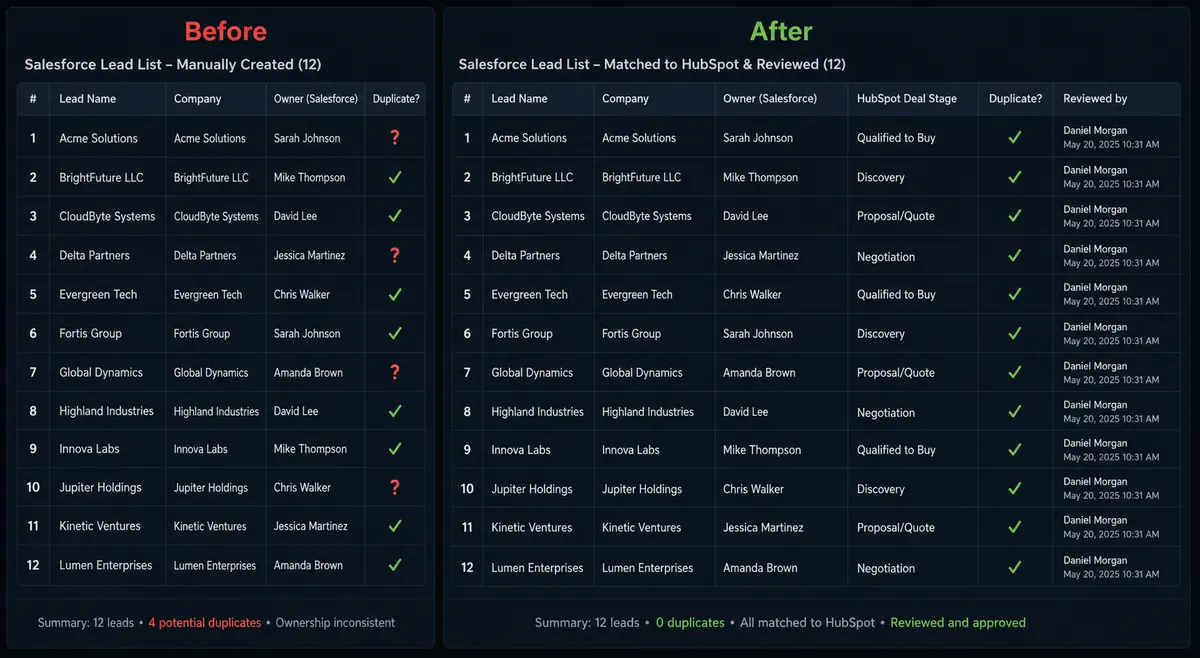
| Duplicate rate | No systematic check; duplicates accumulate over months | Agent checks both systems before creating any record; conflicts routed to CRM admin |
| Lead conversion control | Reps convert leads at different points; no approval workflow | Every conversion routes through manager approval; no unconverted records slip through |
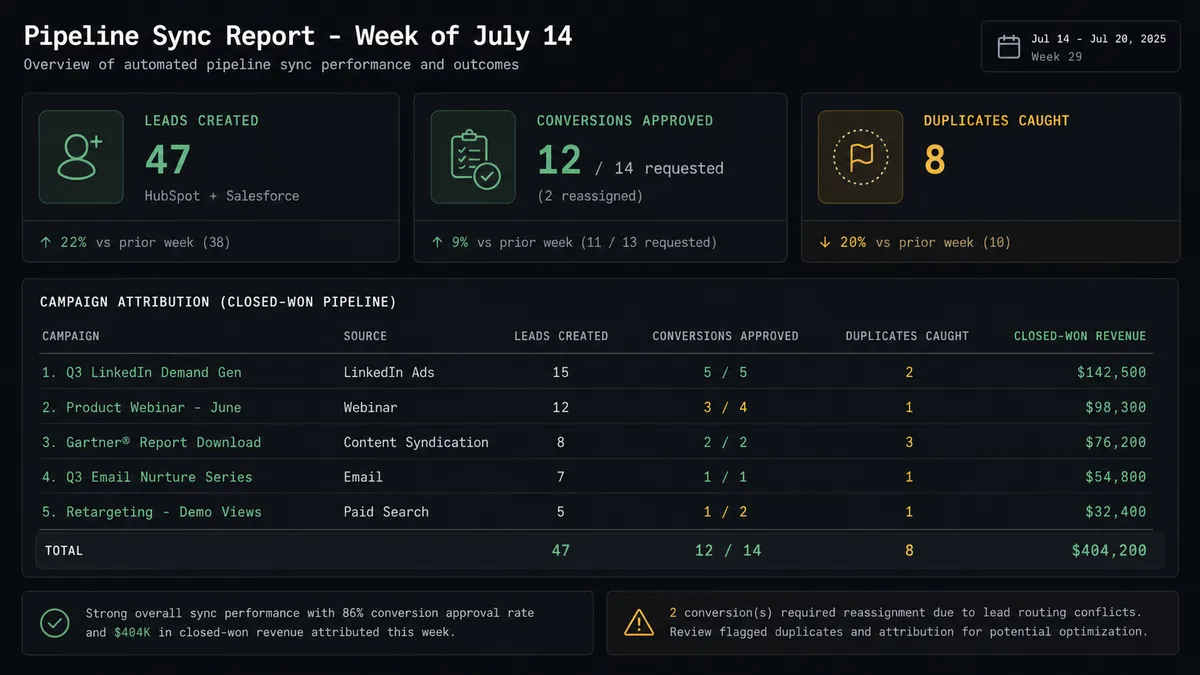
| Campaign attribution | Revenue ops runs manual SOQL queries against spreadsheets weekly | Agent runs SOQL query automatically and posts attribution report to #revenue-ops channel |
| Territory disputes | Discovered after conversion; correction is manual and painful | Agent flags existing account conflicts before converting; manager resolves in one click |
| CRM data freshness | Salesforce reflects deal stage days or weeks after HubSpot update | Both systems updated within seconds of any pipeline event |
What you can build
Inbound lead capture and dual-system creation. When a prospect submits a form, the agent calls Get Contact by Email in HubSpot and Find Record in Salesforce Pro before creating anything. New leads get a HubSpot contact and a Salesforce lead created in parallel. Existing contacts get updated in both systems with the latest engagement data.
ICP-scored lead conversion pipeline. The agent enriches each inbound lead with firmographic data, scores it against your ICP criteria, and routes it through the appropriate path. High-scoring leads trigger a manager approval via Slack before Convert Lead to Contact executes in Salesforce and Create Deal fires in HubSpot. Below-threshold leads go into nurture via Add Lead to Campaign in Salesforce Pro automatically.
Deal desk document package. When a deal reaches Proposal stage in HubSpot, the agent calls Find Child Records in Salesforce Pro to retrieve opportunity line items, assembles the quote, attaches it to the Salesforce opportunity using Create File and Add File to Record, and sends it to the customer via Send Email. The rep has a complete paper trail in both systems without assembling anything manually.
Weekly campaign attribution reconciliation. Every Monday, an agent runs a Custom SOQL Query against closed Salesforce opportunities to match each contact to the campaign they were in at conversion. The results get posted to the #revenue-ops Slack channel. HubSpot deal records get updated with matching attribution tags via Update Deal. Marketing has accurate ROI data without pulling spreadsheets.
Stalled deal reactivation. The agent queries HubSpot for deals in Negotiation stage inactive for 14 days. For each, it retrieves the Salesforce opportunity using Find Record by Query to check for any recent activity logged there. If both systems show no movement, the agent sends the deal owner a Slack message with one-click options to update the stage, flag for review, or close the deal. Non-responses surface to the sales manager after 48 hours.
Common questions
Is it free to connect HubSpot and Salesforce Pro on FlowRunner? FlowRunner has a free plan with 100 executions a month, every integration included, and no credit card required, and new accounts get 14 days of Professional on top. Paid plans start at $5 a month for Starter, with Growth at $45 a month.
Can I self-host the HubSpot and Salesforce Pro integration? Yes. FlowRunner offers a self-hosted Community Edition at no cost. Enterprise self-hosted includes multi-instance clustering and the full compliance suite.
Does the AI agent need my own OpenAI or LLM key? FlowRunner uses a bring-your-own-keys model for AI providers. You connect your preferred provider, whether that is OpenAI, Anthropic, or another, and the agent uses your account directly. No lock-in to a single model.
What happens when the AI agent is not sure about a lead conversion? The agent pauses the workflow and routes the decision to a sales manager via Slack or email, including the lead’s name, company, ICP score, and proposed rep assignment. The manager approves or reassigns in one click. The agent converts the record only after human confirmation.
Can the agent handle duplicate contacts across HubSpot and Salesforce Pro? Yes. The agent uses Get Contact by Email in HubSpot and Find Record in Salesforce Pro to check for existing records before creating new ones. When a potential duplicate is found, the agent pauses and routes the conflict to a CRM admin for resolution rather than silently picking one.
What is the difference between FlowRunner and Zapier for this connection? Zapier executes fixed trigger-action sequences and cannot reason about data or escalate exceptions. FlowRunner runs an AI agent that reads each record, evaluates context, and decides which actions to take, including invoking a human approval step as a callable tool on the consequential steps.
Getting started
FlowRunner’s Growth tier ($45/month) includes full AI agent capabilities, BYOK for your LLM provider, and the human-in-loop orchestration that keeps a manager in the loop on consequential Salesforce actions. FlowRunner has a free plan with 100 executions a month, every integration included, and no credit card required, and new accounts get 14 days of Professional on top.
Connect both integrations in the FlowRunner editor: HubSpot and Salesforce Pro. Both use standard OAuth2 or API key authentication and are ready to use as agent tools in minutes.
Start at flowrunner.ai or book a 30-minute walkthrough at calendly.com/flowrunner/intro to see the lead qualification and conversion workflow running live with your own CRM data.
Frequently asked questions
Is it free to connect HubSpot and Salesforce Pro on FlowRunner?
FlowRunner has a free plan with 100 executions a month, every integration included, and no credit card required, and new accounts get 14 days of Professional on top. Paid plans start at $5 a month for Starter, with Growth at $45 a month.
Can I self-host the HubSpot and Salesforce Pro integration?
Yes. FlowRunner offers a self-hosted Community Edition at no cost. Enterprise self-hosted includes multi-instance clustering and the full compliance suite.
Does the AI agent need my own OpenAI or LLM key?
FlowRunner uses a bring-your-own-keys model for AI providers. You connect your preferred provider, whether that is OpenAI, Anthropic, or another, and the agent uses your account directly. No lock-in to a single model.
What happens when the AI agent is not sure about a lead conversion?
The agent pauses the workflow and routes the decision to a sales manager via Slack or email, including the lead's name, company, ICP score, and proposed rep assignment. The manager approves or reassigns in one click. The agent converts the record only after human confirmation.
Can the agent handle duplicate contacts across HubSpot and Salesforce Pro?
Yes. The agent uses Get Contact by Email in HubSpot and Find Record in Salesforce Pro to check for existing records before creating new ones. When a potential duplicate is found, the agent pauses and routes the conflict to a CRM admin for resolution rather than silently picking one.
What is the difference between FlowRunner and Zapier for this connection?
Zapier executes fixed trigger-action sequences and cannot reason about data or escalate exceptions. FlowRunner runs an AI agent that reads each record, evaluates context, and decides which actions to take, including invoking a human approval step as a callable tool on the consequential steps.