How to Connect GitHub with Slack (With or Without an AI Agent)
Connect GitHub events to Slack channels so pull requests, releases, and exceptions surface automatically, with an AI agent that pauses for human judgment before merging or shipping.
How do you connect GitHub to Slack?
Use FlowRunner’s GitHub trigger, On Pull Request Opened, to start a flow that calls Send Message to Channel in Slack with the PR title, author, branch, and check results. FlowRunner is a visual AI-agent orchestration platform where automations run autonomously and pause for human judgment on the steps that carry real consequence. The same connection can run as an AI agent that calls List Workflow Run Jobs, reads the check output, and pauses for a human before executing Merge Pull Request on any PR with failing checks or a production target branch.
What breaks when GitHub and Slack stay disconnected
Most engineering teams already have GitHub’s native Slack app installed. It sends notifications. What it does not do is act on what the notification contains.
A pull request opens. Slack gets a ping. Someone has to click through to GitHub, read the check results, find the right reviewer, and remember to follow up. If the checks fail, another manual loop starts: who owns the failing job, is it a flaky test or a real break, and is it safe to merge anyway? The answer lives in someone’s head or in a DM that nobody else can see. When a release ships with a broken check, the post-mortem reconstructs the decision from memory.
The volume compounds the problem. A team shipping ten PRs a day generates ten of these loops daily. Engineers spend real time on coordination that should be automatic. Reviewers get pinged broadly instead of precisely, so the pings stop feeling urgent. Important things fall through the cracks because everything looks the same.
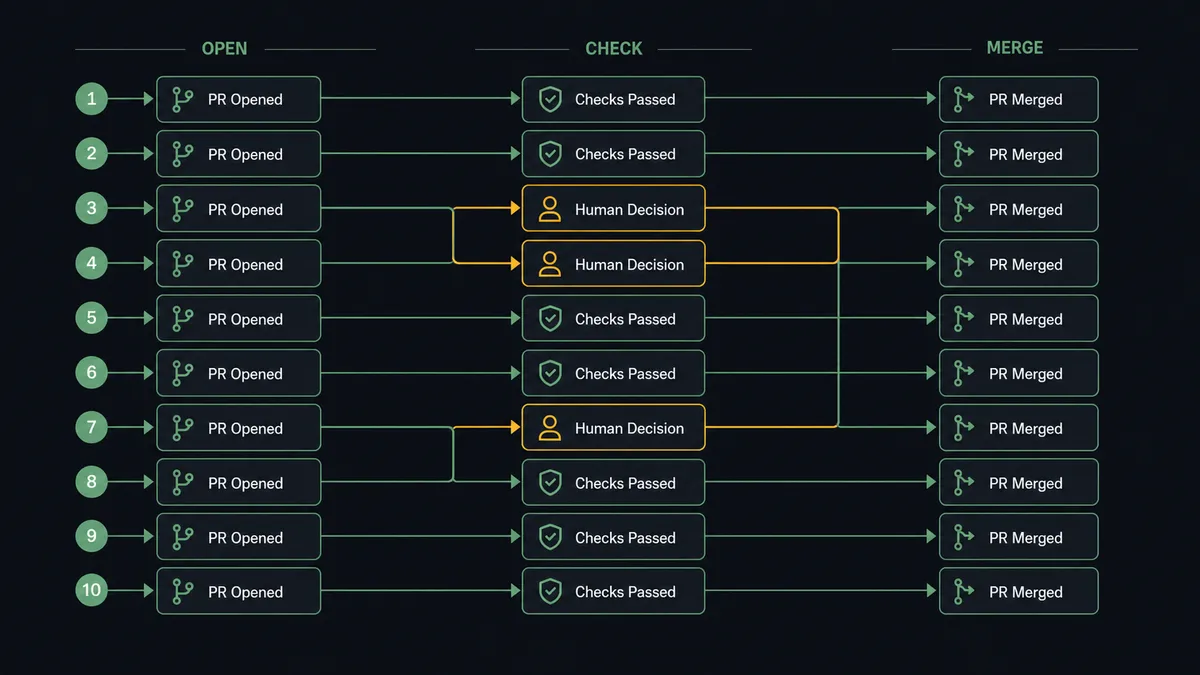
How it works: the GitHub-to-Slack connection
The starting point is a GitHub trigger. On Pull Request Opened fires when a new PR appears in a watched repository. The flow reads the PR title, author, branch name, and touched files from the event payload.
From there, the flow calls List Workflow Run Jobs to pull the check status for the branch. This is the data most teams need to know immediately: which jobs passed, which failed, and whether the failure is in a critical path. The flow maps that summary into a Slack message and calls Send Message to Channel with the structured output. The message lands in your engineering channel with the PR link, the author, the branch, and the check results in one place.
For direct reviewer routing, the flow uses Find Member to resolve the PR’s assigned reviewer to a Slack user ID, then calls Send Direct Message with the same summary. The reviewer sees a focused message in their DMs rather than a channel ping they have to scan.
This is the basic connection. It runs fully automatically. No manual tracking, no tab-switching, no “did you see the PR?” messages.
Can an AI agent run it? (and why a human stays in the loop)
The plain connection delivers notifications. An AI agent turns those notifications into decisions.
The agent’s toolbox includes List Workflow Run Jobs, Search Issues and Pull Requests, Get File Content, Merge Pull Request, and the Slack actions for messaging and interactive buttons. The agent reads the PR data, calls List Workflow Run Jobs to pull the check status, and reasons about what it found. Not against a hardcoded threshold. Against context: Is this a production branch? Has this author merged PRs with failing checks before? Is the failing job a known flaky test or a blocker?
When everything looks clean, the agent routes the PR summary to the right channel and moves on. When something warrants human judgment, the agent stops.
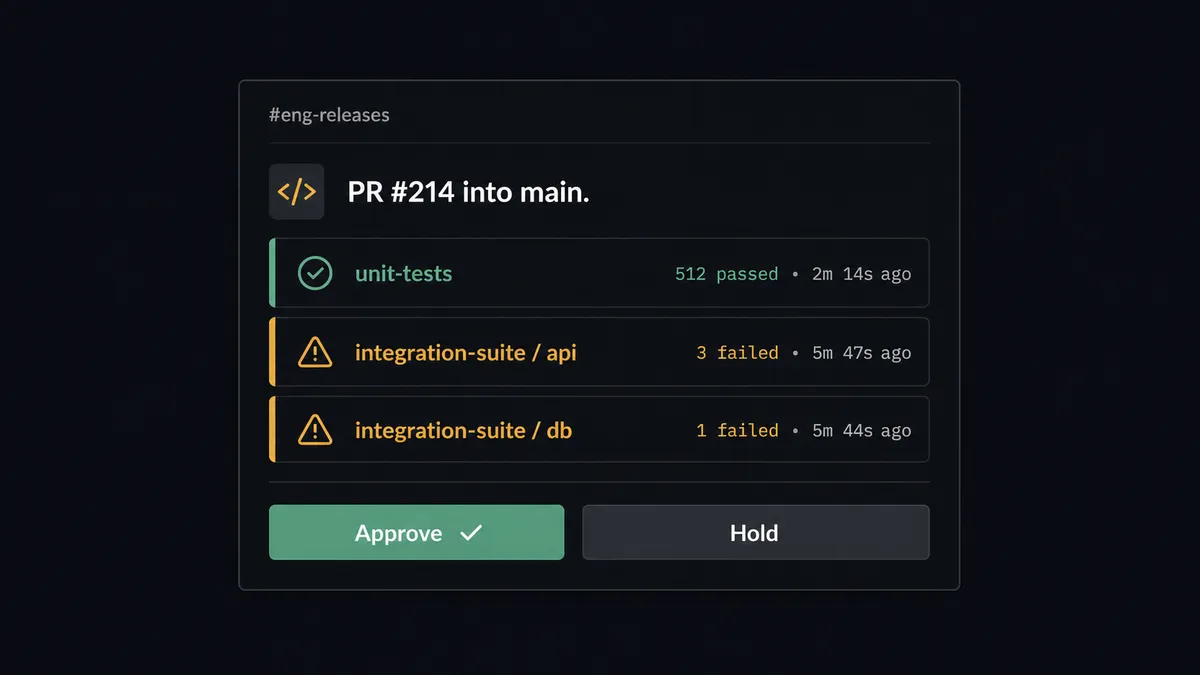
Here is what that looks like in practice. A PR opens against the main branch. The agent reads the check results and finds two failing jobs: one in the unit test suite and one in the integration suite. The agent’s instructions say to treat integration failures on production branches as escalation triggers. It does not merge. It does not just notify. It sends a Slack message to the on-call engineer: “PR #214 into main. Failing checks: unit-tests (2 failures), integration-suite (1 failure). Approve, request changes, or hold?” The engineer gets the PR link, the failing job names, and the author. Two buttons: Approve or Hold. The decision takes 30 seconds.
On approval, the agent calls Merge Pull Request and records the decision. The approver’s identity, the timestamp, and the reason are captured in the audit trail. That record does not live in someone’s memory or a DM. It is part of the flow’s execution history.
This is what prospects describe as a digital andon cord. The line stops when the agent hits uncertainty. A human pulls it back into motion. The work continues with a record of who made the call.
FlowRunner vs Zapier (and how they compare for this workflow)
Zapier is the right comparison for non-technical teams evaluating GitHub-to-Slack automation. It is fast to set up, has a large template library, and works well for straightforward notification flows. If you need a PR opened in GitHub to post a message in Slack with no logic involved, Zapier handles that in minutes.
Where the workflows diverge:
| Capability | Zapier | FlowRunner |
|---|---|---|
| Basic GitHub-to-Slack notifications | Yes, fast setup | Yes, same speed |
| Read check results before routing | Not natively; requires custom code step | Native action: List Workflow Run Jobs |
| AI agent that reasons about PR risk | No | Yes, built-in AI Agent node |
| Human-in-loop as a callable tool | No; approvals require separate Zapier paths | Yes, native; agent invokes it as a tool |
| Merge Pull Request after approval | Possible with webhooks and custom code | Native action with audit record |
| Unlimited users on every plan | No; Zapier charges per user | Yes, all FlowRunner tiers |
| BYOK for AI model | No | Yes |
Zapier excels at connecting two apps with a fixed trigger-action. FlowRunner’s advantage shows when the logic between trigger and action requires reasoning, the action has consequences, or the flow needs to pause and ask a human something specific.
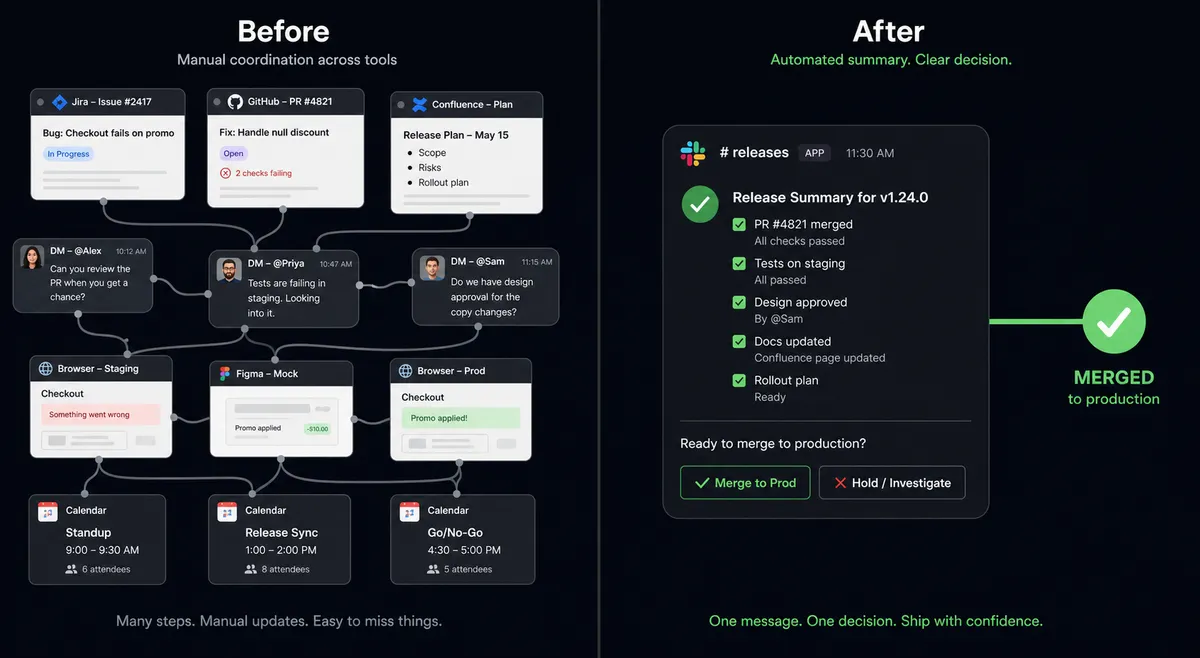
Before and after
| Category | Before | After |
|---|---|---|
| PR check visibility | Engineers switch to GitHub tabs and manually read check results after each notification | Agent calls List Workflow Run Jobs and posts a structured summary to Slack on every PR event |
| Reviewer routing | Engineers @mention reviewers in channels or send DMs manually | Agent calls Find Member and routes Send Direct Message to the assigned reviewer with PR context |
| Merge decisions on failing checks | Team discusses in DMs or a meeting; decision from memory | Agent sends Approve/Hold message to on-call engineer; decision captured with identity and timestamp |
| Release coordination | Release notes assembled manually from commits and DMs | On Release Published trigger drives a structured Slack post with workflow status from List Workflow Runs |
| Exception handling | Failing-check PRs sit open until someone remembers to chase | Agent escalates immediately; engineer resolves in under a minute from Slack |
What you can build
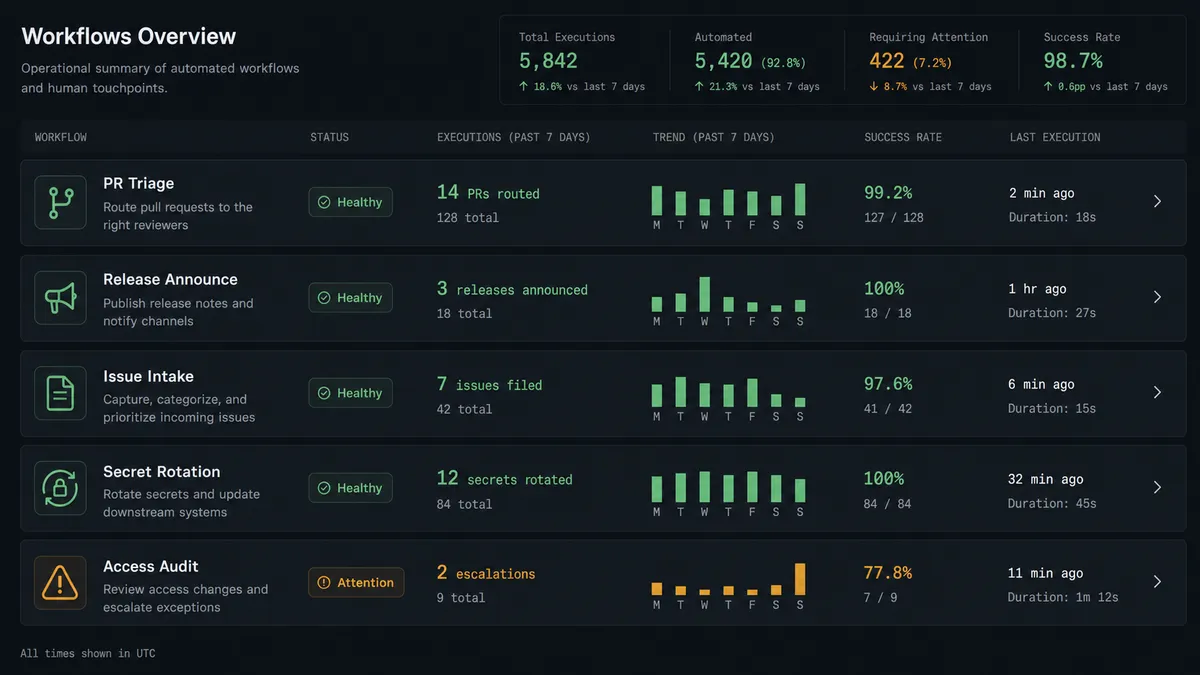
PR triage agent with check-based routing. The agent listens on On Pull Request Opened, calls List Workflow Run Jobs, and routes the PR to the right channel based on check status. Clean PRs get a summary in #eng-reviews. PRs with failing integration tests get a direct escalation to the on-call engineer with Approve or Hold buttons.
Release announcement on publish. On Release Published fires when a tagged release ships. The agent calls List Workflow Runs to confirm the release pipeline ran clean, summarizes the run outcomes, and posts the release notes to your release channel via Send Message to Channel. Contributors and stakeholders see one message with everything they need.
Issue-to-Slack intake from support. When a customer bug surfaces in a support channel, an On Channel Message trigger picks it up. The agent calls Search Issues and Pull Requests to check for duplicates, then either adds a comment to the existing issue or calls Find or Create Issue to open a new one with the reproduction steps. The agent posts a confirmation back in the thread so the support team knows the issue is tracked.
Secret rotation audit. On a schedule, the agent reads the list of repository secrets via the configuration actions, identifies ones flagged for rotation, rotates them via Create Repository Secret, and posts a summary to #security-ops with what rotated and what needs attention. Routine credential hygiene runs as a flow instead of an annual scramble.
New collaborator access audit. New Collaborator fires when someone is added to a repository. The agent checks organization membership via Check Organization Membership, verifies the access level matches the request in your HRIS or ticket system, and posts a summary to #access-audit. Exceptions get a Slack escalation with Approve or Revoke buttons.
Common questions
Is it free to connect GitHub and Slack on FlowRunner? FlowRunner has a free plan with 100 executions a month, every integration included, and no credit card required, and new accounts get 14 days of Professional on top. After that, Growth is $45 per month. All tiers include unlimited users and workflows, so your whole engineering team can use it without per-seat costs.
Can I self-host FlowRunner? Yes. FlowRunner offers a free Community Edition for self-hosted single-instance deployments. Enterprise self-hosted includes multi-instance clustering and the full compliance suite. The Community Edition includes the GitHub and Slack connectors.
Does the agent need my own OpenAI or Claude API key? FlowRunner uses a bring-your-own-key model for AI providers. You connect your own key from whichever provider you prefer. FlowRunner orchestrates the agent logic; you control which model runs and what it costs.
What happens when the agent is not sure whether to merge? The agent does not guess and it does not skip. It sends a Slack message to the on-call engineer with the PR number, the branch, the list of failing checks, and Approve or Hold buttons. The engineer decides. The agent resumes on response and records the decision in the audit trail.
Does this replace GitHub’s built-in Slack notifications? GitHub’s native Slack app sends notifications. FlowRunner’s agent acts on them. The agent can read check results with List Workflow Run Jobs, route PRs to the right reviewer with Send Direct Message, block merges on failing checks, and only execute Merge Pull Request after a human approves. It is an orchestration layer, not a notification relay.
What GitHub events can trigger the flow? FlowRunner’s GitHub connector has 21 triggers including On Pull Request Opened, On Push, On Release Published, New Review Request, On Issue Opened, New Commit, and New Collaborator. Any of these can start a flow that sends a structured Slack message, routes an exception, or pauses for a human decision.
Getting started
FlowRunner has a free plan with 100 executions a month, every integration included, and no credit card required, and new accounts get 14 days of Professional on top. Corporate email gets you in.
Start with the GitHub integration at /integrations/github and the Slack integration at /integrations/slack. Connect both accounts, pick On Pull Request Opened as your trigger, and your first PR summary is live in under 30 minutes.
To talk through the setup or see the agent run on your actual repos, book a call at calendly.com/flowrunner/intro. To start building now, go to flowrunner.ai.
Frequently asked questions
Is it free to connect GitHub and Slack on FlowRunner?
FlowRunner has a free plan with 100 executions a month, every integration included, and no credit card required, and new accounts get 14 days of Professional on top. After that, Growth is $45 per month. All tiers include unlimited users and workflows, so your whole engineering team can use it without per-seat costs.
Can I self-host FlowRunner?
Yes. FlowRunner offers a free Community Edition for self-hosted single-instance deployments. Enterprise self-hosted includes multi-instance clustering and the full compliance suite. The Community Edition includes the GitHub and Slack connectors.
Does the agent need my own OpenAI or Claude API key?
FlowRunner uses a bring-your-own-key model for AI providers. You connect your own key from whichever provider you prefer. FlowRunner orchestrates the agent logic; you control which model runs and what it costs.
What happens when the agent is not sure whether to merge?
The agent does not guess and it does not skip. It sends a Slack message to the on-call engineer with the PR number, the branch, the list of failing checks, and Approve or Hold buttons. The engineer decides. The agent resumes on response and records the decision in the audit trail.
Does this replace GitHub's built-in Slack notifications?
GitHub's native Slack app sends notifications. FlowRunner's agent acts on them. The agent can read check results with List Workflow Run Jobs, route PRs to the right reviewer with Send Direct Message, block merges on failing checks, and only execute Merge Pull Request after a human approves. It is an orchestration layer, not a notification relay.
What GitHub events can trigger the flow?
FlowRunner's GitHub connector has 21 triggers including On Pull Request Opened, On Push, On Release Published, New Review Request, On Issue Opened, New Commit, and New Collaborator. Any of these can start a flow that sends a structured Slack message, routes an exception, or pauses for a human decision.