Can an AI Agent Log Shopify Order Decisions in Notion?
Connect Shopify's On New Order trigger to Notion's database actions, then run the same flow as an AI agent that pauses for a person before a flagged order ships.
How do you connect Shopify to Notion?
Connect Shopify’s On New Order trigger to Notion’s Create Database Item action: every time a customer checks out, FlowRunner writes the order into a Notion database with the order number, total, and status. FlowRunner is a visual AI-agent orchestration platform where automations run autonomously and pause for human judgment on the steps that carry real consequence. Run the same connection as an AI agent and it reads each order, checks it against fraud signals and a high-value threshold, and only pauses for a person when an order actually warrants one, then records that person’s decision in the same Notion database.
The problem it solves
Right now, a Shopify order gets checked out and lands in the admin dashboard next to every other order, clean or not. An operations coordinator opens the dashboard, scans the queue by eye, and decides which orders look off: a first-time customer with a shipping address that doesn’t match billing, a cart three times the store’s average, a rush order at 2am. There’s no consistent rule for what gets a second look and what ships straight through. On a slow day it’s a quick scan. On a promo day with two hundred new orders, something slips.
When an order does get flagged, the decision to hold or release it usually happens in a Slack DM or a hallway conversation, then someone manually updates the order in Shopify and moves on. Nobody writes down who approved it, when, or why. Weeks later, when a chargeback shows up or a customer asks why their order sat for a day, the paper trail doesn’t exist. The billing manager and the ops lead each remember it differently. The decision fell through the cracks the moment it left Slack.
How it works: the connection
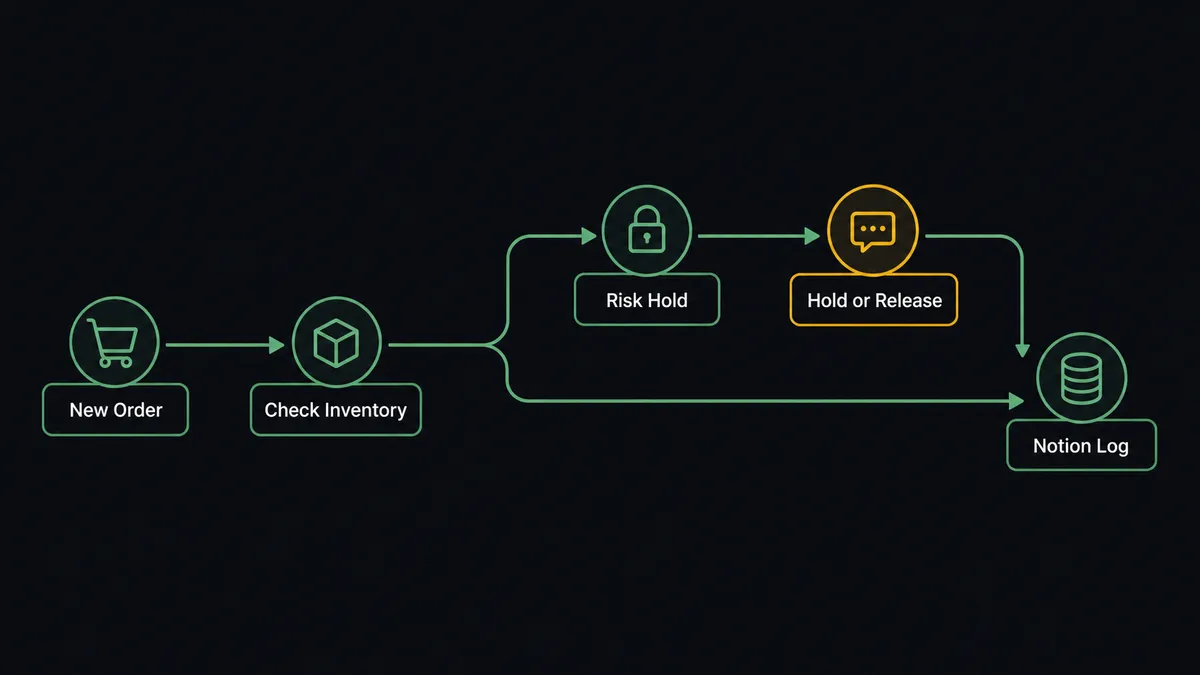
The flow starts when Shopify fires On New Order. The agent reads the order’s line items, shipping address, and total, then calls Get List of Inventory Levels to confirm the SKUs are actually available across locations before anything downstream promises them.
From there, clean orders take the short path: the agent calls Add Tags to mark the order as reviewed, hands it to the fulfillment flow, and the customer gets their confirmation. Every order, clean or flagged, also gets a Notion record. The agent calls Create Database Item (or Find or Create Database Item, so a duplicate trigger fire doesn’t produce a second row) in an operations database, mapping the order number, customer, total, and status into the columns your team already scans. That database becomes the searchable order log that the Shopify admin dashboard never was.
For an order that trips the fraud check or the high-value threshold, the path is different, and that’s the next section.
Can an AI agent run it? (and why a human stays in the loop)
An AI Agent node doesn’t just run these steps in a fixed order. It reads the order data, reasons about what it sees, and picks from a toolbox that includes Get List of Inventory Levels, Add Tags, Create Refund, and a human-in-loop flow built as a callable tool. It decides case by case whether an order needs a person, based on the order in front of it, not a hardcoded dollar cutoff.
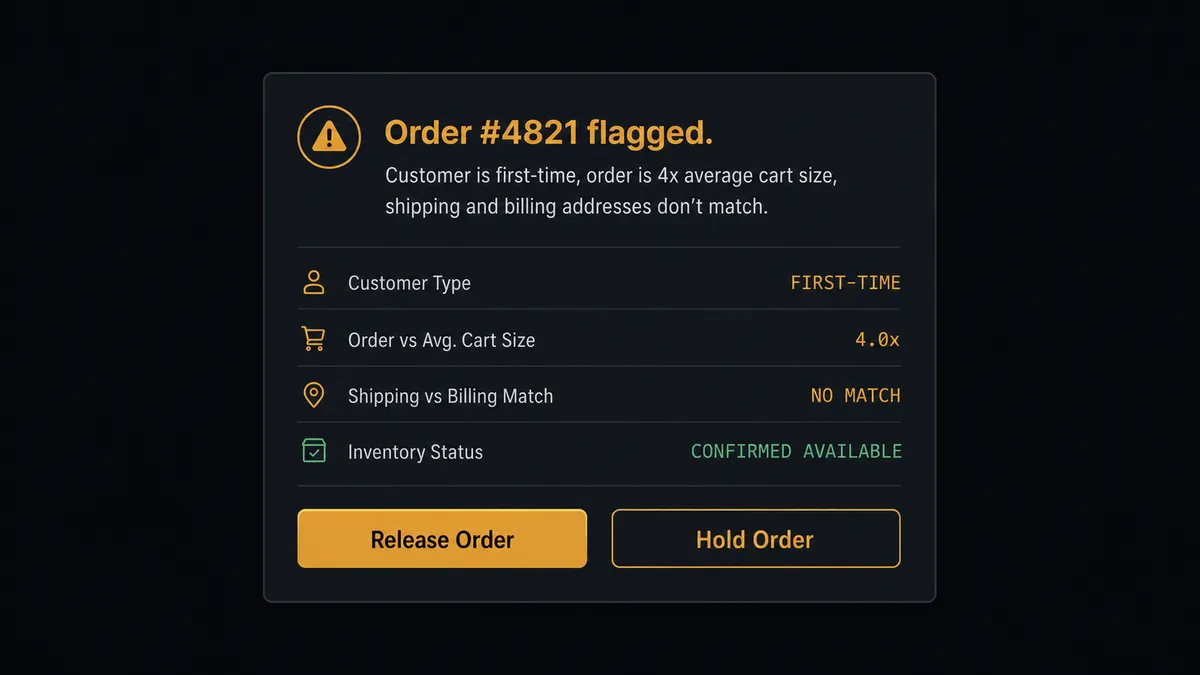
Say a first-time customer places an order for $1,400, four times the store’s average cart, shipping to an address that doesn’t match the billing zip. The agent doesn’t ship it and doesn’t reject it. It invokes the human-in-loop tool and posts to the operations Slack channel: “Order #4821 flagged. Customer is first-time, order is 4x average cart size, shipping and billing addresses don’t match. Inventory confirmed available. Hold or release?” The person on the other end sees the full context the agent already assembled, not a bare order number, and makes the call in one message. The moment they respond, the agent resumes: it either tags the order for fulfillment or flags it for cancellation, and either way it calls Create Database Item in Notion to log the order, the flag reason, and the approver’s name and decision.
This is not a sync tool quietly moving data in the background. It’s a digital andon cord: the agent keeps working until it hits a decision that carries real weight, then it stops and asks, in the channel the operations team already lives in.
FlowRunner vs Zapier
Zapier is a reasonable place to start a Shopify-to-Notion sync. It has deep, mature integrations with both apps, a large template library, and it’s genuinely easy to wire up a simple “new order creates a Notion row” Zap in a few minutes. For a straight one-way sync with no decision logic, that’s a fair fit.
Where it stops being enough is the moment a real business needs a person in the loop before something happens, not just after. Zapier’s automation engine runs a fixed chain of steps once a Zap fires; getting a genuine approval pause usually means bolting on a Delay step, a Formatter workaround, or a separate approval app, and the context a reviewer sees is whatever fields you remembered to map, not a reasoned explanation.
| Capability | Zapier | FlowRunner |
|---|---|---|
| Human-in-the-loop | Approval workarounds via delays or third-party apps, not a native step | A callable tool the agent invokes mid-flow with full context and a channel it already uses |
| Decision logic | Fixed step chain once the Zap fires | Agent reads the order and decides case by case what needs a person |
| Users included | Paid per user on Team and higher plans | Unlimited users on every tier |
| Pricing model | Per-task pricing that gets harder to predict at volume | Transparent workflow-based tiers with a visible execution cap |
| Self-hosting | Not available | Enterprise self-hosted option |
Before and after
| Category | Before | After |
|---|---|---|
| Order routing | New orders wait in the admin queue until someone opens the dashboard and routes each one | Orders are validated, tagged, and routed the moment they’re placed |
| Refund approvals | Refund decisions get made in DMs, then keyed into Shopify with no consistent record of who approved what | Every refund is quoted with full context and issued only after a named approver signs off |
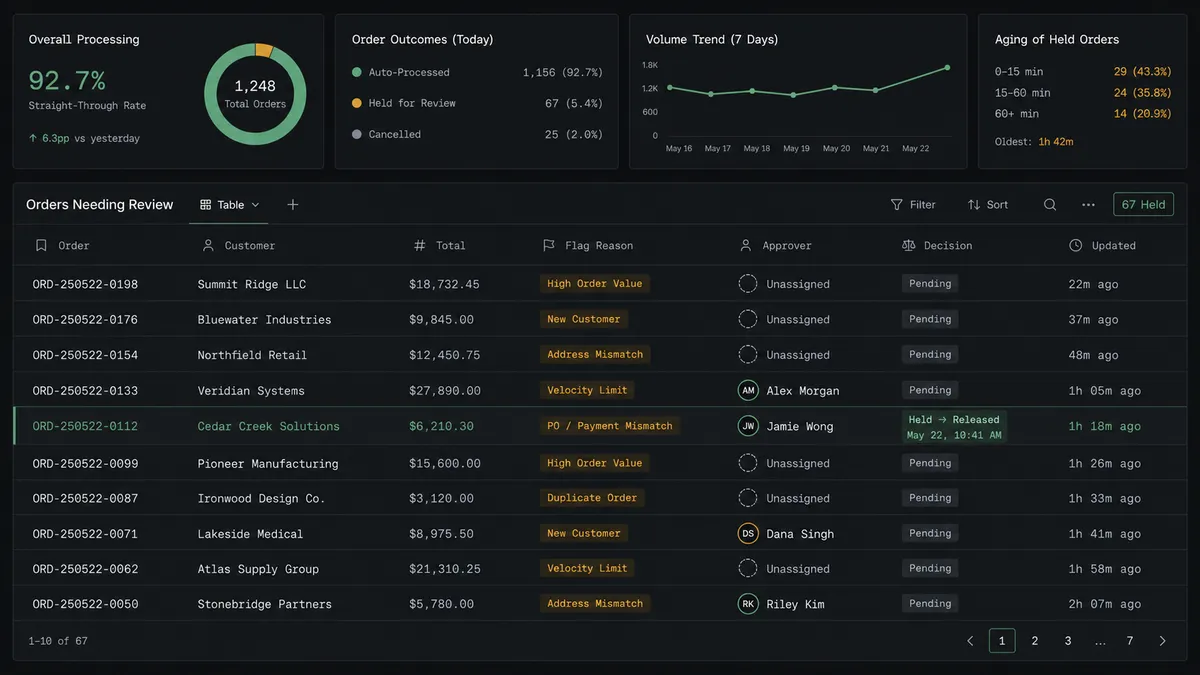
| Decision audit trail | Escalation decisions made via Slack leave no searchable, organized record | Every human escalation decision is recorded with context in a Notion database the team already uses |
| Inventory accuracy | Stock counts fall out of sync between the storefront and the warehouse feed, and oversells surface at fulfillment | Stock levels sync from the supplier feed into each location as counts change |
What you can build
Order decision log. Every order that passes through the fraud and inventory checks gets a row in a Notion database, whether it shipped straight through or needed a hold-or-release call, so the whole order history is searchable in one place.
Refund approval trail. When Create Refund is gated behind a human approval, the agent logs the refund amount, the approver, and the stated reason as a Notion database item the moment the refund is issued, giving finance a paper trail that never lived only in Slack.
Dispute evidence workspace. On New Dispute triggers the agent to create a Notion page with the dispute amount, reason, and evidence deadline, then use Append Block Children to add the order and customer context as the agent gathers it, so the person submitting evidence works from a page instead of hunting through Shopify.
New product documentation. On New Product triggers a Notion page in a merchandising database with the product name and variants, giving the merchandising team a running record of what launched and when without anyone copying it over by hand.
Getting started
Connect Shopify and Notion in FlowRunner and build this flow with the visual editor, no code required. FlowRunner has a free plan with 100 executions a month, every integration included, and no credit card required, and new accounts get 14 days of Professional on top.
Start at flowrunner.ai or book a walkthrough at calendly.com/flowrunner/intro to see the human-in-loop step built around your actual order thresholds.
Frequently asked questions
Is it free to connect Shopify and Notion on FlowRunner?
FlowRunner has a free plan with 100 executions a month, every integration included, and no credit card required, and new accounts get 14 days of Professional on top. Both Shopify and Notion are included connectors on every paid tier, so there's no separate fee to link them.
Can I self-host the Shopify to Notion connection?
Yes, on the Enterprise tier, which adds a self-hosted deployment option alongside the cloud tiers. Growth, Professional, and Business run on FlowRunner's hosted infrastructure.
Does the agent need my own OpenAI key?
FlowRunner runs on a bring-your-own-key model, so you connect the AI provider account you already use rather than paying FlowRunner a markup on model calls. This applies to any AI agent step in the flow, including the one deciding whether a Shopify order needs a human.
What happens when the agent isn't sure about an order?
It stops before acting, posts the order details and the reason it flagged the order to your operations channel, and waits for a named person to decide. The moment someone responds, the agent resumes and logs the decision in Notion, so nothing gets held in limbo.
Can Notion trigger a Shopify action?
Not directly. The Notion connector currently exposes 23 actions and no triggers, so this connection runs one direction: Shopify events drive what gets written into Notion. Notion can still sit inside a flow triggered by something else, such as a scheduled digest or another system's event.
How does FlowRunner avoid creating duplicate Notion entries?
The agent can call Find Database Item or Find or Create Database Item before writing, so a re-fired trigger or a retried step updates the existing row instead of creating a second one.