How to Connect DocuSign with Bigin (With or Without an AI Agent)
Connect DocuSign envelopes to Bigin by Zoho so signatures move your pipeline automatically, with an AI agent that pauses for a human before it voids a live envelope sitting in a customer's inbox.
How do you connect DocuSign to Bigin?
You connect DocuSign to Bigin by having DocuSign’s triggers drive Bigin actions: On Envelope Completed fires, the workflow calls Search Records to find the deal, Update Deal to advance the stage, Add Note to log the executed contract, and Create Task to queue the handoff. FlowRunner is a visual AI-agent orchestration platform where automations run autonomously and pause for human judgment on the steps that carry real consequence. When the connection runs as an AI agent, the agent also watches envelopes in flight, and it stops for a named human before Void Envelope cancels a signature request that is already sitting in a customer’s inbox.
The problem it solves
Small sales teams live in the gap between “sent for signature” and “signed.” A contract goes out through DocuSign, and from that moment the Bigin pipeline is guessing. The deal says negotiation while the contract is already signed; the deal says closing while the envelope was declined on Tuesday. The owner updates the CRM when there is time, which on a lean team means after the fact, and the pipeline review runs on stale stages.
The sharper problem is the envelope that should never be signed. Terms move fast in small-business deals: a discount approved after the contract went out, a different start date agreed by phone. Now a customer has an envelope with wrong terms in their inbox, and the clock is running on whether they sign it before anyone notices. Voiding and resending fixes it, but voiding is visible and jarring, and doing it hastily, or to the wrong envelope, damages the exact relationship the deal depends on.
How it works: the connection
The connection listens to DocuSign and writes to Bigin. Here is the plain version, grounded in the real connector actions.
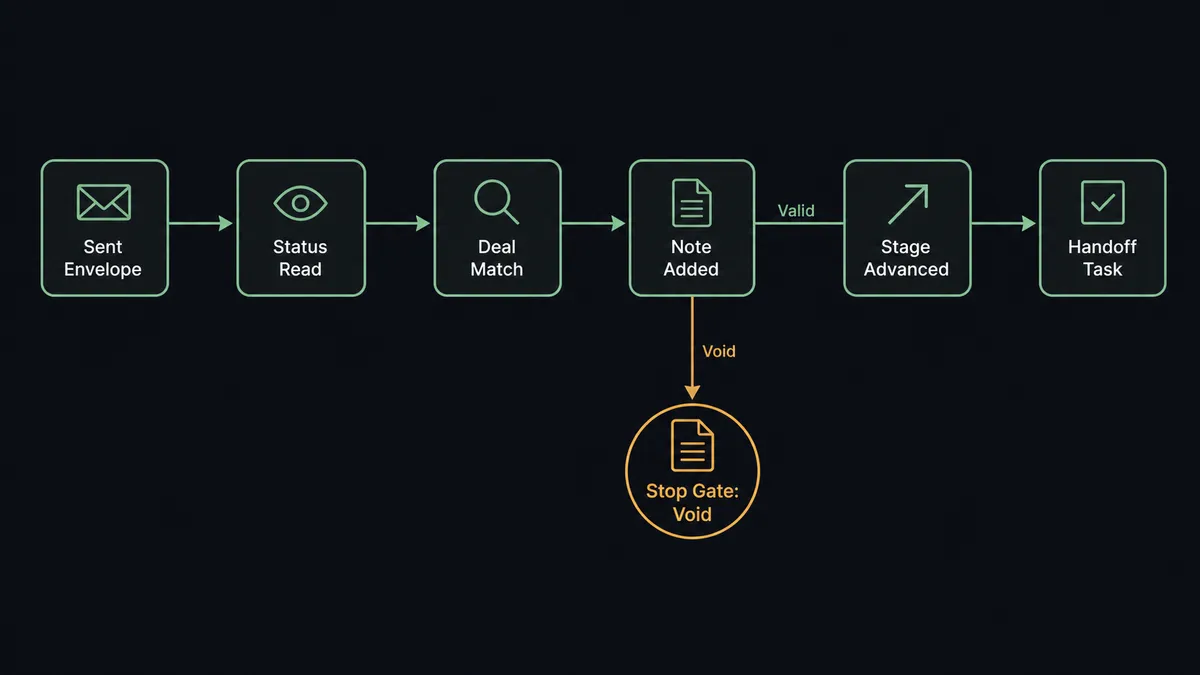
- Trigger: DocuSign fires On Envelope Sent when a contract goes out, and On Envelope Completed when the last signer finishes.
- Read: The workflow calls Get Envelope Status and Get Envelope Recipients to know where the envelope stands and who holds it.
- Match: It calls Search Records in Bigin to find the deal and contact tied to the counterparty.
- Log: It calls Add Note to put the envelope ID, status, and sent date on the deal, so the pipeline shows signature reality.
- Advance: On completion, it calls Update Deal to move the stage and set the closing date.
- Hand off: It calls Create Task for onboarding or fulfillment, assigned the moment the ink is dry.
That is the “just connect them” answer. Envelope events become deal stages, notes, and tasks without the owner touching Bigin. On Envelope Declined runs the recovery path: the decline lands on the deal with Add Note, and Create Task puts the save attempt in front of a person the same day.
Can an AI agent run it? (and why a human stays in the loop)
Yes, and the in-flight envelope is where the agent earns its keep. The agent holds Get Envelope Status, Get Envelope Recipients, Download Document, Search Records, Update Deal, Add Note, Create Task, Send Envelope from Template, Resend Envelope, and Void Envelope as tools. It does more than relay events: when On Envelope Sent fires, it reads the envelope against the current Bigin deal, and it keeps watching, because deals change after contracts go out.
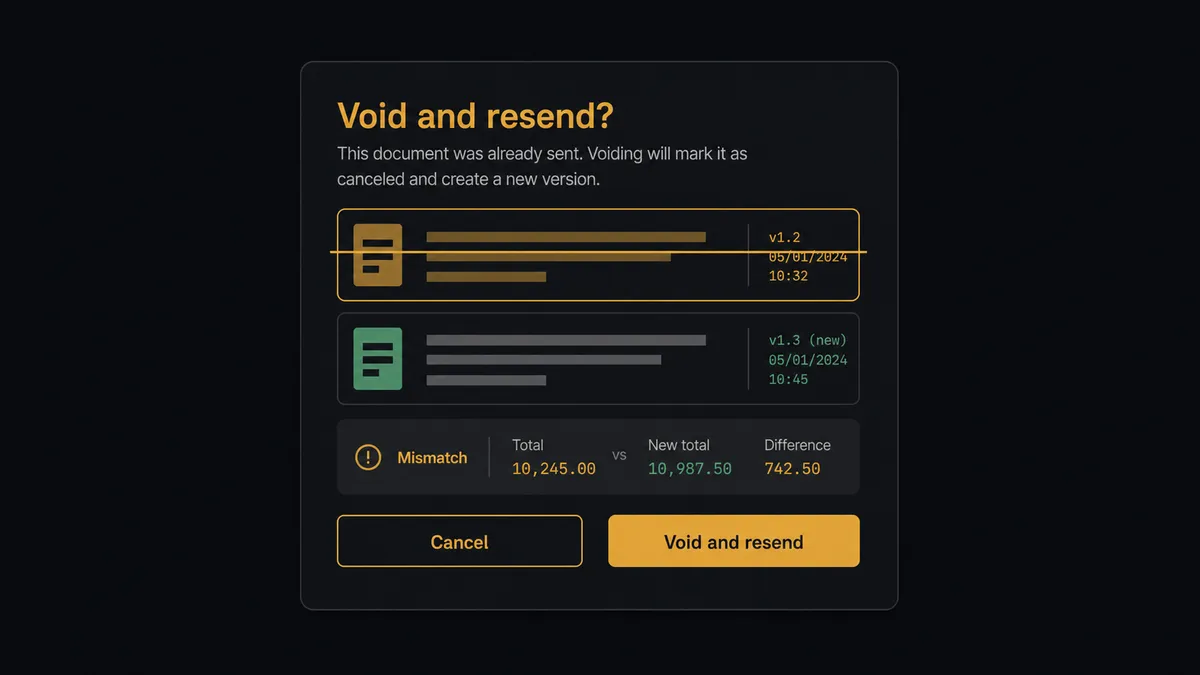
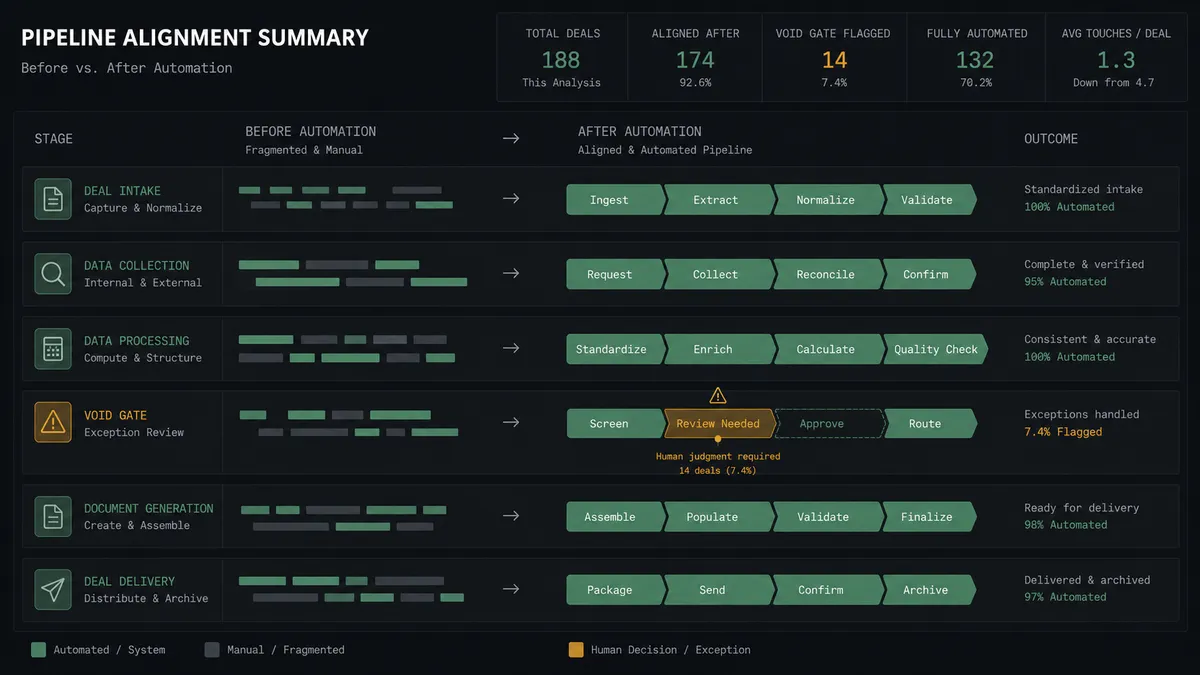
The consequential step is Void Envelope. Canceling a live signature request is visible to the customer and unrecoverable for that envelope, and the wrong void, on a deal where the “mismatch” was an approved exception, is worse than the mismatch. So the agent never voids alone. It invokes a human-in-loop flow it holds as a callable tool, and the workflow pauses and posts to the deals channel: “Envelope [ID] for [company] was sent before the deal amount changed in Bigin. The customer has not signed yet. Recommend voiding and resending from the template with current terms. Approve the void?” A named approver decides. On approval, Void Envelope runs and Send Envelope from Template goes out corrected, and the decision, the approver, and the timestamp land in the audit trail.
Everything else flows without ceremony: completions advance deals, declines create tasks, stalled envelopes get a Resend Envelope nudge proposed to the owner. The agent asks only when the action is visible to the customer and hard to take back. Prospects call this the digital andon cord: like Toyota’s cord on the line, the workflow stops itself at the moment of consequence, and a person restarts it with the whole picture.
FlowRunner vs Zapier
Zapier is a natural first reach for a Bigin shop: the connector library is enormous, both apps are well supported, and the template gallery stands up “envelope completed, update a deal” in minutes. Zapier also sits comfortably alongside Zoho’s own ecosystem tools, which matters to teams already invested there.
The difference is the in-flight envelope. FlowRunner is built around native human-in-the-loop and AI-agent orchestration, where watching a sent contract against a moving deal, and pausing before the void, is what the platform is for.
| What matters for this pair | FlowRunner | Zapier |
|---|---|---|
| Human-in-the-loop before Void Envelope | Native. The agent invokes an approval flow as a callable tool with the mismatch evidence attached | Available via added approval steps or paths, not a native agent decision |
| Who runs the flow | An AI agent reads envelopes against deals, reasons, picks actions as tools | Predefined step sequence you configure per Zap |
| Users included | Unlimited users on every tier | Priced by task volume; seats vary by plan |
| Bring your own AI keys | Yes, BYOK | AI features tied to Zapier’s own AI offering |
| Self-hosted option | Yes, cloud-hosted or self-hosted | Cloud only |
| Pricing model | Transparent workflow-based tiers | Per-task pricing that grows with envelope volume |
If all you need is completed envelopes advancing deal stages, Zapier does that respectably. If contracts sometimes go out ahead of final terms and you want a guard between a wrong envelope and a customer’s signature, this pairing is built for exactly that moment.
Before and after
Here is what changes operationally when the connection is live.
| Category | Before | After |
|---|---|---|
| Pipeline accuracy | Deal stages trail signature reality by days | Update Deal advances the stage the moment On Envelope Completed fires |
| Contract visibility | Envelope status lives in one person’s DocuSign account | Add Note puts envelope ID and status on the deal for the whole team |
| Wrong-terms envelopes | Discovered when the customer signs the outdated contract | The agent flags the mismatch while the envelope is still unsigned |
| Declines | Declines sit unread while the deal quietly dies | On Envelope Declined creates a same-day task for the save attempt |
| Handoffs | Onboarding starts when sales remembers to announce the win | Create Task fires the handoff the moment the ink is dry |
What you can build
Signature to stage, hands off. On Envelope Completed fires. The agent finds the deal with Search Records, advances it with Update Deal, logs the contract with Add Note, and queues onboarding with Create Task.
In-flight mismatch watch. On Envelope Sent fires and the agent keeps the envelope and the deal in view. When the deal changes under a live envelope, it assembles the diff and routes the void-and-resend call through the approval gate.
Contract-stage autopilot. When a deal reaches the contract stage in Bigin, the agent fills Send Envelope from Template from the deal record, so the contract goes out minutes after the stage change instead of after lunch.
Stalled-signature nudge. The agent tracks unsigned envelopes with Get Envelope Status, proposes a Resend Envelope after your chosen quiet period, and logs each nudge on the deal with Add Note.
Decline save play. On Envelope Declined fires. The agent logs the decline, pulls the recipient detail with Get Envelope Recipients, and creates a task with a suggested next step, so a person makes the call while the deal is still warm.
Getting started
Start on the free plan: 100 executions a month, every integration included, no credit card required, plus 14 days of Professional for new accounts. Both connectors are available on every tier, and every tier includes unlimited users and unlimited workflows, so a small team gets the whole pipeline watched without paying per seat.
Explore the integration details:
- DocuSign integration (4 triggers and 9 actions covering the full envelope lifecycle)
- Bigin integration (17 actions across contacts, companies, deals, and tasks)
Start building free at flowrunner.ai or book a demo to see a live DocuSign to Bigin workflow, void gate and all.
Frequently asked questions
Is it free to connect DocuSign and Bigin on FlowRunner?
You can build and run the connection on FlowRunner's free plan, which includes 100 executions a month and every integration with no credit card required, and new accounts also get 14 days of Professional. Both connectors are available on every FlowRunner tier, and every tier includes unlimited users and unlimited workflows.
Can I self-host the DocuSign to Bigin workflow?
Yes. FlowRunner offers a cloud-hosted option and a self-hosted option, so the connection can run inside your own environment.
Does the AI agent need my own OpenAI or Claude key?
FlowRunner uses a bring-your-own-keys model, so you connect the AI provider key you already have. You are not locked to one model.
What happens when a sent envelope no longer matches the deal in Bigin?
The agent flags it before the customer signs the wrong terms. It posts the envelope details next to the current deal record and recommends voiding and resending a corrected envelope. Void Envelope only runs after a named approver agrees, because killing a live signature request is visible to the customer.
Which DocuSign events can trigger a Bigin update?
DocuSign offers four triggers: On Envelope Completed, On Envelope Sent, On Envelope Declined, and On Envelope Voided. On Envelope Completed advances the deal, On Envelope Sent starts the mismatch check, and On Envelope Declined routes the save attempt to a person.
Can the workflow send contracts as well as track them?
Yes. The agent holds Send Envelope from Template as a tool, so a deal reaching the contract stage in Bigin can trigger the envelope going out, with the template filled from the deal record. Resend Envelope handles nudges on stalled signatures.