Connect Confluence to Slack: Stale Pages Flagged, Not Deleted
Connect Confluence and Slack so stale wiki pages get flagged for review automatically, with an AI agent that pauses for the documentation owner before anything is permanently removed.
How do you connect Confluence to Slack?
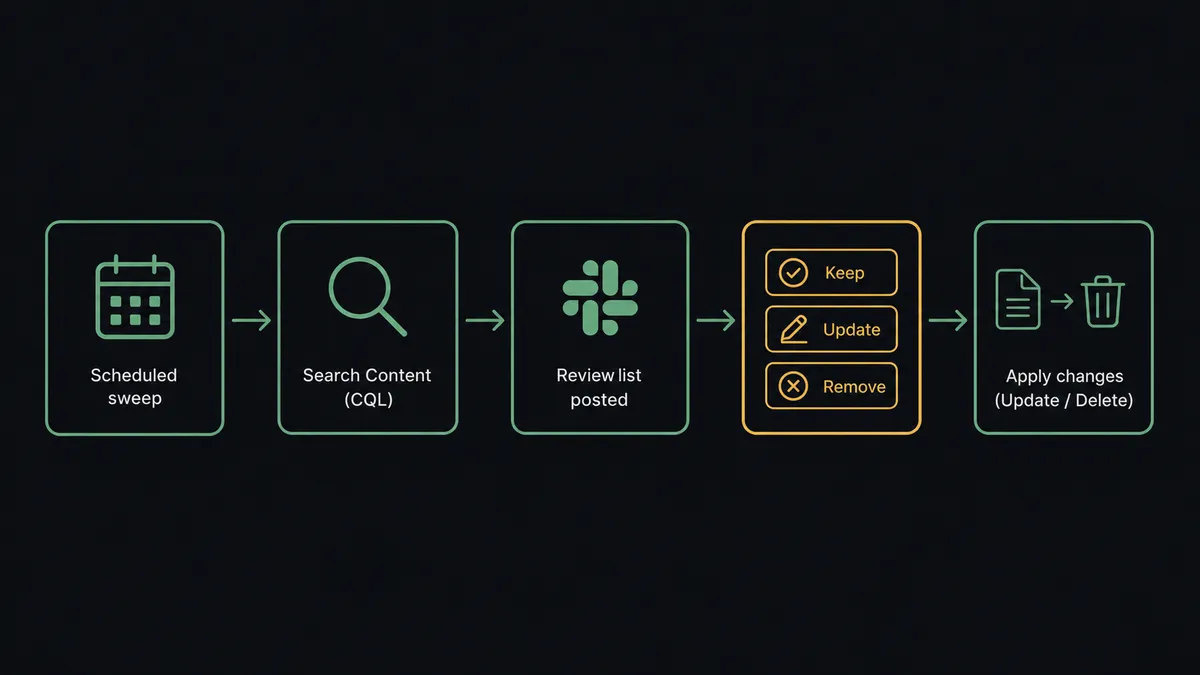
A scheduled sweep runs Confluence’s Search Content (CQL) action to find pages that have gone stale, and Slack’s Send Message to Channel action posts the review list with buttons that fire Slack’s On Block Action trigger to send the owner’s decision back into the flow. FlowRunner is a visual AI-agent orchestration platform where automations run autonomously and pause for human judgment on the steps that carry real consequence. The same connection can run as a fixed schedule that always posts the same query, or as an AI agent that reasons about which pages actually need a person and stops to ask before anything is permanently removed.
The problem it solves
A wiki’s failure mode is not emptiness, it is staleness. A documentation owner or team lead knows, in the abstract, that half the pages in Confluence describe a process that changed months ago, but nobody has time to click through every space and check. So the wiki keeps growing while it quietly stops being true. Someone searches for the onboarding checklist and finds three versions, two of them wrong, with no way to tell which is current without asking around.
The manual fix is worse than the problem. Auditing a space by hand means opening pages one at a time, checking when each was last touched, guessing who still owns it, and deciding whether to fix it, archive it, or delete it, usually while also doing the rest of the job. Most teams never get to it, so the wiki accumulates for years and search returns results that are confidently wrong. The pages that do get flagged often get deleted on the spot by whoever noticed, with no second person confirming that the page wasn’t the only written record of a decision that still matters.
How it works: the connection
The flow starts on a schedule, weekly or quarterly depending on how fast a team’s Confluence space grows. The agent calls Search Content (CQL) to find pages in the target space untouched past their review window, then calls Get Child Pages to walk each page’s tree so a whole stale branch surfaces together, not just its root. For every page found, it resolves an owner from the page’s version history rather than guessing from the current org chart.
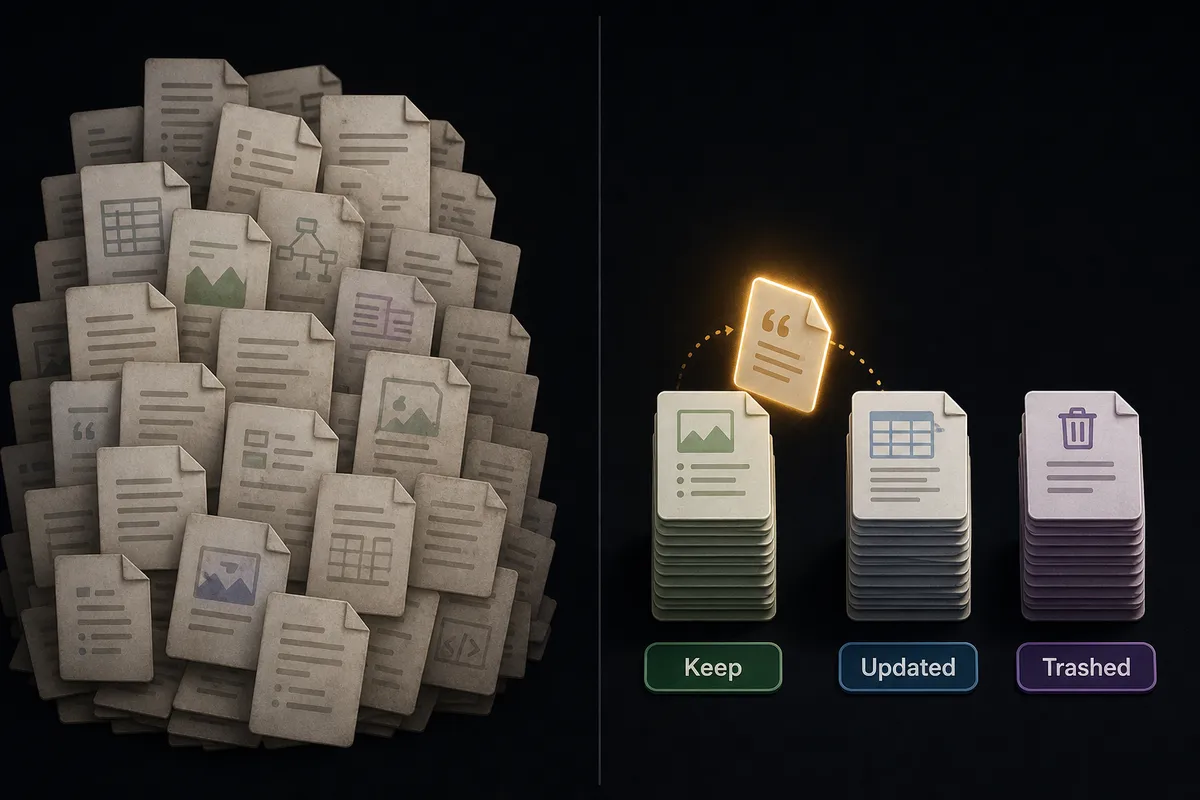
That review list, page by page with a proposed owner, is what gets posted to Slack with Send Message to Channel. Each page shows a title, a last-touched date, and a set of options for the owner to choose: keep, update, or remove. When the owner responds, Slack’s On Block Action trigger fires and sends the decision back into the flow. The agent then acts on it: Update Page for corrections, with the version incremented automatically, or Delete Page (trash mode) for the pages marked for removal. Nothing is ever guessed at and nothing moves without landing in front of the person who owns it.
Can an AI agent run it? (and why a human stays in the loop)
A fixed schedule would run the same CQL query every week and post the same kind of message regardless of what it finds. FlowRunner’s agent reads the search results, reasons about what each page actually represents, and calls Confluence’s and Slack’s actions as tools it chooses to use in the order the situation calls for. This is not a sync tool. The agent knows when to stop and ask, twice.
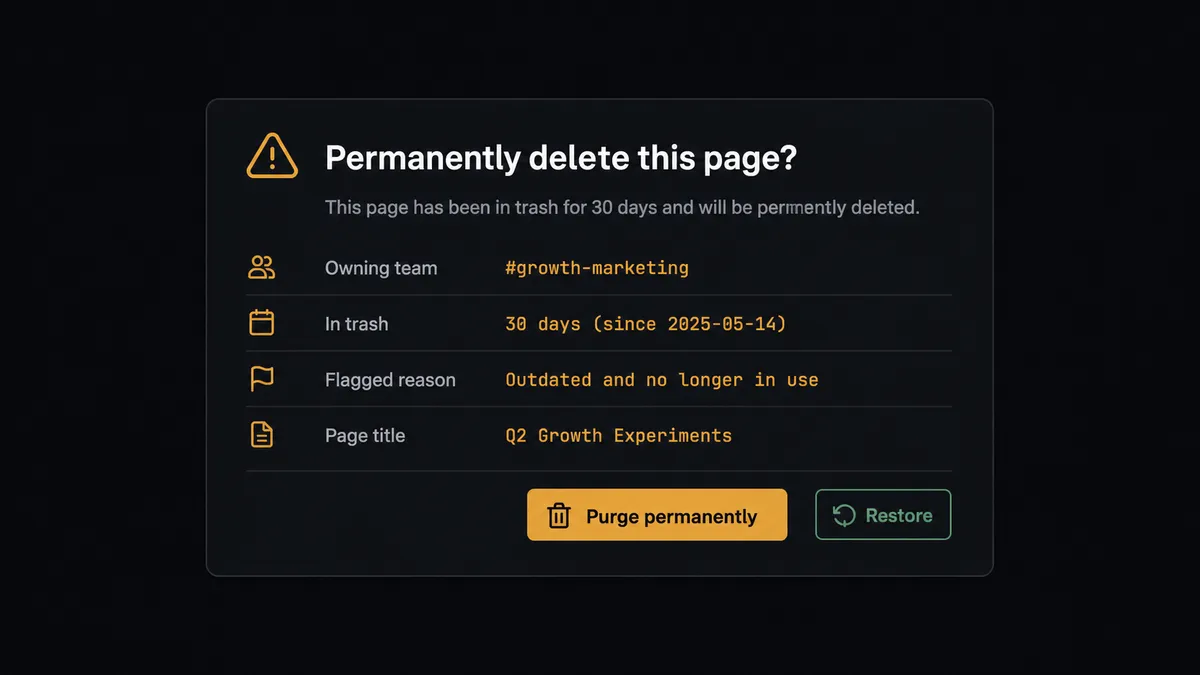
The first pause happens before anything leaves the trash. Delete Page has two modes: by default a deleted page moves to the trash and can be restored, but with Purge enabled it is permanently gone, and the same is true of Delete Attachment. A knowledge base is institutional memory, so the agent treats cleanup as two acts. Act one is reversible: it trashes the pages the owner marked for removal and keeps the record of what moved. Act two is permanent, and the agent never runs it on its own. It packages the page title, who owns it, how long it has sat untouched, and why it was flagged for removal, and sends that to the documentation owner: “This page has been in trash for 30 days and describes a deploy process replaced last quarter. Purge permanently, or restore?” Only an explicit confirmation triggers Delete Page with Purge enabled.
The same discipline applies to comment moderation. Delete Comment is permanent the instant it runs, taking every reply with it, so when a moderation flow flags a comment thread, the agent includes the comment text itself in the Slack approval request, so the reviewer sees exactly what disappears before it does. The agent does the finding and the filing. A person owns everything that cannot come back.
FlowRunner vs n8n
n8n connects Confluence and Slack through its own nodes, and for a technical team that wants full control over the query logic and the JSON shape moving between them, it is a capable, flexible way to wire this up. Where the two diverge is what happens when a page marked for removal actually needs a second, permanent confirmation, and what it costs to run that safely at scale.
| Capability | n8n | FlowRunner |
|---|---|---|
| Human-in-loop on the risky step | Build your own wait-for-webhook node and approval logic | Native: the agent invokes a human-in-loop flow as a callable tool at the step that carries weight |
| Reasoning over what was found | Fixed node logic follows the same path on every run | The agent reads the search results and decides what to flag, escalate, or leave alone |
| Users included | Seat-based pricing on the tiers with this workflow depth | Unlimited users on every tier |
| Self-hosting | Self-hosted from the start, infrastructure and DevOps on you | Self-hosted Community Edition free, self-hosted Enterprise for full compliance |
| Pricing model | Self-hosted Business tier priced separately from cloud, custom above that | Transparent workflow-based tiers with clear execution limits |
Before and after
| Category | Before | After |
|---|---|---|
| Stale content | Pages accumulate for years, and search returns results that are confidently wrong | A scheduled sweep with Search Content (CQL) finds pages past their review window automatically |
| Ownership | No one is sure who still owns a given page, so nothing gets fixed | The agent resolves an owner from version history before anyone is asked to act |
| Deletion risk | Whoever notices a stale page deletes it on the spot, no second check | Delete Page runs in trash mode first; permanent purge requires the owner’s explicit confirmation |
| Review effort | Auditing a space means opening pages one at a time by hand | The review list lands in Slack with keep, update, and remove options in one message |
| Comment moderation | Comment threads get removed with no record of what was in them | Delete Comment only runs behind explicit review, with the comment text included in the approval request |
What you can build
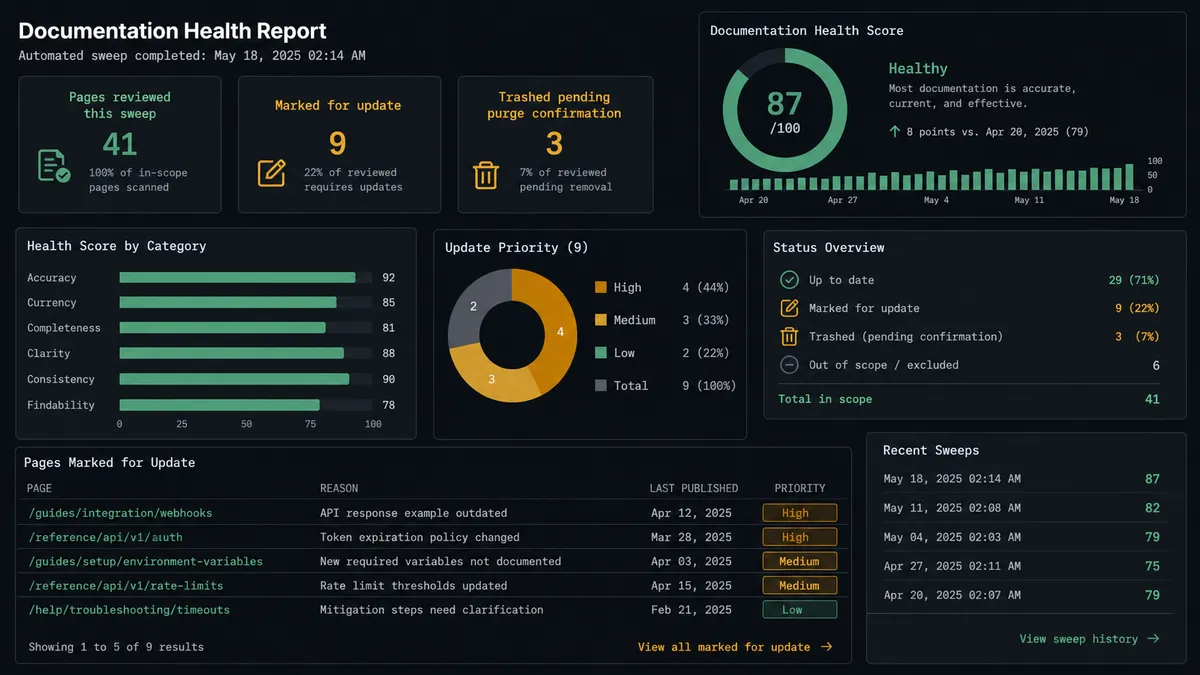
The stale-content sweep with owner review. The agent runs Search Content (CQL) and Get Child Pages on a schedule, posts the results to Slack, and only trashes or updates pages after the owner responds through On Block Action.
A new page announced the moment it exists. After Create Page publishes a spec under a project’s parent and Add Labels to Page tags it, Send Message to Channel notifies the assignee in Slack instead of leaving Create Footer Comment as the only trace.
Document pipeline into the knowledge base. When a finished file is uploaded with Upload Attachment, the agent posts a Slack message announcing the new version with a link to the page, so the team sees it without watching the space.
Comment moderation with the deleted text on record. Before Delete Comment removes a footer comment and its replies, the agent posts the comment text to a moderator in Slack and waits for confirmation.
A weekly documentation digest. The agent compiles page counts, labels added, and pages flagged for review, then posts it to Slack using the same reporting pattern teams already use for other workflow digests.
Common questions
Is it free to connect Confluence and Slack on FlowRunner? FlowRunner has a free plan with 100 executions a month, every integration included, and no credit card required, and new accounts get 14 days of Professional on top. Beyond the free plan, Growth starts at $45/mo for 12,000 executions.
Can I self-host the Confluence and Slack connection? Yes. The Community Edition is free for a single self-hosted instance, and the self-hosted Enterprise tier adds multi-instance clustering and the full compliance suite for teams that need the flow on their own infrastructure.
Does the agent need my own OpenAI key? FlowRunner uses a bring-your-own-key model, so you connect the AI provider you already use and the agent runs on your key rather than a shared pool.
What happens when the agent isn’t sure a page should be removed? It never deletes a page on its own judgment. It trashes candidates in a reversible first pass, posts the list to the documentation owner in Slack, and only runs Delete Page with Purge enabled after that owner explicitly confirms.
Can Confluence trigger a Slack message the moment a page changes? Yes. The agent can call Send Message to Channel or Create Footer Comment right after Create Page or Update Page runs, so a new or edited page is announced in Slack the moment it exists.
Does this replace the approvals I already run in Slack? No. FlowRunner is the layer that decides when a Confluence action is risky enough to need one of those approvals; your existing Slack channels and Block Kit messages are what it uses to ask.
Getting started
FlowRunner has a free plan with 100 executions a month, every integration included, and no credit card required, and new accounts get 14 days of Professional on top. Start at flowrunner.ai to build the sweep yourself, or book time at calendly.com/flowrunner/intro to walk through the purge-confirmation gate with the team.
Frequently asked questions
Is it free to connect Confluence and Slack on FlowRunner?
FlowRunner has a free plan with 100 executions a month, every integration included, and no credit card required, and new accounts get 14 days of Professional on top. Beyond the free plan, Growth starts at $45/mo for 12,000 executions.
Can I self-host the Confluence and Slack connection?
Yes. The Community Edition is free for a single self-hosted instance, and the self-hosted Enterprise tier adds multi-instance clustering and the full compliance suite for teams that need the flow on their own infrastructure.
Does the agent need my own OpenAI key?
FlowRunner uses a bring-your-own-key model, so you connect the AI provider you already use and the agent runs on your key rather than a shared pool.
What happens when the agent isn't sure a page should be removed?
It never deletes a page on its own judgment. It trashes candidates in a reversible first pass, posts the list to the documentation owner in Slack, and only runs Delete Page with Purge enabled after that owner explicitly confirms.
Can Confluence trigger a Slack message the moment a page changes?
Yes. The agent can call Send Message to Channel or Create Footer Comment right after Create Page or Update Page runs, so a new or edited page is announced in Slack the moment it exists.
Does this replace the approvals I already run in Slack?
No. FlowRunner is the layer that decides when a Confluence action is risky enough to need one of those approvals; your existing Slack channels and Block Kit messages are what it uses to ask.