How to Connect Calendly with Zoom (With or Without an AI Agent)
Connect Calendly and Zoom so every booking automatically creates the Zoom meeting, registers the attendee, and sends their personal join link, with an AI agent that pauses for human judgment on the steps that carry real consequence.
How do you connect Calendly to Zoom?
When someone books through a Calendly link and the On Invitee Created trigger fires, a FlowRunner workflow calls Create Meeting in Zoom, registers the attendee with Add Meeting Registrant, and sends them their personal join link, all without anyone touching a keyboard. FlowRunner is a visual AI-agent orchestration platform where automations run autonomously and pause for human judgment on the steps that carry real consequence. The same connection can run as an AI agent that reads the booking data, makes decisions about what to do with it, and invokes a human-in-loop flow as a callable tool when the situation warrants it.
The manual process that falls through the cracks
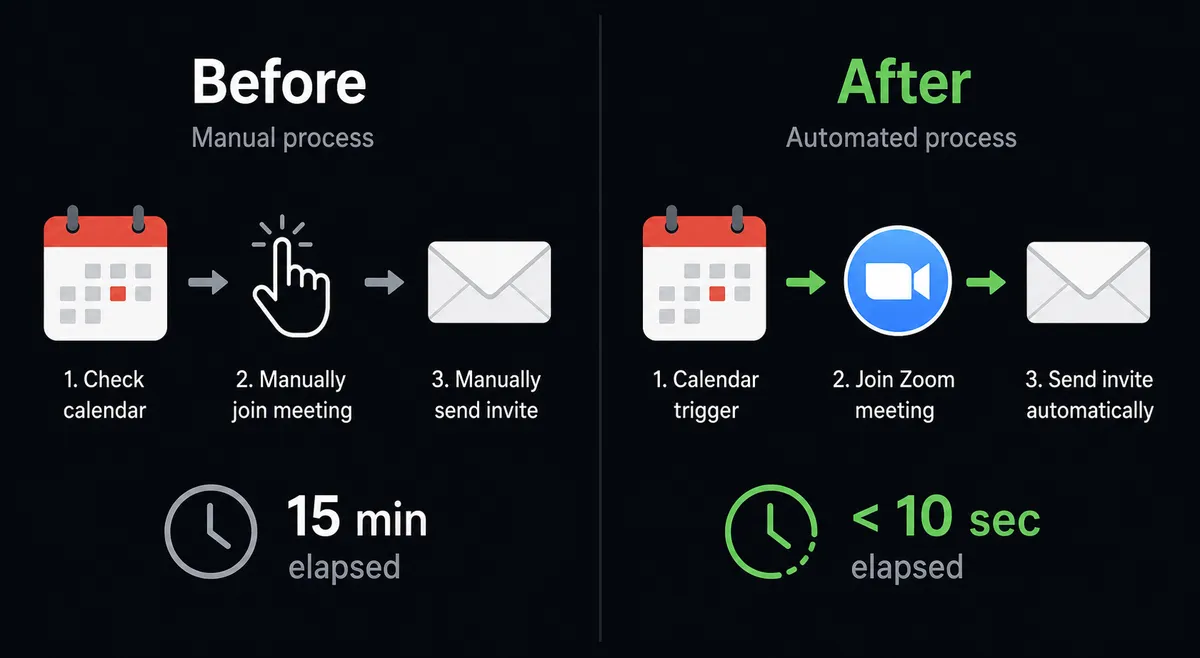
The scheduling coordinator, the operations lead, or the sales rep books a Calendly meeting and then switches tabs to Zoom to create the meeting manually. They copy the join link. They paste it into an email. They hit send and hope they got the right person. When it is a high-volume week, some of those steps get skipped. Attendees show up without a link. Recordings get lost. No-shows do not get a follow-up for three days because someone forgot.
The problem compounds on the back end. After the call ends, someone has to go find the recording in Zoom’s portal, download it or forward the link, and then manually reconcile who actually attended. Attendance data sits in Zoom. Meeting notes sit in email. CRM records sit untouched. Nothing talks to anything else without a person in the middle connecting the dots.
How it works: the connection
The Calendly trigger node fires on a booking and passes the attendee’s name, email, meeting type, start time, and duration downstream. The workflow maps that data to two Zoom actions in sequence.
First, Create Meeting provisions the call using the exact time and title from the Calendly event. Zoom returns the meeting ID and the host join URL.
Second, Add Meeting Registrant enrolls the attendee by name and email. Zoom returns their personal join link, which is different from the host link and unique to that attendee. The workflow then sends that link to the attendee via email or Slack alongside the invitation text from Get Meeting Invitation.
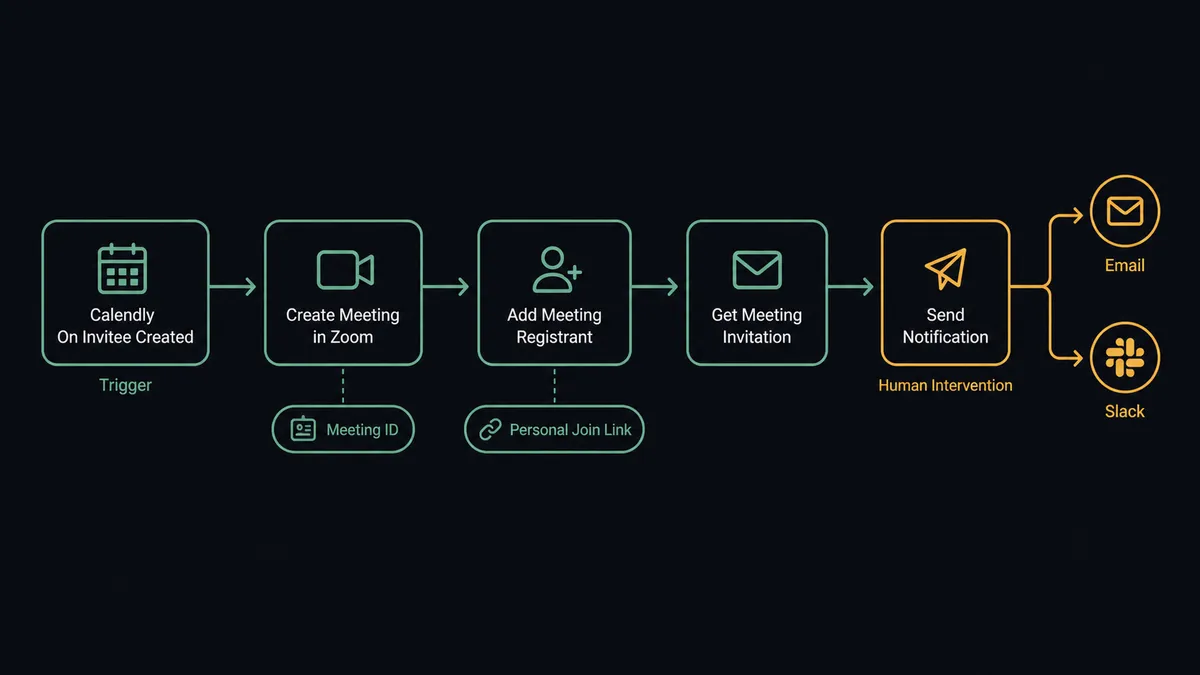
That covers the “just connect them” case. Every booking creates a meeting, every attendee gets their link, and the invitation text goes out. No one touched anything manually.
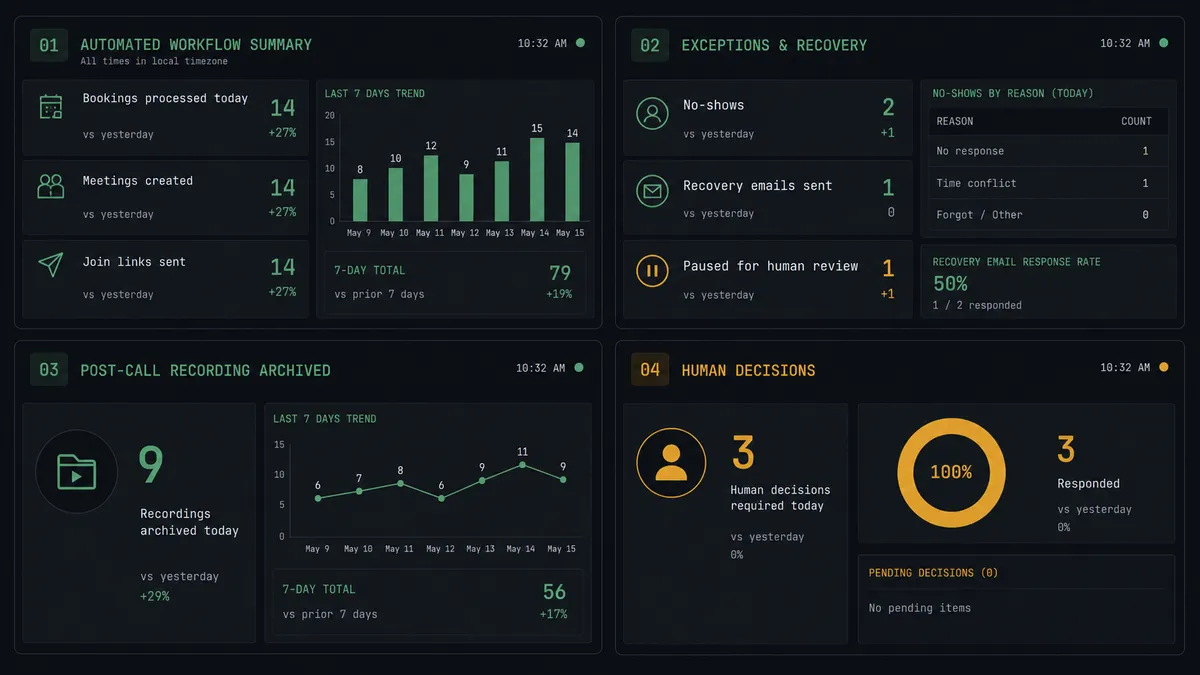
For cancellations, the On Invitee Canceled trigger fires. The workflow can call Update Meeting to adjust the Zoom event, or it can call Delete Meeting if the cancellation is final. For no-shows, On Mark Invitee as No-Show fires and the workflow generates a fresh single-use scheduling link with Create Single-Use Scheduling Link in Calendly, then sends a recovery email on behalf of the rep.
After the call, the workflow can call Get Meeting Recordings to retrieve the recording download links and archive them, and call List Past Meeting Participants to pull join and leave times for attendance tracking.
Can an AI agent run it? (And why a human stays in the loop)
A plain connection runs the same sequence every time. An AI agent reads the situation and decides what to do.
The agent has every Zoom and Calendly action as a tool in its toolbox. Create Meeting, Add Meeting Registrant, Create Single-Use Scheduling Link, Get Meeting Recordings, List Past Meeting Participants. It picks which tools to use and in what order based on what it finds in the booking data.
Here is a real decision moment. A VP-level contact at a priority account cancels their demo an hour before it is scheduled to start. The agent reads the cancellation. It checks the contact’s deal value and account tier. It sees this is a prospect worth $48,000 in potential annual contract value and that this is their second cancellation. The agent does not send the automated rescheduling email. It pauses and routes to the sales manager via Slack:
“[Prospect Name] at [Company] canceled their Zoom demo again. This is their second cancellation. Deal value: $48,000. I can send an automated rescheduling link or hold for your personal outreach. What would you like to do?”
The manager sees the full context. She knows this account. She chooses to reach out personally. The agent does not send the automated email. The decision, the manager’s identity, and the timestamp go into the audit trail.
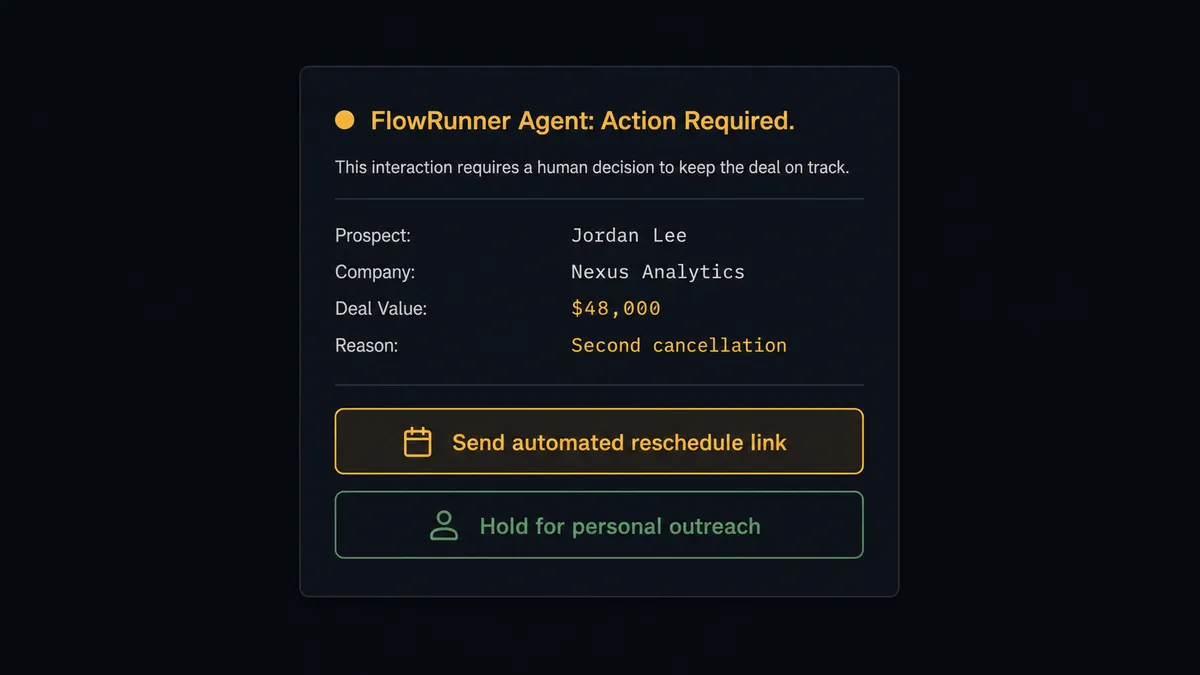
This is not a hardcoded rule (“if deal value over $40K, ask human”). The agent evaluated context: deal value, cancellation history, and account priority. It decided this was a consequential step. That is the difference between a sync tool and an orchestration layer.
The same reasoning applies to the irreversible steps. When a cleanup workflow reaches a point where it would call Delete Meeting Recordings, the agent pauses. Recordings can be recovered from Zoom’s trash for 30 days, but not after that. The agent routes to the meeting owner: “The workflow wants to delete the cloud recording for [Meeting] on [date]. Confirm the deletion or keep the recording?” The owner confirms. Only then does the deletion run.
Prospects describe this as a digital andon cord. The line keeps moving until something genuinely uncertain appears. Then it stops and gets a human.
FlowRunner vs the tool you are probably comparing
Most teams connecting Calendly to Zoom start with Zapier. That is a reasonable starting point. Zapier is reliable, has a large integration library, and a lot of people already know how to use it.
The differences emerge when the workflow needs to reason rather than just relay.
| What matters | Zapier | FlowRunner |
|---|---|---|
| Native AI agent reasoning | No. Logic is branching rules, not agent decisions. | Yes. The agent reads data and picks tools based on context. |
| Human-in-loop as a callable tool | No. Approval steps require third-party tools or workarounds. | Yes. Human oversight is a flow the agent invokes, not a hardcoded gate. |
| Unlimited users and workflows | No. Zapier charges per user on most plans. | Yes. Every FlowRunner tier includes unlimited users and workflows. |
| Post-meeting recording and attendance | Not native; requires additional Zaps and manual triggers. | Yes. Get Meeting Recordings and List Past Meeting Participants are native agent tools. |
| Transparent workflow-based pricing | No. Per-task pricing creates execution anxiety at scale. | Yes. Workflow-based tiers with clear execution limits. |
Zapier is a good fit if you want a simple, no-reasoning trigger-action connection. FlowRunner is the right layer when the workflow needs to think about what it found and decide whether to proceed or pause.
Before and after
| Metric | Before | After |
|---|---|---|
| Meeting setup time | Rep creates Zoom meeting manually after each Calendly booking | Meeting created, attendee registered, join link sent automatically within seconds of booking |
| Attendee experience | Attendee receives a generic join link after a manual copy-paste | Attendee receives their personal Zoom join link immediately after booking |
| No-show follow-up | Rep follows up days later, if at all | Personalized rescheduling link generated and sent within 2 hours of no-show |
| Recording retrieval | Staff hunt for the recording link in Zoom’s portal after each call | Recording download link retrieved and archived automatically after the meeting ends |
| Attendance tracking | Join times pieced together from memory or Zoom’s UI | Join and leave times pulled into tracking automatically via List Past Meeting Participants |
| Consequential decisions | Automated messages go out regardless of account value | Agent pauses on high-value cancellations and irreversible steps; human decides |
What you can build
Demo booking to Zoom with attendee registration. When On Invitee Created fires for a demo event type, the agent calls Create Meeting, registers the attendee with Add Meeting Registrant, and sends their personal join link along with Get Meeting Invitation text. The rep’s calendar gets an event with the deal notes. The CRM record updates. No one touched anything.
No-show recovery sequence. On Mark Invitee as No-Show triggers the agent. It logs the no-show, waits two hours, generates a fresh Create Single-Use Scheduling Link, and sends a personalized recovery email. High-priority accounts get routed to the rep for a judgment call before the automated message goes out.
Post-call recording archive. After a meeting ends, the agent calls Get Meeting Recordings to retrieve the download links and stores them in a tracking system. Attendees receive the recording link by email. The agent then calls List Past Meeting Participants to log join and leave times for attendance records.
Routing form to qualified Zoom meeting. On New Routing Form Submitted fires when a prospect fills out a Calendly qualification form. The agent scores the submission. High-score prospects get a Create Meeting provisioned immediately and a personal join link via email. Borderline scores route to the sales manager via Slack before a meeting is created.
Common questions
Is it free to connect Calendly and Zoom on FlowRunner? FlowRunner has a free plan with 100 executions a month, every integration included, and no credit card required, and new accounts get 14 days of Professional on top. You can connect Calendly and Zoom and run the workflow end-to-end before spending anything.
Does the agent need my own Zoom or Calendly API key? FlowRunner connects to both platforms via OAuth2. You authorize each account through the FlowRunner connector settings. No API keys to manage. If you want to use an AI model for reasoning steps, FlowRunner supports BYOK so you bring your own key from any provider.
Can I self-host this workflow? Yes. FlowRunner offers a self-hosted Community Edition at no cost. Enterprise self-hosted adds multi-instance clustering, full audit retention, and SSO. Cloud plans start free, with paid plans from $5 a month and Growth at $45 a month with unlimited users and workflows.
What happens when the agent is not sure what to do? The agent invokes a human-in-loop flow as a callable tool. It pauses execution, sends the relevant context to a person through their preferred channel (Slack, email, or WhatsApp), and waits. When the person responds, the agent resumes with the decision as input. The decision, who made it, and when are all captured in the audit trail.
Can the agent handle no-shows automatically? Yes. When Calendly fires the On Mark Invitee as No-Show trigger, the agent can generate a single-use Calendly rescheduling link, send a follow-up email, and log the no-show in your CRM without anyone touching the process. High-value accounts can be routed to a human before the automated message goes out.
Does this replace my Calendly-Zoom native integration? The native Calendly-Zoom integration creates a meeting on booking. FlowRunner does that plus registers attendees and returns personal join links, handles no-shows and cancellations, fetches recordings and attendance reports after the call, and adds an AI agent layer that reasons about what to do and when to ask for help. It is an orchestration layer on top of the native connection, not a replacement.
Getting started
FlowRunner has a free plan with 100 executions a month, every integration included, and no credit card required, and new accounts get 14 days of Professional on top. Any real email address works; disposable domains are not accepted.
Connect both platforms from the FlowRunner integrations panel: Calendly and Zoom. The OAuth2 flow takes about two minutes per connector.
Start your free trial at flowrunner.ai or book a walkthrough at calendly.com/flowrunner/intro. The Calendly-Zoom workflow can be live before your next demo call.
Frequently asked questions
Is it free to connect Calendly and Zoom on FlowRunner?
FlowRunner has a free plan with 100 executions a month, every integration included, and no credit card required, and new accounts get 14 days of Professional on top. You can connect Calendly and Zoom and run the workflow end-to-end before spending anything.
Does the agent need my own Zoom or Calendly API key?
FlowRunner connects to both platforms via OAuth2. You authorize each account through the FlowRunner connector settings. No API keys to manage. If you want to use an AI model for reasoning steps, FlowRunner supports BYOK so you bring your own key from any provider.
Can I self-host this workflow?
Yes. FlowRunner offers a self-hosted Community Edition at no cost. Enterprise self-hosted adds multi-instance clustering, full audit retention, and SSO. Cloud plans start free, with paid plans from $5 a month and Growth at $45 a month with unlimited users and workflows.
What happens when the agent is not sure what to do?
The agent invokes a human-in-loop flow as a callable tool. It pauses execution, sends the relevant context to a person through their preferred channel (Slack, email, or WhatsApp), and waits. When the person responds, the agent resumes with the decision as input. The decision, who made it, and when are all captured in the audit trail.
Can the agent handle no-shows automatically?
Yes. When Calendly fires the On Mark Invitee as No-Show trigger, the agent can generate a single-use Calendly rescheduling link, send a follow-up email, and log the no-show in your CRM without anyone touching the process. High-value accounts can be routed to a human before the automated message goes out.
Does this replace my Calendly-Zoom native integration?
The native Calendly-Zoom integration creates a meeting on booking. FlowRunner does that plus registers attendees and returns personal join links, handles no-shows and cancellations, fetches recordings and attendance reports after the call, and adds an AI agent layer that reasons about what to do and when to ask for help. It is an orchestration layer on top of the native connection, not a replacement.