How to Connect Calendly with Aircall (With or Without an AI Agent)
Connect Calendly bookings to Aircall contacts and insight cards so every scheduled call starts with context, optionally as an AI agent that pauses for a human before a suspect booking is canceled on a real person's calendar.
How do you connect Calendly to Aircall?
You connect Calendly to Aircall by having Calendly’s On Invitee Created trigger drive Aircall actions: the workflow matches the invitee with List Contacts, writes them with Create Contact or Update Contact, and attaches the event type, meeting time, and routing form answers with Add Insight Cards, so when the scheduled call happens, the rep is looking at what the prospect actually wrote when they booked. FlowRunner is a visual AI-agent orchestration platform where automations run autonomously and pause for human judgment on the steps that carry real consequence. The same connection can run as an AI agent that preps every booking on its own and pauses for a human before Cancel Scheduled Event bounces anyone off a real calendar.
The problem it solves
A booking and a phone call live in different systems, and the person in the middle is the rep, five minutes before the meeting, hunting. The prospect booked through Calendly and answered three routing form questions about their team size and their problem. None of that reaches Aircall. So the rep dials from a bare contact, asks questions the prospect already answered in writing, and the first impression is “they did not read my form.” Multiply that across every booked call on every rep’s calendar.
The lifecycle edges leak just as much. A prospect books twice on two event types and two reps prep for the same conversation. A no-show gets marked and then forgotten, because the flag lives in Calendly and the follow-up motion lives in the phone system. And the tempting fix for calendar clutter, letting an automation auto-cancel anything that looks like a duplicate, is how a legitimate prospect who rebooked with a corrected email address gets a cold cancellation notice an hour after they finally committed to talking to you. A cancellation is not a data operation. It is a message to a person who was about to give you their time.
How it works: the connection
The connection listens to Calendly and writes to Aircall. Here is the plain version, grounded in the real connector actions.
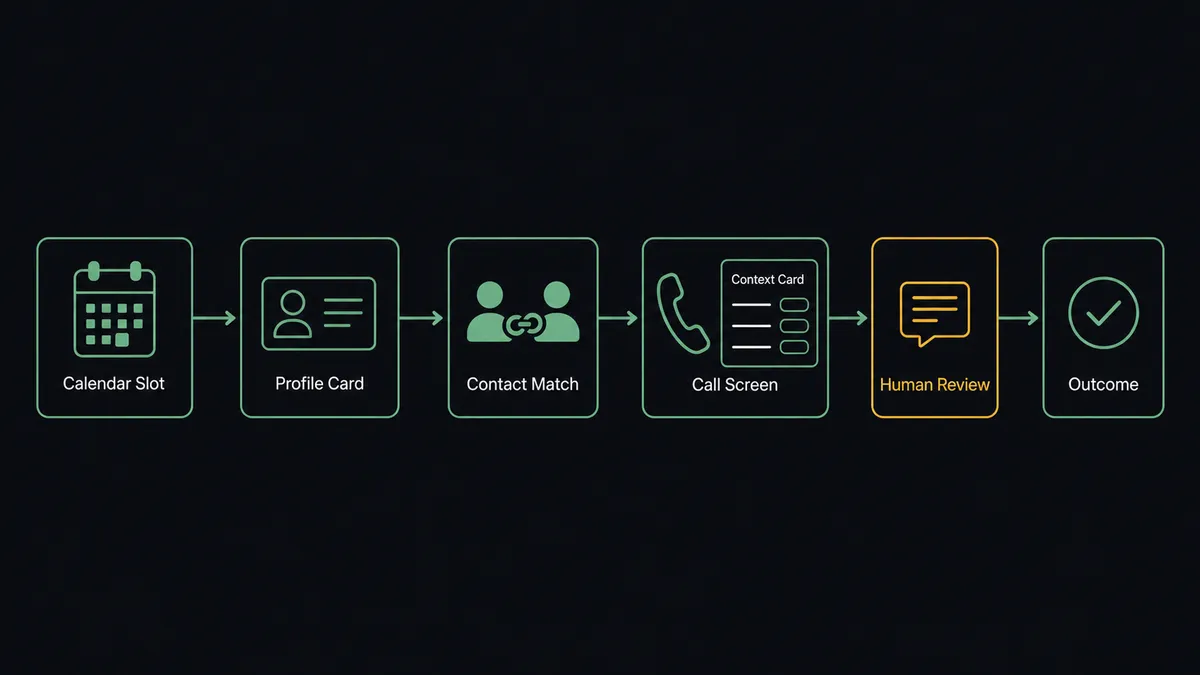
- Trigger: Calendly fires On Invitee Created when a prospect books a call.
- Read: The workflow reads the invitee’s name, email, phone, event type, meeting time, and their routing form answers.
- Match: It calls List Contacts in Aircall by email and phone, so a returning prospect resolves to their existing record and history.
- Write the contact: No match means Create Contact; a match means Update Contact, so the phone system is current before the meeting exists on anyone’s calendar for long.
- Attach the context: It calls Add Insight Cards with the event type, time, and form answers, putting the prospect’s own words on the call screen.
- Track the lifecycle: On Invitee Canceled refreshes the card, and On Mark Invitee as No-Show applies Add Tags to Call and Comment on Call so the missed meeting is visible on the account and queued for follow-up.
That is the “just connect them” answer. Every booked call starts with the context the prospect already gave you, and the booking lifecycle stops leaking between two systems.
Can an AI agent run it? (and why a human stays in the loop)
Yes, and the agent is what makes the lifecycle intelligent instead of merely wired. It holds the actions as tools: Create One-Off Meeting, Create Single-Use Scheduling Link, Cancel Scheduled Event on the Calendly side; List Contacts, Get Contact, Create Contact, Update Contact, Add Insight Cards, Add Tags to Call, Comment on Call on the Aircall side. For each booking it reasons: is this a new prospect, a returning customer who should route to their account owner, or the same person’s third booking this week under a slightly different email?
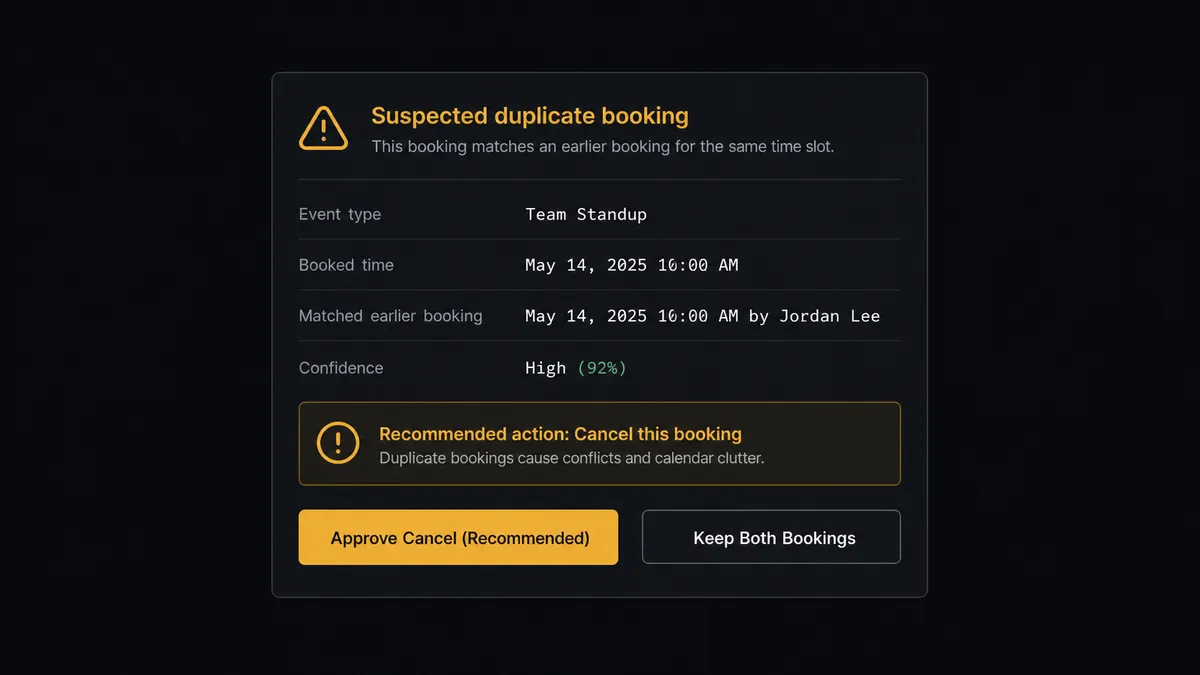
The consequential step is Cancel Scheduled Event. It is customer-facing the instant it runs: Calendly emails the invitee that their meeting is gone. Auto-cancel the wrong booking and you have uninvited a warm prospect. So the agent never cancels alone. When it spots a suspect booking, a duplicate pair, a spam pattern, an enterprise prospect on the free-clinic event type, it invokes a human-in-loop flow it holds as a callable tool. The workflow pauses and posts to the calendar owner: “Booking on [event type] for [time] looks like a duplicate of the earlier booking from the same person under [email]. Recommend canceling the second and keeping the first. Approve?” Only on approval does Cancel Scheduled Event run, often followed by Create Single-Use Scheduling Link so the prospect lands on the right event type with a clean, personal path back. The decision, approver, and timestamp go to the audit trail.
Prospects call this a digital andon cord: like Toyota’s production line pull cord, the workflow stops the line before the step a customer will feel. Booking prep runs at machine speed. Uninviting a human waits for a human.
FlowRunner vs Zapier
Zapier is the first tool most teams reach for on a Calendly automation, with reason: Calendly is one of its most popular connectors, Aircall is well supported, and the template gallery is full of booking-notification patterns a non-technical person can clone in minutes. For “when someone books, add them to a list,” Zapier is quick and reliable.
The gap is judgment across the booking lifecycle, and who gets to be in the tool as the team grows.
| What matters for this pair | FlowRunner | Zapier |
|---|---|---|
| Human-in-the-loop before Cancel Scheduled Event | Native. The agent invokes an approval flow as a callable tool and pauses mid-run | Available via added approval steps, not an agent decision built on contact history |
| Who runs the flow | An AI agent matches invitees, reads routing forms, and picks actions as tools | A fixed trigger-action sequence per Zap |
| Users included | Unlimited users on every tier | Priced by task volume; seat limits vary by plan |
| Bring your own AI keys | Yes, BYOK | AI features tied to Zapier’s own AI offering |
| Self-hosted option | Yes, cloud-hosted or self-hosted | Cloud only |
| Pricing model | Transparent workflow-based tiers | Per-task pricing; every booking, update, and no-show event consumes tasks |
If you need booking notifications in a channel, Zapier does the job. If you want every scheduled call prepped with the prospect’s own answers and any cancellation gated behind the calendar owner, this pairing on FlowRunner is the better fit.
Before and after
| Category | Before | After |
|---|---|---|
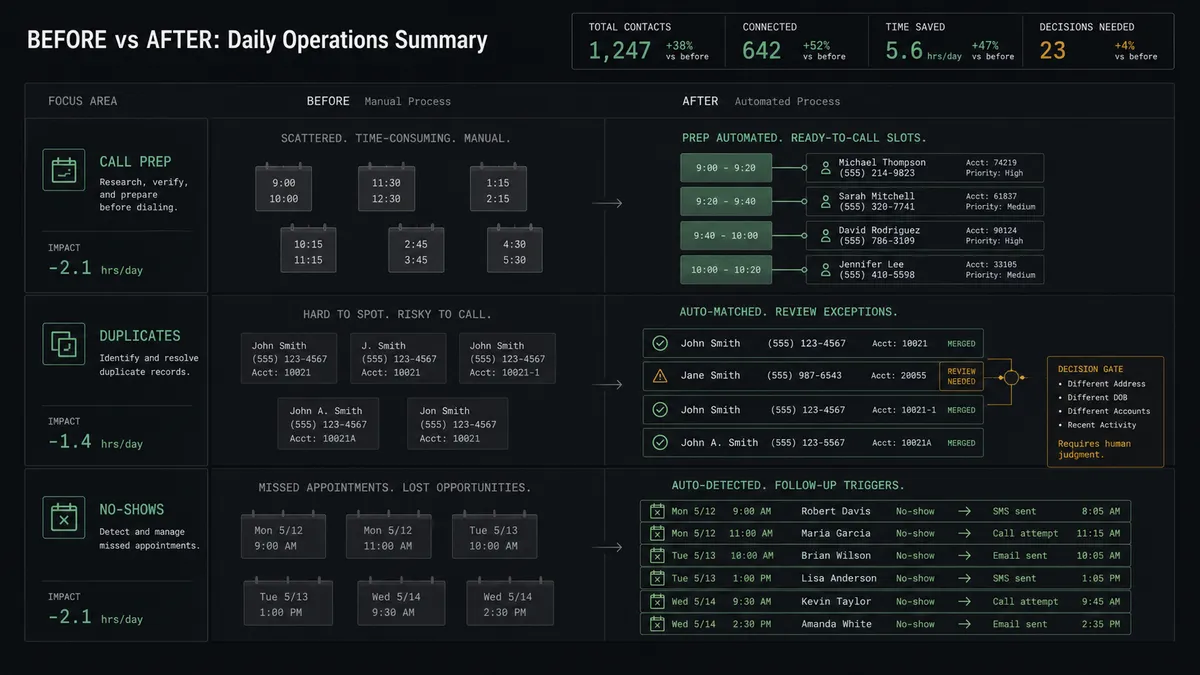
| Call prep | Reps hunt through Calendly emails five minutes before the meeting | The routing form answers are on the call screen when the call connects |
| Returning prospects | A rebooking creates a second, blank contact | List Contacts resolves the invitee to their existing record and history |
| Duplicates | Two reps prep for the same conversation, or an auto-rule cancels the wrong one | Suspect bookings wait for the calendar owner’s call, with evidence attached |
| No-shows | The flag lives in Calendly and the follow-up never happens | Tags, a comment, and a fresh single-use link queue the recovery automatically |
| Accountability | Nobody knows why a prospect’s meeting was canceled | Every cancellation carries a reason, an approver, and a timestamp |
What you can build
Prepped-call pipeline. On Invitee Created, the agent matches with List Contacts, writes with Create Contact or Update Contact, and docks Add Insight Cards, so every scheduled call opens with the prospect’s own routing form answers.
Duplicate and spam triage. The agent spots twin bookings and junk patterns, packages the evidence, and waits for the owner before Cancel Scheduled Event, then offers Create Single-Use Scheduling Link when the prospect belongs on a different event type.
No-show recovery loop. On Mark Invitee as No-Show, the agent tags the account, comments the missed meeting into call history, and sends a fresh single-use link, and On Unmark Invitee as No-Show unwinds it all when the flag was wrong.
Routing form fast lane. On New Routing Form Submitted, the agent reads the answers and applies Add Tags to Call conventions by segment, so enterprise inquiries and small-team inquiries land with the right reps before the meeting starts.
VIP fast rebook. When a high-value account cancels, the agent alerts the owner and drafts a Create One-Off Meeting so the reschedule happens as a personal invitation rather than a generic booking link.
Getting started
Start on the free plan: 100 executions a month, every integration included, no credit card required, plus 14 days of Professional for new accounts. Both connectors are available on every tier, and every tier includes unlimited users and unlimited workflows, so every rep with a calendar and the owner who approves cancellations are covered without seat math.
Explore the integration details:
- Calendly integration (5 triggers and 3 actions covering bookings, cancellations, no-shows, and routing forms)
- Aircall integration (33 actions covering calls, contacts, tags, and insight cards)
Start building free at flowrunner.ai or book a demo to see a live Calendly to Aircall workflow, cancellation approval and all.
Frequently asked questions
Is it free to connect Calendly and Aircall on FlowRunner?
You can build and run the connection on FlowRunner's free plan, which includes 100 executions a month and every integration with no credit card required, and new accounts also get 14 days of Professional. Both connectors are available on every FlowRunner tier, and every tier includes unlimited users and unlimited workflows.
Can I self-host the Calendly to Aircall workflow?
Yes. FlowRunner offers a cloud-hosted option and a self-hosted option, so the connection can run inside your own environment.
Does the AI agent need my own OpenAI or Claude key?
FlowRunner uses a bring-your-own-keys model, so you connect the AI provider key you already have. You are not locked to one model.
What happens when the agent suspects a booking is a duplicate or spam?
It does not cancel anything. The agent packages the booking, the matching contact history from Aircall, and its reasoning, then posts it to the calendar owner. Cancel Scheduled Event runs only after a named approval, because a cancellation email lands in a real person's inbox.
Which Calendly events can drive Aircall actions?
Calendly offers five triggers: On Invitee Created, On Invitee Canceled, On New Routing Form Submitted, On Mark Invitee as No-Show, and On Unmark Invitee as No-Show. This pair uses all five across booking prep, cancellations, and no-show follow-up.
How does the workflow handle no-shows?
On Mark Invitee as No-Show fires and the agent applies Add Tags to Call and Comment on Call so the account shows the missed meeting, then queues a follow-up with a fresh Create Single-Use Scheduling Link. If the flag was a mistake, On Unmark Invitee as No-Show cleans it back up.