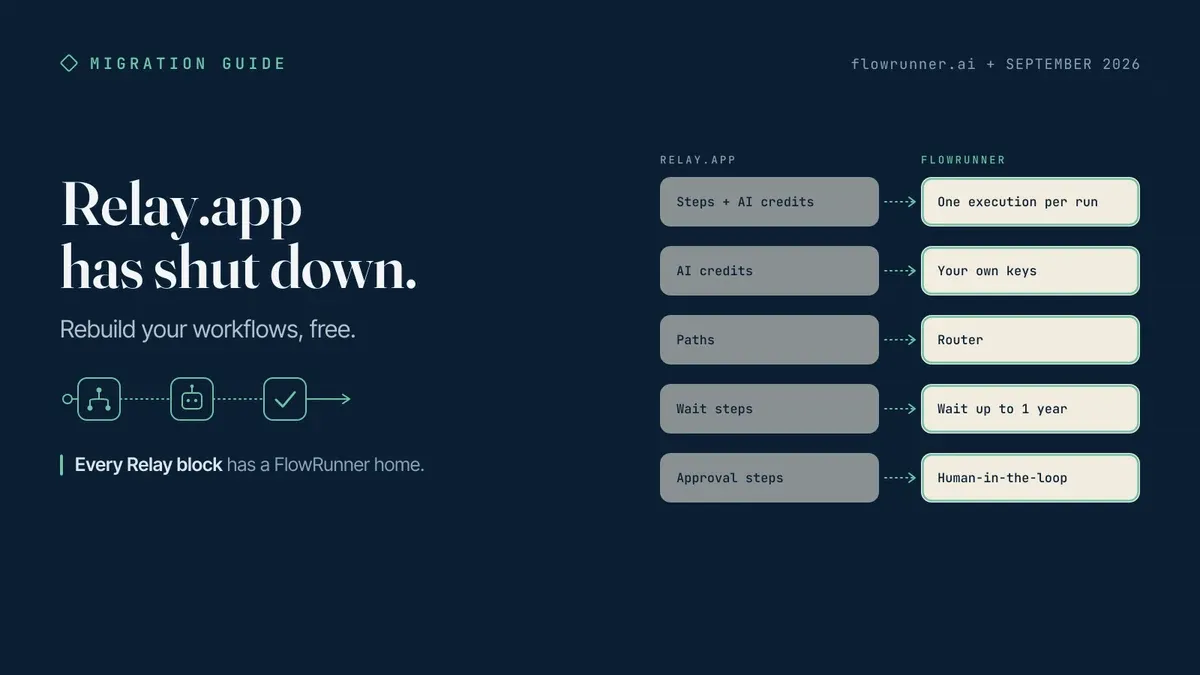
If you ran your business on Relay.app, the last two months have been rough. The notice went up in July, the clock ran out in August or September depending on your plan, and the tool you built your operations around is gone through no fault of yours. Nothing about the way you were working was wrong. The workflows were right, the human steps were right, and the instinct to put a person at the decisions that need one was the whole point. That instinct needs somewhere stable to live, and you are welcome here.
This guide is for you. It walks through what is in your export, how each Relay building block maps to a FlowRunner one, and what changes about the bill. The position underneath it is simple: an automation with a person inside it is the normal case, not the exception, and the platform you land on next should treat the human step as native and never charge you extra for using it. FlowRunner was built that way. It has a permanent Free plan with no card and no clock, and if you would rather have someone walk your export with you, that help is free as well.
The short version, for anyone who arrived here from a search box this week. Relay.app shut down on September 14, 2026 after closing free accounts on August 15; a Relay export (workflows and sequences as JSON, your AI prompts, run history, tables as CSV) can be rebuilt on FlowRunner’s permanent Free plan, which has no step meter and no AI credits: every integration, AI agents on your own keys, and human-in-the-loop approvals, data requests, and AI output reviews are included, with 14 days of Professional on signup.
The rest of this is the detail. What you are holding, what maps to what, and what changes about the bill.
What happened, and when
Relay posted the notice on July 16, 2026. In its own words:
“Relay.app will be shutting down on August 15, 2026 for free users and September 14, 2026 for paying customers.”
New signups and free-to-paid upgrades stopped the same day. For free users, Relay stated that “free accounts and all associated data will be permanently deleted” after August 15. Paying customers had their subscriptions canceled effective July 16 with “a prorated refund for the unused remainder of the current billing period”, kept access through September 14, and were given “an additional 25,000 steps and 10,000 AI credits per month for the next 60 days” to land somewhere. Verified on relay.app, September 15, 2026.
Relay also shipped an export path on the way out, which was the right call and is the reason a rebuild is a weekend rather than a rediscovery project.
What you have in hand
Relay’s notice lists what comes out: “Workflows, Sequences and MCP servers as JSON and AI prompts so you can rebuild them elsewhere,” plus run history and “Tables as CSVs.”
Here is what most Relay alternative posts this month will not say. The JSON is the least valuable file in that export. Connector lists are easy to shop for and easy to match, and every tool in this category will tell you it has the apps you need. What is hard to replace is the set of moments where your workflow stopped and asked a person, because that is the part every meter in this category prices differently. Read your export for those moments first, and choose on them.
With that in mind, each file has a job:
- The workflow and sequence JSON is a specification, not an import file. It records every step of every workflow in order, with the fields each one wrote. Keep it open on one monitor while you lay the flow out again on the other. The reading takes minutes; the value is that you never have to remember what step nine did.
- The AI prompts are the file to protect. They are the part you actually tuned, over months, against your own data. They paste straight into an AI Agent block or into the conversational builder, and they behave the way they did because the model is the same model. You are changing the orchestrator, not the reasoning.
- Run history tells you what to rebuild first. Sort by what actually ran. The workflow you were proudest of and ran twice is not the migration; the dull one that fired four times a day is.
- Tables as CSV go where you already keep records. A Google Sheet, Airtable, Postgres, whatever the rest of your stack already reads. Small key and value state that only the workflow cares about has a home too, which is covered below.
The mapping, block by block
Relay’s vocabulary and FlowRunner’s are close enough that most of the rebuild is renaming. This is the table I would keep open.
| Relay | FlowRunner | What changes |
|---|---|---|
| Workflow | Flow | A flow can begin with any block, not only a trigger. |
| Webhook trigger | External Callback | The same URL pattern, except it can start a run or resume one that is already waiting. |
| Scheduled trigger | Scheduling | Once, interval, daily, weekly, monthly, or cron. |
| Manual trigger | Run from the app, Call Flow, or the API | Three ways in instead of one. |
| Batch trigger | Triggers Group | Fires on any of several triggers, or on all of them inside a time window. |
| Actions in apps | Integration actions | The whole catalog is on every plan, Free included. |
| Transform data, Create constants | Transform Data, Set Variables | Transform Data covers 40+ deterministic operations across objects, arrays, strings, dates, and numbers, with AI Transform when the shape is not deterministic. |
| Custom HTTP request | HTTP Request | All methods, headers, and auth. |
| Run custom code (JS) | Custom Cloud Code | A sandboxed JavaScript step, and it can also be attached to an agent as a tool. |
| Paths | Condition, Value Router, AI Router | Condition handles AND/OR logic with precedence; AI Router branches on meaning with an Everything Else fallback. |
| Looping, Iterators | List Iterator, Repeat | Break exits early. |
| Wait steps | Wait | Up to 30 days on Free, Starter, and Growth, and up to a year on Professional and above. A Wait scopes to its own branch, so parallel branches keep moving. |
| Sequences | SubFlows, Call Flow | Call Flow invokes a live flow, synchronously or asynchronously. |
| Approval steps, data input steps, AI output reviews | A human-in-the-loop flow the agent calls as a tool, plus Forms and External Callback | The person is reached over email, Slack, WhatsApp, phone, or a Form. |
| AI steps, Agentic tool use | AI Agent block, AI Transform | Your own provider keys. Force Parsed Output when you need structured returns. |
| Knowledge | Knowledge Bases | Built-in chunking, embedding, and semantic search, callable by the agent. |
| MCP servers | MCP client | External MCP servers attach to an agent as tools. |
| Tables | The sheet or database you already connect, or Shared Memory | Shared Memory is key and value state that persists across runs. |
| Run history (Relay stated 30 days of run history) | Log history | 24 hours on Free and Starter, 7 days on Growth, 30 on Professional, 90 on Business. |
Two Relay triggers are deliberately not in that table: Mailhook and RSS. Both are shapes an External Callback covers with a sender in front of it, and which sender is right depends on what is producing the mail or the feed. That is a two-minute conversation and a bad table row. Guessing in a migration guide is how people lose a weekend.
The two meters you are leaving behind
Relay counted two things. Steps, where every step in a run counted against the monthly allowance, and AI credits, which Relay described as powering the AI steps. Its Free plan carried 200 steps and 500 AI credits a month for one user; Professional was $19 a month billed annually for 750 steps and 2,000 AI credits; Team was $59 a month billed annually for 10 users and 1,500 steps. Those are archived numbers from relay.app/pricing, captured mid-2026.
FlowRunner counts one thing. An execution is one complete workflow run, start to finish. A run with twelve steps counts as one execution, the same as a run with two. Adding a step to an existing flow does not change what the flow costs to run.
And AI is not metered at all. FlowRunner uses BYOK, a model where you supply your own AI provider API credentials, pay the providers directly for usage, and FlowRunner orchestrates calls across providers without taking a markup on inference. Your OpenAI or Anthropic or Google keys, your rates, your existing agreement, your invoice from them. There is no second currency to watch and nothing to top up.
That is the structural difference, and it is worth understanding before you decide which workflows to rebuild, because it changes which design choices cost you anything. Under a step meter, every branch you add and every enrichment call you make is a line item. Under a run meter, the shape of the flow is a design question again.
The human step is the one to get right
This is the part Relay was good at, and it is the part worth being careful about now.
Relay’s approvals, data input steps, and AI output reviews were steps you placed in a workflow: the run reached one, and it waited for a person. That model is fine, and it is the model most of the category ships.
FlowRunner inverts the relationship. Human-in-the-loop here is an execution pattern where AI agents pause autonomously, assemble the relevant context and the decision choices available, route to a human via their preferred channel, and resume the moment the human responds. The human step is a flow, and the agent calls that flow as a tool the same way it calls any other tool. The agent suspends while the flow runs. The flow reaches the person over email, Slack, WhatsApp, phone, or a Form. The answer comes back as a typed result the agent reasons with, and the run picks up where it left off. The wait can stretch to 30 days on Free, Starter, and Growth, and to a year on Professional and above, which is the difference between a vacation being a non-event and a vacation killing a run.
The reason that inversion matters is bigger than any one product. The moment a person gets pulled into an automation is almost never inside a single system. It sits in the seam between them: the invoice is in one place, the approval policy is in a second, the person who decides is in a third, and the record of what they decided has to end up in a fourth. No individual system of record owns that seam, and no tool that models a human as a step inside one pipeline ever will. That seam belongs to an orchestration layer above the systems: a layer that holds the run open, carries the context across, and treats the person as a participant rather than a pause. Orchestration as a Service is the name for that category, a platform category that coordinates, governs, and supervises multi-agent environments while keeping humans in control of the decisions that require judgment. FlowRunner is built for that layer. Relay’s users already believe the premise; that is what makes them the easiest readers this piece will ever have.
Where this lands
The Free plan is $0, permanent, no card, and no time limit. It runs 100 executions a month, one at a time, with 24 hours of log history. Unlimited users, unlimited workflows, and every integration, with AI agents and human-in-the-loop included. One Free workspace per account. Relay’s Free plan was a single user; invite everyone who touched the old workflows on day one here.
Every new account also gets 14 days of the Professional plan on its first workspace, with audit trails and role-based access control switched on and no card required. When the trial ends without a payment method, the workspace moves to Free and the flows keep running. Nothing is paused and nothing is deleted. Above Free, Starter is $5 a month for 300 executions or $15 for 3,000, and the ladder continues from there. The full breakdown of how that pricing came together is in the Free plan announcement.
A rebuild order that works
- Start with the workflow that had a human step in it. It is the one you will be most anxious about and the one that proves the platform. Build the human-in-the-loop flow first, call it from the agent, and send yourself the approval on Slack.
- Then the scheduled ones. They are the easiest to verify, because you know exactly when they should have run and what they should have written.
- Then the webhook-triggered ones. Point the External Callback URL at the sender and replay a payload from your Relay run history.
- Then the tables. Push the CSVs into the sheet or database the rest of your stack already reads, and keep only the small key and value state in Shared Memory.
- Paste the AI prompts last, and change nothing about them on the first pass. Get the flow running with your prompt exactly as it was, then tune. Changing the orchestrator and the prompt at the same time makes every difference impossible to attribute.
Relay closed. What you built there was sound, and it has a home.
Start on the Free plan
Open a free workspace, keep the JSON on the other monitor, and rebuild the flow with the approval in it first. No card, no clock. If you would rather have someone walk the export with you, send us a note and we will map it with you; migration help for people arriving from a shutdown is free, and there is no version of this where you owe us something for it.
Frequently asked questions
When did Relay.app shut down?
Relay.app closed free accounts on August 15, 2026 and cut off paying customers on September 14, 2026. New signups and free-to-paid upgrades stopped on July 16, 2026, the day the notice went up. Relay stated that free accounts and all associated data would be permanently deleted after August 15.
Can I import my Relay.app JSON export into FlowRunner?
You rebuild from it rather than importing it. The JSON is the specification: it records every step of every workflow in order, which is what you want in front of you while you lay the flow out again. Your exported AI prompts paste straight into an AI Agent block or into the conversational builder.
What replaces Relay's approval steps and AI output reviews?
A human-in-the-loop flow that the agent calls as a tool. The agent suspends, the flow reaches the person over email, Slack, WhatsApp, phone, or a Form, and the run resumes with the answer when they reply. The wait can last up to 30 days on Free, Starter, and Growth, and up to a year on Professional and above.
Does FlowRunner charge AI credits?
No. Agents run on your own provider keys and you pay OpenAI, Anthropic, Google, or whoever else directly, with no markup. Executions, concurrency, and log history are the only meters.
What does it cost to rebuild my Relay workflows on FlowRunner?
The Free plan is $0 with no card and no time limit: 100 executions a month, one at a time, 24 hours of log history, unlimited users, unlimited workflows, and every integration. Every new account also gets 14 days of the Professional plan on its first workspace.