OpenAI shuts down Agent Builder on November 30, 2026. This guide is how to move your workflows to FlowRunner without rebuilding each one by hand.
FlowRunner Prompt to Flow reads the code Agent Builder exports and builds the same workflow as a FlowRunner flow. The agents keep their instructions and models, and the branches and guardrails come across as blocks on a canvas. The approval step becomes a real one that pauses the run until someone answers. What’s left for you is connecting accounts and testing.
It takes five steps, and after them are six of OpenAI’s own Agent Builder templates converted this way, with what came across, what didn’t, and what we decided along the way. For the shutdown details and how each Agent Builder piece maps to FlowRunner, see our Agent Builder migration guide.
1. Export each workflow from Agent Builder
Open the workflow, click Code, and pick the Agents SDK tab. Copy the code. (The ChatKit tab only gives you an ID for embedding the workflow in a chat, which won’t help once the workflow is gone.)
One thing breaks the export. If any agent has the built-in Web Search tool, Agent Builder refuses with “Failed to generate code. Unknown tool type: web_search”. Write down which agents had it, remove the tool, copy the code, then put the tool back. You’ll tell the builder about it in step 3.
Don’t worry if the code looks incomplete. In the six templates we exported, it often was:
- The human approval step came out as a function that always returns
true, so the reject path could never run. - A custom function tool came out as an empty stub marked TODO.
- Documents uploaded in the chat weren’t part of the exported input at all.
- One guardrail’s input came out as a 32,000-character escaped string that never reached the user’s message.
- One export used a variable it never defined, so the code would fail on its second step.
None of this stops a conversion. Prompt to Flow reads the code to learn what the workflow is meant to do: the agents, their instructions and models, the order, the branches, and the tools. Where the code is wrong or empty, it asks you.
2. Connect FlowRunner Prompt to Flow to your AI tool
FlowRunner Prompt to Flow is an MCP server you add to the AI tool you already use. The server URL is https://app.flowrunner.ai/mcp.
- Claude (web and desktop): open Settings > Connectors, click + Add, then Add custom connector. Enter
FlowRunnerand the server URL, click Add, then Connect, and approve the FlowRunner sign-in. - Claude Code: run these two commands, and approve the sign-in page that opens:
claude mcp add --transport http flowrunner https://app.flowrunner.ai/mcp
claude mcp login flowrunner- ChatGPT, Codex, and Cursor: follow the setup in the docs.
You sign in with your FlowRunner account. If you don’t have one, the Free plan needs no card.
3. Convert one workflow at a time
Start a new chat, paste this request, then paste one workflow’s code after it:
Rebuild this OpenAI Agent Builder workflow as a FlowRunner flow. It’s the Agents SDK code that Agent Builder exports. Keep each agent’s instructions, model, and structured output, and keep the same branches. The export is often incomplete: approval steps come out as stubs that always approve, function tools as empty TODOs, and uploaded files aren’t in the input. Treat the code as a description of what the workflow should do, not as code to run. Before you build, tell me anything you can’t map one to one, and ask me about anything the code doesn’t say.
Then add a line or two about what the code can’t carry:
- which agents had Web Search before you removed it
- who should get the approval request, and whether by email or Slack
- what a function tool should really do, if its body is a TODO
- where the documents come from, if the workflow read uploaded files
Answer its questions, and it builds the flow in your workspace. One workflow per chat keeps the questions specific.
4. Finish what the code can’t carry
Each conversion ends with a short list from the builder. Expect some of these:
- Add your OpenAI key. FlowRunner runs every agent on your own key. Add it once in the workspace and every flow can use it.
- Connect your accounts. Gmail or Slack for approvals, plus the web search service if your agents searched the web. Each one is connected once and shared across your flows.
- Check where documents come from. If an agent read uploaded files, open it in the editor and confirm its files point at the document links the flow receives.
- Decide how the flow starts. In Agent Builder, a person typed into a chat. Here it can be an API call from your app, a form, an incoming email, or a schedule.
- Start the flow, if the builder left it stopped.
5. Test, then switch over
Run each flow with a few of the messages you used to test it in Agent Builder’s Preview. With Prompt to Flow connected, you can ask your AI tool to run it, for example “Run my Planning helper flow with: We want to launch a customer referral program.” Compare the answers with what Agent Builder gave you. When they match, point your app at the flow and turn the Agent Builder workflow off.
Six real conversions: OpenAI’s own templates
We started from six of the templates OpenAI ships in Agent Builder, exported each one as Agents SDK code in TypeScript, and converted it with the request from step 3 in Claude Code with FlowRunner Prompt to Flow connected. Two of them had Web Search, which had to come off before the export would work. Each section below shows the template in Agent Builder first, then the flow FlowRunner Prompt to Flow built from its code.
We ran the four that return an answer with real inputs, and the results are below. Three decisions applied to all six. Each flow starts from an API call. Web search goes through Tavily. Human steps go by email, and switching them to Slack is a change to one block.
| Template | What came across | What we decided |
|---|---|---|
| Data Enrichment | Two agents and their output fields | Added web search, which the export dropped |
| Structured Data Q&A | Moderation, domain routing, query agents | Moderation checks the real input, not the garbled export |
| Internal Knowledge Assistant | Query rewrite, classification, three paths | Web search in place of code interpreter |
| Planning Helper | Triage and the two paths | A missing detail returns a question to the caller |
| Customer Service | Jailbreak check, classification, three agents | A real approval by email; retention offers from a code step |
| Document Comparison | Triage, proposal, approval, three other paths | A real approve or reject by email; the approved reply saved as a Gmail draft |
Data Enrichment
You name a company and a topic. One agent searches the web and returns the companies it finds. A second agent turns that into a single profile with seven fields: name, industry, headquarters, size, website, description, and founded year.
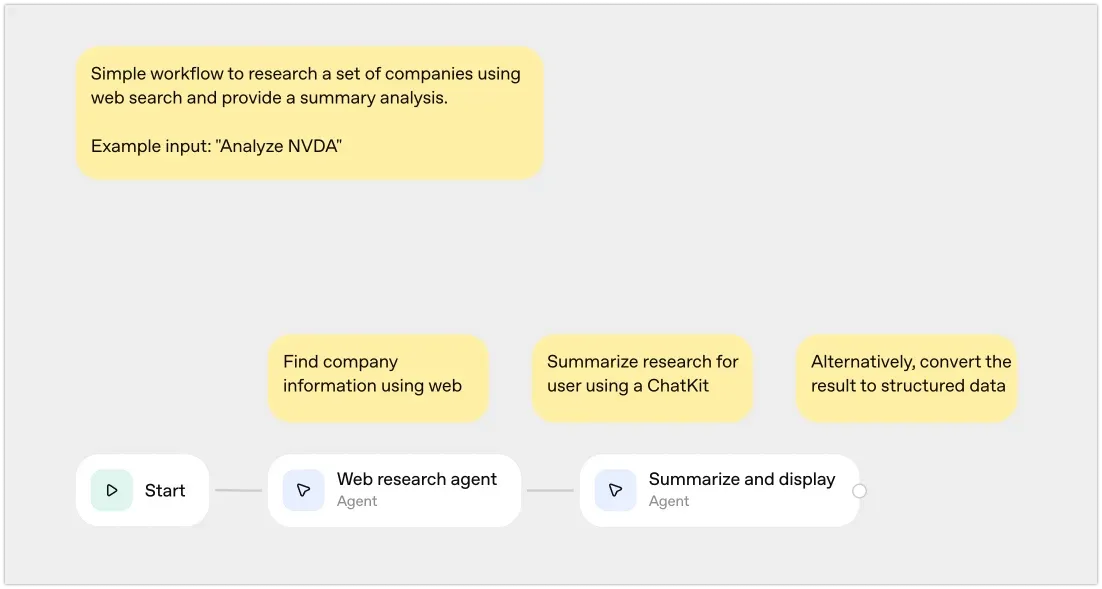
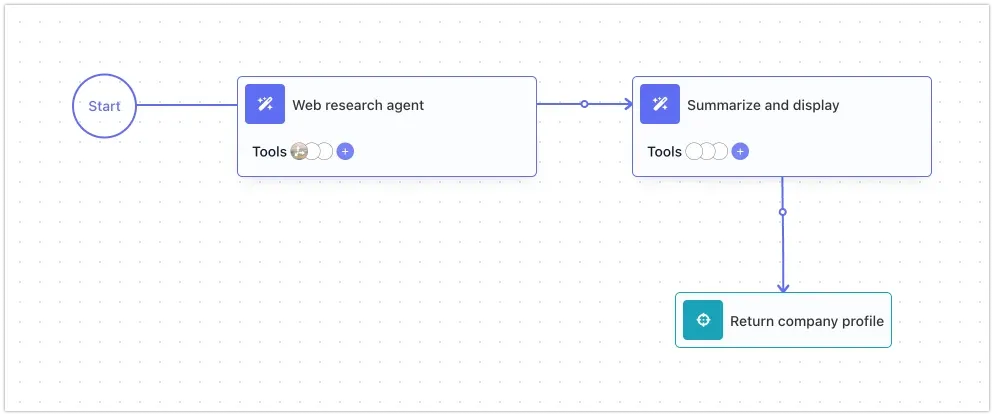
What changed: the template tells its first agent to “use web search”, but the exported code gives it no tools at all. The flow attaches a web search tool to that agent, so it actually searches.
Tested: asked about FlowRunner, the flow searched the web and returned one profile with all seven fields filled in.
Structured Data Q&A
You ask an analytics question in plain words. A moderation check screens it, an agent decides whether it’s about commerce or personnel data, and two more agents write a query against that domain’s schema and return sample results. As in OpenAI’s template, the last step invents the results. Connecting a real database is the next step for anyone using it.
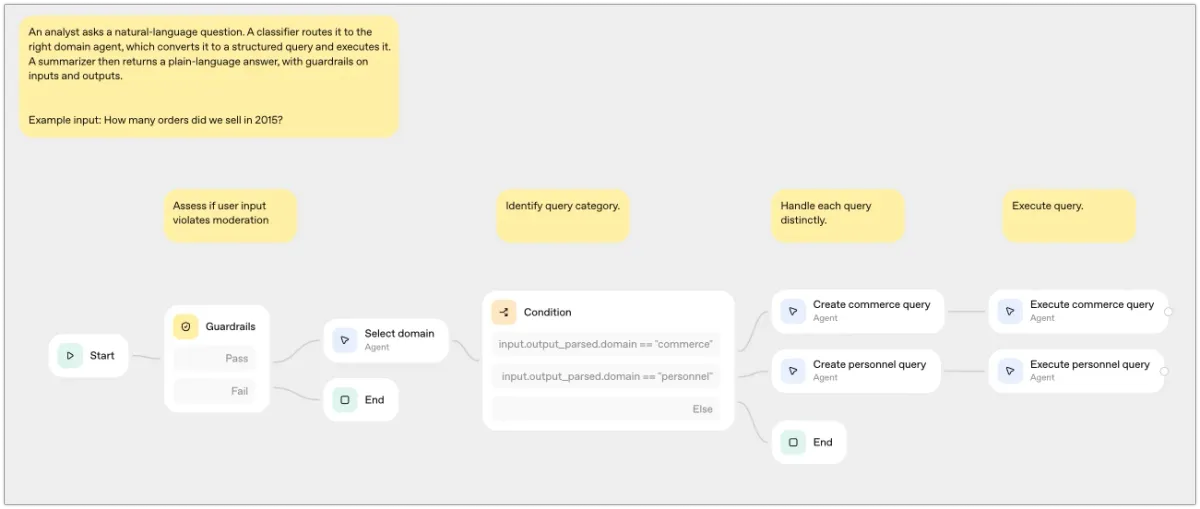
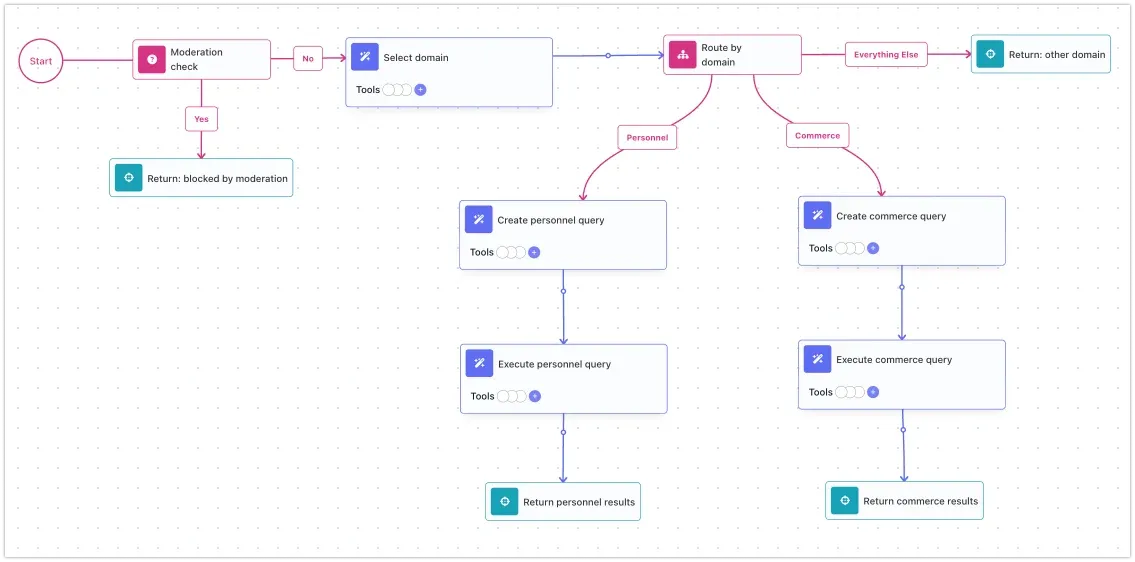
What changed: in the export, the moderation step’s input is a 32,809-character escaped string with a broken reference where the user’s message should be, so it never checked anything. The flow’s moderation check is a Condition with an AI Question that reads the actual question.
Tested: “Which product categories had the highest revenue last quarter?” went to the commerce path and came back with a SQL query and ten sample categories. “How many employees in the engineering department were hired in 2025?” went to the personnel path. A request for instructions to hurt a coworker was stopped by the moderation check and returned "blocked": true.
Internal Knowledge Assistant
An agent rewrites the question to be more specific, a second one classifies it as Q&A or fact finding, and the flow sends it down one of three paths: an internal answer, external fact finding, or a request for more detail.
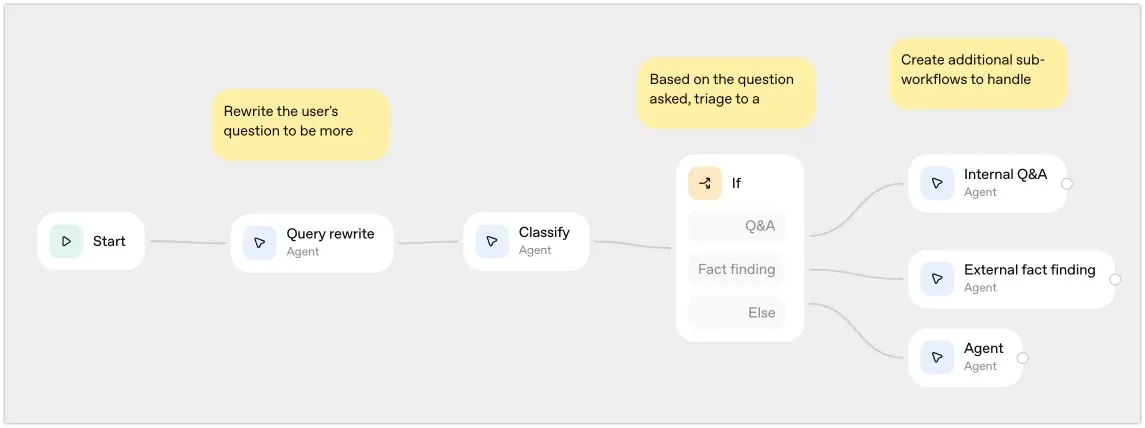
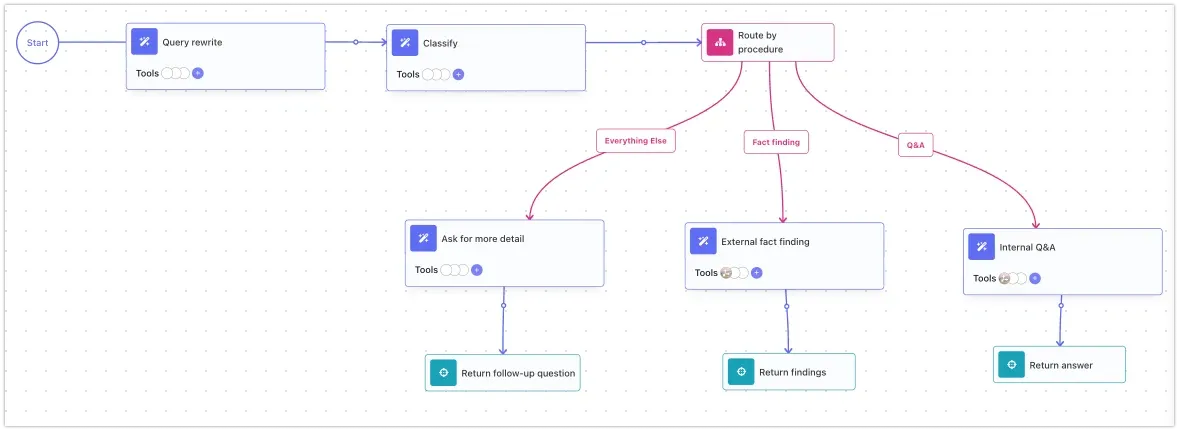
What changed: the export’s classify step reads input.output_text, which is never defined, so the code fails before it classifies anything. The flow passes the rewritten question, which is what the template means. Code interpreter has no FlowRunner equivalent, so the fact-finding agent uses web search instead. Two agents had Web Search removed for the export, and the flow gives them web search again.
Tested: “What is the current US federal minimum wage, and when did it last change?” was classified as Q&A and answered: $7.25 an hour, last changed July 24, 2009.
Planning Helper
You describe a business initiative. A triage agent checks for three details: the goal, the timeframe, and the resources. If all three are there, a second agent searches the web and writes a plan with opportunities, risks, and mitigations. If any is missing, a third agent asks for it.
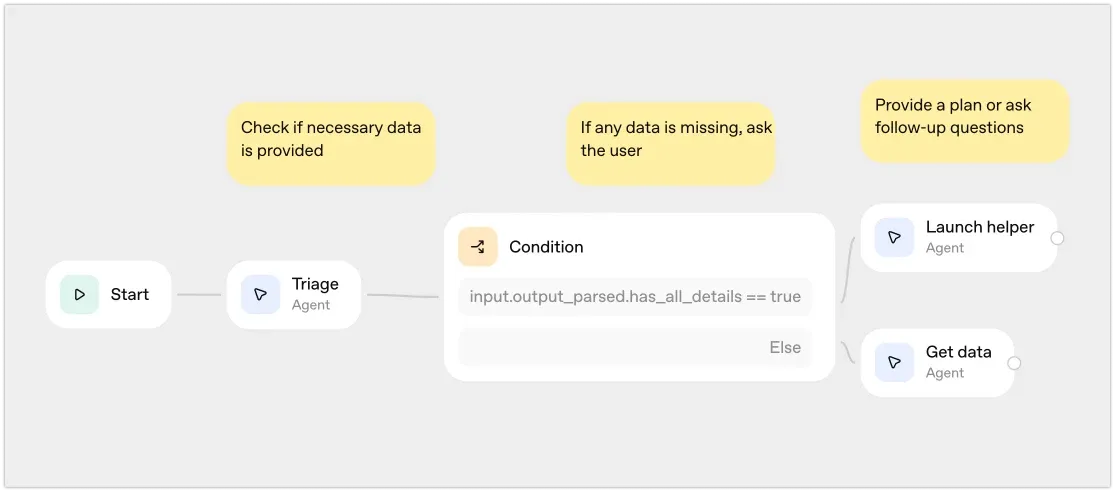
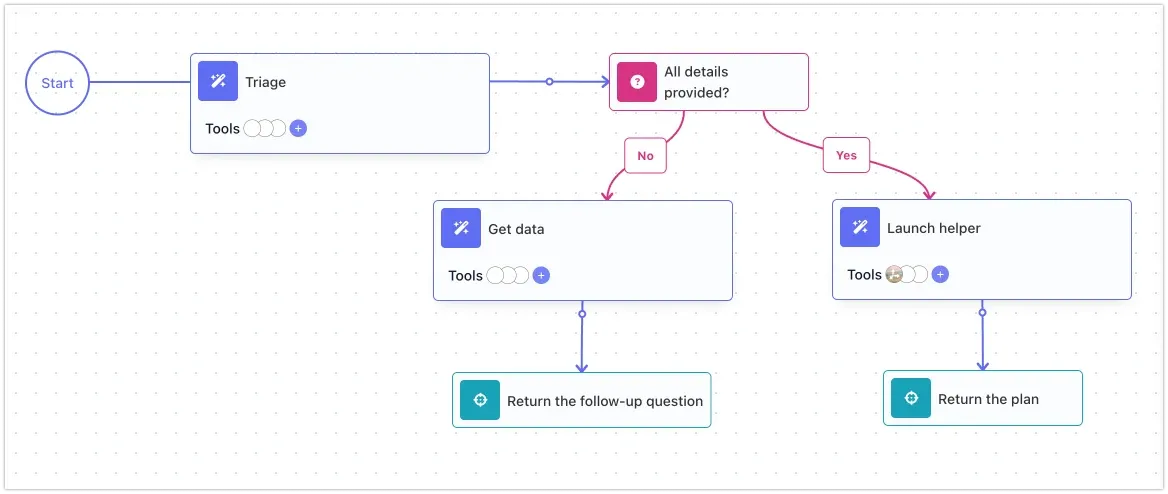
What changed: the export’s output schema spells one field initative_goal while the instructions ask for initiative_goal, and the flow uses the correct spelling throughout. In Agent Builder, the follow-up question appears in the chat and the user answers in the next message. A flow takes one request, so the flow returns the question to the caller, and the caller runs it again with the details added.
Tested: with only “We want to launch a customer referral program”, the flow came back with:
{"status":"needs_details","question":"Thanks. To finalize the plan, please provide:\n- Target completion date or timeframe (e.g., “MVP by Jan 31” or “launch in Q1”)\n- Available resources/capacity (e.g., team/headcount by role, budget, and tool access like CRM, email/SMS, referral software)"}With a date, a half-time marketer, a $15,000 budget, and HubSpot added, it returned a seven-part plan with a timeline, a budget split, and three risks with mitigations.
Customer Service
A jailbreak check screens the message, an agent classifies it as a return, a cancellation, or a question, and a different agent handles each one. Returns need the customer’s approval before anything ships.
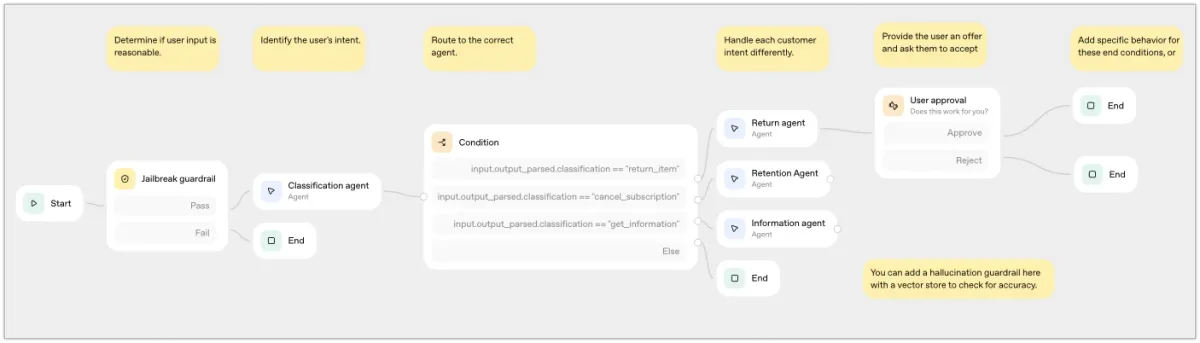
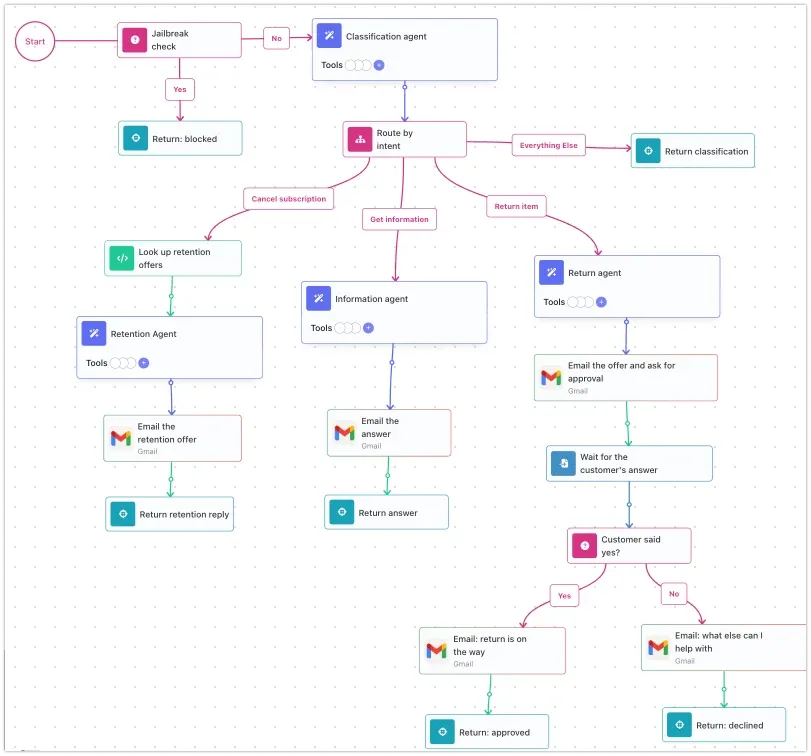
What changed: the export’s approval is return true, so every return was approved without asking anyone. In the flow, the return agent writes the offer, an email sends it to the customer with Yes and No links, and the run pauses until they click one. Yes sends the confirmation, and No asks what else they need. The retention tool came out of the export as an empty TODO. In the flow, a code step looks up the available offers before the retention agent runs, and the agent is told to offer only those. That way it can’t invent a discount.
Document Comparison
You send two documents. With no question, an agent proposes one way to reconcile the differences and the proposal goes to you for approval. With a question, an agent answers it from the documents. With fewer than two, the flow asks for them.
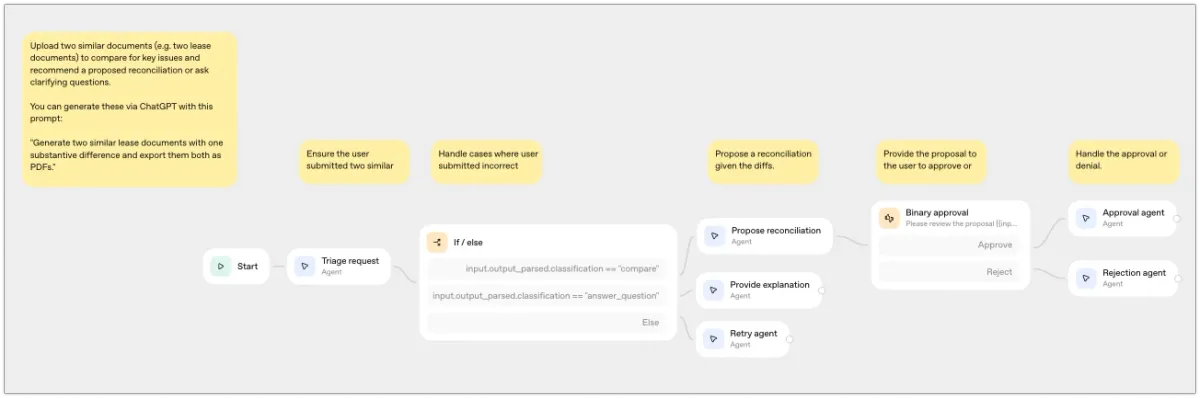
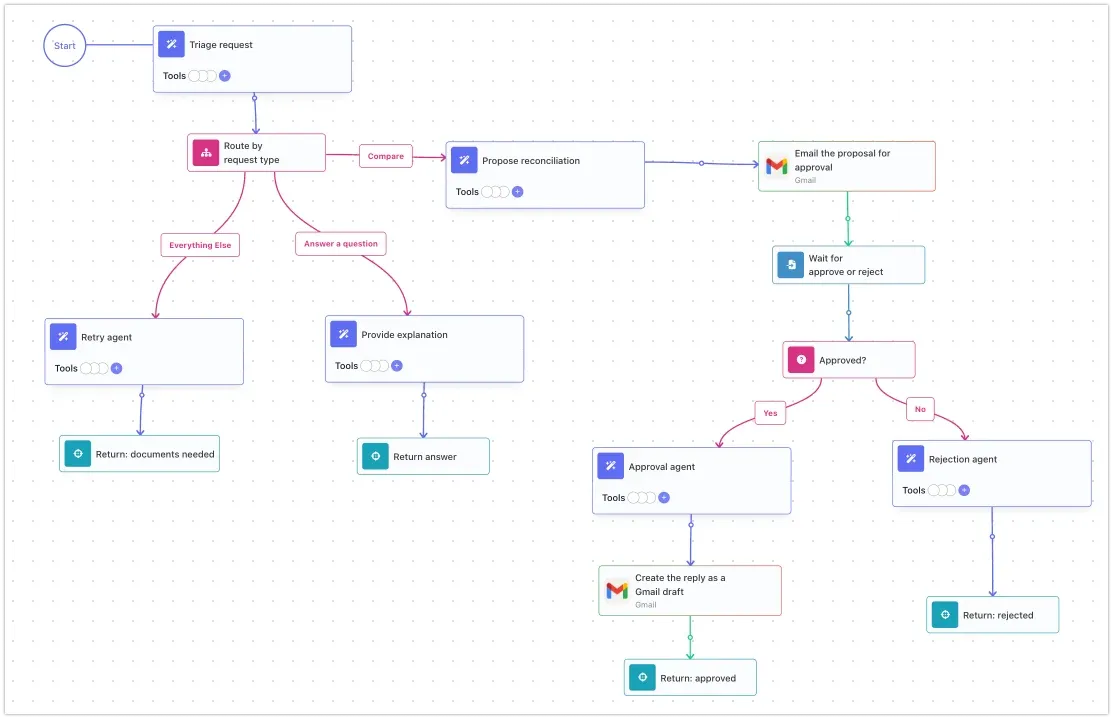
What changed: the export’s approval stub always returns true, so the rejection agent could never run, and the uploaded documents aren’t part of the exported input. The flow takes two document links, emails the proposal with Approve and Reject links, and waits. On approve, an agent drafts the reply to the other party and saves it as a Gmail draft for you to send. On reject, an agent explains why. The template’s sample email body, a note asking about “the ChatKit roadmap”, didn’t come across.
What this means if you’re moving
All six converted, including the ones whose code wouldn’t run. Several came out more complete than their exports, because the approvals and tools the export left as stubs are real steps in the flow. What took judgment was small: where approvals go, what a stubbed tool should do, and how a chat follow-up works when there’s no chat.
If you have Agent Builder workflows to move, start on the Free plan, connect Prompt to Flow, and convert one this week. November 30 is five weeks away.
Frequently asked questions
Can I import an Agent Builder workflow into FlowRunner?
Yes, through FlowRunner Prompt to Flow. Copy the workflow's code from Agent Builder (Code, then Agents SDK), paste it into your AI tool with Prompt to Flow connected, and it builds the same workflow as a FlowRunner flow in your workspace.
Does the exported code have to run?
No. Prompt to Flow reads the code to learn what the workflow does: the agents, their instructions and models, the branches, and the tools. Several exports we tried would not run as exported, and they still converted, because the builder asks about anything the code leaves out.
Do my agents keep using OpenAI models?
Yes, if you want them to. FlowRunner uses your own API key for each AI provider, so the converted agents keep their OpenAI models. You can also switch any agent to another provider later.
What happens to Agent Builder's human approval step?
It becomes a real approval. The flow sends the request by email or Slack with approve and reject links, pauses the run, and continues down the matching path when the person answers.