
If you are a finance leader pricing out how to automate the QuickBooks work that has outgrown your team, the question that actually decides the platform is not which one connects to QuickBooks. They both do. The question is who is going to be on call the day the integration needs to change. Celigo and FlowRunner answer that question differently, and the right answer depends on whether you have a developer in the building.
Celigo is a mature, top-ranked integration platform, and for a team with engineering on call it is a serious choice. FlowRunner is built for the finance or operations team that wants to own the workflow itself. Most comparison content in this category picks a winner and hides the trade-off. This one names it.
Celigo and FlowRunner at a glance
| Celigo | FlowRunner | |
|---|---|---|
| Category | Intelligent automation platform / iPaaS, self-described as “#1 ranked iPaaS for two years” | Orchestration layer for work and AI agents across the tools finance and ops already run |
| Primary buyer | IT team enabling business users across ecommerce, CRM, and ERP | Finance or operations leader who wants to own a QuickBooks-centered agent |
| Building model | Prebuilt integration templates plus JavaScript hooks for custom transformation logic | Agents and flows configured visually, with human-in-the-loop as a callable step |
| Connector breadth | Broad and mature; 1,000-plus prebuilt connectors and templates | Narrower today; concentrated on integrations finance and ops invoke from QuickBooks-centered work |
| Custom logic ownership | JavaScript hooks, written and maintained by a developer | Visual configuration, owned by the team that owns the workflow |
| Human approval | AI exception management plus workflow design; Celigo states AI resolves “95% of errors automatically” | Pause-and-ask as a callable action; routes to a named approver via Slack, email, WhatsApp, or phone, captures the response, resumes |
| Governance | Role-based access and compliance features in higher editions | Audit trails and RBAC at the Professional tier ($299 a month); SSO at the Business tier ($999 a month) |
| Pricing posture | Endpoint-and-flow based, not per transaction; dollar figures not public, sold through sales | Published tiers; core platform at Growth ($45 a month); governance overlay at Professional ($299 a month) |
| Maturity | Established enterprise base and active community | Newer entrant; smaller customer base, carries adoption risk |
The table sorts the two platforms. The rest of this article is the part a table cannot carry: when each answer is the right one.
What “QuickBooks API automation” actually means for a finance buyer
Here is what most QuickBooks API comparisons skip past. The buyer searching for this is rarely the developer who wants OAuth scopes and endpoint references. The buyer is the controller or VP of Finance at a company where the QuickBooks-centered work has grown faster than the headcount, and someone said “there’s an API, we can automate this.”
There is an API. Intuit publishes the QuickBooks Online Accounting API, and it is the same interface both Celigo and FlowRunner call into to read and write bills, invoices, and journal entries. That is the part worth saying plainly, because it dissolves the most common false premise in this category: the platform choice is not decided by who has better QuickBooks API coverage. Both reach the same API. The choice is decided by who owns the workflow logic that sits on top of it.
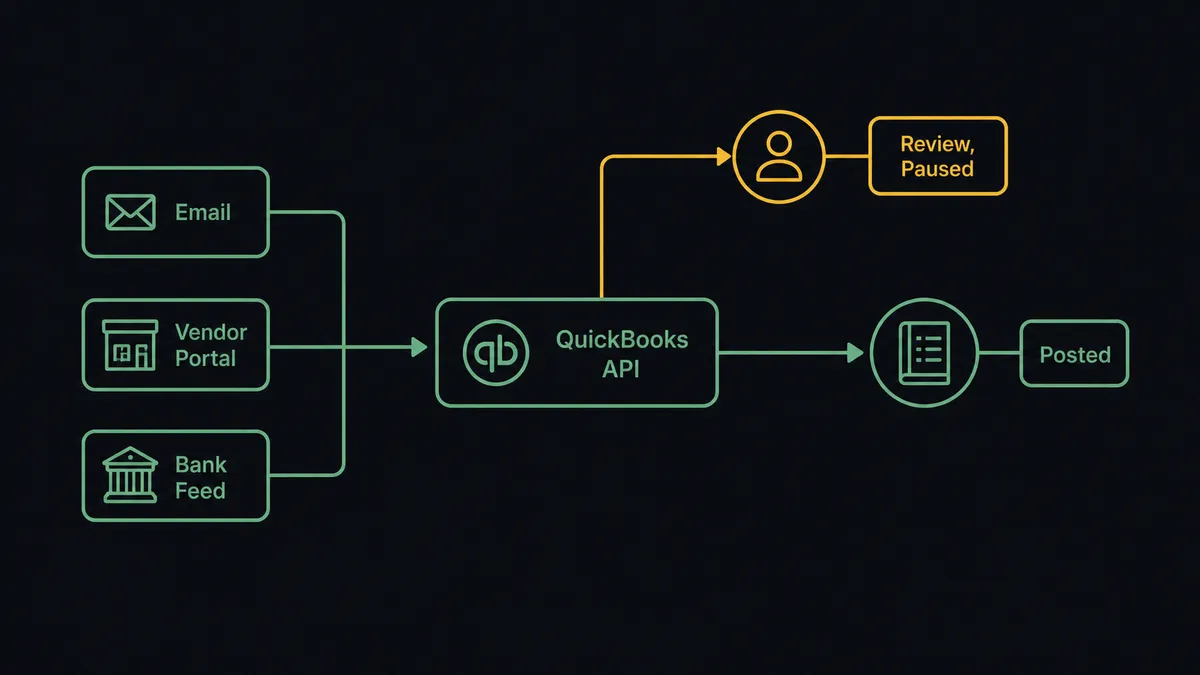
The work itself is consistent enough across finance teams to predict. In conversations with finance leaders, the same pattern surfaces:
- Bills arrive by email, by vendor portal, and sometimes on paper. AP entry happens manually when staff are out, which means senior finance occasionally enters bills directly.
- Distributor billbacks get reconciled across portals and spreadsheets. Duplicate payment is a recurring worry, because the company and the distributor can both pay the same charge and nobody catches it for weeks.
- Stripe payouts do not line up cleanly with QuickBooks invoices. The matching is mechanical, but the exceptions (the payment short by a fee, the refund that did not propagate) are the actual work.
- Recurring journal entries get drafted in Excel and uploaded monthly. The rule almost never changes once documented.
That is the work both platforms are bidding on. Not “automate QuickBooks” in the abstract. Automate AP intake, reconciliation, and journal entry drafting around QuickBooks, with the controller in the loop on the exceptions and out of the loop on the routine.
What Celigo is genuinely good at
Celigo is a mature integration and automation platform, and it describes itself as the “#1 ranked iPaaS for two years.” That is the vendor’s own framing, and the product depth behind it is real. A finance buyer evaluating it should know exactly where it is strong.
Connector breadth. Celigo advertises 1,000-plus prebuilt connectors and templates spanning ERP, CRM, ecommerce, and HR systems. For QuickBooks specifically, Celigo ships prebuilt integration templates it describes as “pre-packaged flows to jump start your integrations,” covering ecommerce, CRM, and payment syncs with tools like Shopify, Salesforce, and NetSuite. If you need broad out-of-the-box coverage across many SaaS tools, this is a genuine advantage, and FlowRunner does not match the breadth of that catalog today.
Developer-grade customization through JavaScript hooks. This is the heart of Celigo’s model and a real strength for the right team. Celigo’s integrator.io exposes JavaScript hooks that let developers customize how data is transformed and how a flow behaves, with support for modern JavaScript including object destructuring and spreading following the V8 engine upgrade in the 2026 release line. For a team that needs precise, low-level control over transformation logic, hooks give a developer exactly that. This is not a weakness to be argued away. It is a deliberate design choice that fits teams who have someone to write and maintain the code.
An established base and an active community. Celigo has a real enterprise customer base and an active community where product staff engage directly on technical questions. That matters. When a flow breaks at month-end, the difference between a vendor with a responsive community and a vendor without one is the difference between a fixed evening and a lost one. FlowRunner is a newer product, and the maturity gap is a fact a buyer should weigh, not a detail to bury.
The honest read most comparison posts in this category will not say out loud is that none of those strengths are in dispute. The comparison is not Celigo versus a strawman. It is a fit question, and the fit question has a name: do you have a developer on call to write and maintain the hooks?
Where the hook model and the orchestration model diverge
The cleanest way to understand FlowRunner against Celigo is to separate the two customization models without arguing about which is smarter. They are different answers to “how does the workflow do something the prebuilt template does not.”
The hook model. A Celigo flow handles the common case through a template. When the flow needs to do something custom, transform a field, filter a record, branch on a condition the template does not cover, a developer writes a JavaScript hook. The fluency required is “what does this hook receive, what should it return, how do I keep it working when the data shape changes.” That fluency lives in a developer. For a finance team with engineering on call, that is a clean division of labor. For a finance team without one, the hook is the moment the automation stops being theirs. Every future change routes back through a person who has other priorities.
The orchestration model. A FlowRunner agent owns a workflow end to end. The builder configures what the agent does, the agent gathers context from the systems it needs, and the agent invokes a human as a callable action when the situation warrants it. The fluency required is “what does this workflow do, when does it pause, who decides.” That fluency lives in the finance or operations team that owns the work. The custom logic is configured visually rather than scripted, so the person who owns the workflow can change it without filing a ticket.
The shape of the unit itself is also different, and the difference matters for orchestration. A Celigo flow follows the standard iPaaS contract: the flow starts with a trigger (a scheduled run, a webhook, a record event), and the steps after it run in response. A FlowRunner flow can start with any node type, an action, a trigger, a condition, or a group. That means a flow can be defined once and invoked as a callable subflow by another flow (treated as a function in someone else’s workflow), run manually when the controller wants to kick it off, or started by a condition evaluating business state rather than waiting for an event. The same building block becomes a routine, a tool another agent can call, and a step inside a larger orchestration. That compositional flexibility is the practical shape an orchestration layer takes when you sit it above the systems of record rather than between two of them.
The distinction matters most for QuickBooks-centered work because the exceptions are not edge cases. They are the work. A workflow that posts the matched bills and pauses for a named approver on the ones that need judgment is exactly what finance leaders describe wanting. The agent does the routine. The human owns the exception. The audit trail records both.
The category that owns this pattern is orchestration as a service: a layer above the systems of record that listens for what they emit, gathers the context those systems do not share, calls a human at the moments that need judgment, and writes a structured record of who decided what across the whole workflow. A hook is a developer customization point inside a flow. It is not a place where the judgment call between systems lives, because that judgment is not a transformation, it is a decision. An orchestration layer is built to own that decision, and FlowRunner is built for that layer. For the deeper category framing, the companion read is FlowRunner vs Workato for QuickBooks API automation, which works the same fit question against a different competitor.
How human review shows up in each platform
The two platforms treat the human moment as different shapes, and the shape is decisive for finance work. FlowRunner’s human-in-the-loop architecture treats human reviewers as callable steps at decision points. Celigo treats the same moments primarily as errors for the platform to resolve. That single architectural difference drives most of what follows.
Celigo approaches exceptions primarily as errors to be resolved, increasingly with AI. The platform’s positioning leans hard on automation that keeps running: Celigo states that its AI exception management resolves “95% of errors automatically.” Read that as the vendor’s own marketing claim, because it is, and read the intent behind it clearly. The goal is to keep the flow running with as little human interruption as possible. For a high-volume ecommerce sync where most exceptions are genuinely mechanical (a malformed SKU, a timeout, a retryable failure), that is the right goal.
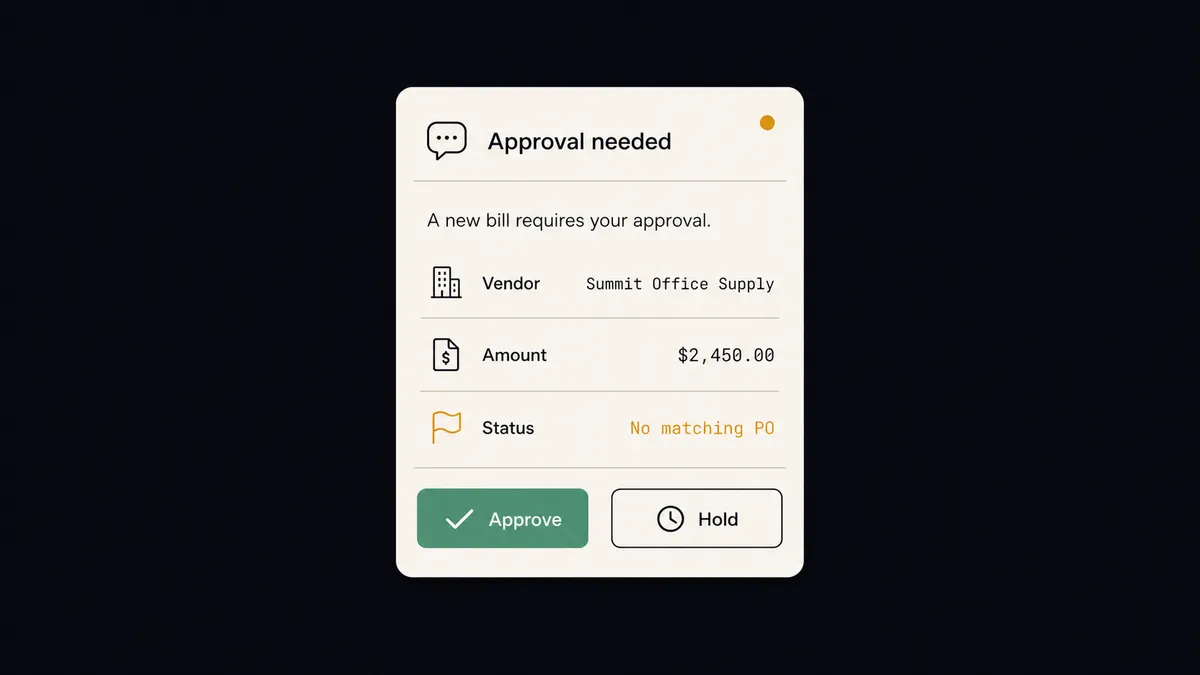
FlowRunner approaches the human moment as a decision the workflow is designed to route, not an error to suppress. The agent invokes a human as a callable step inside its own orchestration: pause the workflow, route a structured request to a named approver through the channel they prefer (Slack, email, WhatsApp, or phone), wait for the response, then resume with the decision captured in the audit trail. The same pattern powers QuickBooks bill approval in Slack, Stripe-to-QuickBooks reconciliation with mismatches paused for review, and inbox-to-QuickBooks invoice processing with duplicate detection.
The architectural difference shows up in three concrete places:
- The intent. Celigo’s exception management is built to resolve and keep running. FlowRunner’s human-in-the-loop is built to pause and ask. In finance, the bill without a matching PO and the suspected duplicate payment are not errors to auto-resolve. They are exactly the decisions you want a human to make before money moves.
- What the audit trail records. Auto-resolution records that the system fixed it. An orchestration-step approval records the trigger, the context the agent gathered, the decision the system would have made on its own, the human it routed to, the response, and the action taken. That difference matters in an audit conversation, not in a demo.
- Who owns the rule. Deciding which cases pause for a human, in FlowRunner, is workflow configuration the finance team owns. Tuning exception handling in a hook-based flow is, for the custom cases, developer work. The owner of the pause rule should be the person accountable for the money. That is the controller, not the engineer.
This is not a feature gap with Celigo. It is a different starting point. Celigo built a platform to keep automations running across a broad SaaS estate. FlowRunner built a platform to put a human in the loop at the decision points finance cannot delegate to a retry.
Pricing, and who can authorize the spend
A direct dollar comparison is not fully possible, because Celigo does not publish tier pricing. What can be said honestly:
- Celigo uses endpoint-and-flow-based pricing, and it makes a real virtue of this: “Pay for endpoints and flows, not per task or transaction,” with “no overage fees.” That is a genuinely cleaner metering model than per-task pricing, and for a buyer burned by execution-count surprises it is worth weighing. The dollar figures are not public; pricing runs through a sales conversation, and the compliance and access features sit in higher editions.
- FlowRunner publishes pricing. The core platform (AI agents, human-in-the-loop across email, Slack, WhatsApp, and phone, all integrations, BYOK, unlimited users and workflows) is at the Growth tier at $45 a month. The Professional tier at $299 a month adds governance (audit trails and RBAC); SSO is at the Business tier at $999 a month. No developer work required to turn governance on.
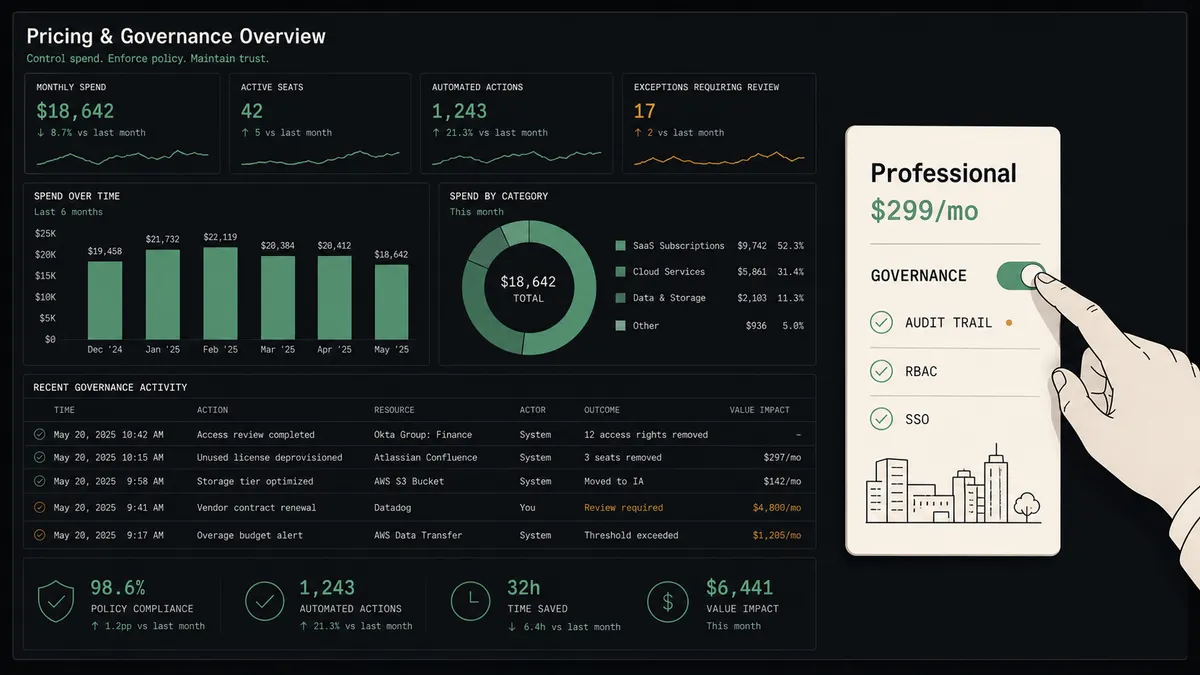
The point is not that one is cheaper. Without a Celigo quote, that comparison cannot be made. The point is who can authorize the spend. A finance director with a software budget can sign for the Growth tier at $45 and have a working QuickBooks-centered agent the same afternoon, or step up to the Professional tier at $299 when audit trails and RBAC are required. An iPaaS contract sold through enterprise procurement, with dollar figures behind a sales call, is a different motion that pulls in IT and frequently legal. For a finance-led purchase, that difference is decisive. For an IT-led integration program, it is irrelevant. Match the platform to who is signing.
Where Celigo is the stronger choice
The brief for this article was explicit, and so is this section. There are concrete situations where Celigo is the better platform, and a comparison that hides them is not worth reading.
- You need broad, out-of-the-box connector coverage today. Celigo’s 1,000-plus connector library is larger and more mature than FlowRunner’s. If your automation depends on prebuilt connectors across a wide SaaS estate, especially deep ecommerce and ERP coverage, Celigo is built for that and FlowRunner is not yet.
- You have developers and want low-level transformation control. If your team needs precise scripting control over how data is transformed, and you have engineers to write and maintain JavaScript hooks, Celigo gives you that depth directly. FlowRunner’s visual model is a deliberate trade: easier for the finance team to own, less granular than raw code.
- You want the lower-risk, established platform. Celigo has years in market, an enterprise customer base, and an active support community. FlowRunner is newer and carries the adoption risk any earlier-stage product carries. For a buyer who weighs maturity heavily, that is a real point in Celigo’s column, and we will not argue otherwise.
These are not throwaway acknowledgments. They are decision-shaping facts. If your situation matches them, Celigo is the right call.
Where FlowRunner is the better fit
Choose FlowRunner when:
- The work that needs automating is QuickBooks-centered AP, reconciliation, invoice intake, or journal entry drafting, with the controller in the loop on exceptions.
- The team that will own the build is finance or operations, and they do not have a developer on call to write and maintain hook scripts. They want to own and change the workflow themselves.
- Human approval is the moment the workflow’s value is decided, and you want that approval to be a callable step inside the agent (pause, route with context, capture the decision) rather than an error the platform tries to auto-resolve.
- You want to start the core platform at a price a finance director can authorize (Growth at $45 a month) without an enterprise procurement cycle, and add governance (audit trails and RBAC at Professional, $299 a month) or compliance posture (SSO at Business, $999 a month) when the audit conversation requires it.
- You expect AI agents to start arriving in your stack from multiple vendors and you want a coordination layer above them, with humans in the loop, before that becomes the next integration mess.
The same orchestration shape extends past QuickBooks. The pattern for reconciling Stripe against open QuickBooks invoices, parsing inbox documents into QuickBooks with duplicate detection, or running equivalent AP work on Acumatica is identical: ingest the trigger, gather context across systems, attempt the mechanical match, call the human on the exception, record the decision.
How to decide
Two axes settle this, and you can place yourself on both in about five minutes.
Axis one: who is on call when the integration needs to change? Walk through what happens when a flow needs new transformation logic next quarter. If the answer is “we file it with engineering and they write the hook,” Celigo fits that division of labor cleanly, and you get a mature platform and a deep connector catalog with it. If the answer is “there is no engineering team, and the finance ops person who owns this needs to change it themselves,” that is the constraint FlowRunner was built around. The constraint here is organizational, not technical, and it is the one that actually predicts which platform a finance team can live with.
Axis two: what shape is the human moment? Look at the last five exceptions in your AP or reconciliation process. Were they mechanical failures you would happily have a system auto-resolve to keep the flow running? Celigo’s exception-management model is built for that. Or were they judgment calls (a new vendor with no history, a suspected duplicate payment, a bill that should have a PO and does not) where the right behavior is to stop the line and ask a named person before anything posts? That second shape is the digital andon cord finance leaders describe wanting, where the system pulls up and says it needs a human rather than plowing on. That is what a callable human-in-the-loop step is for.
Both platforms are real answers to real questions. Celigo is the proven, broad, developer-extensible iPaaS. FlowRunner is the orchestration layer a finance team can own without an engineer, built so the human decision is a first-class step rather than an error to suppress. The question is not which is better. It is which buyer is doing the asking, and whether there is a developer standing behind them.
Frequently asked questions
Is FlowRunner a replacement for Celigo?
Not for an IT team that has standardized on Celigo as its integration backbone across ecommerce, CRM, and ERP. Celigo is purpose-built for that, and it is a mature, top-ranked iPaaS. FlowRunner is for the finance or operations leader who wants to own a QuickBooks-centered AP, reconciliation, and approval agent without writing JavaScript hooks or depending on the team that maintains them.
Does FlowRunner have as many connectors as Celigo?
No, and we will not pretend otherwise. Celigo advertises 1,000-plus prebuilt connectors and templates built over many years. FlowRunner focuses on the integrations finance and operations teams actually invoke from QuickBooks-centered workflows. If your decision turns on the widest possible out-of-the-box catalog, Celigo wins that axis.
Do I need a developer to automate QuickBooks with Celigo?
Not for prebuilt integration templates, which are designed for business users. You do need developer ownership when a flow needs custom data transformation, because Celigo's customization layer is JavaScript hooks that someone has to write and maintain. FlowRunner's model keeps that logic in a visual builder, so the finance team that owns the workflow can own the changes too.