How to Connect WooCommerce with Xero (With or Without an AI Agent)
Connect WooCommerce to Xero so every new order automatically creates an invoice and records payment in your books, optionally as an AI agent that pauses for a human before posting a disputed charge or voiding a record.
How do you connect WooCommerce to Xero?
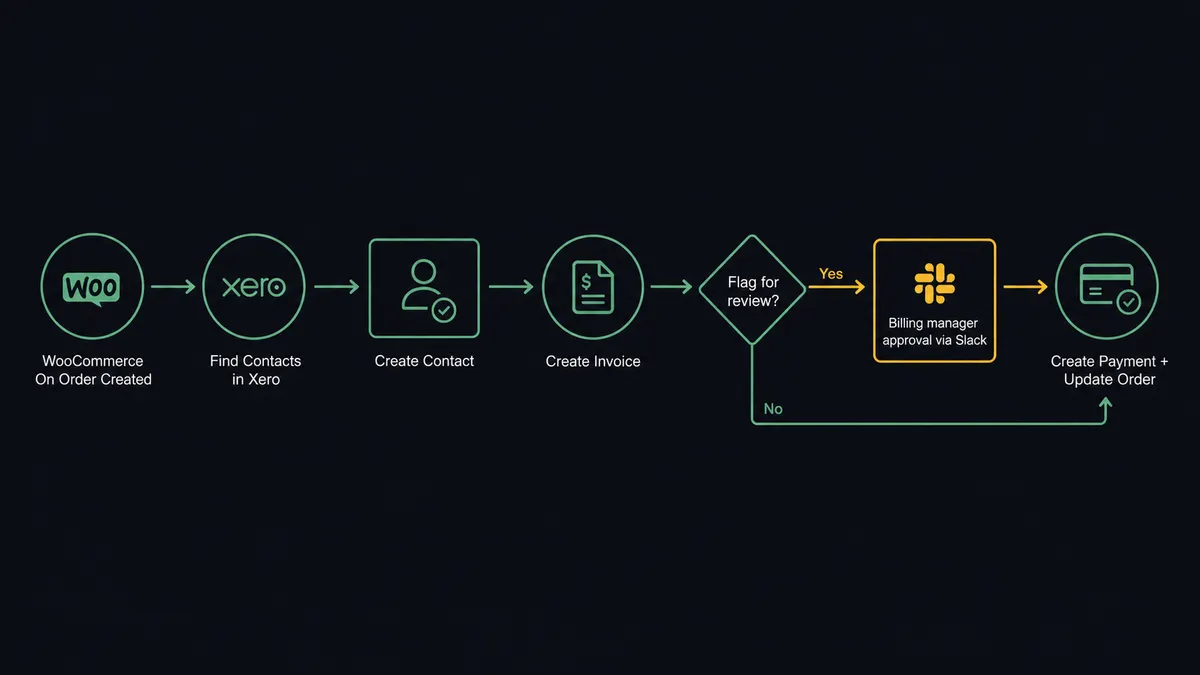
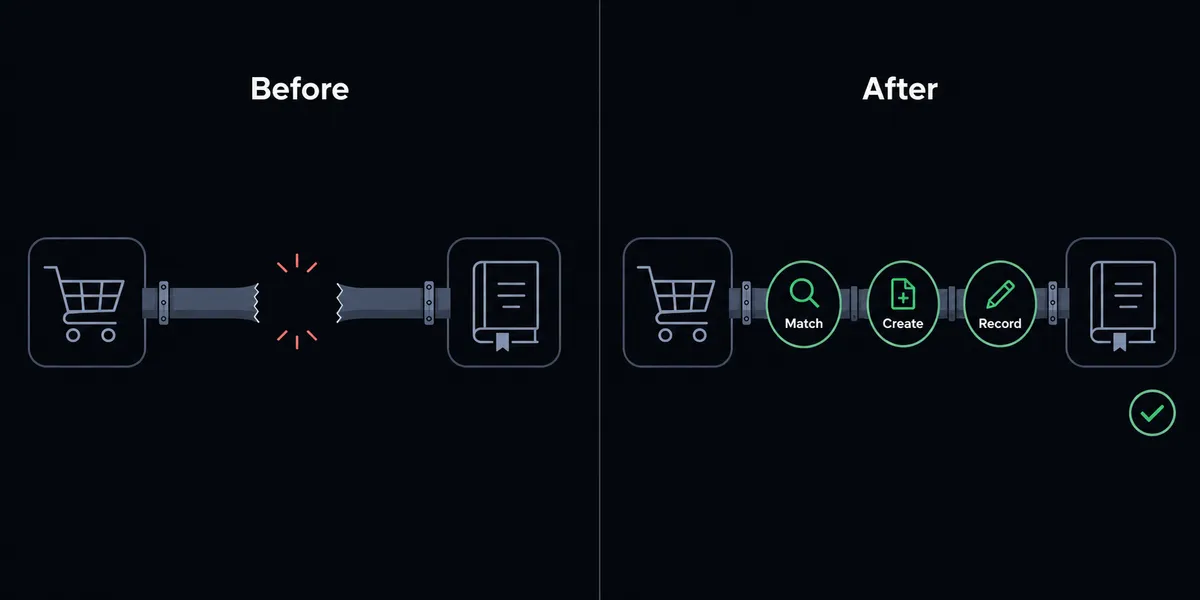
When a customer places an order in WooCommerce, FlowRunner’s WooCommerce trigger On Order Created fires, the agent checks Xero for an existing contact using Find Contacts, creates one with Create Contact if needed, then creates the invoice and records the payment using Create Invoice and Create Payment. FlowRunner is a visual AI-agent orchestration platform where automations run autonomously and pause for human judgment on the steps that carry real consequence. The same connection can run as an AI agent that reads every order, reasons about whether it looks clean, and stops for a human before posting anything that warrants a second set of eyes.
The problem it solves
Today, every WooCommerce order creates work in two places. Someone on the billing side opens Xero and keys in a new invoice. Someone checks whether the customer already exists. Someone maps the line items. Someone records the payment when it clears. If the order involves a return or a disputed charge, there is a third system conversation and a string of emails. At low volume this is annoying. At scale it is a liability: records drift between systems, exceptions fall through the cracks, and the bookkeeper is always a step behind.
The ops and finance teams most affected by this are not looking for a technical project. They want orders to land in Xero the way deposits land in a bank account: automatically, accurately, and with a clear record of what happened and who touched it. What they have instead is a spreadsheet of orders to reconcile at the end of every week and a standing question about which system is right when the two disagree.
How it works: the connection
The flow starts the moment a customer checks out. WooCommerce fires On Order Created, passing the full order: line items, quantities, pricing, customer details, and payment method.
The agent’s first move is to check whether the buyer already exists in Xero using Find Contacts. If the contact is there, it proceeds. If not, it creates one with Create Contact, mapping the WooCommerce billing name, email, and address to the Xero contact record. No duplicate contacts, no manual lookup.
Next, the agent creates the invoice in Xero using Create Invoice. Line items from the WooCommerce order map directly to Xero invoice lines. The order total, tax, and any applied coupons carry across. The invoice is created against the correct contact and is immediately ready for payment.
Then the agent records the payment using Create Payment in Xero, allocating it to the invoice just created. The WooCommerce order total and the payment method post to the right Xero account.
Back in WooCommerce, the agent uses Update Order to advance the order status and Create Order Note to log a fulfillment note with a reference to the Xero invoice number. The operations team has a complete record in both systems without touching either one manually.
The whole sequence runs in seconds. For a clean, straightforward order with a known customer and a matching total, nothing waits for a person.
Can an AI agent run it? (and why a human stays in the loop)
Yes. Wrapping the connection in a FlowRunner AI Agent turns a sync into a decision-maker.
The agent reads each WooCommerce order and evaluates it before acting. It is not following a fixed script. It checks whether the customer is new, whether the order total is consistent with the customer’s history, whether line items map cleanly, and whether any signals suggest the order warrants a pause. This is where the connection moves past what Zapier or n8n can offer: the agent reasons about what it finds, not just what it was told to expect.
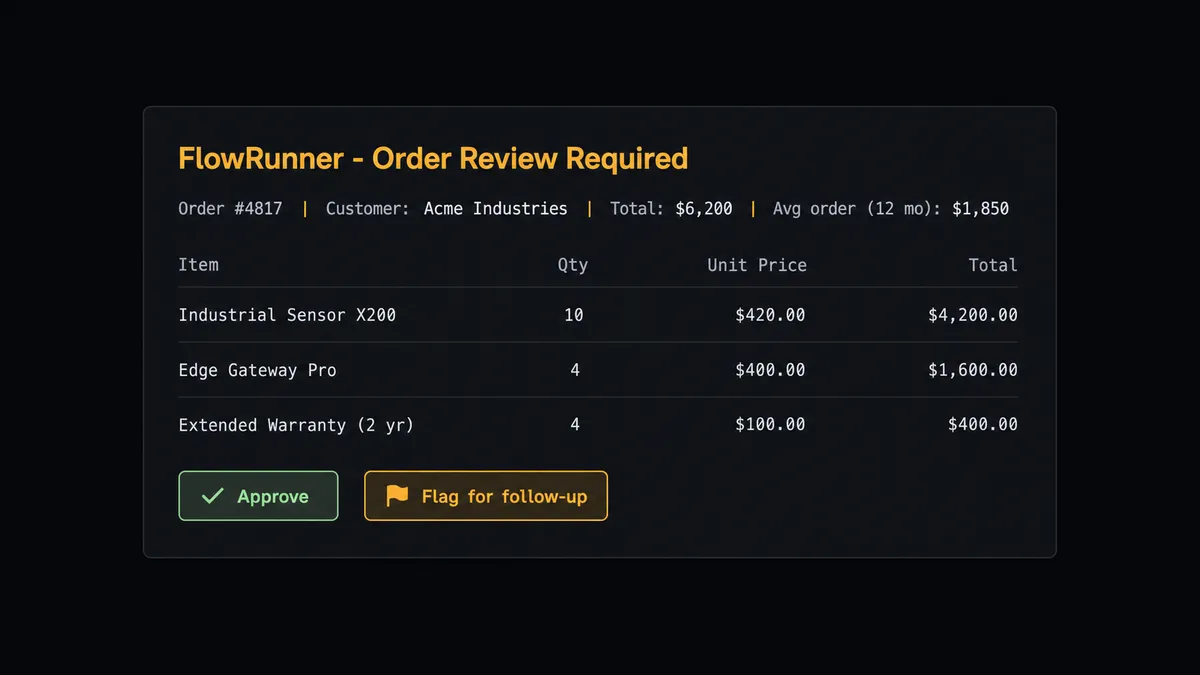
Here is a real decision moment. A WooCommerce order comes in from a customer with a two-year purchase history. The order total is $6,200. That is three times their typical order. The agent notes the discrepancy. Rather than creating the invoice automatically, it invokes its human-in-loop tool: a separate FlowRunner flow that sends a Slack message to the billing manager.
The message includes the customer name, the order total, the customer’s average order over the past 12 months, and the specific WooCommerce line items. The billing manager sees: “Order #4817 from [Customer] for $6,200. Their average order is $1,850. Review the line items and approve or flag for follow-up?” Two buttons. The manager clicks Approve. The agent creates the invoice, records the payment, and logs the decision with the manager’s identity and the timestamp.
This is not a threshold rule. The agent looks at context. The same $6,200 order from a new customer with no purchase history might get the same pause. A $12,000 order from a customer whose typical orders run $15,000 might go straight through. The call belongs to the agent, not a hardcoded if-statement.
Prospects describe this as a digital andon cord: the AI stops the line when it hits something that a human should own.
The same logic applies to refunds and voids. When a WooCommerce cancellation triggers a refund flow, the agent can use Create Order Refund in WooCommerce and Create Credit Note in Xero, but it pauses before voiding anything. As the Xero integration makes clear, voiding an invoice is an irreversible accounting action. The agent sends the full invoice detail to the accounting manager before using Void Invoice, not after.
FlowRunner vs Zapier (and where n8n fits)
For a WooCommerce and Xero connection, the tool most non-technical billing teams already have is Zapier. Zapier is genuinely good at simple trigger-action links: “order created, create invoice.” It is reliable, fast to set up, and well-documented for both integrations.
Where Zapier stops is the decision layer. It follows the rules you write. It does not reason about whether an order looks right. It cannot invoke a human mid-flow based on its own judgment. And its per-task pricing model means that high-volume ecommerce operations face real cost anxiety as order counts grow.
n8n is a better comparison for technical teams. It offers more control, visual workflow design, and self-hosting. Like Zapier, it does not have native AI-agent reasoning or intelligent human-in-loop as a platform primitive.
| Capability | Zapier | n8n | FlowRunner |
|---|---|---|---|
| WooCommerce + Xero basic sync | Yes | Yes | Yes |
| AI agent reasons about each order | No | No | Yes |
| Human-in-loop as a callable agent tool | No | No | Yes |
| Unlimited users on every paid tier | No | No | Yes |
| BYOK for AI model selection | No | No | Yes |
| Self-hosted option | No | Yes | Yes |
| Pricing model | Per task | Per execution | Per workflow tier |
Before and after
| Category | Before | After |
|---|---|---|
| Invoice creation | Billing team keys orders into Xero by hand, hours after checkout | Invoice created in Xero within seconds of WooCommerce order confirmation |
| Customer deduplication | New customers sometimes create duplicate Xero contacts | Agent runs Find Contacts before every Create Contact; no duplicates |
| Flagged order handling | High-value or unusual orders caught only during manual review | Agent pauses automatically, packages full context, routes to billing manager for decision |
| Refund and void process | AP team voids invoices directly in Xero with no approval trail | Agent sends full invoice detail to accounting manager before using Void Invoice; decision is logged |
| Payment reconciliation | Payment status checked manually against WooCommerce and Xero separately | Create Payment records the allocation in Xero the moment the order is confirmed |
| Audit trail | Decision history lives in email threads and spreadsheet notes | Every agent action, human decision, approver identity, and timestamp captured automatically |
What you can build
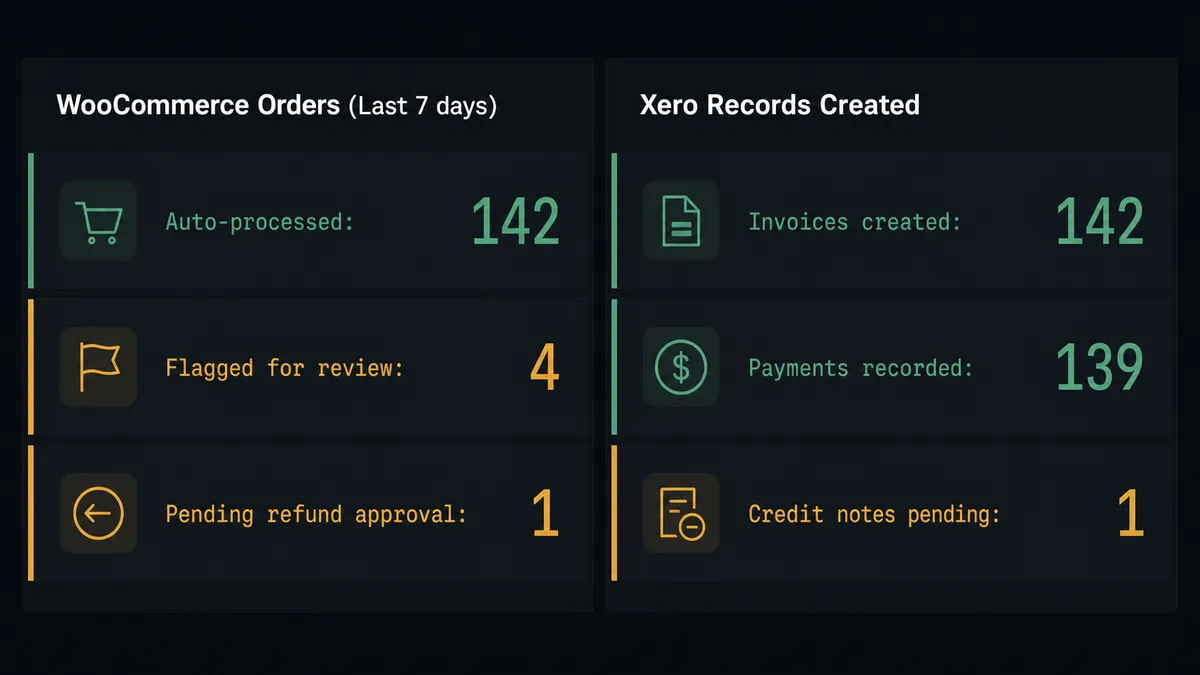
Order-to-invoice sync on every checkout. On Order Created fires, the agent checks for the Xero contact, creates the invoice, and records the payment. The WooCommerce order status updates automatically. For most orders, no one touches anything.
Refund flow with credit note creation. When On Order Updated fires for a cancelled order, the agent reads the refund amount, uses Create Order Refund in WooCommerce, and creates the matching credit note in Xero using Create Credit Note, pausing for manager approval on refunds above a value the agent judges material given the customer’s history.
Aged receivables alert with order context. Every Monday, the agent pulls Get Aged Receivables from Xero and cross-references overdue invoices against the original WooCommerce orders. For invoices 60 or more days overdue, the agent routes the full invoice history and the customer’s order record to the AR manager via Slack.
New-customer onboarding from first purchase. On Customer Created in WooCommerce triggers the agent to create a matching Xero contact, tag the customer in the CRM, and add them to the onboarding sequence. If the email matches an existing Xero contact, the agent flags the possible duplicate for a person instead of creating a second record.
Bulk catalog reprice with accounting sync. When a pricing sheet publishes, the agent stages a Batch Products update in WooCommerce and uses Get Items in Xero to check whether the corresponding billing items need updating. The agent posts a summary to the operations channel before any storewide change goes live. The approver owns the go-live call.
Common questions
Is it free to connect WooCommerce and Xero on FlowRunner? FlowRunner has a free plan with 100 executions a month, every integration included, and no credit card required, and new accounts get 14 days of Professional on top. Corporate email is needed to sign up. Beyond the free plan, Growth is $45 per month.
Can I self-host the WooCommerce and Xero integration? Yes. FlowRunner offers a self-hosted Community Edition at no cost for single-instance deployments, and a self-hosted Enterprise tier for multi-instance clustering with full compliance features.
Does the AI agent need my own OpenAI key? FlowRunner uses a BYOK model. You bring your own API keys for any AI provider you choose. FlowRunner does not lock you to a single model or charge separately for model calls.
What happens when the agent isn’t sure about a charge or refund? The agent pauses the workflow and sends the full transaction detail to the right person through Slack, email, or WhatsApp. It packages the context, the reason for the pause, and the available options. The human decides. The agent resumes and logs the decision.
How many users can access the WooCommerce and Xero workflows? All FlowRunner tiers include unlimited users and unlimited workflows. You are never charged per seat.
Can FlowRunner handle refunds across both systems? Yes. When WooCommerce fires On Order Updated for a cancellation, the agent can use Create Order Refund in WooCommerce and Create Credit Note in Xero in a single flow, with a human-approval step before posting the credit if the amount exceeds a threshold the agent judges to be significant.
Getting started
FlowRunner has a free plan with 100 executions a month, every integration included, and no credit card required, and new accounts get 14 days of Professional on top. Corporate email to sign up.
Start with both integration pages to see the full action and trigger lists: WooCommerce and Xero.
Ready to connect them: flowrunner.ai. Prefer a walkthrough first: calendly.com/flowrunner/intro.
Frequently asked questions
Is it free to connect WooCommerce and Xero on FlowRunner?
FlowRunner has a free plan with 100 executions a month, every integration included, and no credit card required, and new accounts get 14 days of Professional on top. Corporate email is needed to sign up. Beyond the free plan, Growth is $45 per month.
Can I self-host the WooCommerce and Xero integration?
Yes. FlowRunner offers a self-hosted Community Edition at no cost for single-instance deployments, and a self-hosted Enterprise tier for multi-instance clustering with full compliance features.
Does the AI agent need my own OpenAI key?
FlowRunner uses a BYOK model. You bring your own API keys for any AI provider you choose. FlowRunner does not lock you to a single model or charge separately for model calls.
What happens when the agent isn't sure about a charge or refund?
The agent pauses the workflow and sends the full transaction detail to the right person through Slack, email, or WhatsApp. It packages the context, the reason for the pause, and the available options. The human decides. The agent resumes and logs the decision.
How many users can access the WooCommerce and Xero workflows?
All FlowRunner tiers include unlimited users and unlimited workflows. You are never charged per seat.
Can FlowRunner handle refunds across both systems?
Yes. When WooCommerce fires On Order Updated for a cancellation, the agent can use Create Order Refund in WooCommerce and Create Credit Note in Xero in a single flow, with a human-approval step before posting the credit if the amount exceeds a threshold the agent judges to be significant.