How to Connect Shopify with Xero (With or Without an AI Agent)
Connect Shopify's On New Order trigger to Xero invoice and payment actions, then optionally run it as an AI agent that pauses for a human before posting a disputed charge or issuing a refund.
How do you connect Shopify to Xero?
Connect Shopify’s On New Order trigger to Xero by mapping each checkout event to a sequence of Xero actions: Find Contacts to locate or create the buyer, Create Invoice to record the sale, and Create Payment to close the receivable against the Shopify Payments payout. FlowRunner is a visual AI-agent orchestration platform where automations run autonomously and pause for human judgment on the steps that carry real consequence. The same connection can run as an AI agent that reads each order, reasons about it, and invokes a human-in-loop tool before posting a disputed charge, issuing a refund, or holding a high-value order.
The problem: orders move, books do not
An e-commerce operation running Shopify alongside Xero has a gap between two systems that were never designed to talk to each other. When an order closes in Shopify, someone needs to create the invoice in Xero, match it to a contact, record the payment, and file it correctly against the right account code. For low-volume stores that process can be an end-of-day task. For growing operations it becomes a full-time job where the same person moves between two browser tabs all day, copying order numbers and customer details by hand.
The real damage is not the time. It is what falls through the cracks when volume spikes. Refunds that get processed in Shopify but never voided or credited in Xero. Disputes that sit unacknowledged while the evidence deadline passes. New customers whose Xero contact records do not exist yet, so invoices get created under the wrong account or not at all. By the time the discrepancy surfaces in a reconciliation, it is three weeks old and the trail has gone cold.
How it works: the connection
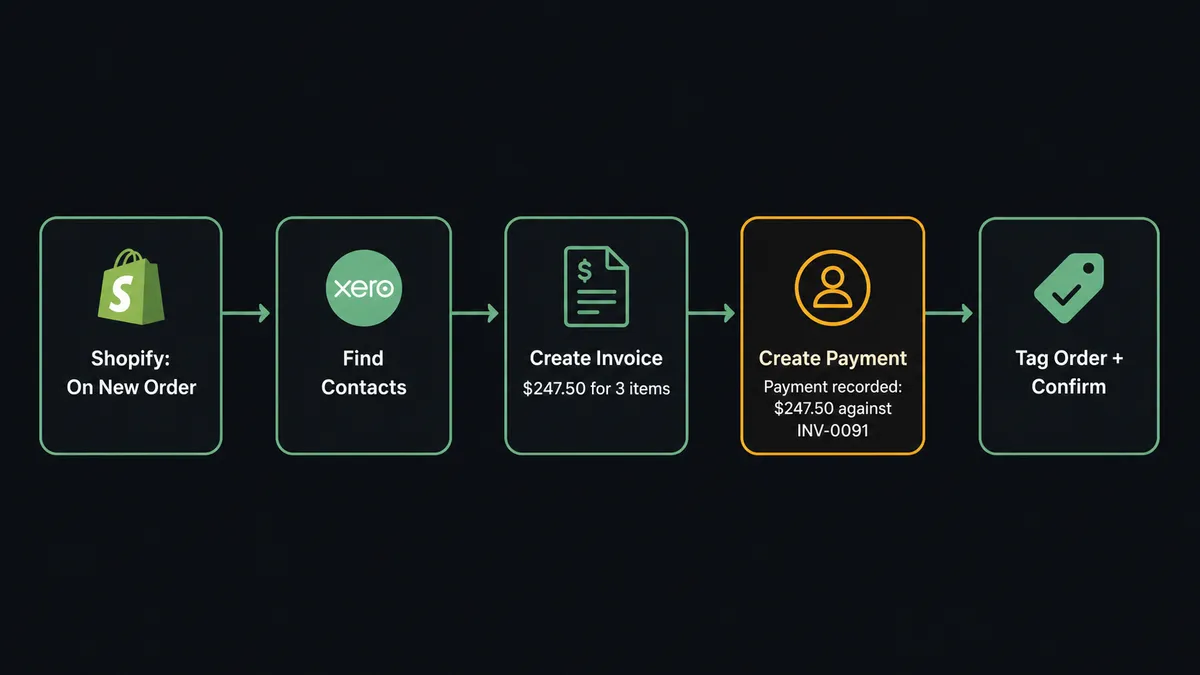
When a customer completes checkout, Shopify’s On New Order trigger fires and passes the full order payload to the FlowRunner workflow: line items, quantities, shipping address, order total, and customer email. The agent uses that email to call Find Contacts in Xero. If a contact record exists, the agent retrieves it. If not, the agent calls Create Contact to provision one before proceeding.
With the contact resolved, the agent calls Create Invoice in Xero, populating it with the order’s line items and total. It then retrieves the Shopify Payments payout data using Get List of Payouts and calls Create Payment in Xero to record the allocation against the new invoice. The receivable is closed the moment the order is placed, not at end-of-day when someone finally gets to it.
The agent also calls Add Tags on the Shopify order to mark it as accounted, which prevents any downstream flow from processing it a second time. This is the clean path: no human needed, no waiting, no spreadsheet.
Can an AI agent run it? (and why a human stays in the loop)
The plain connection handles routine transactions. The AI agent handles everything else, including the decisions a human has to own.
The agent reads each incoming Shopify order and reasons about it before taking action. It checks the order total against a configured threshold. It looks at whether the Shopify Payments payout is clean or carries a dispute flag. It checks whether the customer contact in Xero has an existing payment history. A regular order from a known customer with a clean payment clears automatically. An order that trips a fraud signal, carries an unusual amount, or comes from a new customer with no history gets a different response.
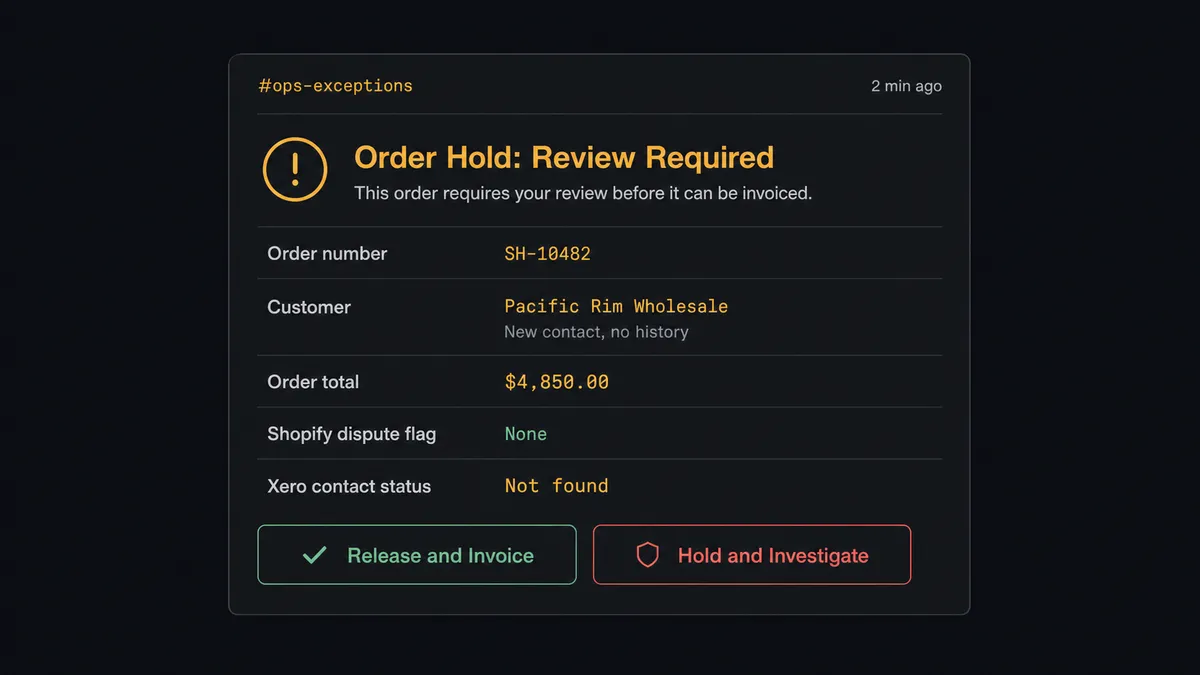
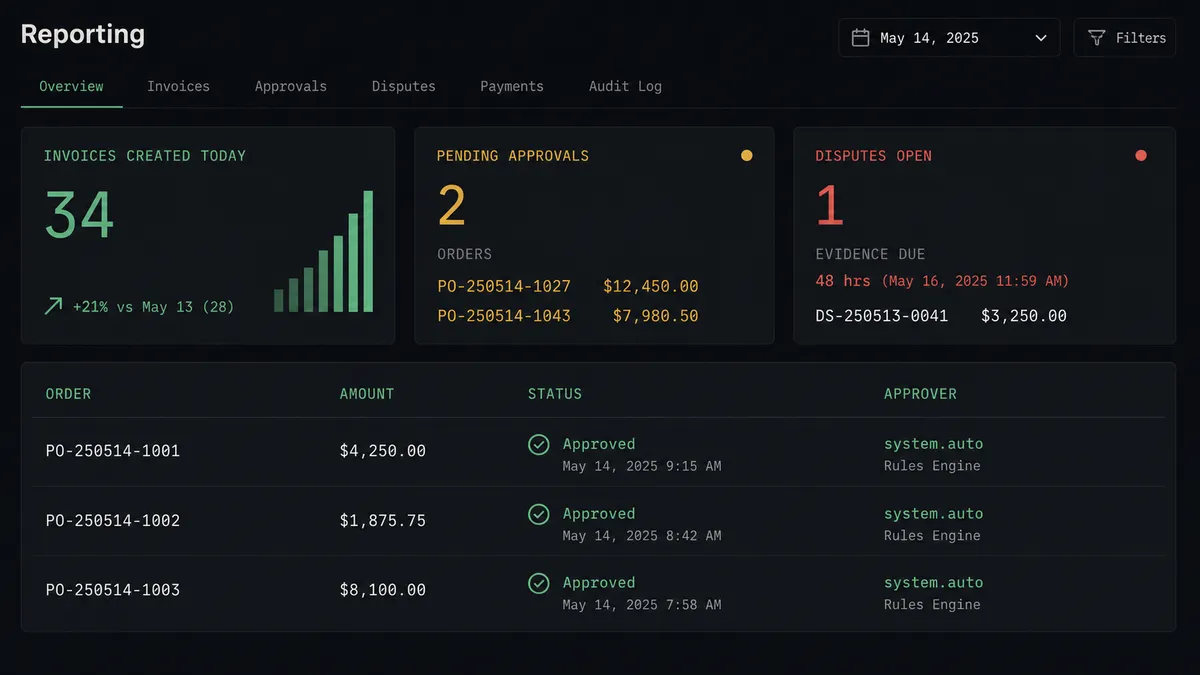
At that moment the agent invokes its human-in-loop tool, a separate flow that constructs a message and routes it to the operations channel. The message packages the order number, the customer name, the total, the reason for the flag, and the two choices available: release the order and create the invoice, or hold it pending investigation. The workflow pauses. No invoice is created. No payment is recorded. No fulfillment handoff happens until a named person responds.
When the approver clicks Release, the agent picks up exactly where it stopped. It calls Find Contacts (or Create Contact), then Create Invoice, then Create Payment. The decision, the approver’s identity, and the timestamp are all written to the audit trail. This is not a hardcoded threshold. The agent assessed the context and chose to stop. That judgment is what makes it different from a rule-based connector.
For refunds, the same logic applies. Before the agent calls Create Refund in Shopify, it posts to the operations channel with the order, the amount, the restock intent, and the reason. The named approver owns the call. Only after approval does the agent execute. The same human-review pattern protects Void Invoice in Xero: an irreversible accounting action that the agent prepares but never executes without a human signature.
This is the digital andon cord. The agent stops the line when it hits a step that carries real consequence.
FlowRunner vs Zapier (and why it matters for this pair)
Most Shopify-to-Xero connections are built in Zapier. Zapier is a capable and widely trusted tool for this kind of point-to-point trigger-action automation, and for simple one-step connections it works well. The library of pre-built Zap templates for Shopify and Xero is large and well-maintained.
The differences appear when the workflow needs to reason rather than relay.
| Capability | Zapier | FlowRunner |
|---|---|---|
| Shopify-to-Xero trigger-action connection | Yes, with pre-built templates | Yes, with native connectors |
| Conditional logic (if/then branching) | Yes, via filters and paths | Yes, plus agent-level reasoning |
| Human approval on consequential steps | Manual workaround (email step + Zap pause) | Native: agent invokes human-in-loop as a callable tool |
| Agent decides when to escalate | No: threshold is hardcoded in the Zap | Yes: agent reads context and makes the call |
| Unlimited users on every plan | No: Zapier charges per user on team plans | Yes: all FlowRunner tiers include unlimited users |
| Bring Your Own Key for AI model | No | Yes: connect your own OpenAI, Anthropic, or other key |
| Audit trail for human decisions | No native log of who approved what | Yes: approver identity, decision, and timestamp captured |
| Self-hosted option | No | Yes: Community Edition free, Enterprise custom |
Zapier is the right tool for a team that wants a no-maintenance connection with no exception handling. FlowRunner is the right tool when orders and accounting decisions carry enough weight that a human needs to be in the loop on the ones that matter.
Before and after
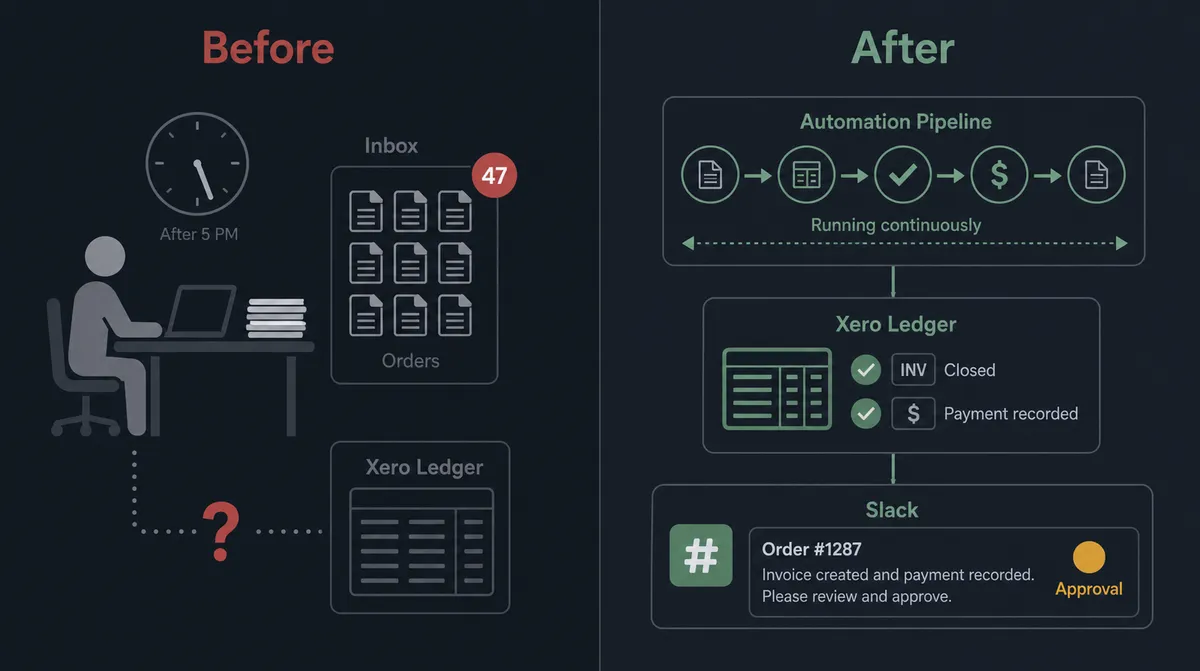
| Category | Before | After |
|---|---|---|
| Invoice creation | AP clerk manually creates Xero invoices from Shopify order exports, typically at end of day | Invoice created in Xero the moment the Shopify order is placed |
| Contact matching | Staff checks Xero by hand to find the right contact; creates duplicates when lookup fails | Agent calls Find Contacts automatically; creates the contact if none exists before proceeding |
| Payment recording | Payments matched manually against invoices during weekly reconciliation | Agent calls Create Payment in Xero immediately after each confirmed Shopify Payments payout |
| Refund approvals | Refund decisions made verbally or in DMs with no consistent record | Agent posts full context to ops channel; refund executes only after named approver responds |
| Dispute response | Disputes discovered during review cycles; evidence sometimes missed | On New Dispute fires immediately; agent assembles evidence and routes to finance before the deadline |
| Audit trail | No record of who approved what or when | Every human decision captured with approver identity and timestamp |
What you can build
Order-to-invoice automation for every checkout. When Shopify fires On New Order, the agent runs Find Contacts, creates or retrieves the Xero contact, calls Create Invoice with the line items, and calls Create Payment once the Shopify Payments payout clears. Receivables stay current without manual entry.
Dispute response before the evidence deadline. Shopify’s On New Dispute trigger fires when a cardholder challenges a charge. The agent calls Get Order and Get List of Payouts to pull the full context, then uses Get Aged Receivables in Xero to surface any open balance. It routes the assembled evidence packet to the finance channel so a person can review and submit before the deadline.
Refund processing with an approval gate. A return or cancellation flow calls Get Order in Shopify to confirm the line items. Before calling Create Refund in Shopify or Create Credit Note in Xero, the agent posts the refund amount, restock intent, and reason to the ops channel. The approver responds. The agent executes both the Shopify refund and the Xero credit note atomically, then calls Void Invoice if the original invoice should not remain open.
New customer onboarding across both systems. When Shopify fires On New Customer, the agent calls Find Contacts in Xero to check for a duplicate. If none exists, it calls Create Contact in Xero so the account is ready for billing before the first order arrives. If a contact already exists, the agent calls Update Contact to keep both records consistent.
Aged receivables collections loop. On a weekly schedule, the agent calls Get Aged Receivables from Xero. For invoices 30 to 60 days overdue it sends an automated reminder. For invoices over 60 days it pauses, routes to the AR manager via Slack with the invoice details and contact history, and waits for a decision: send final notice or escalate. The agent acts on the response.
Common questions
Is it free to connect Shopify and Xero on FlowRunner?
FlowRunner has a free plan with 100 executions a month, every integration included, and no credit card required, and new accounts get 14 days of Professional on top. Beyond the free plan, Growth starts at $45 per month with 12,000 executions included.
Can I self-host FlowRunner?
Yes. FlowRunner offers a free Community Edition for single-instance self-hosting. Enterprise self-hosting with multi-instance clustering and full compliance tooling is available at custom pricing.
Does the AI agent need my own OpenAI key?
FlowRunner uses a Bring Your Own Key model, so you connect your own API key from whichever AI provider you prefer. The platform is not locked to any single model.
What happens when the agent is not sure about a transaction?
The agent invokes its human-in-loop tool, packages the full order and accounting context, and routes it to the right person through Slack, email, or another channel. The workflow pauses until the person responds. The agent resumes only after a named decision-maker approves.
How many users can access FlowRunner workflows?
Every FlowRunner tier includes unlimited users. You are not paying per seat, so the whole operations and finance team can collaborate on the same workflows from day one.
What if the Shopify order amount does not match what Xero expects?
The agent detects the discrepancy during its reasoning step, flags the specific mismatch, and routes to a human with the order total, the expected amount, and a prompt to approve or reject before any invoice or payment record is created.
Getting started
The Growth tier at $45 per month includes the full Shopify and Xero connectors, AI agents, human-in-loop orchestration, unlimited users, and unlimited workflows. FlowRunner has a free plan with 100 executions a month, every integration included, and no credit card required, and new accounts get 14 days of Professional on top.
Start at flowrunner.ai with both integration pages ready: Shopify and Xero. Connect both accounts, pick the On New Order trigger, and have your first invoice flow running in an afternoon.
If you want to walk through the exception-handling design with someone who has built these for operations teams, book a 30-minute call at calendly.com/flowrunner/intro.
Frequently asked questions
Is it free to connect Shopify and Xero on FlowRunner?
FlowRunner has a free plan with 100 executions a month, every integration included, and no credit card required, and new accounts get 14 days of Professional on top. Beyond the free plan, Growth starts at $45 per month with 12,000 executions included.
Can I self-host FlowRunner?
Yes. FlowRunner offers a free Community Edition for single-instance self-hosting. Enterprise self-hosting with multi-instance clustering and full compliance tooling is available at custom pricing.
Does the AI agent need my own OpenAI key?
FlowRunner uses a Bring Your Own Key model, so you connect your own API key from whichever AI provider you prefer. The platform is not locked to any single model.
What happens when the agent is not sure about a transaction?
The agent invokes its human-in-loop tool, packages the full order and accounting context, and routes it to the right person through Slack, email, or another channel. The workflow pauses until the person responds. The agent resumes only after a named decision-maker approves.
How many users can access FlowRunner workflows?
Every FlowRunner tier includes unlimited users. You are not paying per seat, so the whole operations and finance team can collaborate on the same workflows from day one.
What if the Shopify order amount does not match what Xero expects?
The agent detects the discrepancy during its reasoning step, flags the specific mismatch, and routes to a human with the order total, the expected amount, and a prompt to approve or reject before any invoice or payment record is created.