How to Connect WooCommerce with ShipStation (With or Without an AI Agent)
Connect WooCommerce and ShipStation so every new order triggers automatic rate shopping, label purchase, and customer notification, optionally as an AI agent that pauses for a human before buying a high-cost label.
How do you connect WooCommerce to ShipStation?
You connect WooCommerce to ShipStation by triggering on the WooCommerce On Order Created event and calling ShipStation Create or Update Order followed by Get Shipment Rates and Create Shipment Label to buy the label and capture the tracking number. FlowRunner is a visual AI-agent orchestration platform where automations run autonomously and pause for human judgment on the steps that carry real consequence. The same WooCommerce to ShipStation connection can run as an AI agent that reads each order, reasons about carrier cost and margin, and invokes a human-in-loop flow before purchasing a label that would hurt profitability.
What breaks when you run this manually
Every WooCommerce order that needs to ship starts a small cascade of manual work. Someone opens ShipStation, finds the order, compares carrier rates by eye, picks a service, buys the label, updates the order status in WooCommerce, and sends the customer a tracking number. On a day with 20 orders that is a morning. On a day with 200 orders that is a team problem.
The exceptions are worse. A high-cost label on a low-margin order looks like every other label at a glance. A cancelled order after the label prints means a void that often gets skipped, so postage is charged for a shipment that never leaves. Orders from outside WooCommerce (phone, trade, wholesale) get entered manually into ShipStation when someone remembers. The pattern is the same every time, which is exactly why it should not require a person to run it.
How it works: the WooCommerce to ShipStation connection
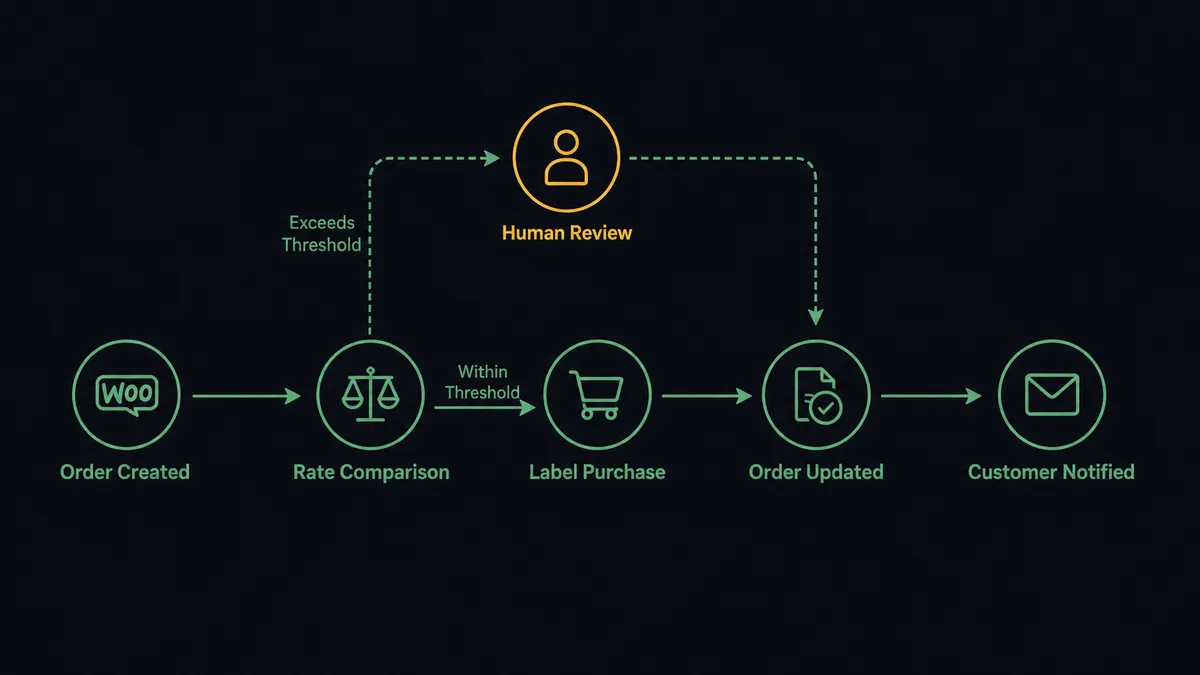
WooCommerce fires On Order Created the moment a customer checks out. The agent reads the line items, the ship-to address, and the requested service level from the trigger payload.
The agent calls ShipStation Get Shipment Rates with the shipment details. It receives live carrier options and prices. It evaluates those options against your fulfillment rules: preferred carrier, service level, delivery promise.
For an order that passes review, the agent runs Create Shipment Label in ShipStation. ShipStation returns the tracking number. The agent calls Mark Order as Shipped in ShipStation to close the fulfillment loop, then calls Update Order in WooCommerce to advance the order status, and adds a private note with Create Order Note so the order record shows what ran.
When an order comes in from another channel (a trade account, a phone order, a wholesale portal), the agent calls Create or Update Order in ShipStation to import it, then runs the same rate and label sequence. Every order, regardless of source, goes through the same path.
If an order was cancelled after the label was already bought, the agent calls Void Shipment Label. The void happens in-flow, not in a weekly cleanup that someone has to remember.
Can an AI agent run it? (And why a human stays in the loop)
A standard WooCommerce to ShipStation connection runs the same steps on every order. An AI agent runs the same steps on routine orders and makes a different call on the exceptions.
Here is where that matters. Get Shipment Rates returns the full range of carrier options and prices for each order. The agent evaluates the best available rate against the order’s margin. Most orders pass through. Some do not.
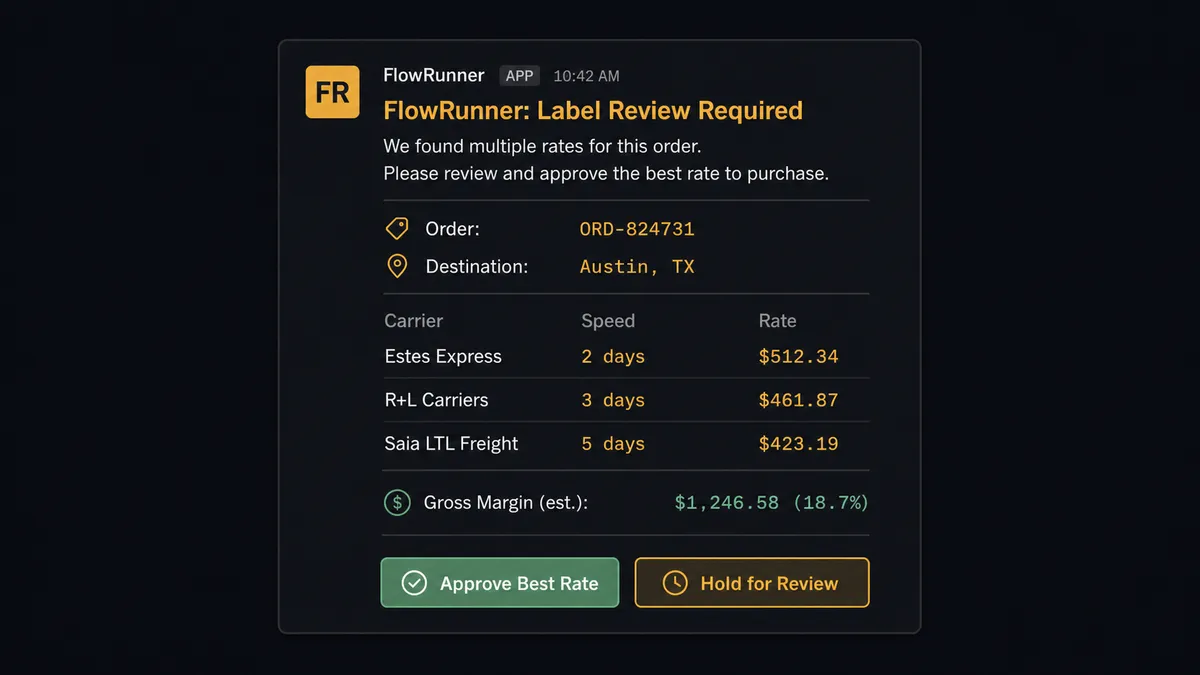
When the cheapest available label costs more than a configurable threshold relative to the order value, the agent does not buy it. It packages the decision: order number, items, destination, all rate options with carrier and speed, the order’s gross margin, and what each label choice costs in margin points. It invokes the human-in-loop flow and routes that package to ops in Slack.
The message reads something like: “Order #3391 cheapest label is $47 on a $95 order. Options: USPS Ground $47, UPS Ground $41, FedEx Economy $52. Buy it, downgrade the service, or hold for review?” Ops picks an option. The agent buys that label, records who approved, and logs the rate chosen in the audit trail. The order ships with the decision documented.
This is not a rule. The agent reads the data, evaluates context, and makes the call. Prospects working with FlowRunner describe this pattern as a “digital andon cord”: the agent stops the line when it hits a decision that carries cost or risk, instead of running through it and creating a problem to clean up later.
FlowRunner vs Zapier for WooCommerce and ShipStation
Zapier is the right answer for teams that want WooCommerce and ShipStation connected through a fixed sequence with no setup overhead. The integration marketplace is mature, the interface is straightforward, and a non-technical person can build a basic order-to-label flow in under an hour. For a store that ships uniform orders at predictable margins, that is often enough.
The gap appears when the work is not uniform. Zapier runs steps in the same order every time. When a label is expensive, it still buys it. When an order is cancelled after the label printed, the void is a separate zap that someone has to configure and remember to maintain. When an exception falls outside the zap’s conditions, it either errors or runs through incorrectly.
| Zapier | FlowRunner | |
|---|---|---|
| AI decision-making per order | Not available | Agent reads data and reasons; picks tools based on context |
| Human-in-loop on high-cost labels | Manual conditional steps | Native callable tool; agent decides when to invoke it |
| Carrier rate comparison | Fixed service selection | Agent calls Get Shipment Rates and evaluates options dynamically |
| Audit trail on human decisions | Not available | Approver identity, rate chosen, and timestamp recorded automatically |
| Unlimited users on every tier | Per-seat pricing | Unlimited users on Growth ($45/mo), Professional ($299/mo), Business ($999/mo) |
| Self-hosted option | Not available | Community Edition free; Enterprise self-hosted available |
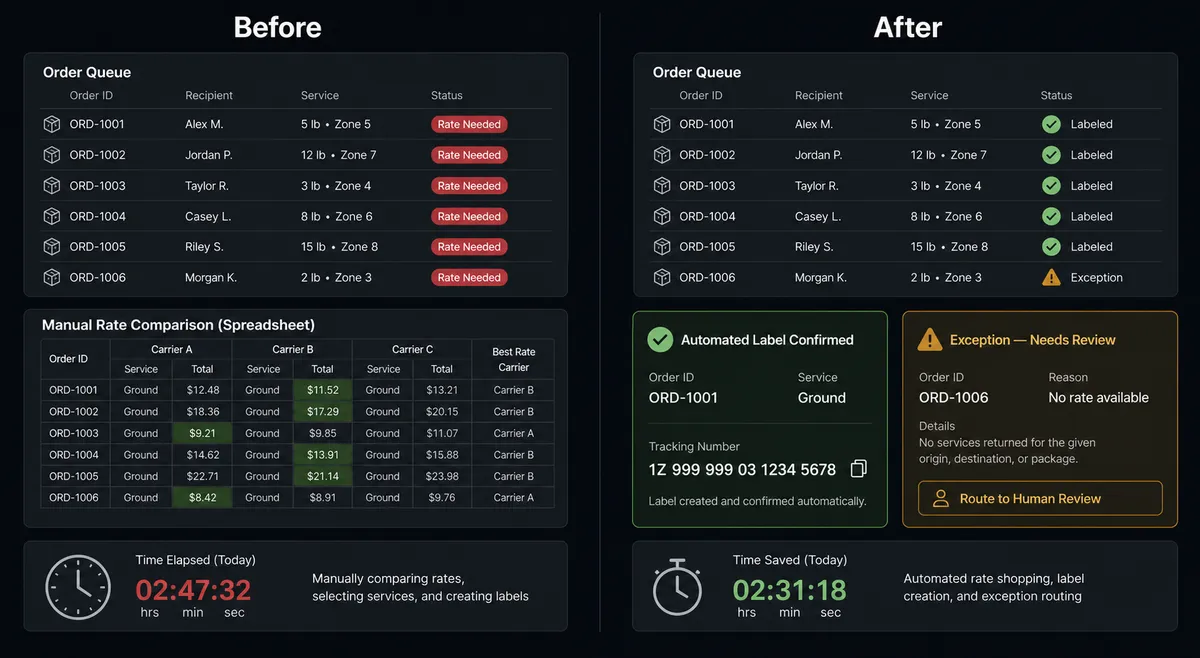
Before and after
| Before | After | |
|---|---|---|
| Label purchase | Someone compares rates in ShipStation for each order before buying | Agent calls Get Shipment Rates and buys the label on routine orders automatically |
| High-cost label handling | Purchased with no check against margin | Agent pauses, sends ops the order and rate options, records approval before spending |
| Order status in WooCommerce | Updated manually after label prints | Update Order runs the moment the label is confirmed |
| Void on cancellation | Often skipped; postage charged on shipments that never move | Void Shipment Label runs in-flow when the cancellation triggers it |
| Cross-channel orders | Entered manually into ShipStation | Agent calls Create or Update Order for any source; same fulfillment path runs |
| Exception visibility | Falls through the cracks between systems | Every exception logged; human decisions recorded with approver and timestamp |
What you can build
Order-to-label on arrival. WooCommerce On Order Created fires. The agent reads the order, calls Get Shipment Rates, evaluates options, buys the label with Create Shipment Label, marks the order shipped, and updates WooCommerce. Routine orders ship without anyone opening a queue.
Cross-channel order intake. Orders from trade accounts, phone sales, or wholesale portals are pushed into ShipStation via Create or Update Order and tagged with Add Tag to Order to mark their source. The agent runs the same rate and label flow regardless of where the order originated.
Inventory hold and resume. When an order includes an item that is out of stock, the agent calls Hold Order Until in ShipStation to park the order, then calls Restore Order from Hold once a WooCommerce On Product Updated event confirms stock is back. The order does not ship partially and does not require manual follow-up.
Shipment notification on label creation. ShipStation On New Shipment fires when a label is created. The agent reads the carrier and tracking number and sends the customer a shipping confirmation. The notification goes out the moment the shipment exists.
Label void on cancellation. WooCommerce On Order Updated fires when an order status changes to cancelled. If ShipStation shows a label already exists for that order, the agent calls Void Shipment Label automatically. No postage is charged for a shipment that will not move.
Common questions
Is it free to connect WooCommerce and ShipStation on FlowRunner? FlowRunner has a free plan with 100 executions a month, every integration included, and no credit card required, and new accounts get 14 days of Professional on top. Beyond the free plan, Growth is $45 per month.
Can I self-host this integration? Yes. FlowRunner offers a self-hosted Community Edition at no cost and an Enterprise self-hosted tier for multi-instance clustering with full compliance features. Both include the WooCommerce and ShipStation connectors.
Does the agent need my own API key for AI decisions? Yes. FlowRunner uses a Bring Your Own Key model, so the AI reasoning inside the agent uses your own key from Claude, OpenAI, or another provider. FlowRunner never marks up AI usage.
What happens when the agent is not sure about a label cost? When Get Shipment Rates returns a price that exceeds your configured cost threshold or order-value percentage, the agent pauses and routes the decision to ops in Slack or email. It presents the order, the rate options, and the margin impact. Ops decides. The agent records who approved and which rate was chosen.
Does this work with WooCommerce variants and batch orders? Yes. The WooCommerce connector supports product variations, Batch Products, Batch Orders, and Batch Customers. The ShipStation connector handles Create or Update Order for multi-source intake and Hold Order Until for inventory gaps.
What is the difference between this and a Zapier integration? Zapier connects the two systems through fixed steps that run the same way every time. FlowRunner runs an AI agent that reads order data, reasons about it, compares carrier rates, and decides when to call a human. The agent adapts to context; a Zapier zap does not.
Getting started
FlowRunner has a free plan with 100 executions a month, every integration included, and no credit card required, and new accounts get 14 days of Professional on top. The WooCommerce connector and the ShipStation connector are available on every tier.
See the full connector documentation at /integrations/woocommerce and /integrations/shipstation.
Start building at flowrunner.ai or book a 30-minute intro at calendly.com/flowrunner/intro to walk through the WooCommerce to ShipStation flow with the team.
Frequently asked questions
Is it free to connect WooCommerce and ShipStation on FlowRunner?
FlowRunner has a free plan with 100 executions a month, every integration included, and no credit card required, and new accounts get 14 days of Professional on top. Beyond the free plan, Growth is $45 per month.
Can I self-host this integration?
Yes. FlowRunner offers a self-hosted Community Edition at no cost and an Enterprise self-hosted tier for multi-instance clustering with full compliance features. Both include the WooCommerce and ShipStation connectors.
Does the agent need my own API key for AI decisions?
Yes. FlowRunner uses a Bring Your Own Key model, so the AI reasoning inside the agent uses your own key from Claude, OpenAI, or another provider. FlowRunner never marks up AI usage.
What happens when the agent is not sure about a label cost?
When Get Shipment Rates returns a price that exceeds your configured cost threshold or order-value percentage, the agent pauses and routes the decision to ops in Slack or email. It presents the order, the rate options, and the margin impact. Ops decides. The agent records who approved and which rate was chosen.
Does this work with WooCommerce variants and batch orders?
Yes. The WooCommerce connector supports product variations, Batch Products, Batch Orders, and Batch Customers. The ShipStation connector handles Create or Update Order for multi-source intake and Hold Order Until for inventory gaps.
What is the difference between this and a Zapier integration?
Zapier connects the two systems through fixed steps that run the same way every time. FlowRunner runs an AI agent that reads order data, reasons about it, compares carrier rates, and decides when to call a human. The agent adapts to context; a Zapier zap does not.