Send Webflow Leads to Slack, Approve Every Publish
Connect Webflow to Slack so new form leads post instantly, and run it as an AI agent that pauses for a marketing manager's approval before a content change goes live.
How do you connect Webflow to Slack?
On Form Submit fires the moment a visitor submits a Webflow form, and the flow calls Send Message to Channel or Send Direct Message in Slack so the assigned rep sees the lead’s name, company, email, and inquiry within seconds. FlowRunner is a visual AI-agent orchestration platform where automations run autonomously and pause for human judgment on the steps that carry real consequence. The same Webflow-to-Slack connection can also run as an AI agent: it reads the submission or the content update, decides what to do, and invokes a human-in-loop step in Slack before a step with real consequence, like publishing the site, goes out.
The problem it solves
A visitor fills out a contact form on the marketing site. Today that submission lands in a shared inbox, and whoever checks the inbox next manually forwards it to the right rep, or worse, it sits until someone notices. A sales rep who should be following up within minutes instead finds out hours later, after the lead has already filled out three other vendors’ forms. Nobody owns the handoff, so leads fall through the cracks and nobody can say how many.
On the content side, a marketing manager updates case studies, pricing copy, or product pages directly in Webflow’s CMS. Publishing those changes to a live site is a one-click action with no review step built in. A typo on the pricing page or a broken quote on a case study goes live the instant someone clicks publish, and the team only finds out when a customer mentions it. The manual fix is a Slack message asking “did anyone check this before it went live,” sent after the fact instead of before.
How it works: the connection
For lead routing, On Form Submit fires from the Webflow contact form the moment a visitor submits it. The flow extracts the name, company, email, and inquiry fields from the submission and passes them into Send Message to Channel or Send Direct Message, so a rep or a shared sales channel sees the full lead detail without anyone forwarding an email. This is the direct, no-agent version of the connection: one trigger, one action, done.
For content changes, the connection runs the other direction. When a marketing team updates the CMS, Create Collection Item or Update Collection Item writes the new content into a Webflow collection. Rather than calling Publish Site immediately, the flow uses Get Collection Items to compile what changed, then posts a summary to Slack before the site goes live. That review step is what turns a one-click publish into a checked publish, and it is where the AI agent adds the most value.
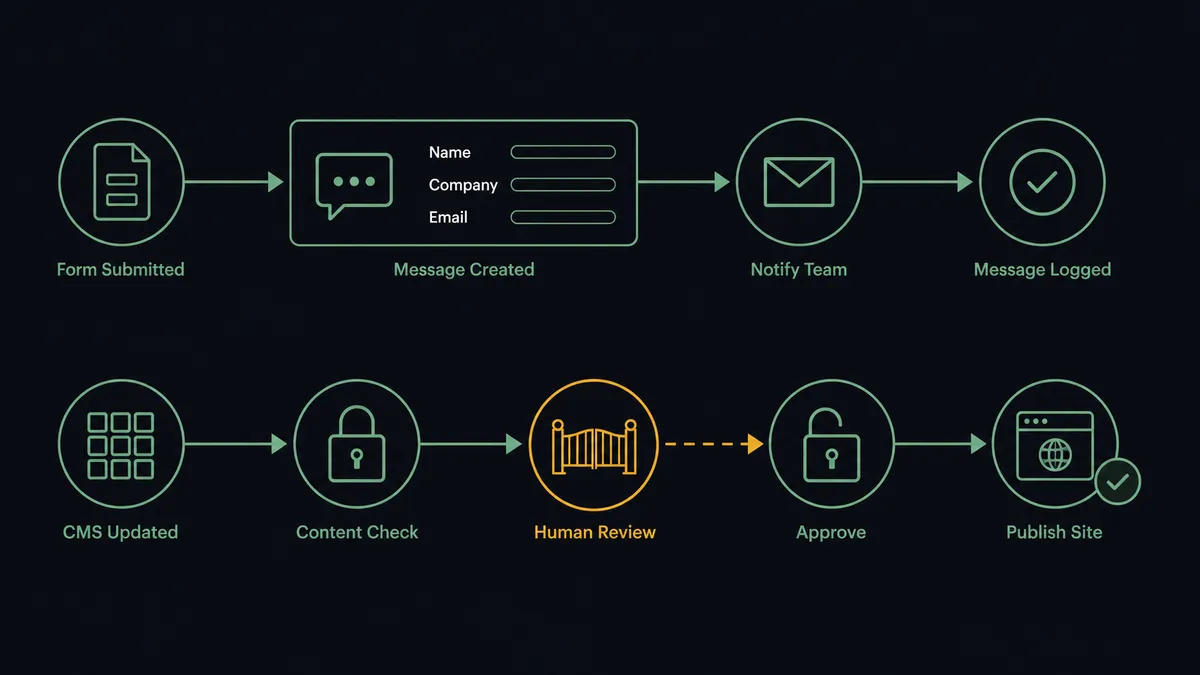
Can an AI agent run it? (and why a human stays in the loop)
An AI agent does more than relay data from one trigger to one action. It reads the Webflow form submission, decides how to route it (which rep, which channel, whether the inquiry needs immediate escalation), and calls Send Message to Channel or Send Direct Message as a tool, not as a fixed next step. For content changes, the agent reads the batch of updated collection items, reasons about which pages they touch, and decides whether the batch can publish on its own or needs a person to look first.
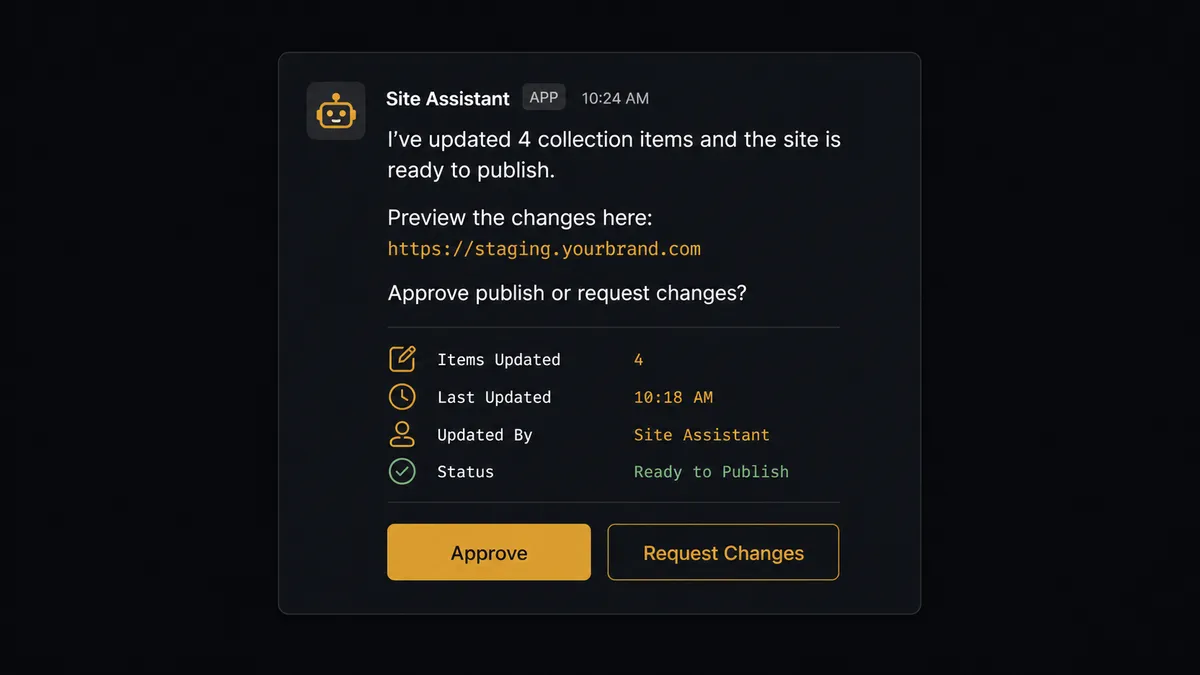
This is the moment that matters. The agent does not use a hardcoded rule like “always ask before every publish.” It evaluates the actual content: a new blog post or an updated case study description can go live without review, but a change to the homepage, the pricing page, or a product page gets held. When the agent decides a change is critical, it invokes a human-in-loop flow as a callable tool. It posts a Slack message to the marketing manager: “I’ve updated 4 collection items and the site is ready to publish. Preview the changes here: [staging URL]. Approve publish or request changes?” The message carries a Block Kit Approve button and a Request Changes button, backed by Slack’s On Block Action trigger.
The workflow pauses there. The marketing manager previews the staged changes from their phone or desk, clicks a button, and the decision fires On Block Action, which resumes the flow. If approved, the agent calls Publish Site and posts the outcome back to the thread. If changes are requested, the agent holds the publish and logs the feedback instead of guessing at a fix. The approver’s identity and the timestamp are captured in the audit trail either way.
This is not a sync tool quietly moving data in the background. The agent knows when to stop and ask, and it asks the person who owns that decision, in the channel they already use. Prospects who have felt burned by automation that publishes first and apologizes later call this a digital andon cord: the agent stops the line the moment it hits a decision it should not make alone.
FlowRunner vs Zapier
Zapier connects a Webflow trigger to a Slack action well, and plenty of teams use it to post new form leads into a channel with no setup friction. That part of the job is genuinely simple, and Zapier does it fine.
Where the two diverge is what happens before a site publish, and what it costs to add a review step later.
| Zapier | FlowRunner | |
|---|---|---|
| Human-in-the-loop | No native approval step; you’d chain a Slack message and rebuild logic around it manually | Native: the agent invokes a human-in-loop flow as a callable tool before the publish step |
| Reasoning over the data | Fixed trigger-to-action steps only | Agent reads the collection items, decides what changed, and picks which actions to call |
| Users included | Paid per user on most plans | Unlimited users and unlimited workflows on every tier |
| AI provider | Tied to Zapier’s built-in AI options | Bring Your Own Keys (BYOK); connect the provider you already use |
| Self-hosting | Not available | Free Community Edition for self-hosted single-instance use, Enterprise for clustering |
| Pricing model | Per-task pricing that scales with volume | Transparent workflow-based tiers with a fixed execution ceiling per tier |
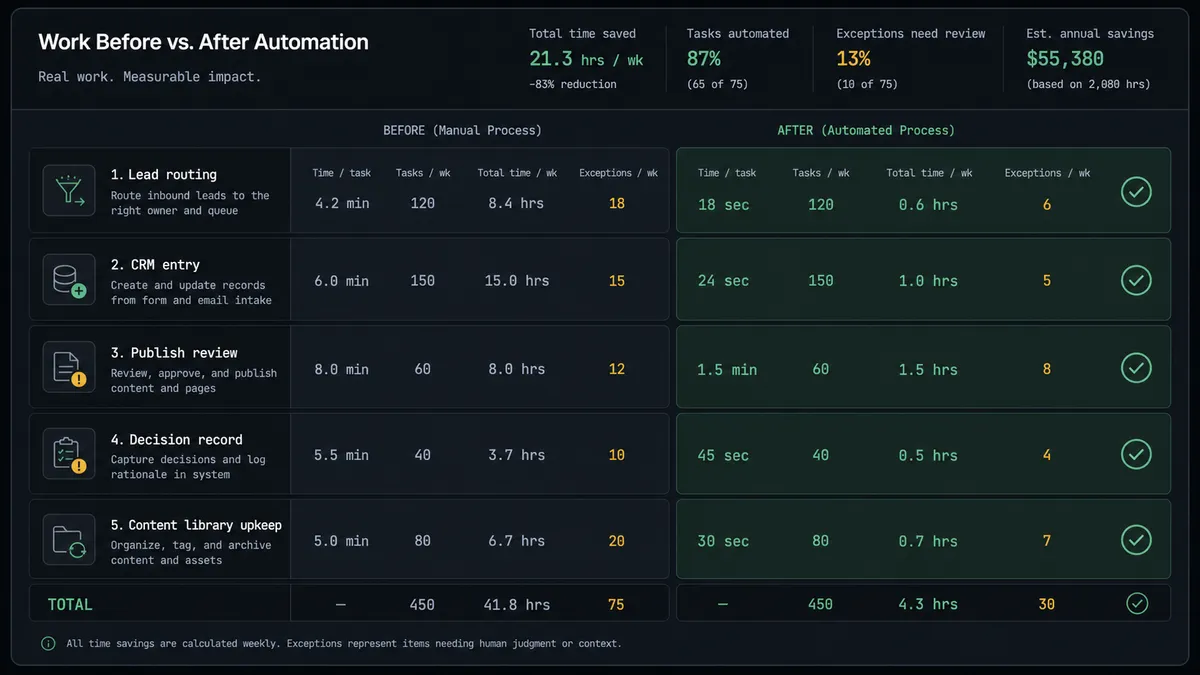
Before and after
| Category | Before | After |
|---|---|---|
| Lead routing | Web form submissions land in a shared inbox and get routed to reps by hand | Every Webflow form submission notifies the assigned rep in Slack within seconds |
| CRM entry | Leads sit in email until someone manually creates the CRM record | Lead detail posts to Slack the moment the form is submitted, ready to act on immediately |
| Publish review | Site changes go live the moment someone clicks publish, with no structured review step | Critical-page changes pause for a Slack approval with a staging preview before Publish Site runs |
| Decision record | No trail showing who reviewed a content change or when | Every approval or requested change captured with approver identity and timestamp automatically |
| Content library upkeep | New case studies require someone to log into Webflow and build the page by hand | Collection items update automatically and route for approval only when the page is critical |
What you can build
Instant lead alerts to the right rep. On Form Submit fires, the agent extracts the submission data, and sends a direct Slack message to the assigned rep with the lead’s name, company, email, and inquiry so follow-up starts in minutes, not hours.
Case study publish approvals. When new case study content lands in the CMS through Create Collection Item, the agent posts a Slack approval request with a staging preview before Publish Site pushes the page live.
Weekly content digest. The agent uses Get Collection Items to compile what changed across the site in the past week and posts a formatted summary to a #marketing channel so leadership gets visibility without opening Webflow.
Form cleanup after processing. Once a submission has been routed and confirmed, the agent calls Delete Form Submission and posts a short confirmation in the originating Slack thread, keeping the form queue clean without manual review.
Order or fulfillment escalation. On New Order or On Order Updated fires from Webflow’s e-commerce events, and if something in the order looks off, the agent posts to Slack with Approve and Escalate buttons instead of pushing a bad order downstream automatically.
Common questions
Is it free to connect Webflow and Slack on FlowRunner? FlowRunner has a free plan with 100 executions a month, every integration included, and no credit card required, and new accounts get 14 days of Professional on top. After that, Growth is $45 per month with 12,000 executions included, and every tier includes unlimited users and unlimited workflows.
Does the agent need my own OpenAI or Claude key? Yes. FlowRunner uses a Bring Your Own Keys (BYOK) model, so you connect your own AI provider key and pay that provider directly. You are not locked to one model and you keep control of your data and costs.
Can I self-host FlowRunner? Yes. FlowRunner offers a free Community Edition for single-instance self-hosted deployments and an Enterprise tier with multi-instance clustering and the full compliance suite.
What happens when the agent is not sure whether to publish? It does not guess and it does not publish. The agent posts a Slack message to the marketing manager with a staging preview link and Approve or Request Changes buttons, and the workflow pauses until a person responds.
Can I start with a simple notification and add the approval step later? Yes. You can begin with a plain trigger-to-message connection, such as posting new Webflow form leads to Slack, and add the On Block Action approval step to a separate publish workflow whenever you are ready. Neither change requires rebuilding the other flow.
How is this different from Zapier’s Webflow and Slack integration? Zapier connects a Webflow trigger to a Slack action reliably. FlowRunner adds an AI agent that reads the form or content data, decides which Webflow and Slack actions to call and in what order, and invokes a human approval step as a callable tool before anything with real consequence, like a site publish, goes out.
Getting started
FlowRunner has a free plan with 100 executions a month, every integration included, and no credit card required, and new accounts get 14 days of Professional on top. Connect Webflow and Slack, pick a trigger, and turn the flow on in a few minutes. Add the human-in-loop step whenever you are ready to gate publishes on a real person’s sign-off instead of a click.
Start free at flowrunner.ai, or book time with the team at calendly.com/flowrunner/intro to walk through the setup live.
Frequently asked questions
Is it free to connect Webflow and Slack on FlowRunner?
FlowRunner has a free plan with 100 executions a month, every integration included, and no credit card required, and new accounts get 14 days of Professional on top. After that, Growth is $45 per month with 12,000 executions included, and every tier includes unlimited users and unlimited workflows.
Does the agent need my own OpenAI or Claude key?
Yes. FlowRunner uses a Bring Your Own Keys (BYOK) model, so you connect your own AI provider key and pay that provider directly. You are not locked to one model and you keep control of your data and costs.
Can I self-host FlowRunner?
Yes. FlowRunner offers a free Community Edition for single-instance self-hosted deployments and an Enterprise tier with multi-instance clustering and the full compliance suite.
What happens when the agent is not sure whether to publish?
It does not guess and it does not publish. The agent posts a Slack message to the marketing manager with a staging preview link and Approve or Request Changes buttons, and the workflow pauses until a person responds.
Can I start with a simple notification and add the approval step later?
Yes. You can begin with a plain trigger-to-message connection, such as posting new Webflow form leads to Slack, and add the On Block Action approval step to a separate publish workflow whenever you are ready. Neither change requires rebuilding the other flow.
How is this different from Zapier's Webflow and Slack integration?
Zapier connects a Webflow trigger to a Slack action reliably. FlowRunner adds an AI agent that reads the form or content data, decides which Webflow and Slack actions to call and in what order, and invokes a human approval step as a callable tool before anything with real consequence, like a site publish, goes out.