Can Vapi Call HubSpot Leads and Write the Outcome Back Itself?
Connect Vapi and HubSpot so outbound calls dial from deal data and log their own transcript and outcome, with a human approving the list before anyone's phone rings.
How do you connect Vapi to HubSpot?
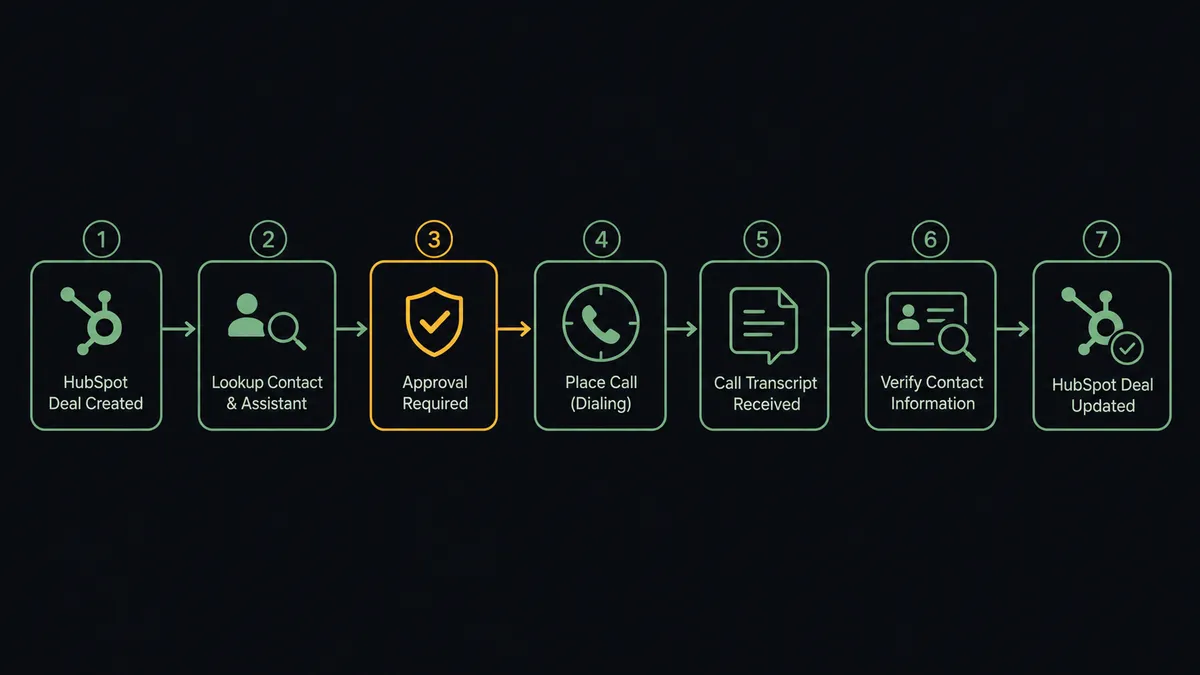
A deal entering the pipeline stage your team marks as ready to call is what starts the connection: the agent pulls the contact’s phone number from HubSpot, dials with Vapi’s Create Call, and once Get Call returns the transcript and outcome, writes it back to the deal with Update Deal and Associate Objects. FlowRunner is a visual AI-agent orchestration platform where automations run autonomously and pause for human judgment on the steps that carry real consequence. The same connection can run as a simple two-step sync, or upgrade to an AI agent that reads each deal, decides how to stage the call, and pauses for a manager’s approval before a single number gets dialed.
Why do outbound calls and CRM updates fall apart without this connection?
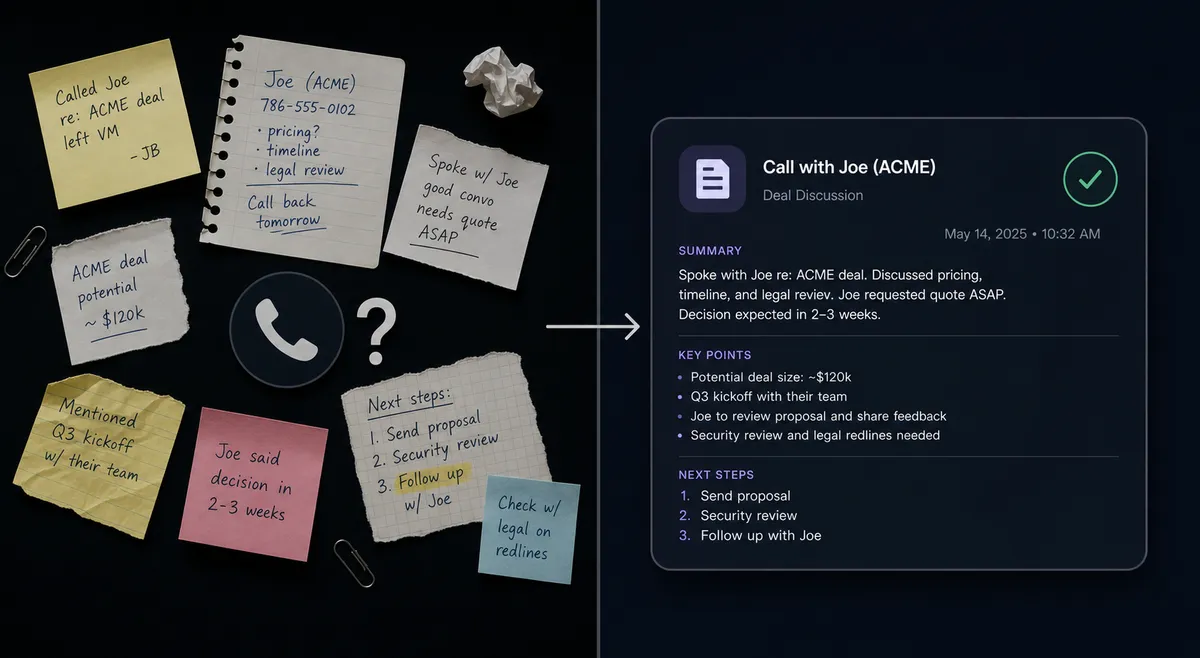
A qualified lead lands in HubSpot and then sits. The rep who should call it is on another account, in a meeting, or working a different list entirely. By the time someone dials, the lead has cooled, and there is no record beyond whatever the rep types into a note field afterward, if they remember to. Sales managers end up reconstructing what happened on a call from a Slack message or a half-remembered summary in a stand-up.
The CRM side has its own version of the same problem. Nobody wants to be the person who created a duplicate contact because they didn’t check first, but checking by hand for every inbound lead is exactly the kind of manual step that gets skipped when the queue is long. Deal stages drift out of date because updating them after every call competes with actually making the next call. The result is a pipeline that looks stale even when the team is working it hard, and a sales manager with no reliable way to see which leads fell through the cracks versus which ones just haven’t been touched yet.
How does the connection actually work?
The trigger is a deal moving into the stage your team uses to mean “this one is ready for outbound,” or a fresh lead that needs a first call. From there, the agent pulls the contact and deal record from HubSpot with Get Contact by ID and Get Deal by ID, gets the phone number and time zone, and resolves which Vapi assistant should run the call with List Assistants, confirming the script and voice version match what the team expects for that segment.
Once the call list is staged, Create Call handles a single dial and Create Campaign handles a batch, both scheduled inside each lead’s local calling window rather than firing all at once. As each call wraps, Get Call pulls the full record back: status, cost, ended reason, the transcript, the recording URL, and a structured success evaluation. That’s the raw material the agent uses to update HubSpot. It calls Get Contact by Email first to confirm it has the right record, then runs Update Deal to log the outcome and move the stage, and Associate Objects to make sure the call ties back to the correct contact and company.
Can an AI agent run it, and why keep a human in the loop?
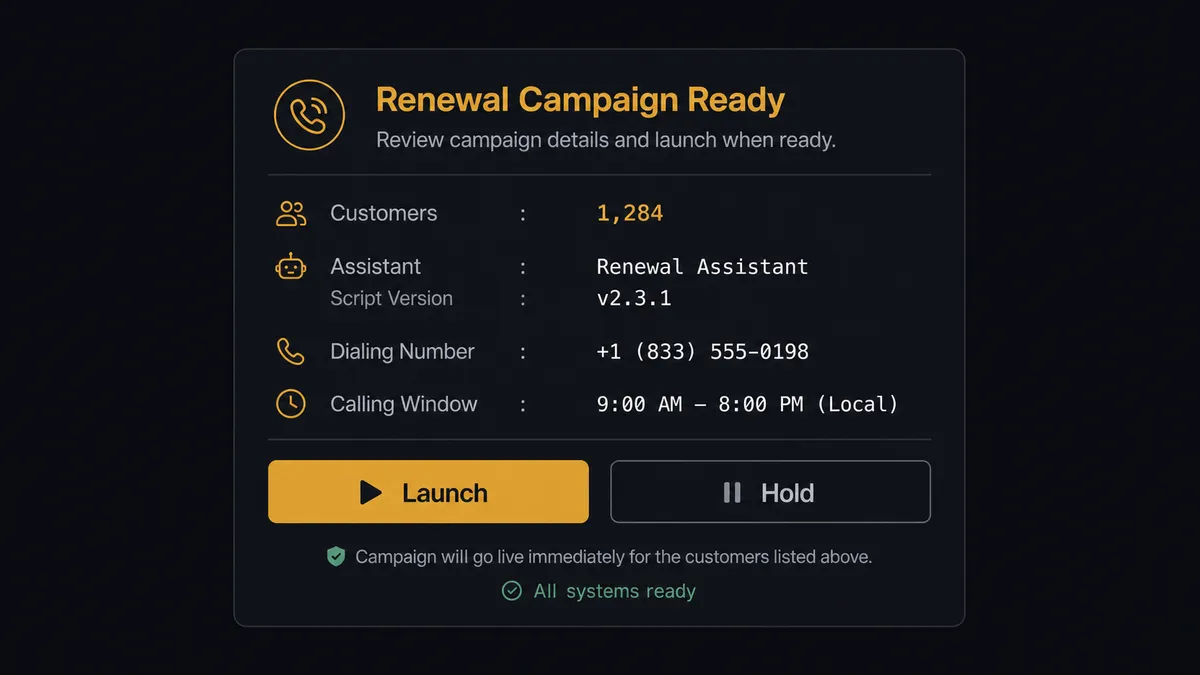
Yes, and the difference from a plain sync is what the agent does at the two points that actually carry weight. The first is the launch itself. A placed call cannot be un-placed, so the agent never dials on its own judgment alone. It assembles everything a manager needs to evaluate the batch: how many leads, which assistant and script version, the dialing number, the calling window. Then it stops and asks. A real version of that message reads: “Renewal campaign ready: 412 customers, assistant ‘Renewals v3,’ dialing from the main outbound number between 10:00 and 16:00 local. Launch, edit the list, or hold?” Nothing dials until someone answers, and the manager keeps a working brake for the whole run. If early transcripts show a script problem or the voicemail rate spikes, Update Campaign with status set to Ended stops the run immediately. Calls already placed stay in history; the rest never happen.
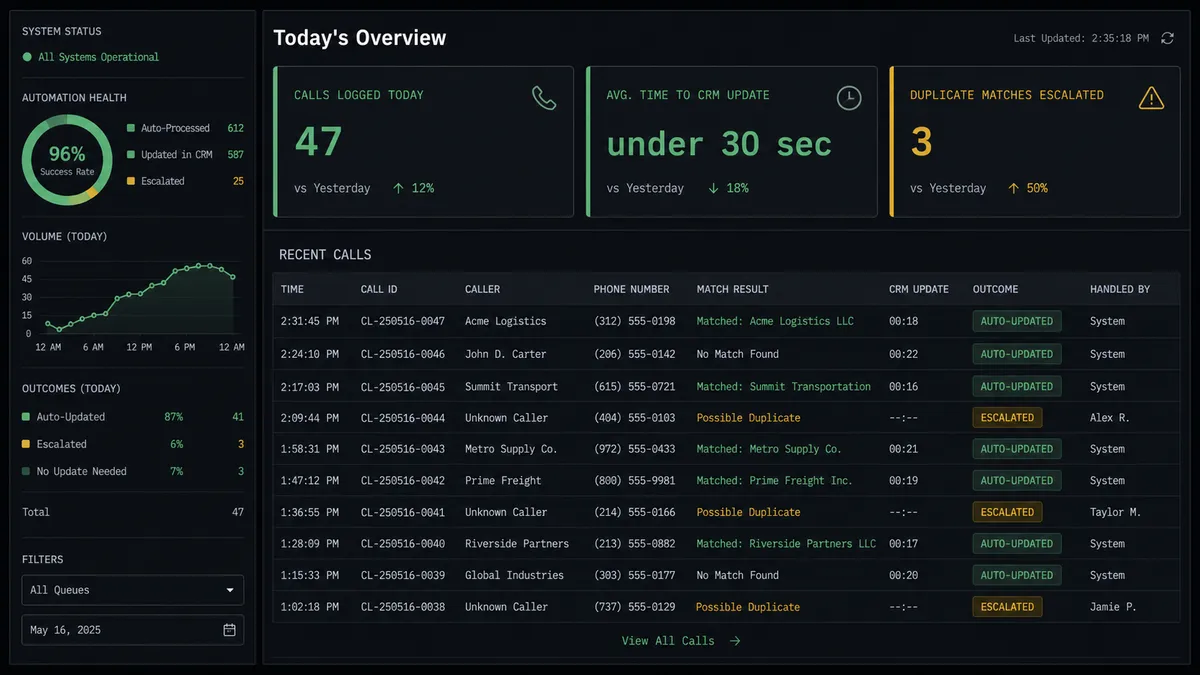
The second point is the write-back. Before the agent updates any HubSpot record, it checks for ambiguity. If Get Contact by Email turns up more than one plausible match, or the deal’s owner assignment looks inconsistent with the call, the agent doesn’t pick one and move on. It pauses and routes the decision to a CRM admin: “I found two contacts matching this email. Which should I associate this deal with?” The admin decides, the agent associates the record and documents who made the call, and the decision lands in the audit trail with a timestamp. This is not a sync tool guessing its way through edge cases. The agent knows when to stop and ask, on both the dialing side and the data side, which prospects sometimes call a digital andon cord: the line stops the moment something needs a human.
FlowRunner vs Zapier: what’s different for calling and CRM workflows?
Zapier is a fair comparison here because most HubSpot-heavy sales teams already have it wired into something. It’s genuinely easy to set up a single-step zap, has a huge library of pre-built app connections, and most ops leads can build a basic trigger-to-action flow without engineering help. Where it runs out of room is exactly the two moments described above: staging a call list for approval and pausing a write-back on ambiguous data both require conditional logic and human decision points that Zapier’s linear zap model isn’t built to hold.
| What matters for this pair | FlowRunner | Zapier |
|---|---|---|
| Human approval before a batch of calls dials | Native: agent stages the list and waits for a manager’s decision | Requires custom filters and a separate app for approvals |
| Pausing a write-back on a duplicate contact match | Native: agent detects ambiguity and routes to a CRM admin | No built-in ambiguity detection; writes proceed or fail silently |
| Users on the plan | Unlimited on every tier | Priced per user on most plans |
| Bring-your-own AI key | Yes, connect the provider account you already have | Limited to Zapier’s own AI credit system on most tiers |
| Self-hosting option | Free Community Edition, Enterprise for multi-instance | Not available |
| Pricing model | Transparent workflow-based tiers with clear execution limits | Per-task pricing that scales less predictably with call volume |
Before and after: what changes when Vapi and HubSpot are connected
| What changes | Before | After |
|---|---|---|
| Time to first call | Leads wait for a rep to find an open hour to dial | Calls launch inside each lead’s local window the moment a manager approves the list |
| Record of what was said | Call notes live in rep shorthand, if they get logged at all | Every deal gets Get Call’s transcript, recording link, and success evaluation attached automatically |
| Duplicate contacts | No systematic check before creating a new record | Agent checks Get Contact by Email before writing anything, and pauses on any match |
| Who controls a launch | Whoever uploads the list decides who gets dialed, and when | No batch dials until a manager approves the list, script, and window |
| Deal stage accuracy | Deal progression updates only when a rep remembers to touch it | Stage updates automatically from the call outcome the moment Get Call returns |
What can you build with Vapi and HubSpot together?
Stalled-deal recovery calls. Every Friday, the agent queries HubSpot for deals sitting in Negotiation for 14 days with no update, stages a call list for those accounts, and gets manager sign-off before Create Call dials the owner-of-record contact for each one.
Inbound-to-outbound handoff. A new contact and deal get created from a website form, and the same agent that opened the record stages the first outbound call with the right assistant, so the lead’s first touch is a phone call inside minutes of filling out the form rather than an email that sits unread.
Renewal campaigns with a working brake. Create Campaign stages a full renewal list against a schedule window and holds for approval; once launched, the agent watches Get Campaign counters, and Update Campaign with status Ended stops the run the moment something looks wrong.
After-hours call routing tied to CRM ownership. Update Phone Number re-points inbound calls to a voicemail-taking assistant after hours, and the morning flow files each transcript onto the matching HubSpot contact so the owning rep sees it before their first meeting.
Common questions about connecting Vapi and HubSpot
Is it free to connect Vapi and HubSpot on FlowRunner? Connecting the two costs nothing to set up. FlowRunner has a free plan with 100 executions a month, every integration included, and no credit card required, and new accounts get 14 days of Professional on top.
Can I self-host this workflow instead of running it in FlowRunner’s cloud? Yes. The Community Edition is free for a single self-hosted instance, and the Enterprise tier adds multi-instance clustering plus full audit retention for teams that need call and CRM data to stay on their own infrastructure.
Does the agent need my own OpenAI key to run this? FlowRunner uses a bring-your-own-key model for AI providers, so you connect the model account you already pay for rather than routing usage through a shared FlowRunner-owned key.
What happens when the agent finds two HubSpot contacts that could match a completed call? It does not guess. It pauses the workflow, sends the CRM admin a Slack message naming both matching contacts, and waits for a decision before it writes the call summary or creates any association.
Can the agent start dialing a list of HubSpot leads without anyone approving it first? No. Every Create Call or Create Campaign launch in this connection is staged for a manager’s approval first; the agent assembles the list, script, and calling window, but a person clears the launch before the first ring.
Does this only work with HubSpot deals, or can it write back to contacts and companies too? It can write to any of the three. Associate Objects links a call outcome to a contact, a company, or a deal, so the same call can update deal stage, contact lifecycle stage, and account notes in a single pass.
Getting started
Connecting Vapi and HubSpot takes a trial account and a few minutes of mapping, not an engineering ticket. Start on the free plan: 100 executions a month, every integration included, no credit card required, plus 14 days of Professional for new accounts. Review the Vapi integration and HubSpot integration pages for the full action list, then build the connection directly at flowrunner.ai. If you’d rather walk through the approval and write-back logic with someone first, book time at calendly.com/flowrunner/intro.
Frequently asked questions
Is it free to connect Vapi and HubSpot on FlowRunner?
Connecting the two costs nothing to set up. FlowRunner has a free plan with 100 executions a month, every integration included, and no credit card required, and new accounts get 14 days of Professional on top.
Can I self-host this workflow instead of running it in FlowRunner's cloud?
Yes. The Community Edition is free for a single self-hosted instance, and the Enterprise tier adds multi-instance clustering plus full audit retention for teams that need call and CRM data to stay on their own infrastructure.
Does the agent need my own OpenAI key to run this?
FlowRunner uses a bring-your-own-key model for AI providers, so you connect the model account you already pay for rather than routing usage through a shared FlowRunner-owned key.
What happens when the agent finds two HubSpot contacts that could match a completed call?
It does not guess. It pauses the workflow, sends the CRM admin a Slack message naming both matching contacts, and waits for a decision before it writes the call summary or creates any association.
Can the agent start dialing a list of HubSpot leads without anyone approving it first?
No. Every Create Call or Create Campaign launch in this connection is staged for a manager's approval first; the agent assembles the list, script, and calling window, but a person clears the launch before the first ring.
Does this only work with HubSpot deals, or can it write back to contacts and companies too?
It can write to any of the three. Associate Objects links a call outcome to a contact, a company, or a deal, so the same call can update deal stage, contact lifecycle stage, and account notes in a single pass.