Stripe Zoho Books Integration: Payments Reconciled Live
Connect Stripe and Zoho Books so every successful payment closes the matching invoice automatically, optionally as an AI agent that pauses for a human before a refund goes out.
How do you connect Stripe to Zoho Books?
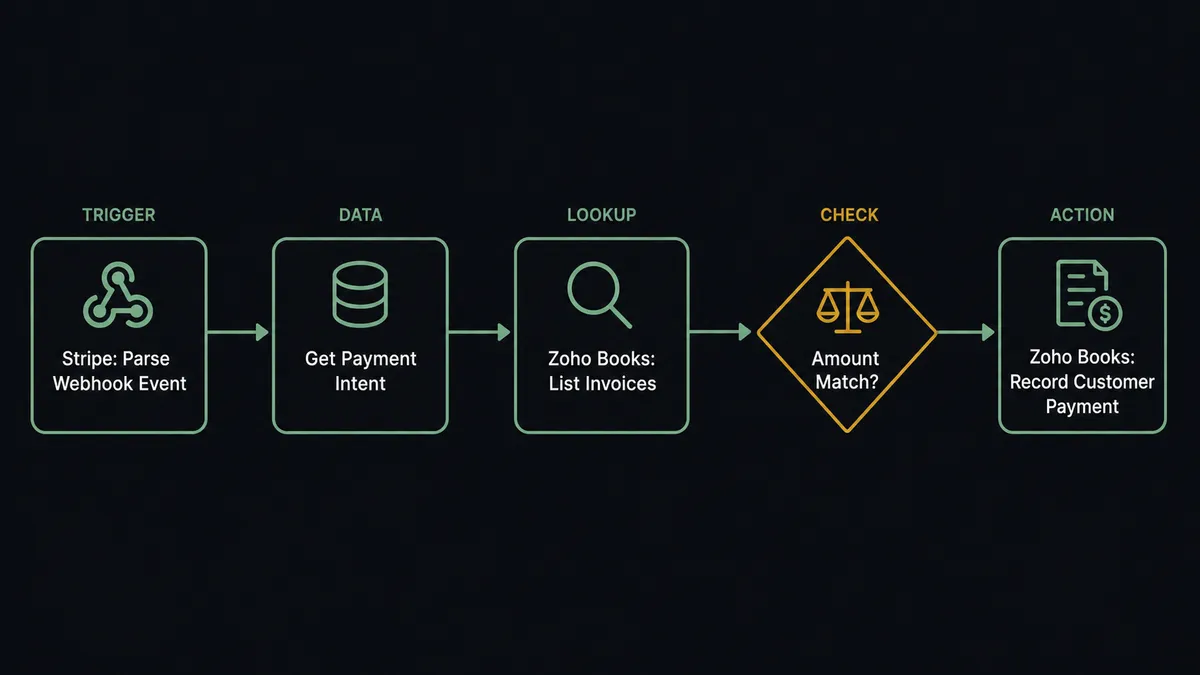
Stripe’s Parse Webhook Event trigger fires the moment a payment succeeds, and FlowRunner uses that event to call Record Customer Payment in Zoho Books, applying the payment against the matching open invoice automatically. FlowRunner is a visual AI-agent orchestration platform where automations run autonomously and pause for human judgment on the steps that carry real consequence. The same connection can run as an AI agent that reads the payment, checks it against Zoho Books’ invoice data, and pauses for a human before a refund over $500 goes out or before a payment with no clean match gets recorded blind.
The problem it solves
Right now, someone on your finance team is opening Stripe every day to see what came in, then logging into Zoho Books to find the matching invoice and mark it paid. On a good day that is quick. On a normal day, a payment does not line up cleanly with an invoice amount, a customer paid twice, or a subscription payment landed against the wrong account, and the whole process stalls while someone digs through both systems by hand. AR sits open longer than it should, not because the money did not arrive, but because nobody has recorded it yet.
Refunds make it worse. A refund gets processed in Stripe and the reversal in Zoho Books happens whenever someone remembers to do it, sometimes a full billing cycle later. Your books show a customer still owing money they were already refunded. These are not rare exceptions. They are what a billing manager’s Tuesday actually looks like: a spreadsheet of Stripe payment IDs, a second tab of Zoho Books invoice numbers, and a manual match between the two that has to happen before month-end close can start.
How it works: the connection
FlowRunner listens to Stripe through the Parse Webhook Event trigger, which covers every Stripe event type from a single connection: payment success, payment failure, refund requested, dispute opened. When a payment succeeds, the agent calls Get Payment Intent to confirm the amount, the customer, and any metadata carried on the charge.
With that confirmed, the agent calls List Invoices in Zoho Books, filtered by the matching customer, to find the open invoice the payment is meant to close. This is where the two systems actually meet: Stripe knows the money moved, Zoho Books knows what it was owed for, and the agent is the thing that connects the two records instead of a person doing it from memory.
Once the agent confirms the Stripe payment amount matches the Zoho Books invoice total, it calls Record Customer Payment, which applies the payment against that invoice and updates the customer’s outstanding balance. The invoice status moves from open to paid without anyone touching Zoho Books directly. On the refund side, when Stripe’s Parse Webhook Event fires on a refund, the agent calls Get Refund for the amount and reason, then prepares to reverse the corresponding record in Zoho Books using Create Credit Note and Apply Credit Note To Invoices.
Can an AI agent run it? (and why a human stays in the loop)
A rule-based sync connects the trigger to the action and stops. It records whatever Stripe sends, however it lines up. An AI agent reads the payment data, reasons about what it means against the current state of Zoho Books, and decides what to do next. That distinction is the whole difference on the exceptions, which is where the real risk in payment reconciliation lives.
On a routine payment, the agent finds a clean match between the Stripe amount and an open Zoho Books invoice and records it without asking anyone. But when the amount does not match any open invoice, the agent does not force a match or skip the payment silently. It pauses and invokes a human-in-loop flow as a callable tool, routing the exception to the billing manager through Slack: “Stripe payment of [amount] from [customer] does not match any open invoice. Closest candidates: [invoice list]. Apply to one, hold, or flag as unearned revenue?” The billing manager decides. The agent records exactly what was approved.
Refunds get the same treatment, built on the threshold Stripe’s own human-in-loop pattern defines: any refund over $500 pauses the workflow before it reaches Zoho Books. The agent packages the refund reason, the customer’s payment history, and the original invoice reference, and sends it to the billing manager for a one-click approval or modification. This is not a fixed rule applied the same way every time regardless of context. A $50 refund on a subscription downgrade goes through without a second look. A $2,000 refund on an account with no dispute history gets the same threshold check, and the agent’s reasoning is what decides whether the case warrants escalation in the first place, not just the dollar figure. Every decision, the approver’s identity, and the timestamp land in the audit trail.
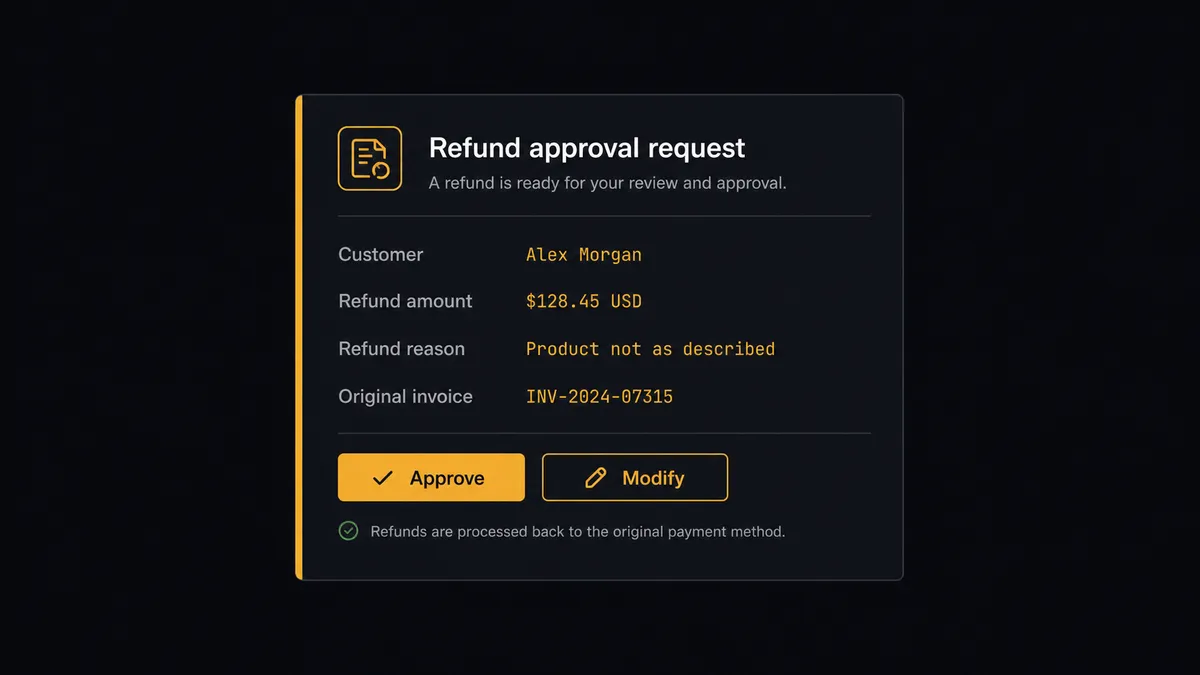
This is what prospects call a “digital andon cord.” The agent stops the line when it hits a step that carries real consequence: money reversing out of the business, or a payment with no clear home. It does not just execute. It knows when to ask.
FlowRunner vs the tool you’re probably comparing
If you built this connection on Zapier, you have a trigger that fires on a Stripe payment and an action that creates a record in Zoho Books. That works for the clean case. It has no native way to check whether the amount actually matches an open invoice before recording it, and no native way to hold a refund for approval; both require bolting on a separate tool and wiring the logic yourself. Zapier is genuinely fast to set up for a single-path connection, and its Zoho Books and Stripe apps cover the basic create and update actions well.
Where the two diverge is everything past the happy path:
| Feature | Zapier | FlowRunner |
|---|---|---|
| Basic payment-to-invoice sync | Yes, fast to set up | Yes, same speed |
| Invoice match validation before recording | Not native | Agent checks the amount against open invoices before acting |
| Native refund approval step | Not native (requires manual Slack wiring) | Native callable tool; agent invokes it by judgment against a $500 threshold |
| Audit trail of approvals | No | Yes; approver identity and timestamp captured |
| Unlimited users on every tier | No (seat-based pricing) | Yes |
| Bring your own AI keys | No | Yes (BYOK model) |
Before and after
| Category | Before | After |
|---|---|---|
| Payment recording | Finance staff check the Stripe dashboard and manually record each payment in Zoho Books | Record Customer Payment applies each Stripe payment to the matching invoice the moment it clears |
| AR visibility | Invoices stay open until someone runs a manual reconciliation pass | On Payment Created and Parse Webhook Event react in real time, so AR reflects the true state within seconds |
| Mismatched payments | A payment that does not line up cleanly gets set aside in a spreadsheet until someone investigates | The agent flags the mismatch immediately and routes it to the billing manager with the closest candidate invoices |
| Refund reversal | Refunds get reversed in Zoho Books whenever someone remembers, sometimes a full billing cycle later | Refunds over $500 route to the billing manager for approval before the credit note is created |
| Month-end close | Close is delayed while the team hand-matches Stripe payments against open Zoho Books invoices | Payments are matched at the moment they arrive, so close starts with AR already current |
What you can build
Payment-to-invoice auto-close. Parse Webhook Event fires on payment success. The agent calls Get Payment Intent and List Invoices, then Record Customer Payment closes the matching invoice. AR reflects reality within seconds of the charge clearing.
Refund reconciliation with approval gate. A refund is processed in Stripe. The agent calls Get Refund, checks the amount against the $500 threshold, and either reverses the balance directly with Create Credit Note or routes to the billing manager first.
Vendor bill capture alongside customer payments. The same agent uses Create Bill in Zoho Books to record vendor payables from parsed documents, holding anything above a set amount for a controller before it is marked open. Receivables and payables run through one coordination layer instead of two disconnected habits.
New customer provisioning to first invoice. A deal closes in your CRM. The agent calls Create Customer and Create Subscription in Stripe, then Create Invoice in Zoho Books, so the customer is billed and their Zoho Books record exists before anyone touches either platform manually.
Estimate-to-cash tracking. When Zoho Books’ On Estimate Accepted trigger fires, the agent calls Convert Estimate To Invoice, then watches for the matching Stripe payment to close the loop with Record Customer Payment, giving the sales and finance teams a single thread from quote to cash.
Common questions
Is it free to connect Stripe and Zoho Books on FlowRunner? FlowRunner has a free plan with 100 executions a month, every integration included, and no credit card required, and new accounts get 14 days of Professional on top. Growth is $45 per month and includes unlimited users, unlimited workflows, and full access to both the Stripe and Zoho Books connectors.
Can I self-host the Stripe and Zoho Books connection? Yes. FlowRunner offers a self-hosted Community Edition at no cost and an Enterprise self-hosted option with multi-instance clustering and a full compliance suite. Both run the same connector library as the cloud-hosted tiers.
Does the AI agent need my own API keys for Stripe and Zoho Books? Yes. FlowRunner uses a bring-your-own-keys model. You connect your own Stripe secret key and your own Zoho Books OAuth credentials, and BYOK applies to the AI provider behind the agent as well. Your credentials stay in your environment.
What happens when the agent can’t find a matching invoice in Zoho Books? The agent does not guess. If a Stripe payment does not match any open invoice returned by List Invoices, it pauses and routes the payment to the billing manager through Slack with the customer, the amount, and the closest candidate invoices, and waits for a decision before recording anything.
Can this workflow also record vendor bills, not just customer payments? Yes. Zoho Books’ Create Bill action lets the same agent capture vendor payables from parsed invoices. Bills above a threshold you set pause for a controller before they are marked open, the same human-in-loop pattern applied to money leaving the business instead of money coming in.
How is this different from Zoho Books’ built-in Stripe payment gateway? Zoho Books’ native Stripe gateway lets customers pay a Zoho invoice through Stripe checkout. This connection is broader: it reconciles any Stripe payment, including subscriptions and charges that never touch a Zoho-hosted invoice page, and it adds an agent that reasons about mismatches and refunds instead of only recording a clean one-to-one payment.
Getting started
FlowRunner has a free plan with 100 executions a month, every integration included, and no credit card required, and new accounts get 14 days of Professional on top. Every tier includes unlimited users and unlimited workflows.
Both connectors are ready to use:
Start building at flowrunner.ai or book a 30-minute walkthrough at calendly.com/flowrunner/intro.
Frequently asked questions
Is it free to connect Stripe and Zoho Books on FlowRunner?
FlowRunner has a free plan with 100 executions a month, every integration included, and no credit card required, and new accounts get 14 days of Professional on top. Growth is $45 per month and includes unlimited users, unlimited workflows, and full access to both the Stripe and Zoho Books connectors.
Can I self-host the Stripe and Zoho Books connection?
Yes. FlowRunner offers a self-hosted Community Edition at no cost and an Enterprise self-hosted option with multi-instance clustering and a full compliance suite. Both run the same connector library as the cloud-hosted tiers.
Does the AI agent need my own API keys for Stripe and Zoho Books?
Yes. FlowRunner uses a bring-your-own-keys model. You connect your own Stripe secret key and your own Zoho Books OAuth credentials, and BYOK applies to the AI provider behind the agent as well. Your credentials stay in your environment.
What happens when the agent can't find a matching invoice in Zoho Books?
The agent does not guess. If a Stripe payment does not match any open invoice returned by List Invoices, it pauses and routes the payment to the billing manager through Slack with the customer, the amount, and the closest candidate invoices, and waits for a decision before recording anything.
Can this workflow also record vendor bills, not just customer payments?
Yes. Zoho Books' Create Bill action lets the same agent capture vendor payables from parsed invoices. Bills above a threshold you set pause for a controller before they are marked open, the same human-in-loop pattern applied to money leaving the business instead of money coming in.
How is this different from Zoho Books' built-in Stripe payment gateway?
Zoho Books' native Stripe gateway lets customers pay a Zoho invoice through Stripe checkout. This connection is broader: it reconciles any Stripe payment, including subscriptions and charges that never touch a Zoho-hosted invoice page, and it adds an agent that reasons about mismatches and refunds instead of only recording a clean one-to-one payment.