How to Connect Stripe with Salesforce Pro (With or Without an AI Agent)
Connect Stripe payment events to Salesforce Pro CRM records automatically, and optionally run the connection as an AI agent that pauses for human approval on refunds, large transactions, and lead conversions.
How do you connect Stripe to Salesforce Pro?
You connect Stripe to Salesforce Pro by using Stripe’s Parse Webhook Event trigger to fire a flow whenever a payment event occurs, then using Salesforce Pro actions such as Create Record, Update Record, Create Lead, or Convert Lead to Contact to write the result into your CRM. FlowRunner is a visual AI-agent orchestration platform where automations run autonomously and pause for human judgment on the steps that carry real consequence. The same connection can run as an AI agent that reads the payment data, reasons about it, and invokes a human-in-loop flow before posting a refund or converting a lead in Salesforce.
The problem it solves
Revenue data and CRM data live in separate systems, and the gap between them costs time every day. When a Stripe subscription payment fails, someone on the billing team has to check the Stripe dashboard, figure out the failure reason, and decide what to do. When a new opportunity closes in Salesforce, someone has to log into Stripe and create the customer, the subscription, and the invoice. Neither of these steps is difficult, but both require a person to stop what they are doing, switch contexts, and handle a task that follows a predictable logic every time.
The exceptions are where things fall through the cracks. A chargeback dispute opens and the 7-day response window starts. A payment fails on an account that has been flagged for a billing dispute. A lead converts in Salesforce before anyone checks whether the customer’s payment method on file is still valid. These are not edge cases. They are routine moments that carry real financial and legal weight, and they demand more than a spreadsheet and a daily dashboard check.
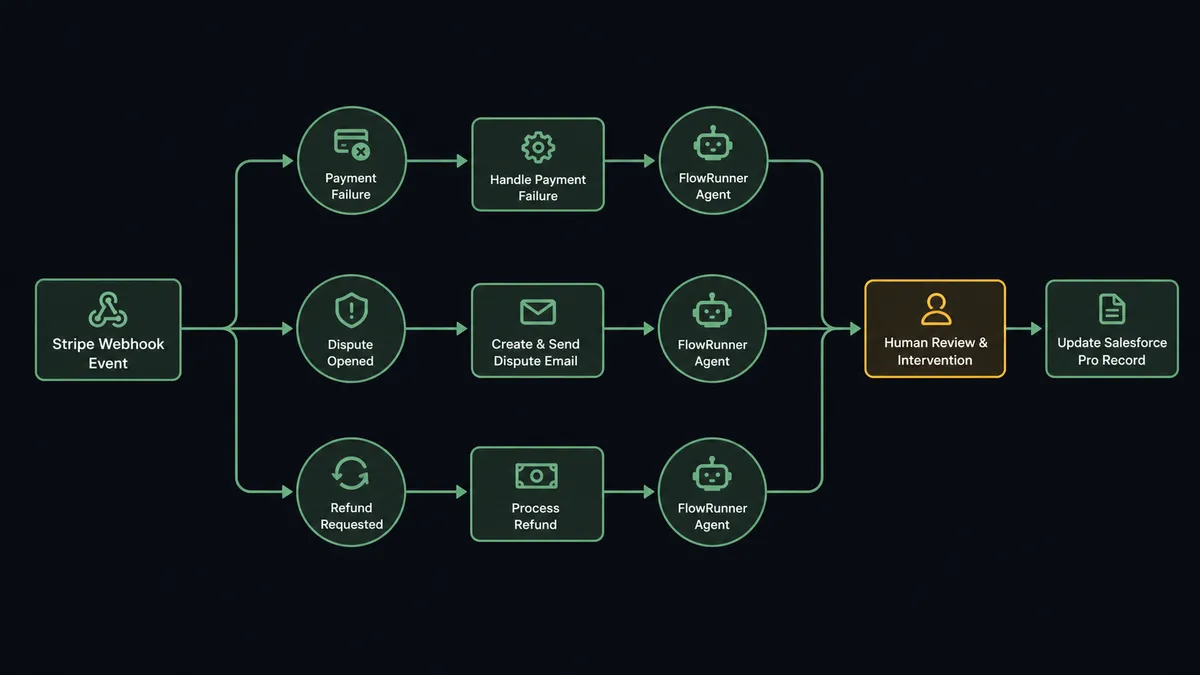
How it works: the connection
Stripe’s single trigger, Parse Webhook Event, covers the full spectrum of payment activity. Every event type you care about, including payment success, payment failure, subscription canceled, dispute opened, and refund requested, routes through the same trigger and carries the full event payload.
On the Salesforce Pro side, the agent has 25 actions available as tools. The common ones for this integration:
- Find Record or Find Record by Query: The agent looks up the Salesforce contact, account, or opportunity tied to the Stripe customer ID before taking action.
- Update Record: The agent updates billing status, flags, or custom fields on the Salesforce record to reflect what just happened in Stripe.
- Create Note or Create Enhanced Note: The agent logs the Stripe event details directly into the Salesforce activity timeline, so the sales or account management team has a full picture without logging into Stripe.
- Create Record: For new Stripe customers with no CRM match, the agent creates the Salesforce record from the Stripe payload.
- Convert Lead to Contact: When a payment confirms a qualified buyer, the agent converts the Salesforce lead and creates the associated opportunity.
- Send Email: The agent sends a Salesforce-tracked email from the record when a payment confirmation or failure notice should appear in the activity timeline.
A basic configuration looks like this: the Parse Webhook Event trigger fires, the agent uses Find Record by Query to locate the matching Salesforce contact or lead, then updates the record and logs a note. No manual logging. No Stripe dashboard check. The CRM stays current automatically.
Can an AI agent run it? (And why a human stays in the loop)
The plain connection is useful. The agent upgrade is where the work actually changes.
A standard Stripe-to-Salesforce Pro sync fires the same action every time. A payment fails, the record updates. A dispute opens, a note is created. The agent version reads the data and decides. It evaluates the failure reason. It checks the customer’s history. It looks at the amount, the account stage, the number of prior failures. Then it decides which tools to use and in what order.
This is not a sync tool. The agent knows when to stop and ask.
Here is a specific decision moment: a refund request arrives for $2,400 from an account that has been a customer for 14 months with a clean payment history. The agent looks at the Stripe customer record, finds the related Salesforce Pro account, checks the opportunity value and the account health fields. A routine refund on a healthy account. The agent processes it automatically.
The same amount arrives from an account that opened 18 days ago, has never made a successful payment, and whose Salesforce Pro record shows a deal that closed under unusual terms. The agent recognizes this does not match the pattern. It does not process the refund. It invokes the human-in-loop subflow.
The billing manager receives a Slack message: “Refund request of $2,400 from [Company]. Account is 18 days old. No prior successful payments. Opportunity notes flag as non-standard deal terms. Approve refund, deny, or escalate to finance?” One click. The agent acts on the decision. The approval, the manager’s identity, and the timestamp are captured in the audit trail.
This is the digital andon cord: the agent stops the line when it hits something uncertain, gets a human decision, and resumes with that decision as input.
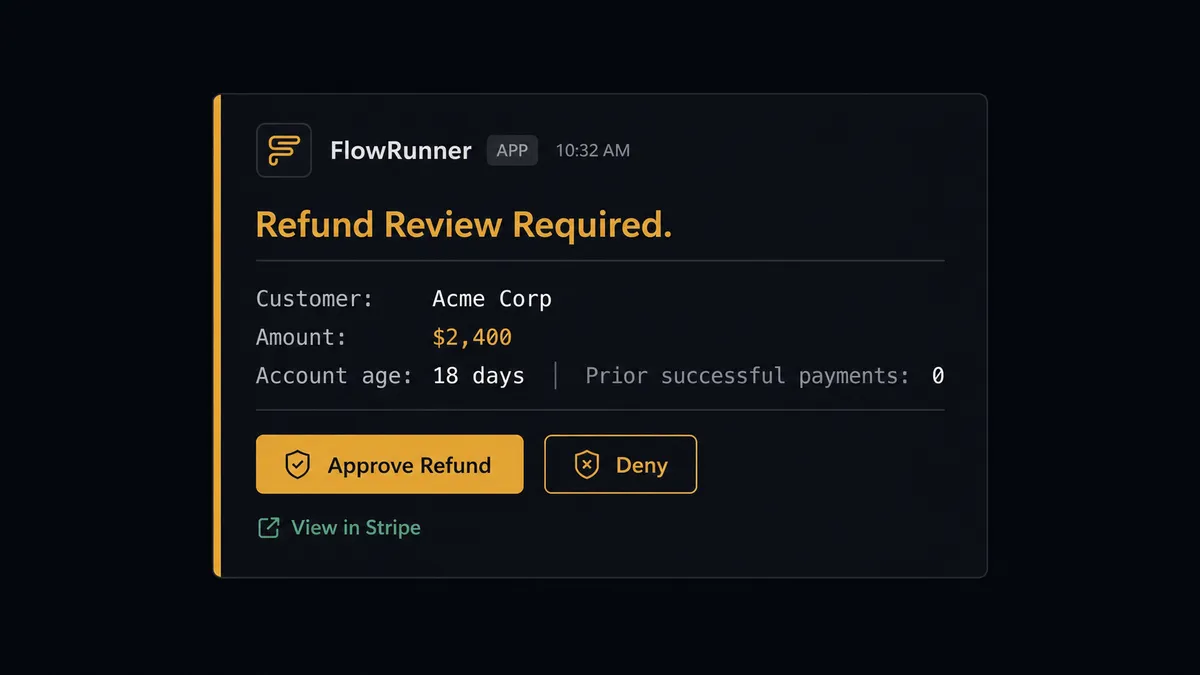
The same logic applies on the Salesforce Pro side. Lead conversion is irreversible. Before executing Convert Lead to Contact, the agent pauses and routes the conversion request to the sales manager: “Lead [Name] at [Company] has a valid payment method on file in Stripe. Ready to convert to contact and opportunity. Confirm or reassign?” The manager approves in one click. The agent converts. No phantom conversions, no territory disputes.
FlowRunner vs the tool you are probably comparing
For teams that already use Zapier to connect Stripe and Salesforce, the comparison is worth making honestly.
Zapier does the basic connection well. It is fast to set up, the Stripe and Salesforce integrations are mature, and for simple trigger-and-action flows it is reliable. If you need a payment to log a note in Salesforce and nothing more, Zapier handles that.
The differences show up when the workflow gets more complex.
| Capability | Zapier | FlowRunner |
|---|---|---|
| Human-in-loop | Not available natively; requires external tools | Native. The agent invokes a human-approval flow as a callable tool, with full context, one-click response, and audit log |
| Agent decision-making | Sequential, rule-based steps | AI Agent node reads data, reasons, picks tools, and decides. Not a fixed sequence |
| SOQL queries | Not available in standard Salesforce integration | Available via Find Record by Query and Find Records by Query and Custom SOQL Query |
| Unlimited users | Priced per team member on most plans | All FlowRunner tiers include unlimited users |
| Self-host option | Not available | Community Edition (free) and Enterprise self-hosted available |
| BYOK for AI | Not applicable | Bring your own keys for any AI provider |
For technical teams comparing n8n: n8n has a strong Stripe integration and supports complex multi-step flows. It does not have native human-in-loop as an agent-callable tool, and compliance features (audit trails, RBAC, SSO) require Enterprise pricing. FlowRunner includes audit trails and RBAC starting at the Professional tier ($299 per month).
Before and after
| Category | Before | After |
|---|---|---|
| Payment failure handling | Billing staff check Stripe dashboard daily and handle each failure manually | Agent routes failures automatically by reason: expired card gets update email, insufficient funds gets retry sequence |
| CRM record accuracy | Salesforce records updated manually when billing team remembers | Every Stripe event updates the related Salesforce Pro record within seconds |
| Refund approval | Finance team approves refunds via email thread; no audit record of who decided | Agent routes refunds over threshold to billing manager via Slack; approval logged with identity and timestamp |
| Lead conversion timing | Reps convert leads at different points; no payment verification step | Agent verifies Stripe customer status before converting; manager approves conversion with one click |
| Dispute evidence assembly | 2-3 hours of manual record pulling for chargeback responses | Agent compiles order records, emails, and Salesforce notes into evidence package automatically |
| Billing status visibility | Sales team logs into Stripe separately to check payment status | Payment status, notes, and event history written directly to the Salesforce Pro activity timeline |
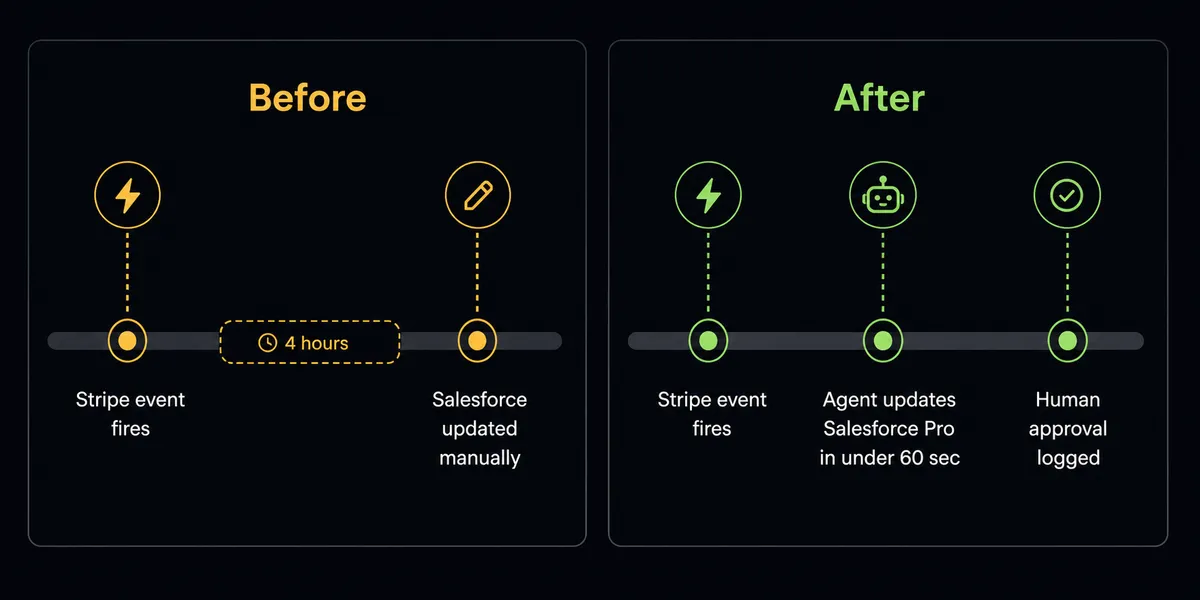
What you can build
Subscription cancellation with CRM update and save attempt. When a Stripe subscription canceled event fires, the agent finds the Salesforce Pro opportunity, updates the stage to Churned, creates a note with the cancellation reason, and checks whether a save attempt flow should run before the cancellation is finalized. If account health data suggests the customer is recoverable, the agent routes to an account manager for a retention call.
New deal close to Stripe provisioning. A Salesforce Pro opportunity moves to Closed Won. A connected trigger fires a FlowRunner agent that creates the Stripe customer record, creates the subscription, generates and finalizes the invoice, sends it, and posts a confirmation note to the Salesforce Pro activity timeline. The customer is billed and the CRM record reflects the billing setup without anyone touching Stripe manually.
Dispute response with evidence from Salesforce. Parse Webhook Event fires on a dispute opened event. The agent retrieves the original charge details from Stripe, then uses Find Record by Query to pull the related Salesforce Pro opportunity, contact, and file attachments. It assembles the evidence package and uploads it to the Stripe dispute. If any record is missing or the timeline is unclear, the agent routes to the billing team with the context before submitting.
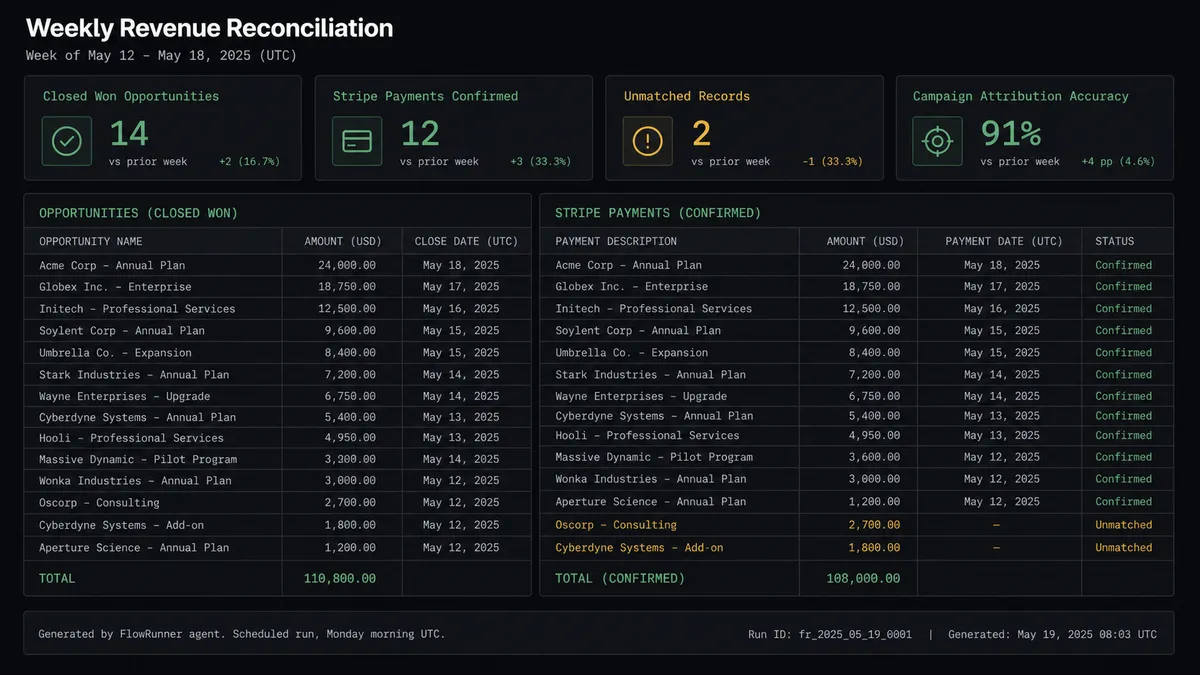
Weekly revenue attribution from Salesforce SOQL. On a scheduled trigger, an agent runs a Custom SOQL Query against closed Salesforce Pro opportunities to pull campaign attribution data, cross-references with Stripe payment records to verify actual revenue, and posts the reconciled attribution report to the revenue ops Slack channel. No spreadsheets, no manual query runs.
Refund approval queue with CRM context. All Stripe refund requests above a set amount route to an agent that retrieves the customer’s Salesforce Pro account history, payment record, and open opportunities before making a recommendation. Routine refunds from long-term accounts process automatically. Unusual refunds from new accounts or accounts with open disputes go to the billing manager with the full CRM and Stripe context in one Slack card.
Common questions
Is it free to connect Stripe and Salesforce Pro on FlowRunner? FlowRunner has a free plan with 100 executions a month, every integration included, and no credit card required, and new accounts get 14 days of Professional on top. No credit card is required to start. The Growth tier is $45 per month beyond the free plan, and all tiers include unlimited users and workflows.
Can I self-host FlowRunner for this integration? Yes. FlowRunner offers a self-hosted Community Edition at no cost and an Enterprise self-hosted option with multi-instance clustering and full compliance features. The Stripe and Salesforce Pro connectors work the same way in both cloud and self-hosted deployments.
Does the AI agent need my own OpenAI or AI provider key? FlowRunner uses a bring-your-own-key (BYOK) model. You connect your own keys for whatever AI provider you use. FlowRunner orchestrates the agent; it does not bill you separately for model calls.
What happens when the agent is not sure what to do? The agent invokes a human-in-loop flow as a callable tool. It packages the full context, sends it to a human via Slack, email, or WhatsApp, and pauses until the human responds. The decision, the approver identity, and the timestamp are all recorded in the audit trail.
Does Salesforce Pro support webhooks or inbound triggers? The Salesforce Pro integration has 25 actions but no native trigger. In a Stripe-to-Salesforce Pro flow, Stripe’s Parse Webhook Event trigger fires the flow, and the agent uses Salesforce Pro actions to create or update CRM records downstream.
Can the agent handle both payment failures and lead conversion in the same workflow? Yes. A FlowRunner agent can manage multiple decision branches: route a failed payment to a dunning sequence and simultaneously update the related Salesforce Pro contact or opportunity record to reflect the billing status. The agent picks the right tools from its toolbox based on what the data shows.
Getting started
FlowRunner has a free plan with 100 executions a month, every integration included, and no credit card required, and new accounts get 14 days of Professional on top. Any real email address works; disposable domains are not accepted.
To build a Stripe-to-Salesforce Pro integration, connect both accounts in FlowRunner and choose your starting trigger from Stripe’s Parse Webhook Event. From there, you can build a simple sync in under 30 minutes or add an AI Agent node with human-in-loop for the steps that need oversight.
Start at flowrunner.ai or book an intro call at calendly.com/flowrunner/intro.
Integration pages: Stripe on FlowRunner and Salesforce Pro on FlowRunner.
Frequently asked questions
Is it free to connect Stripe and Salesforce Pro on FlowRunner?
FlowRunner has a free plan with 100 executions a month, every integration included, and no credit card required, and new accounts get 14 days of Professional on top. No credit card is required to start. The Growth tier is $45 per month beyond the free plan, and all tiers include unlimited users and workflows.
Can I self-host FlowRunner for this integration?
Yes. FlowRunner offers a self-hosted Community Edition at no cost and an Enterprise self-hosted option with multi-instance clustering and full compliance features. The Stripe and Salesforce Pro connectors work the same way in both cloud and self-hosted deployments.
Does the AI agent need my own OpenAI or AI provider key?
FlowRunner uses a bring-your-own-key (BYOK) model. You connect your own keys for whatever AI provider you use. FlowRunner orchestrates the agent; it does not bill you separately for model calls.
What happens when the agent is not sure what to do?
The agent invokes a human-in-loop flow as a callable tool. It packages the full context, sends it to a human via Slack, email, or WhatsApp, and pauses until the human responds. The decision, the approver identity, and the timestamp are all recorded in the audit trail.
Does Salesforce Pro support webhooks or inbound triggers?
The Salesforce Pro integration has 25 actions but no native trigger. In a Stripe-to-Salesforce Pro flow, Stripe's Parse Webhook Event trigger fires the flow, and the agent uses Salesforce Pro actions to create or update CRM records downstream.
Can the agent handle both payment failures and lead conversion in the same workflow?
Yes. A FlowRunner agent can manage multiple decision branches: route a failed payment to a dunning sequence and simultaneously update the related Salesforce Pro contact or opportunity record to reflect the billing status. The agent picks the right tools from its toolbox based on what the data shows.