How to Connect Stripe with Sage Intacct (With or Without an AI Agent)
Connect Stripe payment events to Sage Intacct's ledger so every charge, invoice, and refund posts automatically, with a human in the loop before money moves on exceptions.
How do you connect Stripe to Sage Intacct?
When a Stripe Parse Webhook Event fires on a payment, FlowRunner creates the corresponding record in Sage Intacct using Create Record or Submit an invoice, mapping the charge data directly to the ledger without manual re-entry. FlowRunner is a visual AI-agent orchestration platform where automations run autonomously and pause for human judgment on the steps that carry real consequence. The same connection can run as an AI agent that reads each transaction’s context, posts routine records automatically, and stops for a finance approver before it posts a disputed charge or an unusually large refund.
The problem it solves
Finance teams running Stripe alongside Sage Intacct face the same wall every payment period: Stripe knows what happened, Sage Intacct needs to know, and the path between them runs through a person. An AP clerk or billing manager opens the Stripe dashboard, reads off the charge, switches to Sage Intacct, and keys it in. Multiply that by dozens of transactions a day and you have an operation that is slow by design and wrong by probability. Mismatches fall through the cracks at month-end. Refunds approved in Stripe never make it to the ledger. Disputes land without evidence already assembled.
The problem compounds because not every transaction is the same. A $400 invoice from a ten-year vendor is not the same decision as a $12,000 refund from a customer the team has never seen. Treating them identically, by routing every transaction through the same manual queue, means either your people are buried in routine work or your controls on the high-stakes items are too thin. The spreadsheet that tracks what has and has not been posted is always one missed entry behind reality.
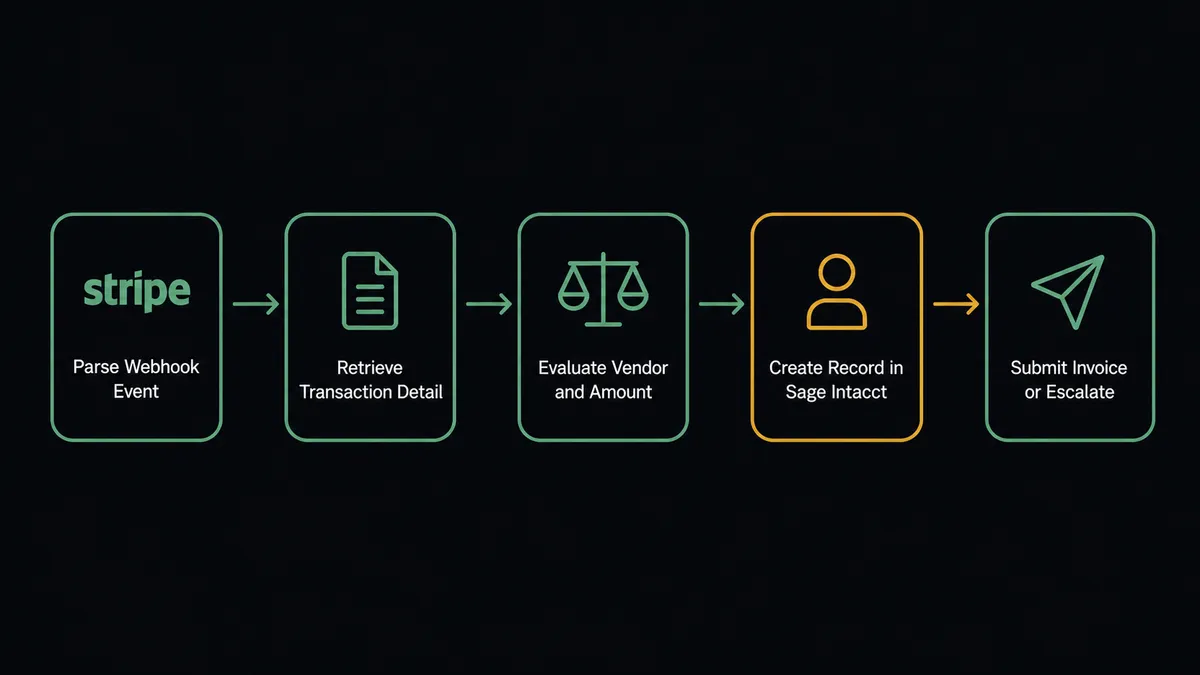
How it works: the connection
The Stripe connector has one trigger that covers everything: Parse Webhook Event. It fires on any Stripe event type, payment success, payment failure, invoice paid, dispute created, refund requested, subscription canceled, or any other event your Stripe account emits. When it fires, the agent receives the full event payload.
From there, the agent works the Sage Intacct side with a straightforward sequence. For a successful payment:
- The agent calls Get Record to check whether the Sage Intacct customer or vendor already exists.
- If not, it calls Create Record to create the record with the correct object type, fields, and coding from the Stripe payload.
- It calls Submit an invoice to post the AR record, or Create Record for a vendor bill, depending on the direction of money.
- For completed invoices, it calls Generate a PDF of an invoice and delivers it to the customer.
For a failed payment, the agent reads the failure reason. Expired card and insufficient funds each get a different sequence, not because a rule was written for each case, but because the agent reads the reason and decides which path to take.
Every step uses real named actions from both connectors. Nothing is invented. The agent picks the right tool for the situation.
Can an AI agent run it? (and why a human stays in the loop)
Yes, and this is where the integration moves from a data pipe to an operation. A standard Stripe-to-Sage-Intacct connection posts every transaction the same way. An AI agent reads each transaction in context.
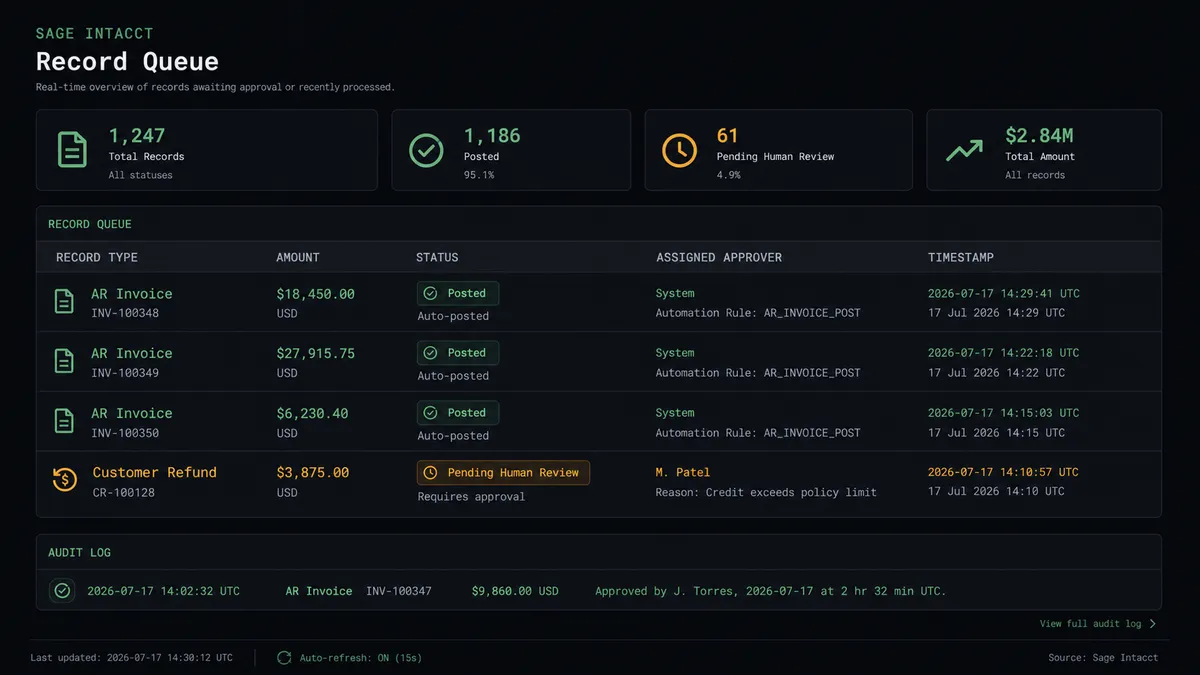
Consider a $6,800 refund request hitting the webhook. A simple sync would post the refund and move on. The agent looks at the customer record, the original charge date, whether there is an open dispute on the account, and how this refund compares to what this customer has historically requested. If the refund is routine, the agent calls Create Refund in Stripe and Submit a customer refund in Sage Intacct without interruption. If the refund is 3x the customer’s typical request size and sits alongside an open dispute, the agent does not guess. It stops.
This is the digital andon cord. The agent invokes its human-in-loop tool, a separate escalation flow built inside FlowRunner and handed to the agent as a callable action. The agent packages the context: customer name, refund amount, original charge date, dispute status, and a plain-language explanation of what it found unusual. That package arrives in Slack (or email, or WhatsApp, whichever channel the finance team works in) with two buttons: Approve and Decline.
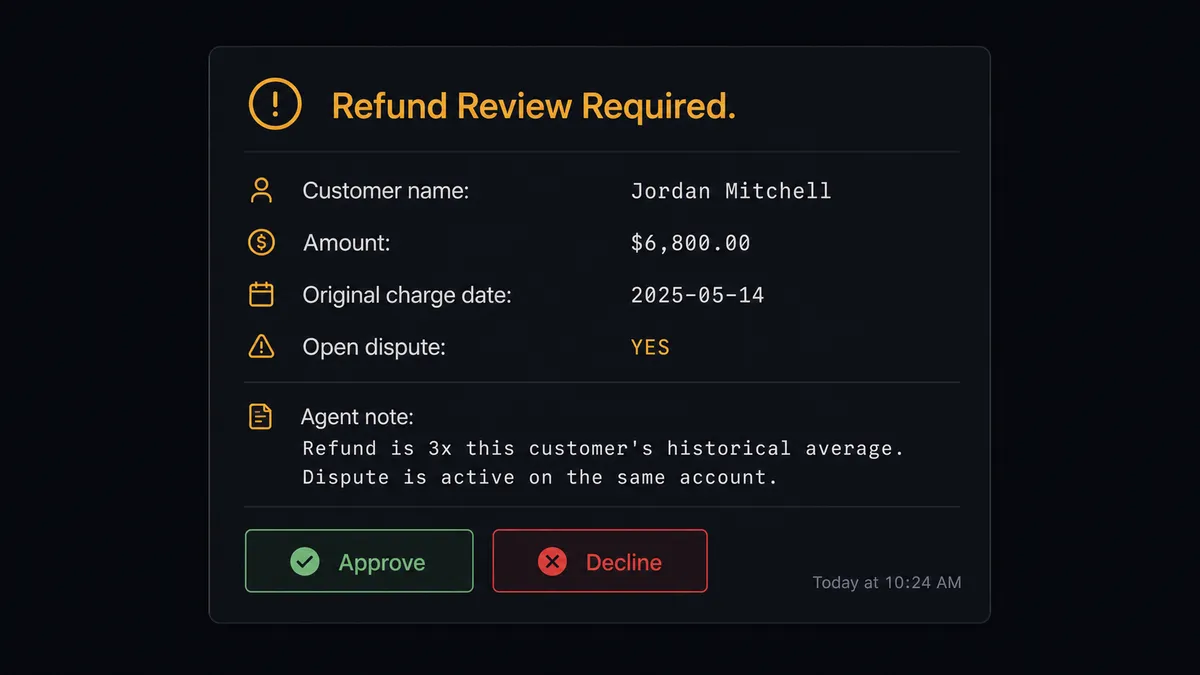
The approver decides. The agent resumes with their answer. If approved, it calls Submit a customer refund. If declined, it calls Reverse a customer refund to unwind anything already posted and sends the customer a notification. The approver’s name, the decision, and the timestamp are written to the audit trail. The agent cannot approve itself. This is not a hardcoded threshold. It is a judgment call the agent makes based on context, the same call a senior controller would make.
Purchasing approvals work the same way on the payables side. Before the agent calls Approve a purchasing document, it routes to the finance approver. The vendor, the amount, and the document detail land in their channel. They decide. The agent posts on their answer.
FlowRunner vs the tool you are probably comparing
If your team reached for this integration via Zapier or n8n, you already know the shape of what those tools offer. Here is an honest comparison.
Zapier makes linear Stripe-to-accounting connections fast to build. Its library of pre-built Zaps is genuinely useful for teams that want to move quickly without writing any logic. It is the right choice if every transaction should be handled identically and the volume is low enough that the per-task pricing stays predictable.
n8n gives technical teams more control, complex branching, and self-hosting at a lower cost than Zapier at scale. Teams comfortable in JSON and node-based editors will find it more flexible.
| Capability | Zapier / n8n | FlowRunner |
|---|---|---|
| Human-in-loop escalation | Not native; requires external webhook or third-party approval tool | Native: escalation flow is a callable tool the agent invokes based on context |
| AI agent with reasoning | Not available; linear step execution | Agent reads transaction context, picks tools, and decides when to stop |
| Sage Intacct Purchasing approval flow | Manual step; no awareness of approval state | Agent submits, routes to human, posts on approval, all in one workflow |
| Unlimited users on every tier | Zapier charges per user on higher plans; n8n limits seats on cloud tiers | All FlowRunner tiers include unlimited users |
| BYOK for AI model | Not applicable | Yes; you supply the API key, you control the model |
| Audit trail with approver identity | Not built in | Every human decision logged with name and timestamp |
The honest distinction: Zapier and n8n are sync tools that execute steps. FlowRunner is an orchestration layer where an agent reasons about the data and decides what to do, including when to involve a person.
Before and after
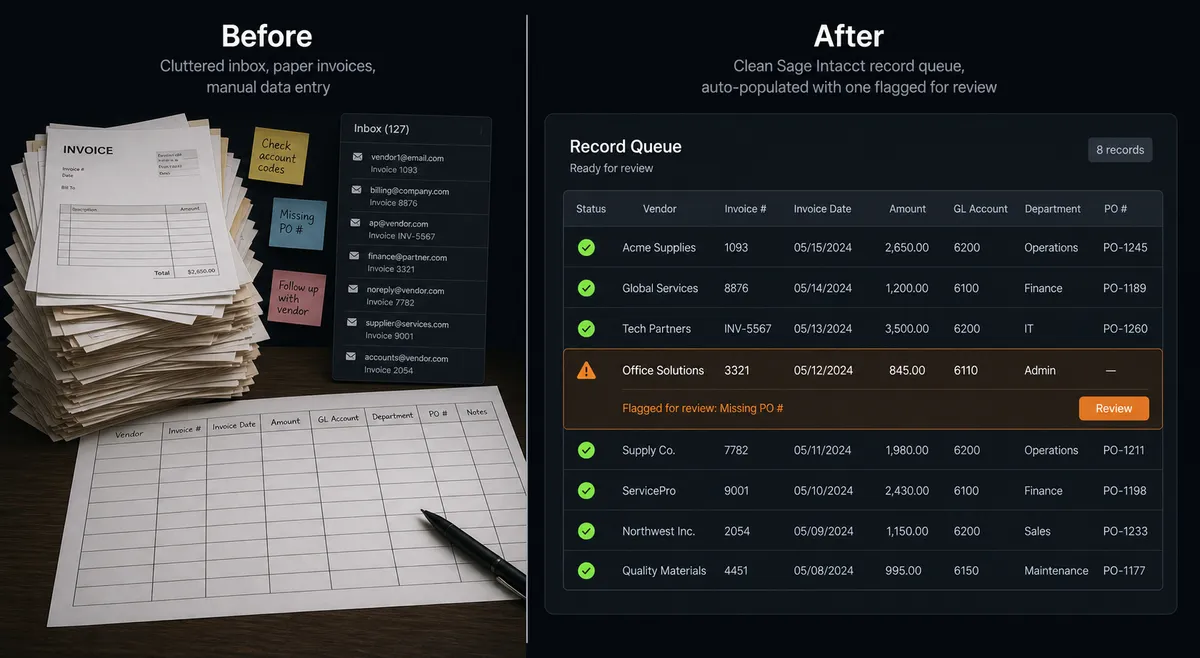
| Category | Before | After |
|---|---|---|
| Invoice posting | AP clerk keys Stripe charges into Sage Intacct manually, one at a time | Agent creates records from Stripe payload on the same event, zero re-keying |
| Refund handling | Refunds approved in Stripe not reflected in the ledger until end-of-week reconciliation | Agent posts refunds to Sage Intacct in the same workflow, with a human gate on exceptions |
| Dispute evidence | 2 to 3 hours pulling records from Stripe and connected systems | Agent assembles and routes the evidence package automatically; team reviews, not builds |
| Purchasing approvals | Purchasing documents waiting in inboxes with no clear queue or deadline | Agent lists pending documents, routes each to the right approver with context, posts on approval |
| Reconciliation exceptions | Bank fees and card transactions corrected line by line at month-end | Routine reversals automated; only genuine exceptions surface to the team |
What you can build
Subscription revenue recognition. When Stripe fires a subscription created or renewed event, the agent creates the corresponding AR record in Sage Intacct, posts the contract with Post a contract to activate revenue schedules, and sends the customer a PDF invoice. Revenue recognition starts the moment the subscription does.
Failed payment dunning with ledger sync. Parse Webhook Event fires on a failed charge. The agent reads the failure reason. Expired card gets an automated update email. Insufficient funds gets a 3-day wait and a retry. If both attempts fail, the agent routes to the billing manager via Slack with the account history and a grace period or cancellation decision. Whichever path the manager chooses, the agent updates the Sage Intacct record to match.
Dispute evidence assembly. A chargeback opens in Stripe. The agent retrieves the original AR invoice from Sage Intacct with Get Record, generates a PDF, and attaches the transaction detail to the dispute record. Total time: under 4 minutes. The agent escalates any dispute it cannot build a complete evidence package for, with a note on what is missing.
Vendor onboarding with AP approval gate. A new vendor submits documents through your intake system. The agent creates the vendor record in Sage Intacct with Create Record, routes to the AP manager for approval using Approve a vendor behind a human gate, and only activates the vendor after sign-off. No vendor posts bills until a person has confirmed them.
Cash management reconciliation. At a scheduled interval, the agent lists unreconciled bank transactions in Sage Intacct with List Records and cross-references them against Stripe payouts using List Payouts. Matched transactions are marked with Assign customer to a bank transaction. Unmatched ones surface to the finance channel with the relevant detail, ready for a human decision.
Common questions
Is it free to connect Stripe and Sage Intacct on FlowRunner? FlowRunner has a free plan with 100 executions a month, every integration included, and no credit card required, and new accounts get 14 days of Professional on top. No credit card is required to start. Beyond the free plan, Growth is $45 per month.
Can I self-host FlowRunner for this integration? Yes. FlowRunner offers a self-hosted Community Edition at no cost for a single instance. Enterprise self-hosted plans add multi-instance clustering, full compliance features, and dedicated support.
Does the AI agent need my own API key for the AI model? Yes. FlowRunner uses a Bring Your Own Keys model. You supply your API key from Anthropic, OpenAI, or another provider. FlowRunner orchestrates the agent; you control the AI spend and the model selection.
What happens when the agent is not sure whether to post a transaction? The agent pauses the workflow and routes the record to a human approver through Slack, email, or WhatsApp with full context: vendor name, amount, and the reason for escalation. The human approves or declines. The agent resumes on their answer and logs the decision with the approver’s identity and a timestamp.
How many users can connect to this integration? Every FlowRunner tier includes unlimited users and unlimited workflows. There is no per-seat charge for adding team members to the automation.
Does FlowRunner work with Stripe’s webhook events? Yes. The Stripe connector’s Parse Webhook Event trigger fires on any Stripe event: payment success, failure, dispute opened, refund requested, subscription created or canceled. One trigger covers the full event spectrum.
Getting started
FlowRunner has a free plan with 100 executions a month, every integration included, and no credit card required, and new accounts get 14 days of Professional on top. Any real email address works; disposable domains are not accepted.
Connect both integrations from the FlowRunner integrations directory: Stripe and Sage Intacct. Both connectors are built and verified against each platform’s official API.
Start your trial at flowrunner.ai or book a 30-minute call at calendly.com/flowrunner/intro to walk through the Stripe and Sage Intacct setup with a FlowRunner team member.
Frequently asked questions
Is it free to connect Stripe and Sage Intacct on FlowRunner?
FlowRunner has a free plan with 100 executions a month, every integration included, and no credit card required, and new accounts get 14 days of Professional on top. No credit card is required to start. Beyond the free plan, Growth is $45 per month.
Can I self-host FlowRunner for this integration?
Yes. FlowRunner offers a self-hosted Community Edition at no cost for a single instance. Enterprise self-hosted plans add multi-instance clustering, full compliance features, and dedicated support.
Does the AI agent need my own API key for the AI model?
Yes. FlowRunner uses a Bring Your Own Keys model. You supply your API key from Anthropic, OpenAI, or another provider. FlowRunner orchestrates the agent; you control the AI spend and the model selection.
What happens when the agent is not sure whether to post a transaction?
The agent pauses the workflow and routes the record to a human approver through Slack, email, or WhatsApp with full context: vendor name, amount, and the reason for escalation. The human approves or declines. The agent resumes on their answer and logs the decision with the approver's identity and a timestamp.
How many users can connect to this integration?
Every FlowRunner tier includes unlimited users and unlimited workflows. There is no per-seat charge for adding team members to the automation.
Does FlowRunner work with Stripe's webhook events?
Yes. The Stripe connector's Parse Webhook Event trigger fires on any Stripe event: payment success, failure, dispute opened, refund requested, subscription created or canceled. One trigger covers the full event spectrum.