How to Connect Stripe with HubSpot (With or Without an AI Agent)
Connect Stripe and HubSpot so payment events automatically update your CRM, optionally running as an AI agent that pauses for human review before posting disputed charges or processing large refunds.

How do you connect Stripe to HubSpot?
You connect Stripe to HubSpot by using Stripe’s Parse Webhook Event trigger to fire a flow on any payment event, then calling HubSpot’s Get Contact by Email, Update Contact, and Update Deal actions to keep the CRM current. FlowRunner is a visual AI-agent orchestration platform where automations run autonomously and pause for human judgment on the steps that carry real consequence. The same connection can run as an AI agent that reads the context of each payment, decides whether it warrants a CRM update or a human review, and acts accordingly without a fixed script.
Why this integration exists: the problem it solves
Every time a Stripe payment lands, something should change in HubSpot. A deal moves to Closed Won. A contact’s billing status updates. A subscription cancellation should flag the account for a save conversation. None of that happens automatically unless someone builds the bridge. Most teams handle it with a morning routine: pull the Stripe dashboard, cross-reference HubSpot, update whatever needs updating. That takes time the team does not have and misses events that happen overnight.
The deeper problem is exceptions. The routine payments are easy to handle manually. The ones that fall through the cracks are refund requests that arrive at 6pm on Friday, disputes that need evidence assembled before a deadline, and subscription cancellations from accounts that the sales team did not know were churning. By the time a billing manager finds those events in the Stripe dashboard, the window to act has already narrowed.
How it works: the connection
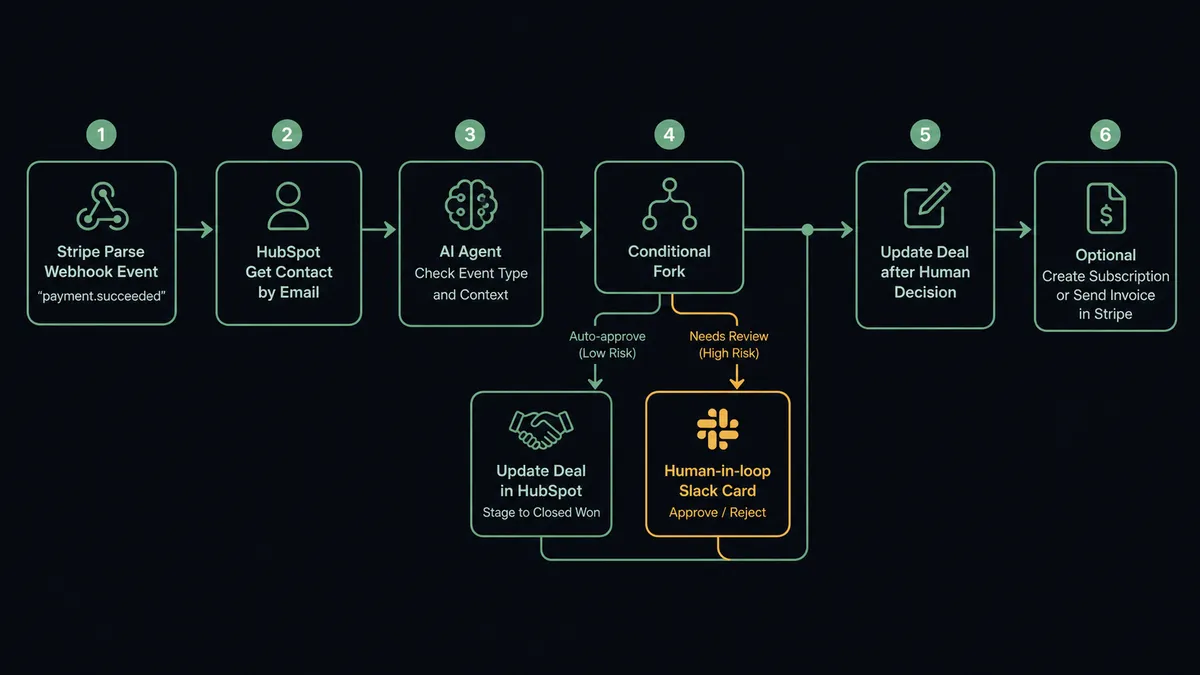
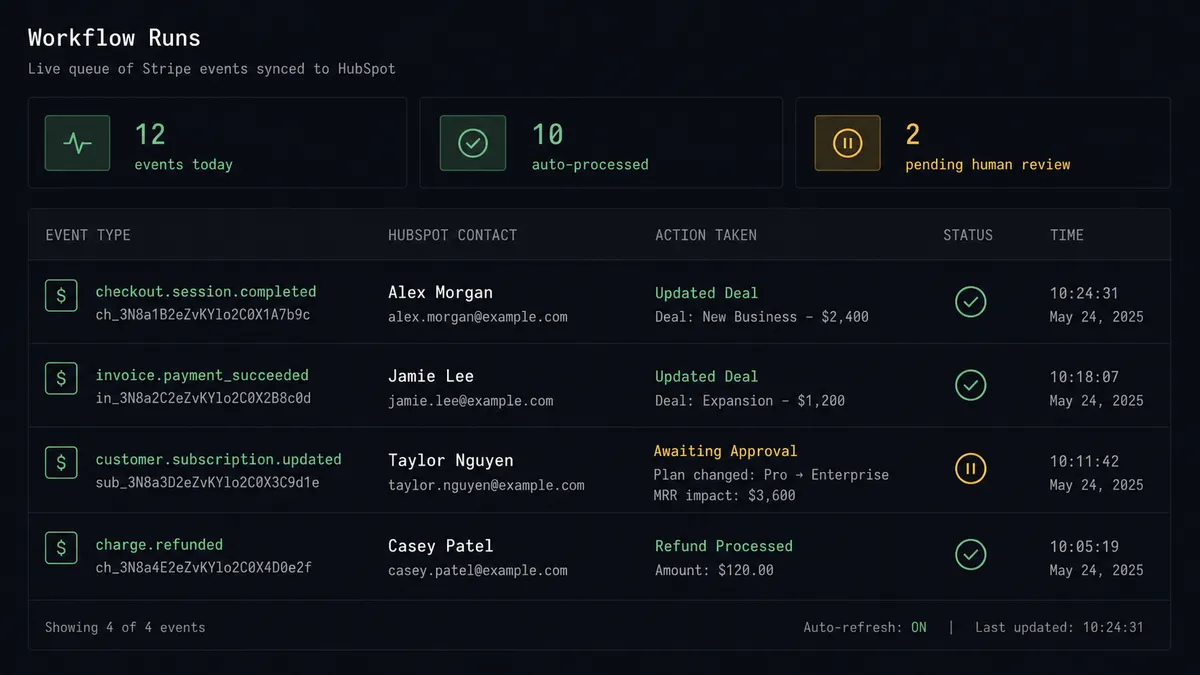
The Stripe integration connects via Parse Webhook Event, a single trigger that handles every Stripe event type. You configure which events fire your flow: payment.succeeded, customer.subscription.deleted, charge.dispute.created, invoice.payment_failed, and so on. When Stripe fires the event, FlowRunner receives the full payload and passes it to your flow.
On the HubSpot side, the first action is always Get Contact by Email. The agent uses the customer email from the Stripe payload to find the existing HubSpot contact. If the contact exists, it proceeds to the update step. If no contact exists, it can create one with Create Contact before continuing.
From there, the flow maps Stripe event data to HubSpot fields. A payment.succeeded event triggers Update Deal to move the deal stage forward. A customer.subscription.deleted event triggers Update Contact to flag the customer’s lifecycle stage and can trigger a Create Deal in a win-back pipeline. A charge.dispute.created event triggers a Slack alert to the billing team with the dispute details. Every step uses named actions: Get Contact by Email, Update Contact, Update Deal, Create Deal, Associate Objects.
Can an AI agent run it? (and why a human stays in the loop)
A rule-based connection handles the routine. An AI agent handles the rest. The difference is in how decisions get made.
In a rule-based setup, you write: “if event type is payment.succeeded, update deal stage.” That works until it does not. A payment.succeeded event on a disputed account. A subscription.created event for a customer who already has an active subscription in HubSpot. A refund requested by a customer with a history of disputes. A rule-based flow either blindly executes or blindly stops. Neither is right.
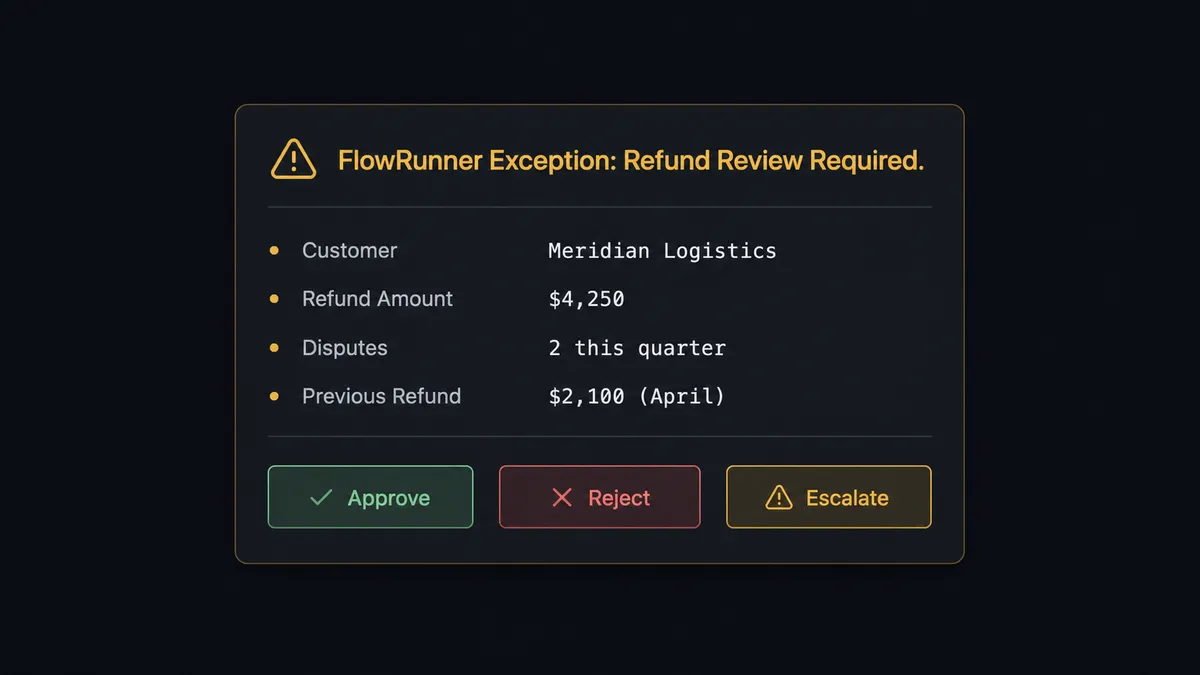
The agent reads the full context. It calls Get Contact by Email, retrieves the HubSpot deal, looks at the payment history, checks the Stripe event details, and reasons. A $300 subscription renewal from an account that has been on-time for three years: the agent updates the deal and moves on. A $4,250 refund request from an account that has disputed twice in the past 90 days: the agent pauses.
When it pauses, it does not just stop. It invokes the human-in-loop flow as a callable tool. That flow sends a structured Slack message to the billing manager:
“Stripe refund request: $4,250. Account: Meridian Logistics. Second dispute this quarter. Previous refund was $2,100 in April. Customer email: [email protected]. Do you approve this refund? [Approve] [Reject] [Escalate]”
The billing manager sees the full picture and makes a call in one click. The agent receives the decision, processes the Create Refund action in Stripe, updates the HubSpot contact with the outcome, and logs everything: the decision, the approver, the timestamp. This is not a hardcoded threshold. The agent escalated the $4,250 refund because of context, not because of a number. It would process a $6,000 renewal from a clean account without a pause.
Prospects call this a “digital andon cord.” Like Toyota’s quality control pull cord, the agent stops the line when it hits uncertainty rather than passing a defect downstream.
FlowRunner vs Zapier
Zapier is the right choice for teams that want a simple, pre-built Stripe-to-HubSpot connection with minimal setup. It has a large library of templates, a straightforward interface, and it handles the routine sync case well. If you need a payment event to create a HubSpot contact, Zapier does that.
The gap shows up at the edges: when the data needs to be reasoned about, when a human should be in the decision path, or when the team needs an audit record of who approved what.
| Feature | Zapier | FlowRunner |
|---|---|---|
| Basic Stripe event to HubSpot action | Yes | Yes |
| AI agent that reasons about each event | No | Yes |
| Human-in-loop as a callable agent tool | No | Native |
| Audit trail with approver identity and timestamp | No | Yes |
| Bring your own AI provider key (BYOK) | No | Yes |
| Unlimited users and workflows on every tier | No (seat-based) | Yes |
| Self-hosted option | No | Yes |
| Pricing model | Per-task execution | Workflow-based tiers |
The honest framing: Zapier is faster to set up for a simple sync. FlowRunner is the right layer when the sync needs to carry accountability: when refunds need approvals, when disputed charges need a paper trail, when the team needs to know a human reviewed a decision before money moved.
Before and after
| Category | Before | After |
|---|---|---|
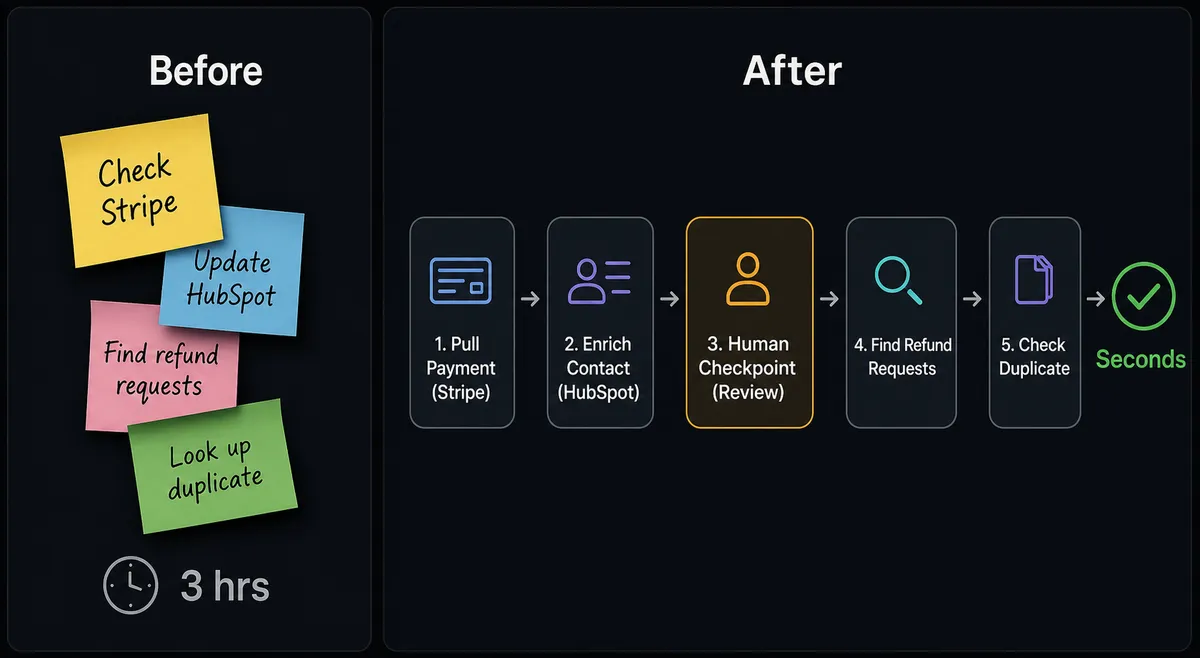
| Payment-to-CRM sync | Billing staff manually cross-reference Stripe and HubSpot each morning | Parse Webhook Event fires on every payment; HubSpot updates within seconds |
| Refund handling | Billing manager finds refund requests in Stripe dashboard manually | Agent surfaces refunds with full context; manager approves in one Slack click |
| Duplicate contact risk | Stripe events create new HubSpot contacts regardless of existing records | Get Contact by Email runs first; duplicates route to CRM admin for resolution |
| Subscription cancellation response | Churn identified when the deal goes cold; save conversation often too late | customer.subscription.deleted fires immediately; win-back deal created in HubSpot |
| Dispute evidence | 2-3 hours of manual record assembly from multiple systems | Agent compiles payment record, emails, and event history in under 4 minutes |
| Audit trail | No record of who reviewed what or when | Every human decision logged with approver identity and timestamp |
What you can build
Closed-won deal to Stripe provisioning. When a HubSpot deal moves to Closed Won, the agent calls Create Customer in Stripe, Create Subscription, Finalize Invoice, and Send Invoice automatically. The customer is billed and the CRM deal is updated before any rep touches either system.
Subscription cancellation to win-back pipeline. When Stripe fires a customer.subscription.deleted event, the agent retrieves the HubSpot contact, updates the lifecycle stage, creates a deal in a win-back pipeline, and routes to the account owner with context. The owner gets a Slack message within seconds of the cancellation, not days.
Failed payment dunning with CRM tagging. A payment failure fires Parse Webhook Event. The agent checks the failure reason: insufficient funds or expired card. For expired cards, it updates the HubSpot contact with a “Payment Failed” tag and triggers the email recovery sequence. For insufficient funds, it waits 3 days, retries in Stripe, and tags the HubSpot deal if the second attempt also fails.
Dispute detection with escalation. A charge.dispute.created event fires. The agent retrieves the HubSpot deal, checks the account’s dispute history, and assembles the context. If the account has a clean history, the agent packages evidence and uploads it to the dispute in Stripe automatically. If the account has prior disputes, the agent pauses and routes to the billing manager before acting.
Refund request with approval gate. A refund is requested from any source: customer email, support ticket, direct request. The agent calls Create Refund in Stripe only after a billing manager approves via Slack. The refund amount, the approver, and the timestamp are logged in HubSpot as an activity on the contact record.
Common questions
Is it free to connect Stripe and HubSpot on FlowRunner? FlowRunner has a free plan with 100 executions a month, every integration included, and no credit card required, and new accounts get 14 days of Professional on top. No credit card is required to start. Beyond the free plan, Growth is $45 per month with 12,000 executions and unlimited users.
Can I self-host FlowRunner for this integration? Yes. FlowRunner offers a self-hosted Community Edition at no cost, plus an Enterprise self-hosted tier for teams that need compliance features and multi-instance clustering.
Does the AI agent need my own OpenAI or AI provider key? FlowRunner uses a bring-your-own-key (BYOK) model. You connect your own key from Claude, OpenAI, or any supported provider. You control the model and the cost.
What happens when the agent is not sure what to do? The agent invokes a human-in-loop flow as a callable tool. It packages full context, sends it to the right person via Slack, email, or WhatsApp, waits for a decision, then resumes. The decision, the approver’s identity, and the timestamp are all logged in the audit trail.
Does FlowRunner check for duplicate HubSpot contacts before creating new ones? Yes. The agent calls Get Contact by Email before creating any new record. If a match exists, it updates the existing contact rather than creating a duplicate. Ambiguous matches pause and route to a CRM admin for resolution.
Can I trigger the workflow from Stripe payment events automatically? Yes. The Parse Webhook Event trigger fires on any Stripe event: payment success, payment failure, subscription created, dispute opened, refund requested. You configure which event types activate the flow.
Getting started
FlowRunner has a free plan with 100 executions a month, every integration included, and no credit card required, and new accounts get 14 days of Professional on top.
Start with the integration pages: Stripe and HubSpot. From there, you can build the connection in minutes using the visual flow builder.
To try it now, go to [flowrunner.ai](https://flowrunner.FlowRunner has a free plan with 100 executions a month, every integration included, and no credit card required, and new accounts get 14 days of Professional on top. To talk through your specific Stripe-HubSpot workflow first, book a 30-minute intro at calendly.com/flowrunner/intro.
Frequently asked questions
Is it free to connect Stripe and HubSpot on FlowRunner?
FlowRunner has a free plan with 100 executions a month, every integration included, and no credit card required, and new accounts get 14 days of Professional on top. No credit card is required to start. Beyond the free plan, Growth is $45 per month with 12,000 executions and unlimited users.
Can I self-host FlowRunner for this integration?
Yes. FlowRunner offers a self-hosted Community Edition at no cost, plus an Enterprise self-hosted tier for teams that need compliance features and multi-instance clustering.
Does the AI agent need my own OpenAI or AI provider key?
FlowRunner uses a bring-your-own-key (BYOK) model. You connect your own key from Claude, OpenAI, or any supported provider. You control the model and the cost.
What happens when the agent is not sure what to do?
The agent invokes a human-in-loop flow as a callable tool. It packages full context, sends it to the right person via Slack, email, or WhatsApp, waits for a decision, then resumes. The decision, the approver's identity, and the timestamp are all logged in the audit trail.
Does FlowRunner check for duplicate HubSpot contacts before creating new ones?
Yes. The agent calls Get Contact by Email before creating any new record. If a match exists, it updates the existing contact rather than creating a duplicate. Ambiguous matches pause and route to a CRM admin for resolution.
Can I trigger the workflow from Stripe payment events automatically?
Yes. The Parse Webhook Event trigger fires on any Stripe event: payment success, payment failure, subscription created, dispute opened, refund requested. You configure which event types activate the flow.