Connect Rossum to Xero: Invoices Become PO-Matched Bills
Connect Rossum and Xero so extracted invoice data becomes a matched Xero bill automatically, with an AI agent that pauses for an AP specialist on low-confidence fields or PO mismatches.
How do you connect Rossum to Xero?
A new document landing in a Rossum queue triggers Wait for Document Extraction and Get Annotation Content, which pull the vendor, invoice number, total, and line items; the agent then calls Get Purchase Order in Xero to check the match and, once confirmed, runs Create Bill to post the invoice. FlowRunner is a visual AI-agent orchestration platform where automations run autonomously and pause for human judgment on the steps that carry real consequence. The same connection can run as a plain field-mapping sync, or you can run it as an AI agent that reasons over confidence scores and PO variance and calls a human-in-loop flow as a tool on the invoices that need a second look.
The problem it solves
An AP clerk opens the invoices inbox, downloads each PDF, and retypes the vendor, invoice number, total, and line items into Xero by hand. A clean invoice from a vendor with a decade of history costs the same five minutes as a garbled scan with a total that doesn’t match the purchase order. Nobody notices the difference until month-end, when a billing manager is reconciling a spreadsheet of what actually got entered against what should have been billed, and a mismatched invoice has been sitting unposted for two weeks because it fell through the cracks between “received” and “reviewed.”
The manual version of this process doesn’t scale with volume. Add more vendors, and you add more keying hours, not more accuracy. Every invoice competes for the same fixed attention, so the ambiguous ones don’t get more scrutiny, they get the same rushed five minutes as everything else. Teams end up choosing between hiring another AP clerk or accepting that some invoices will get entered wrong and caught later, if they’re caught at all.
How it works: the connection
The flow starts when a vendor invoice PDF arrives in the AP mailbox and is uploaded into a Rossum queue. Upload Document sends the file with source metadata attached, and Wait for Document Extraction polls until Rossum’s AI Engine returns a reviewable annotation, typically within 90 seconds. Get Annotation Content then reads the extracted datapoint tree: vendor name, invoice number, date, total, currency, and line items, each with its own confidence score.
Before anything gets confirmed, the agent calls Get Purchase Order in Xero to pull the PO this vendor’s invoice should match, and compares the extracted total and line items against it. If the vendor is new to Xero, Find Contacts checks for an existing record and Create Contact provisions one only when nothing matches. Once the annotation is validated, Confirm Annotation advances it toward export and fires Rossum’s configured hooks. On the Xero side, the agent runs Create Bill, mapping the confirmed vendor, total, line items, and PO reference directly into the bill record, with Get Accounts available to assign the correct GL code. No document sits in a folder waiting for someone to move it into the ledger; confirming the annotation is the integration.
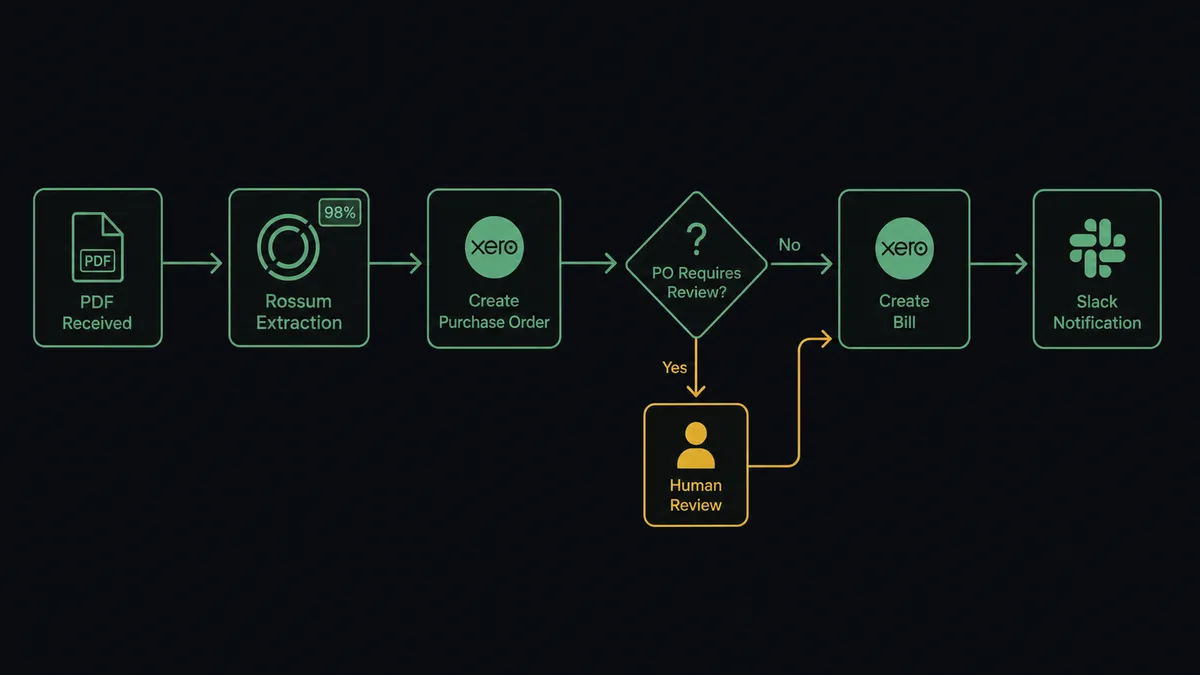
Can an AI agent run it? (and why a human stays in the loop)
A plain sync tool maps fields and posts whatever it extracted. FlowRunner’s agent reads the extraction, reasons about it, and decides whether the data is trustworthy enough to post on its own. It has Get Annotation Content, Get Purchase Order, Confirm Annotation, and Create Bill as tools in its toolbox, and it picks the order and the outcome based on what the document actually says.
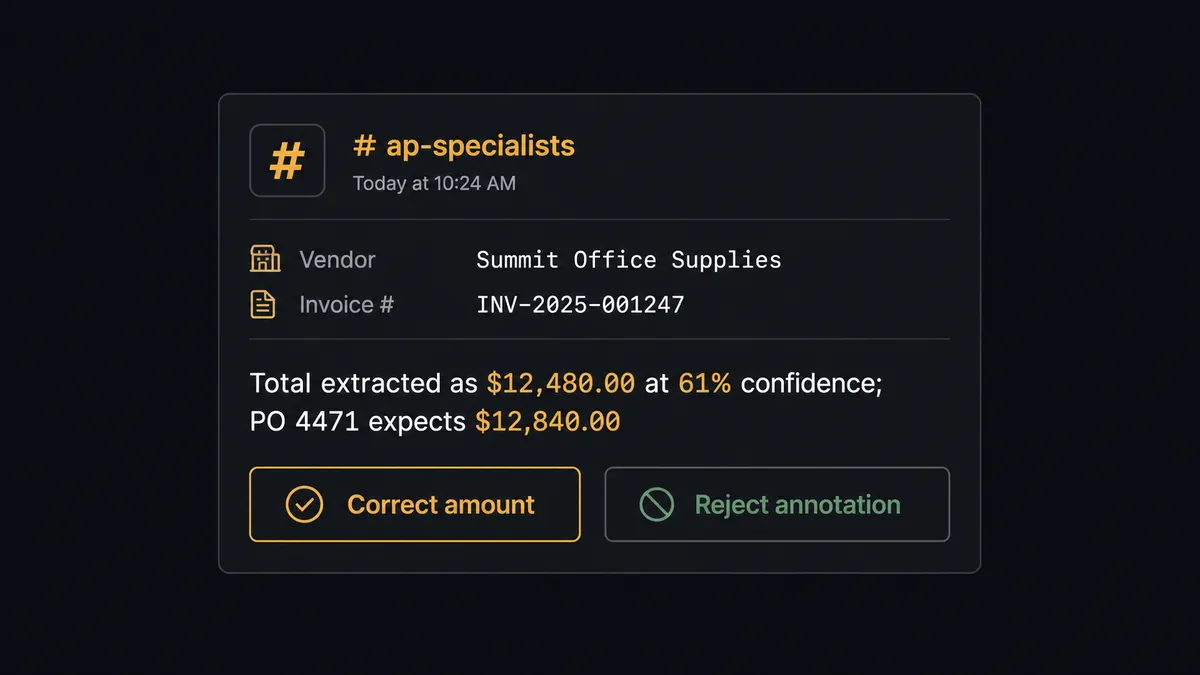
Here’s a real decision moment. The agent extracts a total of $12,480.00 at 61 percent confidence on the total field, and the matching Xero purchase order expects $12,840.00, a variance that crosses the agent’s threshold. Instead of confirming the annotation and creating the bill, the agent invokes a human-in-loop flow as a callable tool. It packages the context: the vendor name, the extracted total and its confidence score, the PO number and expected amount, and a direct link to the annotation. It sends this to an AP specialist over Slack: “Total extracted as $12,480.00 at 61 percent confidence; PO 4471 expects $12,840.00. Confirm, correct, or reject?” The specialist corrects the figure, and the agent resumes: it confirms the corrected annotation and creates the matching bill in Xero, with the decision, the decider, and the timestamp captured in the audit trail. A clean invoice from a known vendor with a total that matches its PO clears every check and posts on its own, no human touches it. This is not a sync tool. The agent knows when to stop and ask.
FlowRunner vs Zapier
Zapier is genuinely easy to set up and has broad, reliable coverage of both Rossum-style document tools and Xero, which makes it a reasonable first stop for a team that just wants field values to move from one system to another. Where it runs out of road is the judgment step: Zapier moves data on a trigger, it doesn’t reason about whether the data it just moved is trustworthy.
| FlowRunner | Zapier | |
|---|---|---|
| Human-in-the-loop | Native, agent-invoked as a callable tool with full context packaged for the reviewer | Not available; conditional paths at best, no reasoning about when to escalate |
| PO and confidence-based routing | Agent evaluates confidence scores and PO variance before deciding to post | Requires manual filter logic per field, no adaptive reasoning |
| Pricing model | Transparent workflow-based tiers with clear execution limits | Per-task pricing that scales with volume and can surprise at invoice peaks |
| Users included | Unlimited on every tier | Limited on lower tiers, priced per user on higher ones |
| Self-host option | Available at Enterprise | Not offered |
Before and after
| What changes | Before | After |
|---|---|---|
| Data entry | An AP clerk reads each PDF and types the vendor, total, and line items into Xero by hand | Get Annotation Content reads the fields automatically; a human only touches what the agent isn’t sure about |
| PO matching | Matching invoice totals against purchase orders happens during a manual review pass, if at all | The agent checks Get Purchase Order before confirming, catching mismatches before a bill posts |
| Review attention | Every invoice gets the same few minutes, clean or ambiguous | Clean extractions confirm and post on their own; review time concentrates on the low-confidence fields |
| Time to post | Invoices can sit for days between receipt and entry into Xero | Confirming the annotation and creating the bill happen in the same flow, no re-keying step left |
| Audit trail | Corrections and overrides live in email threads or nobody’s memory | Every escalation, correction, and confirmation is timestamped with the decider’s identity |
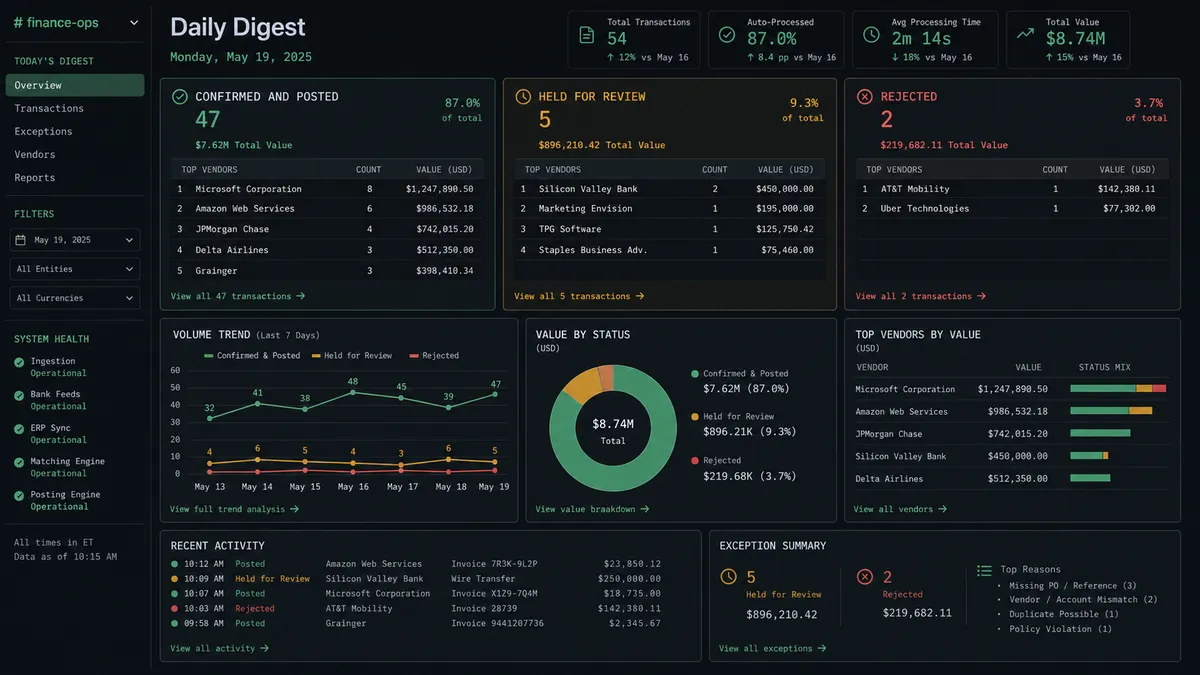
What you can build
PO-matched bill creation. Every confirmed Rossum annotation flows straight into a Xero bill mapped to its matching purchase order, with GL codes assigned from Get Accounts, so AP never touches a clean invoice.
New-vendor onboarding on the fly. When Find Contacts turns up nothing, the agent runs Create Contact in Xero before creating the bill, so a first invoice from a new vendor doesn’t stall the flow waiting for someone to set up the record.
Aged receivables paired with vendor bill intake. Run this connection alongside Xero’s Get Aged Payables report so the same agent that’s creating new bills also flags which existing ones are coming due, giving cash management a single view.
Monthly reconciliation export. Export Queue pulls the month’s confirmed Rossum annotations as CSV, and the agent cross-checks the total against Xero’s Find Invoices results for the same period, surfacing any bill that never got its matching annotation confirmed.
Rejected-document follow-up. When Reject Annotation fires on a duplicate or unprocessable document, the agent checks whether a bill already exists in Xero for that vendor and reference, closing the loop instead of leaving the rejection to be chased down manually.
Common questions
Is it free to connect Rossum and Xero on FlowRunner? Yes. FlowRunner has a free plan with 100 executions a month, every integration included, and no credit card required, and new accounts get 14 days of Professional on top.
Does the AI agent need my own OpenAI key? FlowRunner runs on a bring-your-own-key model for AI providers, so you connect the provider account you already use rather than paying FlowRunner a markup on model calls.
What happens when the agent isn’t sure about an invoice? The agent leaves the Rossum annotation unconfirmed and the Xero bill uncreated, then sends an AP specialist the exact field, its confidence score, and the PO mismatch through Slack or email so a human makes the call before anything posts.
Can I self-host the Rossum to Xero connection? Yes. FlowRunner offers a self-hosted Enterprise option for teams that need the orchestration layer inside their own infrastructure, alongside the standard cloud-hosted tiers.
Does this replace my AP team? No. It removes re-keying and routine matching so the team spends its time on the invoices that actually need a decision, not on retyping totals that were already correct.
Can the agent create a new vendor in Xero automatically? Yes, using Find Contacts to check for an existing match and Create Contact when the vendor is new, though you can gate first-time vendor creation behind human approval if your policy requires it.
Getting started
FlowRunner has a free plan with 100 executions a month, every integration included, and no credit card required, and new accounts get 14 days of Professional on top. Set up the flow yourself in minutes, or book a walkthrough and we’ll help you map your queues and PO thresholds. Get started at flowrunner.ai.
Frequently asked questions
Is it free to connect Rossum and Xero on FlowRunner?
Yes. FlowRunner has a free plan with 100 executions a month, every integration included, and no credit card required, and new accounts get 14 days of Professional on top.
Does the AI agent need my own OpenAI key?
FlowRunner runs on a bring-your-own-key model for AI providers, so you connect the provider account you already use rather than paying FlowRunner a markup on model calls.
What happens when the agent isn't sure about an invoice?
The agent leaves the Rossum annotation unconfirmed and the Xero bill uncreated, then sends an AP specialist the exact field, its confidence score, and the PO mismatch through Slack or email so a human makes the call before anything posts.
Can I self-host the Rossum to Xero connection?
Yes. FlowRunner offers a self-hosted Enterprise option for teams that need the orchestration layer inside their own infrastructure, alongside the standard cloud-hosted tiers.
Does this replace my AP team?
No. It removes re-keying and routine matching so the team spends its time on the invoices that actually need a decision, not on retyping totals that were already correct.
Can the agent create a new vendor in Xero automatically?
Yes, using Find Contacts to check for an existing match and Create Contact when the vendor is new, though you can gate first-time vendor creation behind human approval if your policy requires it.