RingCentral HubSpot Integration: Every Call Logged to the Deal
Connect RingCentral and HubSpot so stalled deals get a real phone call instead of another unread email, run as an AI agent that pauses for a sales manager before it gives up on a deal or keeps dialing blind.
How do you connect RingCentral to HubSpot?
Connect RingCentral to HubSpot by triggering off a stalled HubSpot deal, then running RingCentral’s Send SMS and Make RingOut Call actions to reach the contact, with the outcome written back to the deal through Update Deal. FlowRunner is a visual AI-agent orchestration platform where automations run autonomously and pause for human judgment on the steps that carry real consequence. The same connection can run as a simple call-and-log sync, or as an AI agent that reasons about how long a deal has been stuck and pauses for a sales manager only when it’s time to stop dialing blind and make a call on the deal itself. Either way, a stalled deal gets a phone call instead of sitting untouched.
The problem it solves
A deal moves into Negotiation, and then nothing happens except a HubSpot notification a rep might glance at between calls. Someone, usually the deal owner or the sales manager doing pipeline review, has to notice the deal has gone quiet, look up the contact’s number, and remember to actually pick up the phone instead of sending another email into the same silence. Most weeks that reminder loses to whatever is louder that day, and a deal that could still close sits stalled for weeks with nobody dialing it. Reps end up managing pipeline hygiene from memory and a Friday spreadsheet review instead of from a system that flags what’s gone quiet.
The same gap shows up on the reporting side. Call history lives in RingCentral. Deal history lives in HubSpot. When a manager asks why a deal hasn’t moved, the honest answer often depends on whether anyone called at all, and that information sits in a call log nobody opens unless something has already gone wrong. Voicemails and recordings pile up in the RingCentral portal, deal stages go stale in HubSpot, and the two systems never reconcile unless a person manually does it. That’s hours a week of lookups and cross-referencing that could be time back for the team actually talking to prospects.
How it works: the connection
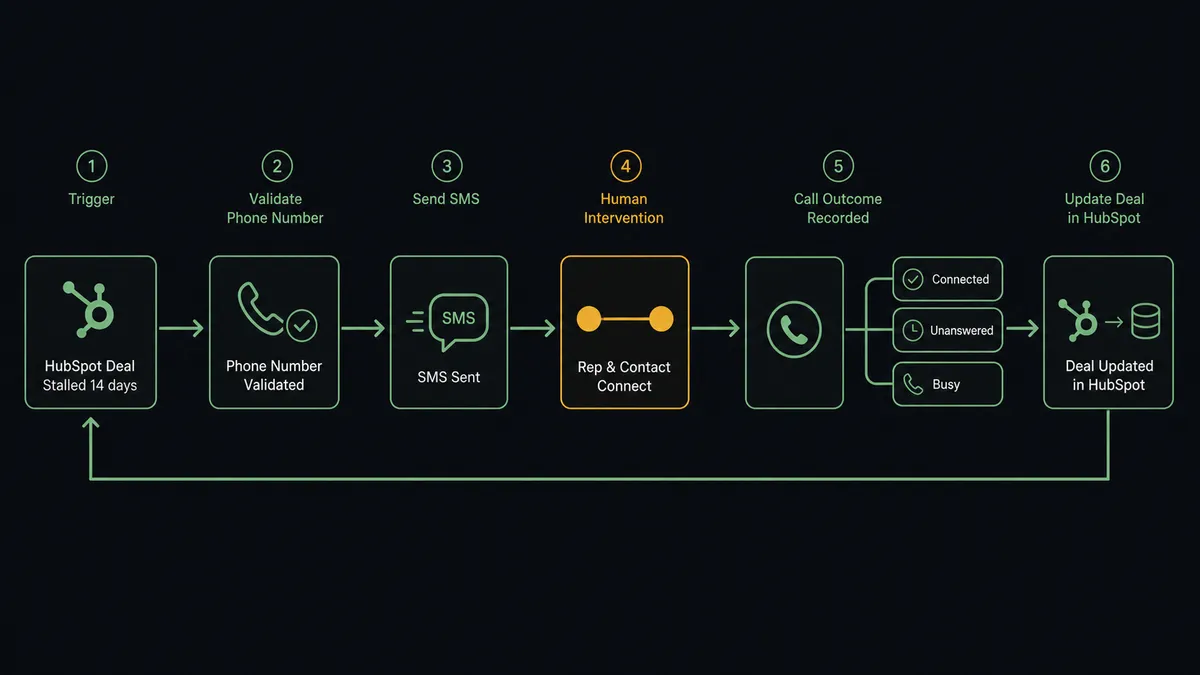
The flow runs on a schedule, checking HubSpot for deals sitting in Negotiation with no update in 14 days, the same stalled-deal pattern HubSpot’s own escalation logic is built around. For each one:
- The agent pulls the deal’s contact and confirms it has a workable phone number.
- List Phone Numbers confirms the RingCentral line sending the reminder carries the SmsSender feature, so nothing goes out from a number that isn’t provisioned to text.
- Send SMS delivers a short heads-up from the business number, giving the contact a moment’s notice before the phone rings.
- Make RingOut Call places a two-legged call: RingCentral rings the deal owner’s line first, then connects the contact once the rep picks up. This is the rep talking, not a recording.
- Get RingOut Status tracks whether the call connected, went unanswered, or hit a busy line, so the flow knows exactly what happened on each attempt.
- Update Deal writes the outcome straight back to HubSpot, connected, unanswered, or busy, along with a timestamp, so the deal record reflects reality without a rep touching the field.
Every action here is a named RingCentral or HubSpot action available today. Nothing in this flow requires custom code or a middleware layer stitched between the two systems.
Can an AI agent run it? (and why a human stays in the loop)
Yes, and this is where the connection stops being a call-and-log sync and starts being an orchestration layer. Instead of dialing every stalled deal on a fixed schedule forever, an AI agent reads each deal’s call history, reasons about what it’s seeing, and calls RingCentral and HubSpot actions as tools in whatever order the situation calls for. A deal that’s had one unanswered call this week gets another attempt. A deal that’s been unanswered three times running, and has sat in Negotiation for two weeks straight, is a different situation, and the agent treats it that way.
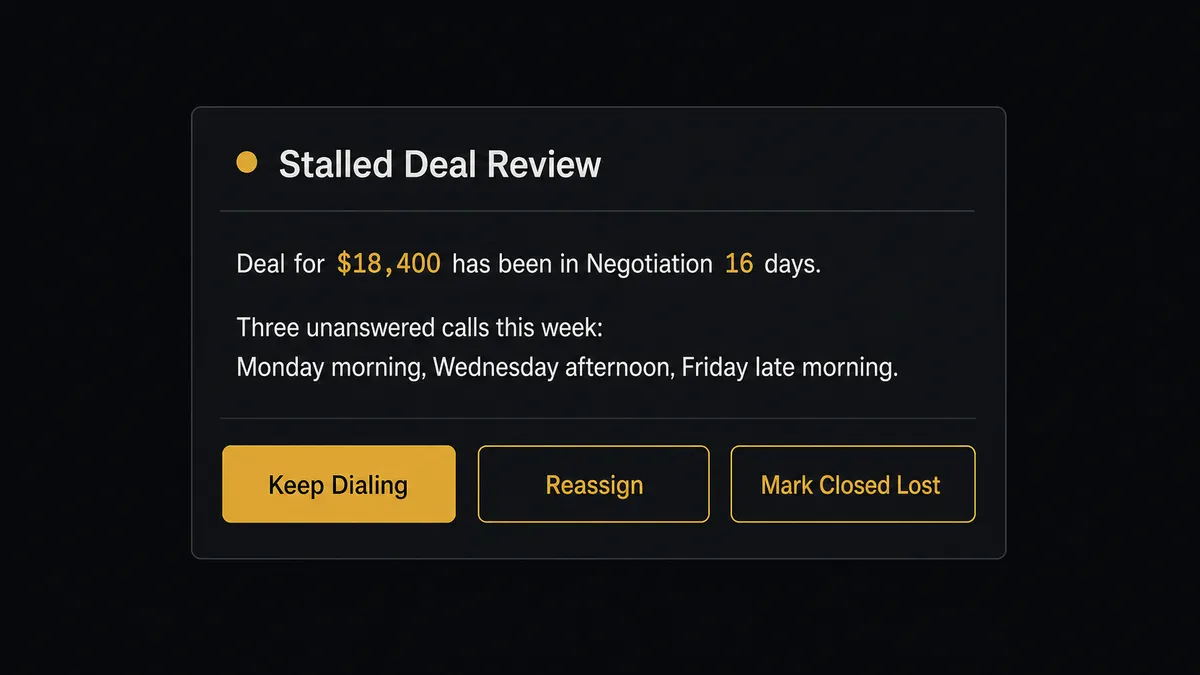
That’s the decision that actually matters. When the third consecutive Get RingOut Status comes back unanswered on a deal already stalled 14 days, the agent doesn’t place a fourth call and it doesn’t quietly mark the deal closed lost on its own judgment. It stops, packages the deal amount, the days stalled, the three attempt timestamps, and the last recorded contact, and posts it to the sales manager over RingCentral’s team chat: “Deal for $18,400 has been in Negotiation 16 days with three unanswered calls this week. Keep dialing, reassign to another rep, or mark closed lost?” The manager picks one, the agent applies it with Update Deal, and the decision, the manager’s identity, and the timestamp all land in the audit trail.
This is the “digital andon cord” idea in practice, the same pull-cord logic Toyota built into its assembly lines: the agent keeps working every deal that’s still moving and stops the line the moment continuing to dial stops being useful. This is not a sync tool. The agent knows when to stop and ask.
FlowRunner vs Zapier
Zapier is the tool most sales and ops teams already know, and it genuinely earns that familiarity. Its trigger and action library covers HubSpot well, the interface is approachable for a non-technical rep or ops coordinator, and a simple “new deal creates a RingCentral SMS” zap can be live in minutes.
Where the two diverge is what happens once the workflow needs to weigh a decision instead of just moving data.
| FlowRunner | Zapier | |
|---|---|---|
| Human-in-the-loop | Native: the agent invokes a manager-review step as a callable tool at the exact point a deal needs a call, not a script | Not built in; requires a separate app or manual pipeline review outside the zap |
| AI reasoning over the data | Agent weighs attempt history and days stalled before deciding whether to escalate | Steps run in a fixed sequence regardless of what the call history shows |
| Users included per plan | Unlimited users and workflows on every tier | Per-user pricing scales with team size |
| AI provider | BYOK, bring your own key from any supported provider | Built-in AI steps run on Zapier’s own model access |
| Self-hosting | Free Community Edition, plus a self-hosted Enterprise tier | Cloud only, no self-hosted option |
| Pricing model | Transparent workflow-based tiers with clear execution limits | Task-based pricing that can create anxiety about what counts as a task |
Before and after
| Metric | Before | After |
|---|---|---|
| Stalled-deal follow-up | Depends on a manager noticing and a rep remembering to dial | Deals stalled 14 days trigger an automatic call attempt every week |
| Call-to-deal visibility | Call history in RingCentral, deal history in HubSpot, nobody sees both together | Every call outcome writes straight to the deal with Update Deal |
| Escalation on repeated no-answer | Deal quietly ages in the pipeline until someone opens it | Three unanswered attempts against a 16-day-stalled deal route to the manager automatically |
| Outbound number compliance | Reminders occasionally go out from an unverified line | List Phone Numbers checks SmsSender status before every text |
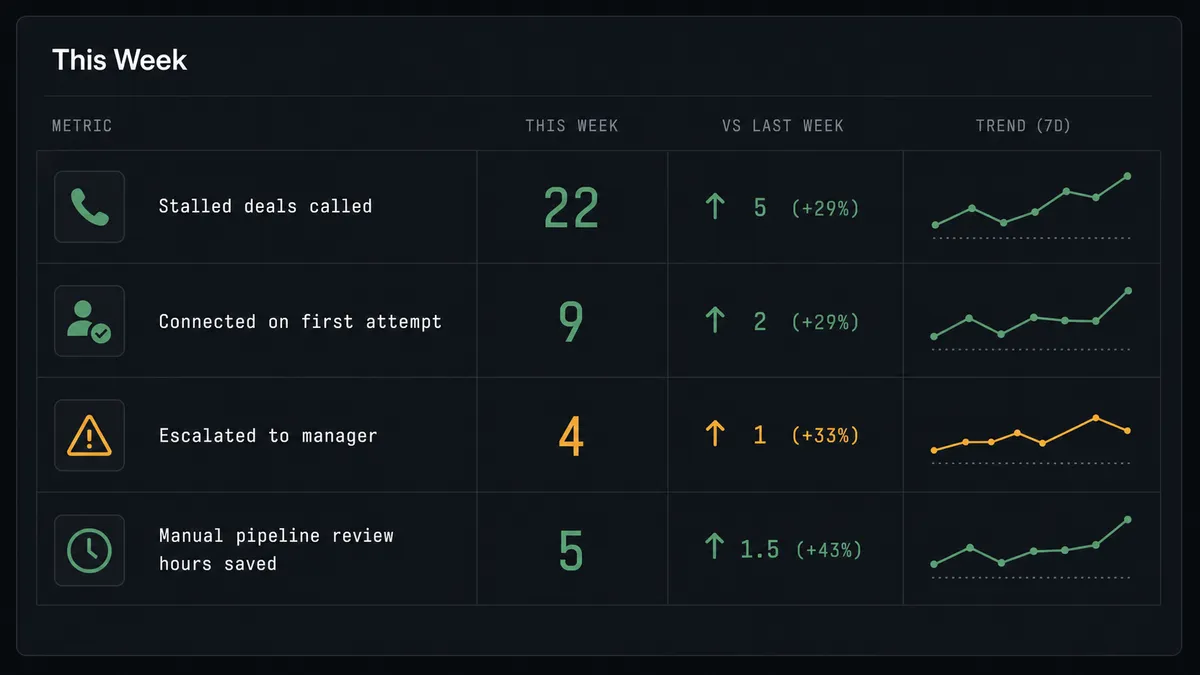
| Manual pipeline review time | Hours a week cross-referencing call logs against deal stages | Manager reviews only the deals the agent flags, with full context attached |
What you can build
Stalled-deal call sweep. A weekly schedule finds deals stuck in Negotiation for 14 days, confirms the sending line with List Phone Numbers, and runs Send SMS followed by Make RingOut Call so the deal gets a real attempt instead of another silent week.
Inbound lead callback loop. A new HubSpot contact from a form fill triggers a RingOut call within minutes, with Get Contact by Email confirming there’s no existing record first, so the lead hears from a rep while the interest is still fresh.
Call archive tied to the deal. Each night, List Call Log Records pulls the day’s recorded calls, Get Call Recording Content downloads the audio into file storage, and the agent links the recording to the matching HubSpot deal for anyone reviewing the account later.
Closed-deal confirmation call. When Update Deal marks a deal Closed Won in HubSpot, the agent places a RingOut Call to the new customer to confirm next steps, logging the outcome back to the deal alongside the win.
Duplicate-contact resolution. When the agent finds two HubSpot contacts sharing an email while building a call list, it pauses and posts both records to a CRM admin over chat instead of guessing which one owns the deal.
Common questions
Is it free to connect RingCentral and HubSpot on FlowRunner? FlowRunner has a free plan with 100 executions a month, every integration included, and no credit card required, and new accounts get 14 days of Professional on top. Beyond the free plan, Growth starts at $45 per month and includes unlimited users and unlimited workflows.
Can I self-host this connection? Yes. FlowRunner offers a free self-hosted Community Edition for single-instance deployments. The self-hosted Enterprise tier adds multi-instance clustering and the full compliance suite for teams that need it.
Does the AI agent need my own API key for the AI model? FlowRunner is a BYOK platform. You bring your own key from your preferred AI provider, so your data stays under your control and your model costs are separate from your FlowRunner subscription.
What happens when the agent isn’t sure whether to keep dialing a stalled deal? It stops dialing and asks. After a deal has sat unmoved in Negotiation for 14 days and a call goes unanswered a third time, the agent packages the attempt history and posts it to the sales manager over team chat instead of continuing to auto-dial or quietly writing the deal off.
Does the contact actually talk to a person, or a recording? A person. Make RingOut Call rings the deal owner’s line first and only connects the contact once a human has picked up, so the automation handles the dialing and logging, not the conversation.
How does RingCentral know which number is allowed to text or call? The flow checks List Phone Numbers before sending anything, confirming the outbound number carries the SmsSender feature, so reminders never go out from a line that isn’t provisioned for it.
Getting started
FlowRunner has a free plan with 100 executions a month, every integration included, and no credit card required, and new accounts get 14 days of Professional on top. Build the flow yourself in the visual editor, or book a walkthrough at calendly.com/flowrunner/intro and we will help you map the trigger, the call actions, and the manager escalation step before you turn it on. Start at flowrunner.ai.
Frequently asked questions
Is it free to connect RingCentral and HubSpot on FlowRunner?
FlowRunner has a free plan with 100 executions a month, every integration included, and no credit card required, and new accounts get 14 days of Professional on top. Beyond the free plan, Growth starts at $45 per month and includes unlimited users and unlimited workflows.
Can I self-host this connection?
Yes. FlowRunner offers a free self-hosted Community Edition for single-instance deployments. The self-hosted Enterprise tier adds multi-instance clustering and the full compliance suite for teams that need it.
Does the AI agent need my own API key for the AI model?
FlowRunner is a BYOK platform. You bring your own key from your preferred AI provider, so your data stays under your control and your model costs are separate from your FlowRunner subscription.
What happens when the agent isn't sure whether to keep dialing a stalled deal?
It stops dialing and asks. After a deal has sat unmoved in Negotiation for 14 days and a call goes unanswered a third time, the agent packages the attempt history and posts it to the sales manager over team chat instead of continuing to auto-dial or quietly writing the deal off.
Does the contact actually talk to a person, or a recording?
A person. Make RingOut Call rings the deal owner's line first and only connects the contact once a human has picked up, so the automation handles the dialing and logging, not the conversation.
How does RingCentral know which number is allowed to text or call?
The flow checks List Phone Numbers before sending anything, confirming the outbound number carries the SmsSender feature, so reminders never go out from a line that isn't provisioned for it.