Connect Recruitee to Slack: Disqualify Only After Sign-Off
Connect Recruitee and Slack so new applications route and screen automatically, and run it as an AI agent that pauses in Slack before any candidate is disqualified.
How do you connect Recruitee to Slack?
Connect Recruitee to Slack by triggering on Recruitee’s On New Application event and running Add Candidate to Job plus Move Candidate to Stage, then posting the result to a hiring manager or recruiter through Slack’s Send Direct Message or Send Message to Channel action. FlowRunner is a visual AI-agent orchestration platform where automations run autonomously and pause for human judgment on the steps that carry real consequence. The same connection can run as a plain trigger-to-action sync, or upgrade to an AI agent that reads each candidate, decides whether to advance or disqualify, and pauses in Slack for a recruiter’s sign-off before it disqualifies, deletes, or merges anyone.
The problem it solves
A recruiter’s morning starts in an inbox, not in Recruitee. Applications land, get scanned by hand, and sit until someone has time to tag them, check for duplicates, and move the good ones into Screening. Candidate emails go out one at a time, composed fresh each time, with no consistent record on the candidate itself. Disqualification reasons end up buried in a private note, if they get written down at all, which means there’s no audit trail when someone asks six months later why a candidate was passed over.
None of this scales past a handful of open roles. A hiring manager who wants to know how a role is progressing has to ask a recruiter directly, because the pipeline status lives in someone’s head and their inbox. Exceptions, a candidate who should be flagged for review, a duplicate that slipped through, fall through the cracks not because anyone is careless, but because the process depends on a person remembering to check.
How it works: the connection
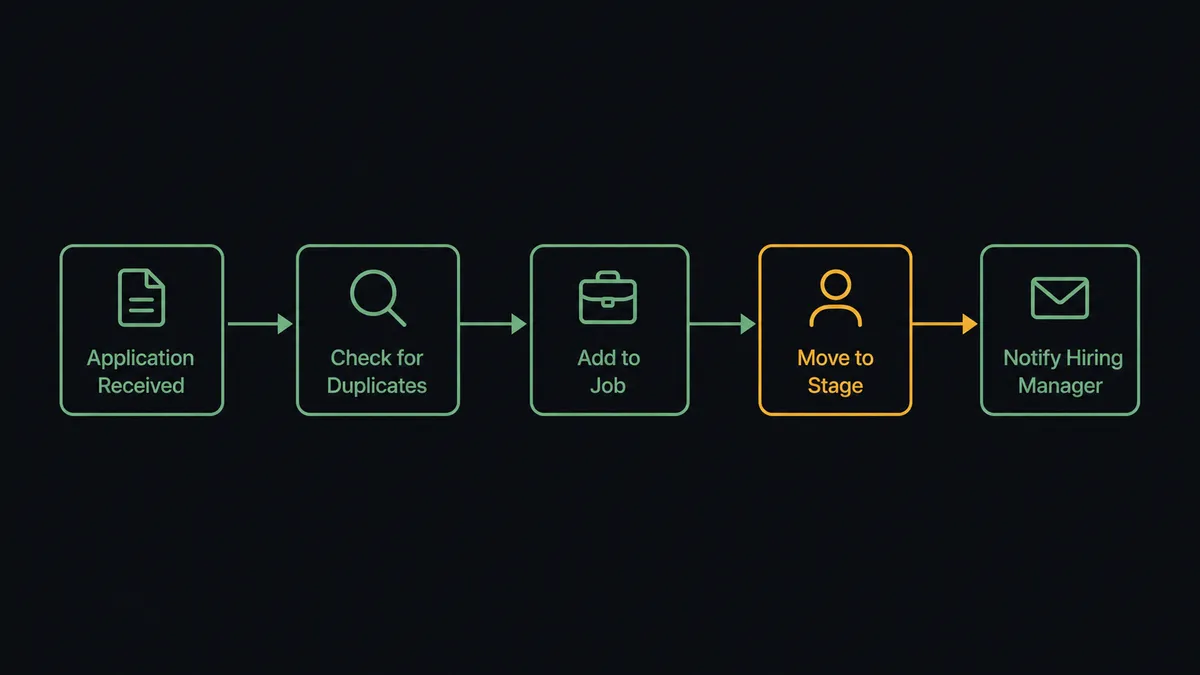
When a candidate applies to a posted job, Recruitee’s On New Application trigger fires. From there, FlowRunner runs Find Candidates to check whether the person already exists in the system, then calls Add Candidate to Job to attach them to the role and Move Candidate to Stage to advance them to Screening. Tags and source data get applied automatically through Add Candidate Tags and Add Candidate Source, so nothing needs to be added by hand later.
The Slack side of the connection is where the hiring manager finds out what happened. FlowRunner uses Slack’s Send Direct Message action to deliver a candidate snapshot and the CV link straight to the hiring manager, without a recruiter having to compose and send that update themselves. For interview stages, On Candidate Moved to Stage in Recruitee can trigger Schedule Interview and Request Feedback, with scorecard status posted back to Slack once submitted. Status changes flow through On Status Change, so a role’s progress shows up in a channel instead of living in one recruiter’s memory.
Can an AI agent run it? (and why a human stays in the loop)
Yes, and this is where the connection stops being a simple sync. As an AI agent, FlowRunner reads the applicant, the job requirements, and the candidate’s activity history, then decides which Recruitee actions to call and in what order, rather than running the same fixed sequence every time. It has every Recruitee and Slack action available to it as a tool: Add Candidate to Job, Move Candidate to Stage, Send Email, Send Direct Message, all of it.
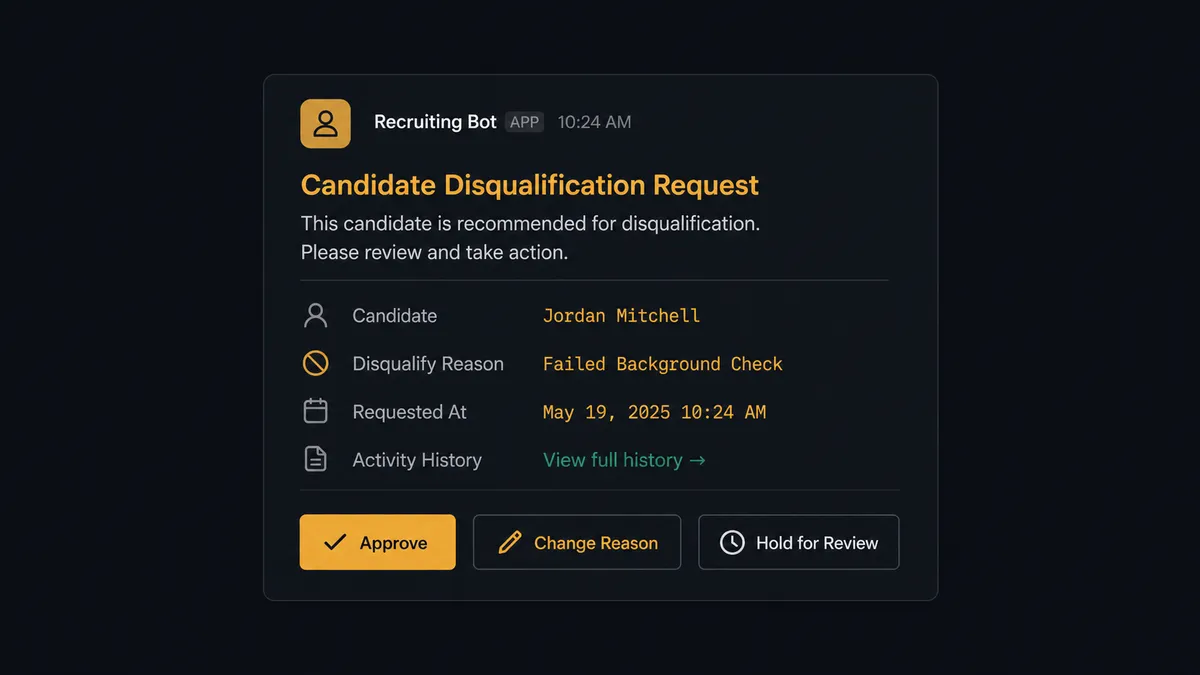
The moment that matters is disqualification. Recruitee’s Disqualify Candidate, Delete Candidate, and Merge Candidates actions close a candidate’s path, and closing a path is exactly the kind of decision that shouldn’t run on autopilot. When the agent determines a candidate should be disqualified, it does not call the action. It stages the change, attaches the reason and the candidate’s full activity history, and posts to the recruiter in Slack through Send Message to Channel with Approve, change the reason, and hold for review as the options. That message carries the same weight whether the candidate applied five minutes ago or has been in the pipeline for three interviews; the agent packages the context either way.
The recruiter’s response comes back through Slack’s On Block Action trigger. If approved, the agent calls Disqualify Candidate and records the approver’s identity and the timestamp in the audit trail. If the recruiter changes the reason or holds it, the agent adjusts and waits. This is not a sync tool. The agent knows when to stop and ask, and it asks in the channel the recruiter already checks.
FlowRunner vs Zapier
Zapier is a genuinely fast way to wire Recruitee’s new-application trigger to a Slack notification, and for teams that just want an alert posted when someone applies, it does the job well. Where it stops is the decision layer. Zapier can post a message when a candidate is disqualified; it cannot evaluate whether the disqualification should happen in the first place, and it has no native mechanism for pausing a multi-step process until a specific person responds with a specific decision.
| Capability | Zapier | FlowRunner |
|---|---|---|
| Human-in-loop on disqualify/delete/merge | Not native; requires a separate approval add-on | Built in as an agent tool the AI calls directly |
| Users included | Priced per user on paid plans | Unlimited users on every tier |
| AI model access | Bring-your-own-key on select plans | BYOK on every tier, no markup |
| Decision audit trail (approver + timestamp) | Not captured automatically | Captured automatically on every human-in-loop decision |
| Self-hosting | Not available | Available on Enterprise |
| Pricing model | Per-task pricing across zaps | Transparent workflow-based execution tiers |
Before and after
| Metric | Before | After |
|---|---|---|
| Application triage | Recruiters scan inbound applications by hand and tag them later | On New Application fires routing and tag application automatically |
| Candidate outreach | Emails composed and sent per candidate with no record on the candidate | Communication sent through the platform with a record on every candidate |
| Disqualification trail | Reasons end up in private notes with no consistent audit | Disqualify Candidate runs only after the recruiter confirms the reason, logged with approver and timestamp |
| Hiring manager visibility | Manager asks the recruiter directly for status | Candidate snapshot and CV link delivered to the manager in Slack automatically |
What you can build
Application triage with recruiter sign-off. On New Application triggers duplicate checks, job assignment, and stage advancement, with disqualification routed to Slack for approval before it runs.
Interview scheduling and scorecard delivery. On Candidate Moved to Stage schedules the interview, requests the scorecard, and posts a reminder to the interviewer’s channel when feedback is overdue.
Bulk sourcing import with a summary post. Sourced candidates get added and tagged in a batch, with a summary of how many were added, tagged, and flagged posted straight to the recruiting channel.
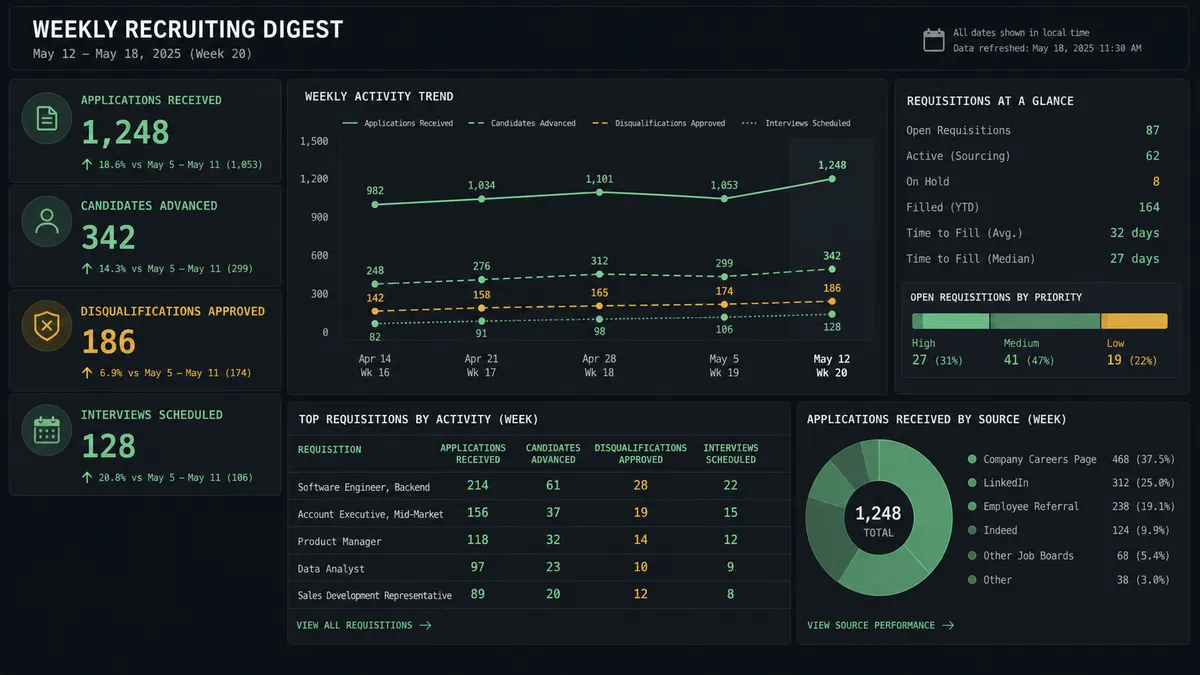
Status digest for leadership. A scheduled agent compiles pipeline status across open jobs and posts a formatted report to Slack every Monday, so leadership doesn’t have to pull it manually.
Getting started
FlowRunner has a free plan with 100 executions a month, every integration included, and no credit card required, and new accounts get 14 days of Professional on top. Set up the trigger, map the screening actions, and add the human-in-loop step on disqualification before you turn it on. Start at flowrunner.ai or book time at calendly.com/flowrunner/intro to see the Recruitee and Slack connection built live.
Frequently asked questions
Is it free to connect Recruitee and Slack on FlowRunner?
Yes. FlowRunner has a free plan with 100 executions a month, every integration included, and no credit card required, and new accounts get 14 days of Professional on top.
Can I self-host the Recruitee to Slack connection?
Yes. FlowRunner offers a self-hosted Enterprise option in addition to cloud tiers, so teams with data residency or infrastructure requirements can run the same workflow on their own servers.
Does the agent need my own OpenAI key?
FlowRunner uses a bring-your-own-key model for AI providers, so you connect the model you already use rather than paying FlowRunner a markup on every AI call.
What happens when the agent isn't sure whether to disqualify a candidate?
The agent stages the disqualification instead of running it, attaches the reason and the candidate's activity history, and posts the decision to the recruiter in Slack with Approve, change the reason, or hold for review as options.
Do I need a developer to set up Recruitee and Slack in FlowRunner?
No. Both connections use standard authentication (an API token for Recruitee, OAuth for Slack) and the trigger-to-action mapping is built visually, no code required.
Does every candidate touch require a human in Slack?
No. Routine actions like moving a candidate to Screening or sending a status update run automatically. Only the actions that close a candidate's path, disqualify, delete, or merge, route to a human first.